
Thermalright Trofeo Vision LCD AIO
4.3Editor score
9.16-inch ultrawide LCD
1920×480 native resolution
TRCC monitoring software
USB-C plug-and-play connection
An LCD screen for a PC case can transform a functional build into a more engaging centerpiece by showing live temperatures, performance data, animations, or custom media. The right panel depends on case dimensions, connection method, mounting style, software support, and whether you want a monitoring display, a secondary screen, or both.
This guide compares ten case-mounted LCD options ranging from compact 6.86-inch models to broad 12.6-inch panels. We evaluated the supplied specifications, focusing on display dimensions, resolution, USB or video connectivity, touch support, monitoring software, speaker integration, and compatibility with particular cases or cooling systems.
Each pick highlights a different balance of screen size, functionality, and installation requirements. Ratings reflect the listed customer feedback, while practical trade-offs depend heavily on your case layout and operating system. Product availability and prices can change, so confirm the current listing and connector requirements before buying.
4.3Editor score

4.4Editor score

4.2Editor score
As an Amazon Associate we earn from qualifying purchases.
The comparison covers ten LCD panels designed for internal or external PC-case use, highlighting differences in physical size, resolution, connection, display purpose, mounting requirements, and extra features.




The Lian Li SM088X combines an 8.8-inch universal LCD with a diffused ARGB frame, giving it a more integrated appearance than a bare sensor panel. Its listed 4.4 rating reflects generally favorable customer feedback, while its defining features are the adjustable bracket, flexible installation options, and support for monitoring data, media, and custom uploads through L-Connect 3.
We may earn a commission when you buy through this link, at no additional cost to you.
The screen can operate as an independent secondary display through a 9-pin connection or Type-A USB, preserving valuable GPU video outputs for other displays. It also includes diffused lighting that can be synchronized with a build, and its mounting bracket supports height and tilt adjustments. The ability to attach to fan frames, case panels, or a flat surface using adhesive pads makes it more adaptable than models designed around one case or cooler.
There are some installation cautions. The supplied instructions specify the correct H screws for the screen stand and universal screen, and warn against using the longer G screws. Software setup through L-Connect 3 is also central to the experience, so buyers who want completely manual operation should not expect that workflow. Despite those qualifications, the combination of display functionality, lighting, and mounting freedom is unusually versatile.
This is the strongest general recommendation for a PC builder who wants an internal screen to complement the visual design of the system. It suits users who enjoy RGB coordination, custom imagery, and a panel that can serve as a standalone information display. Verify that the chosen location has suitable mounting space and use the specified hardware during installation.
The bracket's height and tilt adjustments help position the 8.8-inch panel where it can be read without dominating the case interior. Fan-frame, panel, and flat-surface mounting options also make the screen less dependent on a particular chassis design.
The integrated diffused ARGB strip gives the screen the appearance of a coordinated case component. Through L-Connect 3, its colors and effects can be matched with a broader system lighting setup.
We may earn a commission when you buy through this link, at no additional cost to you.
The darkFlash V92 is a dedicated 9.2-inch PC case display rather than a conventional extended monitor. Its listed 4.1 rating sits in the middle of this group, but the supplied feature set is extensive: CPU and GPU temperatures, usage, RAM, fan speeds, clocks, weather, and custom widgets are all supported.
We may earn a commission when you buy through this link, at no additional cost to you.
Connection through USB-C or an internal motherboard USB 2.0 9-pin header means the panel can draw both power and data without occupying an HDMI or DisplayPort output. Included cables and support for horizontal or vertical placement help with installation, while the slim aluminum body measures 242.4 by 63.1 by 12 millimeters. Station Space adds themes, plugins, weather, news, stock widgets, JPG, GIF, and MP4 content.
The most important limitation is platform dependence. Station Space must remain running, and the product is specified for Windows 10 and 11 rather than macOS or Linux. Buyers also need to verify clearance against the stated 9.54 by 2.48 by 0.47-inch envelope, especially in an ATX, micro-ATX, or ITX enclosure. Its ultrawide 1920×462 format is purpose-built for information panels rather than conventional desktop work.
Choose the V92 when live system information, downloadable media, and a dedicated case dashboard matter more than touch input or a general-purpose extended display. It is especially appealing for Windows builders with a clear internal mounting area and a free internal USB header.
Station Space can turn the V92 into a configurable dashboard with system readings and media-rich layouts. Its support for animated formats makes it more visually flexible than a basic temperature-only panel.
Using a 9-pin motherboard header or USB-C connection avoids taking over a graphics card output. That makes the display practical in builds where GPU display connectors are already serving multiple screens.
We may earn a commission when you buy through this link, at no additional cost to you.
The WOWNOVA 8 Inch panel has the highest listed rating in this roundup at 4.5. It combines sensor monitoring, dynamic themes, custom layouts, and an extended desktop mode in a compact 8-inch IPS display, giving it a broader role than a conventional temperature panel.
We may earn a commission when you buy through this link, at no additional cost to you.
Its one-cable approach can use either USB-C or a 9-pin connection without requiring a dedicated GPU port or separate power cable. The supplied specifications identify a 1280×800 resolution, a 6.77 by 4.21-inch display area, an overall size of 7.52 by 4.59 inches, and a thickness of 0.39 inches. Windows 10 and 11 are supported, and the software displays CPU, GPU, RAM, FPS, and HDD information.
The desktop mode is a meaningful differentiator, but it should not be confused with a universal desktop monitor. Users still need the supplied English software and a compatible Windows system. The white housing may also stand out in an otherwise dark build, while the listed footprint demands careful planning in a compact chassis. The visual theme editor adds creative flexibility, including drag-based customization and dynamic video support.
This is a compelling choice for a builder who wants more than static sensor text and values the highest customer rating among the listed options. It is best suited to Windows systems with room for an 8-inch panel and someone willing to configure the companion software for monitoring, themes, or extended-display use.
Desktop mode expands the screen's potential beyond hardware readouts. It can function as an extended Windows display for additional information, controls, or a small secondary workspace.
A single USB-C or 9-pin route can carry the required connection inside the chassis. This reduces cable clutter compared with solutions that require separate video and power leads.
We may earn a commission when you buy through this link, at no additional cost to you.
The wisecoco 12.6 Inch Bar LCD is the largest screen in the group and one of the most visually ambitious. Its listed 4.2 rating is supported by a 1920×515 IPS panel, a 3–5 millisecond response time, 178-degree viewing angle, 60Hz refresh rate, and 1000:1 contrast ratio.
We may earn a commission when you buy through this link, at no additional cost to you.
Unlike many compact sensor displays, this model includes built-in speakers and standard video connectivity through mini HDMI. It can serve as a case dashboard, a secondary display, or an additional desktop-style screen in landscape orientation. The included 3.5mm DC cable, HDMI-to-mini-HDMI cable, and screwdriver simplify a complete installation.
The mounting solution is explicitly designed for the Hyte Y60 case panel, so that case provides the most straightforward fit. The screen may be used with other compatible arrangements, but the supplied facts do not establish universal case support. Power requirements also need attention: the DC input should receive 5V 2A, while the optional micro USB-A method requires 5V 500mA and that cable is not included.
Among this roundup's premium options, the wisecoco panel offers the strongest combination of display area, audio, and conventional video input. It is best for Y60 owners who want a broad auxiliary display and are prepared to manage its separate power and HDMI connections.
The 12.6-inch physical size creates room for more detailed layouts, larger text, and a wider presentation of performance data. Its 1920×515 resolution follows an ultrawide format tailored to narrow case spaces.
The integrated dual speakers reduce the need for additional desktop or case-mounted audio hardware. This is particularly useful when the screen is being used for media as well as monitoring.
We may earn a commission when you buy through this link, at no additional cost to you.
The Hosyond 8.8 Inch is a touchscreen secondary display with a listed rating of 4.0. Its most distinctive specification is a brightness of up to 520 cd/m², which should make on-screen information easy to see in a bright room, although the actual appearance depends on viewing angles and case placement.
We may earn a commission when you buy through this link, at no additional cost to you.
It includes a capacitive touchscreen, HDMI input, and a driver-free installation approach. The panel can serve as an AIDA64 hardware-monitoring display, but AIDA64 must be downloaded separately by the user. It also works with Raspberry Pi, Banana Pi, BeagleBone Black, PS4, Xbox 360, TV boxes, and digital cameras for display-only use, making it broader than a dedicated sensor panel.
Connection and power are handled through 5V USB Type-C, with stated consumption of 3.8 watts. Listed operating-system support includes Raspbian, Ubuntu, Kali Linux, Kodi, Windows 7, Windows 8, Windows 10, and Windows 11. One detail worth checking is the product listing's unusual 480×1960 resolution wording; the title identifies the display as 1920×480, so buyers should verify the intended orientation and specifications.
This panel makes the most sense for users who already plan to configure AIDA64 or need a touch-capable auxiliary display for a single-board computer. It is less of an out-of-box sensor dashboard than several dedicated PC case panels, but its touch and device flexibility compensate for that difference.
A stated maximum brightness of 520 cd/m² gives this screen a strong specification for readable monitoring information. Placement away from direct glare remains important because brightness alone does not eliminate reflections.
The capacitive touchscreen expands the panel beyond passive display use. It can support interactive controls on compatible systems as well as conventional AIDA64 sensor layouts.
We may earn a commission when you buy through this link, at no additional cost to you.
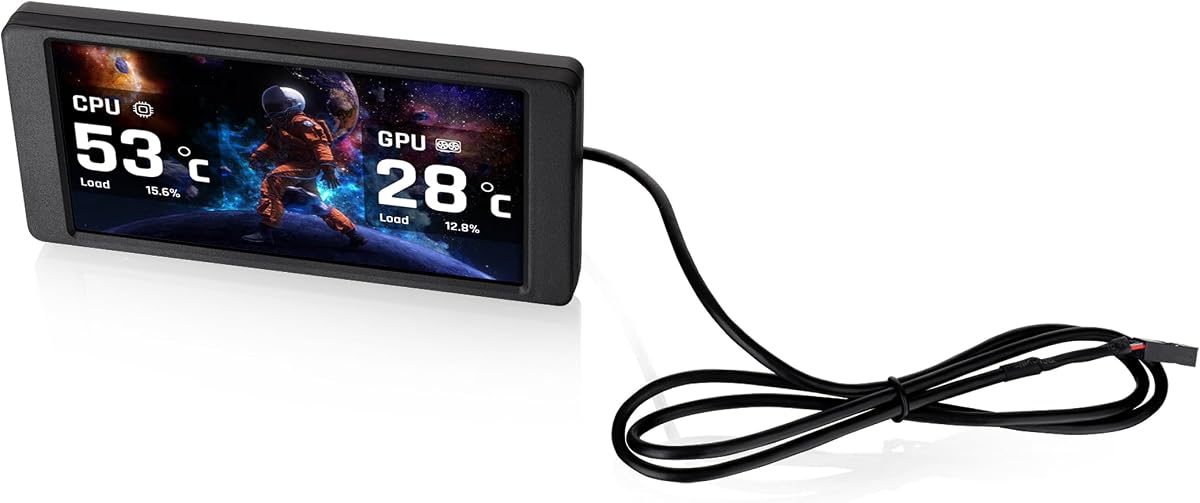
The Thermalright Trofeo Vision LCD AIO Display provides a useful balance of size, resolution, and monitoring features. Its listed 4.3 rating is among the strongest in this group, while its 9.16-inch format and 1920×480 native resolution are well suited to narrow internal case panels.
We may earn a commission when you buy through this link, at no additional cost to you.
TRCC software supports system monitoring, preset themes, and DIY interface customization. The panel can display CPU and GPU temperatures, fan speed, memory usage, and other performance information. Its USB Type-C connection is designed for simple setup with compatible Windows systems, avoiding the need for a dedicated graphics-card video output.
Physical dimensions are listed at 251 by 68 by 17 millimeters, allowing the panel to sit inside or outside a case. The product information also notes that power and data are provided through the motherboard's 9-pin USB interface, so buyers should confirm that an available internal header can reach the intended location. Software-based control is less flexible than a fully manual display, but it provides the customization that makes this type of panel appealing.
This is the best value-oriented recommendation for a builder seeking a capable internal monitoring screen without moving to a larger Y60-specific model. It suits users who want a broad 1920×480 canvas, easy USB-C attachment, and customizable TRCC layouts.
The 1920×480 resolution offers enough horizontal space for several monitoring fields or a compact visual dashboard. It remains a specialized case display rather than a conventional desktop monitor.
TRCC provides preset themes and DIY customization, allowing the panel to show the system information most relevant to the build. It is a straightforward way to turn an otherwise idle internal surface into a useful status display.
We may earn a commission when you buy through this link, at no additional cost to you.
The Thermaltake 6.0 Inch LCD Screen Kit is designed specifically for the View 370 and View 390 series, giving it a clear identity within an existing Thermaltake ecosystem. Its listed 3.8 rating is lower than most alternatives, but the native 1480×720 resolution and support for TTRGBPlus 3.0 make it an interesting compact option.
We may earn a commission when you buy through this link, at no additional cost to you.
The screen can show customizable graphics and real-time information for components including the CPU, GPU, and RAM. Users can select from six default backgrounds or upload up to 20 custom graphics. JPG, GIF, PNG, MP4, MOV, and AVI formats are supported, with each custom file limited to 30MB.
Its Type-C to USB 9-pin connection allows the kit to operate as a standalone display rather than relying on a graphics output. Compatibility is the central trade-off: the panel is explicitly listed for the View 370 and View 390 series, so it is not a universal mounting solution. The 6-inch size also provides less space for complex layouts than the 8.8-, 9.16-, or 12.6-inch alternatives.
This kit is best recommended to Thermaltake case owners who want a display that fits naturally into their chassis and integrates with the brand's control software. It is less suitable for builders seeking case-agnostic placement, a large canvas, or touch controls.
Direct compatibility with the View 370 and View 390 series simplifies the decision for builders who already own one of those cases. The focused design supports a more integrated result than an improvised general-purpose mount.
Six built-in backgrounds and support for several still-image and video formats allow considerable personalization. The 20-file allowance also makes it possible to rotate through a personal set of themes.
We may earn a commission when you buy through this link, at no additional cost to you.
The GeeekPi 12.6 Inch display combines a wide touchscreen panel with built-in speakers and a mounting solution tailored to the Hyte Y60. Its listed rating is 4.0, and its standout feature set includes up to 10-point multitouch, a 1920×515 IPS display, and a 1200:1 contrast ratio.
We may earn a commission when you buy through this link, at no additional cost to you.
The screen is ready for Windows 7, Windows 8, Windows 10, and macOS without additional software according to the supplied information. Adjustable horizontal and vertical display settings make it adaptable to different viewing orientations, while the included screwdriver and case-specific bracket simplify installation in the Y60.
Touch input is the primary distinction from the wisecoco model, which also has built-in speakers but does not list multitouch. Buyers must remember to remove the protective film before using the display. Like the wisecoco panel, it is specifically designed around the Y60 case panel, so compatibility with an unrelated chassis is not established by the supplied facts.
This is a strong choice for Y60 owners who want a large, interactive auxiliary screen and value audio integration. It is less attractive for a case-agnostic build because the installation package is optimized for one enclosure and lacks the broader USB-based monitoring emphasis of several smaller alternatives.
Up to 10-point multitouch provides a more interactive experience than a conventional sensor display. It can suit media controls, touch-oriented utilities, and other compatible functions.
The purpose-designed bracket and included screwdriver reduce the need to source extra mounting hardware. This makes the screen especially convenient for builders assembling or upgrading a Y60.
We may earn a commission when you buy through this link, at no additional cost to you.
The Thermalright TV 9.16 is built around a 9.16-inch IPS display with 1920×480 resolution and a listed 4.3 rating. Its most practical distinction is the magnetic metal-frame installation design, which allows the panel to be mounted without screws and repositioned as the case layout changes.
We may earn a commission when you buy through this link, at no additional cost to you.
TRCC software supports monitoring of system parameters, static and dynamic image switching, video playback, and DIY personalized themes. The display measures 251 by 68 by 17 millimeters, with power and data supplied through the motherboard's 9-pin USB interface using a USB Type-C connection.
Magnetic installation is convenient but requires a compatible metal surface. The panel's position is not fixed, which is useful during assembly but may also mean the final location needs careful planning to keep the cable reachable and the viewing angle practical. Users must install TRCC to control monitoring and on/off functions, and the product information advises confirming that the wiring is complete before setup.
This is an attractive option for builders who want a removable 9.16-inch dashboard and regularly adjust their internal layout. It is especially suitable when a screw-based permanent installation would be inconvenient, provided the selected case area can support magnetic attachment.
The magnetic frame allows the display to be removed and moved without removing screws. That flexibility is useful while tuning the layout or moving the panel to a different viewing position.
TRCC expands the panel beyond static sensor information by supporting animated images, video, and personalized themes. It is a good fit for builders who want the internal display to act as a visual centerpiece.
We may earn a commission when you buy through this link, at no additional cost to you.
The Thermalright Trofeo Vision 6.86-inch model is the most compact screen in this roundup and has the lowest listed rating at 3.4. Even so, it offers several appealing traits for space-conscious builders: a full-color IPS panel, 1280×480 resolution, USB Type-C connectivity, and magnetic installation.
We may earn a commission when you buy through this link, at no additional cost to you.
The panel measures 187.2 by 72.1 by 21 millimeters. It can be attached to a compatible metal chassis area or paired with a Trofeo Vision-series water-cooling radiator, and its position within the chassis is not fixed. TRCC software provides system-parameter monitoring and custom static or dynamic themes.
The compact size inevitably limits what can be shown at once. Its physical depth is also greater than the 9.16-inch Thermalright TV model, so a tight case interior may require extra clearance even though the front footprint is small. As with the other TRCC-based products, wiring must be complete before software installation, and the software controls monitoring and power states.
This display is best suited to builders who value a modest, removable panel more than maximum screen area. It can work especially well in a case with limited room or alongside a compatible Trofeo Vision radiator, but buyers should carefully consider its lower listed rating and smaller canvas.
The 6.86-inch width makes this panel easier to place in compact spaces than larger 9-inch or 12.6-inch alternatives. It is a practical option when every millimeter of the visible interior matters.
Beyond magnetic chassis attachment, the panel can complement a Trofeo Vision-series radiator. That gives builders an opportunity to create a coordinated display and cooling section.
We may earn a commission when you buy through this link, at no additional cost to you.
The best case LCD depends on your enclosure, connection options, and preferred display function. Review size, resolution, software, mounting hardware, and power requirements before making a selection.
Case screens are installed in tight environments, so the dimensions matter more than the diagonal screen size alone. Compare the product's overall width, height, and depth with the space around the case panel, fan bracket, radiator, or mounting rail. The darkFlash V92, for example, lists a 242.4 by 63.1 by 12 mm body and calls for checking a 9.54 by 2.48 by 0.47-inch clearance. The Thermalright options provide their own exact dimensions, while the two 12.6-inch models are designed around the Hyte Y60. Leave room for cables and consider whether the panel can be serviced without dismantling the entire case.
Some LCD screen for PC case options are dedicated sensor dashboards, while others can operate as general secondary displays or extended desktops. The WOWNOVA model supports desktop mode and custom dynamic themes, the darkFlash V92 emphasizes monitoring widgets and media, and the Hosyond panel is designed to work with AIDA64 or compatible single-board computers. If your priority is live temperatures, fan speeds, and load figures, choose a model with dedicated monitoring software. If you want a useful extra workspace, confirm that the display supports extended-screen operation and that its software supports your operating system.
Case panels commonly use ultrawide resolutions such as 1920×480, 1920×462, or 1920×515. These provide substantial horizontal detail but are not intended to replace a conventional full-size productivity monitor. The WOWNOVA 8-inch panel uses a more traditional 1280×800 format, while the Thermaltake kit uses 1480×720. Check whether the product supports horizontal and vertical installation and how the listed resolution should be oriented. A panel with a broad canvas may suit horizontal mounting better, while a more conventional panel could work in either orientation.
USB-based displays often use a 9-pin motherboard header and a Type-C cable, while the larger video panels may use HDMI and a separate low-voltage power input. Confirm which motherboard headers, graphics outputs, and power sources are available. A 9-pin connection avoids tying up an HDMI or DisplayPort port, but it requires an internal header that can physically reach the display. The wisecoco screen lists mini HDMI, a 3.5mm DC interface, and specific input requirements: 5V 2A for DC and 5V 500mA for micro USB-A.
The supplied software determines what the screen can display and how it behaves. L-Connect 3, Station Space, TRCC, and TTRGBPlus 3.0 each support different combinations of monitoring, themes, media, and system control. Station Space is specified for Windows 10 and 11 and must remain running, while the WOWNOVA software is also stated to support Windows 10 and 11. The GeeekPi panel lists Windows and macOS compatibility. Confirm the required operating system, background-software behavior, and whether media uploads or monitoring controls require separate configuration.
A fixed bracket can provide a clean, permanent installation, while magnetic mounting offers easier repositioning. The Lian Li SM088X supports fan-frame, case-panel, and flat-surface mounting with an adjustable bracket. The Thermalright TV 9.16 and 6.86-inch model use magnetic frames, with the smaller model also compatible with Trofeo Vision-series radiators. The Hyte Y60-targeted products come with a fitted bracket and screwdriver. Select the mounting approach that matches your case and willingness to disassemble it when adjusting the display.
Touch input and built-in speakers add convenience but are not essential for every build. The Hosyond 8.8-inch and GeeekPi 12.6-inch models list touchscreens, with the latter supporting up to 10-point multitouch. The wisecoco and GeeekPi panels include dual built-in speakers. These features can make a display more useful for media, touch controls, or casual desktop use, but they may be unnecessary if the screen is reserved for temperature monitoring. Ensure your software and system support the intended touch or audio use.
A bright panel can still be difficult to read if it faces direct glare or sits behind internal components. Consider the angle, viewing distance, and whether tempered glass or a protective film affects clarity. The GeeekPi screen requires removal of its protective film before use. For software-driven displays, check whether brightness controls, automatic shutdown, and theme rotation are available. Accessibility and maintenance are also affected by the need to run applications in the background and by how easily the case must be opened to reach USB or power connections.
Begin by confirming the panel's supported operating system, required software, connector, power requirements, and mounting hardware. For a 9-pin display, connect the supplied USB cable to an available motherboard header and route it so it does not interfere with fans, radiators, or drive cages. Video-based screens may require both a display cable and separate power input, so complete those connections before positioning the panel.
Install the screen using only the specified screws, brackets, or magnetic surfaces. The Lian Li SM088X specifically requires the designated H screws for its stand and screen, not the longer G screws. Install the relevant software, complete any wiring checks, and select a theme or monitoring layout. If the display uses a background application, configure it to start with the computer and verify that sensor readings appear correctly before closing the case.
For ongoing care, clean the panel with a soft, dry cloth and avoid pressing on the screen surface. Keep cables clear of sharp edges and hot components, and periodically check the mount for loosening. Remove the GeeekPi protective film before use, review software updates when available, and retain a small amount of case clearance so the display can be serviced without disturbing other components.
Not necessarily. Many options, including the Lian Li SM088X, darkFlash V92, WOWNOVA, and Thermalright models, can receive power and data through USB-C or a motherboard 9-pin header. Displays such as the wisecoco and Hosyond panels use HDMI for video and may also require a separate power connection. Check the product's listed input method before installation.
Yes, but only if the selected product and its software support extended-display operation. The WOWNOVA 8 Inch panel explicitly includes desktop mode, while some other models are designed primarily for sensor monitoring or media. Compatibility with the host operating system, graphics output, and supplied software must also be confirmed.
A 9-pin connection is convenient because it can carry power and data internally without occupying a graphics-card display output. It also makes the screen more suitable for software-driven sensor dashboards. HDMI remains appropriate when the panel is treated as a conventional video display and needs touch, audio, or extended-desktop functionality.
Support varies by model. The darkFlash V92 and WOWNOVA software are specified for Windows 10 and 11, while the GeeekPi display lists Windows and macOS support. The Hosyond panel lists several Linux distributions alongside Windows versions. Confirm the operating-system requirements for the exact screen and companion software before purchasing.
It depends on the model and mounting method. Buyers should compare the product's full width, height, and depth against the available opening, then allow room for connectors and cables. The darkFlash V92 specifically lists a clearance requirement of 9.54 by 2.48 by 0.47 inches, while the Thermalright screens publish their body dimensions for comparison.
That depends on the product. The Lian Li SM088X includes bracket and adhesive-pad options for flexible placement, while the Thermalright TV 9.16 and 6.86-inch models use magnetic frames. Other models use included screw brackets or a case-specific panel mount. Use only the mounting method supplied or explicitly supported for the product.
No. Touch is most useful for interactive controls, media navigation, or a small secondary workspace. A conventional sensor dashboard can be more straightforward and may suit a builder who only wants temperature, usage, and fan information. The Hosyond and GeeekPi options are the touch-focused choices in this group.
Verify that the screen powers on, the software recognizes the connection, sensor data appears, and the chosen orientation is readable. Confirm that cables do not contact fans or hot components and that the panel or bracket is secure. It is also wise to test any touch, extended-desktop, and audio features before final reassembly.
The Lian Li SM088X is the strongest all-around recommendation because it combines a useful 8.8-inch display, flexible mounting, independent USB operation, custom media, and coordinated ARGB lighting. For a more compact and value-focused build, the Thermalright Trofeo Vision LCD AIO provides a 9.16-inch 1920×480 panel and TRCC customization, while the wisecoco 12.6 Inch Bar LCD stands out as the premium option with a large canvas and integrated speakers.
Prioritize compatibility before visual appeal. Confirm the case opening, mounting surface, available USB header or video output, power requirements, operating system, and software behavior. A smaller purpose-built dashboard may work better in a compact chassis, while a large Y60 panel is more appropriate when the case has been designed around that screen and enough room for separate cables.
Finally, compare the current listing, customer feedback, included accessories, and warranty information at the time of purchase. Prices and product availability can change, and installation details may evolve between revisions. Checking those details reduces the chance of discovering an incompatible connector or mounting arrangement only after the panel has arrived.