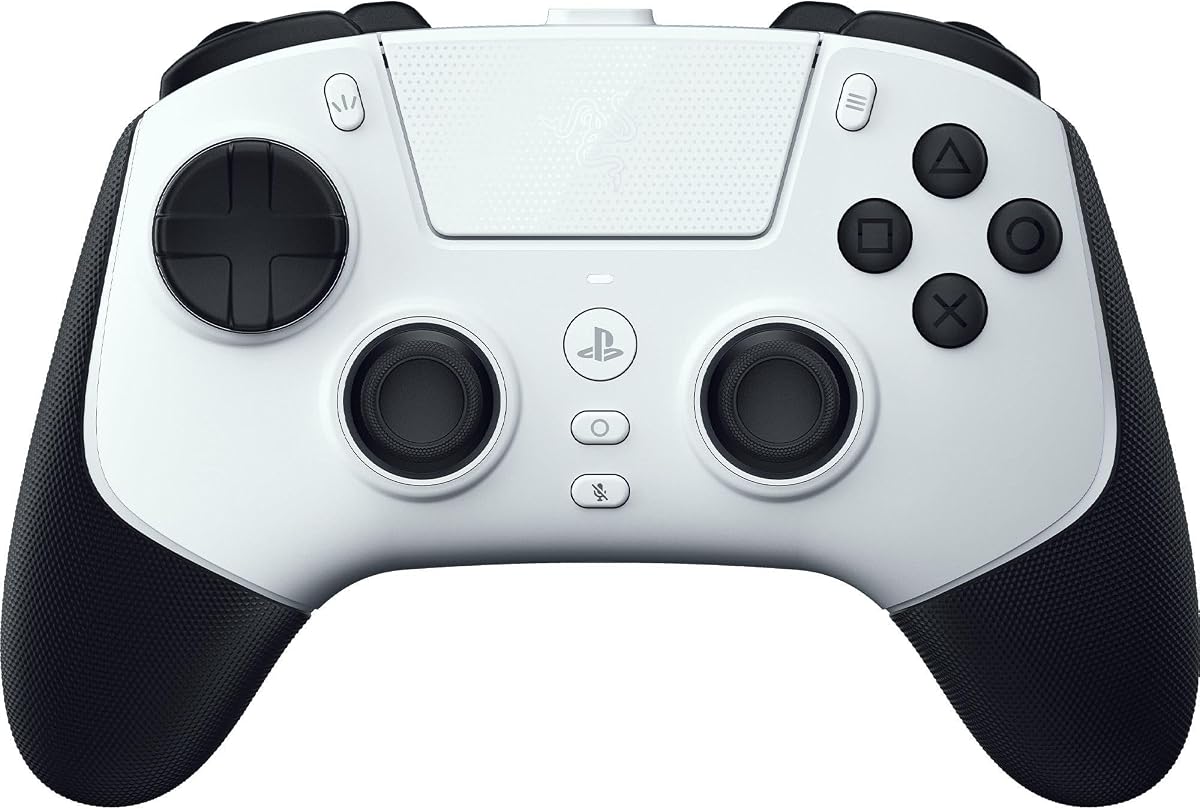
Razer Raiju V3 Pro
3.9Editor score
Removable mouse-click paddles
Magnetic TMR thumbsticks
Instant and analog triggers
Four onboard profiles
This guide compares the best PS5 controller with back paddles, including remapping options, stick precision, connectivity, macros, and compatibility.
A PS5 controller with back paddles can give shooters, fighting games, and action titles more buttons without crowding the face of the controller. The most useful models pair responsive rear inputs with remapping, stable wireless or wired connections, comfortable grips, and controls that suit the way you play.
We compared ten paddles-equipped options across the features that affect everyday use. The list covers plug-and-play add-on kits, complete wireless controllers, and premium esports models, with particular attention to programmability, joystick technology, trigger behavior, connectivity, battery life, and PS5 compatibility.
Each recommendation highlights a different reason to consider an upgrade, from four-button remap kits to licensed performance controllers with swappable components. Ratings and product details reflect the supplied information, while prices and availability can change, so check the current listing before making a final decision.
3.9Editor score

4.4Editor score

4.2Editor score
This side-by-side comparison covers complete controllers and add-on kits, showing how each option approaches rear inputs, remapping, joystick performance, connectivity, and platform compatibility.

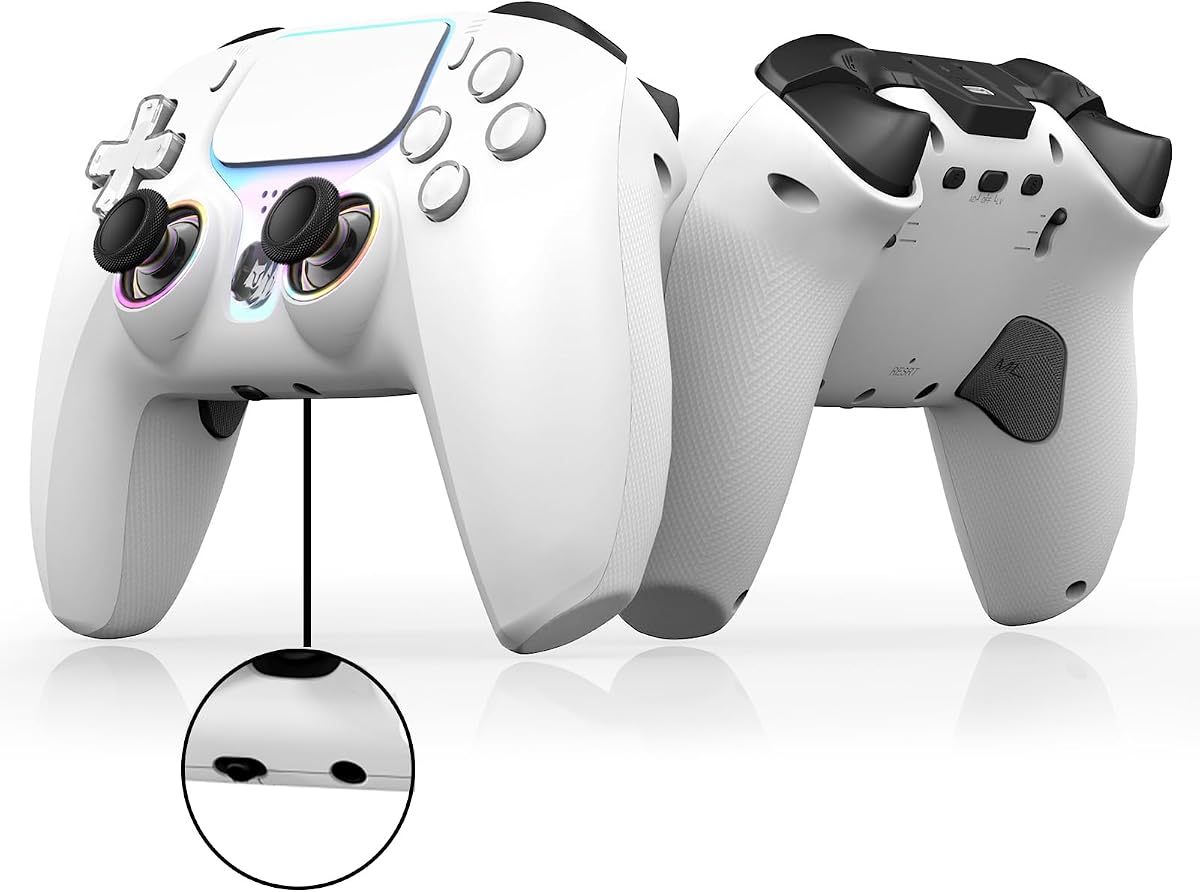


The SCUF OMEGA is an officially licensed PS5 performance controller that combines four rear paddles with extensive customization for competitive play. Its supplied rating is 4.4, and its most impressive qualities are the unusually broad control surface, high-end stick system, mechanical face switches, and support for interchangeable components.
We may earn a commission when you buy through this link, at no additional cost to you.
The controller expands the standard layout with four rear paddles, two side action buttons, and G-Keys, all of which can be personalized. The SCUF Mobile App provides control over trigger and thumbstick response curves, action-button behavior, and a true zero-percent thumbstick deadzone. This makes the OMEGA particularly attractive to players who want to tune the controller rather than rely on one fixed configuration.
Endurance TMR thumbsticks are designed to resist the wear associated with drift and jitter, while Omron mechanical switches provide crisp activation on the Instant Triggers, Instant D-Pad, and Instant Action Buttons. Interchangeable concave or domed thumbsticks in short and tall shapes allow the feel to be adjusted for faster movement or finer precision, and magnetic faceplates make further component changes convenient.
The trade-offs are practical rather than hidden. It sits at the premium end of this guide, and some of the modular accessories are not included, so buyers interested in a complete collection may need additional parts. Even so, the OMEGA offers the most cohesive and adaptable feature set here, making it a strong overall recommendation for competitive PS5 players.
The combination of four paddles, side buttons, G-Keys, app-based tuning, and interchangeable thumbsticks allows the controller to evolve with different games. That flexibility is especially valuable in shooters, fighting games, and other genres where a different action or stick shape may suit a particular matchup.
Optimized 2.4GHz PS5 connectivity, one-kilohertz wireless and wired polling on PC, Bluetooth 5.0 support, and a tournament lock for cable retention all reinforce the controller's performance focus. Omron switches and TMR sticks add further consistency for players who value immediate, dependable inputs.
We may earn a commission when you buy through this link, at no additional cost to you.
The NBCP Wireless Controller combines two rear paddles with a complete set of features for PS5, PS5 Pro, PS5 Slim, and Windows PC. No numerical customer rating was supplied, but the product information describes a strong general-purpose package centered on Hall-effect sticks, programmable macros, flexible connectivity, and a rechargeable battery.
We may earn a commission when you buy through this link, at no additional cost to you.
Its Hall-effect magnetic-sensor joysticks are designed to avoid the drift associated with conventional potentiometer sticks while supporting precise movement. Two rear paddles can be assigned to complex combos and quick actions, and programmable macro functions allow users to record and store sequences. Dual vibration, a six-axis gyroscope, RGB joystick rings, and crystal-style face buttons round out the feature set.
Connectivity is flexible, with Bluetooth 5.0 for wireless play and USB-C for a stable wired connection. The built-in 1000mAh rechargeable battery is intended for extended sessions and can be topped up through USB-C. A 3.5mm audio jack supports a wired headset, while the product description lists out-of-the-box support for PS5 consoles and Windows PC along with Android and iOS access through Bluetooth or USB.
The main limitation is that there are only two rear paddles, which provides less mapping flexibility than four-paddle designs. The lack of a supplied rating also makes it harder to compare long-term customer satisfaction. Even with those caveats, this NBCP model delivers one of the broadest feature packages in the guide and is well suited to players who want more than simple rear buttons.
Macro programming, motion control, dual vibration, RGB lighting, rechargeable power, and both wired and wireless operation are all included in one package. That makes the controller attractive to buyers who prefer not to assemble an upgrade from separate add-ons.
Native PS5 and Windows support makes the controller straightforward for everyday use, while Bluetooth and USB options extend it to mobile platforms. The included headset jack is another practical feature for players who prefer a private wired audio connection.
We may earn a commission when you buy through this link, at no additional cost to you.
This second NBCP Wireless Controller listing offers the same broad hardware concept: two customizable rear paddles, Hall-effect joysticks, macro programming, wireless and wired connectivity, and support for PS5 and PC. Because no numerical rating was provided, the evaluation must rely on the stated specifications rather than a customer score.
We may earn a commission when you buy through this link, at no additional cost to you.
The rear paddles can map complex combinations or immediate actions, while macro keys allow sequences to be recorded and stored. Hall-effect sticks are designed for accurate input and reduced drift, while the integrated six-axis gyroscope supports motion aiming in compatible games. Dual vibration motors provide physical feedback, and RGB rings around the sticks improve visibility in dim rooms.
Bluetooth 5.0 is available for wireless play, with USB-C providing an alternative wired connection. The rechargeable 1000mAh battery is designed to support long sessions, and the built-in 3.5mm audio jack accepts standard wired headsets. Compatibility includes PS5 Pro, PS5 Slim, Windows PC, and mobile platforms through the stated connection methods.
Only two paddles are provided, so the controller is less accommodating for players who want to assign several independent inputs at the rear. It also lacks a numerical rating in the supplied information, which limits direct comparison. Still, the combination of Hall-effect sticks, programmable actions, rechargeable power, and broad connectivity makes this a capable all-round option.
The two rear paddles and macro keys can reduce reliance on face buttons, which is useful in shooters, action games, and fighting titles. Their placement behind the controller also helps preserve a natural grip while making supplementary actions accessible by finger.
Bluetooth, USB-C, and a 3.5mm headset connection cover the main needs of most sessions. The rechargeable battery also removes the routine need to replace disposable batteries, although actual runtime will depend on use and settings.
We may earn a commission when you buy through this link, at no additional cost to you.
The Wireless Hall Effect Controller is a complete PS5 gamepad with two programmable back paddles, a supplied rating of 3.8, and a broad set of everyday features. It is designed for players who want rear controls, anti-drift sticks, macro support, and flexible connectivity in one device.
We may earn a commission when you buy through this link, at no additional cost to you.
Hall-effect joysticks are intended to deliver precise input while resisting the drift associated with standard potentiometer sticks. The two rear paddles can be mapped to combinations or quick actions, while macro keys and turbo functions offer additional ways to accelerate repeated inputs or automate sequences. Dual vibration, a six-axis gyroscope, RGB joystick rings, and crystal-style face buttons add feedback and visual distinction.
Bluetooth 5.0 supports wireless play, while a Type-C connection provides a wired alternative. A 1000mAh rechargeable battery handles extended sessions, and the 3.5mm audio jack allows a standard wired headset. The listing also mentions a built-in speaker and native support for PS5, PS5 Pro, PS5 Slim, and Windows PC, with Android and PS4 compatibility described through the setup notes.
One important caveat is the firmware notice. Recent PS5 system updates may cause temporary vibration and audio compatibility issues, and the manufacturer says a firmware upgrade is available through the product's user guide. With two paddles rather than four, this is also less flexible than the premium competition, but the broad feature set remains appealing.
The paddles, macro keys, and turbo mode make it easier to keep important actions under the fingers during fast play. These features are particularly relevant in competitive shooters, where binding a separate action to a rear input can reduce movement between face buttons.
The manufacturer indicates that recent system changes can temporarily affect vibration or audio behavior and provides an upgrade package and instructions on the listing. Reviewing that guide and updating the controller when necessary is the most reliable way to avoid avoidable compatibility problems.
We may earn a commission when you buy through this link, at no additional cost to you.
The SCUF OMEGA is particularly convincing as a tournament-oriented PS5 controller, with an official license, four rear paddles, two side action buttons, and G-Keys. Its 4.4 supplied rating reflects a well-regarded feature set, while its performance claims focus on input response, wireless stability, and power management.
We may earn a commission when you buy through this link, at no additional cost to you.
Users can customize nearly every major input through the SCUF Mobile App on iOS or Android. The app adjusts trigger and thumbstick response curves, action-button behavior, and a true zero-percent thumbstick deadzone. Endurance TMR sticks are designed to prevent drift and jitter, while Omron mechanical switches give the Instant Triggers, Instant D-Pad, and Instant Action Buttons a quick, crisp action.
The controller supports optimized 2.4GHz communication on PS5, one-kilohertz wireless and wired polling on PC, and Bluetooth 5.0 for other devices. A tournament lock secures the cable for competition, and the magnetic faceplate system allows thumbsticks, D-Pad, action buttons, touchpad, and anti-friction rings to be exchanged without tools.
It remains a premium purchase, and additional modules are not included. The broad customization and competitive connectivity justify the higher-tier positioning for serious players, but a shopper focused mainly on adding rear buttons may prefer a complete lower-cost controller. For those who want a controller designed to be adapted over time, the OMEGA is the strongest option in this list.
A magnetic faceplate and interchangeable thumbstick, D-Pad, action button, touchpad, and anti-friction components make it possible to adjust the controller as preferences change. This modular approach can also replace worn parts without discarding an otherwise preferred setup.
The OMEGA is designed primarily around PS5 and PC but adds Bluetooth support for devices such as tablets and phones. Its 2.4GHz focus and high polling options reflect a strong emphasis on responsiveness in competitive settings.
We may earn a commission when you buy through this link, at no additional cost to you.
The Wireless PS5 Hall Effect Controller is a budget-oriented complete gamepad with two programmable rear paddles, macro recording, remapping, and a turbo function. Its supplied rating is 3.0, so buyers should weigh the generous feature set against a less favorable customer score than most products in this guide.
We may earn a commission when you buy through this link, at no additional cost to you.
Its Hall-effect analog sticks are designed to provide accurate deadzone control and avoid the drift commonly associated with standard potentiometer sticks. The rear paddles support button remapping and recorded macros, while turbo mode offers rapid repeated output. A six-axis gyroscope, dual vibration motors, and RGB lighting add motion response, physical feedback, and visible control rings.
Bluetooth 5.0 provides wireless connectivity, and the 1000mAh rechargeable battery is designed for longer sessions with USB-C charging. The controller supports PS5, PS5 Slim, PS5 Pro, and Windows PC natively, with Android and PS4 support described through Bluetooth or USB. A 3.5mm headset jack is included for wired private audio.
The product's firmware notice is the most important practical caveat. The manufacturer says recent PS5 updates may produce temporary vibration and audio compatibility issues and has released an upgrade package with instructions in the user guide. The two-paddle layout is also less flexible than premium four-button options. Still, for a first back-paddle upgrade, the combination of remapping, macros, anti-drift sticks, and wireless play is substantial.
Macro recording, button remapping, and turbo functions are more advanced than a simple pair of fixed paddles. They give players a way to experiment with alternate bindings and repeated inputs without moving directly to a premium tournament controller.
Because the listing specifically identifies vibration and audio compatibility after recent system changes, updating the controller firmware is worth doing before an important gaming session. The supplied guide provides the package and full upgrade instructions, reducing the chance of confusion.
We may earn a commission when you buy through this link, at no additional cost to you.
The GMVOX Paddles are a four-button add-on kit for existing PS5 controllers, offering remapping, macro-style programming, turbo functions, and preservation of the controller's headphone microphone. The supplied rating is 2.7, making this the lowest-rated option in the guide and encouraging careful consideration of the setup requirements.
We may earn a commission when you buy through this link, at no additional cost to you.
All four paddles, labeled M1 through M4, can be programmed with individual inputs or multi-button combinations. Each paddle can hold up to 25 controller inputs, with each recorded press limited to five seconds. Semi-automatic and fully automatic turbo modes cover single-button rapid fire or programmed combo loops at the stated speed of eight hertz, giving the kit a level of flexibility beyond fixed rear buttons.
Installation is simpler than an internal modification because the paddles connect by wire and require no controller disassembly. The controller must be set to use a USB cable under the PS5 communication-method settings, and the kit works with BDM-010, BDM-020, BDM-030, BDM-040, and BDM-050 controllers. PS5, PC, Mac, and Android TV are listed as compatible platforms.
The wired connection is the main inconvenience, and the low supplied rating suggests that some buyers may be dissatisfied with the product experience. The specific USB communication setting may also be unfamiliar to first-time users. Nevertheless, the four independently programmable buttons, microphone support, and extensive controller compatibility make this a capable add-on for players who want to retain their existing controller.
Four rear inputs make it possible to assign separate actions, navigation commands, or complex combinations without overloading the face buttons. The generous per-paddle input capacity also gives players room to store more than a single shortcut.
The paddles depend on the PS5 recognizing a USB controller connection, so the communication method must be changed to the specified USB cable option. Following that step before playing prevents the rear buttons from appearing unresponsive.
We may earn a commission when you buy through this link, at no additional cost to you.
The eXtremeRate SPARK is an internal-style PS5 modification kit with four programmable paddles, an OLED mapping display, ergonomic rubberized grips, and switchable clicky trigger stops. Its 4.2 supplied rating is among the stronger results in the guide, and the visual mapping system gives it a distinct advantage over simpler kits.
We may earn a commission when you buy through this link, at no additional cost to you.
The OLED display can show button assignments and graphical layouts, allowing players to confirm a profile without navigating blindly. Up to eight mapping profiles can be stored, and up to 15 buttons can be assigned across the four rear paddles. A switchable trigger-stop design lets users move between adaptive and clicky trigger behavior depending on the game or personal preference.
Installation is the main commitment. The kit is designed for BDM-030, BDM-040, BDM-050, and BDM-060 controllers, but it does not fit the older BDM-010 or BDM-020 models. The controller must be taken apart and reassembled, with soldering options mentioned, and BDM-060 owners must replace the original battery bracket. A video installation guide is referenced on the product listing.
This is not the simplest route to rear buttons, but it offers the clearest and most structured remap-management experience. Rubberized grips, compatibility with the official charging dock, and support for other eXtremeRate components add long-term flexibility. For a confident DIY user with a compatible controller, the SPARK balances useful customization with a particularly informative display.
The OLED screen is the SPARK's defining feature. Showing mappings and profile layouts directly on the controller reduces the need to memorize assignments and makes it easier to switch configurations when moving between games with different control needs.
Compatibility depends on the specific BDM model, and the kit excludes the BDM-010 and BDM-020 versions. Checking the model before purchase is essential, particularly for BDM-060 owners who also need the replacement battery bracket.
We may earn a commission when you buy through this link, at no additional cost to you.
The Razer Raiju V3 Pro is an officially licensed PS5 and PC esports controller with a symmetrical layout, four removable mouse-click back buttons, and advanced trigger hardware. Its supplied rating is 3.9, while the feature set places it firmly in the premium performance category.
We may earn a commission when you buy through this link, at no additional cost to you.
The four rear buttons are remappable and can be removed, allowing players to adapt the grip or remove unused inputs. Razer Pro HyperTriggers can switch individually between rapid mouse-click actuation and full analog pulls, making the controller suitable for both shooters and racing or precision games. Magnetic TMR thumbsticks with swappable caps are designed to provide consistent, drift-free micro-adjustments.
Razer Mecha-Tactile PBT action buttons use fast microswitch actuation for crisp feedback, while an eight-way floating D-Pad supports multiple movement directions. The 2.4GHz dongle provides low-latency PS5 play, and the PC connection supports a 2000Hz wired polling rate. The Razer Mobile App or Razer Synapse 4 allows users to adjust stick sensitivity, remap buttons, calibrate triggers, and save four onboard profiles.
The package includes a protective carrying case, USB-C-to-USB-A cable, replaceable thumbstick caps, and a back-button removal toolkit, which is a strong setup for travel or competition. Its premium positioning and the 3.9 supplied rating are the main considerations. Even so, the removable paddles and trigger flexibility create a compelling package for players who want granular control.
The ability to move each trigger between instant and analog behavior is unusually versatile. Shooters can benefit from immediate click actuation, while driving, sports, and precision games can use the full analog pull for smoother control.
The protective case, replaceable stick caps, two-meter cable, and button-removal tool cover common competitive-travel needs. Saving profiles directly on the controller also makes it easier to move between games or devices without rebuilding every setting.
We may earn a commission when you buy through this link, at no additional cost to you.
The Turtle Beach Victrix Pro BFG Reloaded is an officially licensed PS5 controller built around interchangeable modules, four mappable quick-action buttons, and highly adjustable Hall-effect triggers. Its supplied rating is 3.9, and its strongest appeal is the ability to change the controller's physical layout for different types of games.
We may earn a commission when you buy through this link, at no additional cost to you.
The standard configuration includes four mappable quick-action buttons behind the controller and a five-stop Hall-effect clutch trigger system with a hair-trigger mode. One of the three included module types is an ergonomically enhanced six-button fightpad using Kailh microswitches. Eleven interchangeable components allow the layout to be adjusted, and the Victrix Control Hub companion app provides PC customization.
Both wired and wireless connection modes are supported, and the rechargeable battery is advertised for as much as 20 hours. A built-in 3.5mm audio jack and premium Sony 3D audio add another layer to the feature set. A carrying case and module tool are included, which helps when changing components or traveling with the controller.
The principal trade-off is physical bulk when a larger fightpad module is installed, and players who never change modules may not use every interchangeable part. Nonetheless, this is a distinctive option for fighting games and adaptable setups. The official PlayStation license, hall-effect trigger controls, and extensive modular system make it a strong alternative to conventional gamepads.
The six-button fightpad module offers a more traditional arcade-style arrangement, while the standard configuration keeps the controller compact. Swapping modules can be more useful than choosing one permanently fixed layout, especially for players who move between fighting and action games.
Five-stop Hall-effect trigger adjustment and hair-trigger mode provide several levels of control for shooters and fast-paced games. The tactile response of the fightpad's Kailh microswitches adds a separate advantage for players who value clear button feedback.
We may earn a commission when you buy through this link, at no additional cost to you.
The right choice depends on whether you want a simple add-on or a complete controller, how many mappings you need, and whether installation, wireless freedom, or tournament-level customization matters most.
A complete controller is the simplest all-in-one option because it provides a functioning gamepad, paddles, sticks, triggers, connectivity, and power in one package. It is a better fit when the current controller has worn sticks, lacks useful features, or does not support the platforms you use. An add-on kit can preserve a controller you already like, particularly if it remains in excellent condition and its layout is familiar.
Choose a complete controller for straightforward setup and fewer separate accessories. Choose an add-on kit when extending an existing controller makes more sense.
Two rear paddles are enough for common shooter bindings such as aim, crouch, or a single action. Four paddles provide greater freedom for separate actions, navigation, or more complex assignments, but they can also encourage redundant mappings. Removable buttons are useful when different games need different layouts, while fixed paddles are simpler and more consistent once configured.
Match the paddle count and removal options to the number of actions you realistically use. More buttons are useful only when the remapping system is clear enough to manage them.
A useful remapping system should show current assignments, support different profiles, and make it easy to distinguish the four paddles by touch. Macro functions can bind a sequence to one button, but they are less valuable if setup is confusing or difficult to revise. OLED displays, mobile apps, and onboard profile storage are among the clearest ways to manage mappings across games.
Prioritize transparent controls and clear profile management over a large number of advertised shortcuts. A system you can understand and adjust is more useful than one packed with features you never configure.
Hall-effect and magnetic TMR sticks are designed to reduce drift and preserve consistent centering. That can be valuable in competitive shooters and long gaming sessions, although the overall feel still depends on deadzone settings and the stick system. Trigger design matters just as much: hair-trigger modes suit shooters, while analog travel and adjustable stops are valuable for racing and precision games.
Look for stable sticks and trigger modes matched to your genres. Anti-drift hardware is helpful, but it should be paired with sensible sensitivity and deadzone configuration.
Wireless play improves comfort and reduces cable restrictions, but competitive users may prefer a dedicated low-latency connection. Options in this guide include Bluetooth, 2.4GHz wireless, and wired USB or USB-C modes. Wired add-on kits require the PS5 communication method to be set to use a USB cable, while complete controllers may offer both wireless and wired play.
Check the connection modes and any platform-specific setup notes. Choose a stable wired option for tournaments if latency is your priority, or wireless when freedom from cable management matters more.
Plug-and-play kits attach to the controller's wired connection and do not require opening it. Internal modification kits can offer richer displays, grips, and trigger hardware, but they require disassembly, reassembly, and sometimes soldering. Compatibility is model-specific: some kits exclude the earliest PS5 controller versions, while others support only selected BDM models. Always confirm the exact controller revision before ordering.
Read the compatibility list carefully and compare it with the model printed on the back of your controller. If a replacement battery bracket or other part is required, obtain it before beginning the installation.
A rechargeable battery is convenient for regular use, while wireless battery life and charging speed can affect long sessions. Build quality should support the pressure placed on rear buttons, which are often pressed more forcefully than ordinary face buttons. Premium controllers may also include swappable sticks, faceplates, trigger modules, carrying cases, and cable-retention options for competition.
Consider how much hardware you will actually use. A modular system is valuable when the components match your games, but it can add complexity, size, and cost when unnecessary.
PS5 compatibility is the central requirement, but a versatile controller may also be used on Windows PC, Mac, Android, iOS, or Android TV. Some complete controllers support PS4 as well, while add-on kits may require a particular connection method. Voice-chat compatibility, headset connection options, and motion-control support can further determine whether a model fits your routine.
Confirm support for every console, platform, accessory, and communication feature you plan to use. Broad platform claims are only helpful when the required connection method is straightforward.
Begin by confirming controller-model compatibility and deciding whether the product is a plug-in add-on or a complete wireless controller. For a wired kit, set the PS5 communication method to the specified USB cable option, connect the paddles, and test the rear inputs before configuring them. Complete controllers generally follow their setup guide for pairing, charging, and assigning primary player status.
Configure paddles in a controlled environment rather than during a match. Start with one or two actions you already understand, test them in a practice area, and only then introduce macros, rapid-fire functions, response curves, or trigger modes. Use physical labels or the on-screen mapping display to distinguish similarly positioned buttons, and save separate profiles for shooters, fighting games, and other genres when supported.
Care for the controller by keeping the charging port, USB connections, and rear buttons free of dust and debris. Avoid exposing the device to moisture or extreme heat, and do not force a stiff or misaligned paddle. For internal kits, inspect connectors after installation and revisit the manufacturer's instructions before changing components. Periodic firmware updates, careful cable storage, and clean thumbstick caps will help maintain consistent performance.
Yes, but the method depends on the kit. Plug-in models such as the IWGAME and GMVOX attach through the controller's wired connection and require the PS5 communication method to be set to use USB. Internal kits such as the eXtremeRate SPARK require disassembly and reassembly, and some models need extra parts or soldering. Confirm the exact BDM model of your controller before buying either type.
Back paddles can be better for frequently used actions because they remain accessible without moving your thumb away from the stick or directional controls. They are especially useful in shooters, fighting games, and action titles. Their benefit depends on good positioning and remapping, so players should test different layouts rather than assigning every available input immediately.
A plug-in add-on generally needs a wired connection to the PS5 controller, even though the console may still be used without a cable running to the console itself. The important distinction is that the paddles communicate with the controller through its wired port. Complete wireless controllers avoid that limitation by providing their own 2.4GHz or Bluetooth connection.
Look for clear remapping tools, distinct paddle positions, saved profiles, and an easy way to undo or revise assignments. OLED mapping displays, mobile apps, and onboard profile storage can be especially useful. The number of supported inputs also matters, because a controller may offer many paddles but provide only a limited number of customizable functions.
Hall-effect and magnetic TMR sticks are designed to resist drift and maintain consistent behavior over time. That can be helpful for competitive shooters and for players who have experienced drifting on a standard controller. They are not a substitute for good deadzone settings, so stick calibration and sensitivity configuration remain important parts of the setup.
Several products in this guide support Windows PC, and some also support Mac, Android, iOS, or Android TV. Compatibility can depend on connection method, and the supplied setup guide should be consulted for mobile platforms. PC users should also verify whether they prefer Bluetooth, 2.4GHz wireless, or wired operation before choosing a model.
For the complete controllers that specifically mention firmware, updating is advisable because recent system changes may temporarily affect vibration or audio behavior. The product listings provide an upgrade package and instructions through the user guide. Add-on kits that communicate through the controller's wired port generally follow a different setup path and do not use the same firmware process.
No. Four paddles provide more available assignments, but two may be sufficient for a straightforward shooter layout and can keep the controller visually and physically simpler. Premium four-paddle models may also offer remappable or removable buttons. The best choice is the one whose layout, mapping interface, and connection style match the games and habits you actually use.
The SCUF OMEGA stands out for the most complete customization package, with four paddles, extensive app control, mechanical switches, TMR sticks, and interchangeable components. The Razer Raiju V3 Pro is a premium alternative for players who prioritize removable mouse-click paddles and switches between instant and analog trigger behavior, while the eXtremeRate SPARK offers a visually clear remap system for confident DIY users.
For simpler options, the IWGAME and GMVOX kits add four programmable paddles to a compatible controller without internal installation, provided you are comfortable with a wired connection. The NBCP, Hall Effect, and Victrix products are complete controllers that combine rear inputs with sticks, haptics, wireless functions, and broad platform support. Choose based on installation tolerance, paddle count, remapping depth, triggers, and preferred connection method.
Before ordering, verify the controller model, platform support, setup requirements, and any firmware notice for the specific listing. Product prices, ratings, and availability can change over time, so check the current Amazon page and recent customer feedback before making your final purchase.