
Kakyanill 115W Charging Station
4.5Editor score
Two 65W USB-C ports
Retractable six-foot cord
Nine AC and eight USB
Standing USB Hub Tower options compared for charging, data transfer, safety, cable management, compatibility, and everyday desk use.
A standing USB hub tower combines multiple outlets or USB connections in a compact vertical format, helping reduce cable clutter while keeping frequently used devices within reach. The strongest models balance usable charging capacity, dependable data connections, safe power distribution, flexible placement, and enough spacing for real-world adapters and peripherals.
This guide compares ten options selected for different needs, including all-in-one power strip towers, dedicated multiport chargers, powered data hubs, and a magnetic desktop model. We evaluated the supplied specifications for port counts, charging standards, cord design, safety features, mounting options, operating-system compatibility, and practical space-saving benefits rather than relying on appearance alone.
Each entry highlights a different approach to powering and connecting multiple devices, from high-output USB-C charging to dedicated data-transfer hubs. The comparisons show which products are strongest for charging-heavy desks, media workstations, gaming setups, and compact charging areas. Product pricing and availability can change, so readers should verify current listings and technical details before purchasing.
4.5Editor score

4.5Editor score

4.6Editor score
The table below compares all ten products by their core function, connection mix, standout capability, and intended setup, making it easier to distinguish charging stations, full power towers, and data-focused hubs.




The TenTrend Power Strip Tower combines six AC outlets with eight USB charging ports in a compact 3.15-by-3.15-by-5.12-inch vertical unit. It carries a 4.5 rating and stands out for its stated 230W total charging capability. This is the most complete option in the group for users who want ordinary outlets and high-power USB charging in the same standing format.
We may earn a commission when you buy through this link, at no additional cost to you.
Its charging array is more varied than that of many competitors. Two orange USB-C ports can deliver up to 65W each, two green USB-C ports offer up to 20W each, and four blue USB-A ports provide up to 15W each. That mix allows a laptop, phone, tablet, earbuds, and smaller accessories to draw power from one station, although the total output remains shared across the charging system.
The six AC outlets are rated at 1250W, 125V, and 10A, making the tower suitable for ordinary household and office equipment rather than every high-draw appliance. Its ultra-slim plug measures 0.31 inches, and the five-foot flat extension cord can sit more neatly along a wall or desk edge. Built-in protection against overcurrent, overvoltage, short circuits, and overheating adds confidence, although buyers should still operate it within its stated electrical limits.
This is the strongest all-purpose pick for a desk that mixes laptops, phones, peripherals, and occasional standard plugs. It is particularly appealing in dorm rooms, home offices, and bedrooms where wall outlets are scarce. The relatively short cord is the main compromise, but the slim plug and compact tower compensate for that in closely positioned wall outlets.
The combination of 65W USB-C, 20W USB-C, and 15W USB-A outputs covers more device classes than a basic multiport charger. It is a practical one-stop station when several devices need different levels of power.
The vertical body, slim plug, and flat cord reduce visual clutter and help preserve access to neighboring wall receptacles. It fits naturally on desks, nightstands, and counters where a conventional horizontal strip would be cumbersome.
We may earn a commission when you buy through this link, at no additional cost to you.
The Kakyanill Charging Station is built around nine widely spaced AC outlets and eight USB ports, combining conventional plug-in capacity with device charging. Its 4.5 rating reflects a broadly useful design, and the 1.5-inch outlet spacing is especially valuable for desks where wall wart-style chargers can otherwise block neighboring connections.
We may earn a commission when you buy through this link, at no additional cost to you.
The six-foot flat cord can be extended and retracted by rotating the tower body, reducing the amount of cable resting on the floor or desktop. A 0.30-inch flat plug and 45-degree orientation allow the tower to sit more comfortably behind furniture, nightstands, sofas, and bookshelves. The USB section includes four USB-C and four USB-A connections, although the listed total output reaches 4.8A rather than identifying separate high-wattage USB-C charging profiles.
For conventional appliances, the tower supports up to 1875W on a 15A circuit and includes overload protection, a built-in circuit breaker, individual outlet switches, and a fire-resistant ABS shell rated to 1382 degrees Fahrenheit. These protections are meaningful in a product with so many connection points, though the tower should still be connected to a properly grounded wall outlet.
This model is best for households or offices that need many full-size AC connections and value cord management more than laptop-class USB-C charging. It works particularly well in dorm rooms, shared workspaces, and entertainment centers. Buyers with USB-C laptops should verify whether their required charging protocol is supported before choosing it over a higher-wattage station.
The one-and-a-half-inch spacing between outlets reduces conflicts between large AC adapters. This makes the tower more useful in real rooms where the charger footprints are less tidy than the wall plugs.
The retractable six-foot cord gives users useful reach without leaving excess length permanently exposed. Rotating the body back shortens the cable, making the setup easier to manage around furniture.
We may earn a commission when you buy through this link, at no additional cost to you.
The Kakyanill 115W USB Charging Station offers one of the strongest charging specifications in this roundup while still functioning as a conventional power strip tower. It has a 4.5 rating, nine AC outlets, and eight USB connections, with four-sided construction designed to organize cables and minimize the desk footprint.
We may earn a commission when you buy through this link, at no additional cost to you.
Two USB-C ports can supply up to 65W each under USB Power Delivery, while another two USB-C ports provide up to 20W each. The four USB-A ports share a 5V/3A output. This clear allocation makes the tower easier to match with demanding phones, tablets, and USB-C laptops than a generic hub whose individual port capabilities are not specified.
Its six-foot retractable extension cord provides practical placement flexibility and can be shortened by rotating the tower. Four anti-slip rubber feet help prevent movement, while a safety indicator light and easy reset/off switch add visible operational controls. One operational note deserves attention: the manufacturer advises removing a phone case during charging to avoid overheating.
This is the best premium choice for a workstation that needs meaningful USB-C laptop charging as well as several AC outlets. It is less suitable for demanding multi-device charging when every connected product should receive maximum power simultaneously, because the stated 115W is an aggregate ceiling. Otherwise, the combination of port variety, cord management, and stable placement is excellent.
The two 65W USB-C outputs can support compatible laptops and other high-draw USB-C devices. That makes the station more versatile than models limited to basic phone-charging output.
The retractable cord handles reach, while the rubber feet keep the tower from sliding during cable insertion. Together they make it easier to use the full port selection without rearranging the unit.
We may earn a commission when you buy through this link, at no additional cost to you.
The 10FT Tower Power Strip is designed for large households, shared offices, dorm rooms, and recreational vehicles where numerous devices and ordinary appliances need access to power. It carries a 4.5 rating and includes 12 AC outlets, two USB-A ports, and three USB-C ports, including a dedicated 20W Power Delivery connection.
We may earn a commission when you buy through this link, at no additional cost to you.
Its major advantage is reach. The ten-foot flat cord gives the tower considerable flexibility when the wall outlet is far from a desk, island, media console, or bed. A slim 45-degree flat plug helps it fit behind furniture, while the vertical format reduces the amount of horizontal space occupied by the outlet bank.
The wide-spaced AC sockets are designed to accommodate bulky power adapters without blocking adjacent outlets. A weighted, non-slip base helps prevent tipping, and 1800-joule surge protection, overload protection, and flame-retardant housing provide the stated safety package. Charging flexibility is good for accessories and compatible phones, though the dedicated USB-C output is not designed to match the higher laptop-level output of the premium models.
This tower is a compelling choice when outlet count and cord length matter more than maximum charging wattage. It can centralize lamps, printers, chargers, and everyday equipment without forcing users to hunt for wall outlets. It is less appropriate for a desk dominated by USB-C laptops, but its capacity and long reach compensate for that limitation.
The ten-foot cord allows the tower to be positioned where it is most useful instead of immediately beside a wall. A flat profile also makes the extended run easier to place along baseboards and furniture edges.
One-and-a-half-inch outlet spacing is especially helpful in homes with several large AC adapters. The vertical arrangement keeps those plugs accessible rather than allowing a single charger to monopolize the strip.
We may earn a commission when you buy through this link, at no additional cost to you.
The VPSUN USB Charger is a focused charging station rather than a full power strip tower. It has a 4.6 rating, the highest among the listed products, and offers six smart USB ports with 50W aggregate output. The simple format makes it a useful budget option for users who only need to charge several small devices in one place.
We may earn a commission when you buy through this link, at no additional cost to you.
The charging system can support smartphones, tablets, smartwatches, speakers, headphones, cameras, and other compatible USB devices. It detects connected devices and distributes charging automatically, with up to 10A total and up to 2.4A from an individual port. Those figures are useful for phones and accessories but should not be interpreted as laptop-class charging.
The detachable five-foot cord is easy to route and can be replaced independently if needed. The product includes a 30-day refund option and an 18-month warranty, which adds reassurance for a value-oriented purchase. A key limitation is that all six connections are USB-A, and Qualcomm Quick Charge is not supported.
This charger makes the most sense for a kitchen counter, nightstand, office, or travel setup where several USB-A devices are charged together. It will not replace an AC power strip, and newer USB-C-only accessories would require an appropriate adapter. For uncomplicated, multi-device charging, however, it is straightforward and capable.
Smart detection allows the charger to recognize connected USB devices and distribute power among them. That makes it convenient for a mixed collection of everyday accessories without requiring separate wall adapters.
Keeping the focus on six USB ports produces a compact tower without the weight or bulk of multiple AC sockets. It is especially useful where outlets are available but charger adapters create visual clutter.
We may earn a commission when you buy through this link, at no additional cost to you.
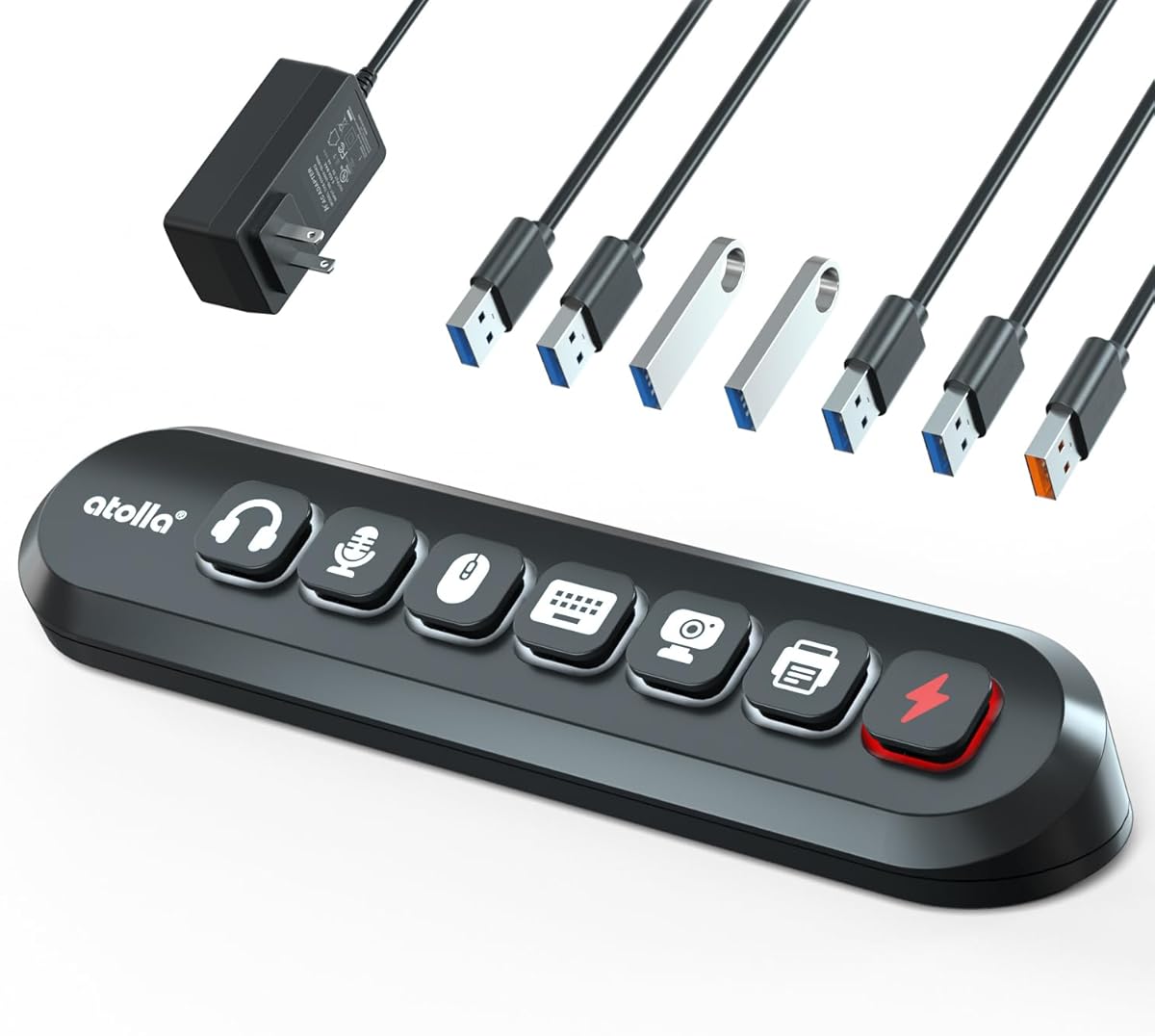
The atolla 7-Port USB 3.0 hub is built for gaming and streaming setups where numerous peripherals need fast data connections and straightforward control. Its 4.5 rating reflects a specialized design that combines six SuperSpeed data ports, one dedicated 18W fast-charging port, and illuminated physical controls for connected equipment.
We may earn a commission when you buy through this link, at no additional cost to you.
The swappable icon switches are the defining feature. Users can assign labels for devices such as microphones, headphones, hard drives, keyboards, and mice, making it easier to identify active connections at a glance. Six spare swappable buttons allow the layout to be customized for a particular streaming or gaming configuration, and the illuminated controls add useful visual feedback.
A 12V/3A adapter supplies stable power for more demanding peripherals and external hard drives. The hub supports Windows, macOS, ChromeOS, and Linux, allowing it to serve PCs, compatible gaming consoles, and other systems. It is a data hub rather than a power strip, so it does not provide full-size AC outlets, and the dedicated charging connection is USB-A rather than USB-C.
This is the pick for a streamer or gamer who wants to organize several USB peripherals without constantly tracing cables. It can also serve as a general powered data hub for external drives and accessories. It is less appropriate for users whose primary need is charging several modern USB-C devices, but it offers excellent control features for connected desktop equipment.
Illuminated icon switches make each connection easier to recognize and operate. The included spare labels support different gaming and streaming arrangements without replacing the hub itself.
The external adapter helps maintain stable operation when several data-intensive peripherals are connected. This makes the hub more appropriate for external drives and demanding accessories than an entirely unpowered alternative.
We may earn a commission when you buy through this link, at no additional cost to you.
The Six-Port Charging Tower offers a compact and distinctive alternative to conventional power strip towers. It carries a 4.6 rating and uses a sailboat-shaped housing with one USB-C port and five USB-A ports. It is intended for charging compatible phones, tablets, earbuds, speakers, lamps, power banks, and game consoles rather than serving as a data hub.
We may earn a commission when you buy through this link, at no additional cost to you.
Its USB-C connection supports Power Delivery and quick charging, giving modern devices a more appropriate interface than an all-USB-A charger. The compact form saves space on desks, counters, nightstands, and in meeting rooms. A detachable 3.3-foot power cord also makes the unit easier to pack and allows the cord to be positioned close to a nearby outlet.
The integrated circuit control is designed to prevent overcharging, overheating, and short circuits, and the product is listed as FCC, UL, and CE certified. Charging is distributed across the ports, but the stated 20W version is primarily suited to phones and smaller devices rather than power-hungry laptops. It does not offer high-speed data transfer through its USB ports.
Choose this tower when a small, attractive charging point is the priority and the connected devices use a mixture of USB-C and USB-A. It is especially suitable for bedrooms, offices, and meeting rooms. Its short cord rules out long-distance placement, and anyone needing laptop charging or file transfer should choose a more specialized hub.
The mix of one USB-C port and five USB-A ports supports newer phones while retaining capacity for older accessories. That balance makes the station useful in households during a gradual transition between connector types.
The upright sailboat-shaped body uses little desk area and keeps the connection faces easy to reach. It works well as a permanent charging spot for frequently used personal devices.
We may earn a commission when you buy through this link, at no additional cost to you.
The EJAY Magnetic 4-Port USB-A Hub is a desktop data hub designed to sit beside a monitor, under a desk, or near a computer tower. It has a 4.1 rating and offers four USB-A data connections with transfer speeds up to 5Gbps. Its primary distinction from the charging towers is the magnetic mounting system.
We may earn a commission when you buy through this link, at no additional cost to you.
The hub attaches directly to metal surfaces, uses residue-free adhesive for non-metal desks, or supports a permanent screw installation. That three-way approach makes it adaptable to rental setups and permanent workstations alike. The magnetic connection has been tested for more than 10,000 attachment cycles according to the product information, helping the hub remain fixed during cable insertion.
Two included cables extend usability: one measures 4.92 feet and the other 3.28 feet, allowing a standing desk to reach a floor-level computer tower. The aluminum housing helps dissipate heat, and the product supports modern MacBook Pro and Air models, Dell XPS systems, Surface devices, and Thunderbolt 3 or 4 hosts.
This hub is for peripherals such as mice, keyboards, and SSDs, not for charging phones, tablets, or laptops. That limitation is clearly stated and should be considered carefully. It is an excellent choice for a tidy standing desk where reachable data ports and secure mounting matter most, while the lower rating and four-port capacity make it less versatile than larger powered data hubs.
The magnetic base eliminates the tendency of ordinary hubs to slide when a cable is inserted. It can be repositioned quickly while remaining stable during normal use.
Magnetic attachment, adhesive, and screw mounting provide options for metal stands, non-metal desks, and permanent installations. This flexibility is useful for both temporary and evolving setups.
We may earn a commission when you buy through this link, at no additional cost to you.
The 6FT Tower Power Strip balances extensive AC capacity with a compact cord and a dedicated USB-C fast-charging connection. Its 4.5 rating and 12-outlet vertical design make it well suited to home offices, dorm rooms, entertainment centers, and recreational vehicles where many ordinary plugs are needed.
We may earn a commission when you buy through this link, at no additional cost to you.
The charging section includes two USB-A ports and three USB-C ports, with one USB-C connection offering up to 20W of Power Delivery. The manufacturer states that a compatible iPhone 17 can charge from zero to 50 percent in 30 minutes. Remaining ports support common accessories such as earbuds, smartwatches, and power banks, with power distributed intelligently across the connected devices.
The outlet bank uses wide spacing suitable for bulky adapters, and the weighted non-slip base helps prevent tipping. Safety features include 1800 joules of surge protection, overload protection, and flame-retardant housing. The six-foot flat cord offers more placement flexibility than a very short lead, while its 45-degree flat plug helps clear nearby furniture and neighboring plugs.
This is a sensible all-around tower for users who need many AC connections and occasional USB charging but do not require laptop-level USB-C power. Its shorter cord makes it easier to keep the cable out of walkways compared with the ten-foot version, though it cannot retract excess length. It is a practical middle ground for shared rooms and busy desktops.
The dedicated USB-C port and additional USB connections eliminate several separate adapters. That keeps commonly used phones and accessories organized in a single accessible location.
The six-foot flat cord provides enough reach for most desks while limiting excess cable. Its slim profile also makes it easier to route behind furniture without creating a bulky loop.
We may earn a commission when you buy through this link, at no additional cost to you.
The RSHTECH 10-Port Powered USB 3.2/USB C Data Hub is built for data-heavy workflows that require more connections than a conventional desktop hub. It has a 4.5 rating, ten data ports, and a 60W external power supply. The hybrid layout includes six USB-C ports and four USB-A ports, allowing peripherals with either connector to be connected.
We may earn a commission when you buy through this link, at no additional cost to you.
Three USB 3.2 ports operate at up to 10Gbps, while the remaining seven USB 3.0 ports support up to 5Gbps. This tiered arrangement helps users assign the fastest connections to demanding storage, photo, or video workflows while using the remaining ports for accessories. Plug-and-play operation means no driver installation is needed.
Individual touch buttons provide per-port control. A brief touch activates a connection, a two-second press deactivates it, and a blue LED indicates status. The 12V/5A supply distributes power evenly across the hub, which is useful when numerous external devices are connected. A detachable three-and-a-third-foot dual USB-A/USB-C host cable supports different computers and laptops.
This is the strongest option for a content-creation or professional workstation that prioritizes data transfer and port control over wall-outlet access. Its USB-C ports are for data rather than video output, and the product is not designed as a charging station. Users who need display connectivity, AC outlets, or phone charging should select one of the power-tower models instead.
Three 10Gbps ports support demanding data workflows, while seven 5Gbps ports handle more conventional peripherals and storage. The tiered design offers flexibility without requiring every device to use the fastest connections.
Each port has a dedicated touch control and status light, making it simple to isolate a connection. That is useful when several external drives or accessories need to be monitored during a busy session.
We may earn a commission when you buy through this link, at no additional cost to you.
The right standing USB hub tower depends on whether the main need is charging, conventional power distribution, high-speed data transfer, or a combination of all three. Review the following factors before choosing a model.
First, distinguish between products designed primarily to deliver power and those intended to transfer data. Charging stations include AC outlets, USB-A charging connections, or USB-C Power Delivery ports, while data hubs are optimized for peripherals, storage, and computer connections. Some products combine both functions, but the wording can still blur the distinction, so verify whether every USB port supports data, charging, or both.
Choose a charging-focused tower for phones, tablets, accessories, and compatible laptops. Choose a data hub when connecting mice, keyboards, external drives, cameras, or other peripherals. Do not assume that a USB-C port provides charging merely because it appears on the listing.
USB-C Power Delivery is especially relevant for compatible laptops and modern mobile devices. Within this group, the Kakyanill 115W model provides two ports rated up to 65W each, while the Kakyanill nine-outlet model offers broader AC capacity but less explicit USB-C power information. The two 20W PD towers and the compact 20W charging tower are better suited to phones and smaller devices than demanding laptops.
Look for a clearly stated per-port maximum and an aggregate charging limit. High individual output is useful for a laptop, while broad total output helps when many smaller devices charge at once. Match the available power to the device that needs the most energy.
Port quantity should reflect actual usage rather than the largest number available. The TenTrend and Kakyanill power towers include both AC outlets and multiple USB connections, the RSHTECH model offers ten data ports, and the charging-only products range from six ports. Excess capacity is valuable in shared rooms, but it may also add bulk without improving the experience for a single user.
Count the devices that will remain connected and leave some room for occasional additions. For mixed equipment, prioritize a combination of AC and USB connections. For a focused computer desk, examine the number and speed of data ports instead.
For power-strip towers, both outlet count and physical spacing matter. The 12-outlet models provide the greatest capacity, the TenTrend and Kakyanill options offer nine or six AC outlets, and wider spacing can help bulky adapters fit without blocking adjacent plugs. Check the listed amperage and wattage to ensure the tower is suitable for connected equipment.
Choose many AC outlets for shared offices, dorms, and media areas. For a compact bedside or desk setup, prioritize a smaller body and clear access to the ports over maximum capacity. Avoid using the tower for loads beyond its stated rating.
Safety features are especially important for towers containing numerous outlets and continuously powered electronics. The most relevant protections include overload protection, overcurrent and overvoltage safeguards, short-circuit prevention, temperature control, surge protection, flame-retardant housing, and a resettable circuit breaker. Some listings also identify UL, FCC, or CE certification.
Treat these claims as useful differentiators rather than substitutes for correct installation. Connect the tower to a grounded outlet, avoid overloading the circuit, and discontinue use if it becomes unusually hot, smells burnt, or shows visible damage. Certified products and clearly stated protections deserve preference over models with vague safety language.
Cord design influences both placement and visual clutter. Five-foot and six-foot cords suit nearby walls, ten-foot cords provide more reach across larger rooms, and retractable systems allow excess length to be wound away. Flat cords are easier to route beneath furniture, while angled or ultra-thin plugs can preserve access to neighboring wall receptacles.
Measure the distance from the outlet to the intended location before selecting a length. Choose a retractable model if aesthetics are important, a longer cord if the tower must reach farther, and a short cord if the device will stay close to an outlet.
A vertical tower saves horizontal desk area, but height and stability still matter. The TenTrend model has compact stated dimensions, while several other towers use four-sided or weighted designs. Anti-slip feet, wide bases, and recessed controls can reduce movement while cables are being inserted.
For standing desks, check that the base will not interfere with monitor arms or desktop accessories. Magnetic data hubs can provide an alternative mounting approach when vertical placement is unnecessary. Choose the format that remains stable in the intended location.
Check connector types, operating-system support, and device requirements before buying. The atolla hub supports Windows, macOS, ChromeOS, and Linux and includes a 12V/3A adapter for powered peripherals. The EJAY model serves data-only peripherals and explicitly excludes charging. The VPSUN charger uses USB-A only and does not support Qualcomm Quick Charge.
Create a quick inventory of the devices you intend to connect, including their connector types, power needs, and data requirements. This prevents a visually appealing tower from being unsuitable for the hardware it is meant to organize.
Place the tower on a stable, dry surface with its ports facing the direction of use. Keep the base clear of cables that could create leverage or pull the unit off the edge. For a retractable model, extend only the length required for the setup and secure the cord so it does not cross a walking path.
Connect high-draw or temperature-sensitive devices to the ports best matched to their requirements. Use the dedicated high-wattage USB-C connections for compatible laptops, distribute smaller devices across the remaining USB ports, and avoid exceeding the tower's stated electrical capacity. Data-hub users should connect the host with the included cable and install any required software for unusually specialized peripherals.
Inspect the cord, plug, and housing periodically. Unplug the tower if it becomes unusually hot, smells burnt, or shows cracking, discoloration, or bent connectors. Dust the vents and connection faces with a dry cloth, keep liquids away from the unit, and never overload an extension arrangement with additional power strips.
A standing USB hub primarily adds data connections to a computer, while a power strip tower provides AC outlets and often includes USB charging ports. Some models combine both functions, but the USB ports may support charging, data, or only one of the two. Check the specifications before assuming every port performs both tasks.
It depends on the USB-C output and charging protocol. The Kakyanill 115W model includes two USB-C ports rated up to 65W each, making it suitable for many compatible laptops. Models with 20W USB-C output are generally better for phones and smaller devices, while data-only hubs should not be used as laptop chargers.
Connector shape alone does not determine speed because each USB-C or USB-A port can support different standards. Data hubs in this comparison specify USB 3.0 or USB 3.2 transfer rates, while charging stations focus on power delivery. Review the actual protocol and rated transfer speed rather than relying on connector appearance.
That depends on whether you are counting AC plugs, USB charging connections, or data devices. The listed products range from six-port charging stations to power towers with nine or 12 AC outlets plus multiple USB ports. A product may physically include many connections while sharing charging power across them, so check both port count and output allocation.
Products with overload, overcurrent, overvoltage, overheating, and short-circuit protections are designed for managed multi-device charging. Even so, use a sound wall outlet, remain within the rated capacity, and stop using the tower if it becomes excessively hot or shows signs of damage. Unplugting it when nobody needs the devices is an additional precaution.
A magnetic USB hub can be convenient when data ports need to remain within reach of a raised monitor, while a retractable tower is useful for power distribution across a larger surface. Consider the desk's depth, monitor-arm clearance, cable reach, and whether you need data connections, charging, or full-size AC outlets.
No. Even products with USB-C connections may provide different outputs on different ports. The TenTrend tower specifies 65W, 20W, and 15W connections, while other models describe a shared total or a single dedicated 20W port. Connect the most demanding device to the highest specified output when possible.
Choose a charging tower when the goal is to power phones, tablets, accessories, and ordinary wall-connected devices from one organized location. Choose a powered data hub when connecting storage, mice, keyboards, cameras, or other computer peripherals. A combined tower is convenient, but verify data support because not every charging port necessarily transfers files.
The TenTrend Power Strip Tower is the strongest overall choice for buyers who want a balanced mix of AC outlets, high-wattage USB-C charging, standard USB connections, and compact placement. The Kakyanill 115W model is the premium option for users who prioritize laptop-capable charging, while the VPSUN USB Charger delivers a straightforward and economical six-port station.
Prioritize the function your setup actually needs. Choose a large power tower for many conventional plugs, a higher-output USB-C model for laptop charging, a compact charger for accessories, or a powered data hub for peripherals and file transfer. Cord management, safety protections, and output allocation can matter more than the largest headline port count.
Before purchasing, verify the current listing, connector standards, supported devices, and safety information because specifications and prices can change. The product links provided make it easy to compare the current details, but buyers should confirm that the selected standing USB hub tower matches their devices, available space, and intended use.