
Seagate Game Drive
4.5Editor score
Officially licensed for PS5
Two terabytes of capacity
Blue LED lighting
Lightweight portable design
A portable SSD can give a PlayStation 5 more room for games, backups, and media without forcing you to delete favorites from internal storage. The right drive balances usable capacity, transfer speed, durability, and straightforward compatibility, while its size and connection options determine how easily it travels between consoles.
This guide compares ten portable SSDs with features relevant to PS5 ownership, including officially licensed options, USB-C and USB-A interfaces, ruggedization, encryption, RGB lighting, and high-speed NVMe performance. We considered each product's stated specifications and practical use cases rather than treating every advertised speed as the same in real-world conditions.
The recommendations reveal several strong approaches: a licensed drive for straightforward PS5 storage, a fast internal NVMe upgrade for native game installation, and compact external models for selective game archiving. The list also highlights important limitations, especially where PS5 games must be copied back to console storage, and current prices should be checked before buying.
4.5Editor score

4.5Editor score

4.8Editor score
As an Amazon Associate we earn from qualifying purchases.
The table below compares the ten featured drives by their strongest PS5-relevant attributes, including storage type, stated speed, capacity, portability features, and primary use case.



The 2TB SanDisk Extreme Portable SSD for PS5 is the most balanced recommendation in this guide. It carries a 4.5 rating and was designed, tested, and approved for PlayStation consoles, giving it a clearer PS5 focus than many general-purpose external SSDs. Its stated read speed reaches 1050MB/s, while two terabytes creates room for a substantial collection of games without constant deletion.
We may earn a commission when you buy through this link, at no additional cost to you.
Its primary strength is the combination of PlayStation-specific design and useful endurance. Game transfers from the external archive to PS5 internal storage can occur at enhanced speeds of up to 1000MB/s under the conditions described by the manufacturer. The enclosure also carries an IP65 rating and protection against drops up to three meters, making it more suitable for travel and storage areas where a bare desktop drive would be vulnerable.
There are practical limits. The title and product information describe this as an archive and expansion solution for moving games to the console's internal storage rather than a dedicated native M.2 upgrade. Two terabytes may also exceed what a player with a modest library needs, while users who want to run PS5 games directly from this drive should verify the current console requirements. Despite those qualifications, the licensed design and strong physical specifications give it broad appeal.
Choose this drive if you want a recognizable, PS5-focused external solution that combines useful capacity, solid stated speed, and travel-ready durability. It is a particularly sensible recommendation for owners who regularly move games between the console and an archive, provided they understand that external storage expands the library but does not replace the PS5's internal game installation area.
Unlike drives that merely state broad console compatibility, this model was designed, tested, and approved for PlayStation consoles. That focused design makes it easier to shortlist for a PS5 owner who prioritizes straightforward use over experimenting with generic external storage.
Two terabytes provides meaningful room for current and older games, while the IP65 enclosure and three-meter drop protection help it cope with travel, dust, and accidental falls. It is therefore more than a stationary game archive.
We may earn a commission when you buy through this link, at no additional cost to you.
The Seagate Game Drive is an appealing entry for PS5 gamers who want licensed compatibility and a substantial game library without moving into a premium internal SSD. It has a 4.5 rating, two terabytes of capacity, and matching firmware designed for PS4 and PS5 models. Its blue LED lighting also gives the otherwise functional drive a distinctive gaming-oriented appearance.
We may earn a commission when you buy through this link, at no additional cost to you.
The central benefit is official licensing. Rather than relying on a generic compatibility claim, Seagate states that the drive uses matching firmware to work with all PS5 and PS4 models. Two terabytes means users can build a larger vault and avoid routinely sacrificing, deleting, or redownloading games. The lightweight enclosure is also simple to carry between a primary console and another system.
Speed information is less compelling than that of several competitors. The supplied title identifies a USB 3.0 connection, but the product details do not publish a maximum read or write speed, making direct transfer-time comparisons difficult. The lighting is decorative rather than functional, and this external drive should not be confused with a native PS5 M.2 expansion card. Its strongest case is uncomplicated licensed storage for users who value simplicity.
This is the best budget-oriented pick for PS4 and PS5 owners seeking a straightforward licensed game vault. It is especially useful for users who want substantial capacity and portable cross-console storage, while prioritizing official compatibility and appearance over a headline maximum transfer rate. Confirm your console and connection requirements before purchase, and check whether the current price reflects the value you expect.
Matching firmware and official licensing reduce the uncertainty involved with generic external drives. If your priority is a drive explicitly prepared for PS4 and PS5 systems, the Seagate Game Drive presents one of the clearest paths.
The lightweight enclosure and two-terabyte capacity suit players who want to preserve a broad collection of games. It is designed to reduce the need to delete titles or repeatedly download them before playing.
We may earn a commission when you buy through this link, at no additional cost to you.
The WD_BLACK 2TB SN850P is the premium choice in this guide and the strongest option for expanding the PS5 through its internal M.2 slot. It has a 4.8 rating, official PlayStation 5 licensing, and stated read speeds of up to 7300MB/s. It is not a conventional cable-connected portable SSD, but it delivers the most direct way to add native console storage.
We may earn a commission when you buy through this link, at no additional cost to you.
Its custom heatsink is designed for the PS5 and is intended to support stable operation during sustained use. Official licensing, tested and approved status, and direct installation into the M.2 slot reduce compatibility concerns. Two terabytes is a practical amount of space for modern libraries, and the product can be used to install and play games without the same copy-back limitation associated with conventional external storage.
The central trade-off is that this drive is not designed to move casually between devices. Installation requires opening the console and using the M.2 expansion bay, and the high speed depends on the host system, interface, workload, capacity, and usage conditions. Its premium specification also does not make it a better choice for owners specifically seeking a pocket-sized travel drive. The claimed game-count estimates also vary with file size and formatting.
Choose the SN850P when your main goal is to expand native PS5 game storage and play directly from the expanded capacity. It is the best fit for owners willing to install an internal upgrade and accept that it will remain associated with the console. For people seeking a cable-connected archive that travels between systems, one of the external recommendations is a better match.
Installing the drive in the PS5's M.2 slot creates internal storage that can hold and run games directly. This avoids the copy-back process required for PS5 games on many external SSD solutions.
The included heatsink was created specifically for the PS5 environment. It is a meaningful feature for a high-performance NVMe drive intended for gaming workloads and extended storage use.
We may earn a commission when you buy through this link, at no additional cost to you.
The Gigastone Dual-Interface SSD combines one terabyte of storage, a stated transfer speed of up to 1050MB/s, and both USB-C and USB-A connections. Its 4.3 rating makes it a versatile option for PS5 owners who also want one drive for computers, tablets, and smartphones rather than a game-only accessory.
We may earn a commission when you buy through this link, at no additional cost to you.
The dual-interface design is the defining feature. USB-C 3.2 Gen 2 can serve modern devices, while the USB-A connection broadens compatibility with systems that lack USB-C. The drive also supports PS4, PS5, Series X|S, and other platforms according to its description, and it can hold high-resolution photos, 4K or 8K video, and other large files in addition to game data.
PS5 use comes with an important restriction: the drive must be formatted on the console and attached through a SuperSpeed port. The product information states that PS5 games cannot be played directly from this external SSD, so game files must be copied back to internal console storage. PS4 games can be played directly from the external drive. That limitation makes it an archive and transfer device rather than a full replacement for internal PS5 expansion.
Pick this model if you need a single portable drive for console archiving, file transfer, and general content storage. It is less suitable for a player who wants to launch PS5 games directly from external storage, but the combination of interfaces, capacity, and stated speed makes it unusually flexible for everything else.
USB-C and USB-A connectivity allows the same drive to work across contemporary and older systems. That flexibility is valuable for users who move media among a PS5, laptop, tablet, or phone.
PS5 games must be copied back to the console's internal storage before play, while PS4 titles can run directly from the external SSD. Planning around this distinction keeps expectations realistic.
We may earn a commission when you buy through this link, at no additional cost to you.
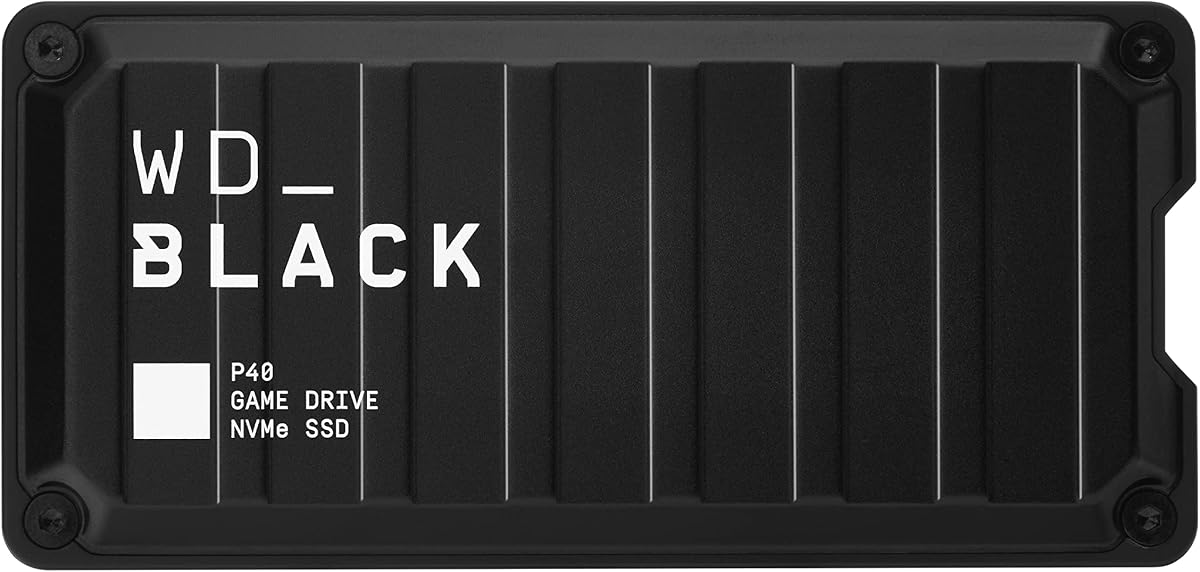
The WD_BLACK P40 Game Drive is a stylish, high-speed external SSD for gamers who want their storage to look as purposeful as their console setup. It has a 4.6 rating, up to 2000MB/s stated read speed, two terabytes of capacity, and customizable RGB lighting controlled through the WD_BLACK Dashboard on Windows.
We may earn a commission when you buy through this link, at no additional cost to you.
The interface uses USB 3.2 Gen 2×2, taking advantage of two lanes of data transfer to reach its advertised performance. Its compatibility extends beyond the PS5 to Xbox Series X|S, Xbox One, PC, Mac, and supported PS4 models. The product information specifically frames PS5 use as playing and storing PS4 games and archiving PS5 games, which is an important distinction when organizing a mixed library.
A drop-resistant structure rated for falls of up to two meters adds practical durability, while the two-terabyte capacity gives room for larger modern titles. RGB customization is a bonus for desk-based gaming setups, although the control software limitation means it is less convenient for Mac users. The maximum read speed is based on internal testing and can vary with the host, workload, capacity, and conditions.
This drive is a good match for a player who values both aesthetics and fast archive transfers. Choose it when direct PS5 game launching is not a requirement and you want one drive to support PlayStation, Xbox, PC, and Mac storage needs. It is less suitable for owners seeking a compact licensed model or a native M.2 upgrade.
A stated read speed of up to 2000MB/s and customizable RGB lighting make the P40 feel purpose-built for a gaming desk. It pairs useful performance with visual customization.
Compatibility with current PlayStation and Xbox systems, older consoles, PCs, and Macs broadens its role. It can organize mixed game collections and personal files in one portable enclosure.
We may earn a commission when you buy through this link, at no additional cost to you.
The 512GB Verbatim Pocket SSD is built for people who prioritize portability above maximum game-library capacity. Its 4.0 rating is the lowest in the guide, but that figure does not tell the whole story. The ultracompact enclosure, keyring, and cable holder make it easy to carry between a console, computer, tablet, or smartphone.
We may earn a commission when you buy through this link, at no additional cost to you.
USB 3.2 Gen 2 delivers stated read and write speeds of up to 1000MB/s, which is suitable for moving games, media, and backups. The solid-state design has no moving parts, and the drive is compatible with USB-C devices including PCs, Macs, tablets, smartphones, and gaming consoles. Backup software is included for Windows users, adding a useful file-protection tool to a drive that is equally suited to everyday storage.
Five hundred twelve gigabytes is the most significant limitation for a PS5-focused list. Large contemporary games can consume a meaningful portion of that capacity, so this drive is better suited to a compact selection, transferred PS4 games, media, or quick backups. It is not explicitly described as officially licensed for PS5, and the relatively low rating may reflect its modest positioning rather than a lack of core functionality.
Choose the Verbatim Pocket when the priority is a drive that fits easily in a pocket, attaches to a keyring, and travels without becoming another bulky accessory. It is not the strongest choice for building a large PS5 game archive, but it is a convenient general-purpose companion for console owners who need modest, portable storage.
The small, lightweight enclosure includes both a keyring and a cable holder. Those details reduce the chance of losing the drive or carrying a loose cable.
Stated read and write speeds of up to 1000MB/s make the drive useful for rapid backups and file transfers. Its broader device support adds value beyond gaming.
We may earn a commission when you buy through this link, at no additional cost to you.
The Crucial X10 combines a 4.5 rating with a stated read speed of up to 2100MB/s, ruggedized construction, and broad compatibility. At one terabyte, it sits between compact specialist drives and larger two-terabyte game vaults, making it a balanced option for PS5 owners who also need to store photos, videos, backups, and project files.
We may earn a commission when you buy through this link, at no additional cost to you.
Its IP65 dust and water resistance and drop protection of up to three meters are especially notable for a portable drive. The product supports Windows, Mac, iPad Pro, Chromebooks, Android, Linux, PS4, PS5, and Xbox through USB-C and USB-A, which makes it useful across a broad collection of devices. Included Mylio Photos Plus and Acronis True Image software adds backup and photo-management options following purchase and registration.
Like many external SSDs, its headline speed is an internal-testing figure and actual performance depends on the host device and operating conditions. It is not explicitly identified as a PS5-licensed drive, and one terabyte may not suit a large game archive. As with conventional external PS5 storage, the distinction between storing, transferring, and directly playing native PS5 games should be checked against current console requirements.
This is a strong choice for users who want a fast, tough, all-purpose portable drive. It appeals especially to someone who travels with a console, stores valuable media, and values resistance to dust, water, and drops. For the highest PS5-specific convenience, the licensed SanDisk or Seagate options may be more direct, while the X10 stands out for its combination of speed and rugged portability.
IP65 protection and resistance to three-meter drops support use in environments where unprotected drives may be vulnerable. The protection helps preserve the drive during travel and everyday handling.
A stated 2100MB/s read speed and support for major desktop, mobile, and gaming platforms make the X10 useful well beyond a PS5 game archive. It can also carry everyday files and backups.
We may earn a commission when you buy through this link, at no additional cost to you.
The 2TB SanDisk Extreme Portable SSD is a durable, feature-rich external drive with a 4.6 rating. It provides up to 1050MB/s read speed and 1000MB/s write speed in a portable enclosure, while its USB-C connection and 3.2 Gen 2 interface align well with modern computers and consoles.
We may earn a commission when you buy through this link, at no additional cost to you.
Privacy is the feature that distinguishes this model from many competitors. The included password protection uses 256-bit AES hardware encryption to help keep private files secure. The enclosure also carries IP65 water and dust resistance, protection against drops of up to three meters, and a carabiner loop for attaching it to a belt loop or backpack. The SanDisk Memory Zone app supports file management and automatic space recovery.
The drive is not presented as a PS5-specific licensed model, so compatibility should be confirmed for the particular games and console software in use. Its two-terabyte capacity and strong transfer performance make it an effective archive, but external storage does not automatically mean that native PS5 games can be played directly from it. Users should also consider encryption management before placing files that a console needs to access.
Choose this SanDisk Extreme if security, ruggedness, and a generous portable capacity matter alongside game storage. It is an excellent travel companion for a console owner who also needs a reliable place for backups, media, and private files. The PS5-focused Extreme model in this guide is more explicit about console use, while this version offers stronger emphasis on hardware encryption and everyday file management.
Password protection and 256-bit AES hardware encryption provide an added security layer. This is useful when the drive carries personal media, backups, or sensitive documents alongside games.
The IP65 rating, three-meter drop protection, and carabiner loop support mobile use. The drive is designed to withstand more handling than a conventional bare storage device.
We may earn a commission when you buy through this link, at no additional cost to you.
The 1TB SanDisk Extreme Portable SSD for PS5 shares the PlayStation-focused strengths of the larger version while offering a more moderate amount of storage. It has a 4.5 rating, a stated read speed of up to 1050MB/s, and a design that SanDisk says was tested and approved for PlayStation consoles.
We may earn a commission when you buy through this link, at no additional cost to you.
The drive is intended to expand the game library and move archived content back to PS5 internal storage at enhanced speeds of up to 1000MB/s. Its one-terabyte capacity is enough for a curated selection of games, and the small footprint may be more convenient for owners who do not want to carry a large drive. IP65 protection and three-meter drop resistance improve its suitability for travel.
Capacity is the main trade-off. Modern game file sizes can fill one terabyte quickly, especially when the same drive holds saves, media, or backups. As a conventional external archive, it also does not eliminate the need for internal storage when running native PS5 games. The one-month Discord Nitro trial included with the product is separate from the drive's core storage performance and should not influence the storage decision.
Pick this model if you want a PS5-oriented drive in a smaller capacity than the 2TB version. It is well suited to users with a focused game collection, secondary-console owners, and travelers who prioritize portability. If you routinely retain dozens of large games, the 2TB alternative provides a safer margin.
One terabyte reduces the amount of storage to carry while preserving the PlayStation design and performance focus. It is a practical middle ground between a tiny media drive and a full game vault.
IP65 protection and three-meter drop resistance reduce concern when the drive is carried between locations. Those physical protections reinforce its value as a portable archive.
We may earn a commission when you buy through this link, at no additional cost to you.
The new-model 1TB SanDisk Extreme Portable SSD is built around a claimed transfer speed of up to 2000MB/s and a pocket-sized form factor. It carries a 4.6 rating and is positioned as a fast, rugged drive for large files, high-resolution photos, edited video, and other demanding workloads that can also include console game transfers.
We may earn a commission when you buy through this link, at no additional cost to you.
SanDisk states that the new model is nearly twice as fast as the previous generation and can move 1,000 high-resolution photos in under 60 seconds under the stated test conditions. It retains an IP65 rating, three-meter drop protection, and 256-bit AES encryption for password-protected files. The compact body is designed to fit in pockets and small bags.
Its value for a PS5 owner depends on the connection used and the console's treatment of external storage. The product information does not identify it as officially licensed for PlayStation, and its headline transfer speed may require compatible host hardware and favorable conditions. One terabyte also offers less breathing room than a two-terabyte archive. The drive's encryption feature should be considered when organizing files that a console must recognize.
Choose this model for fast personal file transfers, compact backups, and console archiving where a general-purpose portable SSD is preferred. It is not the clearest pick for compatibility-focused PS5 shopping, and the licensed one- and two-terabyte SanDisk models may be easier to recommend for a console-specific setup. Its advantages are speed, portability, durability, and security.
A stated transfer speed of up to 2000MB/s is well suited to moving large media libraries and edited files. It also shortens routine transfers between an external game archive and a computer.
The pocket-sized enclosure combines 256-bit AES encryption with IP65 protection and three-meter drop resistance. It supports users who need both privacy and mobile durability.
We may earn a commission when you buy through this link, at no additional cost to you.
The most important decision is whether you want native internal expansion, a licensed external archive, or a general-purpose drive shared across several devices. Capacity, interface, speed, and durability should then be matched to the way you play and travel.
A PS5 M.2 SSD is installed inside the console and becomes part of its internal storage, allowing supported games to be installed and played directly from the expanded capacity. An external SSD connects through USB and is generally better for archives, backups, and carrying a collection between locations. This distinction is more important than advertised speed because an external drive cannot necessarily replace the console's internal game area.
One terabyte is a sensible starting point for a focused collection, while two terabytes gives large games, older favorites, and media more breathing room. Check how many titles you realistically expect to retain and avoid filling a drive completely, since SSDs benefit from spare capacity for maintenance and temporary file operations. The featured WD_BLACK estimates illustrate why game-count figures are imperfect: actual totals depend on file size, formatting, and other installed software.
The PS5 includes USB-A ports, while modern computers and phones often favor USB-C. Dual-interface drives simplify cross-device use, but PS5 owners should still verify the included adapter or cable arrangement. A USB 3.2 Gen 2 or faster interface can provide useful transfer throughput, although the console and host device ultimately determine real-world results. Internal M.2 drives require the correct physical size and compatible interface rather than an external cable.
Speeds such as 1050MB/s, 2000MB/s, 2100MB/s, and 7300MB/s describe different interfaces and use cases. Internal PCIe Gen 4 storage is the fastest category here, while external USB drives depend on bus bandwidth, controller behavior, and the connected device. Manufacturer figures are commonly based on internal testing, so consider the headline number as a potential ceiling rather than a guaranteed console experience.
Officially licensed drives are designed, tested, and approved for the relevant console, which can reduce uncertainty over setup and support. The SanDisk Extreme for PS5 and Seagate Game Drive take this approach, while the WD_BLACK SN850P is licensed as an internal PS5 expansion. Licensing is not automatically required for every compatible third-party drive, but it offers reassurance when console recognition or warranty concerns matter most.
Understand whether the drive will store, archive, or directly run the games you care about. The Gigastone description says PS5 games cannot be played directly from its external SSD and must be copied back, while PS4 games can be played directly. The WD_BLACK P40 is likewise described as supporting PS5 game archiving. For direct access to PS5 games without copying, native M.2 expansion is the more suitable route.
A portable drive may live in a backpack, travel to another console, or sit near a TV stand where accidental knocks happen. IP65 dust and water resistance and stated drop protection offer useful reassurance, while a compact enclosure, keyring, or cable loop improves everyday handling. These features are more valuable when the drive contains backups or must survive frequent relocation.
Password protection and 256-bit AES hardware encryption are valuable for personal media and sensitive files. RGB lighting, carabiner loops, and included backup software are lifestyle conveniences rather than essential storage metrics. Consider whether the console needs unrestricted access to the drive before enabling encryption, and whether visual or organizational features justify choosing one model over another.
Before using an external SSD with a PS5, connect it to a suitable SuperSpeed USB port and format it through the console's storage settings. The Gigastone product information specifically requires formatting on the PS4 or PS5 before use. Because formatting erases existing contents, copy important files elsewhere first and confirm that the drive contains only data you can replace. For an internal M.2 drive, shut down the PS5, install the licensed module and heatsink correctly, and follow the console's official expansion procedure.
Organize the drive according to how the console and the manufacturer intend it to be used. Keep an external archive logically structured, and remember that native PS5 games generally need to be moved to internal storage for direct play. If you use hardware encryption, confirm that the drive is unlocked and accessible before asking the console to read it. Safe removal through the operating system is also important, particularly while game files are transferring or when a backup is in progress.
Protect the drive by keeping its firmware and management applications updated, using the supplied cable or a dependable alternative, and avoiding abrupt removal. Keep the enclosure dry, clean, and away from extreme heat, and do not rely on stated drop protection as permission to leave it in a hazardous location. Back up irreplaceable files to another location and reserve major archive transfers for times when the console and computer are not simultaneously reading or writing to the drive.
It depends on the drive and current console capabilities. Some external SSDs can directly run supported PS4 games, but the Gigastone product information specifically states that PS5 games must be copied back to internal storage before play. For direct installation and access to native PS5 games, a compatible M.2 expansion installed inside the console is the more dependable choice.
Licensing is not absolutely necessary for every storage task, but it reduces uncertainty because the drive has been designed, tested, or approved for the console. It is particularly helpful when you want straightforward setup, game archiving, and confidence in compatibility. The Seagate Game Drive and the PS5-specific SanDisk Extreme models are examples of this approach.
One terabyte is practical for a smaller, curated collection, while two terabytes is safer for large modern games and users who want to retain many titles. Capacity needs vary because installable games, updates, saves, and media consume different amounts of space. Leave some free room rather than treating the advertised capacity as a fixed number of games.
Use a SuperSpeed port so the drive has the bandwidth required for practical transfer performance. The Gigastone instructions specifically call for a USB-C SuperSpeed or USB-A SuperSpeed connection and require the SSD to be formatted on the console first. Cables that only support basic USB speeds can make a fast SSD feel considerably slower.
No. A higher maximum transfer rate can shorten file moves, but compatibility, sustained performance, durability, and how the console uses the drive also matter. A licensed drive with a more modest interface may be easier to use, while a high-speed USB drive can still require files to be copied back to internal storage before playing.
Many external SSDs can work with both console generations, but the exact behavior differs by model. The Seagate Game Drive is officially licensed for PS4 and PS5, while other products have model-specific instructions or restrictions. Format the drive for the intended console and confirm whether titles will be archived, transferred, or played directly.
IP65 dust and water resistance, stated drop protection, and a secure attachment point can make a drive better suited to travel. The SanDisk and Crucial options in this guide emphasize environmental resistance and multi-meter drop ratings. Durability does not eliminate the need for backups, especially for a library that would be costly to download again.
It is better if your priority is direct access to native PS5 games and expanded internal storage. The WD_BLACK SN850P installs in the console's M.2 slot and supports games installed directly on that storage. An external SSD is more portable and better suited to archives, backups, and sharing files between systems.
The strongest overall external recommendation is the 2TB SanDisk Extreme Portable SSD for PS5 because it combines PlayStation-focused approval, useful speed, physical protection, and ample game capacity. The Seagate Game Drive stands out as a licensed, portable two-terabyte alternative, while the WD_BLACK SN850P is the premium choice for owners who want native M.2 expansion and direct game installation.
Your priorities should determine the rest of the shortlist. Choose the Gigastone for dual-interface flexibility, the WD_BLACK P40 for RGB lighting and cross-platform use, the Verbatim Pocket for minimum size, the Crucial X10 for rugged high-speed storage, or the encrypted SanDisk models for private files. If you want to run native PS5 games directly, favor internal M.2 expansion over a conventional external archive.
Before purchasing, verify the drive's current PS5 behavior, required formatting, connector support, and warranty terms. Advertised transfer speeds are maximum figures that depend on hardware and conditions, so use them as a guide rather than a promise. Check current prices, storage capacity needs, and compatibility details at the time of purchase, since pricing and product availability can change.
