
Razer Kiyo V2 X Webcam
4.3Editor score
1440p 60FPS video
Fast accurate autofocus
Integrated physical shutter
Built-in microphone
Monitor and tripod mounting
Our Razer webcams guide compares 10 leading models for streaming, meetings, and content creation, helping you choose the right resolution, features, and design
A webcam can determine how clearly your audience sees you during a stream, presentation, or video call. Razer webcams range from practical 1440p models to advanced 4K options with intelligent framing, HDR, and extensive manual controls, making the right choice easier when key features are compared clearly.
This guide examines 10 webcams included in the current Razer webcam comparison, covering the Kiyo V2, Kiyo V2 X, Kiyo V2 Pro, and Kiyo Pro Ultra, plus two mainstream alternatives for context. We assess resolution, frame rate, focus, low-light performance, software, privacy, mounting, and audio features using the supplied product information.
Each review explains who the camera is best suited for, what makes it stand out, and where its compromises may matter. The top selections highlight the strongest choices for different priorities, while color variants are treated separately. Product availability and prices change, so confirm the current listing and specifications before purchasing.
4.3Editor score

4.6Editor score

4.0Editor score
This side-by-side comparison highlights video modes, intelligent imaging, physical privacy, mounting options, and software control. Although most selections are Razer models, the inclusion of the Angetube 4K and Logitech Brio 101 provides useful context for buyers weighing webcam performance, convenience, and value.




The Razer Kiyo V2 X in black earns a 4.3 rating by offering a balanced mix of video quality, convenience, and adaptable framing. Its 1440p 60FPS capture mode is especially useful for fast gaming action because it delivers smooth movement without requiring the processing demands associated with 4K. The camera also includes autofocus, a wide-angle lens, a built-in microphone, and a physical privacy shutter.
We may earn a commission when you buy through this link, at no additional cost to you.
Its strongest appeal is the combination of features that improve everyday use rather than merely adding resolution. Fast, accurate autofocus helps keep your face defined when you lean forward or shift position, while the wide lens can capture a close shot or reveal more of a streaming setup. Razer Synapse provides presets and detailed color and lighting adjustments, allowing users to begin quickly and refine the image later.
The built-in microphone makes the package more self-contained for a first streaming setup, although a dedicated microphone can still improve vocal clarity. The privacy shutter provides a reassuring physical solution when the camera is not in use, and the universal pivoting mount can sit on a monitor or attach to a tripod through its built-in thread. The main limitation is that its maximum 1440p resolution falls short of the 4K models for users who require greater detail or tighter cropping.
This is a strong recommendation for gamers, remote workers, and everyday presenters who value 60FPS smoothness, simple setup, and privacy without moving into the more advanced Kiyo V2 Pro category. It may be the most balanced Razer option for a new creator who wants meaningful customization, a wide field of view, and a physical microphone and shutter in one device.
The 1440p 60FPS mode is well suited to gaming streams, where rapid movement, head turns, and on-screen action benefit from a higher frame rate. The result gives creators more latitude when cropping or adjusting the view without making movement appear as choppy as a lower-frame-rate capture.
Fast autofocus reduces the need for manual focus adjustments, while the integrated shutter physically blocks the lens. Razer Synapse presets simplify initial configuration, and the included microphone makes the camera useful for meetings or early streams without requiring a separate audio device.
We may earn a commission when you buy through this link, at no additional cost to you.
The Razer Kiyo V2 Pro holds a 4.6 rating, the highest among the listed products, and serves as the most complete option for serious streaming and content creation. Its headline capability is 4K 60FPS video from an 8.3MP Sony STARVIS 2 sensor, combining high detail with fluid motion. For creators who regularly move around their frame, that combination is especially compelling.
We may earn a commission when you buy through this link, at no additional cost to you.
AI-powered auto-framing adds practical intelligence by tracking the face and adjusting pan, tilt, and zoom to keep the subject naturally centered. One-click image enhancement automatically adjusts exposure, white balance, and noise reduction, making the camera more approachable in dim rooms or mixed and backlit environments. At the same time, Razer Synapse exposes ISO, shutter speed, exposure, gain, white balance, and field of view for creators who want precise control.
Vivid HDR technology is intended to produce brighter highlights, deeper shadows, and more lifelike colors, while the 86-degree field of view supports wide workspace shots as well as close framing. The integrated privacy shutter and adjustable mount with quarter-inch thread support make it practical for both fixed monitor setups and tripod placement. The trade-off is complexity: advanced features may require a compatible software environment, and 4K 60FPS recording can demand more from the computer, capture software, and connection.
This webcam is best for streamers, presenters, and content creators who need high resolution, smooth motion, intelligent tracking, and detailed controls in one unit. It is also the clearest all-around recommendation in this guide for buyers who do not want to compromise between automated image enhancement and manual adjustment.
Face tracking dynamically changes pan, tilt, and zoom as you move, keeping your presence prominent without requiring a completely static camera position. This is particularly useful during presentations, hands-on demonstrations, and streams in which standing up or leaning sideways is common.
The camera offers two complementary approaches to image quality. One-click enhancement corrects difficult lighting automatically, while Synapse settings give experienced creators access to ISO, shutter speed, gain, exposure, white balance, and field of view.
We may earn a commission when you buy through this link, at no additional cost to you.
The black Razer Kiyo V2 has a 3.9 rating and delivers 4K 30FPS video through a Sony STARVIS sensor. It is designed for creators who value resolution, natural face tracking, and automatic image correction over the very high frame rate offered by the Kiyo V2 Pro. Its 4K mode can reveal more detail in the frame and provides useful flexibility when cropping a wider composition.
We may earn a commission when you buy through this link, at no additional cost to you.
AI-powered auto-framing uses natural face tracking with pan, tilt, and zoom effects to keep the subject visible. One-click image enhancement adjusts exposure, white balance, and noise reduction for low-light, backlit, and mixed-lighting environments. Razer Synapse adds ISO, shutter speed, and other advanced settings, while HDR introduces greater contrast, depth, and richer hues for gaming streams, tutorials, and lifestyle content.
The ultrawide lens can move between an intimate close view and a broad shot of a complete setup without emphasizing edge warping or distortion. Its universal pivoting mount supports monitor placement and tripod attachment through a built-in thread. The trade-off is frame rate: 4K at 30FPS is less fluid than 4K at 60FPS for rapid gaming action, and the supplied information does not list an integrated microphone.
The Kiyo V2 is best suited to creators who record at a deliberate pace, produce polished demonstrations, or want 4K detail for presentations and collaboration. It makes more sense than a 1440p model when fine detail and digital cropping matter, but buyers who stream fast competitive games should examine whether the Pro model's 60FPS mode better fits their workflow.
A 4K 30FPS stream provides ample resolution for detailed demonstrations, close-up commentary, and polished recorded content. The Sony STARVIS sensor works with automatic enhancement to maintain clarity in dim or backlit rooms, reducing the need to correct every setting manually.
The wide lens captures either a personal close-up or a larger view of a desk and streaming environment. AI tracking adjusts the framing as you move, while the pivoting mount makes it simple to change between monitor and tripod positions.
We may earn a commission when you buy through this link, at no additional cost to you.
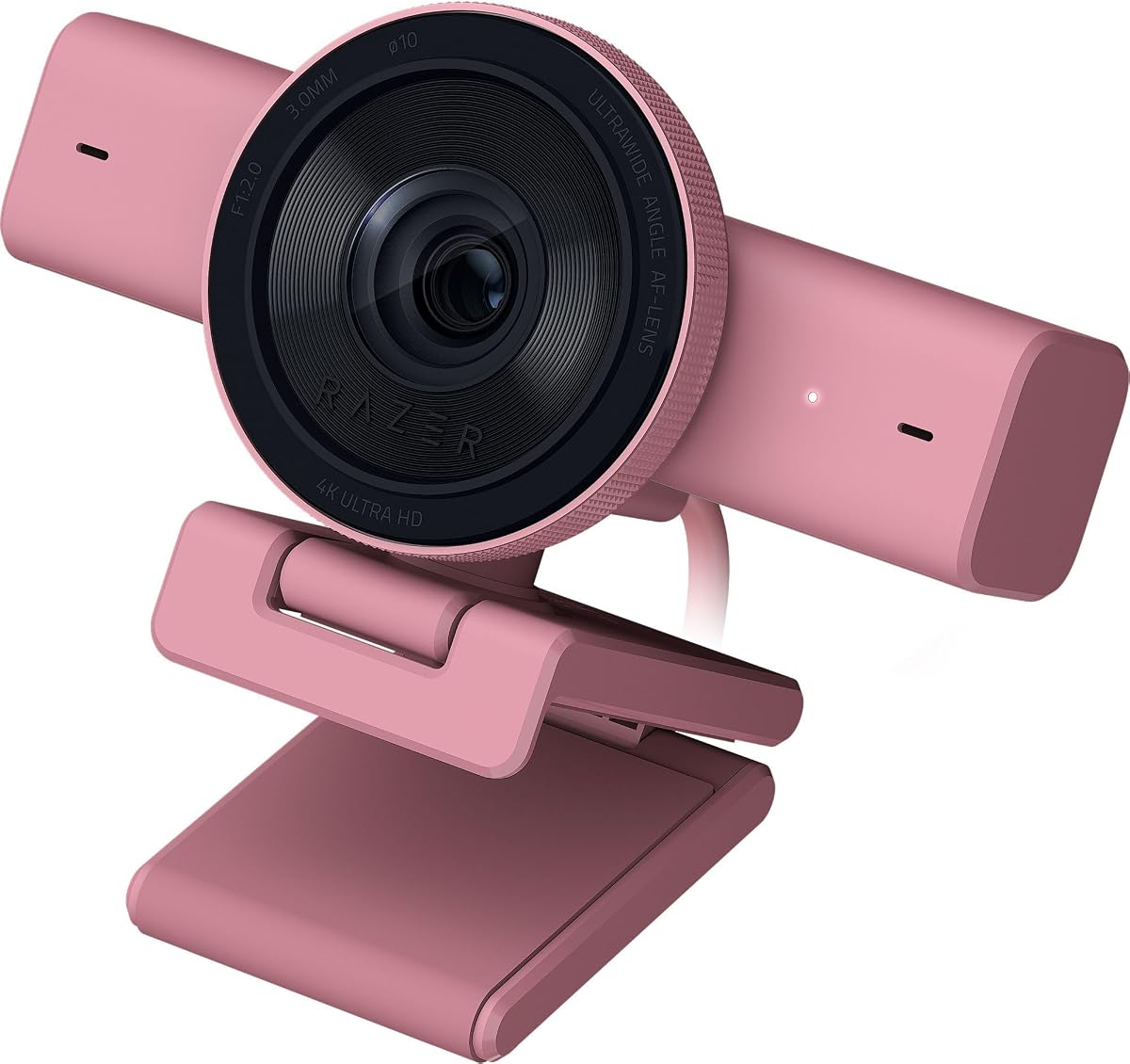
The Quartz Razer Kiyo V2 X provides the same core performance as the black version, earning a 4.3 rating, while offering a lighter exterior for setups that suit its finish. It records 1440p at 60FPS, a useful combination for smooth gaming streams and detailed enough footage for video meetings, presentations, and regular content creation.
We may earn a commission when you buy through this link, at no additional cost to you.
Fast, accurate autofocus follows the user as they lean or move, while the wide-angle lens can alternate between close framing and a broad view of the workspace. Razer Synapse provides intuitive presets along with precise color and lighting adjustments, making the camera approachable for a first setup and flexible for later tuning. The built-in microphone adds basic audio capture, and the quick-turn privacy shutter physically covers the lens.
The universal pivoting mount tilts and swivels for a monitor and can be attached to a tripod through the built-in thread, allowing creators to find a higher, lower, or more natural camera angle. Compared with the Kiyo V2 Pro, this model lacks 4K 60FPS capture and advanced AI auto-framing, but it offers a simpler feature set for users who value smooth video and straightforward operation.
Choose the Quartz version if you prefer a light-colored peripheral that coordinates with a pale desk, white monitor, or brighter gaming setup. It is particularly suitable for everyday streaming and meetings, where 1440p 60FPS, dependable autofocus, and physical privacy are more valuable than maximum image detail.
The Quartz finish gives buyers an alternative to the conventional black webcam used with dark gaming peripherals. Because the core specifications match the black Kiyo V2 X, the choice can be based on setup aesthetics without compromising speed, autofocus, or mounting flexibility.
The combination of 60FPS capture, integrated microphone, and a twist-on privacy shutter keeps routine use straightforward. It works well for a creator who wants good motion handling and a clear visual cue that the lens is covered between calls or broadcasts.
We may earn a commission when you buy through this link, at no additional cost to you.
The white Razer Kiyo V2 X is a 4.3-rated option for users who want smooth 1440p streaming in a light-finished webcam. Its 60FPS mode is designed to preserve fluid motion during gaming, while the autofocus and wide-angle lens help maintain clarity whether the user is close to the camera or showing a broader desk setup.
We may earn a commission when you buy through this link, at no additional cost to you.
Its software support is one of its more attractive features. Razer Synapse supplies presets for a quick start and precise color and lighting controls for users who want to match the camera to their room. The built-in microphone ensures that basic calls and streams have an audio source, while the physical shutter offers immediate privacy by covering the lens.
The universal pivot mount lets the webcam rest on a monitor or connect to a tripod, giving creators flexibility to improve eye level and composition. As a trade-off, this model does not match the Pro's 4K 60FPS resolution, AI face tracking, or HDR specification. It also does not provide the same AI auto-framing found on the standard Kiyo V2, so users must position the camera thoughtfully.
The white Kiyo V2 X is a practical recommendation for gamers, students, and remote workers who prioritize smooth video, a clean aesthetic, and minimal setup. It is especially useful where a 1440p 60FPS stream offers enough detail and 4K is not essential to the content being produced.
Capturing 1440p at 60FPS provides a practical middle ground for fast content. It gives the stream a more polished appearance than standard-definition output while avoiding the more demanding demands associated with 4K 60FPS workflows.
The built-in microphone and straightforward Synapse presets reduce the number of separate devices a new user needs. For quick meetings, scheduled classes, and regular gaming streams, the white Kiyo V2 X offers a focused feature set without requiring advanced framing software.
We may earn a commission when you buy through this link, at no additional cost to you.
The Razer Kiyo Pro Ultra has a 4.0 rating and stands apart through its large sensor and custom optics. Its 1/1.2-inch Sony STARVIS 2 sensor uses 2.9-micrometer pixels to gather light and image information, while the custom F/1.7 aperture lens is designed to support clear imagery in low-light conditions.
We may earn a commission when you buy through this link, at no additional cost to you.
AI-powered imaging tracks the face, maintains focus, and adjusts light levels to keep the subject properly exposed. The lens can blur the background directly without additional software, adding depth while keeping the face sharp. At 30FPS, HDR can enhance color, texture, contrast, and detail across bright and dark areas, and the camera can output uncompressed 4K 30FPS, 1440p 30FPS, or 1080p 60FPS footage.
Customization includes a broad collection of settings and on-board memory for the last saved configuration, which is convenient for creators who move between locations. It is optimized for Windows with full software control and offers plug-and-play basic capture on macOS, though advanced features are not supported there. A built-in microphone and privacy shutter round out its premium hardware package.
This model is ideal for dedicated content producers who prioritize sensor size, low-light capability, background blur, and flexible output modes. The main compromises are the lack of a 4K 60FPS mode and a software experience oriented more toward Windows. Those limitations are reasonable for a premium camera whose greatest strength is image quality rather than maximum gaming frame rate.
The large Sony STARVIS 2 sensor and F/1.7 lens work together to gather substantial light and retain detail. This makes the camera especially compelling for evening recordings, dim home studios, and setups that cannot rely on consistently strong room lighting.
The webcam can produce uncompressed 4K footage and alternate output formats, giving creators meaningful choices for live work and recording. Its hardware-assisted background blur creates visual separation without requiring the same effect in separate streaming software.
We may earn a commission when you buy through this link, at no additional cost to you.
The white Razer Kiyo V2 combines 4K 30FPS capture with AI-assisted framing in a light-colored housing. Its Sony STARVIS sensor, automatic face tracking, and one-click image enhancement make it a practical option for creators, remote workers, and presenters who want a more polished image without configuring every parameter themselves.
We may earn a commission when you buy through this link, at no additional cost to you.
Face tracking applies pan, tilt, and zoom to keep the subject naturally centered, which helps during meetings, tutorials, and streams in which the user changes position. One-click enhancement corrects exposure, white balance, and noise reduction in dim rooms, mixed lighting, and backlit environments. HDR adds depth and richer contrast, while Synapse provides more advanced settings such as ISO and shutter speed.
The ultrawide lens gives flexibility between close compositions and wide views of a full workspace. A universal pivoting mount supports monitor placement or tripod attachment, and the wide field of view avoids emphasizing the edge distortion that can become distracting when a large area is captured. Compared with the Kiyo V2 Pro, however, it does not provide 4K 60FPS, and the supplied feature list does not identify a built-in microphone.
The white Kiyo V2 is a strong choice for polished recorded content and professional collaboration where 30FPS is sufficient. Buyers should ensure that their computer, platform, and workflow are comfortable with 4K capture. Those who need highly fluid gaming video or a stronger low-light lens specification may prefer a different Kiyo model.
The white finish suits clean, bright office environments and setups that avoid the all-dark look of conventional gaming peripherals. Because the underlying camera offers 4K, HDR, and intelligent framing, its visual design is paired with features intended for polished communication.
One-click enhancement corrects exposure, white balance, and noise reduction, making inconsistent room lighting less disruptive. The AI framing system complements that automation by keeping the subject centered when a meeting or recording requires natural movement.
We may earn a commission when you buy through this link, at no additional cost to you.
The Quartz Razer Kiyo V2 is a 4.3-rated model's more colorful sibling in a different finish, delivering the same 4K 30FPS specifications and a 3.9 rating. It is built for users who want high-resolution video, automated framing, and a distinctive light-colored enclosure that stands apart from the standard black webcam aesthetic.
We may earn a commission when you buy through this link, at no additional cost to you.
The camera's AI auto-framing tracks the face and applies natural pan, tilt, and zoom effects as the user moves. One-click image enhancement handles exposure, white balance, and noise reduction, which is useful in low-light gaming rooms and backlit environments. For creators who want to go beyond automatic corrections, Razer Synapse provides ISO, shutter speed, and other manual controls.
HDR contributes richer hues and stronger contrast, while the ultrawide lens allows a shift between close-up and full-setup compositions without pronounced edge distortion. The pivoting mount can be positioned on a monitor or connected to a tripod, offering a straightforward way to improve camera height and angle. The compromise is that 4K remains restricted to 30FPS, which is less fluid for rapid competitive gaming than the Kiyo V2 Pro.
The Quartz model is best for content creators who record polished video, present educational material, or want a 4K camera with a distinctive finish. It should appeal to users who value automatic image correction but also want manual access when a scene requires fine adjustment. For fast game streams, verify that 30FPS fits your preferred presentation style.
The Quartz finish makes the webcam easier to integrate into a pale or warm-neutral desk arrangement. It retains the full 4K, HDR, AI framing, and Synapse feature set, so the selection is primarily about appearance rather than a reduced capability level.
At 4K 30FPS, the camera offers ample detail for tutorials, commentary, presentations, and recorded streams. The STARVIS sensor and one-click enhancement help preserve usable image quality in rooms where lighting is not carefully controlled.
We may earn a commission when you buy through this link, at no additional cost to you.
The Angetube 4K Webcam provides a non-Razer alternative centered on convenience and integrated lighting. It carries a 4.4 rating and supports resolutions from 4K at 30FPS to 1080p at 60FPS. PDAF autofocus helps maintain sharpness, while the built-in three-level ring fill light provides a quick way to brighten the face in a dim room.
We may earn a commission when you buy through this link, at no additional cost to you.
Its strongest differentiator is the hardware illumination. The ring light creates a soft, even glow intended to reduce harsh shadows, and a simple touch control allows users to select among three brightness levels. This makes the webcam appealing to first-time streamers and remote workers who do not want to assemble a separate lighting arrangement before their first call.
The dual built-in microphones provide a convenient audio source, and a closing privacy shutter physically blocks the lens. It connects through USB-A and includes a USB-C adapter, requiring no additional drivers for plug-and-play use. Compatibility includes major Windows, macOS, and Linux systems along with widely used meeting and streaming platforms. The limitation is that the supplied information emphasizes automatic convenience rather than the extensive manual controls found in Razer Synapse.
This webcam is best for straightforward calls, online classes, and entry-level streaming where built-in lighting and a simple connection are the priorities. It is not a Razer model, so buyers specifically seeking Razer integration should choose from the Kiyo range. Even so, it serves as a useful comparison for demonstrating the value of a ring light and dual microphones in a more integrated design.
The three-level ring light addresses a common webcam problem: a dark face caused by inadequate room illumination. Because the light is built in, users can improve their appearance immediately without positioning a separate panel, diffuser, or desk lamp.
USB-A plug-and-play operation and the included USB-C adapter make the camera accessible across modern computers. The closing shutter offers a tangible privacy measure, while dual microphones reduce the need to purchase additional basic audio equipment.
We may earn a commission when you buy through this link, at no additional cost to you.
The Logitech Brio 101 is a straightforward 1080p Full HD webcam with a 4.4 rating. Rather than competing with advanced Razer cameras on 4K detail or manual control, it focuses on making everyday meetings and casual streaming straightforward. It works with major services such as Microsoft Teams, Zoom, and Google Meet, and it is also compatible with Nintendo Switch 2's GameChat mode.
We may earn a commission when you buy through this link, at no additional cost to you.
RightLight is the most notable imaging feature. It can boost brightness by up to 50% and reduce facial shadows, helping the user look clearer in ordinary room lighting. The built-in microphone provides basic voice capture, while a sliding privacy cover blocks the lens when the camera is not in use. The Logi Options+ app allows adjustments to zoom, framing, and camera settings without requiring constant physical changes.
Its built-in USB-A cable supports a reliable plug-and-play experience, and the 1080p output is sufficient for routine video calls and standard streaming use. The Brio 101 is also made with a minimum of 77% post-consumer plastic, providing an environmental detail that some buyers may appreciate. The principal limitation is resolution: it cannot match the 4K detail of the Razer Kiyo V2, Kiyo V2 Pro, or Kiyo Pro Ultra.
This camera is a sensible alternative for users who want uncomplicated Full HD communication, reliable platform compatibility, and a physical privacy solution. It is not the choice for detailed 4K production, but it may be a more practical fit for office calls, online classes, and casual streams where ease of use matters more than a broad professional specification sheet.
RightLight increases brightness and reduces shadows, helping users look more present in a typical home or office setting. This automated correction is useful for quick calls where arranging professional lighting would be inconvenient.
The sliding cover makes camera privacy easy to confirm at a glance, and the Logi Options+ app provides access to zoom, framing, and camera adjustments. Broad platform support and a built-in USB-A cable keep the initial setup uncomplicated.
We may earn a commission when you buy through this link, at no additional cost to you.
The best Razer webcam depends on whether smooth motion, maximum detail, intelligent framing, low-light quality, or simple setup matters most. Compare the sensor and output mode first, then examine focus, software, privacy, audio, and mounting options to find the model that fits your recording environment.
Resolution describes how much visual information the camera captures, while frame rate determines how many images are recorded each second. The Kiyo V2 X records 1440p at 60FPS, making it attractive for fast gaming streams. The Kiyo V2 offers 4K at 30FPS for detailed recorded content, and the Kiyo V2 Pro combines 4K with 60FPS. The Kiyo Pro Ultra focuses on 4K image quality through a large sensor but records its highest-resolution mode at 30FPS, while also supporting 1080p 60FPS output.
Choose resolution and frame rate according to the motion in your content. Fast gameplay generally benefits from 60FPS, while demonstrations, presentations, and recorded videos can look excellent at 30FPS with 4K detail. Also consider whether your computer, connection, and streaming platform can handle the selected mode smoothly.
A larger sensor can gather more light and preserve more detail in difficult lighting. The Kiyo Pro Ultra highlights this principle with its 1/1.2-inch Sony STARVIS 2 sensor, 2.9-micrometer pixels, and custom F/1.7 lens. The Kiyo V2 and Kiyo V2 Pro also use Sony STARVIS sensors and offer automatic enhancement for dim, mixed, or backlit rooms, while the Angetube includes a three-level ring light to brighten the subject directly.
Prioritize a larger sensor when your recording space is consistently dim or you want greater control over low-light output. If a ring light or front-facing illumination suits your setup, that can also improve consistency. Software corrections are helpful, but they cannot fully replace the light-gathering capability of a physically larger sensor.
Autofocus keeps your face sharp as you move toward the camera, lean back, or change position. The Kiyo V2 X uses fast, accurate autofocus, while the Angetube provides PDAF autofocus. AI-powered framing goes further by tracking the face and adjusting pan, tilt, and zoom, a feature found on the Kiyo V2 and Kiyo V2 Pro. The Kiyo Pro Ultra also uses AI imaging to track the face and maintain focus.
Fixed-position presenters can often manage with basic autofocus, but moving creators benefit from tracking. Choose auto-framing when your content involves standing, demonstrations, or frequent changes in position. For a stationary desk setup, a simpler focus system may be sufficient and easier to maintain.
A wide-angle lens can frame a close face shot or include more of a desk, keyboard, and gaming equipment. The Kiyo V2 X includes a wide-angle lens, the Kiyo V2 offers an ultrawide perspective designed to avoid pronounced edge distortion, and the Kiyo V2 Pro uses an 86-degree field of view. A broad view provides flexibility, but it can also make your face appear smaller within the frame.
Match the field of view to your recording style. Choose a close framing for commentary, meetings, and face-led content, or use a wider view for tabletop demonstrations and setup tours. Software-controlled framing and digital cropping can further refine the composition after the camera is mounted.
Razer Synapse is central to the Kiyo V2 family. It offers presets for fast configuration and deeper controls such as color, lighting, ISO, shutter speed, exposure, gain, white balance, and field of view. The Kiyo V2 Pro and Kiyo Pro Ultra provide especially broad control sets, while the Logitech Brio 101 offers zoom, framing, and camera adjustments through Logi Options+.
Automatic modes are valuable if you want a camera that is ready to go without constant tuning. Manual controls are more useful for creators who understand exposure and white balance or who need to maintain a consistent look across different scenes. Check that your preferred operating system supports the camera's advanced software features.
A physical shutter gives immediate peace of mind by blocking the lens rather than relying only on a software setting. The Kiyo V2 X, Kiyo V2 Pro, and Kiyo Pro Ultra include integrated privacy shutters, while the Angetube uses a closing shutter and the Logitech Brio 101 uses a sliding cover. Audio is less consistent: the Kiyo V2 X, Kiyo Pro Ultra, Angetube, and Brio 101 include microphones, but the supplied Kiyo V2 and Kiyo V2 Pro information does not list integrated microphones.
Check privacy hardware before sharing a room or recording unattended. If clear voice capture is important, a dedicated external microphone will generally provide more control than a built-in option. Treat built-in microphones as a convenient starting point rather than a guarantee of broadcast-grade sound.
A webcam should sit close to eye level and point naturally toward your face. Most Razer models use a pivoting or adjustable mount that works on a monitor and supports tripod attachment through a built-in thread. The Kiyo V2 Pro specifically supports quarter-inch thread mounting, and the Kiyo Pro Ultra includes an on-board memory feature for saving the last configuration when the setup changes.
Choose a monitor mount for a simple fixed workstation, or use tripod compatibility if you need a higher angle or greater framing freedom. Account for desk space, monitor thickness, cable reach, and the camera's weight. A stable, well-positioned webcam is often more valuable than a small improvement in digital specifications.
Begin by connecting the webcam with the supplied cable and placing it on a monitor, stand, or tripod. Open Razer Synapse if you want the full control suite, confirm that the camera is recognized, and select the required resolution and frame rate. Start with an automatic enhancement preset, then make small adjustments to exposure, white balance, and focus rather than changing several settings at once.
Position the lens near eye level and angle it toward the center of your face. Clean the surrounding area to keep the frame uncluttered, and test the camera in the application you will actually use for calls or streaming. Check brightness with several lights in the room, test the built-in microphone if present, and confirm that privacy shutters or covers move freely and fully block the lens.
For ongoing care, gently wipe the lens with a soft, lint-free cloth and avoid household cleaners or moisture around the sensor and controls. Keep the camera away from direct heat, intense sunlight, and dust. Review saved settings before important broadcasts, keep the device's software and drivers current, and use the physical privacy cover whenever the camera is not actively being used.
The Razer Kiyo V2 Pro is the strongest option in this group for fast gaming because it records 4K at 60FPS and uses AI-powered auto-framing. The Kiyo V2 X is also highly practical, offering 1440p at 60FPS with fast autofocus and a simpler feature set. Your computer and streaming software should be able to handle the selected resolution and frame rate.
The Kiyo V2 Pro is worth considering when 4K detail, 60FPS capture, AI face tracking, HDR, and advanced low-light enhancement matter. The Kiyo V2 X offers 1440p at 60FPS, accurate autofocus, a built-in microphone, and a physical privacy shutter in a more straightforward package. Choose the Pro for professional image control or the X for balanced everyday streaming.
Both offer 4K capture, AI-assisted framing, image enhancement, and detailed Synapse controls, but the Pro raises the top frame rate to 60FPS and uses an 8.3MP Sony STARVIS 2 sensor. It also specifies vivid HDR performance and an 86-degree field of view. The standard Kiyo V2 records 4K at 30FPS and emphasizes a wide-angle lens and collaboration-focused operation.
No. The supplied information lists integrated microphones for the Kiyo V2 X and Kiyo Pro Ultra, but it does not list one for the Kiyo V2 or Kiyo V2 Pro. The Angetube and Logitech Brio 101 also include microphones. If broadcast-quality voice matters, consider whether a separate microphone will provide better control.
The Kiyo Pro Ultra is designed around a large Sony STARVIS 2 sensor and custom F/1.7 lens, making it a compelling choice for low-light capture. The Kiyo V2 and Kiyo V2 Pro also offer one-click exposure, white balance, and noise-reduction adjustments. A separate light can still improve any camera, but the Pro Ultra's larger sensor provides a stronger physical foundation.
Yes. The Kiyo V2 X, Kiyo V2, and Kiyo Pro Ultra support tripod attachment through their built-in threads, while the Kiyo V2 Pro's adjustable mount includes quarter-inch thread support. A tripod can help you place the lens at eye level, improve framing, or move the camera between different recording positions.
The Kiyo V2 X, Kiyo V2 Pro, and Kiyo Pro Ultra all feature integrated physical privacy shutters. A physical cover is reassuring because it blocks the lens directly rather than depending solely on a software command. The alternative models in this comparison also provide physical privacy through a closing or sliding cover.
It depends on how you use the camera. 4K provides useful detail for recorded content, close demonstrations, and cropping, while 60FPS at a lower resolution can look smoother during fast movement. For routine meetings, a good 1080p or 1440p camera may be more than sufficient, and lighting and framing often influence the final result more than resolution alone.
The Razer Kiyo V2 Pro is the most complete selection in this guide, combining 4K 60FPS video, AI auto-framing, one-click enhancement, HDR, and extensive controls. The Kiyo V2 X stands out as the most balanced option for everyday streaming, with 1440p 60FPS output, fast autofocus, a built-in microphone, and a physical shutter, while the Kiyo Pro Ultra represents the premium choice built around its large sensor and custom aperture lens.
Prioritize the feature that most affects your work rather than resolution alone. Fast games favor 60FPS, detailed tutorials benefit from 4K, dim rooms favor larger sensors and effective enhancement, and mobile creators may prioritize auto-framing. Built-in microphones, physical privacy, and tripod-compatible mounting can be equally important in a practical setup.
Before buying, verify the current model details, software compatibility, operating system support, and latest specifications on the product listing. Prices and availability can change, and color variants may sell separately. The right webcam should fit your room, platform, and production style while providing the controls and convenience you will actually use.