
NETGEAR Nighthawk Tri-Band WiFi 7 Router
4.3Editor score
Dedicated 6GHz band
Up to 2,500-square-foot coverage
Two 2.5Gbps LAN ports
Our expert Long Range WiFi Routers guide compares ten models for coverage, speed, multi-gig networking, mesh expansion, security features, device capacity, and
Long Range WiFi Routers are built to deliver dependable coverage across large homes, stubborn dead zones, and busy connected environments. The right model balances wireless range, throughput, wired connectivity, device capacity, and manageable configuration rather than relying on headline speed alone.
This guide compares ten routers and mesh systems using their published specifications, including Wi-Fi generation, band configuration, coverage claims, Ethernet options, security tools, and expansion support. The list includes standalone routers, tri-band designs, and multi-unit mesh systems for different home layouts.
Each pick reveals which kind of buyer it best suits, from compact homes seeking better range to demanding users who want multi-gig connections and dedicated high-speed bands. Product listings and current availability can change, so confirm specifications, ISP requirements, and accessories before purchasing.
4.3Editor score

4.3Editor score
4.4Editor score
The table below compares the ten selections by wireless standard, radio layout, stated coverage, and wired capabilities. These figures describe manufacturer specifications, while actual range and throughput depend on the property, client devices, internet plan, interference, and installation.





The TP-Link Archer BE400 is a dual-band Wi-Fi 7 router built for households that want modern wireless performance without moving to a tri-band or mesh configuration. It carries a 4.3 rating and stands out through Multi-Link Operation, Multi-RUs, 4K-QAM, and 2.5Gbps wired connectivity.
We may earn a commission when you buy through this link, at no additional cost to you.
Its stated combined throughput reaches 6,452 Mbps, with up to 5,764 Mbps on the 5GHz band and 688 Mbps on 2.4 GHz. Six antennas, beamforming, and a stated coverage area of up to 2,400 square feet make it a credible option for medium and larger homes. The router is also rated for as many as 90 connected devices at one time.
Wired connectivity is a major strength because the BE400 includes one 2.5Gbps WAN/LAN port, one additional 2.5Gbps LAN port, and three 1Gbps LAN ports. Its limitations are that it lacks the dedicated 6GHz radio found in higher-tier Wi-Fi 7 models, and it still requires a compatible modem or gateway for most internet services.
This is the strongest general recommendation for buyers who want Wi-Fi 7, flexible multi-gig ports, and room to expand. It suits connected homes, remote workers, and households that want a capable standalone router without deploying several mesh nodes.
Multi-Link Operation allows the router to use multiple frequency bands simultaneously, while Multi-RUs and 4K-QAM improve efficiency and capacity. These features are particularly relevant to newer Wi-Fi 7 clients, although older Wi-Fi 6 and Wi-Fi 5 devices can also benefit from the improved platform.
The 2.5Gbps ports help avoid an Ethernet bottleneck when using a multi-gig internet plan, fast NAS, or a demanding wired workstation. The WAN/LAN port also provides operational flexibility, while the remaining gigabit ports support ordinary home devices.
We may earn a commission when you buy through this link, at no additional cost to you.
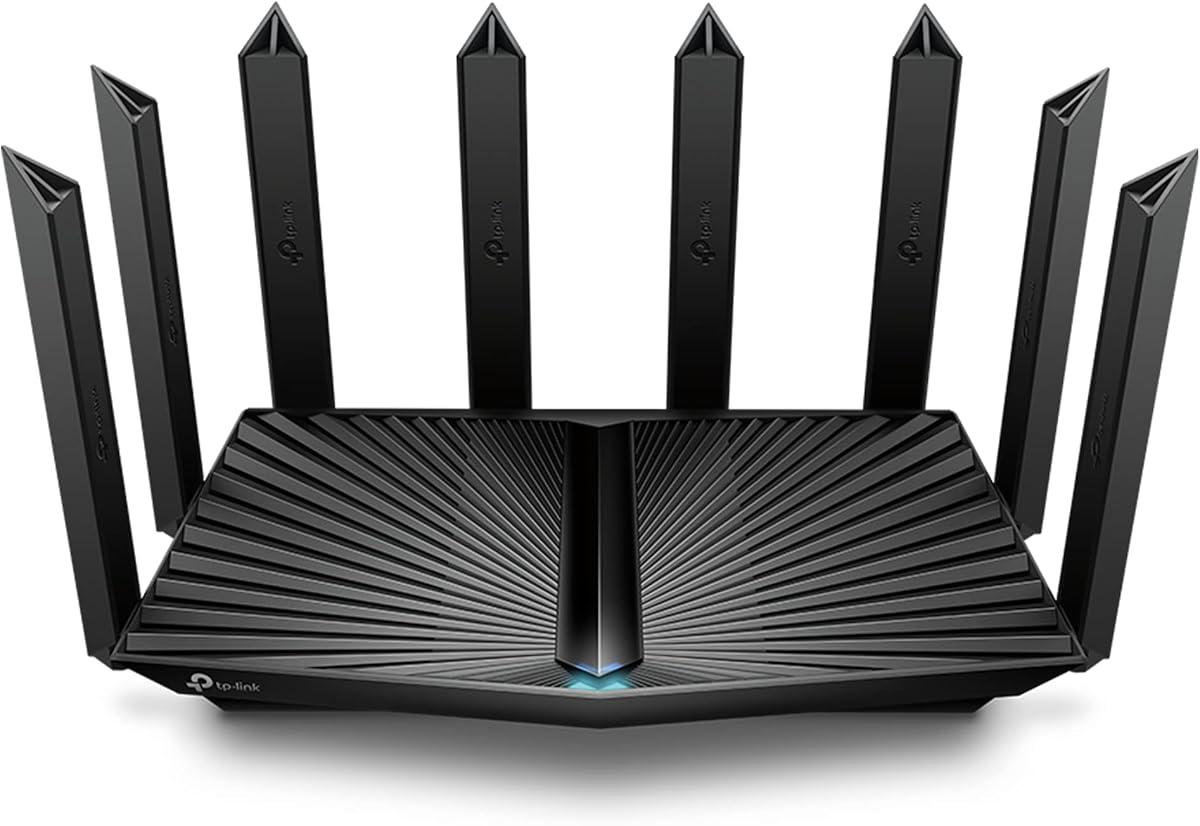
The TP-Link Archer AXE75 is a Wi-Fi 6E tri-band router with a 4.3 rating. It combines a dedicated 6GHz band with 5GHz and 2.4GHz radios, making it an attractive option for buyers who want newer wireless features and balanced whole-home capacity.
We may earn a commission when you buy through this link, at no additional cost to you.
Its stated aggregate throughput reaches 5,400 Mbps: 2,402 Mbps on both the 6GHz and 5GHz bands and 574 Mbps at 2.4 GHz. The dedicated high-band channel can improve responsiveness for compatible modern devices, while OFDMA helps the network serve many clients more efficiently.
The hardware includes a 1.0GHz dual-core CPU and 512 MB of memory, unusual specifications for a value-oriented tri-band router. EasyMesh compatibility permits expansion with compatible routers, extenders, or wireless powerline adapters. The main caveat is that the 6GHz band benefits most from clients designed for Wi-Fi 6E.
Choose the AXE75 for a modern, expandable home network without moving to Wi-Fi 7. It is especially well suited to users with recent phones and laptops, busy wireless environments, and a preference for separate bands rather than a multi-node mesh system.
The 6GHz radio provides additional spectrum for compatible devices, reducing contention with the traditional 5GHz network. The gain is most noticeable when several recent clients can use the band and the local environment is not overly crowded.
A dual-core processor and 512 MB of memory provide useful processing headroom for a tri-band router. Combined with OFDMA and true tri-band operation, these specifications help the AXE75 manage many simultaneous connections.
We may earn a commission when you buy through this link, at no additional cost to you.
The TP-Link Archer AX73 is a dual-band Wi-Fi 6 router that combines a high stated throughput class with a 4.5 rating, the highest customer rating among these picks. It remains a compelling option for buyers who prioritize established Wi-Fi 6 performance and full gigabit wired networking.
We may earn a commission when you buy through this link, at no additional cost to you.
The router offers up to 5,400 Mbps aggregate throughput, with 4T4R and HE160 support on the 5GHz band for connections up to 4.8 Gbps. MU-MIMO and OFDMA improve concurrent efficiency, while High-Power FEM, six antennas, and beamforming support a stated coverage area of up to 2,000 square feet.
Four gigabit Ethernet ports provide ample wired capacity for a home office or media network, and the USB 3.0 port supports media sharing and private cloud storage. Compared with newer Wi-Fi 7 models, the AX73 lacks multi-gig ports and the 6GHz band, but it does not require compatible Wi-Fi 6E clients to deliver its best results.
The AX73 is an excellent fit for a medium-size home with many gigabit devices and a desire for simple, powerful dual-band Wi-Fi. It is a particularly sensible choice when 5GHz performance and wired networking matter more than having the newest wireless standard.
The 4T4R configuration and HE160 support allow the 5GHz band to deliver high theoretical throughput. That makes the router well suited to large file transfers, modern laptops, and high-resolution streaming when connected clients can take advantage of Wi-Fi 6.
Four gigabit LAN ports support wired workstations, game consoles, televisions, and network storage. The dedicated USB 3.0 port adds convenient local media access, although the router remains limited to gigabit rather than multi-gig Ethernet.
We may earn a commission when you buy through this link, at no additional cost to you.
The TP-Link Archer AX80 is a dual-band Wi-Fi 6 router rated 4.4 stars. Its distinguishing physical feature is a set of eight high-gain antennas, which give the design a strong coverage-oriented appearance and support beamforming across the home.
We may earn a commission when you buy through this link, at no additional cost to you.
Aggregate throughput is stated at up to 5,952 Mbps, with up to 4,804 Mbps on 5GHz and 1,148 Mbps on 2.4GHz. MU-MIMO and OFDMA help multiple devices share capacity efficiently, while a 2.5Gbps Ethernet port supports faster wired connections and potentially multi-gig internet service.
The principal trade-off is that it remains a dual-band Wi-Fi 6 model. It does not offer the 6GHz spectrum of the AXE75 or the tri-band capacity of Wi-Fi 7 routers, and its eight antennas do not guarantee a specific coverage figure in every property. OneMesh support does allow the addition of a compatible range extender.
The AX80 is well suited to buyers who want broad physical range, a useful multi-gig port, and support for many connected devices without moving to a mesh package. It is a versatile middle ground for medium and large homes.
Eight high-gain antennas support stronger directional transmission through beamforming. Their placement and the router's construction can aid reach, although walls, floors, neighboring networks, and client limitations still determine actual performance.
The 2.5Gbps port provides a path for a fast connection to a compatible modem or other wired device. OneMesh support offers a simpler expansion path than a full multi-node system when only one or two additional coverage points are needed.
We may earn a commission when you buy through this link, at no additional cost to you.
The NETGEAR Nighthawk RS90 is a dual-band Wi-Fi 7 router with a 4.3 rating. It is designed for homes up to a stated 2,000 square feet and prioritizes a straightforward, modern alternative to more complex tri-band and mesh systems.
We may earn a commission when you buy through this link, at no additional cost to you.
Its stated aggregate throughput reaches 3.6 Gbps across the 2.4GHz and 5GHz bands. MU-MIMO and OFDMA allow several devices to exchange data simultaneously, while a 2.5Gbps WAN port supports multi-gig internet plans. Four gigabit LAN ports handle conventional wired devices.
The RS90 does not have a dedicated 6GHz band, so it cannot separate compatible high-speed clients onto an additional radio. NETGEAR also notes that walls, floors, and interference reduce real-world range, and recommends an Orbi mesh system for larger or multi-story properties. The Nighthawk app provides setup, speed tests, device pausing, and guest-network controls.
This router fits buyers who want a modern Wi-Fi 7 upgrade in a medium-size home without needing a tri-band radio or several mesh units. It is also a sensible choice for users who value simple app-based management and a multi-gig internet connection.
The Nighthawk app guides setup and provides controls for Wi-Fi settings, connected devices, speed tests, and guest access. Automatic firmware updates help keep the router current, while the app supports management away from home when an active internet connection is available.
The dual-band design offers lower theoretical throughput than tri-band Wi-Fi 7 models but may be sufficient for ordinary broadband service and modern client devices. It is most appropriate where the goal is efficient, current networking rather than maximum simultaneous wireless speed.
We may earn a commission when you buy through this link, at no additional cost to you.
The NETGEAR Nighthawk tri-band Wi-Fi 7 router is the premium selection in this guide. It has a 4.3 rating and stands out with up to 9.3 Gbps of aggregate throughput, a dedicated 6GHz band, and a stated ability to serve as many as 100 devices.
We may earn a commission when you buy through this link, at no additional cost to you.
The third radio gives compatible high-speed devices a separate lane on 6GHz, reducing contention with 2.4GHz and 5GHz traffic. The router is rated for coverage of up to 2,500 square feet and uses MU-MIMO and OFDMA to improve simultaneous transmission across a busy connected home.
Wired connectivity includes a 2.5Gbps WAN port, two 2.5Gbps LAN ports, and two 1Gbps LAN ports. This is useful for a multi-gig internet plan, high-performance NAS, or demanding gaming setup. The trade-off is that the premium radio hardware comes with greater complexity, and walls, floors, interference, or a large property can still create coverage gaps.
The tri-band Nighthawk is best for buyers with current Wi-Fi 7 devices, high-bandwidth applications, and a need for multiple fast Ethernet connections. It is a premium standalone solution, while the Orbi system below is more appropriate when consistent coverage must extend throughout a much larger property.
Separating compatible clients onto 6GHz can reduce competition on the traditional bands. The additional spectrum is particularly useful for recent devices that support Wi-Fi 7 and can sustain higher throughput over a shorter connection distance.
Two 2.5Gbps LAN ports allow more than one high-speed device to benefit from multi-gig networking. The 2.5Gbps WAN port also makes the router suitable for service plans that exceed a single gigabit.
We may earn a commission when you buy through this link, at no additional cost to you.
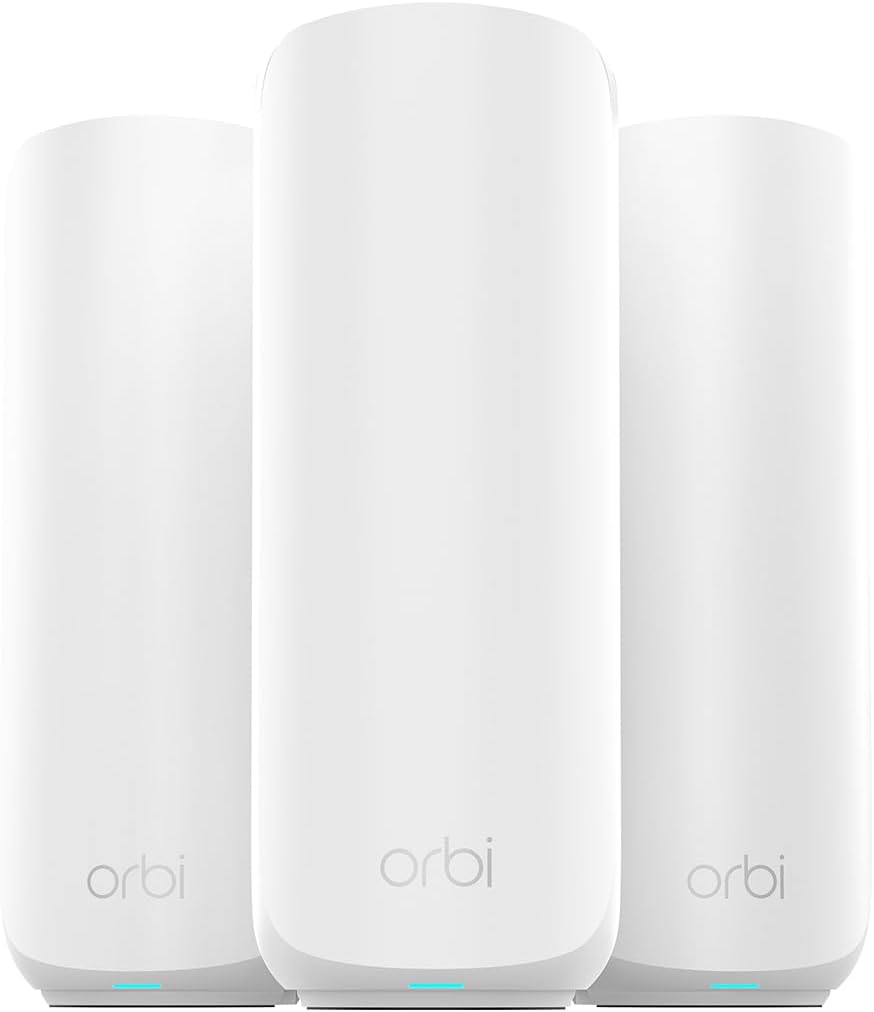
The NETGEAR Orbi 370 Series 3-Pack is a Wi-Fi 7 mesh system intended for larger homes where one access point cannot provide uniform coverage. It has a 4.2 rating and combines a router with two satellites to create a unified network across a stated 6,000 square feet.
We may earn a commission when you buy through this link, at no additional cost to you.
Up to 70 devices can link to the system, which supports Wi-Fi 7, Wi-Fi 6, and Wi-Fi 5 clients. Enhanced Backhaul is included to help maintain communication between nodes, while the Orbi app assists with guided setup and remote management. The system is compatible with cable or fiber providers and plans up to 2.5 Gbps when connected to an existing modem.
Coverage still depends on the property's construction, layout, and satellite placement. Another limitation is that continued use of NETGEAR Armor after its trial requires a separate subscription, although built-in security features and Advanced Router Protection are enabled. The product is also specified for use in the US only.
Choose the Orbi 370 3-Pack when the priority is reliable coverage across multiple rooms or floors. It is a better fit than a standalone router for a sprawling home, and it can be expanded with additional compatible Orbi satellites for larger or more complicated properties.
Placing satellites in appropriate areas lets the system distribute access points rather than trying to push one radio through every wall and floor. A single network name also simplifies roaming as users move between rooms.
Additional Orbi 370 Series satellites can add coverage in larger or multi-story homes. Installation quality still matters, so node placement should follow the app guidance and account for walls, power outlets, and the locations where signal is weakest.
We may earn a commission when you buy through this link, at no additional cost to you.
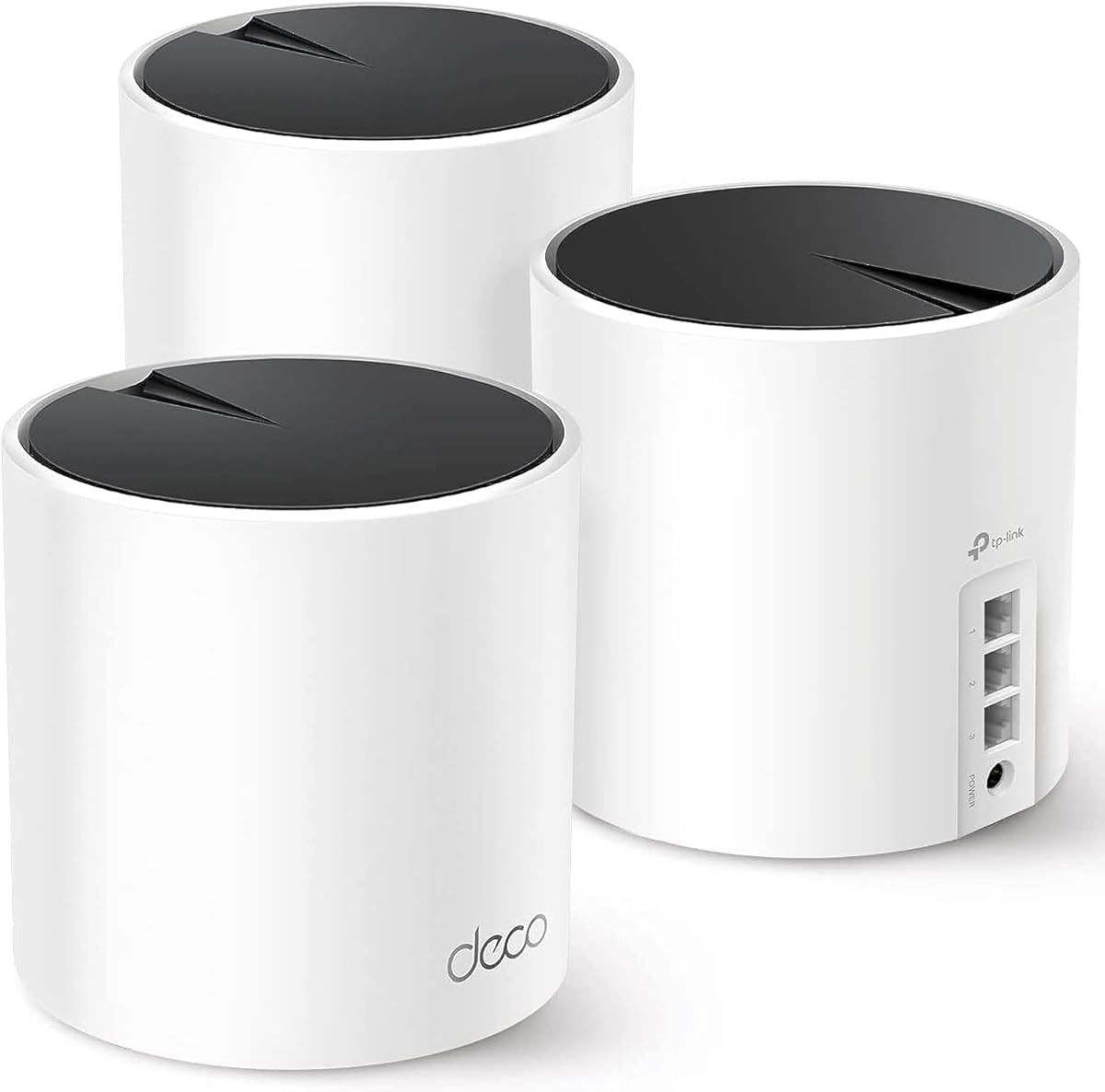
The TP-Link Deco X55 3-Pack is a Wi-Fi 6 mesh system that provides one of the strongest coverage-per-system configurations in this guide. It has a 4.4 rating and claims coverage of up to 6,500 square feet across three coordinated units.
We may earn a commission when you buy through this link, at no additional cost to you.
Each node uses AX3000-class Wi-Fi 6, providing 2,402 Mbps on the 5GHz band and 574 Mbps on 2.4GHz. The system is stated to support up to 150 connected devices, making it relevant to homes with extensive smart-home equipment, family devices, work systems, and entertainment hardware.
Every Deco X55 includes three gigabit Ethernet ports, and the mesh supports wired Ethernet backhaul for a more robust connection between nodes when cabling is practical. The limitation is that it lacks Wi-Fi 7, a 6GHz band, and multi-gig Ethernet, so its strength is broad, cost-conscious coverage rather than top-end speed.
The X55 is a strong choice for buyers who want a complete multi-node system and a very large stated coverage area. It is also appropriate for mixed client generations because Wi-Fi 6 remains widely supported and the Deco app provides guided setup and remote management.
Three access points allow the system to place a node in more than one area of the property. The AI-driven mesh system is designed to learn the environment and help maintain a suitable connection as clients move between units.
Connecting nodes with Ethernet can provide a dedicated path for inter-node traffic. This can improve the system in homes where running cable between rooms is practical, especially alongside the included gigabit ports.
We may earn a commission when you buy through this link, at no additional cost to you.
The TP-Link Archer BE550 is a tri-band Wi-Fi 7 router built around speed and extensive multi-gig Ethernet support. Its 4.0 rating is the lowest among the selections, but the hardware specification set is among the most ambitious, with 320MHz channel support and five 2.5Gbps ports.
We may earn a commission when you buy through this link, at no additional cost to you.
The router's stated band speeds reach 5,760 Mbps on 6GHz, 2,880 Mbps on 5GHz, and 574 Mbps on 2.4GHz, for an aggregate of 9,210 Mbps. Multi-Link Operation, Multi-RUs, 4K-QAM, and 320MHz channels are intended to improve capacity, latency, and throughput for compatible Wi-Fi 7 clients.
One 2.5Gbps WAN port and four 2.5Gbps LAN ports provide excellent wired flexibility. HomeShield, WPA3, a private IoT network, and VPN client and server functions strengthen the security offering. EasyMesh can expand coverage with compatible equipment, although the package does not include mesh nodes and its stated 4.0 rating is the least favorable in the group.
The BE550 fits an advanced home that already has multi-gig service and several fast wired devices. It is less attractive for a modest internet plan because much of its capability may go unused, but it gives compatible clients a high-performance tri-band platform and unusually flexible Ethernet.
The three radios divide traffic across 2.4GHz, 5GHz, and 6GHz, while Wi-Fi 7 features improve efficiency. Maximum benefits depend on compatible clients, channel availability, and the distance between the router and each device.
With one 2.5Gbps WAN port and four 2.5Gbps LAN ports, the router can serve multiple high-speed wired systems without a gigabit limitation. It is especially relevant to homes with fast NAS storage, workstations, and multi-gig broadband.
We may earn a commission when you buy through this link, at no additional cost to you.
The TP-Link Archer A6 is an entry-level AC1200 dual-band router with a 4.5 rating. It offers a straightforward way to add gigabit wired connections and modern security features without adopting a higher-bandwidth Wi-Fi 6 or Wi-Fi 7 platform.
We may earn a commission when you buy through this link, at no additional cost to you.
Its stated maximum wireless throughput is 1,200 Mbps, divided into 300 Mbps on 2.4GHz and 900 Mbps on 5GHz. Four external antennas use beamforming to focus signals, while MU-MIMO on the 5GHz band supports simultaneous data transmission to multiple clients.
Four gigabit LAN ports make the Archer A6 useful for connecting a desktop, game console, smart television, or other wired equipment. WPA3 support improves personal-network security, and OneMesh allows a compatible extender to join a single whole-home network. Its principal drawback is the older Wi-Fi 5 standard, which cannot match newer routers for wireless capacity.
This router is best for modest homes, apartments, or users who primarily need reliable dual-band Wi-Fi and full gigabit Ethernet. It can also serve as a practical starting point that is later expanded with a compatible OneMesh extender.
Four gigabit LAN ports are unusually useful in a straightforward home router. They allow several wired devices to use fast Ethernet without requiring a separate switch when the number of connections is within the router's port limit.
OneMesh support creates one network name across the router and a compatible extender. This is a less comprehensive solution than a three-node mesh system, but it can be useful for extending coverage into one problematic area of a home.
We may earn a commission when you buy through this link, at no additional cost to you.
Long-range performance depends on the router's radio design, coverage claims, wired ports, and ability to expand. Use these factors to match the hardware to your home size, walls, client devices, internet service, and tolerance for setup effort.
Choose newer standards for a long-term upgrade, but prioritize compatibility and real needs over labels. A capable Wi-Fi 6 router can provide excellent coverage and stable throughput without requiring every device to support Wi-Fi 7.
A dual-band design is sufficient for many homes, while tri-band models make more sense for dense wireless environments and many recent devices. Match the radio count to the number and capability of clients in the home.
For small to medium homes, a well-positioned standalone router may be enough. For multi-story houses, long corridors, basements, and detached areas, a mesh system with carefully placed nodes usually offers a more consistent result.
Pick a standalone model for an open layout or a single problematic zone. Pick a multi-pack mesh system when several rooms or floors consistently lose coverage and reliable roaming is a top priority.
Do not buy multi-gig ports solely for fast internet if the service plan cannot use them. They are most valuable for local high-speed storage and networks with several demanding wired devices.
For a typical household, pay more attention to coverage and client compatibility than a maximum-device headline. For very busy networks, favor tri-band systems, generous memory, and a mesh design that can distribute demand.
Security is not only about the number of advertised tools. Enable automatic updates, change administrative credentials, use WPA3 where supported, and separate guest or smart-home traffic from essential devices.
Plan expansion around the same ecosystem from the beginning. Mixing standards or naming systems can make roaming and centralized management less predictable than using a supported range extender or additional mesh node.
Begin by placing the router near the center of the home and close to the modem or gateway. Avoid enclosures, cabinets, televisions, metal objects, and low positions near the floor. For a mesh system, position one unit near the incoming connection and distribute the remaining units across areas where coverage is weak.
Follow the manufacturer's app or setup interface, connect the appropriate WAN port to the modem, and update the router firmware before making extensive configuration changes. Choose a distinctive administration password, enable WPA3 or the strongest mixed security mode supported by every client, and create a separate guest network for visitors and selected smart devices.
After installation, test coverage in bedrooms, offices, basements, and outdoor areas rather than judging performance beside the router. Adjust node placement, channels, and placement based on results. Keep ventilation openings clear, periodically check for firmware updates, and revisit security settings whenever connected devices or household usage change.
A mesh system is often helpful in a large, multi-story, or unusually shaped home because it places several access points throughout the property. A single router can still work well if it is centrally positioned and the construction does not heavily attenuate the signal. The most reliable test is to check signal and latency in the rooms that matter most.
A stronger router can improve local wireless coverage, device capacity, and speed between compatible clients, but it cannot exceed the speed delivered by your internet plan. The slowest part of the connection often limits the result. Wired multi-gig service may also require a modem and router with matching 2.5Gbps or faster ports.
Yes, Wi-Fi 7 routers are generally backward compatible with older Wi-Fi devices, but older clients cannot use Wi-Fi 7-specific benefits. They will connect using the standards they support and remain limited by their own radio capabilities. A mixed-generation home may still receive a benefit from improved overall network efficiency and coverage.
A range extender repeats or extends an existing signal and can introduce additional wireless overhead. A mesh system uses coordinated access points and a unified network to distribute coverage more systematically. Mesh is usually better for filling several dead zones or supporting many devices across a large property, while a compatible extender can solve a smaller issue.
Fiber installations often provide an internet gateway that can connect to a router through Ethernet, though some providers require a specific router or gateway. A standalone router is generally compatible because it accepts an Ethernet WAN connection. Check the equipment supplied by the provider and confirm whether bridge mode is needed.
The 2.4GHz band offers the longest reach but is usually the most congested. The 5GHz band balances range and speed, while 6GHz provides additional spectrum for compatible devices, generally over shorter distances. Modern routers usually choose bands automatically, but understanding each band helps when troubleshooting congestion or placement.
Published limits range from as many as 50 devices on the RS90 to as many as 150 on the Deco X55 3-Pack. These are capacity claims rather than guarantees of uniform speed. Processor resources, band distribution, client capabilities, and local interference determine how a network performs when many devices are active.
Usually, no. Most standalone routers connect to an existing compatible modem or gateway through the WAN port. A separate modem is required when the provider supplies only an internet connection, and some gateway combinations may need bridge mode. Confirm the connection type and ISP requirements before installation.
The TP-Link Archer BE400 is the most balanced overall pick because it combines Wi-Fi 7, strong stated coverage, 2.5Gbps wired connectivity, and EasyMesh expansion in one standalone unit. The NETGEAR Nighthawk tri-band model is the premium option for demanding Wi-Fi 7 clients and multiple fast wired connections, while the Deco X55 3-Pack delivers the most practical budget-oriented mesh coverage.
Prioritize the home's difficult areas, the capabilities of your client devices, and the speed of your internet service before focusing on the largest headline number. A suitable tri-band Wi-Fi 6E router can be more valuable than an overly ambitious model whose advanced features remain unused, while a multi-node mesh system is the safer choice for extensive coverage.
Before ordering, verify the router's WAN connection, port speeds, ISP compatibility, and expansion requirements. Product listings, technical specifications, firmware, and current availability can change, so confirm the latest details and inclusion of all required components.