
10-Port 2.5G PoE++ Switch
4.6Editor score
Eight multi-gigabit access ports
Four 90W PoE++ ports
Dual 10G SFP+ uplinks
Our Layer 3 Network Switch guide compares ten managed models for routing, VLANs, PoE, port density, high-speed uplinks, and easier control at home or work.
A Layer 3 network switch combines high-speed Ethernet switching with routing and network-control features that traditionally belong in a dedicated router. The right model can improve traffic organization, support VLAN segmentation, provide resilient uplinks, and give administrators greater control over demanding home labs, creative studios, offices, and distributed enterprise networks.
We compared the ten switches in this guide across Layer 3 management, copper and fiber port options, PoE availability, routing protocols, switching capacity, installation requirements, and practical administration. The list covers compact desktop models, fanless rack units, high-density access switches, and multi-gigabit systems designed to serve modern access points, NAS devices, servers, and workstations.
Each pick highlights the capabilities that distinguish it within the category, while also identifying details that may affect compatibility or administration. Product ratings and availability can change over time, and prices fluctuate, so readers should verify current listings, component requirements, and the latest management documentation before making a final purchase.
4.6Editor score

4.7Editor score

4.7Editor score
The comparison below organizes all ten models by their most important hardware and management characteristics, making it easier to identify the appropriate balance of access ports, high-speed uplinks, PoE, routing support, and physical design.

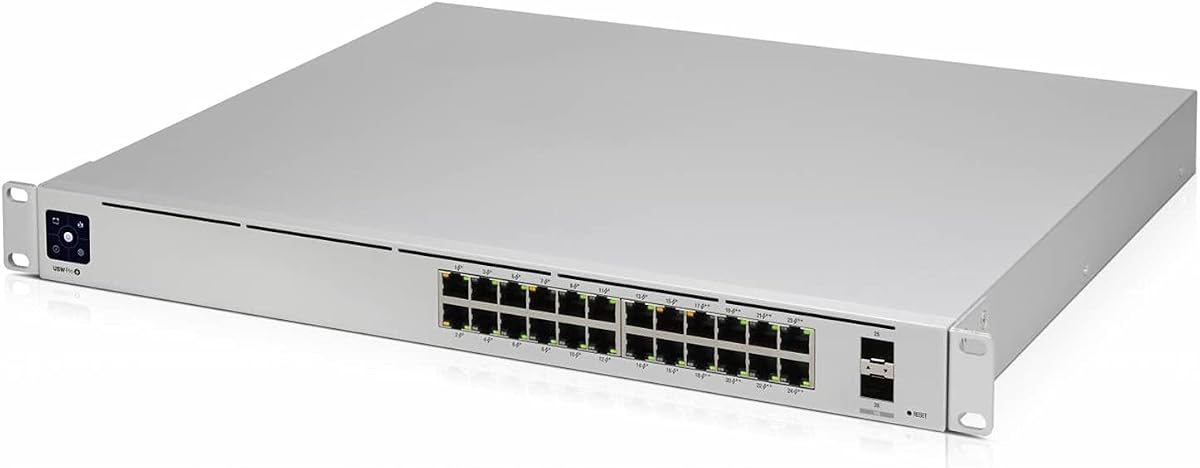



The Ubiquiti USW-Pro-24-PoE is a highly rated Layer 3 network switch for administrators who need a substantial number of wired connections and integrated power delivery in one unit. Its 4.7 rating reflects strong customer reception, while its most obvious attraction is the combination of 24 access ports, PoE capability, and Layer 3 functionality. It is especially convincing for offices, studios, laboratories, and larger smart-home installations where many access points, cameras, or other powered endpoints need centralized support.
We may earn a commission when you buy through this link, at no additional cost to you.
The strongest part of the design is its practical balance. Twenty-four Gigabit Ethernet ports provide room for ordinary workstations, printers, cameras, and management devices, while integrated PoE removes the need for a separate power adapter at every supported endpoint. Because the switch performs Layer 3 switching, it can serve as more than a simple port divider and becomes relevant to VLAN-based networks that need local inter-VLAN routing or advanced centralized control.
There are practical compromises to consider. The 24-port layout is built around Gigabit rather than 2.5 or 10-gigabit copper access, so devices requiring multi-gigabit connectivity would need suitable adapters, separate multi-gigabit switches, or an appropriate fiber-based uplink. PoE also demands attention to power planning, especially when deploying several power-hungry devices. Finally, buyers who are not already comfortable with the Unifi management approach should account for a learning curve and the need to configure the device through its controller.
This is the strongest general recommendation for buyers who want one switch to handle a large number of standard Ethernet endpoints while adding PoE and Layer 3 organization. It suits offices that expect growth, access-heavy installations, and users who value a unified management experience. For a smaller network needing multi-gigabit ports, the MokerLink may offer a more appropriate balance, while buyers with heavier high-speed workloads should examine the 10-port PoE++ model and its 10G uplinks.
Centralized PoE is especially useful when access points, cameras, VoIP equipment, or other supported devices must be located away from convenient electrical outlets. A single managed switch can provide both network connectivity and power, reducing desktop clutter and simplifying cable routing while giving administrators a unified place to monitor endpoint status.
Layer 3 switching allows the unit to participate in routed network design rather than simply forwarding traffic within one broadcast domain. That makes it useful when the network is divided into VLANs and administrators want routing decisions to remain close to the switching hardware instead of relying entirely on a separate router.
We may earn a commission when you buy through this link, at no additional cost to you.
The MokerLink 8-Port 10G is a feature-rich managed switch for buyers who want high-speed copper access and broad Layer 3 control without moving immediately to an all-fiber design. It carries a 4.3 rating and distinguishes itself with eight 10-gigabit-capable ports that automatically adapt across 10G, 5G, 2.5G, 1G, and 100M rates. That versatility makes it appealing to compact studios and advanced home labs where different devices have very different bandwidth requirements.
We may earn a commission when you buy through this link, at no additional cost to you.
Its management capabilities extend well beyond basic port configuration. The switch supports IPv4 and IPv6 routing, ARP, loopback interfaces, VLANs, ACLs, QoS, jumbo frames, DHCP, and multiple spanning-tree modes. Security tools include 802.1X and MAC-based authentication, dynamic ARP inspection, DHCP snooping, IP source guard, port security, protected ports, and storm control. Telnet, SSH, SNMP, configuration transfer, firmware upgrades, and diagnostic functions make it possible to approach the unit as a small professional network device rather than a basic consumer switch.
The main tradeoff is administrative complexity. This many features can create a steep learning curve for someone who only needs simple switching, while operators accustomed to mature enterprise ecosystems may want to confirm documentation, software support, and upgrade workflows for their specific environment. The metal case and fan-assisted cooling support continuous use, but the product's suitability still depends on understanding its operational behavior and fitting it properly into the intended installation.
Buyers who want eight fast copper ports, sophisticated security functions, and both web and command-line access should give this switch serious consideration. It is particularly useful for small enterprise transport, access, and aggregation roles where flexible port speeds matter. It is less compelling for a basic household network, but for a technically confident user building a segmented high-speed environment, the feature density can outweigh the learning curve.
Five supported speed ranges let a single switch accommodate 10-gigabit servers, 2.5-gigabit workstations, ordinary Gigabit clients, and legacy 100M equipment. Auto-negotiation reduces the need to place every device into a uniform speed category, which is particularly useful in studios and labs where equipment refreshes occur gradually.
DHCP snooping, dynamic ARP inspection, source guard, storm control, and port-based authentication tools address common internal network risks. Together with VLAN and ACL support, these capabilities allow administrators to segment users and devices rather than treating every connected endpoint as part of one undifferentiated broadcast domain.
We may earn a commission when you buy through this link, at no additional cost to you.
The Ubiquiti USW-Pro-24 without PoE is a strong choice for high-density wired networks where every port does not need centralized power. It has a 4.4 rating and retains the familiar advantages of a 24-port managed access switch: Layer 3 switching, built-in power, rack-mounting, and optical fiber support. This makes it suitable for offices, schools, labs, and distributed installations where computers, printers, and other conventional endpoints dominate.
We may earn a commission when you buy through this link, at no additional cost to you.
Its 24 Gigabit Ethernet RJ45 ports make port density the defining advantage. An administrator can connect many standard devices without stacking several small switches, while Layer 3 features support more sophisticated network segmentation. Optical fiber media support provides an option for extending the network over longer links or connecting it to appropriate fiber infrastructure, and the built-in supply simplifies the core installation.
The decision not to include PoE is a deliberate division from the closely related PoE model. It removes unused powered-port complexity, but it also means that access points, cameras, VoIP phones, and other powered devices need local power or a separate PoE injector or switch. That requirement can complicate deployments with many ceiling-mounted or remotely located devices. Users should also assess whether Gigabit access is enough for their highest-bandwidth endpoints.
This model is best for organizations that want many reliable wired ports without paying for PoE on every access location. Choose it when most connected equipment receives power independently and the network benefits from centralized Layer 3 management. For installations centered on numerous powered endpoints, the PoE-equipped USW-Pro-24-PoE or the multi-gigabit 10-port PoE++ model may be a better fit.
A single 24-port unit can accommodate a substantial group of standard Ethernet clients in a neat rack installation. This simplifies topology management and provides a more coherent Layer 3 configuration point compared with a collection of smaller unmanaged switches distributed throughout the same area.
Removing PoE from the access layer can be advantageous in offices where computers and printers use wall power and only a small number of peripherals require centralized power. The simpler power model reduces the number of devices and adapters that must be considered when planning powered endpoint support.
We may earn a commission when you buy through this link, at no additional cost to you.
The 10-Port 2.5G PoE++ Switch is the most feature-forward premium option in this guide. It earns a 4.6 rating by combining eight 2.5-gigabit RJ45 ports, two 10G SFP+ uplinks, and substantial PoE++ capability in a metal enclosure. It is aimed at studios, technical users, and small enterprise networks where modern access points, servers, NAS systems, and workstations need more headroom than conventional Gigabit Ethernet can provide.
We may earn a commission when you buy through this link, at no additional cost to you.
The PoE design is one of the standouts. Ports 1 through 4 can deliver up to 90W under IEEE 802.3bt, while ports 5 through 8 provide up to 30W. A 275W total budget and PoE Watchdog add operational value for installations using Wi-Fi 6E or Wi-Fi 7 access points, PTZ cameras, and other demanding powered equipment. Two SFP+ slots provide scalable 10G uplinks, and the listed 80Gbps switching capacity gives the unit ample performance for its access-port arrangement.
Layer 3 administration includes static IPv4 and IPv6 routing, OSPF v2, a DHCP server, and VLAN management. A physical console port, CLI, SSH, and web interface cover both hands-on troubleshooting and remote administration. The active fan and full-metal housing are sensible for sustained heavy loads, although they make the unit less discreet than a fanless desktop switch. Buyers should also confirm that their powered devices support the relevant PoE standard before installation.
This is the premium recommendation for buyers who want multi-gigabit access, high-power PoE, and high-speed uplinks in one system. It is particularly compelling for technology-heavy offices, creative studios, and home labs built around fast NAS storage or advanced wireless equipment. Networks centered on ordinary Gigabit clients may not use every capability, but those anticipating multi-gigabit growth will find the combination unusually well balanced.
Delivering as much as 90W on four ports allows compatible high-performance access points and other demanding devices to receive both data and power through one cable. The remaining 2.5G ports offer lower PoE allowances, making it important to map each device's power requirements before finalizing the deployment.
Two SFP+ uplink slots keep aggregate traffic from multiple 2.5G access ports from having to pass through a single lower-speed connection. That is particularly important for NAS storage, servers, and high-throughput creative workflows where a constrained uplink can erase the benefit of faster client ports.
We may earn a commission when you buy through this link, at no additional cost to you.
The MikroTik CRS312-4C+8XG-RM offers a compact 10G-oriented option for administrators who understand the MikroTik ecosystem. Its 4.3 rating reflects a generally positive customer response, and the one-unit rack format makes it easier to incorporate into space-conscious installations. The model supports 100, 1,000, and 10,000 Ethernet rates, making it a natural option for a compact access or aggregation layer.
We may earn a commission when you buy through this link, at no additional cost to you.
Its distinguishing feature is the combination of 10G capability, Layer 3 management, and a relatively space-conscious rack enclosure. This allows multiple high-speed links to be consolidated without occupying a large portion of a standard rack. The model is particularly attractive for users who want direct control over advanced routing and switching features but prefer MikroTik's established network operating environment over a conventional consumer switch interface.
The main limitation is the limited amount of product-specific information provided here. Buyers should verify the exact mix and behavior of physical and combo ports for their cabling plan, along with supported routing features and current RouterOS behavior. They should also confirm power requirements and cooling needs in the intended rack. A network built around MikroTik devices will benefit from familiarity with its configuration workflow, while beginners may prefer a more guided web interface.
This switch makes sense for compact professional networks, branch offices, and technically experienced users seeking 10G performance without a large footprint. It is a good match when existing infrastructure already uses MikroTik equipment or when administrators want granular control over routing and switching. For a simpler office deployment where exhaustive feature discovery matters more than compact 10G capability, one of the Unifi models may be easier to integrate.
The one-unit rack format makes the CRS312 useful where port density and cable management matter. Its 10G orientation supports modern uplink designs without requiring administrators to spread high-speed traffic across multiple lower-capacity devices.
Layer 3 managed operation places this model in the category of infrastructure-oriented switches rather than basic plug-and-play Ethernet boxes. Buyers comfortable with granular network controls can shape routing, switching, and monitoring around a professional configuration model.
We may earn a commission when you buy through this link, at no additional cost to you.
The MikroTik CRS317-1G-16S+RM is designed for installations that need many high-speed fiber connections rather than a large collection of ordinary copper access ports. Its 4.4 rating is solid, and the defining hardware is a bank of 16 SFP+ slots plus one Gigabit RJ45 port. Layer 3 management, IEEE 802.1Q support, a console port, and a one-unit rack format position it as a capable aggregation switch.
We may earn a commission when you buy through this link, at no additional cost to you.
A 16-port SFP+ layout is valuable where multiple devices need 10G links distributed across a rack. Depending on the modules and cables used, the switch can support fiber, direct-attach copper, or other compatible transceiver arrangements. That flexibility makes it useful for connecting high-speed servers, storage systems, access-layer switches, and backbone equipment while keeping most traffic on fast links.
This design also has a clear drawback for ordinary access devices. Most of the available interfaces require compatible modules and cabling, and only one native Gigabit RJ45 port is listed. That can make it less convenient for offices filled with standard computers, printers, and phones. Administrators also need to plan transceiver compatibility, power, cooling, and module support carefully. The product's value is greatest when many SFP+ links are genuinely required.
The CRS317 is best for fiber-centric aggregation, high-speed server environments, and experienced MikroTik users. Buyers should choose it when they understand the module ecosystem and can make good use of 16 SFP+ slots. For a conventional office floor or a home lab that primarily needs plug-in Ethernet, a copper-focused model is likely easier to deploy.
A large concentration of SFP+ interfaces allows many high-speed network relationships to be managed in one rack unit. The design is well suited to aggregation points where several downstream switches or storage systems need consistent high-capacity links.
IEEE 802.1Q support allows traffic to be separated into VLANs, which is essential for networks with multiple departments, device classes, or service requirements. Layer 3 management adds the ability to build routed designs around those segmented networks.
We may earn a commission when you buy through this link, at no additional cost to you.
The Ubiquiti UniFi Switch Pro 48 is built for large access networks where port density and uplink capacity matter more than multi-gigabit access. It has a 3.7 rating, the lowest among the listed products, but its specification sheet remains compelling: 48 Gigabit RJ45 ports, four 10G SFP+ uplinks, Layer 2 and Layer 3 features, UniFi SmartPower RPS input, and a 1.3-inch touchscreen.
We may earn a commission when you buy through this link, at no additional cost to you.
The 48-port capacity makes this model especially useful for schools, offices, hospitality spaces, and other installations with dozens of standard Ethernet endpoints. Four 10G fiber or compatible SFP+ uplinks provide aggregation capacity for downstream traffic, while the touchscreen offers a convenient local view of switch status. UniFi SmartPower RPS support adds resilience for compatible power arrangements in professional installations.
The rating warrants attention. Some customers may prefer a different model for its combination of physical features, management experience, and support. Another clear limitation is that the access ports are Gigabit and the listed feature set does not include PoE, so powered endpoints need a separate solution. Buyers should confirm that their Unifi controller environment and intended RPS equipment are compatible before standardizing this model across a large deployment.
The USW-Pro-48 is most appropriate for organizations that need an unusually large number of conventional wired endpoints and can manage them through the UniFi ecosystem. Its value comes from high port density, dedicated 10G uplinks, and centralized control rather than speed on each individual access port. For smaller offices or networks needing 2.5G and PoE at the edge, one of the more compact multi-gigabit options may deliver a better fit.
A single 48-port switch can terminate a large number of ordinary clients without requiring several smaller units. This can make cabling, inventory, and recurring administration more consistent in offices, schools, and institutional networks.
Four SFP+ uplinks give the access layer several ways to connect to faster network infrastructure. This is valuable when a large number of Gigabit clients need to be served without funneling all traffic through one limited uplink.
We may earn a commission when you buy through this link, at no additional cost to you.
The 8-Port 10G SFP+ Switch is an appealing value-focused option for buyers who can work with transceiver-based connections. It carries a strong 4.7 rating and offers eight 10Gbps SFP+ ports, a listed 160Gbps switching capacity, and a fanless metal chassis. Its routing and management features go well beyond a basic fiber switch, making it useful for compact networks that need serious aggregation in a small enclosure.
We may earn a commission when you buy through this link, at no additional cost to you.
Layer 3 functionality includes static routing, RIP v1 and v2, OSPF v2, and internal inter-VLAN routing. That range supports both simple routed designs and more dynamic environments. Administration is available through a web interface and console port, while ERPS, DAI, and ACLs provide resilience and internal security controls. The fanless construction also makes the switch suitable for quiet offices, bedrooms, studios, and other spaces where fan noise would be unwelcome.
The major consideration is the global rate-mode behavior. The switch supports two switchable modes: a default 10G/1G mode and a 10G/2.5G mode. Changing the mode for one port applies it across all eight ports, so every connected SFP+, DAC, or copper transceiver must be compatible with the selected mode. This unusual operational detail demands careful planning and can cause disconnection if modules are mismatched.
This is the budget recommendation for technically confident buyers who need a compact, silent, all-fiber-capable Layer 3 switch. It is a strong fit for NAS-heavy home labs, creative studios, and compact aggregation points where eight fast interfaces are more valuable than numerous copper ports. Buyers should confirm their existing modules before ordering and avoid assuming that every SFP+ device will operate at the same rate in both supported modes.
Eight SFP+ interfaces allow the switch to connect storage, workstations, servers, and network infrastructure over high-capacity links. The design is especially efficient when existing infrastructure already uses compatible fiber or direct-attach cabling rather than relying on ordinary copper Ethernet.
The fanless design removes the constant mechanical noise associated with actively cooled switches. Combined with compact desktop or wall mounting, it can sit near workstations or in a quiet office without becoming an obvious source of distraction.
We may earn a commission when you buy through this link, at no additional cost to you.
The Ubiquiti Pro Max 16 offers a middle path between a compact eight-port switch and a high-density 24-port access unit. It has a 4.5 rating and provides 16 managed access ports with 2.5G or 1G capabilities. For home labs, creative offices, and growing small businesses, that balance can be particularly attractive when many endpoints need multi-gigabit options but a larger 24-port chassis would be unnecessary.
We may earn a commission when you buy through this link, at no additional cost to you.
Layer 3 management is the defining network feature. It allows the switch to fit into segmented VLAN architectures and take on more active routing duties than a basic Layer 2 unit. Sixteen access positions also provide enough room for ordinary computers, NAS systems, printers, cameras, access points, and management devices without immediately pushing the installation into very large switch territory.
Because the supplied product information is limited to the model designation, buyers should verify important details before purchasing. These include the precise uplink arrangement, PoE availability for the exact variant, supported installation methods, management software requirements, and thermal design. The separate Pro Max 16 PoE model in this guide has detailed PoE++ specifications, but buyers should not assume those features apply to every Pro Max configuration.
The non-PoE Pro Max 16 is best for users who want many multi-gigabit-ready access positions in a relatively compact format. It is particularly suitable for mixed client environments where Gigabit remains adequate for many devices while 2.5G benefits a NAS, high-end workstation, or local server. Prospective buyers should confirm the full hardware specification and ecosystem compatibility before finalizing the choice.
A 16-port capacity is large enough for many professional desks and device groups without moving to a 24-port access switch. It can therefore serve as a central point while remaining more compact than the highest-density options.
Support for 2.5G and 1G allows administrators to introduce faster clients without replacing the entire switching layer immediately. It is especially useful in mixed networks where storage, laptops, and basic office equipment have different bandwidth requirements.
We may earn a commission when you buy through this link, at no additional cost to you.
The Ubiquiti USW-Pro-Max-16-PoE combines a strong 4.7 rating with a carefully mixed port design. It includes four 2.5GbE PoE++ ports, 12 Gigabit PoE+ ports, and two 10G SFP+ uplinks within a 16-port Layer 3 switch. A 180W PoE budget and silent fanless cooling make it particularly attractive for quiet offices, studios, and smart-home or small-business installations that need both power and multi-gigabit performance.
We may earn a commission when you buy through this link, at no additional cost to you.
The hardware layout is more nuanced than a uniformly multi-gigabit product. Four access ports can handle 2.5-gigabit traffic and provide PoE++ output, which suits demanding modern wireless equipment. The other 12 access ports offer Gigabit with PoE+, covering conventional phones, cameras, access points, and office devices. Two 10G SFP+ ports create a high-speed path to a server, NAS, gateway, or distribution switch.
The Etherlighting port indicators are a thoughtful operational feature because they communicate port location, link or speed status, and the native VLAN or network. Combined with flexible desktop, wall, and rack mounting, the switch can be placed where it is most useful. The trade-off is that buyers needing more than four 2.5G powered ports must account for the split port speeds, and the 180W budget must be allocated carefully.
This model is an excellent recommendation for a quiet mixed-speed network with a modest number of power-hungry devices. It gives administrators Layer 3 management, centralized PoE, high-speed uplinks, and useful physical indicators without active fan noise. It is less appropriate for a large building where every endpoint requires 2.5G PoE++, but for a focused studio, office, or advanced home network it offers a particularly attractive balance.
Four PoE++ ports concentrate higher power delivery where it is most likely to be needed, such as modern high-performance access points. The remaining PoE+ ports support the broader device population, creating a practical mixed-speed design without forcing every connected endpoint onto the same platform.
Illuminated indicators can reveal port location, link speed, and native VLAN or network information at a glance. That visibility is helpful during installation and troubleshooting, particularly in racks or dense wall-mounted deployments where tracing individual cables can otherwise be tedious.
We may earn a commission when you buy through this link, at no additional cost to you.
A Layer 3 switch is most valuable when its port speeds, uplinks, routing features, power options, and management model align with the devices and operating environment of the network. The following factors help narrow the field before comparing final models.
Layer 3 switching goes beyond VLAN creation and basic packet forwarding. Depending on the model, features may include static IPv4 and IPv6 routes, DHCP services, OSPF, RIP, inter-VLAN routing, ARP management, loopback interfaces, or route-related monitoring. A small home lab may need only static routes and VLANs, while a multi-site or business network may require dynamic routing and more detailed administration. Review the exact protocol list rather than assuming every Layer 3 switch supports the same functions.
Choose a model whose routing capabilities match the design you intend to operate. More protocols are not automatically better if they add complexity without solving a present requirement.
Most ordinary computers, printers, phones, and cameras use copper Ethernet, while fast servers, NAS systems, aggregation links, and building backbones may use SFP+ connections. Some switches provide all copper ports, others provide mainly SFP+ ports, and the best-performing combinations include both. Count current endpoints, reserved growth, uplink types, and the modules or cables already in the installation before selecting a port layout.
For mixed environments, a switch with multi-gigabit RJ45 ports plus a few SFP+ uplinks is often more flexible than a model built entirely around one medium.
Gigabit Ethernet remains suitable for many standard office and home endpoints, but 2.5G is increasingly useful for modern laptops, high-end workstations, NAS devices, and local servers. 10G access is valuable for demanding storage, editing, and virtualization workflows but requires compatible clients, cabling, and uplinks. Think about which devices actually generate high traffic rather than selecting the fastest available port for every function.
Faster access ports are most valuable when the path to the server or uplink can also carry that speed. Otherwise, an upgrade at the edge may not improve end-to-end performance.
PoE switches require more than a count of powered endpoints. Each device consumes a different amount of power, and high-power access points, cameras, lighting equipment, and other systems may need PoE++ rather than standard PoE+. Look for the per-port maximum, total power budget, and power allocation behavior. The 10-Port 2.5G PoE++ model provides up to 90W on four ports and a 275W total budget, while the Pro Max 16-PoE provides four PoE++ ports and a 180W total budget.
Sum expected device consumption with reasonable headroom, then verify whether all ports must support high power simultaneously. PoE is an advantage only when the endpoint and cabling setup are compatible.
Static routing is simple and effective for small, stable networks. Dynamic protocols such as OSPF or RIP can reduce manual route management in larger environments, but they also require careful address planning and operational knowledge. The MokerLink and 8-Port 10G SFP+ models list static routing with OSPF support, while other products emphasize broader Layer 3 switching without providing equally detailed routing information in the supplied specifications.
Choose protocols you can configure and maintain. It is better to operate a smaller set of routing features correctly than to deploy advanced protocols without a clear topology and failover plan.
Web interfaces are convenient for initial setup and routine changes, while CLI, SSH, console access, and configuration file tools are valuable for advanced work and recovery. Security features can include VLANs, ACLs, 802.1X, MAC-based authentication, DHCP snooping, dynamic ARP inspection, IP source guard, protected ports, and storm control. These tools are most useful when the switch serves multiple departments, device types, or untrusted access points.
Consider the management platform you already use and whether centralized visibility is important. Also check how firmware upgrades, configuration backups, logging, and remote monitoring are handled before relying on a switch as critical infrastructure.
Layer 3 switches operate in environments where loops, link failures, and inconsistent paths can disrupt traffic. Spanning-tree support helps prevent Layer 2 loops, while link aggregation can increase available bandwidth and provide a degree of resilience where the switch and connected equipment support it. The 8-Port 10G SFP+ model also lists ERPS for rapid loop recovery, and the MokerLink supports common spanning-tree protocols. Verify whether these features fit the redundancy design already used across the network.
Redundancy features do not replace deliberate topology planning. Document uplinks, alternate paths, and failure scenarios so the switch behaves predictably when a cable, module, or power supply is interrupted.
Rack-mounted models suit structured installations, while desktop and wall-mount options work well for small offices, studios, and home labs. Pay attention to dimensions, included mounting hardware, cooling design, noise, and nearby power. Active fans can support sustained heavy loads but add noise, whereas fanless models are quieter but require suitable airflow and thermal headroom. The UniFi Switch Pro 48 adds a local status touchscreen, and some products provide port illumination or a physical console connection.
Choose a chassis that fits the intended space and can operate without restricting airflow. Confirm mounting options, module sizes, temperature expectations, and whether the physical design suits a home, office, cabinet, or rack.
Begin by recording the desired network topology, including which devices belong to each VLAN, which switch ports they will use, which ports provide PoE, and how the Layer 3 switch connects to the internet gateway and any upstream infrastructure. Create an addressing plan before configuring interfaces or static routes. Label every cable and map each port to its function so that future troubleshooting does not depend on memory or guesswork.
Install the switch in a cool, dry, ventilated location with appropriate clearance around the chassis. Connect the uplink before adding access devices, update the management firmware when appropriate, and save a baseline configuration after the core settings are working. Apply VLAN membership, routing, access control, and PoE settings in stages, testing traffic after each major change. If using multiple switches, verify compatible aggregation, spanning-tree, and failover behavior before relying on them in production.
For ongoing care, monitor port utilization, errors, temperature, power consumption, and PoE allocation through the management interface. Keep configuration backups on a separate system, record any firmware changes, and periodically remove dust that could obstruct airflow. Do not move cables or replace modules while critical traffic is active unless the topology explicitly supports hot work. A regular review of access policies and connected-device inventories helps keep the Layer 3 network aligned with actual organizational needs.
A Layer 2 switch primarily forwards Ethernet frames within VLANs and relies on a separate router for movement between different IP networks. A Layer 3 switch can perform routing functions itself, including traffic between VLANs and participation in routed protocols. This additional capability can simplify topology, but it does not automatically replace every function of a dedicated internet gateway.
A basic home network may not need one if all devices communicate within a small number of simple networks and the existing router provides adequate routing. A Layer 3 switch becomes more useful when you need VLAN segmentation, local inter-VLAN routing, extensive managed access ports, high-speed storage connections, or centralized control over multiple switches. The value depends on network complexity rather than household size alone.
PoE is valuable when several supported endpoints require both network connectivity and electrical power in remote locations. It can simplify wiring for access points, cameras, VoIP phones, and other devices, while the switch reports power status centrally. If almost every connected device uses nearby wall power, a non-PoE model may be simpler and more economical for the installation.
They can be, but ordinary computers usually need compatible copper transceivers or direct-attach cables rather than standard RJ45 Ethernet plugs. The 8-Port 10G SFP+ switch also uses a global rate mode, so all connected modules must match the active setting. Buyers should inventory compatible hardware and confirm its support before choosing an all-SFP+ model.
Some advanced switches can perform many routing tasks, but internet termination, address translation, firewall behavior, and service continuity may still require a dedicated gateway. A safer design often uses the Layer 3 switch for internal routing and high-speed switching while keeping a dedicated device at the network edge. Confirm the specific features and responsibilities of both devices before consolidating their roles.
2.5GbE provides a middle tier between Gigabit and 10-gigabit Ethernet. It is useful for modern laptops, NAS devices, servers, and workstations that can benefit from faster transfers but do not need full 10G access everywhere. Its value is greatest when the attached devices, switch ports, and uplinks all support the same speed without creating another bottleneck.
They generally need an initial design involving VLANs, addresses, routes, security policies, and uplink connections. After that, stable small networks may require limited routine attention, while larger environments benefit from monitoring, firmware review, configuration backups, and periodic policy checks. The amount of work depends on the number of routing protocols, users, devices, and physical links being managed.
Basic Ethernet and VLAN interoperability is usually possible, but advanced features such as link aggregation, spanning-tree behavior, LACP, multicast, PoE, and routing protocols can differ between vendors. Mixing ecosystems may also require separate management systems and careful configuration of native VLANs and trunks. Verify compatibility before combining switches, especially in environments where failover or a specific convergence behavior matters.
The Ubiquiti USW-Pro-24-PoE is the most balanced overall recommendation, combining 24 access ports, integrated PoE, and Layer 3 switching in a familiar managed ecosystem. The 10-Port 2.5G PoE++ Switch takes the premium position because it combines multi-gigabit access, four high-power PoE++ ports, two 10G uplinks, and a generous power budget. The 8-Port 10G SFP+ Switch stands out as the budget selection for technically confident buyers building a compact, quiet, transceiver-based network.
For most buyers, the correct starting point is the network that exists today, not the fastest possible specification. Count endpoint types, identify the devices that require power, map the uplink capacity, and decide whether fiber modules or multi-gigabit copper ports are genuinely needed. Then match those requirements to management expertise, physical space, cooling requirements, and the features you are prepared to maintain.
Finally, verify the current listing and technical documentation before ordering. Availability, ratings, firmware behavior, included components, and prices can change, while compatible transceivers and deployment details can materially affect the final result. Confirm that the selected switch supports your intended routing, PoE, uplink, and installation requirements as well as the devices already in your network.