
Brother DCP-L2640DW
4.1Editor score
36 pages per minute
50-page document feeder
Dual-band wireless networking
Automatic duplex printing
Explore the best copier machine for business with comparisons of speed, capacity, connectivity, security, copying, scanning, and monochrome or color output.
A business copier should do more than duplicate pages. It should print, scan, copy, connect securely, and handle everyday workflows without slowing down employees. The right model depends on your team size, document mix, security requirements, desired output quality, and the volume of pages processed each week.
We compared ten laser-based multifunction printers across print speed, paper capacity, document feeders, duplexing, connectivity, copying features, output type, and business-oriented security. The guide includes compact models for small offices, monochrome workhorses for high-volume teams, and color systems for businesses that regularly print presentations, marketing materials, and client-facing documents.
Each review explains the product's strongest benefits, practical limitations, and ideal buyer profile so you can narrow the field efficiently. Ratings and specifications reflect the supplied product information, while current pricing and availability may change. Always verify the latest specifications and system requirements before purchasing equipment for your workplace.
4.1Editor score

4.3Editor score
4.4Editor score
The table below compares all ten recommended multifunction printers by their most important business features, including output type, rated speed, paper handling, connectivity, and core copier functions.



The Brother DCP-L2640DW is a compelling choice for small businesses that want genuine copy and scan capabilities without paying for features they will never use. It combines laser printing, scanning, and copying in a compact monochrome system. Its 4.1 rating reflects a balanced package centered on productivity, straightforward connectivity, and manageable office output.
We may earn a commission when you buy through this link, at no additional cost to you.
The printer reaches speeds of up to 36 pages per minute, making it well suited to invoices, reports, forms, contracts, and other black-and-white documents. Its 50-page automatic document feeder is especially valuable for repetitive copying or scanning tasks, while duplex printing reduces the need to manually rearrange pages. Dual-band wireless, Ethernet, and USB provide flexible installation options for a single user or shared office.
The main limitation is that it is a three-function device rather than a full office multifunction system. There is no fax capability, and although the scanner can scan color originals, the printer produces monochrome output only. That makes it less suitable for businesses that need polished color printouts or frequent fax workflows. Its 4.1 rating is still solid for a compact model centered on essential office functions.
Choose the DCP-L2640DW when your team primarily produces monochrome documents, values automatic duplexing and feeder-based copying, and wants a compact machine with flexible network connections. It is particularly suitable for small offices, administrative teams, and hybrid workers who need dependable copying and scanning without the complexity of a larger color system.
A rated speed of up to 36 pages per minute supports routine business output without turning the device into a full production system. Combined with automatic duplexing, it helps teams complete high-volume text jobs more efficiently.
The 50-page automatic document feeder allows multiple pages to be copied or scanned in one session, reducing repetitive handling. The flatbed scanner remains useful for books, forms, and documents that cannot feed cleanly.
We may earn a commission when you buy through this link, at no additional cost to you.
The Brother MFC-L5915DW targets busy offices that need substantial monochrome output in a shared multifunction system. It combines printing, scanning, and copying, reaches speeds of up to 50 pages per minute, and carries a 4.4 rating. That performance positioning makes it attractive for administrative teams producing large runs of forms, records, invoices, and internal reports.
We may earn a commission when you buy through this link, at no additional cost to you.
Its 70-page automatic document feeder is a major advantage for high-volume document handling. The feeder supports single-pass, two-sided scanning at speeds of up to 56 images per minute, helping preserve page order and reduce manual intervention. A large document glass accommodates legal-sized documents, while automatic two-sided printing improves throughput and reduces paper consumption.
The trade-off is color. This model is designed for black-and-white work and therefore will not satisfy a business that regularly prepares color presentations, proposals, or marketing pieces. It is also a more substantial machine than compact three-function printers, which is reasonable given its speed and document-handling capacity. A larger physical footprint may matter in tight workspaces.
The MFC-L5915DW is best for a high-volume monochrome office that values speed, batch scanning, and reliable sharing over a single computer. Its rated 4.4 rating reflects a strong productivity balance, and its high-yield toner support can help businesses that print consistently maintain efficient supply management.
At up to 50 pages per minute, the MFC-L5915DW is the fastest model in this guide by stated print speed. It is a practical choice for distributed teams with heavy, repetitive monochrome workloads.
The 70-page feeder and single-pass duplex scanning support demanding document sets. Users can reduce manual page flipping and preserve multi-sided originals in one workflow.
We may earn a commission when you buy through this link, at no additional cost to you.
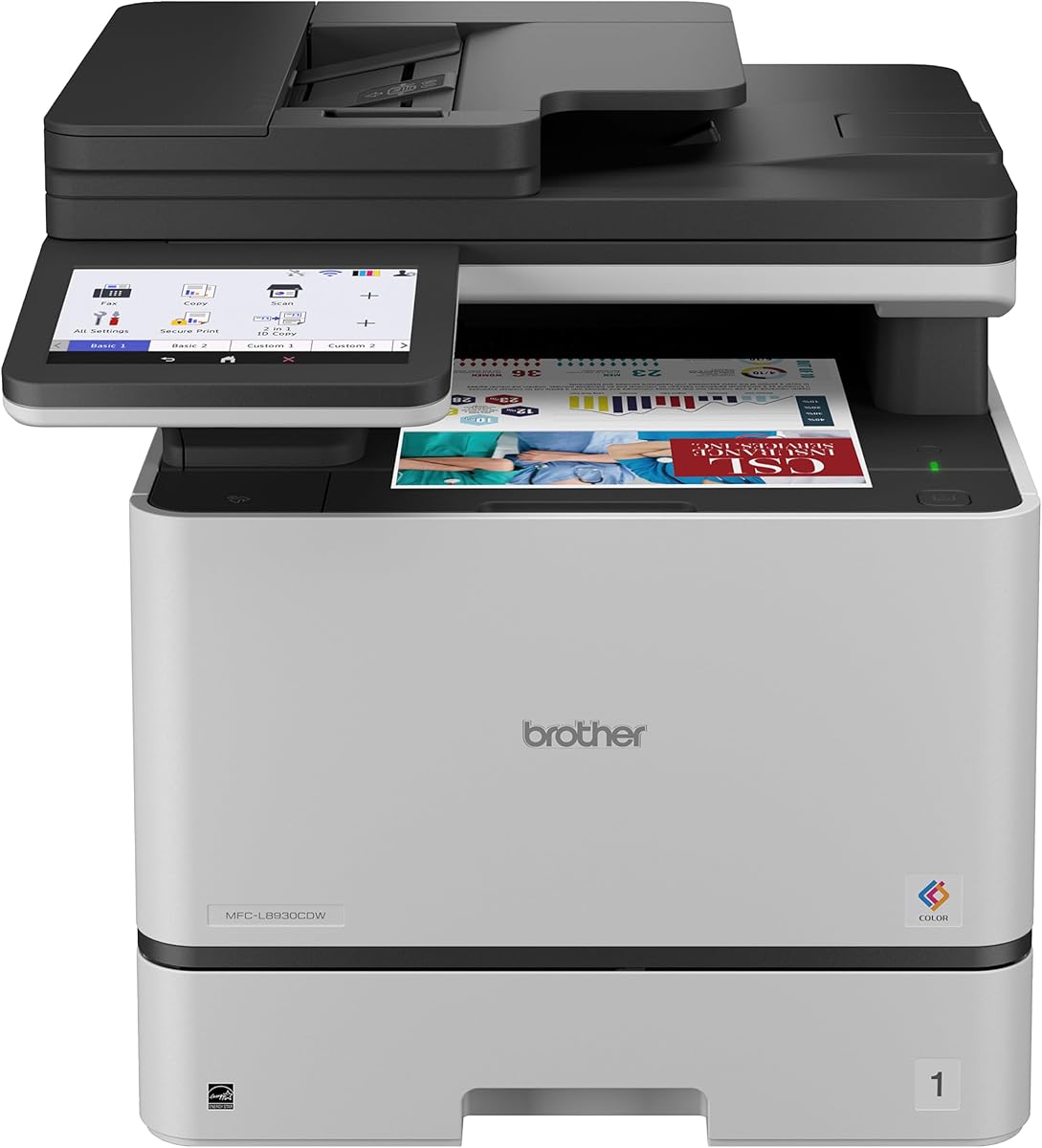
The Brother MFC-L8930CDW is the most feature-rich premium option in this roundup. It delivers professional color and monochrome laser output, advanced scanning, document copying, duplex printing, flexible networking, and business security tools. Its 4.4 rating and extensive feature set make it well suited to organizations handling sensitive documents and varied print jobs.
We may earn a commission when you buy through this link, at no additional cost to you.
Print and copy speeds reach up to 33 pages per minute, which is strong for a color multifunction system. The 80-page automatic document feeder handles large document sets, and two-sided scanning reaches up to 104 images per minute. A 7-inch color touchscreen provides scan previews and up to 64 customized shortcuts, helping experienced users streamline recurring tasks.
Security is the standout differentiator. Triple Layer Security features protect devices, networks, and documents in transit. An integrated NFC card reader provides a convenient way to use badge authentication, which is valuable where teams want tighter access control. The device is also EPEAT Gold rated, ENERGY STAR certified, and uses EPS-free packaging, although these credentials do not replace the need for proper configuration.
This model is ideal for established offices that produce presentations, client reports, proposals, and high-quality color documents while also handling sensitive workflows. Its complexity and larger footprint may be excessive for a minimal home office, but for a business seeking centralized control and advanced capabilities, it is the most complete premium choice here.
Triple Layer Security and NFC badge authentication distinguish this model from more basic office copiers. These features are especially relevant when multiple departments share one machine or sensitive records pass through it.
The device supports up to 33 pages per minute while also providing professional color output. The generous 80-page feeder and rapid duplex scanning help support substantial document volumes.
We may earn a commission when you buy through this link, at no additional cost to you.
The Brother MFC-L3720CDW is a versatile four-function color laser system for businesses that want printing, scanning, copying, and faxing in one device. Its 4.0 rating reflects a broad set of everyday office features, including automatic duplex printing, a 50-page feeder, and a 250-sheet adjustable paper tray.
We may earn a commission when you buy through this link, at no additional cost to you.
Color output is rated at up to 19 pages per minute, which is more modest than the fastest monochrome models. That makes it better suited to mixed-color workloads where sales documents, forms, and internal reports are printed throughout the day. The 3.5-inch color touchscreen provides 48 customizable shortcuts, and the interface offers direct access to services such as Google Drive, Dropbox, and OneNote.
Network access is flexible, with dual-band wireless, Wi-Fi Direct, and USB connectivity. A companion app adds remote printing, toner monitoring, and printer management. The trade-off is that the device is more substantial than a three-function compact copier, and its 50-page document feeder may require more frequent refills than the 70- and 80-page alternatives in this guide.
The MFC-L3720CDW is a good fit for a small or midsize office that still relies on fax and wants centralized color output. It prioritizes convenience, workflow shortcuts, and shared access rather than maximum speed. Buyers with unusually large scanning jobs should compare its feeder capacity with higher-capacity models.
Adding fax to printing, scanning, and copying makes this model useful for offices with established administrative workflows. It avoids the need for a separate fax machine when all four tasks share a common network.
Touchscreen shortcuts, direct cloud access, and mobile management simplify common tasks. Employees can move between digital workflows and physical documents more easily.
We may earn a commission when you buy through this link, at no additional cost to you.
The HP LaserJet Pro MFP 3101sdw is a focused monochrome copier for small teams that want fast printing, scanning, copying, and automatic duplexing. Its 4.5 rating is the highest among the models featured, reflecting a well-regarded package for professional black-and-white document production.
We may earn a commission when you buy through this link, at no additional cost to you.
The device prints at speeds of up to 35 pages per minute and includes a 250-sheet input tray plus a 50-sheet automatic document feeder. These specifications support regular work such as reports, forms, meeting materials, and internal documents. Wireless connectivity is designed to select a stable connection, while automatic two-sided printing reduces paper use during longer jobs.
The main limitation is the absence of fax. This is not a concern for businesses that have moved entirely to digital communication, but offices with legacy fax requirements will need a different model. HP also states that this printer is intended to work only with cartridges containing HP chips or circuitry, which is an important consideration for buyers comparing cartridge options.
This is a strong recommendation for a small team seeking a simple, capable monochrome system. It does not offer color output, a large touchscreen, or extensive enterprise controls, but it balances speed, convenience, and productivity without presenting an overly complex feature set.
A rated speed of 35 pages per minute and a 250-sheet tray cover the needs of many small offices. The 4.5 rating makes this one of the strongest general choices for routine monochrome work.
Automatic two-sided printing helps with lengthy reports, while the 50-page feeder reduces repetitive scanning and copying. The flatbed remains available for media that cannot be fed automatically.
We may earn a commission when you buy through this link, at no additional cost to you.
The Canon imageCLASS MF753Cdw II is a color, wireless, duplex multifunction laser printer that combines printing, scanning, copying, and faxing. Its 4.2 rating indicates a generally favorable reception, and the four-function design gives it broad usefulness for offices that still handle fax alongside printed and digital documents.
We may earn a commission when you buy through this link, at no additional cost to you.
The supplied product information emphasizes color output, wireless connectivity, duplex printing, and the four core office functions. Those characteristics position it as a versatile all-in-one for small and midsize teams. Automatic duplexing is particularly valuable for multipage reports, while wireless access makes the device easier to share across workstations than a direct USB-only arrangement.
Compared with the models for which detailed capacity and speed information is provided, the Canon has fewer published specifications in the source data. That makes it harder to compare feeder capacity, print speed, paper handling, and security features without consulting the current manufacturer documentation or retailer listing. It should not automatically be assumed to outperform models with more clearly specified throughput.
The MF753Cdw II is best for buyers who specifically want a wireless color laser copier with fax and duplex capability. It is a sensible candidate for mixed administrative environments, but careful verification of current specifications is advisable before purchase.
Print, scan, copy, and fax functions consolidate routine office tasks into one machine. This can simplify workflows where employees regularly move information between physical and digital channels.
Wireless access supports shared office use, and automatic duplex printing helps shorten multi-page jobs. Together, these features make the device practical for teams seeking convenience without a dedicated production copier.
We may earn a commission when you buy through this link, at no additional cost to you.
The HP LaserJet Pro MFP 3101fdw is a well-rounded monochrome office copier for teams of up to seven people. It provides printing, scanning, copying, and faxing, along with automatic two-sided printing and an automatic document feeder. Its 4.2 rating reflects a capable, security-conscious package for everyday small-office workflows.
We may earn a commission when you buy through this link, at no additional cost to you.
Black-and-white output reaches up to 35 pages per minute. Intelligent Wi-Fi is designed to find a dependable connection, while Ethernet and Bluetooth broaden wired and wireless access options. Compatibility with Microsoft, Mac, AirPrint, Android, and Chromebook environments makes the device adaptable to mixed device fleets.
HP Wolf Pro Security adds customizable settings intended to protect the printer and information handled through it. This is a meaningful advantage for offices with sensitive information, although security features still require correct configuration and responsible account management. As with the 3101sdw, HP says the printer is intended for cartridges with original HP chips or circuitry.
This model is a good middle ground for a small office that requires fax but not color. It is less expansive than the 4101fdw and less focused on speed, yet its combination of four functions, wireless connectivity, and security tools makes it a well-rounded choice for a modest team.
The combination of printing, scanning, copying, and faxing meets many administrative needs in one device. It is particularly useful for teams of up to seven people handling a mixture of paper workflows.
HP Wolf Pro Security provides customizable controls for the device and associated information. Shared offices can benefit from these tools when they are paired with proper user policies.
We may earn a commission when you buy through this link, at no additional cost to you.
The Canon imageCLASS MF462dw II combines fast monochrome output with a feature-rich touchscreen interface. It supports printing, scanning, copying, and faxing, earning a 4.2 rating and making it a strong candidate for offices that value guided document workflows. Its stated print speed reaches up to 37 pages per minute.
We may earn a commission when you buy through this link, at no additional cost to you.
The 5-inch color touchscreen and customizable Application Library make common functions easy to access. A 50-sheet one-pass duplex automatic document feeder helps users scan both sides of a document without reversing the original. The 250-sheet standard cassette can be expanded with an optional AH-1 cassette, while a 100-sheet multipurpose tray supports envelopes and specialty media.
Mobile printing is available through the Canon PRINT app, Apple AirPrint, and Mopria Print Service. The device uses Canon Genuine Toner 070 or 070 high-capacity cartridges, which the manufacturer presents as supporting reliable output and extended page yields. The main trade-off is that it cannot print in color despite offering a color touchscreen.
The MF462dw II fits businesses that want fast monochrome documents, a polished control panel, and convenient digital integration. It is a particularly good option for administrators who appreciate a dedicated interface and straightforward application presets rather than a minimal button panel.
The 5-inch color touchscreen and Application Library put frequently used settings within easy reach. This is helpful for employees who copy or scan inconsistently and need a clear path through each task.
A one-pass, two-sided 50-sheet feeder reduces the need to turn multipage originals manually. Combined with automatic duplex printing, it supports efficient document-heavy workflows.
We may earn a commission when you buy through this link, at no additional cost to you.
The HP LaserJet Pro MFP 4101fdw is an excellent all-around choice for a small business that needs more speed and security than a basic three-function copier. It prints, scans, copies, and faxes monochrome documents, with a stated speed of up to 42 pages per minute. Its 4.3 rating indicates strong user reception.
We may earn a commission when you buy through this link, at no additional cost to you.
Automatic two-sided printing and an automatic document feeder help handle lengthy documents. HP Wolf Pro Security adds configurable protection for the printer and the information it processes. For connectivity, intelligent Wi-Fi, Ethernet, and Bluetooth provide several ways to reach the device from mobile devices, PCs, or tablets.
The printer supports major operating environments, including Microsoft, Mac, AirPrint, Android, and Chromebook. That broad compatibility makes it suitable for mixed offices. The main limitation is its lack of color output. A second limitation is HP's stated cartridge-chip restriction, which means the device is designed to work with cartridges using original HP chips or circuitry.
The 4101fdw is best for growing teams of up to ten people that still need fax, want faster monochrome production, and value integrated security. It offers a more comprehensive feature set than the 3101fdw while remaining less complex than a color enterprise multifunction system.
At up to 42 pages per minute, this model offers more throughput than the 3101-series choices. It is well suited to teams of up to ten people with steadily increasing document volumes.
HP Wolf Pro Security gives a small office meaningful device controls without requiring a large color workflow. The four-function design keeps printing, scanning, copying, and faxing consolidated.
We may earn a commission when you buy through this link, at no additional cost to you.
The Brother HL-L2480DW is a compact monochrome copier designed for small offices and work-from-home environments. It combines printing, scanning, and copying, adds automatic duplexing, and carries a 4.5 rating. That makes it one of the strongest compact options for users who need more than a basic printer but do not require fax.
We may earn a commission when you buy through this link, at no additional cost to you.
Its stated print speed reaches up to 36 pages per minute. A 250-sheet tray supports regular business documents, and a manual feed slot handles envelopes and specialty paper. The 2.7-inch touchscreen provides a clear way to manage settings and offers printing and scanning to popular cloud services such as Google Drive, Dropbox, Evernote, and OneNote.
Connectivity includes dual-band wireless, Ethernet, and USB. The Brother Mobile Connect app supports remote printing, scanning, toner tracking, and supply ordering. The device is monochrome only and has no fax capability, so it does not suit every traditional office workflow. Its touchscreen is also smaller than those found on the MFC-L8930CDW and Canon MF462dw II.
Choose the HL-L2480DW for a compact home office or small business with a steady need for monochrome printing, scanning, and copying. It balances a generous paper tray, modern connectivity, duplexing, and cloud workflows in a relatively space-conscious package.
The three-function design saves space compared with larger office systems, while the 250-sheet tray handles a useful amount of routine work. This balance suits small workspaces and hybrid offices.
Touchscreen access to cloud applications and the Brother Mobile Connect app simplify printing and scanning beyond the office desk. Toner tracking and supply ordering add convenience for ongoing operations.
We may earn a commission when you buy through this link, at no additional cost to you.
The best copier machine for business is not simply the model with the highest specification. It is the device that matches your document volume, required functions, security expectations, physical space, and daily operating workflow.
Begin with a realistic estimate of how many pages your team prints, copies, and scans during a typical week. A small office handling occasional forms may be well served by a compact three-function model, while a group producing hundreds of pages daily needs faster throughput, larger feeders, and high-yield toner support. Stated print speed, scanner speed, paper capacity, and feeder size provide the most useful baseline for comparing demand. Also consider how often large jobs arrive, because a fast print engine does not fully solve a bottleneck caused by manual feeding or insufficient paper storage.
Monochrome copiers are generally the simpler choice for internal documents, invoices, contracts, shipping records, and routine office forms. They tend to be well suited to high-volume workflows because they focus on fast text output. Color models make more sense when your business regularly produces presentations, brochures, charts, proposals, or other client-facing materials. Consider whether occasional color is truly needed or whether employees can use a separate color service. Choosing the wrong capability can add complexity and operating expense without improving everyday workflow.
Multifunction printer terminology can obscure the number of functions actually included. A three-function model handles printing, scanning, and copying, while a four-function model also includes fax. Some businesses still rely on fax for regulatory, customer, or operational processes, while others have eliminated it entirely. Make a list of every function employees expect to perform before evaluating models. Also distinguish scanning from copying and check whether the automatic document feeder handles single-sided pages, one-pass duplexing, or only manual two-sided processing.
Automatic duplex printing saves time and reduces paper consumption during multipage jobs. Document feeder capacity becomes increasingly important as teams scan and copy longer sets. A 50-page feeder suits many moderate workloads, while 70- and 80-page feeders reduce interruptions for legal, financial, medical, or administrative records. One-pass duplex scanning is especially valuable because the machine captures both sides without requiring the user to turn the originals. For mixed media, confirm the flatbed glass can handle oversized or legal-length documents when that is part of your workflow.
Most business copiers are shared devices, so connectivity is a core requirement rather than an optional convenience. Dual-band wireless can provide better performance in crowded offices, while Gigabit Ethernet offers a stable wired connection. Wi-Fi Direct and mobile printing support make it easier for employees to send jobs from laptops, tablets, and phones. The Brother Mobile Connect app, Canon PRINT app, AirPrint, and Mopria support improve compatibility across common device ecosystems. Check that your chosen copier supports the operating systems and mobile platforms actually used by your staff.
A network-connected copier can hold document data, cached scans, saved shortcuts, and user credentials, making security configuration important. Look for features such as HP Wolf Pro Security, Brother Triple Layer Security, NFC card authentication, protected network communication, and administrative controls. These features are particularly relevant in shared offices, legal practices, healthcare organizations, financial teams, and businesses with remote administrators. The presence of a security feature does not guarantee a secure deployment, so pair it with unique administrator credentials, sensible access policies, firmware updates, and clear user guidelines.
The standard paper tray should support the media types your employees use most often, while a multipurpose or manual feed slot provides flexibility for envelopes, labels, and specialty stock. Expandable cassettes can be valuable when monthly volume is high, but they also increase the machine's size. On the consumable side, compare the yield and availability of compatible toner cartridges. Genuine manufacturer supplies are the safest default because their compatibility is designed around the machine, and some models restrict cartridges that lack recognized chips or circuitry. Estimate replacement frequency before committing to a particular platform.
Compact models are easier to place in small offices and home-business areas, but larger systems generally provide higher capacities, faster engines, larger touchscreens, and more advanced administration. Consider available counter space, ventilation, noise, and whether employees will share one device or operate separate machines. A color touchscreen can make scanning workflows more accessible, while a simple control panel may be sufficient for trained users. Before installation, confirm that the machine fits your intended space and that your IT team can support its connectivity, security, and update requirements.
Begin by unpacking the copier, removing transport restraints, installing toner, and checking that all paper trays and covers are secure. Place the unit on a stable surface with enough clearance for the document feeder and output tray. Connect it through Ethernet, dual-band wireless, or USB as appropriate, install the manufacturer's software, and complete the initial setup process before allowing employees to print. Set administrator credentials, update the firmware, define users or groups if supported, and configure secure defaults rather than postponing those steps.
For regular use, select the correct paper size and type in the driver or touchscreen before sending a job. Use the automatic document feeder for standard multi-page originals and the flatbed scanner for unusual media, fragile pages, or documents that do not feed correctly. Keep the glass and feeder clean, remove paper clips and staples, and scan documents in the correct orientation. For double-sided originals, use the machine's supported one-pass duplex workflow when available. Review duplex settings carefully because copying a double-sided original onto a single-sided page is a common mistake.
Maintain the machine by following the documented cleaning schedule for the platen, rollers, pickup path, and exterior. Use a dry, lint-free cloth on screens and scanner glass, and avoid spraying cleaner directly onto the device. Monitor toner and paper levels, replace cartridges with compatible supplies, and address error messages promptly. Roll maintenance plans and firmware updates across a schedule that accounts for busy periods, and keep a small stock of frequently used paper and toner to reduce downtime.
A copier machine is designed primarily around document copying, while a multifunction printer combines printing with one or more other capabilities such as scanning, copying, and faxing. The term multifunction laser printer is common in business settings because it centralizes several document workflows in one device. A standalone copier may be preferable for organizations with exceptionally high copy volumes, while a multifunction printer usually offers broader everyday usefulness.
A monochrome copier is usually the better fit when employees mostly print invoices, forms, contracts, and internal reports. Color becomes more valuable when the business regularly produces presentations, charts, proposals, marketing collateral, or client-facing documents. Assess the frequency of color jobs rather than assuming occasional color needs justify a more complex and potentially costlier system.
A 250-sheet tray serves many small and midsize offices, while larger or expandable systems are useful when teams print long reports or need fewer paper refills. Capacity should be matched to daily volume and available storage space. Very high-volume workplaces may benefit from multiple paper cassettes, whereas a compact office with limited space may prefer a smaller standard tray.
An automatic document feeder is highly useful for routine multi-page scanning and copying because it reduces manual page handling. It is especially valuable for two-sided originals when the feeder supports one-pass duplex scanning. A flatbed scanner remains necessary for books, oversized pages, photographs, and documents that cannot feed reliably.
Dual-band wireless can connect over both 2.4GHz and 5GHz networks, giving an office more flexibility when crowded wireless environments cause interference or performance issues. It does not automatically guarantee faster prints, since actual performance depends on the network, distance, and file size. Wired Ethernet remains a stable option for heavily used shared devices or fixed locations.
Yes, especially when the device is connected to a network or handles confidential information. Features such as configurable security controls, badge authentication, protected document transmission, and administrator management help reduce risks. Buyers should also change default credentials, apply firmware updates, establish user permissions, and follow a clear policy for stored scans and printed documents.
Most business multifunction printers support common desktop and mobile ecosystems, including Windows, Mac, AirPrint, Android, and Chromebook environments. The exact compatibility depends on the model, driver, and mobile application. Confirm the current operating-system requirements and network configuration before purchase to avoid onboarding delays.
Choose a standalone copier when copy volume is exceptionally high and dedicated copying is the primary requirement. Choose a multifunction printer when your business also needs printing, scanning, or faxing in one shared device. For most offices handling mixed document workflows, a multifunction laser system offers better flexibility and easier consolidation of daily tasks.
The Brother DCP-L2640DW stands out as the budget-conscious selection for small businesses that need compact monochrome copying, useful scanning, duplexing, and flexible connectivity. The HP LaserJet Pro MFP 4101fdw offers the most balanced overall package for a growing team, combining fast monochrome output, four core functions, wireless access, and security controls. For organizations ready to invest in a premium business copier, the Brother MFC-L8930CDW stands out with color output, advanced security, a large feeder, and a 7-inch touchscreen.
Prioritize the capabilities your employees use most often rather than selecting solely by headline speed. Monochrome users should compare feeder capacity, duplex scanning, paper trays, and network stability, while color buyers should examine output quality, security, and workflow controls. Businesses that still rely on fax should focus on four-function models, and compact offices can avoid unnecessary complexity by choosing a focused three-function system.
Current prices, availability, toner options, and retailer promotions may change over time, so confirm the latest listing and manufacturer specifications before ordering. Check office space, network requirements, consumable compatibility, warranty coverage, and the availability of ongoing support. With those details confirmed, the model that best matches your actual workload will provide the most productive long-term copier experience.