
der8auer Delid-Die-Mate X
4.1Editor score
Integrated CPU heatspreader remover
Aluminium and stainless steel construction
Socket 2066 processor compatibility
Explore the best delidding kits for CPUs, GPUs, and game consoles, compared for compatibility, precision, durability, and ease of use.
Delidding kits help technicians remove integrated heatspreaders, lids, adhesives, and residue with greater control than improvised knives or ordinary pry tools. A useful kit matches the target device, offers stable blade positioning, and includes enough accessories to handle cleanup without adding unnecessary complexity to the work.
This guide compares ten delidding and precision-removal products for desktop processors, GPUs, smartphones, circuit boards, and game consoles. We considered stated compatibility, intended applications, blade and handle design, construction, precision features, rating, and the number of jobs each product is equipped to support, without implying hands-on testing.
Each review explains what the product is best suited for, where its design is especially useful, and where it may fall short for a particular technician. The selections include dedicated CPU delidding tools, console-specific implements, multi-blade repair sets, adhesive-cleaning scrapers, and a general-purpose heat application tool.
4.1Editor score

4.6Editor score
4.0Editor score
The comparison covers dedicated processor and console delidding tools alongside broader precision-repair sets, with emphasis on device fit, application, material, and included accessories.




The Delid Tool V3 is a purpose-built system for removing the CPU heatspreader from compatible PlayStation 3 consoles. Its 4.6 rating reflects a favorable buyer response, while the defining feature is not a generic blade but a thin, durable V3 cutting edge designed to make a controlled cut through the console lid.
We may earn a commission when you buy through this link, at no additional cost to you.
The included three-blade configuration adds practical flexibility. Replaceability is particularly useful because a delidding blade can eventually lose its edge, and swapping blades can be faster and more predictable than trying to restore a compromised cutting edge. The tool’s geometry also offers more control than a general craft knife or an improvised flat blade.
Compatibility is the main limitation. This is not a broad PC processor kit, and buyers should verify that the console model and processor layout match the stated PlayStation 3 application. It should not be assumed suitable for every console generation, GPU, smartphone, or desktop CPU simply because the general operation is called delidding.
For someone who regularly services PlayStation 3 systems, the combination of a dedicated design, three blades, and a replaceable edge makes this a strong recommendation. It is especially compelling for technicians moving beyond thermal-paste replacement alone and undertaking heatspreader removal with a purpose-made implement rather than a makeshift workaround.
A dedicated tool keeps the working edge aligned with the intended cut, which is more controllable than using an unrelated knife. That consistency matters around small console processors and nearby board components.
The three supplied blades provide options for the opening and follow-up work involved in a console delid. A replaceable edge also helps preserve dependable cutting performance over repeated service work.
We may earn a commission when you buy through this link, at no additional cost to you.
The der8auer Delid-Die-Mate X is an integrated heatspreader removal tool aimed at high-end desktop processors. It carries a 4.1 rating and is built for Intel Skylake-X and Kaby Lake-X processors on socket 2066, making platform verification essential before purchase.
We may earn a commission when you buy through this link, at no additional cost to you.
Its integrated construction distinguishes it from a collection of loose blades. The aluminum and stainless steel body provides a substantial platform for applying force evenly, while the anodized black finish suits a professional bench environment. The intended result is a repeatable removal process that addresses the vulnerable exposed die more deliberately than improvised methods.
The product also carries significant procedural caveats. Removing an integrated heatspreader permanently invalidates the manufacturer’s guarantee, and the product information explicitly warns that the procedure is performed at the user’s risk. Without the spreader, cooler mounting height changes, which can make fixed-height coolers impossible to install as before.
This is a premium recommendation for a technician who knows the socket 2066 platform and wants a dedicated, mechanically integrated solution rather than a general knife. It is less attractive to beginners or users with mixed processor collections because compatibility, warranty implications, and cooler-clearance planning must all be addressed before opening the package.
The X version targets a specific collection of server and enthusiast processors rather than trying to cover every CPU layout. Its rigid, integrated construction suits controlled bench work when the technician understands the platform.
Removing the heatspreader lowers the effective mounting height. Coolers with fixed-height hardware may need an adjustable alternative, so cooler compatibility should be checked before delidding begins.
We may earn a commission when you buy through this link, at no additional cost to you.
The Knife Repair Kit is a compact precision solution for BGA chip work, CPU adhesive scraping, glue removal, and power-supply repair. Its 3.6 rating is the lowest among the rated selections, but the broad application range gives it a different role from a model-specific delidding implement.
We may earn a commission when you buy through this link, at no additional cost to you.
The standout specification is the ultra-thin 0.38 mm blade. That slim profile is intended to move between chips and baseplates where a wider blade could catch, scrape unintended surfaces, or make clean chip removal more difficult. The SK5 steel construction is also specified to tolerate heat up to 550°F while retaining a sharp working edge.
This is not the same as a complete CPU heatspreader-removal system. The product is better viewed as a general electronics knife and scraping kit that can support delidding-adjacent work. Its thin edges and sharp points still demand stable handling, careful lighting, and an uncluttered work area.
The kit makes sense for repair technicians who handle BGA components, motherboard maintenance, or adhesive removal and want one compact set of purpose-built implements. It is less suitable as the only tool for a high-value CPU delid, where a model-specific, integrated tool and careful platform preparation offer more control.
The 0.38 mm edge can reach beneath chips and along baseplate seams where a standard knife would be too wide. That makes it useful for controlled removal and residue work.
Compatibility with BGA chips, motherboards, and power-supply assemblies broadens the kit’s value. It can support a repair bench that handles several small-component disciplines rather than only processor lids.
We may earn a commission when you buy through this link, at no additional cost to you.
The Thermal Grizzly Delid-Die-Mate is a purpose-built CPU heatspreader removal tool for 12th- and 13th-generation Intel Core processors. Its 4.5 rating and development by Roman “der8auer” Hartung place it among the strongest specialized picks in this guide for modern desktop platforms.
We may earn a commission when you buy through this link, at no additional cost to you.
The product is designed to make direct die cooling more practical by exposing the processor die to a custom cooling arrangement. Its black and red anodized aluminum construction gives it the appearance and rigidity of a dedicated bench tool, while the stated design aims to make the removal process straightforward rather than improvised.
The claimed cooling benefit depends on the complete system, not the tool alone. Direct die cooling generally requires a compatible cooler, contact plate or fitting, appropriate thermal material, and careful mounting. The listed 10–20°C reduction should therefore be understood as a potential outcome of a properly configured cooling solution, not an automatic result of removing a lid.
This is a strong recommendation for a technician working on the specified Intel generations who intends to build a direct die cooling arrangement. It is less useful for a general repair kit, a PlayStation console, or an older processor platform outside the stated compatibility. Confirm the exact CPU generation and cooling plan first.
The tool removes the integrated heatspreader so the exposed die can contact a specialized cooling surface. That can improve heat transfer when the full replacement assembly is correctly matched and installed.
Supporting 12th- and 13th-generation Intel chips makes this more relevant for current enthusiast systems than a broad tool that lacks model-specific geometry.
We may earn a commission when you buy through this link, at no additional cost to you.
The Thermal Grizzly TG Scraper is a three-pack of acrylic precision scrapers made for removing silicone adhesive and indium solder residue from delidded processors. Its 4.8 rating is the highest among the products with numerical ratings, although that figure should be interpreted alongside its narrower purpose.
We may earn a commission when you buy through this link, at no additional cost to you.
The narrow tip is designed to reach residue without forcing a wide edge against the package. Acrylic construction is positioned as a safer scratching risk for delicate CPU components, while the ergonomic shape helps maintain control near small dies and exposed substrates. The included quantity also allows separate tools to be assigned to different adhesives or stages of cleanup.
It is an accessory rather than a full lid-removal solution. A technician will still need an appropriate delidding tool for the target processor and should employ suitable cleaning procedures. Even a carefully controlled scrape can damage a package if the tip is angled into a fragile area or dragged across a soldered component.
The TG Scraper is best for technicians who already perform direct die cooling and need a dedicated way to remove stubborn residue after opening the package. Among this list, it offers a specialized and highly rated cleanup tool, but it should be paired with a compatible delidding implement rather than treated as a stand-alone kit.
The narrow scraper tip is intended for the small working area exposed after delidding. It helps technicians remove adhesive and solder residue while keeping the contact area localized.
Having three separate implements can reduce cross-contamination between compounds and make it easier to reserve a particular tip for one package or material.
We may earn a commission when you buy through this link, at no additional cost to you.
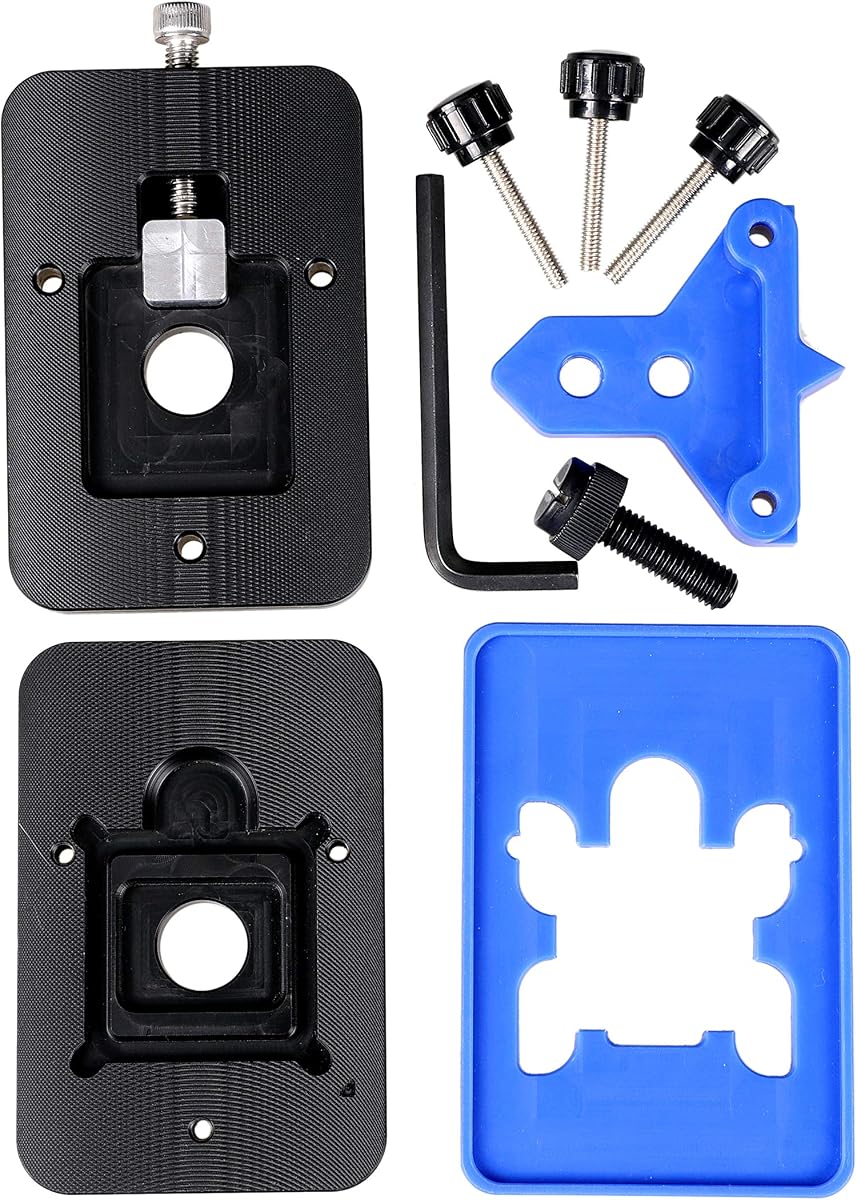
The EG Starts CPU Delid & Relid Tool is aimed at several older Intel platforms, particularly LGA 1150, 1151, and 1155 processors, with Kaby Lake and Coffee Lake compatibility called out. Its 4.6 rating makes it one of the better-rated products in the roundup.
We may earn a commission when you buy through this link, at no additional cost to you.
A major advantage is the combined delid and relid concept. A technician can use the same platform-specific opener for removing an integrated heatspreader and later replacing it during a direct die cooling modification. That focus distinguishes it from generic knives and thin scraping implements.
Its product information includes an important positional warning: the square aluminum block must remain below the plastic plane, or the CPU board may be damaged. This illustrates why orientation and model verification matter even with a purpose-built tool. The long product title also mentions LGA 775, but the detailed compatibility bullet emphasizes other sockets, so buyers should confirm the exact processor rather than rely on the title alone.
This tool is a good match for restoring or tuning an older LGA system, especially one using a processor listed among the supported models. It is not a sensible choice for a modern 12th- or 13th-generation Intel build, and users with uncertain socket identification should avoid buying it until they have confirmed the CPU package and board layout.
The relid capability supports the full conversion process rather than only the initial opening. That is useful when a technician intends to install a custom lid and direct die cooling hardware.
The supported LGA generations give this tool a clear role in legacy system maintenance. Its strengths are most relevant when the processor and board are confirmed to match the stated fitment.
We may earn a commission when you buy through this link, at no additional cost to you.
The QianLi ToolPlus 009 is a 12-in-1 handle and blade set for delicate electronics repair. With no numerical rating available, its appeal should be evaluated from its stated construction and versatility rather than from a customer score. It targets BGA maintenance, adhesive removal, chip lifting, solder-pad cleaning, and advanced microsoldering work.
We may earn a commission when you buy through this link, at no additional cost to you.
Its strongest feature is the variety of blade profiles in a single metal-handle system. Fine points support detailed scraping, while angled edges can handle cutting or prying. A common handle gives the technician a consistent grip while allowing the working tip to change as the repair moves from opening a package to cleaning a pad.
The set’s breadth also requires discipline. A large multi-tool can encourage use of a blade that is not ideal for a particular stage, and very sharp points need a stable working posture. Apple A8 and A9 CPU work is specifically mentioned, alongside general motherboard and BGA repair, so it is more of a complete precision platform than a processor-specific opener.
This kit is most attractive to repair technicians who perform varied component-level work and want several tip styles without managing separate handles. It is a versatile companion for delidding-adjacent tasks, but a technician opening a particular desktop CPU should still verify that model-specific tooling and platform guidance are available.
Interchangeable tips let the technician select an edge for fine scraping, angled cutting, or lifting without changing the primary grip. This can improve efficiency across a multi-stage repair.
Applications including BGA maintenance, solder-pad cleanup, and smartphone CPU refurbishment make the set more versatile than a single-purpose CPU delidding implement.
We may earn a commission when you buy through this link, at no additional cost to you.
The RSX GPU Delid Tool is designed specifically for PlayStation 3 Fat and Slim consoles whose RSX graphics processor has an integrated heatspreader. The product has no numerical rating, but its compatibility boundaries are clearly stated: it does not support Super Slim models and is not intended to remove the CELL CPU lid.
We may earn a commission when you buy through this link, at no additional cost to you.
Its geometry is designed to assist with RSX integrated heatspreader removal while keeping the working edge away from the main board. That targeted approach can make thermal-paste replacement or deeper console repair work more manageable than using an unrelated blade around a densely populated board.
The product still carries inherent console-repair risk. Opening a GPU lid can damage the chip, surrounding components, or the board if the tool is misaligned or the console is handled poorly. A dedicated implement reduces uncertainty, but it does not remove the need for appropriate care, compatible replacement materials, and sound repair procedures.
This is a strong option for a technician who works on original-style Fat or Slim PlayStation 3 systems and needs RSX access. It should not be purchased for a Super Slim console or treated as a universal PlayStation 3 kit. Those needing both GPU and CELL CPU heatspreader access should choose a separate tool explicitly designed for the CPU side.
The tool is shaped around the RSX integrated heatspreader rather than a general console board. That specificity supports a more controlled lid-removal setup when the model is compatible.
Removing the lid exposes the interface between the RSX chip and heatspreader. This creates the access needed to replace aged thermal material during a suitable repair.
We may earn a commission when you buy through this link, at no additional cost to you.
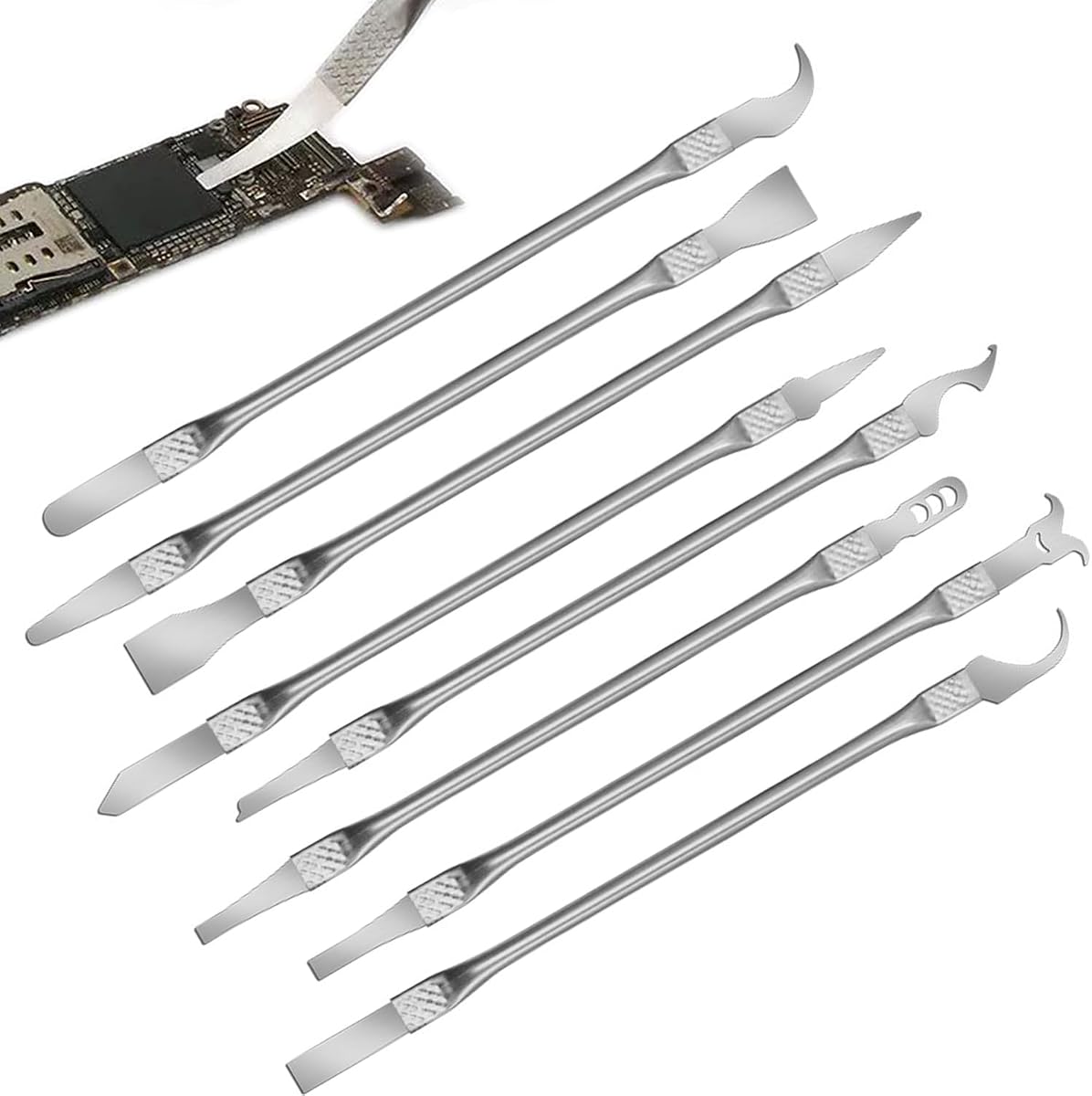
The 8 Piece Multi-Function CPU Removal Tool Set provides a broad collection of implements for removing BGA chips, CPUs, and small components from smartphones and motherboards. Its 4.0 rating indicates a generally positive reception, and its greatest advantage is the amount of functionality available from a single compact set.
We may earn a commission when you buy through this link, at no additional cost to you.
The ultra-thin tools are designed to maneuver between chips and boards without introducing unnecessary width. Their alloy construction is stated to resist corrosion and bending, while the integrated blade-and-handle arrangement removes the need to assemble separate components before beginning a task.
This set sits between a specialist delidding implement and a general repair kit. It can support smartphone and computer board work, yet it does not make a model-specific CPU heatspreader safe by default. The included edges still require controlled pressure, good lighting, and awareness of nearby components.
For a new technician building a repair kit on a limited budget, the eight-piece configuration offers useful variety. It is a practical choice for general small-component removal and for technicians who want several implements available at once. For a major desktop CPU or console delid, a dedicated model-specific opener should still be the primary tool.
Eight implements provide options for different chip shapes, access angles, and residue tasks. That flexibility is valuable on a mixed smartphone and motherboard repair bench.
Integrated handles let a technician pick up a working implement without first assembling it. The approach supports a faster and more organized repair workflow.
We may earn a commission when you buy through this link, at no additional cost to you.
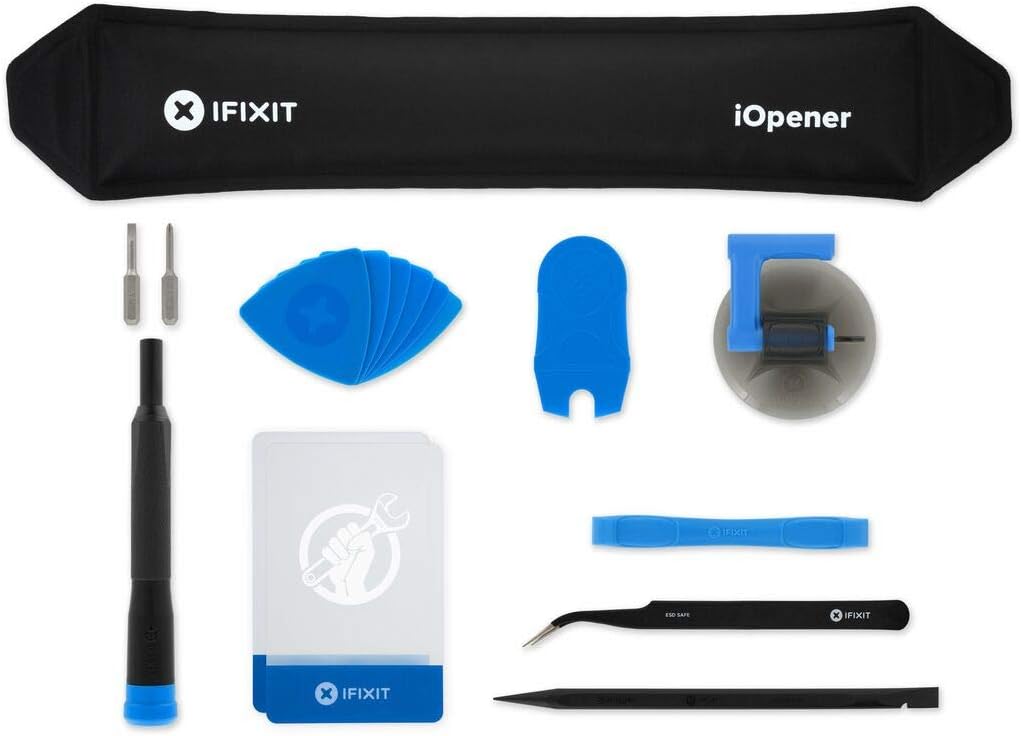
The iFixit iOpener is a heat-based adhesive opening tool rather than a blade-style delidding implement. It earns a place in this guide because effective delidding often begins with loosening stubborn thermal adhesive, and the product is specifically designed to apply heat evenly to screens and other electronic assemblies.
We may earn a commission when you buy through this link, at no additional cost to you.
The iOpener can be used with iPads, tablets, iPhones, Android phones, PC laptops, and other electronics that need controlled heat during disassembly. Its complete fix kit includes tools commonly used with the heat pad, reducing the need to gather a separate opening implement for every task.
Care is still essential. Heat can affect displays, adhesives, batteries, seals, and nearby plastics, and the tool should be used according to the relevant repair procedure. It softens adhesive but does not perform the cut or lift that a model-specific delidding tool handles, so it complements rather than replaces that equipment.
The iOpener is a strong addition for technicians who repeatedly open modern electronics and need a repeatable way to relax adhesive before prying. It is the least direct delidding choice in this list, but its 4.5 rating, broad device support, and straightforward heat application make it a valuable preparatory tool for a modern repair bench.
Heating reduces the resistance of heat-sensitive adhesive, making a display or cover easier to separate. The even application helps avoid concentrating heat on one small area.
Compatibility with tablets, phones, Android devices, and laptops broadens its usefulness. It works especially well as part of a general device-opening setup.
We may earn a commission when you buy through this link, at no additional cost to you.
The right delidding kit depends primarily on the component being opened, the precision required, and the replacement cooling plan. Compatibility, tool geometry, included accessories, and safe handling should be evaluated before making a selection.
A delidding tool is not automatically interchangeable across processors, graphics chips, and consoles. Integrated heatspreaders vary in shape, adhesive layout, mounting structure, and surrounding components, so the manufacturer’s stated platform list is the most important filter. A tool for 12th- and 13th-generation Intel chips should not be assumed to fit an older LGA processor, and the PlayStation 3 RSX opener has no CELL CPU function. Identify the exact processor, console revision, and board layout before buying, and compare those details with the product description rather than relying only on a broad term such as universal.
A purpose-built opener offers geometry aligned with a particular heatspreader and usually provides a more controlled working position. General-purpose thin knives, scrapers, and multi-blade sets are more useful when a technician handles varied BGA chips, glue, solder residue, or smartphone processors. The right balance depends on workload. A bench specializing in desktop CPU conversions may need dedicated openers and relidding accessories, while a mobile repair technician may receive greater value from an interchangeable set of ultra-thin tips. A versatile kit is a better general investment, but versatility does not replace platform-specific fitment.
Delidding depends on placing a thin, stable edge along a precise line without contacting nearby components. Narrow blades can reach tighter spaces, but very fine points may be less forgiving if they slip. Integrated tools can keep the cutting plane aligned, while interchangeable tips allow the technician to select a profile for cutting, scraping, or prying. Material matters as well, because the edge must remain sharp without bending or deforming. Review whether the product emphasizes a thin working edge, a secure handle, correct tool orientation, and replaceable or multiple blades rather than judging only by the number of included pieces.
Small delidding work calls for a secure grip and enough control to maintain a consistent angle. A comfortable handle reduces fatigue during repetitive work and helps the user react quickly if an edge catches. Non-slip surfaces, balanced metal construction, and integrated handles can all support stability. Ergonomics should not be judged separately from geometry, however, because a comfortable grip is of limited value if the blade can shift or the tool lacks an orientation stop. Hold the product, where possible, and consider how the handle places the working tip relative to the user’s fingers.
Removing the lid exposes adhesive, silicone, or solder residue that must be dealt with before a replacement lid or direct die cooling assembly can sit correctly. A narrow precision scraper is useful for cleanup, while alcohol wipes can assist with cleaning the tool and work area. Multi-blade kits often include several forms of residue access, and a dedicated scraper pack can preserve a purpose-made tip for delicate packages. The right combination depends on the thermal compound and replacement method, but choosing the opener and cleanup tools together can reduce interruptions during the job.
Delidding changes the mechanical and thermal arrangement of the component. Removing an integrated heatspreader can alter the required mounting height, and direct die cooling may need a replacement lid, contact plate, custom fitting, or a different cooler. Some coolers have fixed mounting hardware and may not reach the exposed die after the original spreader is removed. A tool listing a potential temperature improvement is describing a system-level result that depends on the complete cooling solution. Before opening a processor, determine how the exposed package will be mounted, cooled, insulated, and protected from moisture or conductive debris.
Accessory count is useful only when the pieces serve a real task. A three-blade package may provide more useful cutting options than a large set of interchangeable tips intended for general electronics. Evaluate whether the set includes cutting edges, scrapers, handles, cleaning materials, and residue tools relevant to the intended work. The multi-piece options can reduce the need to buy separate accessories later, while a dedicated opener may need to be paired with a scraper, thermal material, and a proper relidding solution. Look for a coherent workflow rather than a large number of interchangeable parts with no stated purpose.
Delidding is an invasive modification. It can permanently affect warranty coverage, expose fragile silicon, and create a path for accidental damage to the processor or board. Product-specific warnings are important because they identify the actual risks of a given procedure. Always disconnect power, work on a clean surface, document the original thermal-material layout, and avoid applying uncontrolled force. Keep the tool aligned with the manufacturer’s instructions and use appropriate replacement parts. The right kit reduces risk by improving control, but no tool can make a careless or incompatible procedure safe.
Before starting, identify the exact component and confirm that the selected tool is compatible. Disconnect the system from power, remove the component as directed by the applicable repair procedure, and clean the surrounding work area. Document the original arrangement of thermal material, screws, shields, and adhesives before disturbing anything, since those details may be needed during reassembly.
Use the dedicated opener or appropriate thin blade in the orientation specified by the manufacturer. Work slowly, maintain a consistent angle, and avoid levering against nearby board components. If the tool catches, stop and reassess rather than forcing the cut. Once the lid is removed, use a suitable scraper and cleaning method to remove residue without scraping exposed silicon or dragging debris across the package.
Aftercare is just as important as the opening cut. Keep blades dry, clean residue from tools after use, and store narrow tips in a protected case or their original holder. Replace dull or damaged implements rather than increasing pressure. For a CPU, prepare the planned cooler, contact surface, and thermal material before reassembly, and check that the mounting system accounts for any change in package height.
A delidding kit is used to remove an integrated heatspreader, processor lid, GPU lid, or related adhesive covering. It can also support cleanup of silicone, glue, or solder residue after the cover is removed. The exact components it can handle depend on the tool’s shape and stated compatibility, so a repair kit should not be assumed to fit every processor or console.
No. CPU heatspreaders differ by manufacturer, generation, socket, and package design, and dedicated tools are often made for a limited set of models. Check the exact processor family, generation, and socket against the product description before buying. Using a tool outside its stated fitment can damage the processor, board, or surrounding components.
In many cases, yes. Removing the manufacturer’s integrated heatspreader is a permanent physical modification, and the der8auer product information specifically states that the procedure invalidates the manufacturer’s guarantee and warranty. Confirm the terms associated with the product and processor before beginning, especially if the system is still under coverage.
Only if your cooling plan requires replacing the original heatspreader. Direct die cooling often uses a replacement lid or another custom contact assembly, so a compatible relidding tool may be needed during reassembly. Some kits support both opening and relidding, while others focus only on removal or precision cleanup. Confirm the complete cooling design before ordering accessories.
A delidding tool makes the controlled cut needed to separate an integrated lid or heatspreader. A precision scraper is used afterward to remove adhesive, silicone, or solder residue from the exposed package. Products such as the Thermal Grizzly TG Scraper are valuable accessories, but they are not substitutes for a compatible opener.
Only if the tool is specifically designed for the relevant console component and model. The Delid Tool V3 is listed for PlayStation 3 CPU work, while the RSX GPU Delid Tool is intended for the graphics processor in Fat and Slim models. The latter does not remove the CELL CPU lid and does not support Super Slim consoles, so model and component verification is essential.
Cleaning methods depend on the residue and the manufacturer’s repair guidance. The included product information for the precision knife kit mentions alcohol wipes for cleaning between repairs, while the TG Scraper is designed for silicone adhesive and indium solder residue. Avoid aggressive scraping and make sure any liquid cannot reach powered components or sensitive areas.
No. Delidding exposes the die, but temperature results depend on the entire replacement cooling system, including the cooler, contact surface, thermal material, mounting pressure, and workload. The Thermal Grizzly Delid-Die-Mate listing describes a potential 10–20°C reduction for suitable direct die cooling setups, not an outcome guaranteed by the tool alone.
The Delid Tool V3 stands out for focused PlayStation 3 CPU work, while the der8auer Delid-Die-Mate X offers a premium integrated solution for supported socket 2066 processors. The 8 Piece Multi-Function CPU Removal Tool Set provides the strongest budget-oriented starting point for general small-component repair. Other selections fill important niches involving modern Intel chips, residue cleanup, legacy LGA platforms, console GPUs, interchangeable BGA tips, and adhesive heat.
The most important buying decision is fitment rather than the number of accessories. Identify the exact component, verify the model and generation, and decide whether the task is opening a lid, removing residue, or supporting a direct die cooling assembly. A model-specific tool will usually offer greater control for repeated work, while a precision multi-tool can be more valuable to a technician handling varied electronics.
Finally, compare current listings carefully because compatibility details and package contents can change over time, and product prices fluctuate as well. Check the manufacturer’s instructions, the target device’s service information, and the availability of replacement thermal materials before beginning. The right kit improves control, but safe technique and a complete cooling plan determine the final result.