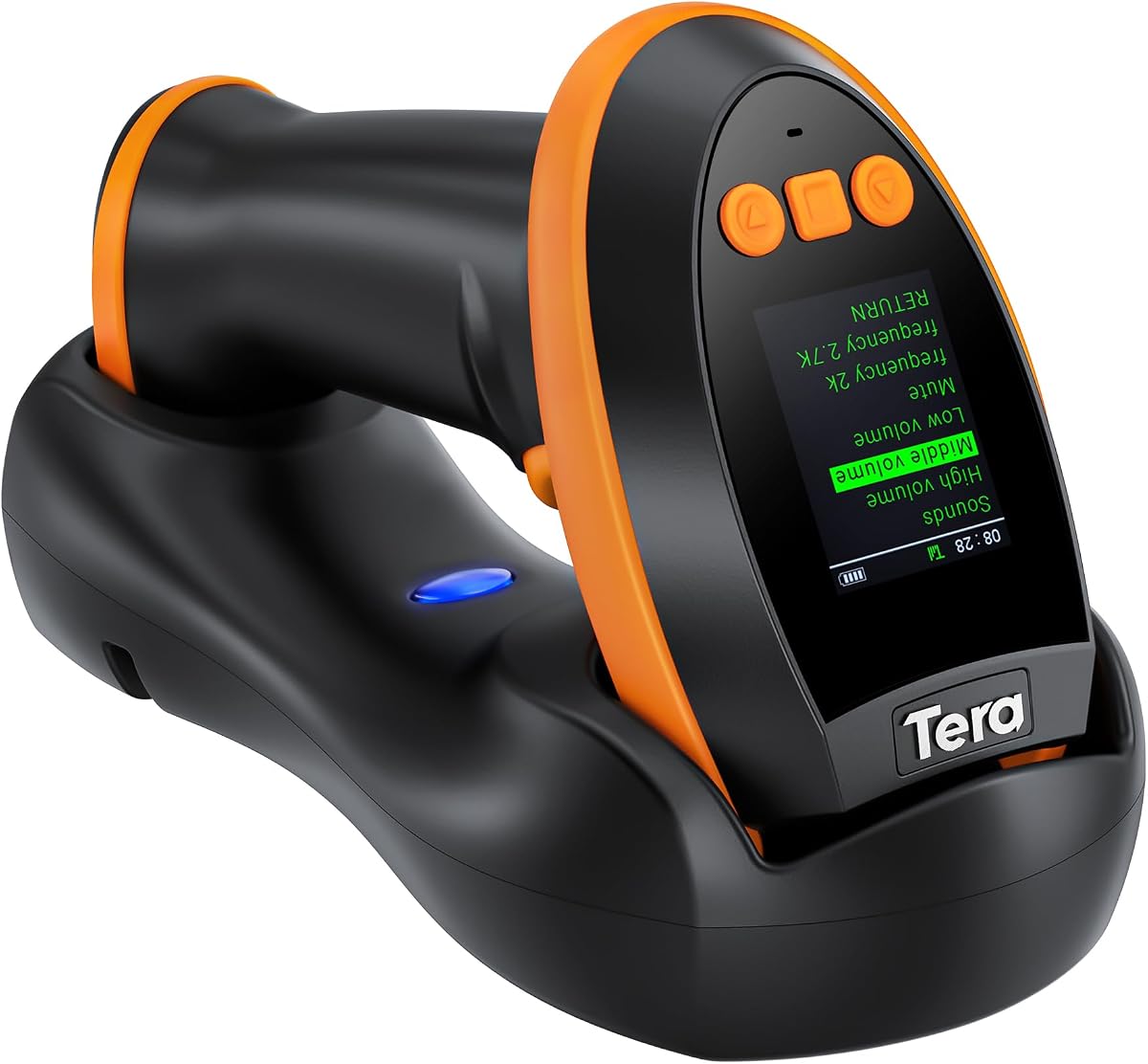
Tera Barcode Scanner Wireless with Screen
4.3Editor score
Configurable display keypad
Broad 1D and 2D support
Cradle with built-in receiver
This Bluetooth Barcode Scanner guide compares ten wireless readers for 1D and 2D codes, compatibility, range, battery life, portability, and everyday workflows.
A Bluetooth barcode scanner can turn inventory checks, retail transactions, library processing, and warehouse receiving into faster, more consistent workflows. The right model depends on the symbologies you need, the devices you use, the range your work requires, and whether a screen, stand, or offline storage is important.
This guide compares ten wireless and Bluetooth barcode readers using the supplied specifications, including supported code types, connection modes, battery capacity, scanning features, compatibility, and included accessories. The list covers compact mobile scanners, screen-equipped models, and dock-based options for different working environments.
Each pick highlights a different balance of capabilities, from 1D-only efficiency to broader 1D and 2D support, with special attention to portability, charging, and workflow control. Product listings and availability can change, so confirm the current specifications and software requirements before purchasing.
4.3Editor score

4.8Editor score

4.2Editor score
The comparison below summarizes the principal differences among all ten scanners, including supported symbologies, connection methods, power options, and workflow features.


The Eyoyo Mini 1D Bluetooth Barcode Scanner is a compact, lightweight option for teams that primarily work with printed linear barcodes. Its strongest qualities are portability, flexible connectivity, and a generous set of configuration controls, making it useful for inventory, retail, library, event, and logistics tasks where carrying a full-size reader would be inconvenient.
We may earn a commission when you buy through this link, at no additional cost to you.
At only 35 grams, this scanner is designed to live in a pocket and move comfortably between workstations. It supports 2.4G wireless, Bluetooth, and USB wired modes, allowing users to choose the most convenient connection for a computer, tablet, or phone. The stated transmission distance reaches up to 98 feet with 2.4G and 164 feet with Bluetooth in barrier-free conditions, which gives it more flexibility than many basic mobile scanners.
Its decoding engine supports common 1D formats such as UPC/EAN, Code 39, Code 128, Codabar, Industrial 25, and Matrix 25. It can also read damaged, distorted, colorful, and reflective printed labels. The important limitation is equally clear: it does not scan QR codes, other 2D symbologies, or linear codes displayed on a phone or computer screen, and it is not compatible with Square.
This is a sensible choice for a small business or mobile worker whose labels are printed 1D codes and whose software accepts keyboard-emulated scanners. Buyers who need QR support, screen scanning, or a charging dock should choose a broader model instead. Within the narrow 1D-only category, its low weight and three-mode flexibility make it especially convenient.
The 35-gram housing makes this one of the easiest scanners to carry throughout a retail floor, warehouse aisle, or event venue. Users can keep it in a pocket and use it without the bulk of a pistol-grip or docked reader.
Bluetooth, 2.4G wireless, and USB wired modes let the scanner move between mobile and stationary workflows. This is particularly useful for staff who alternate between a phone, laptop, and desktop register.
We may earn a commission when you buy through this link, at no additional cost to you.
The NETUM NT-1228BC is a flexible Bluetooth barcode scanner built around a high-resolution CCD sensor, broad device compatibility, and an unusually useful offline storage function. It can read linear and stacked barcodes from paper or digital screens, making it a practical option for retail counters, warehouses, libraries, and businesses that work beyond ordinary printed product labels.
We may earn a commission when you buy through this link, at no additional cost to you.
Connection options include HID, SPP, and BLE through Bluetooth, along with compatibility across Windows, Mac OS, Windows Mobile, Android, iOS, and Linux. Its CCD engine can scan 1D and stacked codes, including ISBN book barcodes, even when they are worn, damaged, tightly spaced, behind glass, or under plastic shrink wrap. That screen-reading ability is broader than the rank-one scanner offers.
Three operating modes cover manual triggering, continuous scanning, and automatic sensing. When the scanner moves beyond Bluetooth or 2.4G range, storage mode can retain up to 100,000 barcodes for later transfer. The supplied 2600mAh battery is also designed for demanding use, with the specification stating up to 200,000 scans from a full charge.
The trade-off is that this is not a general-purpose 2D reader, and the supplied information specifically notes incompatibility with Square POS, Divalto, DoorDash, and Lightspeed systems. It is a good fit for Windows, Mac, and mobile workflows that need reliable screen scanning, configuration flexibility, and offline collection rather than the widest possible 2D format list.
The CCD engine can read 1D and stacked codes from labels, screens, glass, and plastic packaging. This flexibility makes it useful when inventory items are not presented in a uniform format.
Storage mode can retain 100,000 barcodes when the device is out of range. Teams can return to coverage and upload the collected records in a batch.
We may earn a commission when you buy through this link, at no additional cost to you.
The Tera HW0009 combines a display, keypad, advanced imaging, three connection modes, and a charging cradle in one handheld barcode reader. It is a strong premium choice for users who want more visible feedback and direct control than a basic LED-equipped scanner provides, particularly in retail, logistics, and mixed-code environments.
We may earn a commission when you buy through this link, at no additional cost to you.
The screen can display battery level, connection information, language and volume settings, stored barcode counts, and total scan counts. A dedicated keypad allows these functions to be adjusted without relying entirely on a connected computer. Its CMOS imaging engine supports a wide collection of 1D and 2D symbologies, including QR, Data Matrix, PDF417, Aztec, Maxicode, Micro QR, and Micro PDF417.
The included cradle charges the scanner and contains the 2.4G receiver, avoiding the need to keep a separate USB dongle nearby. The stated 2.4G transmission distance is 328 feet without barriers and 114 feet around obstacles. Bluetooth, 2.4G wireless, and USB wired operation also provide flexibility across phones, computers, tablets, and point-of-sale devices.
This scanner is best for users who need extensive code support and a screen-equipped workflow. It is less attractive for someone wanting the lightest pocket model, and users should account for the larger form factor and initial configuration process. Even so, the built-in cradle receiver and broad imaging capabilities distinguish it from simpler alternatives.
The color display and keypad put useful status information and common settings directly in front of the operator. This can reduce reliance on a computer menu during daily work.
The dock charges the scanner while serving as the 2.4G receiver. Keeping those functions in one base reduces desk clutter and the chance of losing a separate receiver.
We may earn a commission when you buy through this link, at no additional cost to you.
The NetumScan U820 is a pocket-oriented 1D and 2D scanner with a charging dock, updated wireless connectivity, and an emphasis on comfortable mobile use. It targets inventory, retail, bookstore, and fulfillment workers who need more symbology support than a simple linear reader without carrying a large industrial unit.
We may earn a commission when you buy through this link, at no additional cost to you.
Bluetooth, 2.4G, and USB wired modes allow it to switch among phones, tablets, and computers. The supplied information notes particular optimization for iPhone, iPad, and Android, while also supporting Windows and Mac OS. Its CMOS sensor captures 1D and 2D codes from both printed labels and electronic screens, including distorted or low-contrast examples.
The integrated base performs two jobs: it charges the scanner and acts as a data receiver. A 1200mAh battery provides the scanner's power, and the specification states a full charge can be completed in four hours. For noisy work areas, the operator can select vibration instead of the buzzer and still receive scan confirmation without adding audible noise.
Compared with larger dock-based readers, the U820 emphasizes portability and a less bulky grip. Its 1200mAh battery is smaller than the 2500mAh or 2900mAh batteries offered by some alternatives, which may matter during long unattended shifts. Square compatibility is also expressly excluded, so confirm that the target inventory or point-of-sale platform accepts external keyboard scanners.
The modified hard ABS shell is designed for a comfortable, fatigue-reduced grip while remaining small enough for a pocket. It suits mobile inventory work better than a large fixed-station reader.
Switching from buzzer to vibration provides useful confirmation during checkout, library, or warehouse work where audible alerts may be disruptive.
We may earn a commission when you buy through this link, at no additional cost to you.
The PecuMecu TM-10B is a budget-oriented handheld reader that combines 1D and 2D decoding, three connection methods, a high stated scan speed, and generous battery capacity. It offers a broad feature set for small businesses, warehouse teams, and mobile users who need more than a basic linear barcode reader.
We may earn a commission when you buy through this link, at no additional cost to you.
Its imaging support includes common 1D symbologies as well as QR Code, Data Matrix, Micro PDF417, Aztec, and Hanxin. The scanner can work over 2.4G wireless, Bluetooth, or USB wired connections. The specified transmission ranges are up to 230 feet in 2.4G mode and 65 feet in Bluetooth mode without barriers, allowing the same unit to serve mobile and fixed tasks.
The 2600mAh battery is listed as supporting more than nine hours of continuous scanning, with a scan speed of up to 350 times per second. An instant-upload mode sends records as they are captured, while storage mode can retain up to 130,000 barcodes for later synchronization when the scanner is away from its receiver.
Its main limitation is the lack of an integrated screen or keypad, meaning configuration is less visible than on the Tera or Eyoyo screen models. Square compatibility is also excluded. For users who want broad format support, strong throughput, and offline collection without a display, however, this is one of the more capable selections in the group.
Supporting both linear and 2D symbologies makes the TM-10B adaptable to product labels, QR codes, Data Matrix codes, and document-oriented formats. Three connection modes extend that flexibility to mobile and desktop systems.
The stated speed supports rapid batch work, while offline storage protects productivity when a user moves beyond the receiver's range. Records can be synchronized after coverage returns.
We may earn a commission when you buy through this link, at no additional cost to you.
The ScanAvenger Portable is a 3-in-1 handheld scanner with a smart stand that combines wireless transmission, storage, and charging. Its mixture of broad 2D decoding, multiple scan modes, and a rechargeable battery makes it a flexible option for inventory work where operators alternate between mobile and station-based use.
We may earn a commission when you buy through this link, at no additional cost to you.
The next-generation stand allows the scanner to communicate wirelessly with the connected system while it rests in the base. The base also charges the built-in rechargeable lithium-ion battery through lighting connectors. This design avoids requiring users to manage a separate charging cable every time the reader is put down.
Manual, continuous, and auto-sense modes cover precise individual scans, high-volume batches, and hands-free operation. The scanner supports Mac, Windows, Android, and Apple mobile devices along with compatible point-of-sale systems. Its 1D support includes UPC, EAN, Code 128, Code 39, Code 11, and Codabar, while 2D support includes PDF417, Aztec, Data Matrix, QR Code, Micro PDF, and Interleaved formats.
Compatibility is the main consideration. The supplied information excludes point-of-sale systems that require proprietary hardware integrations or direct app-level integration, and Maxicode is not supported. No dedicated software or app installation is required for standard use. Buyers should therefore verify that their point-of-sale platform accepts keyboard-emulated scanner input before choosing this model.
The base handles both wireless communication and charging, allowing the handheld to remain ready at a workstation without a separate receiver. It also provides a convenient place to store the scanner between tasks.
Manual, continuous, and auto-sense modes support everything from single-item verification to rapid inventory batches. The choice allows teams to match scanning behavior to their specific workload.
We may earn a commission when you buy through this link, at no additional cost to you.
The Tera 1D Wireless is a cordless laser reader built for linear barcodes, straightforward setup, and physically demanding workspaces. It does not offer Bluetooth or 2D scanning, but its long 2.4G range, battery indicator, and protective construction make it a focused solution for conventional inventory and retail labels.
We may earn a commission when you buy through this link, at no additional cost to you.
The device connects through a USB receiver or a USB 2.0 cable and uses plug-and-play operation without driver installation. Its stated 2.4G transmission distance reaches up to 328 feet in a barrier-free environment, giving warehouse and stockroom users considerable freedom to move away from the host computer.
The extended and widened handle, smooth flat trigger, and orange anti-shock silicone cover are intended to improve grip and protect against scratches and friction. The product specification states protection against drops from up to 6.56 feet, while IP54 technology provides dust protection. A dedicated indicator light shows the remaining battery level, reducing uncertainty during a work shift.
The scanner supports nearly all common 1D formats, including Code 11, Code 39, Code 93, Code 128, Codabar, EAN-8, EAN-13, UPC-A, ISBN, Industrial 25, and Interleaved 25. It can read damaged, fuzzy, reflective, and smudged labels. It is best for teams that only need printed 1D codes and value range, durability, and clear power status over screen-equipped versatility.
The anti-shock cover and IP54 dust protection are useful for inventory environments where scanners are handled frequently. The extended trigger also favors comfortable repeated use.
A visible battery-level light helps operators identify remaining capacity before a scan task is interrupted. This is a simple but valuable feature for long mobile workflows.
We may earn a commission when you buy through this link, at no additional cost to you.
The Anyeast AT009 is a portable 1D and 2D reader designed for teams that need many connection options, multiple scan modes, and substantial offline storage. Its 350,000-character capacity, 12-hour stated continuous-use time, and physical controls make it a compelling choice for large warehouses and mobile inventory projects.
We may earn a commission when you buy through this link, at no additional cost to you.
Bluetooth, a 2.4G wireless dongle, and USB-C wired operation cover phones, tablets, laptops, and point-of-sale systems. A side button switches between Bluetooth and 2.4G modes, while a physical on/off control provides immediate power management. Compatibility includes iOS, Android, Windows, Mac OS, and Linux, with Square POS expressly excluded.
The CMOS image sensor reads common 1D formats and QR, Data Matrix, PDF417, Aztec, Hanxin, and Micro PDF417 codes from paper or electronic displays. Manual trigger, continuous scan, and auto-sensing modes adapt to precision work, batch processing, and hands-free inventory. Auto-sensing is particularly useful for checkout lines and warehouse sorting where a trigger press would slow the process.
The 1500mAh rechargeable battery is specified for up to 12 hours of continuous use and recharges in three to four hours through USB-C. Four LEDs indicate 25%, 50%, 75%, and 100% charge. Storage mode can save up to 350,000 barcode characters for later upload. Buyers should note that the stated storage measure is characters rather than a simple number of complete records.
A 350,000-character buffer supports extended work in areas with weak wireless coverage. Users can continue collecting data and synchronize it after returning to a connected device.
A dedicated mode button and physical power switch reduce the need to open software menus. These controls are useful when the scanner is used throughout a busy shift.
We may earn a commission when you buy through this link, at no additional cost to you.
The Eyoyo Handheld 1D 2D QR Bluetooth Wireless Barcode Scanner with Screen stands out as the most balanced option in this group. It combines a color display, keypad, advanced 1D and 2D imaging, three connection modes, a removable high-capacity battery, offline storage, and a particularly convenient pairing dock.
We may earn a commission when you buy through this link, at no additional cost to you.
The 1.44-inch LCD shows scan data, battery level, and connection status in real time, while the keypad allows common settings to be changed directly on the device. The 2900mAh removable battery is specified for up to 20 hours of operation. It can be charged in the included cradle or powered through a USB-C connection, and the dual-purpose dock can serve as a desktop stand or wall mount.
The high-precision CMOS sensor reads common 1D and 2D codes from paper, plastic, and electronic screens, including damaged, reflective, and low-contrast examples. Bluetooth, 2.4G, and USB wired connectivity support Windows, Mac OS, Android, and iOS. Manual trigger, continuous, and auto-sensing modes suit different tasks, while offline memory retains up to 100,000 barcodes for batch upload.
The main caveat is software compatibility. The scanner works as a standard keyboard emulator with tools such as Excel, Word, web cataloging systems, and many inventory programs, but the supplied information says it is not designed for apps that block external keyboard scanners, including Square POS and ShopKeep. For a compatible system, its screen, battery, pairing process, and broad code support make it the strongest all-around recommendation.
The color display makes scan data and device status immediately visible, while the keypad provides direct control over volume, language, and connection settings. This reduces uncertainty during daily operation.
Placing the scanner in its base and pressing the pairing button creates the 2.4G connection without requiring configuration-code scanning. The dock is ready for a faster initial setup.
We may earn a commission when you buy through this link, at no additional cost to you.
The Eyoyo Portable Mini 2D QR Bluetooth Barcode Scanner Wireless with Clip is a compact scanner for workers who want the carrying convenience of a pocket model with broader 1D and 2D decoding. Its rear clip, small housing, and long stated battery life make it well suited to mobile retail, inventory, and asset-tracking tasks.
We may earn a commission when you buy through this link, at no additional cost to you.
The scanner supports Bluetooth, 2.4G wireless, and USB wired modes, with compatibility for laptops, PCs, Mac systems, iPhones, Android devices, and tablets. Its 2D CMOS imaging technology reads common linear formats as well as QR, Data Matrix, PDF417, and other 1D and 2D codes, including mobile coupons, digital wallets, and digital loyalty cards shown on screens.
A 2000mAh rechargeable battery is listed for 20 hours of continuous scanning after a full charge. Smart LEDs show the remaining power at 25%, 50%, 75%, and 100%, along with input and output status. Configuration includes instant upload, storage mode, prefix and suffix editing, character removal, keyboard commands, trigger control, auto-sensing, and continuous scanning.
The absence of a screen and keypad means status information and settings are less visible than on the Tera HW0009 or Eyoyo screen-equipped scanner. Compatibility with the intended inventory application should also be confirmed before purchase. Within clip-on 2D readers, however, it offers an attractive mix of portability, flexible connectivity, screen-code reading, and long battery endurance.
The rear clip can attach the scanner to a shirt, belt, or other suitable surface, while the pocket-sized body provides a second carrying option. This supports continuous mobile use.
The 2D imaging system can read QR and other 2D labels from electronic screens as well as paper. That versatility is useful for coupons, loyalty cards, and mixed inventory workflows.
We may earn a commission when you buy through this link, at no additional cost to you.
The most suitable scanner depends on code formats, device compatibility, working environment, and the balance between mobility and station-based convenience. Review these factors before making a selection.
A 1D scanner is appropriate when your inventory uses only printed linear formats such as UPC, EAN, Code 39, or Code 128. A 2D-capable scanner is necessary for QR codes, Data Matrix, PDF417, Aztec, and similar symbologies. It is also important to distinguish printed 2D labels from codes displayed on a phone or computer screen, because some 1D readers cannot capture digital barcodes even if their optical sensor reads printed labels well.
Choose 1D only for a focused, lower-complexity workflow. Choose 1D and 2D support when labels, packaging, receipts, identity documents, or mobile screens may contain modern symbologies.
Bluetooth supports pairing with phones, tablets, and computers over relatively short personal-area connections. A 2.4G receiver generally provides a longer, dedicated link to a computer and is useful for stockroom or warehouse roaming. USB wired operation remains valuable as a stable fallback for fixed counters, charging stations, and troubleshooting. Several scanners in this guide support all three modes, allowing the same hardware to serve mobile and stationary functions.
Prioritize a model that supports the connection methods your software and devices use. Check the stated range, but also consider walls, shelving, and other obstacles that can reduce practical coverage.
The scanner must communicate with the operating system and application that receives the data. Windows, Mac OS, iOS, Android, and Linux support is common in this category, but application-level restrictions can still prevent a scanner from working. Some point-of-sale systems block external keyboard emulators or require proprietary hardware integrations. The supplied data specifically identifies Square compatibility limitations for several models and also notes a ShopKeep limitation for one Eyoyo scanner.
Verify the exact point-of-sale, inventory, cataloging, or spreadsheet application before buying. Operating-system support alone does not guarantee that every app will accept scanner input.
Battery capacity is only one part of battery planning. Continuous-use time, standby behavior, charging speed, and whether the battery is removable also matter. A removable battery can be replaced when necessary, while a fixed battery simplifies the housing and may be more convenient for teams that always return the scanner to a dock. Cradles can combine charging with a 2.4G receiver, reducing the number of separate accessories a workstation needs.
For mobile work, compare stated operating time with the length of a typical shift. For fixed use, prioritize a stable charging base and straightforward charging routine.
Manual trigger mode suits precise, one-at-a-time scans. Continuous mode accelerates batch tasks, while auto-sensing mode reads a code when it enters the scanner's field of view. Feedback can come from a buzzer, vibration, LEDs, or an LCD screen. Vibration is useful in noisy environments, while a display provides clearer information about scan data, connection status, battery level, and stored totals.
Match the controls to the workflow. High-volume users may benefit most from continuous or auto-sensing operation, while mobile users may prefer a screen and physical power switch.
Pocket models are convenient for mobile inventory, book lending, event registration, and package tracking. Their smaller size may also mean less grip support during prolonged continuous use. Larger handheld readers are easier to hold steadily during high-volume scanning, while screen-equipped or dock-based models are better suited to a fixed workstation. Weight, trigger placement, button layout, and grip shape influence fatigue as much as the overall dimensions.
Choose a body that suits the user's work environment. For constant movement, prioritize compact size and a clip or pocket fit. For prolonged stationary scanning, prioritize balance, grip, and a stable stand.
Offline storage allows a user to scan beyond the receiver's range and transfer the records later. Storage figures may be expressed as a number of barcodes or as a character capacity, and the two are not directly interchangeable. A larger buffer is useful in large warehouses, outdoor yards, and multi-room facilities. Instant upload mode remains better when continuous connectivity is reliable and the application needs immediate updates.
Check both the storage capacity and the batch-transfer process. Also confirm whether storage mode must be enabled and whether the connected software can import the accumulated records.
The package contents determine how quickly a team can begin. Some models include a USB receiver, while others place the 2.4G receiver inside a charging cradle. A one-click pairing button can simplify setup, whereas other scanners require configuration barcodes. Wall-mount hardware, desktop stands, charging cables, and lanyards can also influence the suitability of a model for a particular station.
Check what is included before ordering additional equipment. Confirm the connection method and pairing process, and review the manual if your workflow depends on custom prefixes, suffixes, or keyboard commands.
Begin by fully charging the scanner and installing any required receiver or pairing it through the prescribed Bluetooth process. Select the connection mode that matches the host device, then open the inventory or point-of-sale application before scanning. Test a known label first, confirm that the scanned value appears in the expected field, and adjust prefixes, suffixes, or terminator characters before starting a large batch.
Choose manual trigger mode for individual items, continuous mode for rapid repeated scans, and auto-sensing mode when hands-free operation is appropriate. Use vibration in quiet environments and the buzzer or screen where audible or visual confirmation is more useful. When working beyond wireless range, activate storage mode and synchronize the records after returning to coverage, making sure no scans remain in the device memory.
Keep the scan window clean and use a soft, lint-free cloth to remove dust, adhesive residue, and fingerprints. Avoid abrasive liquids and excessive moisture, and do not leave the scanner on a surface where it can be crushed. Charge it through the specified cradle or cable, monitor the battery indicators, and store it in a dry, moderate environment. Periodic testing with familiar labels can reveal a damaged battery, dirty optical window, or connection problem before it affects an inventory cycle.
That depends on the scanner's imaging capabilities. The Eyoyo Mini 1D, for example, cannot scan screen-displayed 1D codes or any 2D QR codes, while several 2D-capable models can read QR codes from smartphones, tablets, and computers. Confirm that the specifications explicitly mention screen scanning and the required 2D formats before purchasing. A 2D sensor is generally the minimum requirement for this type of capture.
Bluetooth is convenient for pairing with phones, tablets, and computers over a personal-area wireless connection. A 2.4G receiver creates a dedicated link to a computer and usually provides greater roaming range. USB wired operation offers a stable connection for fixed counters and charging stations. Models with all three modes can shift between mobile and stationary workflows without changing hardware.
No. The scanner and application must both support the relevant connection method and input behavior. Several products in this guide are explicitly not compatible with Square, and the Eyoyo screen-equipped model is also not designed for ShopKeep. Other systems may require proprietary hardware or direct app-level integration. Check the application's requirements and its policy on external keyboard scanners before buying.
It can be very useful in large facilities where workers move beyond wireless coverage. The NETUM NT-1228BC, PecuMecu TM-10B, Anyeast AT009, and Eyoyo screen model provide offline collection, with stated capacities ranging from 100,000 barcodes to a 350,000-character buffer. Capacity units differ, so buyers should compare the type of storage and the later synchronization process rather than relying on the largest number alone.
A 1D scanner reads linear barcodes such as UPC, EAN, Code 39, and Code 128. A 2D scanner uses imaging to read square or matrix formats such as QR, Data Matrix, Aztec, and PDF417, as well as supported 1D codes. A 2D-capable model offers broader coverage when inventory, packaging, receipts, identity documents, or digital screens may contain modern codes.
They can be. The Tera HW0009 and Eyoyo screen model provide displays and keypads for viewing scan data, connection status, battery level, and common settings. This lets operators make changes without navigating a connected computer. A screen does not guarantee compatibility, however, so software and point-of-sale restrictions still need to be verified separately.
Choose a pocket or clip-on scanner for mobile work, frequent movement, and tasks involving small personal inventory. A dock-based model is usually better for a fixed counter or warehouse station because it provides a stable charging location and may include the 2.4G receiver. The best choice is the model whose size, controls, battery, and included base match the actual working environment.
Keep the optical window free of dust, smudges, adhesive, and scratches. Clean it with a soft, lint-free cloth rather than abrasive chemicals, and check the focus and scan distance recommended for the model. If performance declines across several known-good labels, inspect the window, connection, and battery. Recalibration or configuration changes should follow the supplied manual.
The Eyoyo screen-equipped model is the strongest all-around option, combining a color display, keypad, broad 1D and 2D decoding, 20-hour stated battery life, offline storage, and simple dock pairing. The Tera HW0009 stands out as a premium alternative with a larger feature set, while the PecuMecu TM-10B delivers broad code support and offline collection at the budget end of the group.
Before choosing, prioritize the symbologies you need, the operating systems and applications involved, and the need for screen scanning or QR support. Then balance wireless range, battery life, triggering modes, storage capacity, portability, and the included dock. For fixed workflows, a receiver-equipped charging base can be especially valuable, while mobile users should look closely at grip, size, and offline collection.
Product listings, software requirements, and bundled accessories can change over time. Review the current specification and compatibility notes for your exact devices and inventory application before ordering, and use the product links to verify the latest package contents and configuration details.