
CENMATE 3 Bay Hard Drive Enclosure
4.3Editor score
USB 3.0 at 5Gbps
Tool-free hot-swap trays
2.5 and 3.5-inch support
A 3 bay hard drive enclosure turns three individual drives into one organized external storage system, but the strongest choice depends on your interface, drive types, cooling needs, and expansion plans. Useful options range from simple USB desktop enclosures to SAS and SATA backplanes designed for professional storage environments.
This guide compares all ten available models across important criteria, including supported drive sizes, USB generation, hot-swapping, tray design, cooling, capacity, operating-system compatibility, and multi-device expansion. It also separates consumer-friendly external enclosures from internal backplanes and server-oriented drive cages.
Each review explains the product's strongest features, practical trade-offs, and ideal user profile. The top selections cover budget, balanced, and premium priorities, while the comparison table provides a quick overview of the complete field. Product availability and pricing can change, so verify current details before buying.
4.3Editor score

4.1Editor score

4.2Editor score
As an Amazon Associate we earn from qualifying purchases.
The table below places all ten products side by side, highlighting their interfaces, drive support, cooling features, and intended installation environments. Because several entries are internal backplanes rather than standalone USB enclosures, connector and chassis requirements deserve careful attention.




The CENMATE Aluminum 3 Bay 10Gbps enclosure combines a modern USB 3.2 Gen 2 connection with three externally accessible SATA drive bays. Its 4.1 rating reflects a capable design rather than a flawless score, but the enclosure offers a strong mix of transfer bandwidth, tool-free operation, active cooling, and room for substantial storage capacity.
We may earn a commission when you buy through this link, at no additional cost to you.
USB 3.2 Gen 2 provides a theoretical 10Gbps interface, and the listed performance includes 500MB/s total read/write speed with two HDDs and up to 510MB/s with one SSD. Actual results depend on the drives, computer, and connection. Tool-free hot-swappable trays make maintenance straightforward, while the aluminum-alloy shell and continuously operating 2.7-inch fan help manage heat.
The enclosure also supports daisy chaining with up to three devices, potentially expanding aggregate capacity to 180TB. Its USB Type-C connection can work with USB 3.0, USB 3.1, USB 3.2, Thunderbolt 3, and Thunderbolt 4 systems. The main compromises are the absence of RAID or NAS functionality and fan noise reported around 40 to 50 decibels, which may bother acoustically sensitive users.
This is an excellent choice for a creative workstation, small server operator, or storage enthusiast who wants three drives, a faster interface, and easy expansion without configuring a complex network appliance. Choose it when balanced external performance matters more than silence. It serves as the most versatile general-purpose pick in this guide.
The USB 3.2 Gen 2 interface gives the enclosure a useful performance ceiling for both HDD and SSD installations. Daisy-chain support also makes it possible to add compatible enclosures, making the device more practical for growing archives than a simple isolated three-bay box.
Hot-swappable, tool-free trays simplify drive replacement and routine maintenance. The aluminum construction and 2.7-inch fan support cooling, although the stated 40-to-50-decibel operating noise makes this a less suitable choice for a silent listening room.
We may earn a commission when you buy through this link, at no additional cost to you.
The CENMATE 3 Bay USB 3.0 enclosure delivers the core functions of a multi-bay external storage box without the complexity of RAID hardware. Its 4.3 rating places it among the stronger-rated products here, while the straightforward design makes it approachable for users who want to consolidate several drives in a single enclosure.
We may earn a commission when you buy through this link, at no additional cost to you.
Each bay supports 2.5-inch and 3.5-inch SATA HDDs or SSDs, with a listed maximum of 20TB per drive. USB 3.0 provides up to 5Gbps bandwidth, and the included USB A and USB Type-C cable supports plug-and-play use across Windows 7 and later, Mac 9.1 and later, and Linux.
Tool-free installation and hot-swappable trays are useful advantages, particularly for backups, media libraries, and drive rotation. However, the supplied information does not list an integrated cooling fan or daisy-chain port. Users should therefore provide reasonable airflow around the enclosure, especially when operating several high-power 3.5-inch hard drives together.
This model is best for straightforward external storage, periodic backups, or a shared desktop archive where a five-gigabit connection is sufficient. It is less appropriate for users who require RAID, multi-bay throughput, Thunderbolt connectivity, or large expansion chains. For basic needs, it provides an unusually attractive balance of usability and value.
The enclosure is a natural central destination for rotating backups, project files, and media that previously occupied multiple external drives. Hot-swappable trays make it easier to move archived media in and out without reaching for tools.
Plug-and-play operation and support for Windows, Mac, and Linux reduce initial configuration. The USB A and USB Type-C cable options also make it easier to connect the enclosure to different computers without searching for a specialized adapter.
We may earn a commission when you buy through this link, at no additional cost to you.
The CENMATE Aluminum 3 Bay USB 3.0 enclosure stands out for combining active cooling with tool-free hot-swapping and multi-enclosure expansion. It holds up to 4.3 stars and is a practical option for users who want the straightforward operation of a five-gigabit USB connection without giving up cooling support.
We may earn a commission when you buy through this link, at no additional cost to you.
The aluminum-alloy body is paired with a 2.7-inch cooling fan, making it more appropriate than the fanless budget model for sustained multi-drive workloads. It accepts 2.5-inch and 3.5-inch SATA HDDs and SSDs with capacity listed up to 20TB per drive. USB 3.0 supplies up to 5Gbps, and the product data states that 1GB files can transfer in approximately three to five seconds under suitable conditions.
Daisy chaining allows as many as three devices to be linked, with potential expansion to 180TB in total. That makes the enclosure more adaptable than many basic three-bay boxes. As with the other CENMATE external products, it is direct-attached storage rather than a RAID or NAS system, so the operating system controls how multiple drives are presented and used.
Buy this enclosure for a desktop archive, small-business backup workflow, or media system where three large SATA drives must operate together. It is particularly compelling when active cooling and future expansion matter. Users seeking maximum throughput should look to the USB 3.2 model, while noise-sensitive buyers should consider the fanless alternative.
The integrated fan is particularly valuable when several 3.5-inch HDDs operate continuously. Its constant cooling helps address heat buildup, though the stated operating noise of approximately 40 to 50 decibels should be considered in a shared workspace.
The added USB host port enables compatible enclosures to be chained together. This makes the product suitable for staged expansion, although users should understand that the package is direct-attached storage and does not automatically create a RAID array.
We may earn a commission when you buy through this link, at no additional cost to you.
The CENMATE 3 Bay USB 3.0 eSATA enclosure is a distinctive direct-attached storage option with a 4.6 rating, the highest among the ten selections. Its combination of USB and eSATA provides unusual flexibility, while active aluminum cooling and tool-free drive trays make it suitable for users with varied workstation requirements.
We may earn a commission when you buy through this link, at no additional cost to you.
The enclosure supports 2.5-inch and 3.5-inch SATA drives, and the listed maximum is 20TB per drive. USB 3.0 offers up to 5Gbps, and the package includes USB A, USB Type-C, and eSATA cabling. It is compatible with Windows 7 and above, Mac 9.1 and above, and Linux systems.
The important caveat is the enclosure's eSATA behavior. It does not work with a computer's SATA-to-eSATA adapter, hot-swapping is not supported, and a computer's eSATA port must support RAID functionality to access all three bays. Otherwise, only one bay can be accessed through eSATA. Those limitations make USB the more predictable primary connection.
This product suits a user who values both connector types and has a compatible workstation, particularly one built around an eSATA port with RAID-aware access. It is less suitable for environments where drive replacement without power is essential. Check the computer's eSATA capabilities before choosing it for that reason; otherwise, its high rating, cooling, and broad drive support are compelling.
eSATA can be useful on systems designed around that interface, but access to multiple bays depends on the computer's RAID functionality. A SATA-to-eSATA adapter is not supported, so compatibility cannot be assumed from the connector shape alone.
The aluminum shell and 2.7-inch fan provide active heat management, while tool-free trays simplify physical installation. Unlike the comparable hot-swap CENMATE enclosure, this version does not support hot-swapping, so planned shutdowns remain necessary.
We may earn a commission when you buy through this link, at no additional cost to you.
The TERRAMASTER D4-320 is a four-bay external enclosure rather than a literal three-bay model, but it remains highly relevant because it offers greater capacity, refined tray retention, and sophisticated cooling. Its 4.2 rating reflects a capable premium design with broad operating-system support.
We may earn a commission when you buy through this link, at no additional cost to you.
USB 3.2 Gen 2 provides up to 10Gbps, and the listed aggregate read/write performance reaches up to 1,016MB/s with four specified SATA III HDDs. A single SATA III SSD can reach 510MB/s. The enclosure supports 3.5-inch SATA hard drives, 2.5-inch SATA hard drives, and 2.5-inch SATA SSDs, with a listed maximum of 30TB per HDD and 120TB total.
Its intelligent temperature-controlled fan adjusts cooling to operating conditions, while sound-absorbing panels and vibration damping help reduce noise. Standby noise is listed below 21dB(A), making it a good fit for desks where a constantly audible fan would be distracting. Tool-free trays use a push-lock mechanism that secures each drive after insertion.
This enclosure is a strong premium option for editors, developers, and backup specialists who want more than three drives and high-speed external access. It supports hot-swapping and works without drivers across Mac, Windows, and Linux. Remember that it presents four independent disks without RAID, so advanced configuration remains the responsibility of the connected computer and operating system.
The USB 3.2 Gen 2 interface supports demanding transfers, whether using an SSD for responsiveness or multiple HDDs for capacity. Stated speeds are ideal-condition figures and will vary with drive type, host interface, and workload.
A temperature-controlled cooling fan avoids constant full-speed noise when conditions allow. Sound-absorbing panels and vibration damping add refinement, while standby operation below 21dB(A) makes the enclosure more suitable for close workspace placement.
We may earn a commission when you buy through this link, at no additional cost to you.
The StarTech HSB3SATSASBA is an internal three-bay backplane designed for professional systems that use 5.25-inch drive bays. With a 4.3 rating, it offers a strong combination of SATA and SAS compatibility, hot-swappable installation, key locking, and active cooling.
We may earn a commission when you buy through this link, at no additional cost to you.
The backplane converts two 5.25-inch bays into a hot-swappable interface for up to three 3.5-inch drives. It supports SATA I, SATA II, and SATA III hard drives as well as SAS I and SAS II drives. Each bay has its own power and status LEDs, making it easier to identify an installed, active, or problematic drive.
Trayless installation and individual ejection levers make servicing more convenient, while an included key-lock design adds optional physical security. A vented solid-aluminum enclosure and built-in fan with speed control support heat dissipation. Two keys are included, and the product is backed by two years of coverage with lifetime technical assistance.
This is not a desktop USB enclosure and does not include a cable to a host computer. It is intended for technicians, system integrators, and workstation builders with compatible SAS or SATA controllers and suitable chassis space. For those users, it delivers an enterprise-style hot-swap mechanism in a compact three-drive format.
Support for both SATA generations and SAS drives makes the backplane useful across mixed server and workstation inventories. Compatibility still depends on the host controller, connector layout, and chassis, so those details should be verified before installation.
Trayless hot-swap installation reduces the need for screws during routine service. Individual ejection levers, keyed locking, and per-bay indicators make drive management easier while adding a measure of physical protection.
We may earn a commission when you buy through this link, at no additional cost to you.
The CENMATE Hybrid HDD NVMe enclosure is the most unconventional selection here because it combines three SATA drive positions with three M.2 NVMe positions in one housing. Its 4.1 rating reflects a versatile design aimed at users who want high-capacity HDDs and fast NVMe storage in the same external package.
We may earn a commission when you buy through this link, at no additional cost to you.
The SATA section accepts 2.5-inch and 3.5-inch HDDs or SSDs, with capacity listed at 22TB per HDD. The NVMe section supports M.2 2230, 2242, 2260, 2280, and 22110 SSDs at up to 8TB each. The manufacturer states a maximum combined capacity of 90TB using three 22TB hard drives and three 8TB SSDs.
USB 3.2 Gen 2 provides a 10Gbps connection, with a listed full-load read rate of 200 to 300MB/s. That figure is lower than the maximum single-SSD speeds quoted by some premium USB enclosures, which is understandable when several devices share the same bus. Two-inch silent fans continuously cool the enclosure, and tool-free trays simplify installation.
This is a compelling enclosure for creative professionals who want media libraries on HDDs and active projects on NVMe SSDs. It also suits backup users who want a high-capacity archive and a performance tier in one enclosure. The trade-off is that continuous cooling can produce noticeable noise and the shared interface limits the benefit of adding several fast NVMe drives.
Three SATA bays and three M.2 positions allow users to combine capacity-focused hard drives with responsive NVMe SSDs. This mixed arrangement is useful for editing, staging, and backup workflows where active projects and slower archives need to remain accessible.
The enclosure can hold a large mixed collection, but its stated full-load read rate of 200 to 300MB/s shows that the shared USB bus becomes a limiting factor. Use the NVMe section strategically rather than expecting every installed SSD to operate at its maximum standalone speed.
We may earn a commission when you buy through this link, at no additional cost to you.
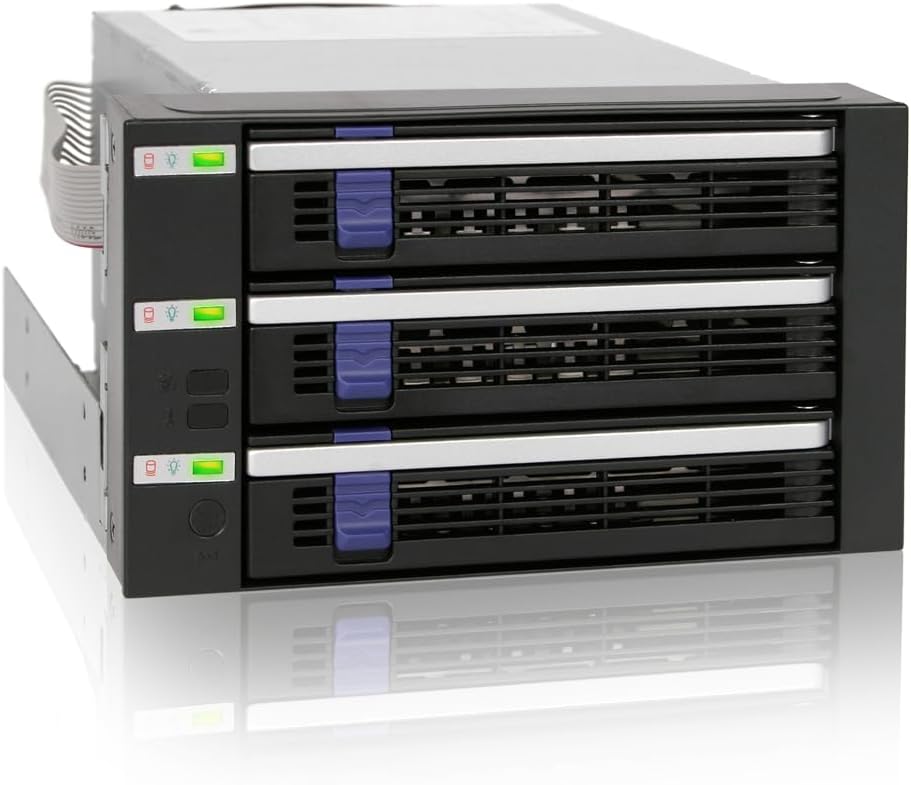
The ICY DOCK FatCage MB153SP-B fits three 3.5-inch SATA or SAS drives into two 5.25-inch bays. Its 4.5 rating is the second highest in the selection, and the space-efficient footprint makes it useful for workstations and servers that need hot-swappable capacity without consuming a full external enclosure.
We may earn a commission when you buy through this link, at no additional cost to you.
The drive bay supports SATA I, SATA II, and SATA III at up to 6Gbps, as well as SAS 3.0 up to 12Gbps. It uses SATA power connectors for compatibility with modern power supplies, and the full-metal enclosure helps dissipate heat. The listed information refers to both an 80mm and a 92mm cooling fan, so buyers should confirm the exact configuration of the received unit.
Hot-swap support allows a failed or departing drive to be replaced without fully dismantling the system. The enclosure is designed to occupy two external 5.25-inch drive bays, making it a better fit for a desktop chassis or server than for a laptop or a simple Thunderbolt storage setup.
Choose this model for IT professionals, system builders, and small server administrators who need dense internal hot-swap storage. Its SAS compatibility and compact installation are compelling. Because it does not provide its own USB-to-SATA controller, the host system must have the necessary controller, cabling, and operating-system support.
The unusual footprint conserves internal space by fitting three 3.5-inch drives into two 5.25-inch positions. This makes the enclosure attractive for workstations and servers where every expansion bay has a practical limit.
Supporting both SATA and SAS gives the enclosure broader relevance across IT inventories. Actual performance and multi-drive access depend on the host controller, and the enclosure should be paired with appropriate cabling and a compatible system design.
We may earn a commission when you buy through this link, at no additional cost to you.
The SilverStone SST-FS305-12G is an internal hot-swap cage that holds five 3.5-inch drives in three 5.25-inch bays. Although it is not a three-bay product, its high density and twelve-gigabit SAS capability make it worth considering for users whose priority is maximum storage in a constrained chassis.
We may earn a commission when you buy through this link, at no additional cost to you.
The drive cage supports SAS at up to 12Gbit/s and SATA at up to 6Gbit/s. Its trayless, screwless design removes the need to physically attach each drive with screws. Individual metal key locks for every drive add physical security, while adjustable drive-status LEDs and fan controls let administrators manage monitoring and cooling according to their system.
The all-aluminum body has a brushed finish and provides a rigid enclosure for multiple hard disks. As an internal component, it requires three available 5.25-inch bays, appropriate SAS or SATA cabling, and a compatible host controller. It is intended for system integration rather than plug-and-play desktop use.
This cage is a better choice for a storage server or enthusiast workstation that can make use of five drives. Its 3.9 rating is the lowest in this group, so buyers should be comfortable with internal installation and should validate chassis and controller compatibility. It does not offer a simpler USB-connected experience.
The cage prioritizes drive density, fitting five 3.5-inch disks into three 5.25-inch positions. This provides greater capacity than a conventional three-bay cage, but it requires a chassis with enough front space and suitable cooling.
Trayless installation, screwless handling, and individual key locks simplify and protect drive access. Adjustable LEDs and fan controls add useful management features for administrators comfortable configuring internal storage hardware.
We may earn a commission when you buy through this link, at no additional cost to you.
The Chenbro SK32303T3 is a straightforward internal three-bay hard drive enclosure with a SAS and SATA backplane. Its perfect 5.0 rating reflects a strong customer rating, while the compact two-bay chassis footprint and 12GB/s SAS support make it relevant to system builders who need enterprise-style internal storage.
We may earn a commission when you buy through this link, at no additional cost to you.
The enclosure fits into two 5.25-inch drive bays and accepts three 3.5-inch hard drives. A rear-mounted 60mm fan supports cooling, and each hot-swap carrier includes HDD failure and activity indicators. These features allow administrators to identify drive status without opening the chassis or removing a drive.
The supplied information is limited, so buyers should verify the exact connector requirements, host-controller support, and physical clearance before purchase. It is clearly an internal backplane rather than a standalone USB product, and it does not provide a convenient way to attach it directly to a laptop or ordinary desktop.
This model is best for technicians building or upgrading a rack, workstation, or server that already supports SAS or SATA backplanes. Its true three-bay layout, hot-swap indicators, and compact footprint make it a practical internal option. It is less suitable for consumers seeking a simple external enclosure with broad plug-and-play connectivity.
Unlike some alternatives in this guide, the SK32303T3 provides exactly three 3.5-inch drive positions. Its use of two 5.25-inch bays helps preserve internal chassis space while retaining enough capacity for a substantial storage array.
Per-drive failure and activity indicators make it easier for an administrator to identify a problem. The rear-mounted fan provides active cooling, while hot-swap carriers support serviceability when the host environment is configured correctly.
We may earn a commission when you buy through this link, at no additional cost to you.
The right enclosure depends on how and where it will be used. Interface speed, drive protocols, cooling, expansion, operating-system support, and installation style can matter more than the number of bays alone.
USB 3.0 provides a stated 5Gbps link, while USB 3.2 Gen 2 offers 10Gbps. The faster interface is valuable for SSDs and large transfers, although real results also depend on the source drive, computer, host controller, file sizes, and whether several disks are active simultaneously. A Type-C cable improves modern laptop compatibility, but USB-A remains useful with older systems and some desktop setups.
Most consumer-oriented products in this guide accept both 2.5-inch and 3.5-inch SATA hard drives and SATA SSDs. Internal server-style products may add SAS support, which requires a compatible SAS host controller and appropriate cabling. M.2 NVMe compatibility is also protocol-specific, so a physical M.2 slot alone does not guarantee that a particular drive will work.
Three spinning hard drives generate heat and vibration, especially during sustained transfers. Aluminum construction improves heat transfer, while an active fan can maintain more consistent temperatures. Some models use temperature-controlled fans or quieter standby behavior, which is preferable for a desk. Always leave airflow around the enclosure and avoid placing it inside a closed cabinet without ventilation.
Hot-swapping allows a drive to be removed or replaced without shutting down the enclosure, which is valuable for backup rotation and server maintenance. Tool-free trays make installation easier, but they do not automatically provide hot-swap capability. The CENMATE eSATA model is a notable exception because its tray design is tool-free while hot-swapping remains unsupported.
Several CENMATE models support up to 20TB per SATA drive, while the hybrid model lists larger HDD and NVMe capacities. Daisy chaining can expand the number of connected enclosures, but it does not create RAID by itself. Consider current capacity, likely future drive sizes, file growth, and whether a backup plan is separate from the storage array.
A standalone USB enclosure can move between compatible computers and usually requires no internal cabling. An internal backplane saves desktop space and may support SAS, but it requires an appropriate chassis, controller, power connections, and technical setup. The StarTech, ICY DOCK, SilverStone, and Chenbro entries are internal products and should not be judged as ordinary plug-and-play desktop boxes.
The CENMATE external models list Windows, Mac, and Linux compatibility and use a plug-and-play approach. Internal SAS and SATA backplanes depend more heavily on operating-system drivers, controller compatibility, and configuration. Multi-bay eSATA access can also depend on RAID-aware host support. Confirm all three elements: the enclosure, the cable, and the computer or controller.
Several products are explicitly direct-attached storage without RAID or NAS capabilities. Individual drives may appear as separate volumes, and the connected computer determines how they are formatted, pooled, mirrored, or otherwise managed. Users who want simplified array management, network access, or automatic rebuilding should consider a dedicated NAS or RAID appliance rather than assuming a multi-bay enclosure provides those functions.
Before installing a drive, confirm that it uses a supported interface and that the enclosure is disconnected from power. For SATA models, secure each drive in its tray or carrier according to the manufacturer's instructions, align the connector, and slide it fully into position. Internal backplanes should be installed with the system powered off and disconnected from mains power.
Connect the enclosure with the supplied USB or internal data cable, then attach power if the installation requires it. Use a drive formatting utility supplied by your operating system or drive manufacturer to give each disk a suitable file system. Label the volume clearly, confirm that all expected drives appear, and create a backup before moving important files into the enclosure.
For safe operation, leave space around external enclosures and avoid abrupt removal while disks are active. Use the operating system's safe-eject command for removable USB storage and shut down or disable hot-swap operations according to the enclosure instructions before replacing a drive. Periodically inspect cables, airflow, drive temperatures, and backup logs, and replace the enclosure if it shows overheating, unusual noise, or unstable connections.
Only if the enclosure includes dedicated RAID hardware and supports the exact array level you need. Many multi-bay enclosures are direct-attached storage, meaning each drive appears separately and the connected computer controls how the disks are used. Software RAID, NAS features, and hardware RAID are not interchangeable, so check the product description before assuming multiple disks will combine automatically.
It can be sufficient for many file-transfer and backup tasks, with a stated interface rate of 5Gbps. It may not fully exploit a fast NVMe SSD or saturate several high-performance SATA SSDs at once. USB 3.2 Gen 2 provides a larger 10Gbps interface, but the host computer, drive types, and workload determine the actual benefit.
Cooling is strongly recommended during sustained multi-drive operation because hard drives generate heat and vibration. Aluminum cases help dissipate heat, while an active fan improves airflow. Even with a fan, leave clearance around the enclosure and avoid enclosing it in a poorly ventilated cabinet. A quieter system may benefit more from a temperature-controlled fan than from one that runs continuously at maximum speed.
Most of the external SATA enclosures in this guide accept 2.5-inch and 3.5-inch SATA hard drives and SATA SSDs. The hybrid CENMATE model adds M.2 NVMe positions, while internal SAS models may require SAS drives or a compatible SAS controller. Always confirm the drive form factor, interface protocol, connector type, and maximum capacity before installation.
Tool-free installation means you can mount or remove a drive tray without screws or other tools. Hot-swapping is different: it allows a drive to be exchanged while the enclosure remains powered and the host system is running. Some products offer both, while others provide tool-free trays without hot-swap capability, so the two features should be checked separately.
Some CENMATE models include a USB host port for daisy chaining, with support stated for up to three devices and expanded aggregate capacity. Compatibility and stable operation depend on the host USB port, drive configuration, and workload. Daisy chaining does not automatically provide RAID, redundancy, or a unified network share.
They can be, provided the case has enough 5.25-inch space and the computer has a compatible controller and cabling. Internal models are primarily aimed at workstation and server builders who value hot-swapping and drive density. Anyone else should verify connector layout, power requirements, operating-system support, and installation skill before choosing one.
Install and format each drive using an appropriate utility before placing important files on it. Newly initialized drives may need a filesystem, allocation, or platform-specific preparation to work correctly with the intended operating system. Maintain at least one separate backup because the enclosure itself does not protect against accidental deletion, logical corruption, or hardware failure.
The CENMATE Aluminum 3 Bay 10Gbps model is the strongest all-around selection for users who want a fast USB interface, active cooling, hot-swappable trays, and daisy-chain expansion. The fanless CENMATE USB 3.0 enclosure delivers the most economical route to three hot-swappable SATA bays, while the TERRAMASTER D4-320 stands out as a premium external option with four bays and refined cooling.
Prioritize the connection method before comparing cosmetic or convenience features. USB users should choose between five- and ten-gigabit interfaces, while workstation and server builders should focus on SAS or SATA controller support, chassis clearance, and cooling. Tool-free trays, hot-swapping, status indicators, and expansion can then narrow the field according to maintenance needs.
Before ordering, confirm drive size, protocol, connector requirements, capacity limits, operating-system compatibility, and available space. Product specifications, availability, and pricing can change, so check the current listing and manufacturer information before making a final purchase decision.