
Govee HDMI 2.1 AI Sync Box 2
4.3Editor score
HDMI 2.1 connectivity
Up to 4K at 144Hz
RGBWIC four-color mixing
Matter and voice support
An LED sync box for TV backlighting can turn ordinary viewing into a more immersive experience by extending onscreen colors around your television. The right model should react quickly, match colors convincingly, fit your screen, and work smoothly with the HDMI sources and smart-home controls you already use.
We compared ten prominent options based on signal extraction, supported resolutions, synchronization methods, LED density, zone control, app features, installation requirements, and TV-size compatibility. The list includes HDMI-based systems that need an external source as well as camera-based alternatives that can work directly with content shown on the television.
Each review identifies the product’s strongest benefits, practical limitations, and ideal buyer. Ratings reflect the available customer feedback, while technical details come from the supplied product information. Prices and promotions can change, so confirm current availability and cost before making a final purchase.
4.3Editor score

4.4Editor score

As an Amazon Associate we earn from qualifying purchases.
The comparison below covers signal type, resolution support, synchronization approach, included lighting, and important compatibility limits, helping separate basic HDMI kits from advanced systems designed for high-end televisions, consoles, and expansive smart-home setups.




The PHILIPS Smart Lighting HDMI Sync Box is a Connected by WiZ lighting package designed for 55- to 65-inch televisions, and its available rating is 3.7. Its central advantage is direct extraction of the video signal from an HDMI source, allowing colors from movies, games, and streaming content to inform the surrounding RGBIC strip without a camera positioned above the screen.
We may earn a commission when you buy through this link, at no additional cost to you.
Signal support extends to 4K at 60Hz, HDR10+, and Dolby Vision, making the box suitable for many modern home-entertainment setups. The WiZ app provides preset synchronization modes and separate controls for color saturation and light intensity, while the included strip can be expanded with other compatible Connected by WiZ products. A built-in microphone also allows the lights to pulse with music from any source.
The main limitation is architectural: syncing requires an external streaming device, cable box, console, or another HDMI source, so applications running natively on the television cannot be synchronized directly. A separate HDMI switcher is also needed to change among multiple source devices, and the product is not compatible with Philips Hue. Its 3.7 rating is respectable for a new offering, although it suggests that some buyers may encounter setup or compatibility frustrations.
This is a sensible choice for a household already invested in WiZ lighting, especially if its ecosystem and app controls appeal more than direct television integration. It is less appropriate for Hue users, owners of very large screens, or anyone who wants effortless synchronization with built-in smart-TV applications. For those requirements, a multi-input HDMI 2.1 kit may offer a more suitable foundation.
Reading the color signal directly from the HDMI source can produce cleaner synchronization than a camera-based system and avoids mounting a sensor above the television. The trade-off is that the source device must route its picture through the sync box.
Compatibility with Connected by WiZ products makes this more than a single-screen accessory. Additional color-changing Wi-Fi and Bluetooth lights can join the synchronized effect, while the app gives users some control over saturation and intensity.
We may earn a commission when you buy through this link, at no additional cost to you.
The Fancyleds 3 Port 2.1 Fancy Sync Box combines a three-input HDMI 2.1 hub with a 96-RGBW-LED-per-meter strip intended for 70- to 95-inch televisions. Its available rating of 4.4 is the highest among the camera-based and HDMI-based systems in this guide, reflecting a favorable balance of connectivity, performance, and included equipment.
We may earn a commission when you buy through this link, at no additional cost to you.
Three HDMI 2.1 inputs simplify access to consoles, streaming devices, and set-top boxes without immediately requiring an external switcher. The box supports 4K at 120Hz, 4K at 144Hz, and 8K at 60Hz, along with HDR, Dolby Vision, ARC, ALLM, and VRR. Its stated high-speed synchronization is particularly relevant to fast games, where delayed illumination would be easy to notice.
The included strip uses 96 RGBW LEDs per meter, which supports a bright and even glow with smooth transitions and a dedicated white diode for more convincing neutral tones. HDCP compliance helps prevent protected content from producing black screens or playback errors. The main compromises are the need for an external HDMI device, the lack of synchronization with native television apps, and the recommendation not to use a PC as the source.
This kit is a strong match for large-screen home theaters, modern gaming rooms, and households with several HDMI sources. It is especially attractive when a buyer wants advanced HDMI 2.1 features and a complete large-TV lighting package in one purchase. Buyers with smaller televisions may find that a more compact 56- to 65-inch system better suits their setup.
The three-port arrangement is one of the product’s clearest advantages over single-input models. Users can connect several source devices and select among them from the box rather than adding a separate switcher before the lighting system.
At 96 RGBW LEDs per meter, the strip offers fine color transitions and reduced dark gaps between individual diodes. The dedicated white component also gives the system a more useful option for bright, neutral backlighting instead of relying exclusively on mixed colors.
We may earn a commission when you buy through this link, at no additional cost to you.
The AIYATO LED TV Backlight with HDMI Sync Box is built around a 16.4-foot RGBIC strip for 75- to 85-inch televisions. It offers HDMI 2.0 synchronization, app control, Wi-Fi operation, sound-reactive lighting, and support for Alexa and Google Assistant, making it a feature-rich option in the budget category.
We may earn a commission when you buy through this link, at no additional cost to you.
Color synchronization is designed to identify edge colors and reproduce them around the display, while music mode can make the strip react to nearby sound through a microphone. A scheduled timer allows the lights to turn on and off automatically according to set days and times. Installation is straightforward: the strip uses adhesive backing and can be mounted on a clean, dry surface behind the television.
The product does not synchronize with video shown by the television’s own applications because most television HDMI ports function as inputs rather than signal outputs. A set-top box or other compatible output device is therefore required. The listing also has no available customer rating, so there is insufficient feedback here to compare its long-term reliability or setup experience against well-reviewed alternatives.
This product is best for buyers who want a long, app-controlled strip for a large television without moving into a high-end HDMI 2.1 system. It offers particularly useful music and scheduling features, but buyers who need native smart-TV synchronization or advanced console features should look at a camera-based or more capable HDMI model.
The 16.4-foot length gives it enough coverage to trace the perimeter of many 75- to 85-inch displays. Because the strip can be applied around the back of a television, it creates a broad ambient effect without requiring separate floor lamps or accent fixtures.
Automatic timers make the kit useful for everyday ambience, while microphone-based music reactions offer a simple alternative to HDMI synchronization. These features work together with app and voice controls, giving users several ways to automate the lighting.
We may earn a commission when you buy through this link, at no additional cost to you.
The Govee HDMI 2.1 AI Sync Box 2 is a premium, HDMI-based lighting system for 55- to 65-inch televisions, with an available rating of 4.3. It supports 8K at 60Hz and 4K at 144Hz, making it one of the more technically capable choices for modern gaming consoles, streaming hardware, and high-end displays.
We may earn a commission when you buy through this link, at no additional cost to you.
Its CogniGlow technology uses AI to recognize images and text and determine suitable lighting triggers, while the RGBWIC strip adds a white channel to improve color blending and neutral tones. The strip has 75 LEDs per meter and a specified brightness of 450 lumens per meter. VRR and ALLM support, Matter integration, DreamView expansion, Dolby Vision, and Dolby Atmos support broaden its appeal beyond basic screen matching.
Automatic source switching is not supported when multiple devices are connected, so buyers may need to manage inputs manually or add their own switcher. The product information also notes that enabling HDR, HDR10+, or Dolby Vision can reduce the saturation of the lighting effect. This is described as normal behavior, and the app can be used to adjust saturation toward a preferred result.
The Govee is a compelling option for gamers and smart-home enthusiasts who value HDMI 2.1 performance, AI-assisted effects, and ecosystem expansion. It is best suited to a 55- to 65-inch television and works most naturally with an external source. Buyers primarily interested in direct smart-TV app capture may prefer one of Govee’s camera-based lights instead.
Support for 4K at 144Hz, 8K at 60Hz, VRR, and ALLM makes the box suitable for demanding console setups. The signal is analyzed directly, avoiding the color confusion and ambient-light interference that can affect camera-based matching.
CogniGlow can identify content types and trigger specific lighting responses, while AI Generative Lighting allows spoken, typed, or image-based prompts to shape effects. These functions give the product more creative flexibility than a conventional color-only sync box.
We may earn a commission when you buy through this link, at no additional cost to you.
The WiZ Connected HDMI Sync Box is a straightforward RGBIC backlighting package for 55- to 65-inch televisions. Its available customer rating is 3.6, placing it among the lower-rated choices here, but the underlying feature set is appropriate for users seeking uncomplicated HDMI color synchronization without a camera mounted over the display.
We may earn a commission when you buy through this link, at no additional cost to you.
The box reads the signal directly from a streaming device, cable box, or console and supports 4K at 60Hz, HDR10+, and Dolby Vision. Its clean installation avoids a camera, calibration process, and visible wiring above the screen. In the WiZ app, users can choose preset sync modes and adjust color saturation and light intensity for movies, games, or general viewing.
The design has two important limitations. First, it includes one HDMI input, so users with multiple sources may need an external HDMI switcher. Second, synchronization depends on an external source and does not work with native smart-TV applications. Its 3.6 rating also suggests that buyers should examine recent customer feedback for recurring setup or compatibility issues before committing.
This kit works best for a straightforward living-room setup with one principal HDMI source. It is particularly attractive to people who prefer clean installations and already use WiZ-compatible smart lights. Those needing several source inputs, higher refresh rates, or direct television-app capture should consider a more advanced alternative.
Because the system extracts colors from the HDMI signal, there is no camera to attach above the television. The result is a less obtrusive installation and a reduced need for room-dependent calibration.
The box can synchronize with compatible Wi-Fi and Bluetooth WiZ lights, allowing the television effect to extend into a room. Preset modes, saturation controls, and intensity adjustments help users avoid an exaggerated look.
We may earn a commission when you buy through this link, at no additional cost to you.
The Govee TV Backlight 3 is a camera-based alternative that captures colors directly from a 55- to 65-inch television screen. Its available rating is 4.3, and the dual 4MP camera arrangement, 24-zone mapping, and 60-LED-per-meter RGBWIC strip make it a strong choice for users who want broad source compatibility without routing every device through a sync box.
We may earn a commission when you buy through this link, at no additional cost to you.
A hybrid optical lens structure is designed to reduce color dispersion and capture sharper edges, while AI color mapping divides the display into 24 zones for independent analysis. The strip combines color and dedicated white channels for a cleaner neutral tone, and the system is stated to be 20 percent brighter with richer layers and depth. A dual-chip processor supports millisecond-level response according to the supplied information.
Because this is a camera system, placement and ambient conditions can influence color accuracy. The slim 90-millimeter gravity-fit camera is designed for ultra-thin televisions, and upgraded adhesive helps stabilize it, but it still occupies the upper edge of the screen. Its compatibility with streaming, gaming, and other displayed content avoids the external-source limitation common to HDMI boxes.
This is an excellent option for mixed entertainment setups where content may come from television applications, consoles, discs, and streaming devices. It also supports Matter, Alexa, DreamView expansion, and AI Generative Lighting. The main constraint is size: it is not intended for the 70-inch-and-above installations addressed by several HDMI-based kits in this guide.
The dual cameras and 24-zone mapping allow different portions of the image to influence separate sections of the strip. This should create a more nuanced gradient than a system that samples the screen as one uniform color field.
Capturing the displayed image means the lights can react to television applications without a separate streaming box or set-top box. That flexibility makes the product particularly useful for viewers who switch among apps, broadcasts, and external sources.
We may earn a commission when you buy through this link, at no additional cost to you.
The Fancyleds 2.1 Fancy Sync Box targets 56- to 65-inch televisions and pairs HDMI 2.1 signal handling with a 96-RGBW-LED-per-meter strip. Its available rating of 4.1 indicates generally favorable customer feedback, and the specification set is especially attractive for gamers seeking high-refresh-rate support in a compact living-room system.
We may earn a commission when you buy through this link, at no additional cost to you.
The box supports 4K at 120Hz, 4K at 144Hz, and 8K at 60Hz, with HDR, Dolby Vision, ARC, ALLM, and VRR listed among its supported features. The high-density strip is designed to deliver smooth color changes without visible dark gaps, while its dedicated white diode supports more natural white tones. Stated high-speed synchronization helps keep illumination aligned during quick action sequences.
An external HDMI source is required, and native smart-TV applications cannot be synchronized. The supplied information also recommends against using a PC as the source, which may narrow its appeal for computer users. Although the product belongs to the advanced Fancyleds line, this model’s feature description emphasizes a single sync-box connection rather than the three-input convenience of the larger 70- to 95-inch kit.
This product is a good fit for owners of 56- to 65-inch televisions with modern consoles and streaming hardware. Its combination of HDMI 2.1 bandwidth, high-density RGBW lighting, and straightforward strip inclusion offers a capable middle ground. Buyers with several HDMI sources should verify whether the included input configuration is sufficient or whether an external switcher would be needed.
Support for 4K at 144Hz, VRR, and ALLM makes the box relevant to modern console gaming. Direct HDMI analysis also avoids the calibration uncertainty associated with camera-based systems in brightly lit or reflective rooms.
The 96 LEDs per meter create closely spaced color points across the strip, supporting smoother transitions and a more even wall wash. A separate white diode allows the lighting to remain useful when vivid saturated color is not the goal.
We may earn a commission when you buy through this link, at no additional cost to you.
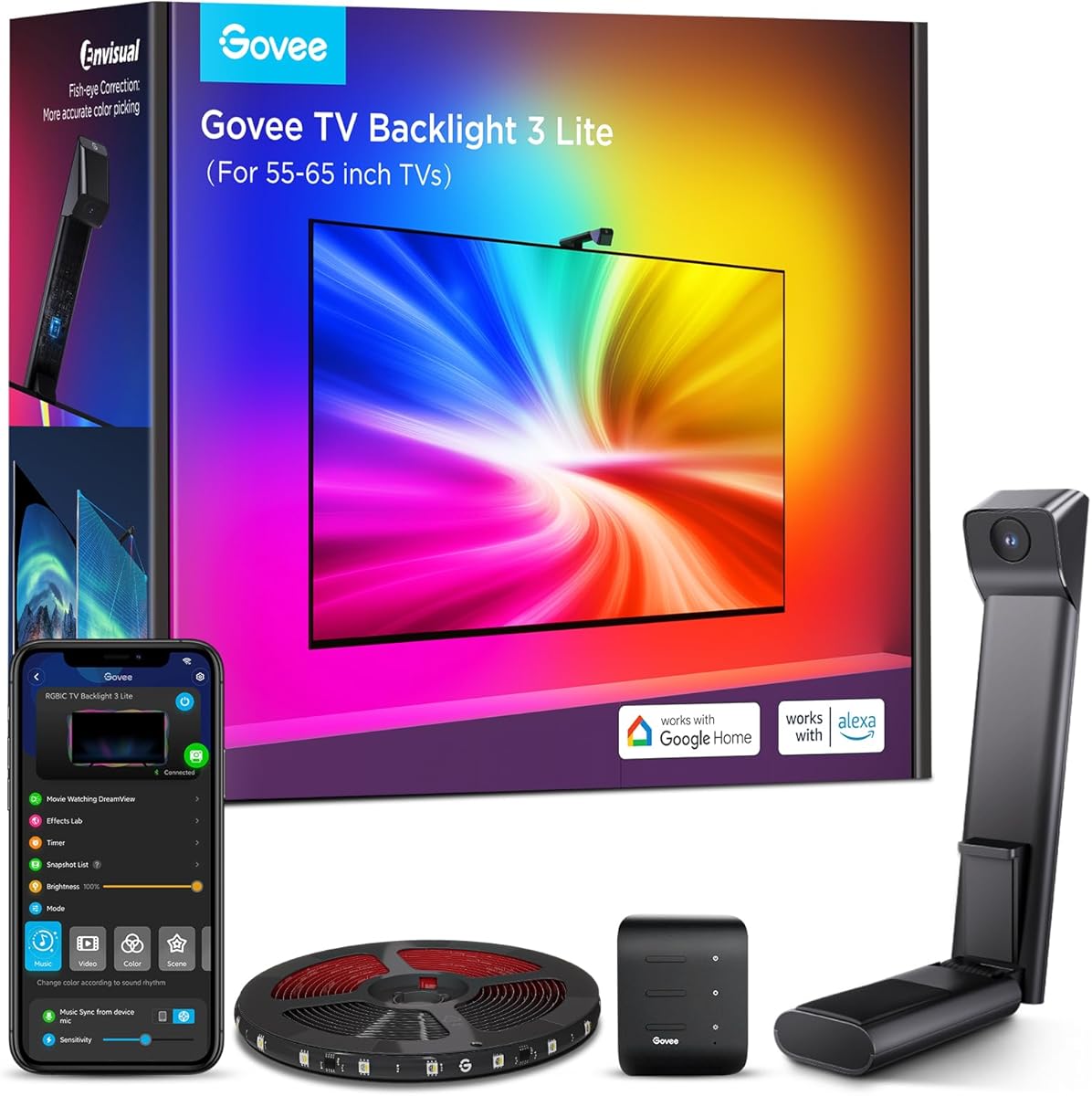
The Govee TV Backlight 3 Lite is a camera-based RGBICW lighting kit with an 11.8-foot strip designed for 55- to 65-inch televisions. Its available rating of 4.5 is tied for the highest customer score in this group, making it a notable choice for buyers who prioritize flexible content capture and a straightforward ambient-lighting package.
We may earn a commission when you buy through this link, at no additional cost to you.
Govee’s Envisual chip includes fish-eye correction to improve the effective capture range and color matching near screen edges. The 4-in-1 lamp beads add a warm-white component, improving neutral tones and overall color density. A gravity-hanging camera design helps the sensor stay stable and accommodates ultra-thin televisions, while adhesive can provide further support.
The system can capture colors from television applications, streaming services, online videos, and games without an external HDMI source. Govee Home and voice commands provide access to black-bar elimination, blank-screen detection, and more than 99 preset effects. DreamView can link up to seven sub-devices for a broader room effect. As with other camera systems, however, the sensor must be positioned where it can see the display clearly.
This Lite model is well suited to the average living-room television, especially for users who want a complete backlight without adding a signal box. It combines strong customer feedback with a manageable strip length and broad smart-control options. Those with larger televisions or a need for HDMI 2.1 specifications should choose one of the dedicated sync-box kits instead.
The upgraded chip and fish-eye correction function expand the camera’s effective field, helping the strip match colors closer to the screen’s outer edges. This is important for creating a continuous halo rather than a concentrated glow in the center.
Preset effects, blank-screen detection, and black-bar elimination are accessible through the Govee Home app, while Alexa and Google Assistant support adds hands-free operation. The included camera design reduces the need for complicated calibration once it is mounted properly.
We may earn a commission when you buy through this link, at no additional cost to you.
The Linkind AI Sync TV Backlight Kit combines an HDMI 2.0 sync box with a long, trimmable 20-foot RGB strip. It is designed for televisions from 55 to 90 inches, giving it exceptional installation flexibility, and its available rating of 3.6 reflects a generally positive but less emphatic customer response.
We may earn a commission when you buy through this link, at no additional cost to you.
Color is captured directly from an external HDMI source, which avoids camera calibration and reduces the effect of room lighting. The kit can create ambient effects for movies, television programs, live sports, concerts, and games, while four music modes add a separate option for parties or casual listening. The AiDot app handles colors, brightness, effects, and scenes, with Alexa and Google Assistant support for hands-free operation.
The most important technical limitation is its stated support for HDMI 2.0 at up to 4K HDR with 30 frames per second. That is suitable for many streaming uses but may not suit buyers seeking 4K at 60Hz or higher through a modern console. Built-in smart-TV applications are also unsupported because the television’s own HDMI port generally does not provide a usable output signal.
This is a practical choice for large televisions that need a long strip and for households wanting direct HDMI matching without a camera. Its broad size range and trimmable design are particularly useful when the precise dimensions of a wall or television are uncertain. High-end gaming buyers should first verify that their required resolution and refresh rate are supported.
The 20-foot length can be trimmed to suit a broad range of 55- to 90-inch televisions. That flexibility makes it easier to account for narrow bezels, unusual stands, or a room layout in which extra strip must be hidden behind the display.
Direct HDMI sampling reads the source signal rather than photographing the screen, so it does not depend on camera angle or ambient room brightness. External source equipment is still necessary, and the supported 4K HDR frame rate should be checked before installation.
We may earn a commission when you buy through this link, at no additional cost to you.
The HDMI Sync Box TV Backlight is a 75- to 85-inch lighting kit with an available rating of 4.5. It combines real-time HDMI analysis, independently controlled lighting zones, a trimmable integrated strip, and app-based scene management in a package aimed at general home entertainment users.
We may earn a commission when you buy through this link, at no additional cost to you.
Its multi-zone system can assign different colors to separate sections of the strip, producing smoother transitions and a more nuanced perimeter effect. The Tuya or Smart Life app provides 12 scene modes and four music synchronization modes, with controls for color, brightness, and effects. Alexa and Google Assistant support allow hands-free adjustments once the lighting is connected to the appropriate ecosystem.
The system works with many common source devices, including the PS5, Xbox, Apple TV, Fire TV, Roku, Blu-ray players, and PCs. However, an external source is required, and synchronization does not work with built-in television applications. The supplied specifications do not state a maximum resolution or refresh rate, so buyers with demanding 4K or high-refresh-rate requirements should verify compatibility directly.
This product is a strong option for large-screen users who value independent zones and a high customer rating without needing a multi-port HDMI 2.1 hub. The trimmable strip is intended to eliminate dark corners and produce continuous edge-to-edge illumination. It is best for shoppers who can confirm that their streaming device, console, and television work together at the desired signal format.
Multi-zone control allows different parts of the strip to display distinct colors, creating a more natural gradient around the screen. The system therefore offers more visual nuance than a basic kit that assigns one color to the entire strip.
Tuya and Smart Life integration provides a broad app-based control set, while Alexa and Google Assistant enable convenient voice operation. Preset scene and music modes provide useful starting points that can be refined through direct color and brightness controls.
We may earn a commission when you buy through this link, at no additional cost to you.
The most useful lighting system is one that matches your television size, source equipment, room conditions, and preferred level of automation. Comparing signal methods, strip capacity, resolution support, and control options prevents a costly mismatch.
Choose HDMI extraction for clean, predictable matching and a minimalist installation. Choose a camera for broader source compatibility.
Measure before buying, and prioritize a trimmable strip with a stated size range that covers your display.
Match the box to your console, streaming device, television, and preferred refresh rate instead of focusing only on 4K.
Count your regular sources, then choose enough built-in inputs or plan to add a compatible switcher.
Prioritize dense RGBW lighting for smooth effects, and check whether the app offers separate saturation and intensity controls.
Verify the required app, voice assistant, wireless connection, and expansion ecosystem before installation.
For gaming, favor low-latency processing; for HDR viewing, confirm that the app provides enough control to tune the result.
Plan cable routing and mounting before peeling adhesive, and avoid bending the strip tightly around corners.
Start by identifying the source that sends video to the television. For an HDMI-based system, connect that source to the sync box, connect the box to the appropriate television input, and attach the light strip around the rear edge of the display. For a camera-based system, position the camera at the top center of the screen with a clear view of the displayed image. Clean the mounting area thoroughly before applying adhesive.
Power the equipment, download the required app, and connect the lights to the specified Wi-Fi network. For HDMI models, choose the correct source and begin with a moderate brightness level. For camera models, run any recommended calibration, adjust the camera angle, and test the effect with bright, dark, and colorful scenes. Disable or reduce the lighting if it competes with the picture, and use saturation and intensity controls to create a subtle bias-light effect rather than an overpowering glow.
For daily care, gently wipe the strip with a soft, dry cloth and keep liquids away from the electronics. Do not pull on individual diodes or sharply fold the strip. Check adhesive adhesion periodically, especially in warm rooms, and route cables so they do not place tension on the connectors. Update the app when prompted, review input settings after changing televisions, and adjust the schedule or effects as daylight and room conditions change.
That depends on the synchronization method. Camera-based backlights can analyze anything displayed on the screen, including applications running on a smart television. HDMI-based sync boxes generally require the content to pass through an external streaming device, console, cable box, or disc player, because a television’s HDMI input usually does not send its own application content back out through the sync box.
Only if you need to connect more sources than your sync box has available inputs. A switcher can make source selection convenient, but it should support the resolution, refresh rate, HDR formats, VRR, and other features used by your equipment. Some multi-port sync boxes already provide enough inputs, while single-input systems generally benefit from adding a compatible switcher.
HDMI syncing is often more consistent because it reads the actual source signal rather than estimating colors from a photograph of the screen. It is less affected by ambient room light, reflections, and camera positioning. Camera-based lighting offers greater compatibility with built-in television applications, so the most accurate method depends on whether consistent HDMI extraction or universal screen capture matters more.
For many living-room setups, HDMI 2.0 with 4K at 60Hz is a practical baseline. Modern gamers may prefer HDMI 2.1 support for 4K at 120Hz or 144Hz, 8K at 60Hz, VRR, and ALLM. Check the exact maximum frame rate, because some HDMI 2.0 products support 4K HDR only at 30 frames per second.
A higher LED density generally creates a more uniform strip with smoother color transitions and fewer dark gaps.
RGBW or RGBWIC strips are also useful because their dedicated white diode can produce cleaner neutral tones.
The best density still depends on strip length, viewing distance, mounting space, and whether the goal is vivid entertainment effects or subtle everyday bias lighting.
Yes, provided the sync box and any intervening switcher support the desired signal format. Many HDMI boxes are explicitly designed for consoles, streaming players, and set-top boxes. Connect the source to the box or switcher, connect the box to the television, and verify that HDR, VRR, ALLM, resolution, and refresh-rate settings pass through as intended.
Place the strip around the outer rear edge of the display so its light diffuses onto the wall behind and beside the screen.
For wall-mounted televisions, check the gap and ensure the strip is not pinched or folded.
For thicker sets, the strip may need to sit slightly farther back to create a smooth, even wash rather than concentrated bright points.
Many listed systems support Alexa, Google Assistant, or both through their companion apps and smart-home integrations.
Voice capabilities vary: users may be able to change colors, brightness, scenes, or schedules but may not be able to select every detailed synchronization mode.
Check the listed assistant and lighting-related functions before installation, and confirm that the required app account and Wi-Fi network are ready.
The Fancyleds 3 Port 2.1 Fancy Sync Box stands out for its three inputs, HDMI 2.1 capabilities, high-density RGBW strip, and large-screen coverage. The Govee HDMI 2.1 AI Sync Box 2 is the strongest premium choice for buyers who value AI-assisted lighting, modern console support, and smart-home expansion, while the AIYATO kit provides a practical lower-cost route to a long, app-controlled strip for a large television.
Prioritize the factor that affects daily use most: choose an HDMI system for clean signal-based matching, or a camera system for compatibility with native television content. Then confirm television size, source count, supported resolution, refresh rate, app requirements, and strip length. A system that comfortably handles your actual equipment is more valuable than one with headline features that your setup cannot use.
Before ordering, review current customer feedback, confirm the included accessories and installation requirements, and compare the present cost of the complete package. Prices, promotions, app compatibility, and source-device support can change over time, so the final purchase should be based on both the physical television setup and the manufacturer’s latest documentation.