
Creative Pebble 2.0
4.6Editor score
Single-cable USB connectivity
Elevated 45-degree drivers
Front-facing volume control
Discover the best small speakers for computers, comparing USB, Bluetooth, and AUX models for sound quality, connectivity, compact size, and everyday use.
Small speakers for computers can make a major difference in videos, calls, games, music, and everyday work. The right pair should fit your available desk space, connect without unnecessary complexity, and deliver balanced sound at a comfortable listening level. Compact dimensions alone do not guarantee good performance, so speaker design and connectivity matter just as much as size.
This guide compares ten small speaker systems for computers using the supplied ratings, documented features, connection options, physical specifications, and intended uses. It covers budget USB speakers, Bluetooth and AUX models, a compact sound bar, a meeting-oriented speakerphone, and a larger 2.1 system for buyers who prioritize stronger output and bass rather than the smallest possible footprint.
Each review identifies the strongest benefit and the main trade-off of its featured product, helping you distinguish basic desktop speakers from flexible wireless models and room-filling audio systems. Ratings and specifications reflect the supplied product information, while prices and availability can change, so compare the current listing and your computer's connections before purchasing.
4.6Editor score

4.4Editor score

4.5Editor score
The table below compares all ten featured systems by audio format, power, connection style, and practical desktop features. It makes clear which products prioritize simple USB operation, which add wireless flexibility, and which are designed for stronger music, gaming, or conference audio.




The Creative Pebble V3 is a 4.4-rated compact stereo system that stands out as the most versatile small speaker set in this guide. It combines USB-C computer audio, Bluetooth 5.0, and a 3.5mm AUX input in a modern two-speaker design. That range of connections lets it move easily between a desktop, laptop, phone, or tablet without requiring a dedicated amplifier.
We may earn a commission when you buy through this link, at no additional cost to you.
Its larger 2.25-inch full-range drivers are documented as producing richer, more powerful audio with enhanced bass compared with earlier Pebble models. The built-in gain switch is particularly useful when a compatible computer or USB power source can deliver enough current for amplified output. Clear Dialog processing is another practical feature for videos, online lessons, television, and streamed series, where intelligible speech matters as much as general sound effects.
The main trade-off is that connection versatility does not eliminate every accessory question. A USB-C to USB-A converter is included for compatibility with older computers, but the 3.5mm AUX cable is not included. Its peak output figure may also exceed what some low-power USB ports can sustain at full amplification, making port selection relevant. Even so, the V3 offers the best balance of compact form, useful processing, and connection options.
Choose the Pebble V3 if your computer has USB-C, you want one compact pair that can also handle wireless audio, and you regularly watch content where dialogue clarity matters. It is a particularly strong fit for home offices, dorm rooms, and modern desks where convenient switching between computer and phone is valuable. For a straightforward all-purpose small speaker system, this is the strongest overall recommendation.
The V3 reduces cable clutter when paired with a modern computer by drawing power and receiving digital audio through USB-C. Bluetooth 5.0 and AUX provide additional options, so the same speaker pair can handle computer audio, streamed media from a phone, or a wired analog source.
Clear Dialog processing is designed to make spoken words easier to follow without requiring maximum volume. That makes the system especially useful for lectures, interviews, films, web videos, and collaborative calls when intelligibility is more important than heavy background effects.
We may earn a commission when you buy through this link, at no additional cost to you.
The Creative Pebble 2.0 carries a 4.6 rating, the highest among the ten featured products, and it offers a focused solution for computer users who want uncomplicated audio. A single USB cable handles both power and sound, eliminating the need for a separate power adapter or analog cable. For a student, office worker, or casual listener, that simplicity is a major practical advantage.
We may earn a commission when you buy through this link, at no additional cost to you.
Custom-tuned far-field drivers and rear-facing passive radiators form the core of the audio design. The passive radiators help support bass reproduction without adding separate powered bass cabinets, while the elevated drivers direct sound upward toward a seated listener. Its documented frequency response runs from 100Hz to 17kHz, and front-facing controls allow quick volume changes without reaching behind either speaker.
The trade-off is a narrower connection strategy than the Pebble V3. This set is designed around USB computer audio and does not offer the newer model's Bluetooth, AUX, amplified gain switch, or dialog processing. The 17kHz upper limit may also be less accommodating for listeners who care about fine treble detail, although the rating indicates broad customer satisfaction with the overall package.
The Pebble 2.0 is the best budget choice for a fixed computer desk where simple USB plug-and-play operation matters more than wireless flexibility. It suits general music, video, online learning, and everyday productivity, and its compact styling makes it easy to place beside a monitor. Choose it when you want reliable, uncluttered basics without paying for features you may never use.
Using one USB cable for power and audio keeps installation straightforward and avoids clutter around the computer. You can connect the system to a compatible desktop or laptop and begin listening without configuring drivers or hunting for a separate adapter.
The 45-degree upward orientation sends more of the sound directly toward the listener seated at the desk. This design also preserves useful space around the monitors and makes each enclosure easier to place on a compact work surface.
We may earn a commission when you buy through this link, at no additional cost to you.
The Amazon Basics Stereo 2.0 is a 4.4-rated pair designed to make desktop audio accessible through two familiar routes: USB power and a 3.5mm audio input. The speakers themselves are powered by the computer's USB port, while the analog input carries sound from a PC, laptop, or another compatible source. This arrangement is common, understandable, and easy to adapt to different setups.
We may earn a commission when you buy through this link, at no additional cost to you.
The in-line volume control means you can adjust output without navigating software settings. Blue LED lights provide a clear operating indication, while the metal finish and scratch-free padded base give the system a practical desktop appearance. A bottom radiator is included to support a springier bass response, giving the basic 2.0 design more low-end character than many similarly straightforward speakers.
Its limitations are equally clear. It has no Bluetooth connection, so it cannot stream wirelessly from a phone, and because the USB lead handles power rather than digital audio, you need a separate 3.5mm connection for sound. Modern computers without a traditional headphone jack may also require an appropriate adapter, depending on the ports available on the device.
This Amazon Basics pair is a sensible option for users who want easy volume control, a recognizable analog connection, and a small two-speaker arrangement. It is well suited to home offices, study spaces, and basic entertainment setups where USB is already available for power. If your priority is simple operation with a physical volume control, it delivers that clearly.
Separating power from audio makes the system broadly usable with computers that expose a USB port for charging and a standard headphone output for sound. It is a flexible arrangement for desktop setups, although newer ultra-thin laptops may require a compatible adapter.
The front-adjacent inline control, blue status lights, metal finish, and padded base reflect attention to everyday use. These details help the speakers remain convenient to operate while protecting the enclosures from scratches during regular placement.
We may earn a commission when you buy through this link, at no additional cost to you.
The Amazon Basics Compact USB is a 4.2-rated system built for small desks, dorm rooms, and temporary workstations. It runs from a 5V USB source, includes no installation requirement, and measures just 2.76 by 3.55 by 5.3 inches per speaker. Its approximately 1.4-pound total weight also keeps the system easy to move when you need to clear workspace.
We may earn a commission when you buy through this link, at no additional cost to you.
One front control handles turning the speakers on, entering standby, and changing volume. A 3.5mm headphone jack allows private listening without unplugging the entire speaker system. The documented frequency range extends from 103Hz to 20kHz, while total RMS output is 2.2 watts, divided between two 1.1-watt speakers. These figures place it clearly in the lightweight desktop category rather than among high-output systems.
Low power and the need for a separate analog audio cable are the main limitations. It is not intended to overpower a large room or deliver the deep bass associated with a subwoofer system, and some modern computers may require an adapter for the audio connection. Even with those constraints, the plug-and-play design is useful for people who prioritize portability and immediate setup.
Choose this model when desk space is scarce, your use involves close-range listening, and you want a dedicated headphone jack in the speaker system. It is also a logical travel companion for a laptop, provided you carry the appropriate audio connection. For modest, focused desktop audio in a compact footprint, it delivers exactly what its specifications promise.
The compact measurements make this pair easy to position beside a laptop or within a limited monitor shelf area. Because the system is USB-powered, it also avoids taking up a mains outlet, which is useful in shared workspaces and temporary setups.
The 3.5mm headphone output lets you switch to personal audio without disconnecting the speakers from the computer. It is a small but useful feature for an open office, shared room, or any setting where listening privately is preferable.
We may earn a commission when you buy through this link, at no additional cost to you.
The Logitech Z207 is a 4.3-rated 2.0 speaker system whose defining feature is the ability to move between computers, phones, tablets, televisions, and other audio sources. It supports Bluetooth 4.2 and a 3.5mm wired connection, allowing you to choose the appropriate route for a particular device or avoid wireless interruptions.
We may earn a commission when you buy through this link, at no additional cost to you.
Logitech Easy-Switch technology is designed to make source changes more convenient. By pausing audio on one device and starting playback on another, the user can move between active sources with less menu navigation. Each speaker contains an active full-range driver and a passive radiator for bass extension, while onboard controls cover Bluetooth pairing, power, and volume. A headphone jack on one speaker adds another convenient output.
The wired version's 3.5mm connection and the older Bluetooth specification are the main points to consider. It does not provide USB digital audio, so a laptop with limited legacy ports may need an adapter. Bluetooth 4.2 remains functional for compatible devices, but buyers seeking the newest wireless standard may prefer a more recent implementation.
The Z207 is well suited to people who regularly alternate between a work computer and a personal phone, especially in a flexible home-office environment. It also works well for media playback from a tablet or television. Choose it when convenient source switching and broad device compatibility matter more than a fully wired or USB-based setup.
The ability to pause one source and play another stream makes device changes less disruptive. This is useful for shared desks, hybrid work routines, and situations where a speakerphone or music from a phone competes with computer calls.
Power, volume, and Bluetooth pairing are accessible on the speaker enclosure. The 3.5mm headphone jack also keeps personal listening within reach, reducing the need to reach for another adapter or separate desktop audio device.
We may earn a commission when you buy through this link, at no additional cost to you.
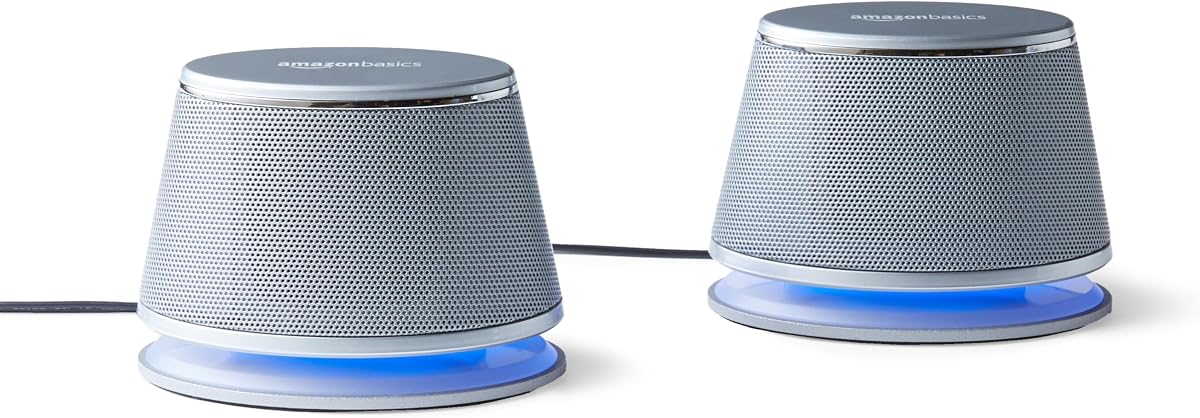
The Amazon Basics LED 2.0 is a 4.4-rated silver stereo pair that offers the same practical foundation as the black version in this guide, with a slightly different visual finish. It connects to a computer's USB port for power and accepts audio through a 3.5mm auxiliary input. This makes it a conventional desktop solution with an easy-to-understand layout.
We may earn a commission when you buy through this link, at no additional cost to you.
An in-line control provides quick access to volume adjustment, while blue LED lights add visual definition to the work area. The metal finish, scratch-free padded base, and bottom radiator are designed for regular desktop use, with the radiator adding support for bass output. Together, these details make the system more visually engaging than a completely plain pair of compact speakers.
As with other USB-powered analog systems, the absence of Bluetooth limits its wireless usefulness. The 3.5mm connection may also require an adapter on a computer that lacks a traditional audio jack. Its appeal therefore rests on straightforward operation, neat styling, and useful physical controls rather than advanced connectivity or processing.
Choose this model for a tidy silver-and-black office setup where a subtle visual accent is welcome. It works well for general video, music, and productivity, and it avoids complicated setup. If you want a simple small speaker system for a fixed computer and do not need wireless audio, it is a polished and approachable option.
The silver finish, restrained proportions, and blue LED accents allow the system to blend into a modern workspace without disappearing entirely. It provides visual character while remaining appropriately understated for office or study use.
A bottom-mounted radiator is included to give the 2.0 system more low-frequency character. It cannot reproduce the deep bass of a dedicated subwoofer, but it can make music and effects feel less thin than a minimal single-driver design.
We may earn a commission when you buy through this link, at no additional cost to you.
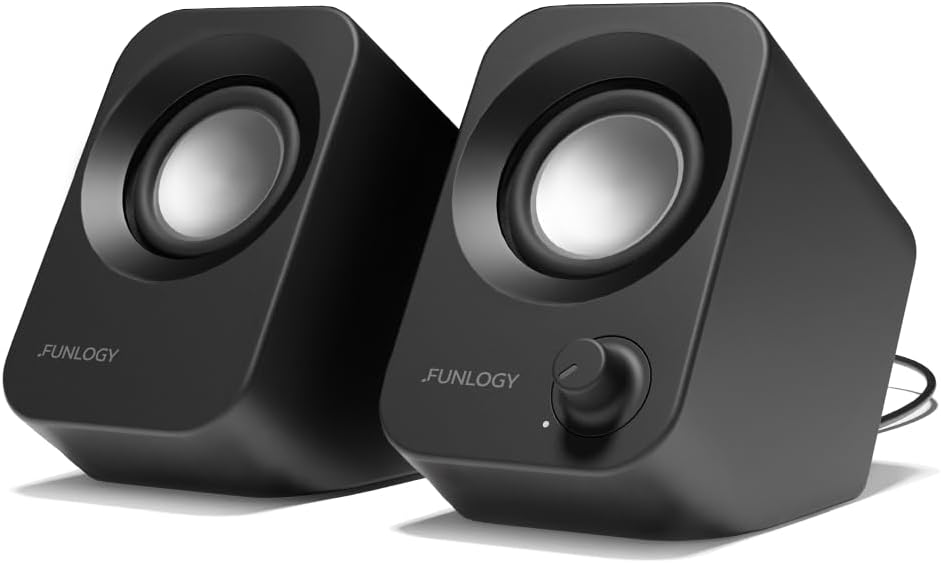
The FUNLOGY 14W Stereo is a 4.2-rated compact system that combines relatively strong documented output with an upward-facing design. Its total 14-watt output uses dual 48mm full-range drivers and passive radiators to provide clear mids, crisp highs, and punchy bass. That specification gives it a useful advantage over basic 2.2-watt desktop pairs when gaming or entertainment is a priority.
We may earn a commission when you buy through this link, at no additional cost to you.
The 30-degree tilt is intended to direct sound toward a listener at the desk rather than straight across the surface. A physical volume dial provides straightforward adjustment, while the included USB and 3.5mm cables make setup clear. The system can be connected to desktop PCs, laptops, monitors, smartphones, and gaming consoles, making it versatile for a mixed entertainment station.
The lack of Bluetooth means every source must be connected through the analog input, and the USB lead remains necessary for power. A gold-plated AUX input is designed to minimize signal noise, including sounds associated with PC startup and shutdown, but it does not replace digital connectivity. The system also uses a more substantial output specification than the entry-level alternatives, so it may be less appropriate for buyers focused strictly on minimal desk footprint.
Choose the FUNLOGY system if you want a small pair with more output and attitude than a standard office speaker, particularly for gaming, videos, or music. The tilted design also differentiates it visually and acoustically from conventional upright desktop models. It is a strong middle ground between basic USB pairs and larger 2.1 systems.
The 14-watt total specification and dual-driver layout provide more headroom than the smallest models in the guide. This is useful for game effects, movie audio, and music, although actual perceived loudness still depends on room acoustics and placement.
Raising the drivers by 30 degrees helps direct sound toward the seated user. The approach can improve perceived clarity while preserving desk space and giving the pair a more purposeful appearance than a purely vertical enclosure.
We may earn a commission when you buy through this link, at no additional cost to you.
The Nylavee Bluetooth Sound Bar is a 4.3-rated horizontal system for buyers who want computer audio without two separate speaker boxes. A single enclosure contains four speaker units and two independent bass diaphragms. Its cavity-based design is intended to improve the loudness and integration of those components while preserving a relatively clean desk profile.
We may earn a commission when you buy through this link, at no additional cost to you.
Bluetooth 5.0 and 3.5mm AUX cover both modern wireless use and conventional wired sources. The system works with laptops, desktop PCs, phones, tablets, Xbox consoles, and PS5 systems. It draws power over USB, has no built-in battery, and turns on automatically when connected to a power source. A single side knob handles the main functions, reducing the need to navigate controls on multiple units.
The main trade-off is size. A sound bar is visually tidy, but it generally occupies a wider continuous footprint than two small speakers positioned on opposite sides of a monitor. It also does not provide a digital USB audio path, so a wired source uses the 3.5mm input, and the required cable may need to be included in your setup.
The Nylavee bar is a good choice for bedrooms, offices, and entertainment desks where visual simplicity and modern wireless connectivity matter. It is especially useful when a phone or console is part of the listening mix. Choose it when you value one clean-looking bar and bass-rich output more than the flexible placement of separate satellites.
A single horizontal bar removes the need to position two satellites around the monitor. That can make a workstation look less crowded and is useful when desk depth or side space is limited.
Bluetooth 5.0 provides convenient streaming from compatible phones, tablets, and computers, while AUX serves wired sources. USB power keeps the system simple to operate, with automatic startup after connection.
We may earn a commission when you buy through this link, at no additional cost to you.
The Dell SP3022 is a 4.2-rated desk speakerphone built around meetings rather than conventional stereo entertainment. Its compact soundbar format can sit on a monitor base or beside a laptop or desktop, making it appropriate for home offices, conference rooms, and shared collaboration spaces. Microsoft Teams and Zoom certification adds a clear focus on communication applications.
We may earn a commission when you buy through this link, at no additional cost to you.
Full-duplex audio allows multiple people to speak while remaining audible, and AI noise cancellation is intended to reduce distracting background sound. LED indicators make the status of Teams activities, calls, volume, and microphone mute immediately visible. A dedicated Microsoft Teams button offers direct access to meetings and notifications, while USB-A and USB-C support simplify connection to current computers.
This is not a conventional two-speaker music system, and its specifications are tailored to voice communication rather than wide stereo imaging or strong low-frequency impact. Buyers primarily seeking speakers for albums, films, or gaming would receive less of what they want. The inline control strategy is also optimized around meetings, including call handling and microphone state.
Choose the Dell SP3022 if online collaboration is the main reason you need amplified computer audio. It is a particularly compelling choice for small conference rooms, home offices, and distributed teams that regularly use Teams or Zoom. For a dedicated meeting device rather than a general-purpose entertainment speaker, it delivers focused features in a compact enclosure.
The full-duplex design allows several participants to speak at the same time while remaining audible. This reduces the need to take turns and supports the natural flow of group conversations.
LED indicators clearly show call status, mute state, volume, and application activity. The dedicated Teams button further reduces friction when a meeting begins during an already busy workday.
We may earn a commission when you buy through this link, at no additional cost to you.
The Klipsch ProMedia 2.1 THX is a 4.5-rated premium system for listeners who want more scale, impact, and bass than a compact 2.0 pair can deliver. It combines two satellite speakers with a dedicated 6.5-inch side-firing, ported subwoofer. That larger footprint makes it less suitable for the smallest workspaces, but it substantially improves low-frequency performance for games, films, and music.
We may earn a commission when you buy through this link, at no additional cost to you.
Klipsch Microtractrix horn technology is used to improve efficiency, control dispersion, and direct sound toward listeners. The satellites use 3-inch midrange drivers, while the subwoofer supplies full-bandwidth bass. The system is documented at 200 watts of peak power and can reach 110dB in-room, giving it considerably more output headroom than the lightweight desktop sets elsewhere in this guide.
The trade-off is size and the need for a 3.5mm connection. The satellite and subwoofer dimensions occupy more desk or floor space than small plastic speakers, and the system lacks modern USB digital audio and Bluetooth. Its separate control pod also includes a main volume control and independent subwoofer gain, which is useful for refinement but adds another component to the setup.
Choose the ProMedia system when computer audio is a central part of entertainment and you have room for a proper 2.1 arrangement. It is well suited to gaming, movies, music, and a larger workstation where stronger output and deeper bass justify a larger footprint. For the most demanding computer speaker use, it represents the premium choice in this guide.
The powered 6.5-inch subwoofer handles the low frequencies that a small satellite enclosure cannot reproduce with the same authority. Its ported, side-firing design gives games and films a deeper impact while leaving the satellites focused on midrange and higher-frequency detail.
Microtractrix horn technology is designed to control dispersion while improving efficiency. By directing sound more consistently toward the listening position, the satellite design can preserve clarity and impact at higher levels.
We may earn a commission when you buy through this link, at no additional cost to you.
The best small speakers for computers depend on your available space, source devices, listening priorities, and tolerance for cables. Use the following factors to compare basic USB pairs, wireless systems, sound bars, meeting devices, and larger 2.1 configurations before making a final selection.
In short, match every input to an actual port, and favor the method you will use most often.
In short, match expected loudness and bass needs to the room and the size of your audience.
In short, choose two speakers for stereo separation, a bar for tidy placement, 2.1 for bass, or a speakerphone for calls.
In short, measure the usable desk area and account for the complete system rather than one enclosure.
In short, prioritize speech clarity and call controls when your computer is mainly a communication tool.
In short, choose the control layout that matches the functions you will actually adjust during the day.
In short, choose Bluetooth for switching convenience and wired options for dependable stationary operation.
In short, choose enough output for the room and intended audience without overlooking nearby coworkers or family members.
Begin by identifying the appropriate audio and power connections for your computer. For a USB digital model, connect the included USB cable to a suitable computer port and wait for the operating system to recognize the device. For a USB-powered analog model, connect USB for power and the 3.5mm plug to the computer's audio output. If your computer lacks a traditional jack, use a compatible USB audio adapter rather than forcing an unsuitable connector.
Place each speaker at a comparable height and separate them enough to create a comfortable stereo image. Models with elevated drivers or upward tilts should face the listening position, while a sound bar can be centered below or above the monitor. Begin at a low volume, set the source device to a moderate level, and then adjust the speakers to avoid distortion. Keep the system clear of walls, enclosed cabinets, and other surfaces that can unnecessarily alter the sound.
For Bluetooth models, put the speaker into pairing mode and select it from the device's Bluetooth menu. Confirm the correct output device in the computer's sound settings before playing media. Wired connections generally provide a steadier route for daily work, while wireless is useful when moving between devices. Clean the enclosures with a soft, dry cloth, keep openings free of dust, and avoid liquids near the electronics. Route cables so they cannot be pulled or pinched, and consult the product documentation before changing internal settings or connections.
USB speakers are usually simpler for a fixed desk because they can provide power and, in some models, digital audio through one cable. Bluetooth speakers offer greater flexibility when switching between a computer, phone, or tablet. The best choice depends on whether your priority is a permanent workstation setup or portable, device-switching audio.
Many small computer speakers draw power directly from a computer's USB port, so no separate adapter is required. Models with larger amplifiers or a subwoofer may have their own power supply, however. Check the included components and power requirements before setting up the system.
You can use a compatible USB audio adapter that provides a 3.5mm output or accepts external headphones. Another option is a speaker system with USB digital audio, such as the Creative Pebble V3, which connects directly through USB-C. Confirm the connector type and audio compatibility before buying an adapter.
A 2.0 system has two main speaker channels, while a 2.1 system adds a separate subwoofer channel. The added subwoofer can produce deeper bass and greater perceived impact, making a 2.1 arrangement more suitable for gaming, films, and music. It also requires more space and usually adds more cost and complexity.
Compact speakers can provide clear dialogue and enjoyable near-field audio, especially for a laptop or a small desk. Their limitations usually appear with maximum volume, wide soundstage, and deep bass. A stronger 2.0 system or a 2.1 arrangement is preferable if the computer is also your primary entertainment system.
It depends on the microphone already built into your computer. Basic stereo speakers reproduce meeting audio but do not necessarily capture your voice well. A dedicated speakerphone can add microphones, noise cancellation, full-duplex conversation support, mute controls, and meeting-status indicators for more effective group calls.
Place the left and right units at similar heights and separate them enough to create stereo separation, ideally forming a loose triangle with the listening position. Elevated or tilted models should point toward your ears. Avoid enclosing either speaker tightly in a cabinet, and leave enough room around the system for cables and controls.
A sound bar is convenient when you want a tidy single-unit setup and easy placement below a monitor. Two separate speakers can provide more flexibility in positioning and may create a wider stereo image. Consider desk width, available shelf space, whether you need to place units on opposite sides of the screen, and how much bass output you require.
The Creative Pebble V3 is the strongest all-around recommendation because USB-C, Bluetooth 5.0, AUX, Clear Dialog processing, and an amplified gain switch make it adaptable to many modern setups. The Creative Pebble 2.0 is the leading budget option when a single USB cable and straightforward controls are the priority, while the Klipsch ProMedia 2.1 THX is the premium choice for listeners who want deeper bass and substantially greater output.
Most buyers should prioritize the connections their computer actually supports, the amount of desk space available, and whether their main activity is entertainment, focused personal listening, or online meetings. Compact USB models cover essential needs, Bluetooth systems simplify device switching, and meeting-focused products add voice features that ordinary stereo speakers do not provide. A dedicated subwoofer is worth considering only when the space and audio benefits justify a larger setup.
Ratings, features, and specifications can change as manufacturers update products, and prices and availability also vary over time. Before purchasing, verify the current listing, confirm the included cables and adapters, and compare the system's inputs with your computer and other devices. That final compatibility check will prevent most disappointments and help you select a small speaker system suited to your actual workspace.