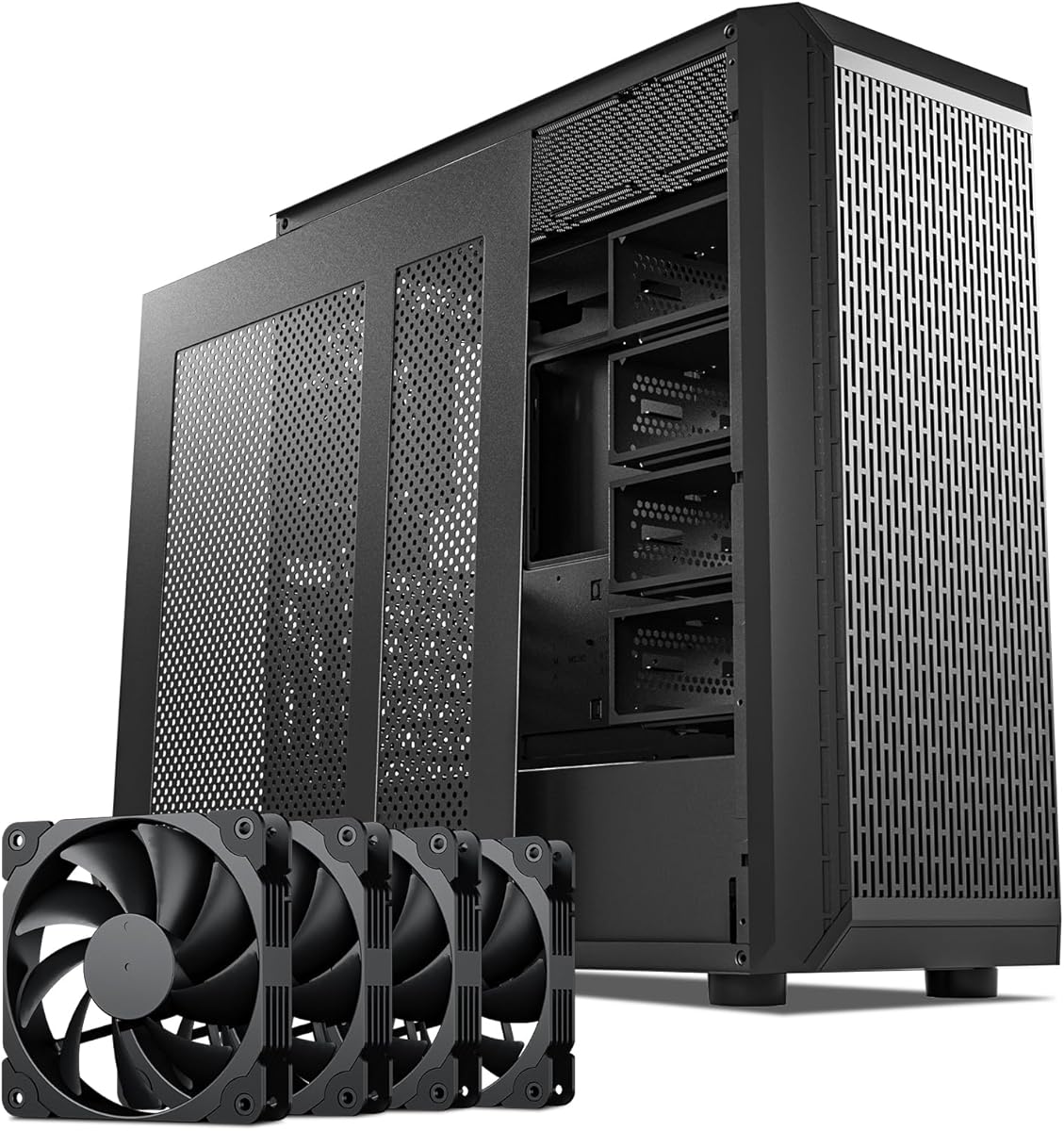
DARKROCK Classico Storage Master
4.4Editor score
Thirteen hard-drive support
Four 120mm cooling fans
Mesh front and side panels
A server chassis designed for multiple hard drives must balance storage capacity, airflow, expansion options, and practical accessibility. The right enclosure can hold demanding storage arrays while giving technicians room for cables, cooling hardware, and future upgrades, whether the system serves a home office, media library, or professional rack.
We compared all ten products by their listed drive-bay capacity, motherboard support, cooling configuration, expansion slots, front connectivity, and rack or tower format. The list includes compact NAS cases, spacious mid towers, and feature-rich rackmount chassis, with attention to both technical fit and the needs of storage-focused builders.
Each pick highlights a different practical balance: a budget-friendly NAS enclosure, a highly expandable rack server, a versatile home-server tower, or a high-density hot-swap system. Product configurations and availability can change, so readers should verify current specifications and prices against the retailer listing before purchasing.
4.4Editor score
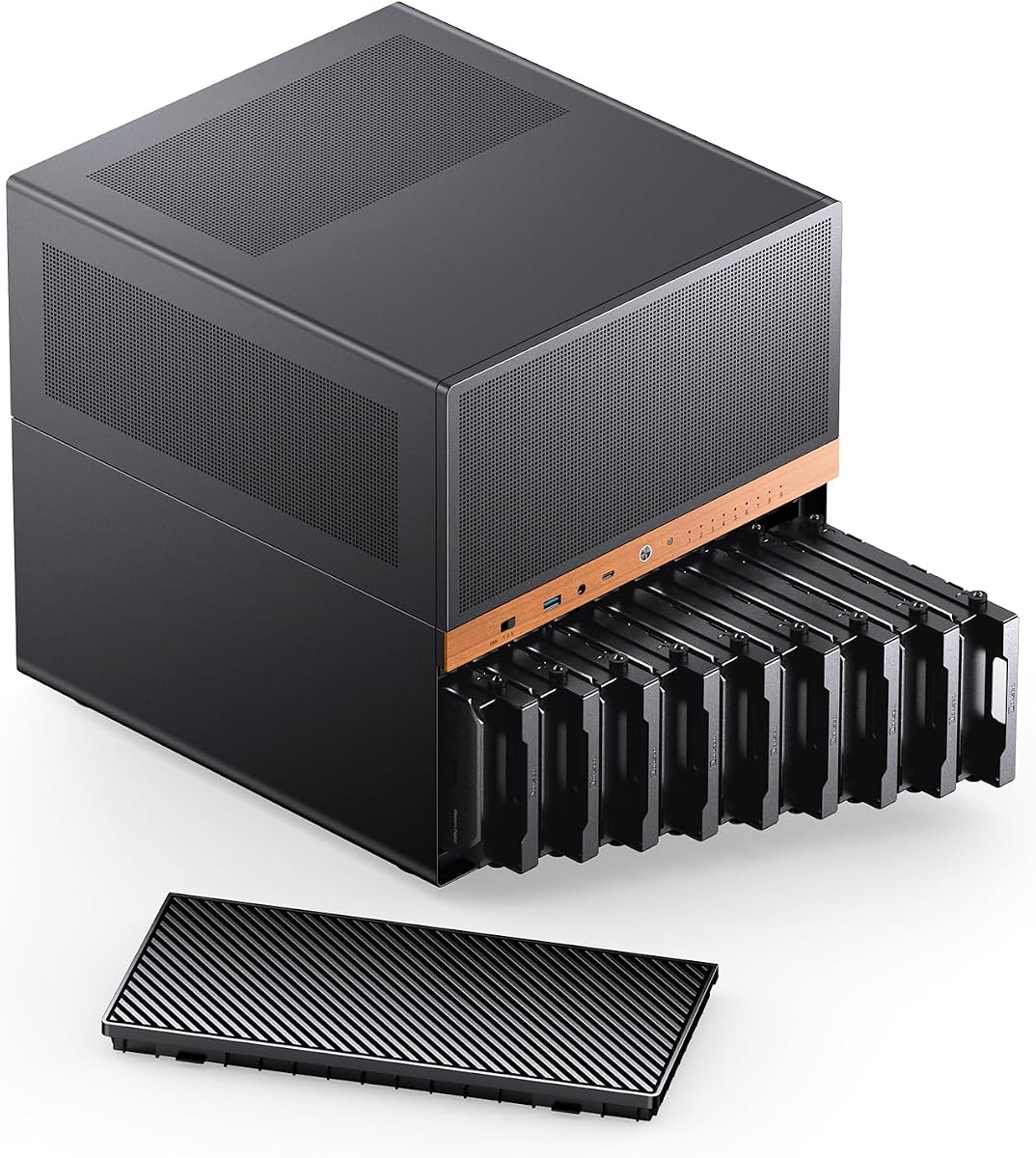
4.6Editor score

4.2Editor score
As an Amazon Associate we earn from qualifying purchases.
This side-by-side comparison highlights each chassis's drive capacity, physical format, cooling, and expansion capabilities, helping storage builders identify the enclosure that best matches their motherboard, drive, and deployment plans.

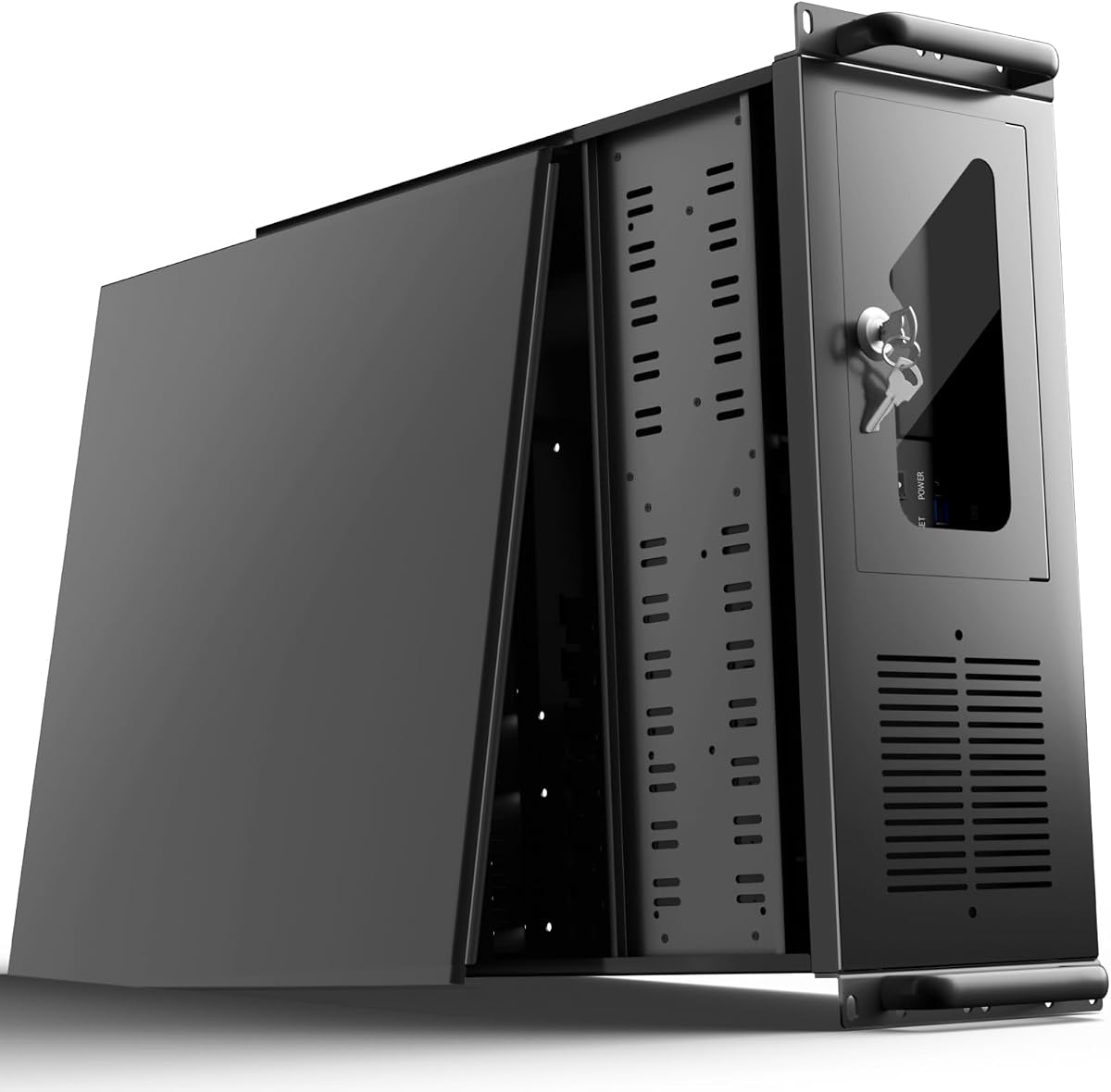


The Rosewill RSV-L4500U is a high-capacity 4U rackmount server chassis with a 4.2 rating. Its defining feature is the group of 15 internal 3.5-inch hard-drive bays, giving storage-focused builders more room than most of the cases in this guide. It also accepts E-ATX motherboards and includes seven PCI expansion slots for a broad range of server configurations.
We may earn a commission when you buy through this link, at no additional cost to you.
Cooling receives unusual attention for a storage enclosure. Six 120mm PWM fans are positioned at the front and middle of the chassis, while two 80mm fans sit at the rear. This arrangement moves air through the drive region and across internal components, which is especially useful when the case is filled with hard drives operating under sustained workloads. Front indicators show power, hard-drive, and LAN status, and two USB 3.0 ports provide convenient access.
The trade-off is the enclosure's specialized format. A 4U rack chassis is designed for a server rack or dedicated equipment area rather than a compact office desk. Buyers also need to account for the depth and weight of a fully loaded system. Nevertheless, the combination of 15 drive bays, substantial cooling, E-ATX support, and seven expansion slots makes this a compelling foundation for home servers, storage farms, and rack-based media systems.
This is a strong recommendation for anyone whose priority is maximizing the number of conventional hard drives inside a rackmount enclosure. It is especially appropriate when future growth is likely, because the large bay count and expansion capacity leave room for additional components. Builders planning a desktop NAS or compact office system should choose a tower alternative, but those with rack space will find an unusually storage-focused package.
Fifteen internal 3.5-inch bays make the RSV-L4500U useful for large storage pools, media libraries, and multi-drive backup systems. The roomy front and middle sections can also make cable routing more manageable than in a compact four-bay NAS case.
The combination of front, middle, and rear fans helps maintain airflow through drive cages and critical internal hardware. That makes the chassis more convincing for prolonged multi-drive use than a basic enclosure with little more than a rear exhaust.
We may earn a commission when you buy through this link, at no additional cost to you.
The DARKROCK Classico Storage Master combines a 4.4 rating with a generous storage-oriented design at a budget-friendly tier. Its listing supports thirteen hard drives and describes an ATX NAS case intended to house substantial amounts of data. Four 120mm fans come preinstalled, and the mesh front and side panels support broad airflow through the internal drive area.
We may earn a commission when you buy through this link, at no additional cost to you.
Beyond hard-drive capacity, this case is designed like a flexible enthusiast storage platform. It supports a 360mm radiator, allowing builders to pair the enclosure with capable liquid cooling, while a vertical GPU mount can preserve clearance and present the card prominently. These details make the chassis relevant not only to NAS users but also to builders adding substantial graphics or computing hardware.
Its main limitation is that the available product information does not specify the exact bay arrangement, connector type, or hot-swap provisions. A large drive count alone does not guarantee that every combination of 3.5-inch and 2.5-inch devices will fit, so buyers should check dimensioned diagrams and component clearances. The absence of listed hot-swap support also makes it less convenient for continuously operated enterprise arrays.
Despite those qualifications, the Classico offers one of the strongest combinations of capacity, cooling, and tower convenience in the guide. It is a good match for a home NAS, large game-library machine, or media server where substantial storage matters more than serviceable hot-swap carriers. It also stands out as a practical budget choice for builders who want a modern, ventilated enclosure without moving to a rack.
A conventional mid-tower can be easier to place than a rack enclosure while still providing unusually high drive capacity. It works well beneath a desk, in a media room, or in a home office where a full server rack would be excessive.
Four included 120mm fans and large mesh panels create a practical cooling foundation. The listed 360mm radiator support also gives builders an upgrade path for demanding CPUs or sustained compute workloads.
We may earn a commission when you buy through this link, at no additional cost to you.
The JONSBO N6 NAS Case is the strongest all-around choice in this guide, combining a 4.6 rating with a purpose-built nine-bay hot-swap layout. It is a more specialized proposition than a general computer tower: the removable HDD cage, multiple drive-bay fan positions, and three possible power-supply installation areas are all designed around NAS and personal-server construction.
We may earn a commission when you buy through this link, at no additional cost to you.
Its motherboard support covers ITX and Micro-ATX, while power-supply flexibility allows ATX units up to 220mm or SFX units up to 100mm to be positioned in different locations. A 240mm AIO is supported, and the extensive fan options cover the front, rear, both sides, and hard-drive bay. Front connectivity includes USB 3.2 Gen 2 Type-C, USB 3.0, and a combined audio and microphone connection.
The backplane requires careful planning. The supplied guidance notes that ordinary SATA and SAS mechanical drives typically need fewer connections than enterprise drives, and it recommends consulting the specifications of each power supply and hard drive. Only one power interface should be inserted into a single back-panel connector on an ATX 4-pin or SATA cable. Those details are manageable but important for anyone assembling a multi-drive system.
The N6 is ideal for a home lab, personal NAS, or office server that needs hot-swappable storage without occupying a full rack. Its compact dimensions and mixed-component support suit flexible builds, although the limited motherboard standard prevents it from accommodating full-size ATX boards. For a builder who values storage serviceability and careful thermal configuration over maximum expansion slots, it remains the most balanced option here.
The nine-bay hot-swap arrangement and removable HDD cage make drive maintenance more convenient than using fixed mounts. This is particularly valuable for a personal NAS where adding or replacing storage should not require dismantling the entire system.
Three power-supply positions and numerous fan mounts allow the builder to adapt the interior around cable routing and heat. The enclosure can therefore serve different storage configurations rather than imposing a single fixed arrangement.
We may earn a commission when you buy through this link, at no additional cost to you.
The UTLGAMENG 4U Rackmount Server Case is a flexible middle ground for storage-oriented rack builds. Its 4.0 rating reflects a chassis that focuses on practical capacity and hardware compatibility rather than compact dimensions. The case provides 12 dedicated hard-drive bays, seven PCI expansion slots, and support for ATX, Micro-ATX, and Mini-ITX motherboards.
We may earn a commission when you buy through this link, at no additional cost to you.
A standard ATX power supply is supported, which simplifies parts selection for builders already familiar with desktop and server components. The listed CPU-cooler clearance reaches 125mm, or 153mm with the bracket removed, while graphics-card clearance is 230mm and can extend to 330mm after removing the hard-drive bay. Two front USB 3.0 ports simplify local administration and peripheral connections.
A key-lock mechanism and side-panel air filter distinguish it from simpler open-frame cases. The filter can help limit dust around frequently spinning drives, while the lock improves physical security for shared offices or equipment rooms. On the other hand, the product information gives limited detail about preinstalled fans, backplane connectors, and hot-swap behavior, so buyers with a specific controller or cabling plan should confirm those details before ordering.
This chassis makes sense for a home lab, small data-center installation, or office server where twelve drive positions and several expansion cards are needed. It is less attractive for someone who wants a simple NAS under a desk or a turnkey hot-swap system. Subject to verifying those missing specifications, it offers a broad foundation with a rack-ready form factor.
Seven PCI slots create useful room for network adapters, storage controllers, and other add-in cards. That makes the chassis better suited to a multi-function server than a simple NAS built around a single storage controller.
ATX, Micro-ATX, and Mini-ITX support gives builders more freedom in component selection. The listed graphics and cooler clearances add another layer of flexibility for mixed compute-and-storage systems.
We may earn a commission when you buy through this link, at no additional cost to you.
The Rosewill Helium NAS Max is an ATX mid-tower aimed at high-capacity DIY NAS, media-server, and small-business storage builds. It carries a 4.0 rating and supports as many as 11 3.5-inch hard drives. Its conventional tower format makes it considerably easier to integrate into an office or home environment than a full 4U rack server.
We may earn a commission when you buy through this link, at no additional cost to you.
Four 140mm PWM fans are listed as part of the cooling design, giving the case a substantial airflow foundation for a bank of mechanical hard drives. Mesh front panels further encourage air movement through the chassis. The case also supports full ATX motherboards and BTF-compatible designs, and its front USB 3.2 Type-C port provides a current connection for compatible peripherals.
The specification summary does not describe hot-swap carriers, individual backplane connectors, or exact bay mixing rules. Those details matter when a storage array must remain available during maintenance, because fixed hard-drive mounts can make replacement less convenient. The available information also does not establish whether every listed position is simultaneously usable with every cooler, cable, and board combination.
The Helium NAS Max is best for builders who want substantial storage capacity in a polished tower rather than a rack enclosure. It is well matched to media libraries, backup servers, and home NAS systems that can tolerate conventional drive mounting in exchange for flexibility and straightforward placement. Buyers planning hot-swappable arrays should investigate the omitted drive-cage details before committing.
Eleven 3.5-inch drive positions provide meaningful storage density without requiring rack hardware. This makes the enclosure attractive for users who want substantial capacity but value a compact, familiar mid-tower footprint.
Four 140mm PWM fans and mesh panels support the heat generated by densely populated drive arrays. The USB Type-C front port and understated black finish also make the case easier to integrate into a modern workspace.
We may earn a commission when you buy through this link, at no additional cost to you.
The Rosewill RSV-R4000U offers a balanced 4U rackmount layout with a 4.1 rating. It includes eight internal 3.5-inch hard-drive bays and three additional 5.25-inch device positions, making it a practical option for systems that need to combine data drives with optical devices, removable media hardware, or another supported 5.25-inch component.
We may earn a commission when you buy through this link, at no additional cost to you.
The chassis supports ATX and CEB motherboards and provides seven PCI expansion slots, giving it more expansion potential than many compact server cases. Cooling is handled by two 120mm PWM front fans and two 80mm rear fans. This front-to-rear arrangement supports airflow through the internal storage area while exhausting heat from the server's far end.
As with many value-oriented rack cases, the product data does not list hot-swap backplanes or a specific drive controller. Users who require immediate drive replacement should plan around conventional mounting and appropriate cabling rather than assuming hot-swap functionality. The 5.25-inch positions are useful, but they are not interchangeable with 3.5-inch storage and should be counted separately when planning capacity.
The RSV-R4000U is well suited to a traditional rack server that needs a balanced mix of storage, expansion, and cooling. It fits well in a home lab or office rack where eight hard drives are sufficient, and it offers more physical flexibility than the very compact 3U alternative. For larger arrays or serviceable enterprise carriers, the 15-bay or 24-bay choices are stronger.
The three 5.25-inch positions distinguish this chassis from cases devoted entirely to hard disks. They provide space for specialized storage or media components when a rack build needs more than standard drive support.
Front status indicators, USB 3.0 ports, and a physical lock make routine administration more convenient. These details help the chassis function as a dedicated server rather than an open test bench.
We may earn a commission when you buy through this link, at no additional cost to you.
The Rosewill RSV-Z3100U is a 3U rackmount server chassis aimed at users who need multiple hard drives without dedicating a full 4U of rack space. Its title lists six 3.5-inch bays, while the supplied feature description describes four internal bays, so buyers should confirm the current physical configuration on the retailer page before ordering.
We may earn a commission when you buy through this link, at no additional cost to you.
The enclosure supports ATX motherboards and includes four PCI expansion slots. Two 80mm PWM front fans provide the listed cooling, while front-panel indicators report power, hard-drive, and LAN status. Two USB 3.0 ports add convenient local connectivity for administration, backups, and diagnostic devices.
The 3U format creates an obvious space advantage in a crowded rack, but it also means less space for cooling and expansion than a 4U chassis. Only four expansion slots can limit the number of controllers, network cards, and accelerators installed simultaneously. The product information also does not establish whether the drive carriers support hot-swapping, so the chassis should be treated as a conventional mounted-drive option unless the seller confirms otherwise.
This is a sensible selection for a compact home lab or small rack where vertical space is the main constraint. It is less suitable for a densely populated enterprise array or a build requiring many add-in cards. Its strongest appeal is the combination of a modest 3U profile with more storage positions than a basic one- or two-bay NAS case.
A 3U chassis preserves rack capacity compared with larger 4U models. That makes it useful when the enclosure must share limited vertical space with switches, patch panels, and other equipment.
Front USB ports and drive, network, and power indicators support quick on-site management. These are modest features, but they can reduce the need to open the enclosure during routine checks.
We may earn a commission when you buy through this link, at no additional cost to you.
The Rosewill RSV-L4620 takes a different approach from the drive-heavy cases in this guide. It supports up to two 3.5-inch hard drives and four 2.5-inch SSDs, making it a hybrid platform for users who need substantial solid-state storage but only a small number of high-capacity mechanical disks. It carries a 4.3 rating and uses a 4U rackmount format.
We may earn a commission when you buy through this link, at no additional cost to you.
Compute-oriented features are a major part of the design. It accepts E-ATX and SSI-EEB motherboards, supports a 360mm AIO radiator, and includes three 120mm PWM fans. A front USB 3.2 Gen Type-C port supports transfer speeds up to 10Gbps, making the enclosure attractive for rendering, AI training, virtualization, and other compute-heavy uses that also need some local storage.
The principal limitation is obvious: two 3.5-inch bays will not support a large archive or conventional NAS array. The supplied information also does not specify hot-swap carriers, so drive replacement appears less convenient than in the dedicated 24-bay chassis. Users who equate server storage with many mechanical disks should choose a different model.
Despite that limitation, the RSV-L4620 is a strong fit for a balanced workstation or virtualized server that prioritizes processing, fast local data access, and rack integration. It is particularly compelling when a small number of large hard disks provide bulk storage while several SSDs support operating systems, databases, caches, or virtual machines.
Four 2.5-inch SSD positions are valuable for operating systems, applications, and virtual-machine data. Pairing them with two large hard drives creates a practical tiered-storage layout inside a single rack enclosure.
E-ATX and SSI-EEB support, 360mm AIO compatibility, and substantial cooling position this chassis closer to a compute server than a basic file server. It suits users who want one enclosure for both processing and moderate data storage.
We may earn a commission when you buy through this link, at no additional cost to you.
The 4U Rackmount Server Case with 24 Hot-Swappable SATA/SAS Drive Bays is the premium choice for dense, serviceable storage. It carries a 4.2 rating and supports 24 hot-swappable bays, giving it the highest stated drive capacity in the guide. The emphasis is unmistakably professional, with SATA and SAS support and six internal SFF-8087 Mini SAS backplanes.
We may earn a commission when you buy through this link, at no additional cost to you.
The hot-swap design changes how the chassis can be operated. Individual drives can potentially be replaced or expanded without powering down the complete system, reducing maintenance downtime when the correct controller and cabling are used. The included cooling consists of three 120mm middle fans and two 80mm rear fans, placing airflow around the dense center of the drive wall and exhausting heat from the rear.
This is not a simple case for a casual NAS, and the drive count alone does not guarantee that every bay can be populated. Enterprise and high-capacity drives can create substantial power draw and heat, while a full array may require careful sequencing, airflow planning, and a controller designed for the chosen drive technology. The Mini SAS backplanes also demand compatible cabling, and buyers should verify controller, expander, and cable support before assembling the system.
The enclosure earns its place for data centers, enterprise storage pools, media archives, and advanced home labs where uptime and serviceability matter. It is the best premium option when hot-swappable density is a firm requirement. For a lighter storage build, a 9-, 11-, 12-, or 15-bay case will be easier to manage and more economical to populate.
Twenty-four hot-swappable bays support large storage pools while reducing the disruption associated with conventional fixed drives. The format is especially valuable where maintenance windows are limited or uptime is a priority.
SATA and SAS support, together with six Mini SAS backplanes, positions the chassis for serious storage configurations. Compatible controllers, cabling, and suitable power delivery remain essential to a dependable installation.
We may earn a commission when you buy through this link, at no additional cost to you.
The Rackchoice 4U Rackmount Server Chassis offers adaptable drive arrangements and broad component support, earning a 4.1 rating. Depending on motherboard size, the listed configurations provide either 4 × 3.5-inch plus 3 × 3.5-inch or 2 × 3.5-inch plus 2 × 2.5-inch bays, while ATX-based layouts can use 8 × 3.5-inch plus either 3 × 3.5-inch or 2 × 3.5-inch plus 2 × 2.5-inch positions.
We may earn a commission when you buy through this link, at no additional cost to you.
Motherboard support extends to E-ATX, ATX, Micro-ATX, and Mini-ITX. The chassis uses a standard ATX PS-2 power supply, includes three preinstalled 120mm front fans and two 80mm rear fans, and offers seven full-height expansion slots. Graphics-card clearance is also generous, making it relevant to builds that combine substantial storage with demanding processing or visualization workloads.
Because the available drive count changes with the installed board, the physical layout is a key part of product selection rather than a single fixed number. Builders should map the board, power supply, graphics card, and cable routing before ordering drives. The information does not mention hot-swap carriers, so the chassis is better treated as a flexible mounted-drive platform than an enterprise hot-swap system.
Rackchoice is a good option for a custom server where different storage layouts may be needed as requirements evolve. Its seven full-height slots and large graphics-card allowance are especially useful for mixed compute-and-storage systems. Buyers seeking a simple 15-bay arrangement should choose the Rosewill RSV-L4500U, while those requiring hot-swap serviceability should favor the 24-bay premium model.
The ability to select among multiple 3.5-inch and 2.5-inch arrangements gives builders useful flexibility. Motherboard dimensions and expansion requirements should guide the final layout so that storage does not crowd essential components.
Seven full-height expansion slots and broad motherboard support allow the chassis to host more than a simple file server. This makes it appropriate for graphics, networking, and specialized controller configurations.
We may earn a commission when you buy through this link, at no additional cost to you.
The right storage server enclosure depends on drive quantity, serviceability, physical deployment, cooling, and component compatibility. Reviewing these factors before buying helps prevent a costly mismatch between the finished system and its intended workload.
Begin with the number and type of drives the system will actually use. A 24-bay hot-swap chassis can support large enterprise arrays, while cases with eight to 15 bays are more realistic for home NAS and media-server projects. Count 2.5-inch SSD positions separately from 3.5-inch hard-drive positions, because they serve different purposes and may require a different mounting arrangement.
Hot-swappable carriers let administrators replace or add drives without shutting down the entire server. They are particularly important in data centers, clustered storage, and other uptime-sensitive systems. A backplane must also be compatible with the selected drive interface, controller, power delivery, and data cables; a case that physically accepts a drive does not guarantee that the drive can be hot-swapped.
A 4U rackmount chassis is appropriate when the system will live in a server rack, equipment cabinet, or dedicated facility. A 3U model can preserve vertical space, while an ATX mid-tower is easier to place under a desk or near office equipment. Rack cases require correct depth, rails, and mounting hardware, whereas towers prioritize accessibility and a familiar footprint.
Check the supported motherboard standard before selecting other hardware. The options here range from Mini-ITX and Micro-ATX to ATX, E-ATX, CEB, and SSI-EEB. Also verify power-supply form factor and dimensions, CPU-cooler height, graphics-card length, expansion-slot count, and operating-system support. These details determine whether a promising drive bay can actually be used in the finished server.
Mechanical hard drives produce heat and may be affected by elevated operating temperatures, while dense drive walls can block smooth airflow. Cases with front, middle, and rear fans distribute cooling through more of the enclosure, and mesh panels reduce restriction. Larger fans can move substantial air at lower speeds, but a radiator-compatible chassis gives demanding CPU and GPU builds an additional thermal option.
Storage servers often need more than a motherboard and a bank of drives. Additional slots may be required for HBA cards, RAID controllers, network adapters, accelerators, or a discrete GPU. Front USB ports, Type-C, audio, and status indicators are useful for administration, and a lock can improve physical security. Match these conveniences to the way the system will be monitored and serviced.
A locking front panel helps deter casual access to drives and internal components. Side-panel or removable dust filters can be useful in dusty environments, while removable drive cages make installation and replacement easier. For frequent maintenance, prioritize carriers, tool-free access, and visible drive indicators. For less frequently serviced systems, conventional mounting and a straightforward panel design may be sufficient.
Avoid filling every available bay on the first build if the drive layout makes airflow or servicing difficult. Leave room for future capacity, faster boot drives, additional controllers, or upgraded cooling. At the same time, avoid buying an oversized chassis if it will consume valuable rack space or sit unused. Expansion should be realistic for the intended budget and workload rather than merely based on the largest advertised bay count.
Before installing components, measure the chassis and map the position of the motherboard, power supply, drive cage, fans, and expansion cards. Confirm that every selected hard drive, SSD, controller, cable, and cooler matches the case dimensions and supported standards. Assemble the system with the chassis disconnected from power, use anti-static precautions, and route cables away from fan blades and hard-drive surfaces.
Install drives according to the manufacturer's guidance, secure each tray or mount, and connect the correct data and power cables. If the case uses hot-swap carriers, confirm that the backplane, controller, and cables support the chosen SATA or SAS devices. For conventional fixed mounts, avoid forcing a connector and verify that the drive is fully seated before tightening screws.
After assembly, power on the system without the drives to verify fans, front indicators, and front I/O where possible, then shut down and install storage. Begin with a small number of drives if the system is new, confirm that the operating system recognizes them, and test the selected storage configuration before adding the full array. Keep the chassis in a ventilated location, clean dust filters regularly, inspect cables, and monitor drive health and temperatures after the system has settled into normal operation.
A server chassis is usually better when a build needs numerous drives, serviceable carriers, high-density backplanes, or a rack-ready format. A desktop case can be adequate for a small home NAS, but it may offer fewer bays, less airflow, and fewer expansion options. The best choice depends on drive count, service requirements, and available space rather than the chassis category alone.
A hot-swap backplane is not essential for many lightly used home NAS systems, but it improves convenience and can reduce downtime when drives are added or replaced. It also requires compatible controllers, data cables, and drive interfaces. Verify all three before assuming a case with removable trays supports true hot swapping.
A home server may need only four to eight drives, while a media archive or small business system may benefit from 12 to 15 bays. A 24-bay design is most appropriate for high-density, continuously managed storage. Choose based on realistic current needs, expected growth, cooling requirements, and the cost of populating the chassis.
Most are designed around standard rack mounting, but the enclosure's width, depth, ears, and included hardware must match the cabinet. A 3U chassis preserves more vertical space, while a 4U model often provides room for more drives, cooling, and expansion cards. Check the case dimensions and rack-clearance requirements before installation.
A full hard-drive array benefits from consistent front-to-rear airflow, with fans positioned near the drive cage and adequate rear exhaust. Multiple fan locations are helpful because a single rear fan can struggle to move air through dense storage. Use the drive manufacturer's temperature guidance and monitor the enclosure under sustained load rather than assuming the default fan configuration is sufficient.
Many cases can accept both 3.5-inch hard drives and 2.5-inch SSDs, but the available positions and connectors may vary by motherboard size. SSDs may also require a separate data connection or a different mounting area. Confirm bay geometry, included adapters, controller support, and the number of available data ports before installing a mixed array.
A RAID controller is not required if the motherboard or operating system provides the storage management features you need. A dedicated controller may add flexibility, monitoring, and support for larger or more specialized arrays. It also adds another compatibility requirement, so the controller, backplane, expander, and cable standards must be planned together.
Leave enough clearance for front and rear airflow, cable movement, drive insertion, and routine service access. Rack systems may also need additional depth behind the ears for power and data cables. Follow the case instructions, avoid placing the chassis in a closed cabinet without active ventilation, and maintain enough room to remove a drive or expansion card without dismantling the entire rack.
The JONSBO N6 is the most balanced overall choice because it combines nine hot-swap drive bays with a removable cage, flexible power placement, and numerous cooling options. DARKROCK's Classico Storage Master stands out as the budget choice for high-capacity tower builds, while the 24-bay Mini SAS chassis is the premium option for dense, serviceable enterprise-style storage.
For most buyers, the best chassis is the one that fits the deployment environment before the drive count is considered. Towers are easier to place in offices and homes, 3U saves rack space, and 4U enclosures provide more room for cooling, expansion, and storage. Match motherboard, power supply, controller, backplane, and drive requirements as a complete system rather than selecting on bay count alone.
Finally, check the current retailer listing, availability, and price before purchasing, since configurations and product details can change. Verify dimensional drawings, included hardware, connector types, and clearance specifications, especially when building a hot-swap array or using enterprise SATA or SAS drives.