
atolla 4-Port Powered USB 3.0 Hub
4.6Editor score
Four USB 3.0 data ports
Dedicated 2.4A charging port
Individual illuminated switches
FiveGbps transfer speeds
Explore the best powered USB hub options, comparing port counts, data speeds, charging support, compatibility, controls, and power design from desks to
A powered USB hub can transform a crowded desk or a computer with too few usable ports by adding data connections, dedicated charging, and more convenient placement for essential peripherals. The right model balances speed, available power, connector variety, compatibility, and physical design rather than simply offering the largest port count.
This guide compares ten powered hubs across important considerations such as USB generation, data-port quantity, charging output, included adapters, individual controls, supported operating systems, cable length, and device compatibility. It covers practical options for compact four-port setups, broad desktop expansions, high-speed 10Gbps connections, and mixed USB-A and USB-C workstations.
Each review highlights the strongest use case, useful design features, and realistic limitations based on the supplied product information. The first three entries form the recommended shortlist, while every product remains a viable candidate for a particular setup. Availability and prices can change, so confirm current details before purchasing.
4.6Editor score

4.5Editor score

4.6Editor score
The comparison below highlights each hub's port capacity, connection standard, charging arrangement, and included power equipment, making it easier to identify the model that matches a particular computer and peripheral mix.


The TP-Link UH720 combines seven USB 3.0 data ports, two smart charging ports, a 12V/4A adapter, and a physical power control in a broad desktop expansion. Its 4.5 customer rating reflects a practical balance of useful capacity and dependable operation. It is especially compelling for users who need to connect several storage devices, input accessories, and charging leads without repeatedly swapping equipment.
We may earn a commission when you buy through this link, at no additional cost to you.
Data ports support transfer speeds of up to 5Gbps, making the hub suitable for keyboards, mice, printers, hard drives, and other compatible peripherals. The two charging outputs can deliver up to 2.4A, and TP-Link's charging technology identifies connected devices to allocate power more appropriately. A sophisticated circuit design includes overheat, overload, overvoltage, short-circuit, and surge protection for connected equipment and data.
The main limitation is that this is a USB-A hub with a maximum fiveGbps data standard. It therefore does not offer the 10Gbps capabilities found in newer USB 3.2 models, and every data connection ultimately shares the host connection. Its nine-port total includes charging rather than data, so buyers should make sure the seven-port data layout matches their actual peripheral count before deciding.
It is the strongest general recommendation for a conventional, multi-device desk. The combination of seven data ports, dedicated charging, hot-swapping, plug-and-play operation, backward compatibility, and a two-year warranty makes it easier to recommend than a barebones unpowered expansion. For modern USB-C systems requiring 10Gbps, one of the newer models may be a better technical fit.
Separating data and charging functions prevents a phone or tablet from occupying a scarce data connection. The two dedicated charging ports also make this model convenient for a shared workstation where several mobile devices need replenishing during the day.
The listed overheat, overload, overvoltage, short-circuit, and surge protections add meaningful reassurance when several hard drives and other powered accessories operate through the same hub.
We may earn a commission when you buy through this link, at no additional cost to you.
The atolla 8-Port Hub provides seven USB 3.0 data connections, one dedicated charging port, individual on/off controls, and a 5V/4A adapter. Its 4.6 customer rating makes it one of the strongest entries in the guide. The design is aimed at users who want more control over each attached peripheral while retaining a relatively compact seven-port data layout.
We may earn a commission when you buy through this link, at no additional cost to you.
The data connections operate at up to 5Gbps and support common devices such as keyboards, mice, printers, and hard drives. Individual switches allow unused equipment to be turned off without physically disconnecting it, which can simplify cable organization and routine troubleshooting. The charging port can deliver up to 2.4A through the included adapter, while plug-and-play operation, hot-swapping, and broad Windows, Mac OS X, and Linux support improve setup flexibility.
This model does not reach 10Gbps, so speed-sensitive external storage may benefit from a newer USB 3.2 hub. There is also only one charging port, and the charging output should be viewed as a convenience rather than a replacement for the device manufacturer's original charger. Despite those limits, the combination of port control, charging, and compatibility is unusually well balanced.
It is a good choice for a home office, shared workstation, or Mac-centered setup where users want numerous USB-A data connections and one extra charging path. The included 100-centimeter hub cable and 120-centimeter power cord offer reasonable placement flexibility. Those who routinely move files between the fastest external SSDs should compare it with the atolla USB 3.2 model reviewed later.
Individual on/off switches let a user isolate a peripheral without removing its cable. This is useful when one device causes a problem or when an unused drive does not need to remain powered.
Support for current and older Windows releases, Mac OS X, and Linux makes this a practical option for mixed personal and office environments where operating systems may change.
We may earn a commission when you buy through this link, at no additional cost to you.
The SABRENT 4-Port Powered USB 3.0 Hub is a compact option for expanding a computer with four data connections. It has a 4.5 customer rating, an included 2.5-amp adapter, LED-equipped individual switches, and support for USB 3.0, USB 2.0, and USB 1.1 devices. Its strongest appeal is straightforward functionality in a relatively small format.
We may earn a commission when you buy through this link, at no additional cost to you.
Data transfers can reach 5Gbps under suitable conditions, making the hub compatible with high-speed storage as well as ordinary keyboards, mice, card readers, and flash drives. Each port has a separate power switch and indicator, allowing users to control devices independently. Plug-and-play installation, hot swapping, and backward compatibility keep the setup uncomplicated across older and newer peripherals.
The trade-offs are immediately clear: there is no dedicated charging port, and four data ports may be insufficient for a desk with many accessories. The listed 2.5-amp supply also makes this model more focused on ordinary data expansion than on charging several demanding mobile devices. Users who need USB-C, 10Gbps transfers, or a larger selection of ports should look elsewhere.
The HB-UMP3 is best for a travel kit, compact workstation, or computer that only needs a few additional data connections. Its thin, lightweight construction saves desk space, while separate switches remain a useful convenience. It is a straightforward powered hub rather than a feature-heavy charging station, making it most attractive when the number of devices is modest and predictable.
Four ports and a slim housing make this hub easier to integrate into a compact desk than larger models. It suits users who need a keyboard, mouse, card reader, and one additional storage device without a large expansion station.
Support for USB 2.0 and USB 1.1 devices allows existing accessories to remain useful even if the primary workflow does not require the full fiveGbps standard.
We may earn a commission when you buy through this link, at no additional cost to you.
The SABRENT 10-Port 60W Powered USB 3.0 Hub is built for users who need many data connections rather than a mixture of data and dedicated charging. Its 4.5 customer rating reflects a straightforward expansion design with ten USB 3.0 ports, individual switches and blue LED indicators, and a generous 60W 12V/5A power supply.
We may earn a commission when you buy through this link, at no additional cost to you.
The hub can expand one USB 3.0 connection into ten data ports with transfer rates of up to 5Gbps. Individual power switches make it possible to disable unused devices without unplugging them, while the indicators provide a quick view of port activity. Plug-and-play operation is supported across Windows, Mac OS, and Linux, and backward compatibility covers USB 2.0 and 1.1 accessories.
With ten data ports, this model is less likely to exhaust available connections than a smaller hub. However, that capacity also creates a larger desk footprint, which may not suit a minimalist workspace. There are no listed dedicated charging outputs, so phone or tablet charging would occupy a data port rather than a specialized connection. The maximum fiveGbps standard also remains below newer 10Gbps options.
The HB-BU10 is a compelling choice for IT desks, editing stations, shared offices, and other environments where many peripherals are connected simultaneously. The included power adapter, USB 3.0 cable, and manual create a complete package, while the high port count reduces the need to purchase or manage several smaller hubs. Buyers who also require dedicated charging should compare the SABRENT HB-B7C3 instead.
A ten-port layout can accommodate numerous storage drives, input devices, and office accessories at once. That makes it easier to keep a complicated workstation connected without a chain of secondary hubs.
The included 12V/5A supply provides dedicated power to the hub, reducing reliance on a computer's own USB power budget when numerous peripherals are active.
We may earn a commission when you buy through this link, at no additional cost to you.
The atolla 4-Port Hub offers four USB 3.0 data connections, one dedicated charging port, and individual illuminated switches in a compact enclosure. Its 4.6 customer rating makes it an attractive small-scale option. It suits buyers who want the convenience of external power and charging without committing to a large multi-port hub.
We may earn a commission when you buy through this link, at no additional cost to you.
Compatible storage and peripherals can transfer data at up to 5Gbps, while the separate charging output can provide up to 2.4A for devices such as an iPad or iPhone. Each data port has its own illuminated on/off switch, allowing connected equipment to be disabled without disconnecting its cable. The hub supports plug-and-play use, hot swapping, and major Windows, Mac OS X, and Linux environments.
The central limitation is capacity. Four data ports may quickly fill with a keyboard, mouse, storage device, and card reader, leaving no room for further expansion. The included 5V/3A adapter is appropriate for a modest collection of peripherals but does not present the same power depth as larger 60W or 65W models. FiveGbps also limits the newest storage performance.
It is a strong budget-oriented recommendation for a home desk that needs a few extra ports and one charging path. The 65-centimeter hub cable and compact case make placement relatively simple. Users who anticipate adding many devices should move up to a seven- or ten-port model, while those prioritizing maximum transfer speed should consider a USB 3.2 option.
The dedicated charging connection is especially useful on a four-port hub because it prevents a phone from occupying one of the limited data sockets. A compatible USB charging cable can then be kept at the desk.
Each switch is illuminated, making it easier to identify active and inactive connections at a glance. This also supports quick troubleshooting when a peripheral is unresponsive.
We may earn a commission when you buy through this link, at no additional cost to you.
The UGREEN 7-in-1 Powered USB 3.0 Hub combines five USB-A and two USB-C data ports, individual switches, and an included 24W adapter. Its 4.1 customer rating is lower than those of the other products in the guide, but the feature set is distinct: it gives modern USB-C accessories data access without requiring a separate adapter.
We may earn a commission when you buy through this link, at no additional cost to you.
The seven data ports share one upstream connection capable of up to 5Gbps. That rate can be achieved by a single active transfer, but simultaneous activity divides the available bandwidth, so individual connections may operate more slowly. The hub is designed for USB-A hosts, including iMac, Surface, XPS, and other compatible computers, and the one-meter host cable provides useful reach from desktop towers or raised laptops.
This product does not charge the host laptop, and its 24W power allocation is distributed among connected peripherals. It should therefore be treated as a data hub with supplemental power rather than a full charging station. The shared bandwidth is also the key limitation for users who expect a 10Gbps transfer or simultaneous high-speed drive performance.
The UGREEN is most appropriate for a USB-A computer desk that uses newer USB-C peripherals, such as a modern keyboard, mouse, or flash drive. It offers more connector variety than the other USB-A-focused hubs in the guide. Buyers who need laptop charging or maximum throughput should choose a more specialized model, while those who value mixed connectors should keep this option in contention.
The two USB-C data ports are valuable for users with USB-C accessories whose host computer still relies on USB-A. This avoids a separate USB-C-to-USB-A adapter for each such device.
A single transfer may approach fiveGbps, but simultaneous transfers divide the same upstream channel. High-volume users should avoid assuming that every port can maintain the maximum rate at once.
We may earn a commission when you buy through this link, at no additional cost to you.
The Wenter 11-Port Hub combines ten USB 3.0 data connections, a dedicated smart charging port, individual LED switches, and a 12V/3A power adapter. Its 4.4 customer rating reflects a useful high-count design for desks that need many USB-A peripherals and a separate charging path.
We may earn a commission when you buy through this link, at no additional cost to you.
Data connections support speeds of up to 5Gbps and are intended for keyboards, mice, printers, hard drives, flash drives, and other compatible accessories. The charging port can deliver up to 2.4A for phones, tablets, and cameras. Individual on/off controls and LEDs let users monitor and deactivate connections without unplugging them, while plug-and-play and hot-swapping support simplify daily use.
The hub remains limited to USB-A data connections and a maximum fiveGbps standard. Its 12V/3A supply is also less substantial than the 60W and 65W adapters offered by some larger competitors. The long cable descriptions in the supplied information are not fully consistent, so buyers should verify the included lengths for their particular setup. None of that changes the model's core appeal: high port count in a traditional format.
This is a strong candidate for a busy office, repair bench, or legacy peripheral collection where USB-A remains essential. It offers more data sockets than most compact alternatives and preserves a separate charging connection. For newer workflows centered on USB-C or 10Gbps storage, a hybrid or second-generation hub would provide a better technical match.
Ten data ports can support a broad mix of input devices, printers, readers, and storage media. The separate charging connection keeps a phone from consuming one of those useful data positions.
Visible indicators make it easier to see whether a connection is receiving power. Combined with individual switches, they help narrow down an inactive or problematic peripheral.
We may earn a commission when you buy through this link, at no additional cost to you.
The SABRENT HB-B7C3 combines seven USB 3.0 data ports with three dedicated smart charging ports and a 60W power supply. Its 4.6 customer rating and balanced port layout make it especially useful for desks where mobile devices and conventional USB peripherals need to be connected at the same time.
We may earn a commission when you buy through this link, at no additional cost to you.
The data ports support transfer speeds of up to 5Gbps for drives, accessories, and other peripherals. The three charging outputs automatically detect connected devices and can deliver up to 2.4A per port, making the hub more versatile than a data-only expansion. Every port has an individual power switch and LED indicator, allowing the user to manage active equipment and reduce unnecessary power use.
Although the product is called a 10-port hub, seven of those ports are for data and three are dedicated charging connections. Buyers who need ten simultaneous data devices should choose the HB-BU10 instead. The fiveGbps maximum is also below the newest USB 3.2 models, but the 60W 12V/5A adapter provides solid capacity for the advertised mix of connected devices.
The HB-B7C3 is a compelling all-purpose option for a home office, conference room, or shared workstation. It provides enough data connectivity for common accessories, while three charging ports serve multiple phones, tablets, or other USB-powered devices. It is also a good candidate for anyone who wants individual controls without moving to the more complex hybrid layouts of newer premium hubs.
Multiple dedicated charging outputs are useful when colleagues or family members regularly connect phones and tablets. Auto-detection helps the hub allocate charging power based on the attached device.
The included 60W adapter is intended to maintain stable operation when numerous data and charging connections are active, reducing dependence on the host computer's own power capacity.
We may earn a commission when you buy through this link, at no additional cost to you.
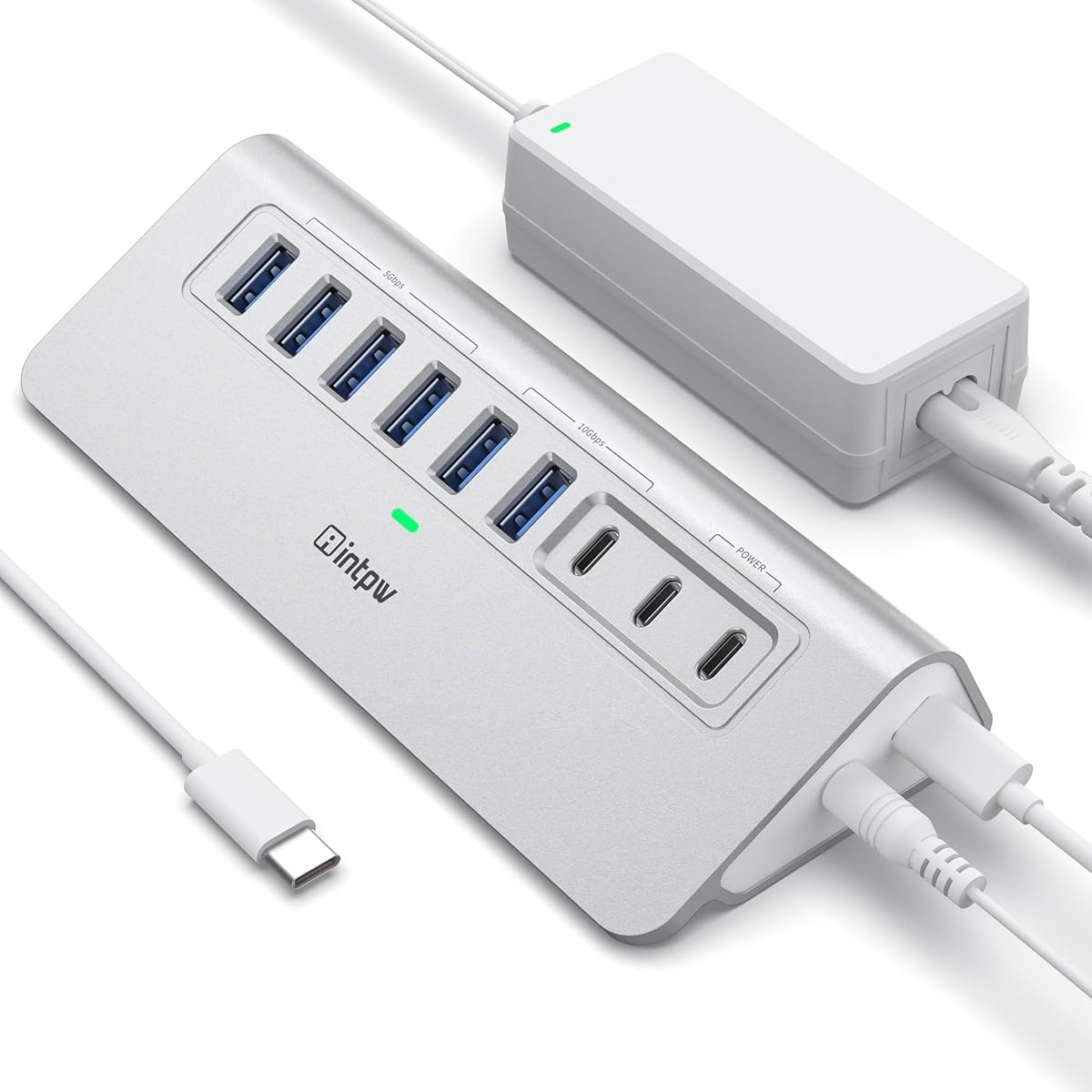
The intpw 9-Port USB Hub is the most technically varied product in the guide, combining USB 3.2 data connections, USB-C data, two 45W charging ports, and a 65W adapter. Its 4.3 customer rating reflects a modern workstation design with clear benefits for USB-C users, though the port functions and limitations require careful attention.
We may earn a commission when you buy through this link, at no additional cost to you.
One USB-C 3.2 port and two USB-A 3.2 ports offer 10Gbps data performance, while four USB-A 3.0 ports provide 5Gbps connections. Two additional USB-C Power Delivery outputs are reserved for charging and do not carry data. The supplied USB-C-to-USB-C cable and broad compatibility with modern USB-C laptops make the hub appropriate for MacBook, iMac, XPS, Surface Pro, and similar systems.
Several cautions come with that flexibility. The product does not support video output, should not be used to charge computers or other high-power devices, and its PD charging ports cannot transfer data. The supplied guidance also warns against using multiple removable drives simultaneously. The included 65W adapter is substantial, but users must not mistake the hub's charging outputs for a laptop-charging solution.
It is a good fit for a modern USB-C desk that needs both high-speed data and dedicated mobile-device charging, provided those functions are understood correctly. Its angled aluminium-style housing, recycled-material claim, and raised feet are intended to make plugging and unplugging more stable. Users needing display output or computer charging should choose a different product category.
The dedicated USB 3.2 connections provide up to 10Gbps for compatible storage and accessories. This is a meaningful advantage over fiveGbps hubs when the host device and individual drive can both support the faster standard.
The two USB-C PD ports are charging-only, while the data ports handle storage and peripherals. Recognizing that distinction prevents a user from expecting file transfer or display output from every USB-C socket.
We may earn a commission when you buy through this link, at no additional cost to you.
The atolla USB 3.2 Hub is the premium performance option in the guide, offering seven data ports that each support up to 10Gbps, plus a dedicated smart charging port. Its 4.6 customer rating reflects a strong combination of high port count, modern throughput, individual controls, surge protection, and broad device placement flexibility.
We may earn a commission when you buy through this link, at no additional cost to you.
Unlike hubs that mix fiveGbps and faster ports, all seven data connections are presented as USB 3.2 Gen 2 capable of 10Gbps. The model is positioned for external SSDs, high-speed drives, and demanding peripherals, although actual transfer rates still depend on connected devices and the host. Individual on/off switches and LED indicators make it possible to deactivate idle equipment and identify active connections at a glance.
The included 20W adapter powers the data ports and charging output, and the listed surge and overcurrent protections add safeguards for attached equipment. Its 20W rating is less generous than the 60W or 65W systems in the list, so it is better suited to a moderate set of data devices than a heavily loaded collection of power-hungry peripherals. The product description also notes that an original device charger can provide faster charging.
This is the most appropriate recommendation for users who need many modern high-speed data ports rather than a large number of inexpensive USB-A connections. The 2-in-1 USB-C and USB-A host cable works with newer laptops and older desktops without a separate dongle, while the longer power cord simplifies placement. It is a premium choice for speed-sensitive storage and a well-equipped professional desk.
Providing seven 10Gbps ports avoids the mixed-generation arrangement found on some hubs. It gives users confidence that no connected data port is limited to the slower fiveGbps standard by design.
Surge and overcurrent protection are particularly relevant when external SSDs, hard drives, and other powered accessories operate through the same shared hub.
We may earn a commission when you buy through this link, at no additional cost to you.
Choosing a powered USB hub starts with the devices you need to connect, the host ports available on your computer, and the amount of data and charging power each peripheral requires. The following factors help narrow the field before comparing individual models.
A hub's advertised total may combine data connections with dedicated charging sockets, so the headline port count can be misleading. Count the exact number of peripherals you expect to operate simultaneously, then add a little room for temporary devices, cables, and future upgrades. A keyboard, mouse, card reader, printer, and external drive can consume most of a five-port hub without leaving any room for a phone.
Choose more data ports if you routinely move files or connect several storage devices. Choose dedicated charging ports if phones and tablets need power without occupying a scarce data connection. Treating data and charging as separate requirements prevents an aesthetically large hub from still being functionally short on the right sockets.
FiveGbps USB 3.0 and 10Gbps USB 3.2 hubs can both handle ordinary keyboards, mice, printers, and flash drives, but the distinction becomes important with external SSDs, high-resolution media, and large file collections. A 10Gbps hub is preferable when the host computer, cable, drive, and file workflow all support the faster standard. Otherwise, paying for additional speed may not produce a visible benefit.
Users should also consider whether all data ports share one upstream channel. Even a hub with high headline rates may divide bandwidth when several devices transfer at once. For predictable performance, evaluate the number of simultaneous high-bandwidth activities and avoid assuming that every connected drive can operate at its individual maximum rate.
The hub must connect through a port supported by the computer. Most conventional models use USB-A, while modern laptops may require USB-C. A USB-C hub can include both USB-C and USB-A data ports, but a USB-A hub cannot automatically provide USB-C peripheral connectivity without an adapter. The included cable and host connector should therefore be checked before ordering.
Cable length also affects desk arrangement. A longer host cable can reach a desktop tower or positioned laptop, while a longer power cord provides freedom when the hub must sit near peripherals rather than directly beside the computer. A hub with an integrated USB-C and USB-A host connector is especially convenient across changing devices.
The adapter's wattage and current indicate how much power the hub can distribute among connected devices. A larger supply is generally preferable for numerous hard drives, high-power charging, or a workstation with many active peripherals. A 60W or 65W package provides more room than a 20W or 30W adapter, although actual requirements depend on the attached hardware.
Pay attention to both voltage and current, not wattage alone. Check whether charging ports advertise a maximum current and whether the hub identifies attached devices automatically. A powered hub should supplement the host's power rather than act as a computer charger, so verify any warnings before connecting a laptop or another high-power device to a charging output.
A dedicated charging port is useful when a mobile device needs reliable power but no data connection. Models advertising smart charging may detect the attached device and deliver a suitable output, often up to 2.4A per port. Even then, a phone or tablet may charge more quickly with its original charger, particularly when another high-output port is already active.
Buyers should distinguish a charging-only port from a USB-C data port. A data-capable port can handle storage, but a charging-only port cannot transfer files. USB Power Delivery ports may provide a high charging wattage yet remain unsuitable for video output, display adapters, or data transfer, so the intended role of every USB-C socket matters.
Individual on/off switches make it possible to turn off an unused drive, printer, or other peripheral without searching for its cable. This can reduce unnecessary power consumption and makes troubleshooting more direct. LED indicators are similarly useful because they show whether a connection is active, particularly in a hub with many similar-looking sockets.
A master power button is convenient for a complete shutdown, while individual controls offer more granular management. Neither feature changes the underlying data speed, but both can make a multi-device hub easier to operate day after day. Consider whether the controls are clearly labeled and positioned so they do not get pressed accidentally.
Check the operating systems listed by the manufacturer and whether drivers are required. Plug-and-play, hot-swapping, and backward compatibility with older USB generations can simplify setup and preserve existing peripherals. Users should also verify whether a product supports display output, since many data hubs do not, and whether simultaneous use of multiple removable drives is recommended.
Physical design matters as well. Consider the hub's footprint, host-cable length, power-cord length, and whether the enclosure is likely to fit behind a monitor or beside a laptop stand. A premium feature is only useful if its connector, power, and physical arrangement suit the actual workspace.
Begin by identifying the correct host port and placing the hub where its data and power cables can reach without creating a trip hazard or pulling against device connectors. Connect the included power adapter first, then attach the host cable. Once the hub is recognized, connect devices one at a time and use the individual switches to manage the final configuration. A short placement test before moving everything can reveal cable or clearance problems early.
Use the hub's data ports for keyboards, mice, printers, flash drives, card readers, and storage devices. Reserve dedicated charging ports for compatible mobile devices, and use the manufacturer's original charger when faster charging is important. Do not assume that a USB-C data port can charge, that a charging-only port can transfer files, or that every hub supports display output; check the product's defined port functions.
For care, keep the enclosure away from moisture, excessive heat, and heavy impact. Route cables so they are not repeatedly bent at sharp angles, and avoid leaving removable drives connected when the hub is not needed. If a device disconnects, switch its port off, reseat the connection, restart the hub's power, and test the peripheral directly before assuming the hub has failed. Periodically check that the power adapter and host cable remain firmly seated.
A powered hub draws electricity from an external adapter and can support more demanding devices with less strain on the computer's USB port. An unpowered hub relies on host power, making it simpler but often more limited when several drives or high-draw peripherals are connected. A powered hub is generally preferable for permanent desktop expansion or multiple external storage devices.
It depends on the model. Most hubs in this guide are designed to power peripherals and data devices, not computers, and some explicitly warn against laptop charging. A few USB-C hubs provide high-wattage Power Delivery outputs, but those ports may be charging-only and are not necessarily designed to power a laptop. Always check the manufacturer's port definitions and warnings before connecting a computer.
Usually not when several devices are active at once. Data ports commonly share the host's upstream bandwidth, so simultaneous transfers can reduce each connection's speed. A 5Gbps hub may reach that rate with one suitable transfer, while a 10Gbps hub can theoretically do the same on a faster connection. The host, cables, and attached storage also determine the final result.
Usually not. Keyboards, mice, webcams, printers, card readers, and many flash drives work well with a fiveGbps USB 3.0 hub. A 10Gbps model is more relevant when transferring large files between compatible high-speed SSDs or using demanding external storage where the host and drive can both sustain the faster standard.
USB-C describes a physical connector, not one universal function. A port may support only data, only charging, Power Delivery charging, video, or a combination of these features. In addition, some USB-C ports on a hub are intentionally separated by role. Buyers should review the port-by-port specifications rather than assuming every USB-C socket performs the same tasks.
It depends on the hub and the number of devices. The high-power models in this guide are better suited to several powered accessories, but some manufacturers still advise against using multiple removable drives simultaneously. A direct connection to the computer or a higher-powered storage solution may be preferable for intensive multi-drive work or large backup jobs.
Yes. Individual switches let you disconnect a specific peripheral logically without searching for its cable, and LEDs make active ports easier to identify. These controls are especially helpful on hubs with numerous connections because they simplify troubleshooting and can prevent idle devices from remaining powered.
The TP-Link UH720 stands out as the most versatile general recommendation because it combines seven data ports, two smart charging connections, protective circuitry, and broad compatibility. The atolla 4-Port Hub is a practical budget choice for smaller desks, while the atolla USB 3.2 Hub earns the premium recommendation for users who prioritize seven ports with 10Gbps data performance.
Before choosing, prioritize the connection standard your accessories need, the number of actual data ports, and the amount of power the included adapter can provide. Mixed USB-C and USB-A layouts are useful for newer peripherals, but dedicated charging-only ports should not be mistaken for data connections. Port controls, indicator lights, cable length, and operating-system support can then refine the choice for your workspace.
Finally, check the current product listing, included accessories, compatibility notes, and price before buying. Product configurations and promotions can change, and the right powered USB hub should match both your present devices and the amount of expansion you realistically expect to add.
