
NETGEAR Nighthawk CAX30
4.1Editor score
DOCSIS 3.1 cable modem
AX2700 dual-band WiFi 6
Four Gigabit Ethernet ports
Explore the best modem router combos for gaming, comparing DOCSIS speed, WiFi performance, wired ports, coverage, and provider compatibility for 2026.
A modem router combo combines cable modem hardware with WiFi and Ethernet connectivity in one enclosure, reducing desk clutter and simplifying installation. For gaming, the strongest choices balance low-latency DOCSIS performance, capable WiFi, fast wired ports, and compatibility with your internet provider rather than merely advertising headline speed.
We compared all ten featured products by examining their modem standard, supported service tiers, wireless generation, theoretical wireless throughput, Ethernet options, coverage claims, device capacity, and management features. The guide includes traditional modem router combos, mesh systems, a renewed Nighthawk, and high-performance routers that can work with an existing cable gateway.
Each review explains where a product stands out, where its compromises may matter, and which type of gamer or household it suits. Ratings and technical specifications reflect the supplied product information, while availability, provider qualification, firmware behavior, and prices can change, so confirm every detail with your internet service provider before buying.
4.1Editor score

3.9Editor score

4.0Editor score
The comparison covers modem standards, wireless performance, wired connectivity, coverage, and practical gaming features. Five products are true cable modem router combinations, two are standalone gaming-focused routers for use with an existing gateway, and the remaining entries are a renewed combo and mesh-based alternatives.
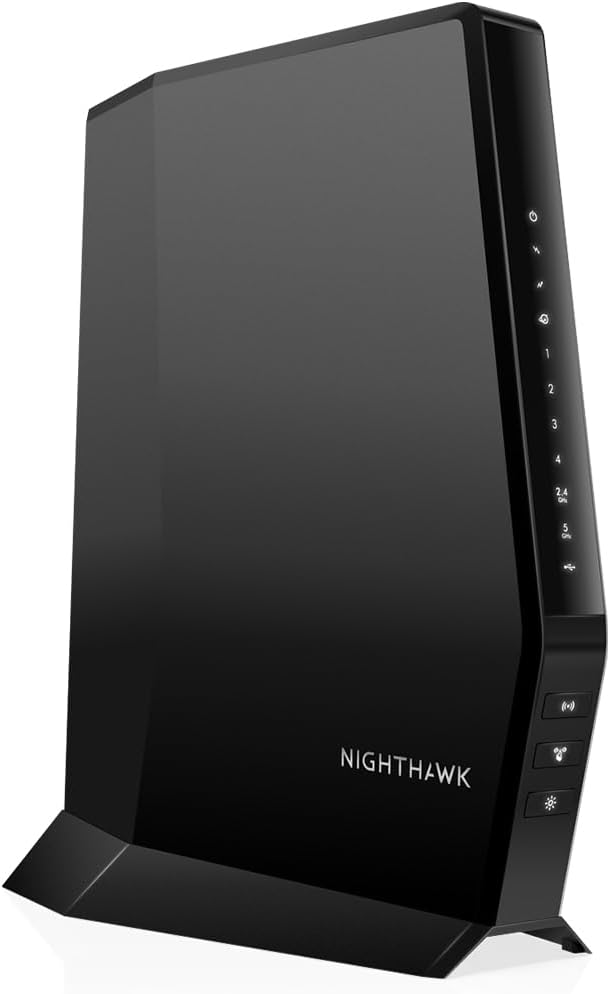


The NETGEAR Nighthawk CAX30 combines a DOCSIS 3.1 cable modem with an AX2700 dual-band WiFi 6 router, making it a practical all-in-one option for homes that use compatible cable internet. Its 4.1 rating reflects a generally favorable balance of features, and its four Gigabit Ethernet ports give gamers dependable ways to connect consoles, desktops, and other latency-sensitive hardware.
We may earn a commission when you buy through this link, at no additional cost to you.
The integrated modem is designed for multi-gig cable plans, while the supplied information lists support for Xfinity plans up to 800 Mbps, Spectrum up to 1 Gbps, and Cox up to 1 Gbps. The router portion advertises up to 2.7 Gbps combined wireless performance, coverage of as much as 2,000 square feet, and capacity for more than 25 connected devices. These are maximum categories rather than guaranteed real-world results.
Its principal limitation is the absence of a 2.5 Gigabit Ethernet port. A modern gaming PC, network storage system, or high-end console can benefit from a multi-gig wired connection, particularly when the internet plan and local devices support it. Coverage also depends on walls, floors, neighboring networks, and device placement, so a larger or multi-level home may still need access points or mesh satellites.
The CAX30 is a strong recommendation for value-conscious gamers who want modern cable hardware without moving to a premium multi-gig system. It suits ordinary gaming sessions, downloads, streaming, and home networking particularly well. Confirm that your provider supports the model and your planned service tier before ordering, then consider a wired connection for the most latency-sensitive device.
DOCSIS 3.1 provides headroom for faster cable tiers, while four Gigabit LAN ports let a gaming console or desktop bypass WiFi entirely. That can produce more consistent local behavior and reduce dependence on radio conditions during matches.
The free Nighthawk app supports guided setup, WiFi management, speed tests, pausing devices, and guest networks. These controls are useful when family members, streaming services, and gaming devices all compete for the same connection.
We may earn a commission when you buy through this link, at no additional cost to you.
The NETGEAR Nighthawk CAX80 is a DOCSIS 3.1 modem router combo for cable subscribers who want more than basic Gigabit Ethernet. Its 3.9 rating is respectable, while the combination of AX6000 WiFi 6, a 2.5 Gig Ethernet port, and support for higher-tier cable plans makes it a serious option for modern gaming setups.
We may earn a commission when you buy through this link, at no additional cost to you.
Compared with the CAX30, the CAX80 offers a higher wireless class and more potential throughput across a busy home. The supplied information describes coverage of up to 2,500 square feet and support for 30-plus connected devices. Its wired section includes one 2.5 Gig Multi-Gig port and four Gigabit Ethernet ports, which is enough to hardwire a primary gaming rig while keeping other devices connected.
The trade-off is that this is not a purely multi-gig network: only one LAN port exceeds Gigabit, so a second gaming PC or network storage device may still need a 1 Gbps connection. The modem's result also depends on the availability of a sufficiently fast provider plan and a DOCSIS network capable of delivering it. In addition, the product data refers to major cable provider compatibility, but activation and plan qualification remain essential.
Choose the CAX80 when a gaming PC or console can use the 2.5 Gig port and your household benefits from stronger WiFi than the CAX30 offers. It is a particularly compelling option for gamers who want one box to handle cable service, wireless connectivity, and a high-speed wired endpoint without adding a separate router.
The dedicated 2.5 Gig port gives a compatible gaming desktop, television, or storage system a faster local link than a standard Gigabit port. This can reduce network bottlenecks when several devices exchange large files or download content simultaneously.
AX6000 performance and a stated capacity of 30-plus devices make the CAX80 a good fit for households combining gaming, streaming, calls, and browsing. Placement remains important because the advertised coverage and aggregate speed are not guaranteed in every building.
We may earn a commission when you buy through this link, at no additional cost to you.
This renewed NETGEAR Nighthawk CAX30 offers the same broad platform as the standard CAX30 but under a renewed condition. Its 4.2 rating is the highest among the three CAX30 listings in the supplied data. The DOCSIS 3.1 modem, AX2700 WiFi 6, and four Gigabit Ethernet ports remain central to its gaming appeal.
We may earn a commission when you buy through this link, at no additional cost to you.
The product information highlights support for multi-gigabit internet, improved capacity for more wireless devices, and link aggregation. The four Gigabit Ethernet ports provide hardwired options for gaming consoles, desktop computers, and streaming equipment. For competitive gaming, avoiding WiFi can help keep local wireless congestion separate from the wired path used by a primary machine.
As with any renewed electronic product, appearance, cosmetic wear, and the basis of refurbishment may vary. Buyers should also check what accessories, cables, and manufacturer support accompany the unit. The absence of a multi-gig LAN port is a more structural limitation, and the product's effective internet speed still depends on the cable provider, service tier, and network conditions.
This renewed model is best for a budget-minded gamer who accepts refurbishment uncertainty and prioritizes modern DOCSIS hardware with multiple wired ports. It may suit a secondary gaming location, a first network build, or a household seeking a complete upgrade from older WiFi 5 equipment. Review the renewed listing details and provider compatibility carefully before purchase.
A renewed designation can make modern networking hardware more accessible, but the exact condition and included components may not match a new unit. Confirm connector condition, accessory inclusion, warranty terms, and return options before committing.
Four Gigabit LAN ports are enough to separate major traffic sources across several devices. Keeping a console or gaming desktop on Ethernet can make performance more predictable than relying on a congested shared wireless channel.
We may earn a commission when you buy through this link, at no additional cost to you.
The NETGEAR Nighthawk C7000 is a discontinued DOCSIS 3.0 cable modem and AC1900 WiFi 5 router combo. Its 4.2 rating shows that the supplied customer feedback remains favorable, but the aging platform makes it best understood as a basic gaming option rather than a long-term multi-gig solution.
We may earn a commission when you buy through this link, at no additional cost to you.
The unit supports Xfinity plans up to 800 Mbps and Cox plans up to 500 Mbps according to the supplied information. It also provides four Gigabit Ethernet ports, dual-band WiFi 5 coverage of up to 1,800 square feet, and Beamforming+ support. These features can be sufficient for online games, voice chat, video calls, HD streaming, and browsing in a moderately sized home.
The meaningful disadvantages are age-related. DOCSIS 3.0 does not offer the same future headroom as DOCSIS 3.1, while AC1900 is behind current WiFi 6 and WiFi 7 standards. Discontinued status can also affect parts availability, firmware longevity, and retailer support. Availability of the service tier and exact device qualification should always be confirmed directly with the provider.
The C7000 makes sense for a budget-limited household with modest cable service, older gaming devices, and no need for multi-gig Ethernet. It can also work as a temporary secondary network in a smaller space. For a new high-speed installation, a DOCSIS 3.1 model is usually the more forward-looking choice.
The C7000 brings modem and router functions together in a format that many cable households already understand. The Nighthawk app can help with guest networks, speed tests, device pausing, and other routine management tasks.
Its stated support levels are suitable for everyday gaming when the internet plan is no faster than the provider-qualified tier. A faster plan would make a DOCSIS 3.1 upgrade a more logical long-term investment.
We may earn a commission when you buy through this link, at no additional cost to you.
The NETGEAR Nighthawk RS700S is not a cable modem router combo, but it is one of the strongest options in this guide for gamers who already have a suitable cable, fiber, DSL, or satellite gateway. Its 4.4 rating is the highest supplied rating in the group, and the router combines tri-band WiFi 7 with 10 Gigabit networking.
We may earn a commission when you buy through this link, at no additional cost to you.
The advertised wireless total reaches 19 Gbps across the 2.4 GHz, 5 GHz, and 6 GHz bands. Its 12-stream design is stated to cover as much as 3,500 square feet and support 200 devices, although walls, floors, and interference can reduce both range and real throughput. A 10 Gigabit WAN port prepares the network for premium fiber tiers, while a 10 Gigabit LAN port and four 1 Gigabit LAN ports serve demanding devices.
The key trade-off is that this device requires a separate modem or gateway. Some providers place their gateway in bridge mode to permit another router to manage the connection. It also asks for advanced hardware even when a household does not yet own WiFi 7 clients, so compatible devices are needed to benefit from the newest wireless features. The supplied data specifically says no coax is needed.
The RS700S is ideal for a future-focused gaming household with a fast existing connection and several high-end wireless devices. It is less suitable for a renter or new customer who wants a single device to replace both a provider gateway and router. Verify provider and gateway compatibility before installation.
The tri-band WiFi 7 design separates traffic across three radio bands and uses MU-MIMO and OFDMA to serve multiple clients. Gaming benefits most when recent consoles, phones, computers, and accessories actually support the newer standard.
A 10 Gigabit WAN port and 10 Gigabit LAN port can eliminate multi-gig bottlenecks on compatible wired networks. This is particularly attractive for fiber subscribers, high-end storage, and local transfers involving several modern devices.
We may earn a commission when you buy through this link, at no additional cost to you.
The ARRIS Surfboard G34 is a compact DOCSIS 3.1 modem and AX3000 WiFi 6 router combo. Its 3.7 rating is the lowest among the featured products, but the core hardware remains relevant for gamers who want faster cable service and a combined device without a large mesh system.
We may earn a commission when you buy through this link, at no additional cost to you.
The modem supports cable internet plans up to 2.5 Gbps, subject to provider qualification, while the dual-band WiFi 6 component advertises up to 3 Gbps of combined wireless performance. Four 1 Gigabit Ethernet ports allow a console, gaming PC, smart television, or other device to be connected by cable. The stated provider testing covers Cox, Xfinity, and Spectrum.
Its compact chassis and simple status LEDs make it less conspicuous than some larger router systems. Setup is also described as a straightforward process involving connection, activation, and joining or customizing the default WiFi network. However, there is no 2.5 or 10 Gigabit Ethernet port, so a faster internet plan will not produce faster local wired throughput on this hardware.
The G34 is best for a moderately sized home with compatible cable service and a preference for straightforward equipment. It handles ordinary gaming, streaming, and browsing well when a client uses a Gigabit wired link. Buyers who require advanced QoS controls, multi-gig LAN, or detailed whole-home mesh expansion should consider a different option.
The space-saving design is useful in a living area where a larger router would be visually intrusive. Four wired ports still allow several important devices to remain off WiFi without needing an immediate additional switch.
The G34 is not compatible with fiber, DSL, or satellite services, and even within cable markets the exact model must be supported. Checking the provider's approved hardware list prevents delays in activation and avoids buying equipment that cannot deliver the intended plan.
We may earn a commission when you buy through this link, at no additional cost to you.
The GL.iNet Flint 2 is the most explicitly gaming-oriented product in the list. It is a standalone WiFi 6 router rather than a modem router combo, and its 4.5 rating is the highest supplied rating among all ten products. With eight-stream WiFi 6, dual 2.5 Gigabit Ethernet, VPN support, and AdGuard Home compatibility, it targets customizable home networks.
We may earn a commission when you buy through this link, at no additional cost to you.
The router advertises wireless speeds up to 6 Gbps and is designed for stable, high-speed connections during demanding multiplayer sessions. One of its major strengths is the pair of 2.5 Gigabit ports, allowing both a high-speed internet uplink and a fast wired gaming endpoint to operate without being limited to 1 Gbps. Its memory and storage also make it suitable for users interested in additional plugins.
VPN performance is another distinguishing feature. The supplied data lists WireGuard speeds up to 900 Mbps and OpenVPN speeds up to 880 Mbps, with real results depending on the internet service, network environment, server location, and VPN provider. AdGuard Home can provide DNS-based ad filtering and customizable control, though the user must enable and configure it.
The principal compromise is that the Flint 2 does not include a cable modem. It works best for someone with an existing compatible gateway, an enthusiast comfortable with web-based administration, or a gamer who wants more control over routing and privacy. Newer clients benefit most from its advanced wireless capabilities, while firmware should be updated during initial setup.
The router is built around the idea of managing a gaming network independently from the provider's gateway. Its web interface and support for plugins make it appealing to users who want more control over DNS, VPN routing, and device services.
Two 2.5 Gigabit ports create a useful upgrade path even when the internet service is not multi-gig. They can accelerate local traffic between compatible devices or provide a faster connection between a gaming PC and a modern network.
We may earn a commission when you buy through this link, at no additional cost to you.
The Motorola MG8702 combines a DOCSIS 3.1 cable modem with an AC3200 WiFi 5 router. Its 4.1 rating reflects a solid consumer reception, and the device is aimed at Comcast Xfinity, Cox, and Charter Spectrum households that want to replace a provider gateway with a recognizable all-in-one unit.
We may earn a commission when you buy through this link, at no additional cost to you.
Its DOCSIS 3.1 modem is designed to support faster cable plans, while the router includes Intelligent Power Boost, Range Boost, and AnyBeam WiFi Beamforming. The supplied data does not give a specific coverage area, so actual range should be judged by layout and placement. The mobile app covers setup, guest networks, usage monitoring, speed testing, parental controls, and network security alerts.
The main weakness is that AC3200 is a WiFi 5 class rather than WiFi 6. That does not prevent smooth everyday gaming, especially for devices connected by Ethernet, but it leaves less wireless headroom in crowded homes with many modern clients. The wired specification also lacks a multi-gig port, so faster cable tiers can reach the home without being fully utilized by local Ethernet connections.
The MG8702 is a sensible choice for a provider-qualified household seeking a straightforward branded combo, robust app management, and included expert support. It is especially attractive to buyers who already recognize Motorola networking equipment. Gamers planning to add WiFi 6 or 7 access points later may be better served by a more modular solution.
The smart WiFi app gives users direct access to guest access, usage information, speed tests, parental controls, and security alerts. For households with children or several connected devices, those routines are more useful than a basic status-light interface.
DOCSIS 3.1 provides a capable cable foundation, but AC3200 wireless hardware belongs to an older generation. Players with compatible wired devices can still benefit from a stable Ethernet path while upgrading the wireless side later.
We may earn a commission when you buy through this link, at no additional cost to you.
The NETGEAR Orbi CBK752 is a premium whole-home solution that combines a DOCSIS 3.1 cable modem router with a mesh satellite. Its 4.0 rating and AX4200 tri-band platform make it a strong choice for gamers who need broader wireless coverage without managing a separate cable modem and conventional router.
We may earn a commission when you buy through this link, at no additional cost to you.
The supplied information states that the router and satellite can cover up to 5,000 square feet in open layouts for 40 or more devices. Tri-band WiFi 6 uses a dedicated band for the mesh connection, helping backhaul traffic travel between nodes rather than competing with client traffic. Four Gigabit Ethernet LAN ports on the main unit and two on the satellite provide wired options for consoles, PCs, media players, and storage.
The most important trade-off is complexity and cost relative to a single-box router. Mesh performance also depends on placement, walls, floors, and interference; the stated open-layout area is not a guarantee for every home. The product is certified for Xfinity service up to 900 Mbps, Spectrum up to 1 Gbps, and Cox up to 1 Gbps, and it does not support fiber, DSL, or satellite.
The CBK752 is recommended for large homes, multi-level layouts, and households where gaming devices regularly roam between rooms. It is less compelling for a compact apartment where a single router can provide adequate coverage. For those who need even more reach, the system can be expanded with an optional RBS750 satellite.
The tri-band design reserves a high-speed band for communication between the router and satellite. This can preserve client performance better than a dual-band mesh system in which backhaul and client traffic share the same spectrum.
A separate satellite can extend the network into areas where a single router struggles, which is useful for players moving between a media room, office, bedroom, and gaming space. Wired backhaul may provide an even stronger alternative where running a cable is practical.
We may earn a commission when you buy through this link, at no additional cost to you.
The NETGEAR Orbi CBR750 integrates a DOCSIS 3.1 cable modem with an AX4200 tri-band WiFi 6 router. It is a premium single-unit alternative to the two-piece CBK752, with stated coverage of up to 2,500 square feet and support for more than 40 connected devices. Its 4.0 rating makes it a viable option for larger and busier homes.
We may earn a commission when you buy through this link, at no additional cost to you.
The modem is stated to support internet plans up to 4 Gbps, although actual service depends on the provider and its network. Certification details list Spectrum and Cox up to 1 Gbps and Xfinity up to 900 Mbps download with 200 Mbps upload. The tri-band wireless section advertises throughput up to 4.2 Gbps, with a dedicated band available for the Orbi mesh connection when satellites are added.
The main caveat is that the advertised 2,500-square-foot coverage is tied to the main unit, while expansion requires separately purchased Orbi Mesh WiFi 6 satellites. This means the buyer can start with one box and add capacity later, but a full-house deployment may ultimately cost more than the included CBK752 package. The product also has no stated multi-gig Ethernet port.
The CBR750 is best for a household that wants a premium, expandable Orbi system but does not yet need a second unit. It suits gamers who need modern cable hardware, tri-band WiFi, and flexible future expansion. Confirm exact provider support and plan limits before purchase, especially if the goal is to use the highest advertised DOCSIS tier.
The main unit can operate as a capable standalone network, then accept additional compatible satellites when larger coverage is required. This makes it flexible for households whose layout or device count may change over time.
DOCSIS 3.1 and AX4200 WiFi 6 provide a modern platform for compatible cable services and busy connected-device environments. Gaming performance still depends on provider speed, client hardware, network layout, and whether key devices use Ethernet.
We may earn a commission when you buy through this link, at no additional cost to you.
The right gaming network depends on your internet service, home layout, client hardware, and tolerance for a single-box or modular setup. Provider qualification should come first, followed by the modem standard, wired speed, wireless class, and coverage needs.
A technically advanced modem is useful only if your internet service provider supports its exact model and the desired service tier. The featured products primarily target U.S. cable networks, with individual qualifications varying for Xfinity, Spectrum, Cox, and other providers. Some combinations also exclude fiber, DSL, satellite, and bundled voice plans. Review the provider's current approved-device list before purchasing, because certification can differ even when two products use the same DOCSIS generation.
DOCSIS 3.1 is the standard for most modern selections in this guide and provides headroom for Gigabit and multi-gig cable tiers. DOCSIS 3.0 can still support ordinary gaming, streaming, and browsing, but it is an older platform better suited to lower provider tiers. Headline modem speed is only an upper limit: real-world performance also depends on the available plan, network congestion, signal quality, and provider equipment.
Fast internet service can still be limited by the local wired network. The CAX80 and GL.iNet Flint 2 include 2.5 Gigabit Ethernet, while the Nighthawk RS700S adds 10 Gigabit ports. A 2.5 Gig connection is especially useful for a current high-end gaming PC, modern television, or network storage system, although internet speed must also support the tier. The remaining combos provide four Gigabit LAN ports, which remain dependable for many gaming setups.
WiFi 6, WiFi 6E, and WiFi 7 can improve efficiency, capacity, and throughput when the devices on the network support them. The RS700S is a WiFi 7 tri-band router for users with compatible clients and an existing gateway, while the Flint 2 offers enthusiast-friendly WiFi 6 features. Combo options based on AC1900, AC3200, or AX3000 may still provide excellent gameplay, but they offer less room for future wireless growth.
Coverage claims are best viewed as planning guidance, not guarantees. A small, open apartment may be served by a single router, while multi-level homes with masonry, floors, and competing networks may need multiple access points. The Orbi CBK752 includes a router and satellite for a stated 5,000-square-foot open-layout area, while the CBR750 starts as a single 2,500-square-foot unit and uses optional satellites for expansion.
A cable modem router combo reduces equipment count and may simplify ownership of the networking setup. A standalone router gives more flexibility because it can work with an existing cable, fiber, DSL, or satellite service and often exposes more advanced controls. The Flint 2 is particularly attractive to gamers who want a dedicated network layer, while the RS700S is aimed at households already equipped with a suitable gateway.
Gamers may value a router that supports VPN services, ad filtering, guest networks, parental controls, and detailed traffic management. The Flint 2 includes WireGuard, OpenVPN, and AdGuard Home support, while the Nighthawk and Orbi products provide mobile apps for setup, speed tests, device management, and guest access. Extra features are useful only if the interface and subscription terms suit the household.
A renewed CAX30 can provide modern hardware under a different purchasing condition, while the discontinued C7000 is built around older DOCSIS and WiFi standards. Renewed products may vary in cosmetic condition or included accessories, and discontinued products may have less predictable support or parts availability. In both cases, read the listing, warranty, return policy, and provider requirements carefully.
Begin by confirming provider compatibility and gathering the required activation information. Connect the coax cable to the modem section, attach the power supply, and follow the provider's activation process before changing advanced router settings. For standalone routers such as the Flint 2 or RS700S, connect the existing gateway through the appropriate WAN port, and ask the provider whether bridge mode is required.
After the network is online, update the router firmware immediately. The Flint 2 product information specifically recommends an initial firmware update for performance and user experience. Create a unique administrative password, enable WPA3 where available, set a secure WiFi password, and separate guest traffic from personal devices. Wired gaming devices should be connected to the fastest suitable LAN port, while wireless clients should be placed near the intended coverage area without blocking signal.
For ongoing care, leave adequate ventilation around the equipment, avoid stacking it under papers or inside a closed cabinet, and keep cables secure. Use the app to review connected clients, run speed tests, and apply updates as released. If congestion is suspected, pause unnecessary high-bandwidth activity, test with an Ethernet client, and separate the router and modem functions according to the provider's instructions rather than changing settings blindly.
A combo can simplify the network and provide a stable path to the internet, but it does not guarantee lower latency by itself. Latency depends on the internet service, provider routing, server distance, network congestion, WiFi conditions, and wired or wireless connection. A hardwired gaming device generally benefits from avoiding unstable WiFi, while a capable DOCSIS modem helps prevent slower service tiers from becoming the network bottleneck.
Ethernet is the preferred choice when practical because it provides a direct, predictable connection without shared wireless contention. It can also take advantage of multi-gig Ethernet when both the PC and router support it. WiFi 6 or WiFi 7 can be suitable for handheld and console gaming, but performance depends on distance, walls, interference, channel conditions, and the capabilities of the wireless client.
DOCSIS 3.1 is not mandatory for every online game, but it is a sensible choice for modern cable service and future upgrades. A DOCSIS 3.0 combo can handle typical gaming when the provider plan and local network are sufficient. The practical benefits of DOCSIS 3.1 appear when the subscriber has a faster cable tier, wants additional headroom, or avoids replacing a modem again soon.
Yes, if you already have a compatible cable modem or provider gateway. The standalone router connects through its WAN port, and the provider may need to place the gateway in bridge mode. The GL.iNet Flint 2 and NETGEAR Nighthawk RS700S are designed for this approach and offer advanced WiFi and wired features, but they require separate internet hardware.
The needed area depends on the building, number of walls, router placement, and the wireless standard of your devices. A single router may be sufficient for a compact home, while larger or multi-level properties may need mesh satellites or wired access points. The stated coverage figures are maximum estimates for favorable layouts and should not be treated as guaranteed reach.
It is not essential for most online games because the internet connection is usually the larger constraint. It can still help with local traffic, large downloads, network storage, and modern devices that exchange substantial data. The CAX80 and Flint 2 are worthwhile choices when at least one gaming or productivity device genuinely supports the faster wired standard.
No. Provider support is model-specific, and plan qualification can also limit the speed available through a device. Some providers may certify a unit for one service tier but not another, while fiber, DSL, satellite, and bundled voice customers need different equipment. Always check the current approved-device list and activation requirements for the specific address and plan.
A renewed device can be reasonable when its warranty, return policy, included accessories, and condition are clearly documented. The renewed CAX30 retains a modern DOCSIS 3.1 and WiFi 6 platform, but buyers should inspect the listing for wear and missing items. A new unit may be preferable for a primary, long-term installation where maximum support matters.
The NETGEAR Nighthawk CAX30 is the strongest value-oriented all-in-one choice, offering DOCSIS 3.1, WiFi 6, and four Gigabit ports. The CAX80 takes the lead for gamers who want a 2.5 Gigabit wired connection, while the Orbi CBK752 stands out for premium mesh coverage across a large home.
Prioritize provider and plan compatibility before any other feature. After that, match the modem to your service tier, choose multi-gig Ethernet when compatible devices can use it, and select wireless coverage based on the actual building. Players in compact homes can usually keep things simple, while larger households benefit from mesh expansion or properly placed access points.
Finally, check current prices, promotions, warranty terms, renewed conditions, and provider approval before ordering. Technology and qualification lists change over time, so the product that fits today may not match a future service tier. A current compatibility check protects both the purchase and the gaming experience.