
VR Headset Charging Dock
4.4Editor score
Compact three-model headset support
Tilted storage tray and stable base
USB-C headset charging only
Our Meta Quest 3 Magnetic Charging Dock guide compares charging speed, magnetic contacts, controller support, lighting, batteries, compatibility, and setup.
A Meta Quest 3 Magnetic Charging Dock can simplify the otherwise repetitive routine of charging a headset and two controllers, while also giving the equipment a dedicated place to rest. The best models combine secure magnetic connections, useful charging speeds, broad headset and strap compatibility, and a stable base rather than simply acting as a decorative holder.
The products in this guide were compared using the information supplied for each listing, including supported Quest models, charging methods, included batteries and adapters, lighting, safety features, storage design, and customer ratings. The roundup covers complete headset-and-controller docks, controller-focused charging accessories, and stands that use conventional USB-C headset charging instead of magnetic connections.
Each review explains the product's strongest benefits, practical limitations, and ideal buyer, while the comparison table makes the major differences easier to scan. Ratings and product configurations can change, marketplace listings may be updated, and prices fluctuate, so readers should confirm the current specifications and accessories before making a purchase.
4.4Editor score

4.2Editor score

4.0Editor score
The table below compares charging methods, Quest compatibility, controller support, included power accessories, and other practical features. It is worth noting that several matching docks charge only the headset, while a smaller group of products also provides magnetic charging for both controllers.



The DOBE FOMIS Electronics dock is an all-in-one charging and storage solution for Meta Quest 3 and Quest 3S owners. Its 4.2 rating reflects a feature-rich approach that goes beyond a simple headset holder. The strongest attraction is simultaneous magnetic charging for the headset and both controllers, allowing the entire VR kit to return to one organized station at the end of a session.
We may earn a commission when you buy through this link, at no additional cost to you.
The dock uses a magnetic USB-C headset connector and magnetic pogo-pin connections for the controllers. A 15W adapter is included, and the listing states that the headset can charge in approximately 2.5 hours while the controllers require about two hours. Standard USB-C cable charging remains available, and both cables are included, which makes the dock useful even if a magnetic connector is temporarily unavailable.
The included rechargeable controller batteries are rated at 900mAh each and are described as supporting more than 2,000 cycles. Compatible magnetic battery covers are also included. This arrangement is particularly valuable for users who want to eliminate disposable batteries, although it does mean the controller covers must be replaced with the supplied magnetic versions for charging. Built-in protection is listed against overcurrent, overvoltage, and overcharging.
RGB lighting adds more personality than a utilitarian dock, and the one-touch control lets users disable the illumination for sleeping. A power-off memory function is another thoughtful detail. This is a strong choice for Quest 3 or 3S users who prioritize true all-device magnetic charging, broad strap compatibility, tidy storage, and customizable lighting; buyers who need Quest 2 support will need to look elsewhere.
Charging the headset and both controllers together reduces cable clutter and removes much of the guesswork involved in preparing a VR setup for the next session. Magnetic alignment also helps position the devices consistently.
The included USB-C alternative provides a useful backup, while support for standard, Elite, and battery-style head straps makes the dock more accommodating of different ways of wearing the headset.
We may earn a commission when you buy through this link, at no additional cost to you.
This KINWIN two-pack is best understood as a controller battery and magnetic-cover accessory rather than a complete charging dock. It is made for Meta Quest 3 and Quest 3S controllers and can be used with a compatible KINWIN charging dock. Its 4.2 rating reflects a focused solution for users who want rechargeable controller power and the proper covers required by magnetic charging stations.
We may earn a commission when you buy through this link, at no additional cost to you.
The package contains two controller covers and two customized rechargeable batteries. According to the listing, the batteries can be used more than 1,000 times, reducing the need to keep replacing disposable cells. The covers are designed to match the controller shape and provide the metal charging contacts needed when a compatible dock is available.
Correct installation is especially important. The battery's negative and positive markings must be aligned correctly, the silver metal contacts must face upward, and those contacts must connect with the metal contacts inside the controller cover. These details are important because a reversed battery or poorly seated contact may prevent charging or create an unreliable connection.
This product makes sense for an existing magnetic-dock setup that needs replacement covers or additional rechargeable batteries. It is not a stand-alone solution for someone who wants a place to charge an entire Quest kit. Buyers should consider the KINWIN 30W dock in this guide for a more complete package, or choose the DOBE FOMIS dock if broader strap support and two headset charging methods are priorities.
Rechargeable cells can reduce ongoing disposable-battery waste and make routine charging more predictable. Their usefulness is greatest when paired with a dock designed around the matching magnetic covers.
The silver contacts must face upward and meet the matching contacts in the cover. Checking polarity and seating the battery correctly is essential for reliable charging.
We may earn a commission when you buy through this link, at no additional cost to you.
The VR Headset Charging Dock is a straightforward storage solution with a 4.4 rating, making it a practical option for Quest 2, Quest 3, and Quest 3S owners. It combines a vertical headset cradle with a dedicated base for controllers. Unlike the fully magnetic docks, it charges the headset through a USB-C cable and does not recharge the controllers.
We may earn a commission when you buy through this link, at no additional cost to you.
Its most useful feature is broad storage compatibility. Quest 3 controllers can remain in silicone sleeves, while the upper tray accommodates third-party head straps and headphones. The headset rests on an angled tray intended to improve balance and reduce wobbling, while four non-slip pads underneath help keep the assembled stand stable.
Charging takes approximately three to five hours when the headset's USB-C cable is connected to an appropriate power source. The listing recommends a 5V-3A, 9V-3A, or 12V-3A adapter and warns that an underpowered supply may slow charging. No controller-charging function is provided, which should be considered before buying if uninterrupted controller play is the priority.
This dock is a sensible budget-oriented choice for people whose main goal is an organized place to rest a headset and controllers without complex electronics. It can also be disassembled for compact storage. Those wanting magnetic headset charging, simultaneous controller charging, or integrated rechargeable batteries should choose one of the dedicated all-in-one magnetic docks instead.
The ability to store controllers in their sleeves and a headset with third-party straps or headphones reduces the need to dismantle the setup every time it is not being used.
An enlarged contact area, a tilted headset tray, and four non-slip pads work together to keep the stand steady. Tool-free assembly and disassembly also simplify setup and storage.
We may earn a commission when you buy through this link, at no additional cost to you.
The Three-Device Magnetic Charging Dock is designed for Quest 3 and Quest 3S users who want the headset and both controllers handled by one station. It carries a 4.2 rating and emphasizes simultaneous magnetic charging, a stable charging mode, and a complete kit. The listing estimates that a full charge for the headset and controllers takes about four to five hours.
We may earn a commission when you buy through this link, at no additional cost to you.
Two 2100mAh rechargeable controller batteries are included, along with their controller covers. These batteries are described as usable more than 3,000 times, which makes them appealing for owners who play frequently and want a reusable alternative to disposable cells. Because the controllers rely on the magnetic covers for charging, users must exchange the original covers for the supplied versions.
The package includes the charging dock, rechargeable batteries, battery covers, a USB-C adapter, a fast-charging head, and a guide. LED indicators provide charging feedback, while the stand itself offers dedicated storage for the headset and controllers. Although the product description repeats the simultaneous-charging feature, the core configuration is clear: one dock handles the complete Quest 3 or 3S kit.
The primary trade-off is the stated four-to-five-hour charging period, which is longer than the times claimed by several faster competitors. It is still a practical choice for overnight charging or planned downtime between sessions. Buyers should consider this model when high-capacity reusable batteries and a generous accessory package matter more than achieving the shortest advertised recharge time.
The included 2100mAh cells are the largest controller battery capacity listed in this roundup. Their advertised long cycle life also targets users who expect to recharge their controllers routinely.
Batteries, covers, a charging head, an adapter, a cable, and a guide are included. This reduces the need to assemble a compatible charging setup from separate parts.
We may earn a commission when you buy through this link, at no additional cost to you.
The KINWIN 30W dock is the most richly equipped premium-style option in this guide, with a 4.0 rating and support for Meta Quest 2, Quest 3, and Quest 3S. Its 30W USB Power Delivery adapter is intended to charge the headset and controllers together, with listed times of approximately two hours for the headset and three and a half hours for controllers.
We may earn a commission when you buy through this link, at no additional cost to you.
Magnetic USB-C alignment helps reduce port wear, while flexible gold-plated pins are designed to maintain a precise connection with the controller charging points. The listing describes 15 layers of protection, including overcharge and short-circuit prevention, and cites UL, CE, RoHS, and FCC certification for the manufacturing process. An extra USB-C port also allows another compatible device to be charged.
Lighting is a major feature: 11 RGB modes create an ambient gaming-station effect, while red and green indicators communicate charging and full-charge states. Two NiMH batteries and separate covers for Quest 3 or 3S and Quest 2 are included. The listed batteries support more than 1,000 cycles, providing a reusable alternative to disposable controller batteries.
There are two notable compromises. The charging indicator cannot be turned off, although it is described as very dim; and if the protection system is triggered, the dock restarts repeatedly until the connected USB device is unplugged. The recommended approach is to use the included 30W charger. Subject to those conditions, this is a strong choice for owners who value broad model support, a substantial adapter, and polished RGB presentation.
The bundled 30W PD adapter supplies more stated power than many competing bundles. Using the specified charger also helps the dock maintain its advertised charging performance.
Red and green indicators distinguish charging from a full or standby state, while 11 ambient modes provide desk customization. The light cannot be disabled, so bedside placement deserves consideration.
We may earn a commission when you buy through this link, at no additional cost to you.
The TechKen VR Charging Dock offers a clean vertical storage solution for Quest 2, Quest 3, and Quest 3S users. It has a 4.4 rating, tying for the highest customer rating among the products with established ratings. Its central purpose is to keep the headset organized, display it upright, and charge it through a Type-C cable.
We may earn a commission when you buy through this link, at no additional cost to you.
The vertical arrangement uses less horizontal desk or shelf space than a broad horizontal charging cradle. Controllers can be placed in the stand even when they have grip covers, and the headset can remain fitted with an Elite strap. This compatibility is useful because it avoids the inconvenience of removing common accessories every time the equipment is stored.
The dock is not magnetic, and it does not recharge controllers. It is therefore best classified as a headset charging and storage stand rather than a complete three-device charging system. The Type-C connection follows the same general charging method used by many conventional Quest stands.
This model appeals to buyers who want a simple, visually tidy charging point with broad accessory compatibility. It may be especially attractive in compact rooms or on shelves where vertical storage is valuable. For people who expect a single station to recharge controllers as well, the DOBE FOMIS or KINWIN magnetic dock would be a more complete choice.
Holding the headset upright reduces the amount of horizontal surface occupied by the station. The result is a more open display area around the charging position.
Support for grip covers and Elite straps means users do not need to strip the headset down for storage. This makes the dock more convenient for frequently used configurations.
We may earn a commission when you buy through this link, at no additional cost to you.
The Four-Battery Quest Charging Station is built for households that want spare rechargeable controller power and a central display hub. It supports Meta Quest 2, Quest 3, and Quest 3S, carries a 4.1 rating, and includes four 1100mAh rechargeable controller batteries. The headset and controller batteries can be handled together, with two battery positions charging at the same time.
We may earn a commission when you buy through this link, at no additional cost to you.
The listing estimates a full headset charge in about three hours and a battery charge in about four hours. A 15W PD adapter is included, along with a USB-C cable. The stand is assembled from a charging base and transparent acrylic components, creating a crystal-like appearance that doubles as a display stand for the headset and controllers.
Lighting is unusually detailed. The headset's ambient display can cycle through seven colors, while four LEDs on the battery section indicate charging progress using red and green states. The ambient lighting can be turned off through the dock buttons, making the station more suitable for nighttime use than options with fixed illumination.
Safety features listed include protection against overcharge, overvoltage, overcurrent, overheating, and short circuit. The primary limitation is that the listing does not explicitly promise magnetic headset charging, so buyers seeking a true magnetic dock should choose a model that clearly identifies that function. As a multi-battery charging and display hub, however, this product offers unusual capacity and broad compatibility.
Four included cells provide practical flexibility for owners with multiple controllers, shared household use, or a preference for keeping backup batteries ready. Two battery slots can charge at once.
Separate LED patterns show whether the headset and battery bank are idle, charging, or full. The ability to disable ambient lighting adds control over nighttime distraction.
We may earn a commission when you buy through this link, at no additional cost to you.
The PD 20W Magnetic Charging Dock is a focused charging station for Quest 3 and Quest 3S. It carries a 4.1 rating and distinguishes itself with a magnetic charging mode, vertical RGB presentation, and an included 20W adapter. The product listing emphasizes fast charging for the headset while acknowledging a longer controller recharge period.
We may earn a commission when you buy through this link, at no additional cost to you.
The headset is stated to reach a full charge in approximately two to two and a half hours, while the controllers take about four hours. Two rechargeable controller batteries are included, allowing the controllers to be replenished through the dock rather than relying entirely on disposable cells. The listing also identifies built-in overcharge and short-circuit protection.
Its vertical format suits buyers who want the charging station to double as an organized display. RGB lighting gives the setup a gaming-oriented appearance, while the magnetic mode offers a more structured way to position the headset than a loose cable connection. Compatibility is intentionally limited to the two current Quest models, and the product does not claim Quest 2 support.
This dock is a good middle-ground option for owners who want true magnetic functionality and a 20W power adapter but do not need broad multi-generation compatibility. The four-hour controller charging estimate means it is best used overnight or between longer sessions. Buyers should also verify the included battery and cover configuration against their controller setup before ordering.
The included 20W adapter and stated two-to-two-and-a-half-hour headset cycle make this useful for users who want to prepare for a session without leaving the dock overnight.
Combining magnetic charging with an upright display position keeps the headset accessible while reducing clutter. RGB lighting adds a customizable presentation to the setup.
We may earn a commission when you buy through this link, at no additional cost to you.
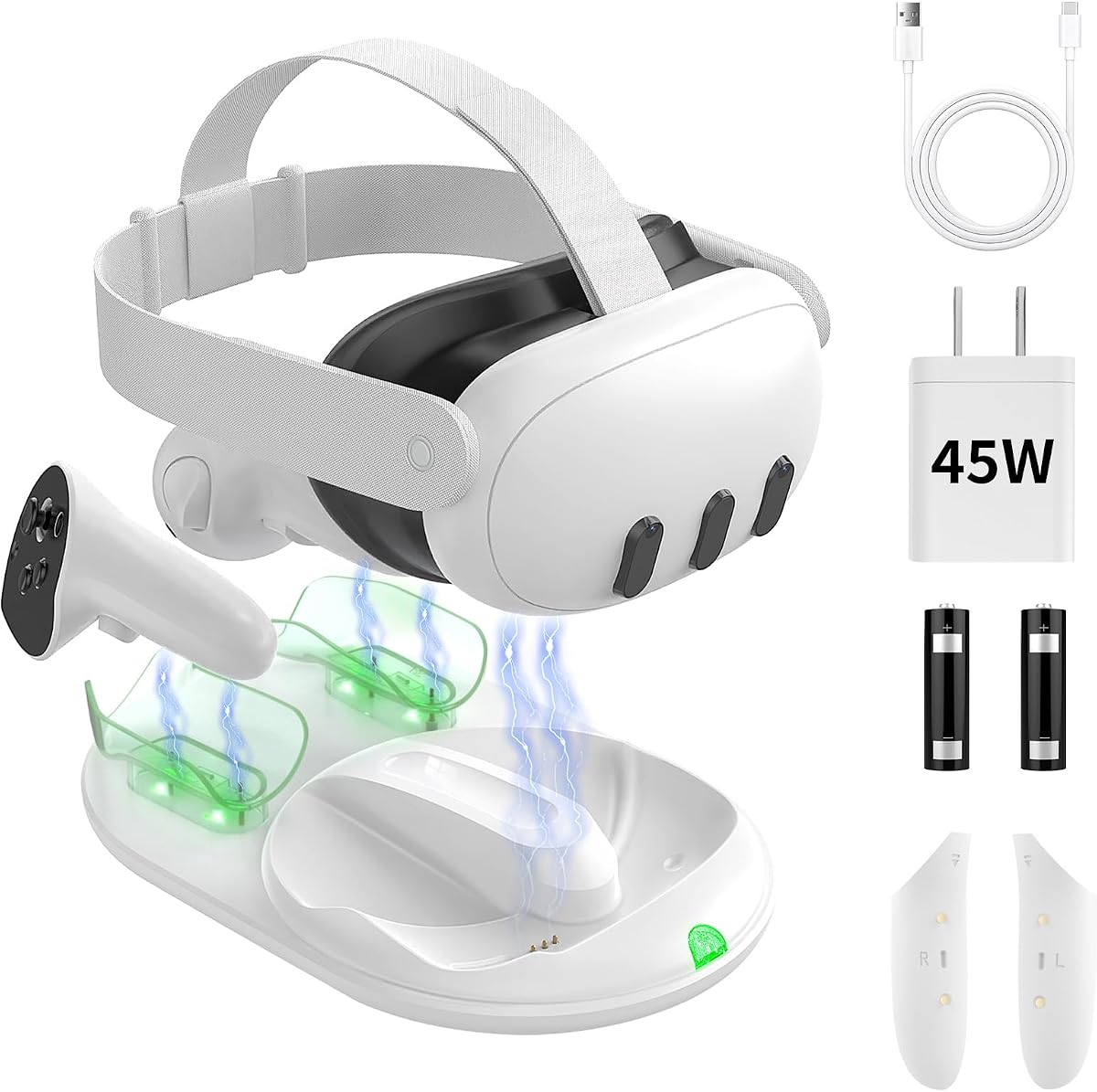
The TiMOVO 45W dock is built specifically for Meta Quest 3 headsets and controllers. Its 3.9 rating is the lowest established numerical rating among the conventional charging docks in this roundup, but the product distinguishes itself with a 45W adapter, magnetic charging for all three devices, and a complete white charging package.
We may earn a commission when you buy through this link, at no additional cost to you.
Headset and controllers align with magnetic contacts and are stated to reach a full charge in approximately two hours. The included 45W adapter supplies substantial charging power, while built-in chips are described as protecting against overheating, overcharging, and short circuits. The dock also supports the official Elite strap, though the listing warns that a heavy third-party strap can shift the headset's balance and prevent magnetic alignment.
Two NiMH rechargeable batteries and matching covers are supplied. The front LED button shows the headset's charging status and can turn off the overall light for sleeping, while two rear indicators show controller status. The listing notes that the controllers may display 80 percent when the base turns green even though the NiMH batteries are actually full, an important distinction caused by their lower voltage.
This is a compelling high-power option for Quest 3 users who do not need Quest 2 or Quest 3S support. Its major limitations are model-specific compatibility and the potentially confusing 80-percent controller reading. Owners with a Quest 3S or a heavy third-party head strap should choose a more broadly compatible dock, and all users should interpret the indicator according to the product instructions.
A 45W adapter and magnetic contacts are intended to make full-kit charging fast and consistent. The headset and both controllers can occupy the same dedicated station.
The controller LEDs can show a different percentage from the actual NiMH charge state. Users should treat the green full-charge signal as the reliable indication rather than expecting an exact percentage match.
We may earn a commission when you buy through this link, at no additional cost to you.
The APEXINNO Haptic GunStock is a specialized controller accessory rather than a conventional charging dock. It is designed for Meta Quest 3 and Quest 3S controllers and adds simulated recoil, impact, and force sensation to compatible shooting experiences. It is included in this roundup because its replacement battery and cover arrangement also provide a way to charge the controllers.
We may earn a commission when you buy through this link, at no additional cost to you.
The product supports single and burst modes, allowing the feedback behavior to suit different play styles. Its detachable 1500mAh battery includes a four-segment blue display for monitoring charge level and charging progress. With a 5V 2A input, the battery is stated to reach a full charge in about three hours and deliver up to three hours of continuous gameplay.
Charging the Quest controllers requires replacing their original batteries and controller covers with the APEXINNO battery and cover. The controller grips must be removed during charging. Two data cables are included, allowing two gun stocks to be charged together, and the instructions emphasize switching the mode to OFF before removing a battery.
This product is intended for VR shooters and other games where haptic feedback adds value. It does not provide a place to charge a Quest headset, and no numerical customer rating is available in the supplied listing. Buyers seeking a complete charging station should treat it as a complementary accessory rather than a substitute for one of the headset-and-controller docks reviewed here.
Recoil and impact sensations can make supported shooting games more immersive. Single and burst adjustments let users choose a feedback style that suits the action.
The detachable 1500mAh battery displays its own charge level and can be recharged in approximately three hours. Correctly switching the gun stock off before removal protects the intended operating process.
We may earn a commission when you buy through this link, at no additional cost to you.
The most useful dock depends on whether the priority is true magnetic charging, compact storage, broad model compatibility, controller battery support, or a particular gaming accessory. Reviewing the charging method and included components before buying prevents a frustrating mismatch between expectations and capabilities.
Choose magnetic charging when convenient alignment and all-device charging are the main goals. Choose a USB-C stand when lower complexity, a simpler footprint, or basic headset organization matters more.
For uninterrupted VR sessions, choose a dock that charges both controllers and includes compatible rechargeable batteries and covers.
Match the dock to the precise headset and controller generation you own, especially when upgrading from Quest 2 to Quest 3 or 3S.
Prioritize the full charging package and the stated cycle time, and use the manufacturer-recommended adapter whenever one is supplied.
Check the exact head strap, controller grip, and headphones you use. Magnetic alignment also requires a balanced headset and a properly aligned connector.
Treat capacity and cycle life as useful comparisons, not guarantees. Verify chemistry, controller fit, polarity, and the meaning of each status light.
Prefer adjustable or disableable lighting for a bedside setup. Always-fixed indicators are acceptable for a gaming desk but less desirable near a bed.
Prioritize a stable base, suitable orientation, and enough clearance for your preferred headset straps. Choose vertical storage when desk depth is more limited than width.
Before first use, read the dock's instructions and confirm that the headset, controllers, batteries, covers, cable, and power adapter are compatible. Position the station on a level, dry surface with enough clearance around the headset and controllers. Connect the supplied adapter to the dock, then install any required rechargeable controller batteries and magnetic covers. Confirm that each battery's positive and negative markings are correct and that the silver contacts face upward toward the cover.
Align the headset's charging connector with the magnetic dock interface and place the controllers on their designated charging contacts. Do not force a headset that tilts or sits unevenly; a heavy third-party head strap can shift the center of gravity and prevent proper contact. For stands that use USB-C, connect the cable to the headset charging port and use a recommended power adapter. A correctly seated magnetic connection or stable USB-C connection should be sufficient to begin charging.
Use the listed indicator colors to determine whether charging is in progress or complete, keeping in mind that NiMH controller batteries may display a lower percentage than their actual state. Disconnect the power before changing batteries or covers, and set powered accessories such as the APEXINNO GunStock to OFF before removing their batteries. Keep the contacts clean and dry, inspect magnetic surfaces for debris, and avoid placing liquids near the dock.
No. Some products use magnetic headset connections and also charge both controllers, but others are simply vertical stands that charge the headset through USB-C and only store the controllers. Look for explicit language describing simultaneous headset and controller charging. Controller charging also generally requires the supplied magnetic covers and compatible rechargeable batteries.
Many of the reviewed docks support both models, but compatibility is not universal. The TiMOVO listing specifically names Meta Quest 3, and the KINWIN controller-cover pack is designed for Quest 3 and Quest 3S. Check every model number in the listing and confirm whether your controllers use the same battery-cover arrangement before ordering.
Magnetic charging uses an aligned connector and, on complete docks, charging pins for the controllers. It offers a consistent placement point and can reduce repeated handling of the headset's port. USB-C charging relies on a conventional cable connected to the headset. Some stands also provide magnetic controller charging, so the headset connection method and controller method should be checked separately.
NiMH batteries use a lower voltage than the batteries they replace in some accessory ecosystems. As the TiMOVO listing explains, the Quest interface may display approximately 80 percent even after the NiMH cell has reached its full charge. The dock's green full-charge light is therefore a more useful signal than expecting the on-screen percentage to match exactly.
Support varies. The DOBE FOMIS dock states that it supports all head straps, while the TechKen stand supports Elite straps and the TiMOVO dock is compatible with the official Elite strap. Heavy third-party straps can change the headset's balance and stop magnetic alignment. Users may need to remove such a strap, reposition the headset, or use a cable-based stand.
First check the battery's positive and negative markings against the controller. The silver metal contacts on the battery should face upward and make firm contact with the corresponding metal contacts inside the cover. A reversed or poorly seated battery may not charge, so the cover should be removed and the installation checked rather than repeatedly forcing the controller onto the dock.
It depends on the model. Many listings recommend the included adapter to maintain full charging speed, while the 30W KINWIN and 45W TiMOVO products specifically provide higher-output adapters. The basic VR stand lists compatible voltage and current specifications. If the included charger is lost or replaced, check the dock manual and the charging requirements of the exact model before powering it.
It can be sufficient if the user already manages controller charging separately and mainly wants an organized place to store the equipment. It will not, however, keep the controllers ready at the same time as the headset. Owners who play frequently or dislike disposable controller batteries often benefit more from a complete magnetic dock with rechargeable batteries and replacement covers.
The DOBE FOMIS magnetic dock stands out as the most complete general-purpose option because it combines headset and controller charging, two headset connection methods, broad strap support, rechargeable controller batteries, and controllable RGB lighting. The VR Headset Charging Dock is a strong budget-oriented storage choice, while the KINWIN 30W model offers the most substantial power package and broad model support among the premium selections.
Prioritize the type of charging actually needed. Choose a complete magnetic dock for consistent all-device alignment, a basic vertical stand for affordable headset organization, or a multi-battery hub for households with several controller sets. Also verify model compatibility, included battery covers, adapter requirements, strap balance, and the meaning of status indicators before ordering.
Product listings, included accessories, ratings, and marketplace prices can change, so the final decision should be based on the current product page. Comparing the charging method, battery compatibility, and physical setup against your own Quest equipment will lead to the most useful and durable choice.