
Vantec Link UGT-CR940
5.0Editor score
Extensive media format support
USB 3.0 20-pin header
Advanced card performance modes
Compare 10 internal media card readers for desktop PCs, evaluating card formats, USB speed, bay fit, compatibility, and ease of use.
An internal media card reader adds convenient, always-available access to memory cards without forcing desktop users to reach around the back of a chassis for an external adapter. The right model should match your case, motherboard connections, card formats, and workflow while providing dependable transfer performance.
This guide compares ten internal card readers across compatibility, supported media, USB generation, installation method, front-panel connectivity, and practical features. It covers compact 2.5-inch and 3.5-inch options as well as multifunction panels designed for 5.25-inch bays, giving different users a clear view of the available choices.
The selections reveal three distinct paths: a feature-rich professional reader, a broad-format value option, and a premium model with extensive media support. Each review explains who benefits most from that design, while current pricing and availability can change and should be checked before purchasing.
5.0Editor score

4.5Editor score

4.0Editor score
The comparison below places all ten models side by side, emphasizing drive-bay fit, connection type, supported media, simultaneous access, and the extra front-panel features that distinguish multifunction dashboards from dedicated card readers.


The SABRENT 74-in-1 CR-USNT combines a 3.5-inch internal card reader with a front USB 2.0 port and support for a notably large collection of flash media formats. Its 4.0 rating reflects a practical design that prioritizes broad compatibility, familiar installation, and useful writer functions rather than the newest interface standard.
We may earn a commission when you buy through this link, at no additional cost to you.
Media support is the defining strength. The six reader slots accommodate M2, XD, SD, SDHC, SDXC, MMC, microSD, microSDHC, microSDXC, CompactFlash, MD, and Memory Stick variants. Some smaller or less common cards may require an adapter. That flexibility makes the unit useful for a photographer, collector, or repair technician who does not want to maintain a separate pile of readers for every format.
The internal power connection helps ensure the front USB hub has sufficient power for connected USB devices, while the front USB 2.0 port adds a basic convenience feature to the installation. The trade-off is that USB 2.0 is much slower than modern USB 3.0 when moving large photo or video libraries. The listed operating system support also skews toward older releases rather than current platform generations.
This is the best choice for users who value one reader that can handle many card types and want a straightforward upgrade inside a desktop with a 3.5-inch bay. It is less attractive for demanding 4K video workflows where interface speed matters most. Even so, the combination of media breadth, writing support, and a useful front USB port makes it a compelling general-purpose option.
The extensive format list is particularly useful when working with a mixed collection of older and newer media. Instead of relying entirely on adapters, a user can often insert a supported card directly into the appropriate front slot.
The integrated USB 2.0 port turns the card reader into a small front-access hub. Its older transfer standard limits large-file performance, but it remains handy for keyboards, flash drives, and accessories that do not require newer USB speeds.
We may earn a commission when you buy through this link, at no additional cost to you.
The StarTech 35FCREADBU3 is the most balanced all-around choice in this guide, combining a 3.5-inch footprint, USB 3.0, four independently accessible card slots, and broad format support. Its 4.5 rating is the strongest among the models with a numerical rating, reflecting a feature set well suited to photographers, editors, podcasters, and IT-managed systems.
We may earn a commission when you buy through this link, at no additional cost to you.
The reader supports CompactFlash Type I, standard and miniature SD formats, SDHC, SDXC, numerous MMC variants, extensive Memory Stick families, and xD Picture cards. It can access four different card slots simultaneously, excluding media of the same type, which is valuable for moving images from one card to another or transferring several kinds of media at once.
Installation is designed for a standard 3.5-inch drive bay, with a 20-pin internal connection, a front-facing USB 3.0 port, and included screws. Built-in power and activity LEDs help confirm operation, while operating system independence provides broad compatibility with Windows, macOS, and Linux. The main drawback is that older desktop platforms are not part of the stated support matrix.
This is the most sensible recommendation for a builder who wants useful transfer speed, simultaneous card access, and professional expansion without buying a large dashboard filled with unrelated ports. Its 3.5-inch format also makes it less visually intrusive than a 5.25-inch panel. For balanced capability and practical deployment, it stands out clearly.
Simultaneous access is more useful than the raw number of advertised formats in an active creative workflow. The ability to work with four different slots at once can reduce repetitive removal and reinsertion during transfers.
Support for Windows, macOS, and Linux makes this reader suitable for offices with mixed systems. The operating system independence also reduces dependence on vendor-specific utilities for routine card access.
We may earn a commission when you buy through this link, at no additional cost to you.
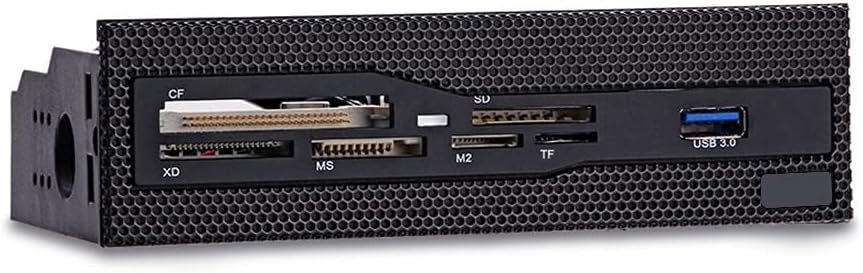
This 5.25-inch multi-function dashboard combines a USB 3.0 front connector with six card slots in a relatively simple desktop front panel. Its 4.3 rating indicates that buyers generally appreciate the straightforward combination, accessible layout, and straightforward integration with desktop cases that still offer a 5.25-inch bay.
We may earn a commission when you buy through this link, at no additional cost to you.
The supported card families include CF, XD, MS, M2, TF, and other commonly used formats. Six slots provide room for a broad working collection, and the copper-plated card slots are intended to improve contact stability during transfers. The front USB 3.0 interface supports faster data movement than older USB 2.0 solutions and is positioned for convenient access.
A grid-style faceplate is designed to integrate neatly into a case with a front mesh panel. The installation target is the 5.25-inch drive bay, which places it in the same class as full media dashboards rather than compact internal readers. This means it offers a clear visual purpose and more substantial front presence, but it will not fit a case limited to 3.5-inch or 2.5-inch bays.
Choose this model when your desktop has an available 5.25-inch bay and you want a dedicated front media panel without paying for a large collection of secondary ports. It is a good middle ground between a basic card reader and an expansive multifunction dashboard, particularly for users who regularly move files among several common card formats.
The six-slot layout accommodates several popular formats at once. That makes it easier to keep working media inserted while moving between a camera card, a compact flash card, and a compact flash card or other legacy format.
USB 3.0 is a meaningful advantage over models limited to USB 2.0. It is particularly relevant when copying large RAW images or high-resolution video files from a supported card.
We may earn a commission when you buy through this link, at no additional cost to you.
The 5.25-inch Media Dashboard is designed as a complete front I/O solution rather than a dedicated card reader alone. It combines USB 3.0, USB 2.0, eSATA, front audio connections, status lighting, and a multi-format reader, making it attractive to PC builders who want to replace several missing or inconvenient front connections with one panel.
We may earn a commission when you buy through this link, at no additional cost to you.
Its card reader supports M2, TF, SD, MMC, MS, and CF media, with stated support for cards up to 64GB. Simultaneous multi-card access helps with busy transfers. The USB 3.0 connection is listed at 5Gbps, while the USB 2.0 port operates at 480Mbps, giving users both modern and legacy options for different accessories.
Audio jacks for speakers and a microphone eliminate the need to connect those devices at the rear of the chassis. LED indicators show power and drive activity, which is useful in low-light environments. The included cables support the USB 3.0 header, power, USB 2.0, storage connections, and audio, but this many leads can make the installation more involved than a single-purpose reader.
Its 3.8 rating reflects a capable package whose appeal depends heavily on the builder's needs. The panel is best for a full-size ATX or mid-tower case with a 5.25-inch bay and several front-panel functions to organize. Users who only need compact flash and SD access may find it unnecessarily large or complicated.
The combination of USB, eSATA, audio, and card access can consolidate a cluttered front panel. It is particularly useful in older cases that lack native front USB 3.0 or convenient audio connections.
Supporting multiple cards at once can reduce idle time when source media arrives in different formats. The feature is useful for photographers, editors, and anyone who regularly transfers several batches of files.
We may earn a commission when you buy through this link, at no additional cost to you.
The Vantec Link UGT-CR940 is the premium specialist in this group, pairing a USB 3.0 internal connection with an unusually detailed set of card specifications. Its 5.0 rating makes it one of the strongest-rated options here, while the multi-LUN design and support for contemporary and legacy media suit users who take card compatibility seriously.
We may earn a commission when you buy through this link, at no additional cost to you.
The specification list covers numerous CompactFlash generations, Secure Digital versions, UHS-I modes, SDHC, SDXC, microSD variants, MMC standards, eMMC generations, Memory Stick Pro and Duo families, and xD-Picture cards. This depth makes the reader appealing to photographers, archival workers, and technicians who may encounter media beyond the latest SD standard.
USB 3.0 provides the necessary underlying connection for modern card performance, while the 20-pin header requires appropriate internal system connectivity. The model is less of a general-purpose front dashboard and more of a dedicated high-specification transfer device. As a result, buyers should verify their motherboard header and case arrangement before installation.
This is the premium recommendation for a user who wants more than routine SD and microSD compatibility. The broad standards coverage, high rating, and USB 3.0 foundation justify a specialized choice for media-heavy work. It is particularly compelling for creators handling large capacity cards or professionals who need confidence that less common formats will be recognized.
The reader's detailed support for CompactFlash, SD, microSD, MMC, eMMC, Memory Stick, and xD makes it useful where compatibility cannot be left to guesswork. This breadth also helps when working with older archival cards.
USB 3.0 and broad UHS-I mode support provide a modern base for high-capacity cards. That foundation matters more than a headline slot count when large media files must move reliably.
We may earn a commission when you buy through this link, at no additional cost to you.
The TCC-QL5E multifunction dashboard combines storage connections, USB ports, audio, and five-in-one card reading in a 5.25-inch front panel. Its feature set is aimed at desktop builders who want old-style drive bays to provide modern convenience, especially when a case lacks accessible front storage and media ports.
We may earn a commission when you buy through this link, at no additional cost to you.
Front connectivity includes USB 3.0 at up to 5Gbps, USB 2.0 at up to 480Mbps, SATA, eSATA, front speaker and microphone connections, and an all-in-one reader for M2, TF, SD, MMC, MS, and CF cards. The reader supports cards up to 64GB. LEDs indicate power and hard-disk read and write activity, helping users confirm that data movement is underway.
The package includes a 20-pin USB 3.0 cable, four-pin power cable, USB 2.0 cable, two SATA data cables, and an audio cable. That breadth enables many functions, but it also means installation requires more careful routing and checking than a dedicated reader with one main header.
No numerical customer rating is supplied for this model, so the decision should be driven by its documented connections rather than an aggregate score. It is most suitable for a full desktop with a 5.25-inch bay and a need for several front functions. Users who want only a compact SD reader will find this dashboard unnecessarily elaborate.
SATA and eSATA connections make this panel more than a card reader. It can provide convenient access to storage devices while keeping the card slots and USB ports within reach on the front of the chassis.
Power and drive activity indicators are especially helpful in a dashboard installation. They provide a quick visual cue that connected storage and media are communicating with the system.
We may earn a commission when you buy through this link, at no additional cost to you.
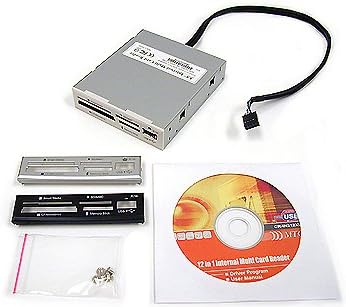
The Sony MRW620/U1/181 is an internal 17-in-1 memory card reader and writer with a classic desktop aesthetic. Its 4.0 rating indicates a still-solid level of satisfaction, while the supplied faceplates and drive-letter recognition software provide a familiar, straightforward approach to card access.
We may earn a commission when you buy through this link, at no additional cost to you.
Rather than centering on front USB connectivity, this product focuses on its primary role as a multi-format card reader. The included black and ivory faceplates allow some visual coordination with a desktop interior, and the drive-letter recognition software is intended to simplify assigning and identifying mounted volumes.
The supplied compatibility statement covers Microsoft Vista and Windows XP Home and Professional. Those are clearly older platforms, so current users should confirm that the device and driver behavior remain suitable for their operating system before relying on it in an active workflow. The product data also provides less detail about individual card formats and connection speed than the newer models.
This reader makes most sense as a classic addition to a compatible legacy desktop or as an aesthetically coordinated option for someone seeking Sony-branded equipment. For a new modern build, one of the models with USB 3.0 and current operating system support will usually be easier to justify. Its enduring value lies in the basic reader-writer function and included bezels.
Writing support expands the unit beyond simple image viewing. It can be useful for formatting compatible media or moving files onto cards when supported by the system and card.
Black and ivory faceplates provide basic choices for matching a desktop's appearance. The alternative finishes make it easier to integrate the reader into a build that already has a defined color scheme.
We may earn a commission when you buy through this link, at no additional cost to you.
The MTG All-In-One is a compact 2.5-inch internal flash card reader with a perfect 5.0 numerical rating. Its appeal comes from a straightforward all-in-one format and the inclusion of black, silver, and white bezels, making it a potentially tidy option for a desktop with limited front-bay space.
We may earn a commission when you buy through this link, at no additional cost to you.
The product data emphasizes reliable, high-quality construction and provides a choice of three fascia colors to suit different desktop interiors. Its smaller physical category than the common 3.5-inch and 5.25-inch options can make it easier to position inside a case where a full-size bay is unavailable or undesirable.
The limited published specification is an important caveat. The product information does not enumerate supported card formats, connection speed, operating systems, or simultaneous slot access in the detail provided for newer readers. Buyers should therefore inspect the current listing carefully to verify that it supports the exact media they use.
Despite that limited detail, the 5.0 rating is encouraging, and the compact design fills a distinct niche. Choose this model when preserving case space and coordinating the front appearance matter more than having a densely documented connection specification. For maximum certainty about format and platform support, a model with fuller published specifications may be the safer purchase.
The 2.5-inch format makes this reader more versatile in compact desktops than a full dashboard. It can add media access without consuming a 3.5-inch or 5.25-inch bay.
Black, silver, and white bezels cover common desktop styling preferences. Including multiple options makes it easier to avoid a visual mismatch in an otherwise carefully planned build.
We may earn a commission when you buy through this link, at no additional cost to you.
The Akasa AK-ICR-07 is a six-port internal media reader designed for a 3.5-inch drive bay, with a 4.2 rating that reflects a generally positive user response. It combines broad card access, high-capacity SDHC support, dedicated adapter positions, status LEDs, and an additional USB connection in a practical front-mounted package.
We may earn a commission when you buy through this link, at no additional cost to you.
The six-port arrangement is intended to place popular cards and their adapters in one accessible location. SDHC compatibility is important for users who need more capacity than standard SD cards provide, while the separate adapter positions reduce the chance of losing small adapters or confusing them with full-size cards.
An extra front USB port provides another route for transferring files from USB memory sticks or USB-enabled mobile phones. Two LEDs indicate power, card insertion, and data transfer conditions. The reader includes black or classic white fascia panels, giving buyers a modest choice in appearance while retaining the familiar 3.5-inch format.
The main limitation is that the supplied information does not state a modern transfer interface or current operating system support. It is most appropriate for users who need a clear, six-port card solution and value the additional USB port. For high-volume transfers or modern system integration, checking the live listing for current platform details remains essential.
Six media ports consolidate common card types and adapters at the front of the desktop. The dedicated arrangement is convenient for users who move between full-size and compact media regularly.
Separate LEDs provide quick feedback for power, inserted cards, and transfers. Dedicated adapter positions keep essential conversion pieces visible and ready for the next transfer.
We may earn a commission when you buy through this link, at no additional cost to you.
The MTG CR-IN212XU-1 is a 22-in-1 USB 2.0 internal reader built around four simultaneously usable media slots. No numerical rating is supplied, so the decision should be based on its documented construction and functions: a metal 3.5-inch chassis, hot-swappable behavior, plug-and-play operation, and bus-powered access.
We may earn a commission when you buy through this link, at no additional cost to you.
Its supported formats include CompactFlash, IBM Microdrive, SmartMedia, SD and MMC, the Memory Stick card series, and others. Four slots can be used at once for data exchange, which remains useful for moving files between different card types even though the number of advertised formats is larger.
The stated transfer rate reaches 4.5MB per second, consistent with the USB 2.0 era. That is adequate for modest card transfers but noticeably below what modern USB 3.0 readers can provide with large files. Its advantage is simple installation: because it is bus-powered, no external power supply is required.
The included beige, black, and silver bezels allow replacement or cosmetic adjustment, and media icons help users identify the four slots. This model is best for a compatible legacy system or a user whose card-transfer needs are light and do not require high throughput. Newer builds should generally prioritize a USB 3.0 option.
Using four different slots simultaneously can shorten the process of moving data among several card types. The ability is especially handy for compact flash and SD workflows that involve multiple media cards.
No external power supply is required, which reduces connection clutter and simplifies setup. Hot-swappable and plug-and-play features also support convenient media changes during normal desktop use.
We may earn a commission when you buy through this link, at no additional cost to you.
The most useful internal card reader is not necessarily the one with the largest advertised format count. Bay size, connection standards, operating system support, card types, and workflow requirements should determine which design is appropriate for your desktop.
Choose a compact reader for a tight build and a dashboard when you want a more substantial front panel. Confirm the bay before buying.
Prioritize direct support for your primary card type, then verify secondary formats and adapter requirements. Never rely on the advertised total alone.
Use USB 3.0 for routine high-volume media work. Choose USB 2.0 only when compatibility and simple operation outweigh transfer speed.
Count the required motherboard headers and compare them with the manual. Prefer fewer connections when the case offers limited space.
Simultaneous access helps professionals managing several cards. For occasional single-card use, it is a secondary rather than essential feature.
Check the current operating system support before purchase. Do not assume that an older plug-and-play device will integrate perfectly with a current operating system.
Favor durable contacts, clear status lights, and a finish that suits the case. Cosmetic choices should never override fit or compatibility.
Stay focused on the functions you will use. A dedicated reader is cleaner, while a dashboard offers broader front-panel utility.
Before installation, power down the desktop completely, disconnect the power cable, and consult the case and motherboard manuals. Identify the intended drive bay and required USB header. Connect the internal cables before placing the reader into the chassis, then route them away from fans, sharp edges, and moving drive mechanisms. Secure the unit with the supplied screws or appropriate fasteners.
After restoring power, let the operating system detect the reader and assign drive letters to the card slots. Insert one card at a time initially so you can identify which slot and format the system recognizes. Confirm that a small test file can be copied before moving an entire library. Use the operating system's safe-eject process before removing each card, particularly while copying, formatting, or writing files.
Keep the card slots clean and dry, and avoid inserting damaged, bent, or force-fit media. Do not move a card while an active transfer is running, and do not use the reader as the only location for irreplaceable files until the workflow has been tested. Periodically confirm that front contacts remain free of dust, and inspect cables for looseness if the system intermittently fails to recognize a card.
An internal media card reader installs inside a desktop case and exposes memory-card slots at the front. It lets users transfer photos, videos, documents, and other files without reconnecting an external reader each time. Most modern readers connect to a USB header internally, while larger dashboard models may also provide front USB, storage, and audio connections.
Speed depends more on the interface and card than on whether the reader is internal or external. An internal USB 3.0 reader can match or exceed a comparable external USB 3.0 reader, while an internal USB 2.0 model will be limited by that older standard. The card itself, host controller, file sizes, and system configuration also influence real transfer results.
Only if the case still includes a 5.25-inch drive-bay opening and the required internal headers are available. Many compact and mini-tower cases do not have that space. A 3.5-inch or 2.5-inch reader is more practical for those systems, while full-size tower and mid-tower cases are the most natural candidates for a dashboard.
Most dedicated readers draw power from the motherboard's USB header and do not require a separate power adapter. Some multifunction dashboards include power and SATA leads because they also support storage devices. Always follow the included connection guide and avoid using an unlisted external power source with a bus-powered reader.
Common formats include SD, SDHC, SDXC, microSD, CompactFlash, Memory Stick, MMC, M2, and xD, although compatibility varies by model. The advertised format count may include variations within a family, and some cards may require an adapter. Check the individual slot list and maximum capacity for your specific cards before buying.
It depends on the reader and its drivers. The StarTech 35FCREADBU3 explicitly supports Windows, macOS, and Linux, while several older products list only legacy Windows versions. For any model, confirm current platform support and test the reader before depending on it for an important transfer.
USB 3.0 is strongly preferable for photographers, video editors, and anyone moving large files. It reduces the time spent copying compared with USB 2.0, particularly with high-capacity SD cards and high-resolution video. For occasional transfers involving smaller files, a USB 2.0 reader can still provide convenient front access at a lower-tier performance level.
Start by confirming that the correct motherboard header is connected and that the case power switch is on. Check the device manager or system information screen for an unexpected drive location, then reseat the card and test a different compatible card. If problems persist, verify operating system support, inspect the connections, and try another USB header or bay.
The StarTech 35FCREADBU3 is the strongest all-around recommendation because it combines USB 3.0, four simultaneous slots, broad format coverage, and cross-platform support in a conventional 3.5-inch package. The Vantec Link UGT-CR940 stands out as the premium specialist for extensive media specifications, while the SABRENT 74-in-1 offers the most expansive everyday format coverage and a useful front USB port.
Your priorities should guide the final choice. Select a compact reader when bay space is limited, a dedicated multi-format reader for routine creative work, and a 5.25-inch dashboard when you also need front USB, storage, or audio connectivity. Most importantly, verify the exact card types, motherboard headers, operating system support, and physical dimensions before completing the build.
Product availability, ratings, and prices can change over time, so check the current listing before purchasing. Comparing the present card support and connection requirements against the reader's stated strengths will help ensure that the selected internal media card reader fits both your desktop and your real transfer workflow.