
HomeBeyond Clip on Fan for Desk
5.0Editor score
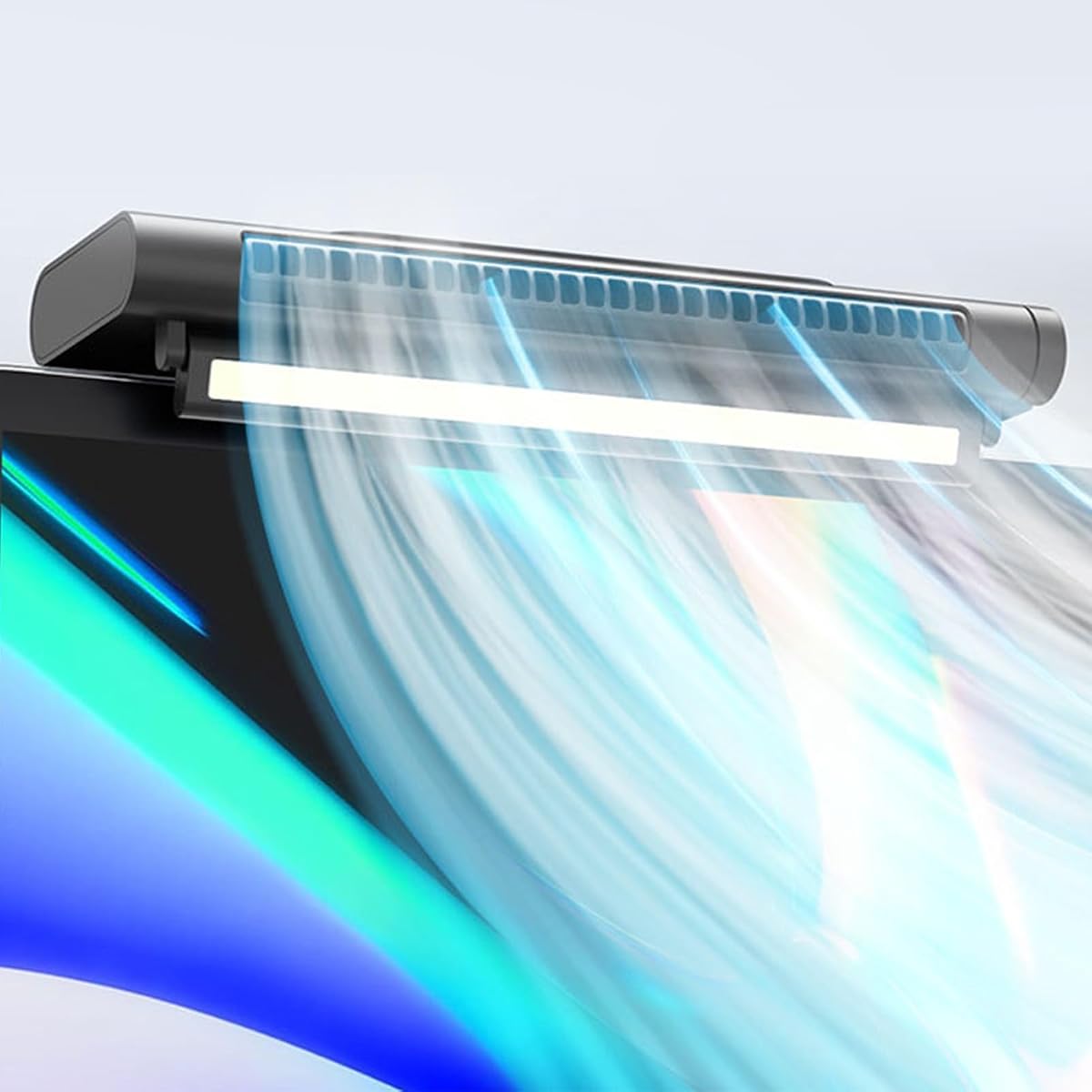
Hanging and standing design
Sixty-degree airflow adjustment
Stepless speed regulation
A clip on desktop monitor fan turns an unused edge above your screen into a convenient source of personal airflow. The best models combine a secure, scratch-resistant clamp with quiet operation, useful directional control, and dependable USB power, making them especially suitable for compact home offices, dorm rooms, and gaming desks.
We compared all ten options by examining their mounting designs, airflow adjustment, speed controls, power requirements, dimensions, noise claims, and added features. The list covers dual-head fans, bladeless bars, rechargeable portable models, combined fan-and-light designs, and convertible clip fans that can also stand on a desk.
Each review identifies the product's strongest use case and any meaningful limitations, helping you choose according to your monitor, workspace, and cooling needs. Product ratings and availability can change over time, so confirm the current listing details and compare the included features before making a final purchase.
5.0Editor score

4.0Editor score

4.3Editor score
As an Amazon Associate we earn from qualifying purchases.
The table below compares the complete lineup by format, airflow control, mounting capability, and power source, making it easier to identify the right model for your monitor and workspace.


This dual-head monitor fan holds a 4.0 rating and stands out as the most flexible all-around option in the group. Its two fan heads can be positioned separately, allowing one head to cool you while the other directs air toward the rear of the display or another nearby area. Three speed levels cover situations ranging from a gentle work breeze to stronger cooling.
We may earn a commission when you buy through this link, at no additional cost to you.
The adjustable silicone clamp accommodates screen edges from 5mm to 25mm, making it suitable for many desktop monitors and laptop displays. A soft rubber layer inside the clamp is intended to reduce the risk of scratches. Mounting it above the display keeps the base off the desk and helps place the airflow higher, where it can reach more of the upper body.
Its primary trade-off is the fixed 6.5-foot USB cable. That means you will need a nearby USB port or a charging hub, and the fan is less convenient for moving between rooms than a battery-powered alternative. The two-head design also occupies more visual space than a single compact clip, although that added bulk brings noticeably broader airflow options.
This is a strong recommendation for office workers, students, and gamers who want meaningful directional control without giving up desk space. It is particularly useful if you want one head facing yourself and another aimed toward your monitor or hands. Choose it over portable rechargeable models when consistent plugged-in operation and broad coverage matter most.
The two independently adjustable heads are the defining advantage of this model. You can maintain a personal cooling stream while using the second head to improve circulation around the display or direct air toward a more comfortable part of the desk.
A wide 5mm–25mm adjustment range and a soft internal rubber layer make the clamp suitable for varied displays. The padded contact area is intended to protect the screen while the upper mounting position keeps the desktop clear.
We may earn a commission when you buy through this link, at no additional cost to you.
This bladeless clip-on fan carries a 2.9 rating, the lowest in the lineup, but it offers a distinctive combination of rechargeable operation, a wide outlet, and monitor mounting. Its 4000mAh battery supports up to seven hours of cordless use depending on the selected speed, making it more portable than a permanently wired monitor fan.
We may earn a commission when you buy through this link, at no additional cost to you.
The adjustable silicone clamp works with monitor edges from 5mm to 20mm and can also accommodate laptops. An adjustable outlet directs the air, while three speed settings provide different levels of cooling. If you need to relocate the fan, the detachable pedestal lets it operate as a small tower-style fan in a narrow space.
The lower rating is the main reason this model does not rank higher. Potential buyers should pay close attention to current customer feedback, especially regarding the rechargeable function, mounting stability, and actual noise experience. Runtime naturally changes with speed, so the advertised maximum should not be treated as identical performance at every setting.
Despite those concerns, the product makes sense for users who value cordless use and dislike exposed spinning blades. It is worth considering for travel, shared workspaces, or a monitor that is not near an outlet. For a desk where USB power is always accessible and quiet operation is the main priority, a higher-rated wired model may be the safer choice.
The built-in rechargeable battery separates this fan from standard USB-only monitor fans. That portability makes it useful when the display is far from a power source or when the fan needs to move between a desk, dorm room, and travel setup.
The bladeless construction and long outlet are designed to spread air over a broader area. The outlet angle is adjustable, helping you aim the breeze toward your face, hands, or another area that needs circulation.
We may earn a commission when you buy through this link, at no additional cost to you.
The HomeBeyond model has a 5.0 rating and stands out for its exceptionally flexible speed control and two-in-one construction. Rather than forcing you to choose between a fixed number of fan levels, its stepless adjustment lets you move gradually from a quiet breeze to a stronger cooling stream according to your comfort.
We may earn a commission when you buy through this link, at no additional cost to you.
A gravity-assisted rotatable clip lets the fan attach securely to monitors of various thicknesses, while a freestanding mode lets it stand on the desk when it is not clipped. The 60-degree vertical adjustment provides enough movement to alter the airflow direction without requiring the entire unit to be repositioned frequently.
The main limitation is that it must remain connected to USB power through a cable, computer, power bank, or wall charger. Its 60-degree adjustment range is also less expansive than the 360-degree movement offered by products with flexible arms or rotating heads. These limitations are modest for standard desk use but may matter to people seeking highly targeted airflow.
This is an excellent budget-oriented choice for offices, study areas, and gaming desks. Its current rating, broad airflow approach, and simple controls make it easy to recommend, while the standing mode expands its usefulness beyond a conventional monitor-mounted fan. It is particularly attractive if smooth speed changes are more important than cordless operation.
Stepless control is more useful than it first appears because many people cycle between a nearly silent breeze and a stronger setting throughout the day. The HomeBeyond lets you settle on a precise intermediate level rather than choosing only broad preset categories.
The ability to alternate between monitor mounting and desk placement makes this more versatile than a fixed clip fan. You can reclaim desk space while working and then reposition the unit when a freestanding angle is more convenient.
We may earn a commission when you buy through this link, at no additional cost to you.
This Deepsea Blue model has a 4.3 rating and is one of the most feature-rich options in the guide. It combines a two-head cooling fan with an adjustable LED monitor light, allowing a single device to provide both personal airflow and supplemental illumination for a workstation.
We may earn a commission when you buy through this link, at no additional cost to you.
Two flexible arms provide 360-degree airflow positioning, and the fan offers gentle, medium, and strong settings. The light includes three adjustable modes, while separate buttons let you operate the fan and lamp independently. That separation is practical when you want airflow without brightening the room or need light without continuous cooling.
The clamp is more versatile than many competing designs. It can grip curved, thin, or thick monitors and laptops, as well as edges up to 3 centimeters, such as table edges, bed frames, picture frames, mirrors, and music stands. The tradeoff is added complexity: this is a larger, busier-looking unit than a basic single fan, and it always needs USB power.
Choose this model if you want to simplify your desk setup by combining airflow with a monitor light. It suits students, office workers, and content creators who appreciate independent controls and multiple mounting locations. If cooling alone is your priority, a simpler model will usually offer a less crowded appearance.
Separate controls for the fans and light provide useful flexibility. You can run the airflow with the lamp off during daylight work, then activate the light independently for evening tasks without changing the fan setting.
The clip and dual flexible arms let the device adapt to many workspace layouts. You can aim one stream toward your face and another sideways, or redirect air toward the back of the display for additional circulation.
We may earn a commission when you buy through this link, at no additional cost to you.
This portable clip fan has a 4.3 rating and earns the premium distinction for combining a rechargeable personal fan, flexible mounting, and emergency USB power output. Its 360-degree durable flexible neck allows the fan head to be bent into different positions, making it especially effective when the clip is attached to a monitor, headboard, tent, or other edge.
We may earn a commission when you buy through this link, at no additional cost to you.
You can operate it through its internal rechargeable battery, with USB-C charging from a wall adapter, computer, power bank, or vehicle charger. Three fan speeds and a motor rated below 40dB make it suitable for offices, cars, dorm rooms, camping, travel, and bedside use. The lightweight, portable form also makes it easier to carry than a monitor-mounted bar.
The built-in USB output lets it supply emergency power to another device, a genuinely useful feature when traveling. However, using that output also draws on the same battery, and the nonreplaceable battery means long-term capacity loss cannot be solved by swapping in a fresh cell. Noise and runtime will naturally vary with operating speed and conditions.
This is the top choice for buyers who want one compact device to handle cooling, portable placement, and backup charging. It is less appropriate if your priority is continuous high-output cooling at a fixed monitor, since the flexible design favors mobility and versatility over the broad outlet coverage of a dual-head bar.
Rechargeable battery operation frees the fan from a nearby outlet, making it practical for camping, travel, a vehicle, or a shared room. USB-C charging also offers a familiar way to replenish the internal battery.
The USB output turns the fan into a small emergency power bank for compatible devices. It is a useful backup for outings, although the same internal battery supports both functions and should be monitored during extended travel.
We may earn a commission when you buy through this link, at no additional cost to you.
This dark green workspace fan has a 3.9 rating and stands apart by combining three functions: airflow, LED illumination, and aromatherapy. The 360-degree adjustable head directs cooling where needed, while low, medium, and high fan speeds accommodate different work conditions and levels of heat.
We may earn a commission when you buy through this link, at no additional cost to you.
The monitor light provides three brightness levels, a 180-degree vertical adjustment, and a folding design. The light is intended for soft, non-glare illumination, while the aromatherapy slot accepts reusable pads and essential oils that are not included. The product description also notes that the lamp can serve as a phone photo ring light, adding value for content creation.
Its 6.9-inch height and included USB-C cable support a relatively tidy setup. The clamp fits curved or flat screens up to one inch thick, and the listed motor noise is under 35dB. The drawback is feature density: buyers who only need airflow may find the light, scent support, and controls more complicated than necessary.
This is a compelling choice for a personalized home office, dorm, or reading nook where soft lighting and a personal aroma are desirable alongside cooling. It also suits content creators who may use the light as a phone ring light. For a minimalist workstation or frequent travel, a simpler rechargeable or single-purpose model may be easier to manage.
Cooling, lighting, and aromatherapy give this unit a broader wellness role than a standard monitor fan. The independent one-touch controls make it possible to use one or more functions according to the time of day and your work routine.
The folding 180-degree lamp can be directed toward the desktop and then moved out of the way. Three brightness levels support different tasks, while the claimed under-35dB motor operation helps maintain a calm environment.
We may earn a commission when you buy through this link, at no additional cost to you.
This 11.8-inch clip-on fan has a 1.0 rating, making it the least well-reviewed product in the guide. On paper, however, it offers a wide bar-style outlet, a tiltable head, and the ability to function as a desktop or wall-mounted fan. Those features distinguish it from smaller personal clip fans.
We may earn a commission when you buy through this link, at no additional cost to you.
Its outlet provides broad, soft airflow and offers three speed levels. The fan head tilts up and down by 45 degrees, allowing the breeze to be aimed toward different seated positions. The mounting system is designed for curved, slim, and thick monitors as well as laptops, and the product description states that low-speed noise is below 36dB and high-speed noise is below 45dB.
The extremely low rating warrants caution. It may reflect limited customer history, an early-stage listing, or issues that cannot be determined from the supplied information, so current reviews should be reviewed carefully. The long outlet may also look visually intrusive on smaller monitors, and the desktop and wall functions add installation considerations.
We would consider this model only after checking recent customer feedback and confirming that its dimensions suit your display. It could be useful for someone seeking a wide bar that can be mounted on a wall, but the available evidence does not make it a confident recommendation despite its appealing design specifications.
The long outlet is intended to distribute air across a wider area than a compact circular fan. That makes the bar format useful for users who prefer a broad, even breeze over concentrated personal cooling.
The ability to move between monitor clipping, desktop placement, and wall mounting provides more positioning options. The 45-degree tilt then helps you match the airflow to your seating height.
We may earn a commission when you buy through this link, at no additional cost to you.
The OVARIA monitor fan has a 2.0 rating and combines a bladeless personal fan, stepless speed control, and an eye-protective light. The product is aimed at users who want a clean, space-saving bar above a flat monitor or laptop rather than a traditional exposed-blade desk fan.
We may earn a commission when you buy through this link, at no additional cost to you.
Its integrated light is designed to reduce screen glare and visual fatigue while the fan circulates air. Stepless speed control allows more precise adjustment than a three-preset model, and installation appears straightforward: attach the clip and connect the supplied USB power. The bladeless form also gives the unit a streamlined appearance that can complement a modern display.
The main concern is the low rating, which is not consistent with the confidence usually expected from a primary recommendation. The supplied information also offers fewer objective details about noise, clamp range, cable length, and outlet coverage than the better-documented competing products. Buyers should therefore examine current customer comments and verify dimensions against their monitor.
This product may appeal to minimalist workspaces that value the combined light and fan function, as well as users seeking stepless airflow adjustment. However, for a straightforward monitor cooling fan, the HomeBeyond model's better rating and documented hanging-and-standing design provide a more reassuring basis for comparison.
The bladeless format and integrated light are designed to keep the monitor area visually tidy. It is a natural fit for clean home offices where a conventional fan head and separate light bar would add clutter.
Stepless adjustment can provide a more comfortable breeze than fixed presets. You can select a very light setting for calls or concentrate on the monitor for focused work and increase the airflow when the room feels warmer.
We may earn a commission when you buy through this link, at no additional cost to you.
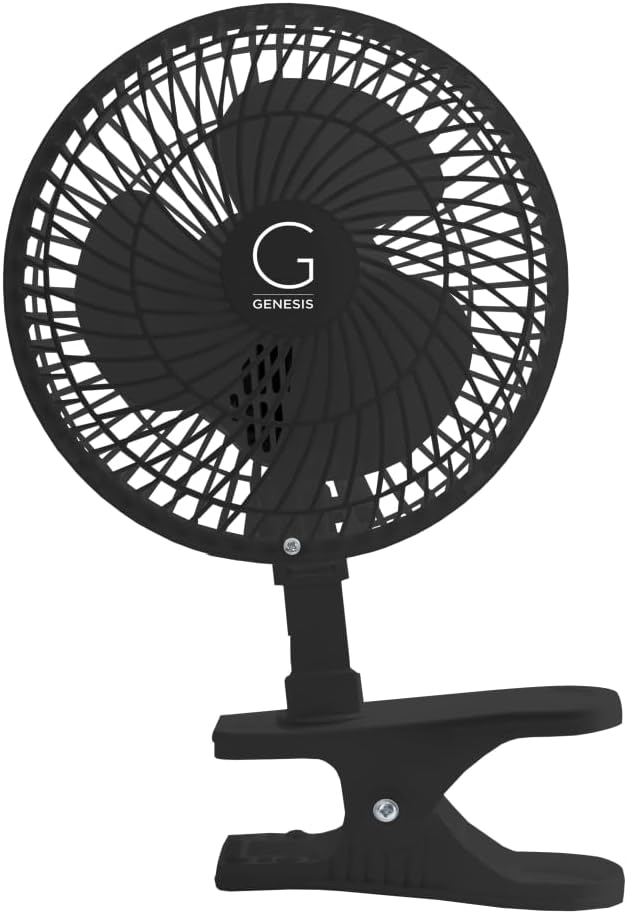
The Genesis convertible fan holds a 4.6 rating, the second-highest customer score among these products. Its 6-inch fan head offers a familiar traditional format, while the base can be configured for either clip-on or tabletop placement. That makes it especially appealing for people who want one small fan to serve several parts of a home, office, or dorm room.
We may earn a commission when you buy through this link, at no additional cost to you.
Two quiet speed settings provide a simple choice between lower and higher airflow. The fan head is adjustable, allowing the breeze to be redirected when a different seating position or another person needs cooling. A sturdy grip clamp is intended to keep the fan securely attached and prevent the airflow direction from shifting unexpectedly.
Its simplicity is both a strength and a limitation. Compared with newer models, it lacks USB specifications, rechargeable operation, stepless control, integrated lighting, and broad multi-head coverage. Converting between modes also requires loosening the butterfly screw and changing the base, so the process is less immediate than a tool-free hanging-and-standing design.
This is a good choice for buyers who value a proven, straightforward fan and already know they want a conventional clip rather than a feature-heavy desk bar. It is particularly useful in a dorm or small office where the same fan might be clipped to a monitor one day and placed on a table the next. Verify power requirements in the current listing before purchase.
Switching between the clip and tabletop base lets one fan follow you around a compact workspace. It can save monitor-edge space when needed and then move to a table where a more traditional position is convenient.
Two clearly separated speed levels make the controls easy to understand. The adjustable head adds directional control without requiring a more complicated electronic interface or a removable base.
We may earn a commission when you buy through this link, at no additional cost to you.
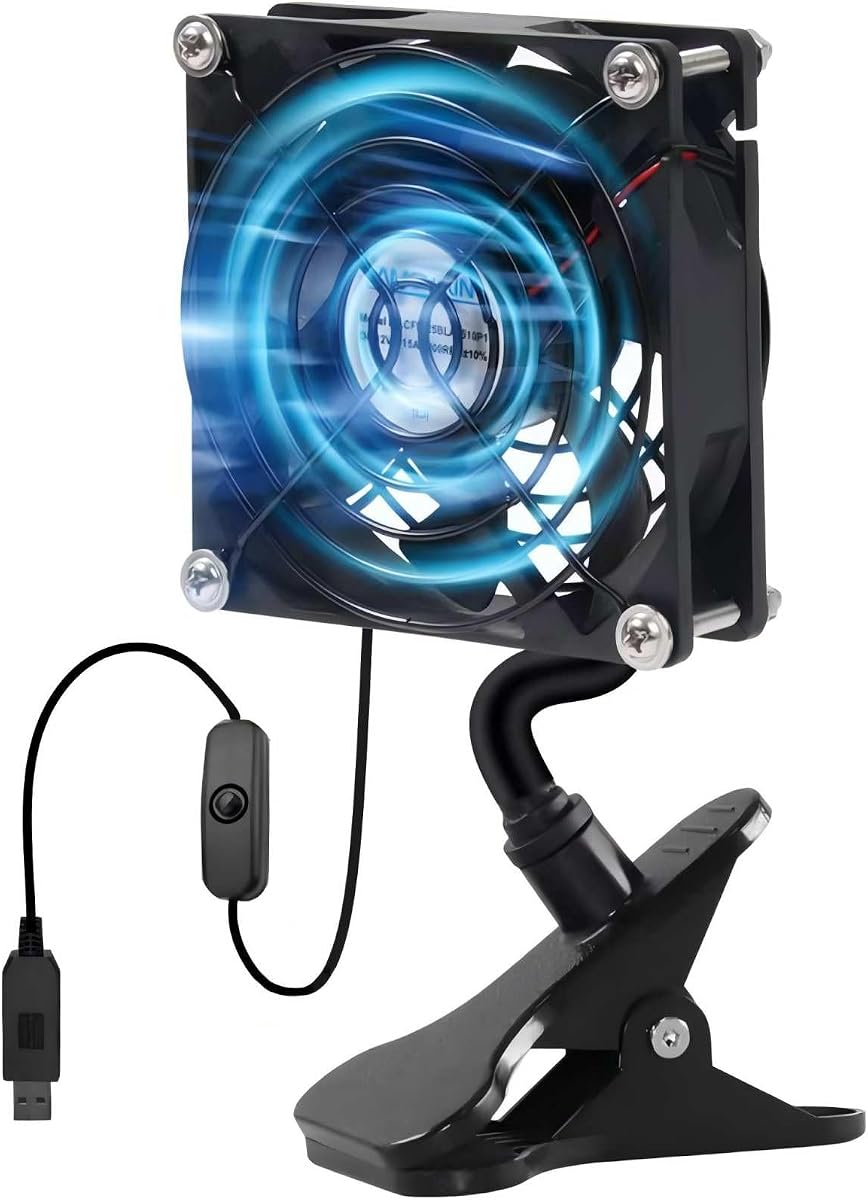
This compact 3.62-inch fan has a 3.6 rating and is designed more like a small utility fan than a full monitor cooling bar. Its 92mm head is easy to position in tight spaces, while the strong clamp can grip surfaces up to 1.38 inches thick without slipping.
We may earn a commission when you buy through this link, at no additional cost to you.
The fan works in two modes. You can clip it to a monitor, computer vent, audiovisual equipment, router, or another suitable edge, or stand it on a flat surface. Its direction is adjustable, allowing you to keep the airflow aimed at a particular area. A wired on-and-off switch provides basic control without repeatedly unplugging the USB connection.
The principal limitation is its small size. A 3.62-inch fan can provide a gentle personal breeze, but it will not match the broad coverage of an 11.8-inch bar or the two-head arrangement of the top-ranked model. It also offers only on/off control, so users who want several intensity levels should look elsewhere.
This is a practical choice for small workspaces, electronics cooling, vehicles, plants, tents, and other applications where a compact clamp fan is useful. Its low listed noise level makes it appropriate for a bedside or office setup. For a monitor directly in front of you, however, a larger dual-head or bar-style model may provide more noticeable cooling.
The clamp accommodates edges up to 1.38 inches thick, giving it more reach than many monitor-specific fans. That makes it useful for equipment, furniture, and other suitable edges where a small personal breeze is needed.
The attached switch allows the fan to be turned off without disconnecting the USB plug. It is a simple control solution that can reduce unnecessary port handling and makes basic on/off operation convenient.
We may earn a commission when you buy through this link, at no additional cost to you.
The right monitor fan depends on your display thickness, available power, preferred airflow coverage, and tolerance for cables or added features. Review these factors before comparing the final details on the current product page.
Choose a clamp whose stated thickness range includes your monitor or laptop edge. The products in this guide cover ranges from 5mm to 20mm, 5mm to 25mm, and broader applications up to 3 centimeters. A secure fit is important because a loose fan can shift, vibrate, or fall, particularly while the head is being adjusted. Curved displays may require more care than flat panels, so check both the stated compatibility and the shape of the attachment area.
In short, measure the edge first and compare it directly with the manufacturer's clamp range.
Single compact fans suit a small personal zone, while dual heads and wide bar outlets can cover more of the face, upper body, hands, or monitor. A bladeless outlet is designed to spread air broadly, whereas a conventional round head can provide a more concentrated stream. Consider whether you want a gentle face breeze, broader desk circulation, or the ability to aim one head toward the back of the display.
In short, match the head format and outlet width to the area you actually want cooled.
USB-powered fans are dependable for stationary desks and generally avoid battery maintenance. Rechargeable models are more useful for travel, camping, vehicles, and locations without an outlet, but their runtime depends on speed and battery condition. Some products can operate from a computer, power bank, wall adapter, or car charger. A model with a USB output can also provide emergency power, although using that output depletes the same internal battery.
In short, prioritize continuous USB power for a fixed workstation and rechargeable capability for mobility.
Two or three preset speeds are straightforward and usually sufficient for changing conditions quickly. Stepless control offers finer personalization, letting you find a precise level between a whisper and a strong breeze. Head tilt, rotating joints, and flexible necks determine how precisely you can redirect the air toward your face, hands, or screen. A product that can stand as well as hang gives you another practical angle.
In short, more control helps, but prioritize an adjustment range you can comfortably reach.
Quiet operation matters during calls, study sessions, gaming, and sleep. Some listings provide decibel figures, while others describe the motor only as quiet or state a maximum level below 40dB. Lower numbers generally indicate less sound, but actual noise varies with speed, mounting rigidity, and airflow. A fan that vibrates against a monitor may sound louder than its published specification suggests, so stable mounting is part of the noise-control equation.
In short, check both published noise data and the stability of the chosen clamp.
A monitor light bar can reduce dependence on harsh overhead lighting and provide a more even work surface. Combined fan-and-light models can simplify cable management and reduce desk clutter, but they add weight, complexity, and control buttons. Adjustable brightness, foldable construction, and independent fan and light switches are especially useful. If you already own a satisfactory monitor light, a dedicated cooling fan may offer better value and a simpler setup.
In short, choose a light only when the added task lighting solves a real problem in your workspace.
A longer cable makes it easier to reach a laptop, desktop tower, or powered hub without a sharp bend. Inline switches avoid repeated USB disconnection, while detachable or convertible bases simplify repositioning. Some monitors include USB ports that may not deliver enough power while the display is asleep, so a separate powered hub or adapter can be more reliable. Cable length and connector type should be checked before installation.
In short, plan the cable route and confirm that your chosen power source remains active.
Look for a sturdy grip, protected clamp surfaces, and a base that remains stable when angled. Soft liners help prevent scratches on displays, while durable joints are important for heads that move frequently. Extra functions such as aromatherapy, emergency charging, and phone-ring-light use can be worthwhile when they match your routine. They should complement, rather than distract from, dependable airflow and secure mounting.
In short, evaluate extras only after confirming that the core fan is secure, quiet, and well powered.
Before mounting the fan, measure the thickness and shape of your display edge, then confirm that it sits within the product's stated clamp range. Clean and dry the attachment area, position the padded section against the screen, and tighten the clamp gradually. Do not overtighten it, particularly on thin panels, because excessive pressure can cause stress or marking.
Connect the specified USB cable to a powered computer, hub, wall adapter, power bank, or compatible source. Select the desired speed and angle before beginning extended work. Keep the cable clear of moving chair wheels and desk edges, and avoid placing the fan where the clamp or head could be bumped. For rechargeable models, charge fully before relying on cordless operation and monitor the remaining capacity during travel.
Clean the removable grille and fan openings with a soft brush or dry cloth after unplugging the unit. Do not allow liquid to enter the motor or USB controls, and avoid using solvents unless the manufacturer specifically permits them. Inspect the clamp and flexible joints occasionally for looseness, and unplug the fan before changing its position or cleaning it.
A properly sized clamp with a soft protective liner is designed to reduce the risk of scratching. Check the stated thickness range, clean the display edge, and tighten only until the grip is stable. Avoid overtightening the clamp, particularly on thin or curved screens, because excessive force can still stress the panel.
Most products in this guide are designed for personal airflow rather than whole-room cooling. Dual-head fans and wide bar models cover a broader personal zone, while compact clip fans provide more localized air. They are best positioned near your face, hands, or workstation and can improve comfort by creating movement around you.
USB-powered clip fans are generally designed for extended desk use, but you should follow the manufacturer's instructions and monitor for unusual heat, vibration, loose connections, or damaged cables. A stable, unobstructed setup is important. Unplug the device before cleaning or adjusting it, and avoid covering the motor or outlet.
Many of the products are compatible with laptop displays as well as desktop monitors. Confirm that the laptop edge falls within the stated clamp range and that the fan does not block the camera, vents, or display. A lightweight model may also be preferable when portability is important.
A wired model is convenient for a permanent desk because it provides continuous power without battery management. A rechargeable model is better for travel, camping, vehicles, or situations without an outlet. Check battery runtime, charging connector, and whether the fan can also operate while charging before deciding.
A combined fan and light can reduce desk clutter and provide supplemental task lighting near the screen. Independent controls are useful when you want the airflow without illumination or the light without continuous cooling. However, a dedicated light may offer finer lighting adjustment than some combined models.
A fan that seems quiet in isolation may be noticeable during calls or quiet work. Published claims range from below 33dB to below 45dB at higher settings, depending on the model. Stable mounting, the selected speed, and vibration from a thin display can affect the perceived sound, so installation quality matters.
Some adjustable models can direct one head toward the rear of a display, which may help move air around nearby components. They are not a substitute for proper case ventilation, and direct airflow should not overwhelm vents or push hot air into another opening. Position the fan according to the computer's cooling design.
The best overall choice is the dual-head THRRLY monitor fan because it combines broad directional control, three speeds, a padded adjustable clamp, and continuous USB power. The HomeBeyond model is the best budget pick for stepless airflow, a high customer rating, and the ability to hang from a monitor or stand on the desk, while the Glovion rechargeable fan is the most premium-oriented portable option.
Your priorities should guide the final decision: measure your monitor first, decide whether continuous USB power or cordless operation matters more, and choose between focused personal airflow and broader multi-head coverage. Fans with lights make sense when your workspace needs task illumination, while simpler models are usually easier to position and maintain.
Ratings, product availability, and current offer terms can change, so review the latest listing and customer feedback before ordering. Confirm the clamp range, connector type, included cable, and power requirements against your setup, and choose the model that solves your specific workspace problem rather than relying on features you will rarely use.
