
Bluetooth 1D&2D Barcode Scanner TM-10B
4.3Editor score
Three connection modes
Screen code support
13000 offline records
Our Barcode Scanner for iPad guide compares 10 top-rated 1D, 2D, Bluetooth, USB, and wireless readers for retail, inventory, books, and everyday mobile work.
A barcode scanner for iPad can turn a tablet into a much more practical inventory, checkout, or data-entry tool. The right model should match the codes you scan, fit your work environment, and connect reliably without adding unnecessary complexity or constant charging.
This guide compares ten scanners based on supported code formats, iPad connectivity, wireless range, battery life, ergonomics, offline storage, and practical features. It includes compact handheld units, screen-capable 2D readers, and a fixed desktop model for higher-volume workspaces.
The selections show where each product fits best, from lightweight mobile use to fixed counter scanning. Product specifications and ratings reflect the supplied information, while prices and availability can change, so readers should verify current listings and app compatibility before purchasing.
4.3Editor score
4.9Editor score

4.4Editor score
This side-by-side comparison highlights connection options, supported barcode formats, mobility features, and storage capabilities. It helps distinguish screen-capable 2D scanners from print-only 1D models and shows which options are best suited to portable, fixed, or mixed workflows.


The NETUM Bluetooth Barcode Scanner is a versatile three-mode reader for users who need more than basic 1D scanning. Its 4.4 rating reflects a generally positive reception, while its combination of Bluetooth, 2.4G wireless, and wired operation gives it broad flexibility across iPads, computers, and mobile workflows.
We may earn a commission when you buy through this link, at no additional cost to you.
A 2500-pixel CCD sensor is designed to read standard and stacked 1D barcodes from paper or displays, including worn, damaged, and tightly spaced examples. Automatic sensing, continuous, and manual trigger modes let users match scanning behavior to the task, while a storage mode can hold as many as 100,000 barcodes for later transfer.
The main trade-off is that this is primarily a 1D and stacked-code reader rather than a general-purpose 2D QR scanner. It is also explicitly unsuitable for square POS, Divalto, DoorDash, and Lightspeed systems. Those limitations matter for businesses that rely on those platforms, even though the hardware itself is flexible.
It is best suited to retail counters, libraries, hospitals, warehouses, and inventory teams that handle large quantities of conventional barcodes. For a buyer who values offline capacity, programmable behavior, and three connection options, this is a strong premium-oriented choice, but screen-heavy QR workflows may be better served by a dedicated 2D model.
Bluetooth supports convenient mobile use with an iPad, 2.4G offers a wireless receiver alternative, and wired operation provides a stable option at a fixed workstation. This range makes the scanner useful across counters, stockrooms, and mobile inventory routes.
The storage mode is a meaningful advantage when workers move beyond receiver range. With capacity for up to 100,000 barcodes, users can collect data during large stock counts and synchronize it when connectivity returns.
We may earn a commission when you buy through this link, at no additional cost to you.
The Eyoyo Mini 1D Bluetooth Barcode Scanner prioritizes portability. At 35 grams, it is among the lightest options in this guide and is well suited to bookstore, library, retail, warehouse, and event staff who prefer a scanner that is easy to carry throughout the day.
We may earn a commission when you buy through this link, at no additional cost to you.
It supports 2.4G wireless, Bluetooth, and USB wired connectivity, with stated unobstructed ranges of up to 98 feet in 2.4G mode and 164 feet in Bluetooth mode. The rechargeable 650mAh battery can support approximately eight hours of continuous use, while auto-off behavior can extend standby life when scanning approximately 1,000 codes daily.
The decisive limitation is its imaging scope. This model supports printed 1D barcodes only and cannot read 1D or 2D codes displayed on a phone, computer, or tablet, nor printed 2D QR codes. It is also not compatible with square POS or square register systems, so buyers must confirm that their codes and checkout platform fit before ordering.
It is a compelling choice for mobile workers who regularly scan ordinary printed labels and want minimal device weight. Users who need to scan digital coupons, mobile wallet codes, QR codes, or Data Matrix labels should choose a screen-capable 2D scanner instead.
At only 35 grams, the Eyoyo Mini places less strain on the hand and pocket during repeated inventory tasks. Its compact form is especially useful for staff who move between shelves, book stacks, stock areas, and checkout counters throughout the day.
The scanner supports adjustable volume, a mute option, and vibration feedback. In a library, event registration area, or customer-facing environment, vibration can communicate a successful scan without adding a disruptive beep.
We may earn a commission when you buy through this link, at no additional cost to you.
The PecuMecu TM-10B combines 1D, 2D, QR, Data Matrix, PDF417, Aztec, and other code support with three connection methods. Its 4.3 rating and broad format coverage make it a practical value-oriented option for users who want more capability than a print-only reader without moving to a premium clip-style scanner.
We may earn a commission when you buy through this link, at no additional cost to you.
Bluetooth, 2.4G, and USB wired modes cover a range of operating patterns. The stated wireless reach extends to about 230 feet through the 2.4G receiver and 65 feet over Bluetooth without barriers. A 2600mAh battery supports more than nine hours of continuous scanning, and a quoted rate of up to 350 scans per second suits fast-paced counting work.
Instant upload and offline storage modes improve flexibility when the scanner temporarily leaves receiver range. Its stated internal capacity is up to 13,000 barcodes, which is adequate for many short field tasks but trails the 100,000-record capacity of the NETUM model. The scanner is also explicitly not compatible with Square.
This is a strong choice for small retailers, warehouse staff, couriers, and inventory users who need screen-capable 2D reading and flexible connectivity on a more modest budget. Buyers should confirm the code types used by their inventory and ensure their software accepts the scanner's keyboard-style input.
Supporting QR codes, Data Matrix, Aztec, PDF417, and conventional 1D formats allows the TM-10B to work across product labels, shipping materials, and digital displays. This is more versatile than scanners limited exclusively to linear codes.
The scanner can pair through Bluetooth, use its 2.4G receiver, or operate over a USB cable. That flexibility lets mobile teams move away from the iPad while fixed users retain a dependable wired option.
We may earn a commission when you buy through this link, at no additional cost to you.
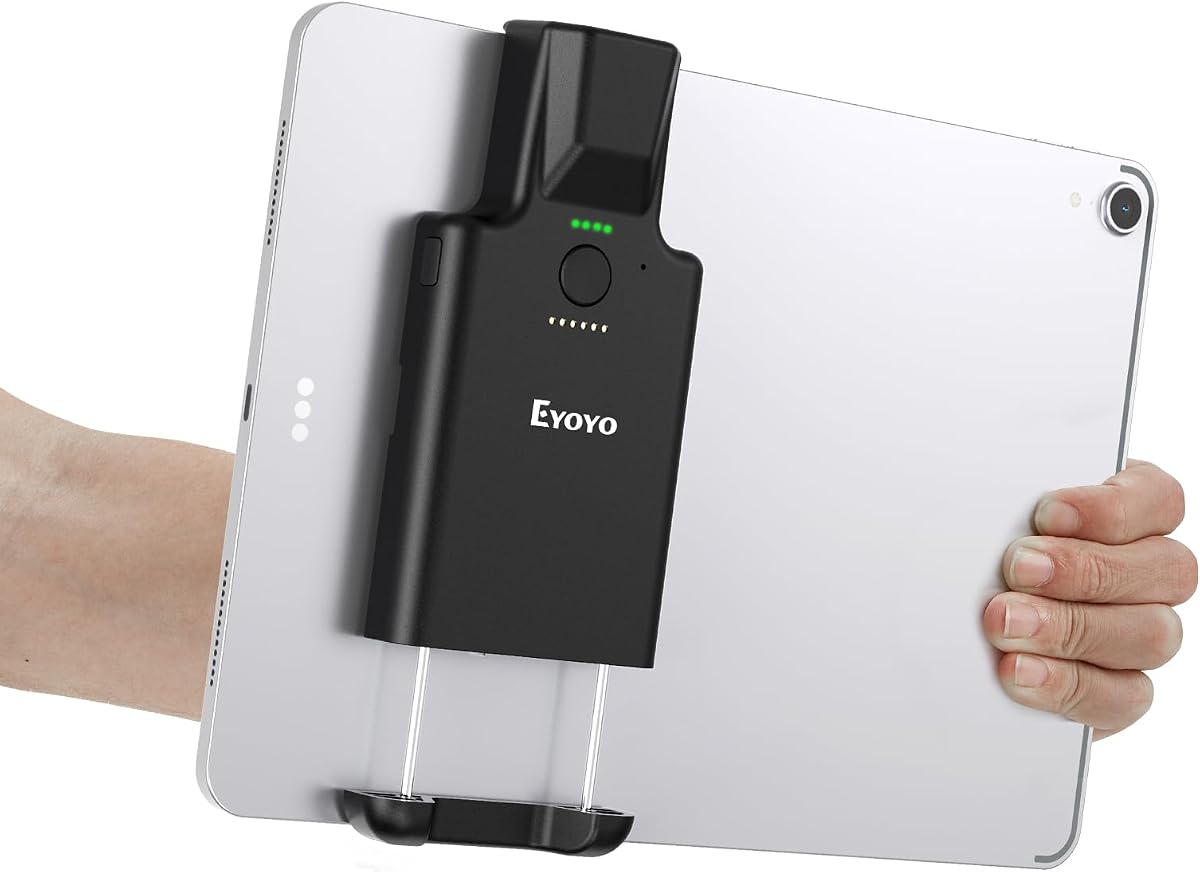
The Eyoyo 1D 2D Portable Bluetooth Barcode Scanner is the most complete iPad-oriented option in this guide. Its 4.9 rating is the highest listed among the ten products, and the integrated clip directly addresses the practical need to keep a tablet steady while scanning.
We may earn a commission when you buy through this link, at no additional cost to you.
The retractable vertical clip adjusts from 5.7 to 7.1 inches and is designed for iPad, iPad Air, iPad Pro, Surface Go 3, tablets, and large phones. Bluetooth permits cable-free operation, while USB wired mode offers a stable alternative. The scanner uses 2D CMOS imaging to read 1D and 2D formats from paper, screens, coupons, wallets, and difficult labels.
Its 3000mAh battery is stated to provide up to 30 hours of continuous scanning, while lighter daily use of around 5,000 scans can extend operation to 30 days. LED indicators show several battery levels along with charging status. The absence of 2.4G support may matter for users who want a dedicated receiver, and the clip range excludes unusually small or large devices.
It is the strongest recommendation for mobile iPad users who want broad code coverage, an integrated grip, and flexible operating modes. It suits retail, warehouses, libraries, mobile coupons, and field inventory as long as the tablet dimensions fall within the stated clip range.
The vertical clip keeps the supported tablet or phone close to the scanner, reducing the chance of dropping the device during rapid movements. The reinforced grip and adjustable range make the setup more practical for mobile counters and stockroom work.
A 3000mAh battery and clearly marked LED charge levels reduce the need for constant monitoring. The stated endurance is particularly useful for long mobile sessions, while the dedicated power switch helps preserve charge when the scanner is idle.
We may earn a commission when you buy through this link, at no additional cost to you.
The NetumScan Desktop Barcode Scanner is built for fixed-point work rather than mobile use. Its 4.6 rating reflects a solid option for checkout counters, kiosks, and inventory stations where an omnidirectional reader can scan codes without requiring the operator to pick up a handheld device.
We may earn a commission when you buy through this link, at no additional cost to you.
An induction trigger enables automatic sensing, and the unit enters a sleeping state when inactive. Once an item moves within the scanning window, it wakes and attempts to read the barcode. The design supports 1D, 2D, and QR codes on labels, paper, and mobile or computer displays, including damaged, distorted, colorful, and reflective examples.
The anti-slip base improves stability, and a built-in anti-vibration system is designed to withstand falls from 4.92 feet. IP54 protection helps guard against dust. However, fixed placement limits mobility, and the product is not compatible with Square, Clover, or Shopify, which may exclude it from certain retail setups.
It is best for high-volume fixed counters where operators handle many products and want hands-free scanning. It can also work with an iPad through a compatible USB connection when the receiving app accepts keyboard-style scanner input, but it is not a first choice for roaming tablet users.
The omnidirectional window lets users pass a label through the reading area without aiming a narrow laser line. This can reduce handling motions during repeated retail or library transactions, especially when staff also need to count or bag items.
The induction trigger lets the scanner sleep during idle periods and reactivate when an object moves into view. This balances convenience with energy use without requiring the operator to manage a trigger button for every scan.
We may earn a commission when you buy through this link, at no additional cost to you.
The NetumScan U820 combines a pocket-sized 1D and 2D reader with a multifunctional charging dock. Its 4.1 rating is the second-lowest among the selections, but the product addresses specific mobile needs through iPhone, iPad, and Android optimization, flexible connectivity, and a dock that can charge the scanner and receive data.
We may earn a commission when you buy through this link, at no additional cost to you.
Users can switch among Bluetooth, 2.4G, and USB wired modes. The 1200mAh battery is stated to charge fully in four hours, while the integrated base supports extended work shifts and reduces cable clutter. The scanner's CMOS sensor is designed to read conventional and QR codes from paper or electronic screens, including distorted and low-contrast examples.
Vibration mode provides quiet confirmation in libraries, offices, and customer-facing areas, and the hard ABS shell offers a lightweight grip for prolonged mobile use. The model is not compatible with Square, and its stated battery capacity is smaller than the 2600mAh and 3000mAh batteries offered by several alternatives.
It is a sensible choice for mobile staff who value a compact scanner, a combined charging and receiver dock, and quiet feedback. Those choosing between similar options should compare dock stability, expected shift length, and compatibility with their inventory software before making a final selection.
The base performs two useful functions: charging the handheld and receiving its wireless data. This can simplify a shared counter setup while keeping the scanner readily available between tasks.
Switching from a buzzer to vibration allows staff to confirm scans without creating noise around customers. The compact shell and restrained shape are also less obtrusive during retail, bookstore, or inventory work.
We may earn a commission when you buy through this link, at no additional cost to you.
The NetumScan Bluetooth Barcode Scanner with Charging Dock earns a 4.9 rating and stands out for its practical control layout and rugged construction. It targets users who move between retail, warehouse, and field environments while keeping a dependable charging and receiving base nearby.
We may earn a commission when you buy through this link, at no additional cost to you.
A dedicated side button manages power and connection mode, while the middle button acts only as the scan trigger. This separation is intended to reduce accidental shutdowns during intensive use. Bluetooth, 2.4G, and USB wired modes provide flexible connectivity, and the global-shutter CMOS sensor reads 1D and 2D codes from paper, tags, and digital screens.
The dock charges the scanner and acts as a receiver, while the 1200mAh battery reaches a full charge in four hours. A stated two-meter drop rating improves confidence in demanding environments. As with another dock-based model in this guide, it is not compatible with Square POS, and the battery capacity is lower than the largest options available.
It is well suited to staff who need clear physical controls, a rugged body, and 2D scanning in a mobile kit. The dock-based design is especially attractive for shared stations where the scanner is returned to a base between rounds or shifts.
Separating power and mode controls from the scan trigger reduces the chance that a working operator accidentally powers down the device. The dedicated trigger also provides consistent tactile feedback during repeated use.
The stated ability to withstand drops from two meters adds durability for warehouse aisles, retail stockrooms, and field operations. The compact ABS body remains suitable for extended handheld use without the bulk of a larger industrial gun.
We may earn a commission when you buy through this link, at no additional cost to you.
The Bluetooth Wireless Handheld Barcode Scanner with Base supports a broad mix of linear and 2D formats. Its 3.8 rating is the lowest in the group, so buyers should examine the complete listing and expected workflow carefully, but the hardware remains relevant for iPad use and inventory work.
We may earn a commission when you buy through this link, at no additional cost to you.
The scanner reads UPC, EAN, Code 128, Code 39, Code 11, several Interleaved 2 of 5 formats, Codabar, PDF417, Micro PDF417, Data Matrix, Maxicode, QR, Micro QR, and Aztec codes. Bluetooth, 2.4G, and USB wired connections are supported, and the 2.4G base provides a receiver-oriented setup for compatible devices.
A 16MB memory area can store up to 50,000 codes for offline transfer. The 110-gram body and contoured grip are designed for comfortable use, while automatic reconnection is intended to simplify returning to wireless operation after a temporary disconnect. The scanner must be switched on using its side control before use.
It may suit users who need a broad format list and offline capture in a lightweight package. However, it is not compatible with Square or Shopify POS, and its lower rating warrants checking recent customer feedback and verifying exact software requirements before purchase.
The wide list of supported formats is useful where products, shipping labels, and serialized assets use different symbologies. PDF417, Data Matrix, QR, and Aztec coverage makes it more adaptable than a basic 1D-only reader.
The stated 50,000-record memory allows workers to collect scans away from the receiver and upload them later. This is helpful during large counts, remote stock checks, and areas where a tablet may temporarily lose connectivity.
We may earn a commission when you buy through this link, at no additional cost to you.
The KUIIYER Bluetooth Barcode Scanner is a versatile 1D and 2D reader with an 800 by 600-pixel CMOS sensor. Its 4.3 rating indicates solid performance, and the combination of omnidirectional reading, screen-code support, offline storage, and protective construction suits demanding mobile work.
We may earn a commission when you buy through this link, at no additional cost to you.
The scanner supports UPC, EAN, Code 128, Code 39, Code 93, Interleaved 2 of 5, Industrial 2 of 5, Matrix 2 of 5, Code 11, Codabar, MSI-Plessey, and GS1 DataBar, as well as QR, Data Matrix, PDF417, Micro QR, and Aztec. It can read curved, fuzzy, damaged, colorful, and displayed codes when positioned correctly.
Bluetooth, 2.4G, and USB wired options support iPads, iPhones, Android tablets, computers, and compatible POS systems. A 2000mAh battery, three scanning modes, instant upload, and storage for more than 50,000 codes improve field flexibility. IP54 protection and a stated 1.5-meter drop capability add durability, but Square POS is explicitly unsupported.
It is a good general-purpose choice for libraries, supermarkets, warehouses, pharmacies, restaurants, hotels, and banking workflows. Buyers should use the manual to configure the preferred scan mode and confirm that the receiving application recognizes the scanner's keyboard-style data entry.
The 800 by 600-pixel sensor is intended to support faster, more accurate reads across a wider range of barcodes. It is particularly useful for screen codes and difficult labels that can challenge lower-resolution readers.
IP54 dust protection and a 1.5-meter drop specification make the scanner practical for stockrooms, service counters, and field inventories. The auxiliary light adds another layer of usability in inconsistent lighting conditions.
We may earn a commission when you buy through this link, at no additional cost to you.
The Inateck BCST-70 is a long-range 1D Bluetooth scanner for mobile use with iPads and other compatible devices. Its 4.5 rating and simple deployment process make it appealing for teams that need dependable linear-code scanning across a sizable area.
We may earn a commission when you buy through this link, at no additional cost to you.
Connection reportedly completes within three seconds, and the scanner supports English, German, French, Italian, and Spanish keyboard layouts. It is compatible with POS systems, iOS, Android, Windows, Mac OS, Linux, and Raspberry Pi. The stated connection distance reaches beyond 115 feet, making it useful for larger warehouses or outdoor stock areas.
The 2600mAh battery is stated to remain on standby for up to 180 days, and the outer TPU case is described as twice as thick as similar products. Internal triple-consolidation treatment supports a stated 6-foot drop capability. It reads a variety of 1D barcodes, including blurry or broken examples, but does not provide the 2D coverage of several competitors.
It is a good fit for warehouse, inventory, and long-range mobile work involving printed linear codes. It is less appropriate for scanning digital QR codes, mobile wallets, or modern retail labels that rely heavily on 2D formats, and its narrower connection list may matter for specialized workflows.
The stated range of more than 115 feet gives workers room to move through large stockrooms, yards, or warehouse aisles while remaining connected. This makes the scanner particularly useful for distributed inventory tasks.
A reported three-second connection process reduces setup delays. Editable prefixes and suffixes, along with the ability to hide selected barcode characters, help tailor transmitted data to different inventory systems.
We may earn a commission when you buy through this link, at no additional cost to you.
Choosing an iPad barcode scanner involves balancing code formats, connectivity, power requirements, workflow, and software compatibility. The most important distinction is whether you need to scan printed 1D labels, digital 2D codes, or both.
A 1D scanner covers common linear formats such as UPC, EAN, Code 39, and Code 128. It is often sufficient for printed retail labels, books, and standard inventory products. A 2D scanner adds QR, Data Matrix, PDF417, Aztec, and related formats, making it more appropriate for digital coupons, mobile wallets, loyalty cards, and complex shipping labels. Confirm the exact symbologies used by your inventory before buying.
Some compact 1D readers use imaging that only captures codes printed on paper. They cannot read a barcode shown on an iPad, phone, or monitor. Screen-capable 2D readers are necessary for mobile coupons, e-wallets, customer displays, and codes generated inside software. If your workflow includes any customer-presented digital code, treat screen support as non-negotiable rather than assuming all 1D scanners can read displays.
Bluetooth is the most natural option for an iPad because it removes the cable and allows mobile scanning. 2.4G wireless uses a dedicated receiver and can be useful with computers, but the receiver must be supported by the device and software. USB wired operation is dependable at fixed stations and can also suit an iPad with the appropriate connection setup. Confirm whether the receiving app recognizes keyboard-style scanner input.
Battery capacity alone does not tell the entire story. Continuous-use time, standby behavior, battery age, and screen visibility all affect a workday. The listed models range from 650mAh to 3000mAh, with several claiming eight or more hours of continuous use and substantially longer lighter-duty endurance. For full-time mobile scanning, prioritize a comfortable grip, fast charging, visible status, and enough endurance to cover the longest expected shift.
Large storage lets workers capture barcodes away from the receiver and synchronize later. Stated capacities range from approximately 13,000 to 100,000 records. Range matters in warehouses and outdoor areas, while signal stability matters in busy stores with many wireless devices. Decide how often offline capture is needed and whether a 2.4G receiver or dock is available at the relevant workstation.
A lightweight scanner reduces fatigue during long mobile sessions, while a fixed desktop unit can be faster when hands-free operation is possible. The Eyoyo clip model adds a tablet holder, and dock models create a defined home for charging and wireless reception. Consider grip shape, trigger placement, left- or right-handed use, and whether workers carry the iPad or operate from a counter.
A scanner can read a code perfectly and still fail within an application that does not accept its input. Several models in this guide are explicitly incompatible with Square, and others exclude Clover, Shopify, Divalto, DoorDash, or Lightspeed. Before purchasing, check the scanner's connection method against the iPad operating system, confirm the app's supported input method, and verify any restrictions affecting the checkout platform.
A clean retail counter demands less protection than a warehouse, delivery route, or outdoor inventory area. Look for stated drop resistance, protective shells, dust or water ratings, and stable bases. These specifications do not guarantee immunity from all damage, but they provide a clearer picture of intended use. The most durable-looking model is not necessarily the best if it is difficult to carry or lacks required code support.
Begin by fully charging the scanner and pairing it through the mode required by your workflow. Open Bluetooth settings on the iPad, select the scanner when it appears, and confirm that the receiving inventory or retail app is ready to accept keyboard-style barcode data. If the application requires a manual input action, enable that setting before scanning.
Choose the appropriate scanning mode for the task. Manual trigger is useful for controlled lists, continuous mode supports rapid passing of many labels, and auto-sensing mode waits for a code to enter the reading area. Configure prefix, suffix, hidden characters, terminators, sound, and vibration through the supplied instructions so that each scan appears in the application exactly as intended.
Clean the optical window with a soft, lint-free cloth and avoid abrasive cleaners or moisture around openings. Charge the unit as recommended, keep it within its stated operating conditions, and use the storage mode for offline work. Periodically test a known label, review paired-device settings, and reconnect the scanner if the application stops receiving data.
Yes, but it must have screen-capable 2D imaging. Print-only 1D models, including the Eyoyo Mini and Inateck BCST-70, cannot read QR codes shown on an iPad or phone. Look for stated support for QR, Data Matrix, PDF417, and other 2D formats, and verify that the scanner can decode digital displays rather than only paper labels.
Bluetooth is usually the most convenient choice because it allows the iPad and scanner to operate without a cable. Some models also offer 2.4G wireless and USB wired modes, which can be useful at a fixed counter or with software that does not support Bluetooth. Check both the iPad operating system and the receiving app before choosing a connection method.
No. Several products in this guide explicitly state that they are not compatible with Square, and the NetumScan desktop model also excludes Clover and Shopify. Compatibility depends on how the app receives scanner input, so buyers should confirm the exact checkout platform, operating system, and connection mode before purchasing.
The necessary amount depends on how long workers remain away from a receiver. The listed products offer capacities from about 13,000 to 100,000 barcodes. A smaller store doing a quick count may need little storage, while large warehouses performing offline inventory sessions may benefit from the higher-capacity models.
Most modern scanners behave like a keyboard and send the decoded barcode as text, followed by a configured terminator. The receiving app must support that method and accept the relevant code format. Before buying, check whether the app requires a Bluetooth keyboard profile, a USB connection, a proprietary SDK, or a particular terminator setting.
Choose a handheld model when workers move through aisles, visit shelves, or need to scan from different positions. A desktop unit is generally more appropriate for a fixed checkout or service counter where hands-free operation and an always-available base are advantageous. Consider charging location, available space, and scanning volume before deciding.
Vibration feedback is the most useful feature for libraries, offices, and customer-facing counters because it confirms a successful scan without producing a beep. The Eyoyo Mini and two NetumScan dock models explicitly support vibration or sound control. These features improve discretion but do not change the scanner's code compatibility.
Keep the optical window clean with a soft, lint-free cloth, and avoid exposing the scanner to liquid, dust, or impact beyond its stated protection level. Store it on its dock or in a protective case when not in use, and recharge it according to the manufacturer guidance. Periodic test scans also help reveal connection, battery, or configuration problems before they affect work.
The Eyoyo 1D 2D Portable Bluetooth Barcode Scanner is the strongest all-around option because it combines 2D decoding, an adjustable tablet clip, flexible scanning modes, and a large battery. The PecuMecu TM-10B delivers a capable three-mode feature set for budget-conscious buyers, while the NETUM Bluetooth Barcode Scanner stands out for extensive configuration and 100,000-record offline storage.
The right choice ultimately depends on the codes and environment. Printed linear labels can be handled by a lightweight 1D model, digital coupons and complex shipping formats require 2D imaging, and fixed counters may benefit from a desktop reader or charging dock. Software, operating system, POS platform, range, and all-day power should be evaluated before focusing on specifications alone.
Product listings, ratings, features, and prices can change over time. Before purchasing, confirm the current specification details, verify iPad and app compatibility, review recent customer feedback, and check the current price and return terms for the selected model.