
ARCTIC Liquid Freezer III Pro 420
4.4Editor score
Three P14 PRO PWM fans
Offset CPU cold plate
Integrated VRM cooling fan
Single-cable fan management
Intel and AMD mounting
A 420mm AIO liquid cooler is a substantial upgrade over a basic air cooler for workstations, gaming systems, and powerful compact PCs. Its larger radiator can absorb more heat, while a dedicated pump and multiple high-speed fans move coolant through sealed tubing and a precision cold plate.
The products in this guide were compared using their published specifications and supplied feature details. The evaluation covers thermal-design features, radiator and fan configuration, pump design, acoustics-related hardware, display capabilities, lighting, cable management, mounting support, and practical installation considerations.
Each review reveals which cooler prioritizes value, quiet operation, visual customization, or premium functionality. The rankings reflect the information available for these ten 420mm models, while current availability and pricing can change, so readers should verify the latest retailer listing and socket compatibility before buying.
4.4Editor score

4.7Editor score

4.4Editor score
As an Amazon Associate we earn from qualifying purchases.
This side-by-side comparison highlights the principal differences in cooling hardware, fan configuration, lighting, displays, mounting support, and case-installation features across all ten 420mm AIO liquid coolers.


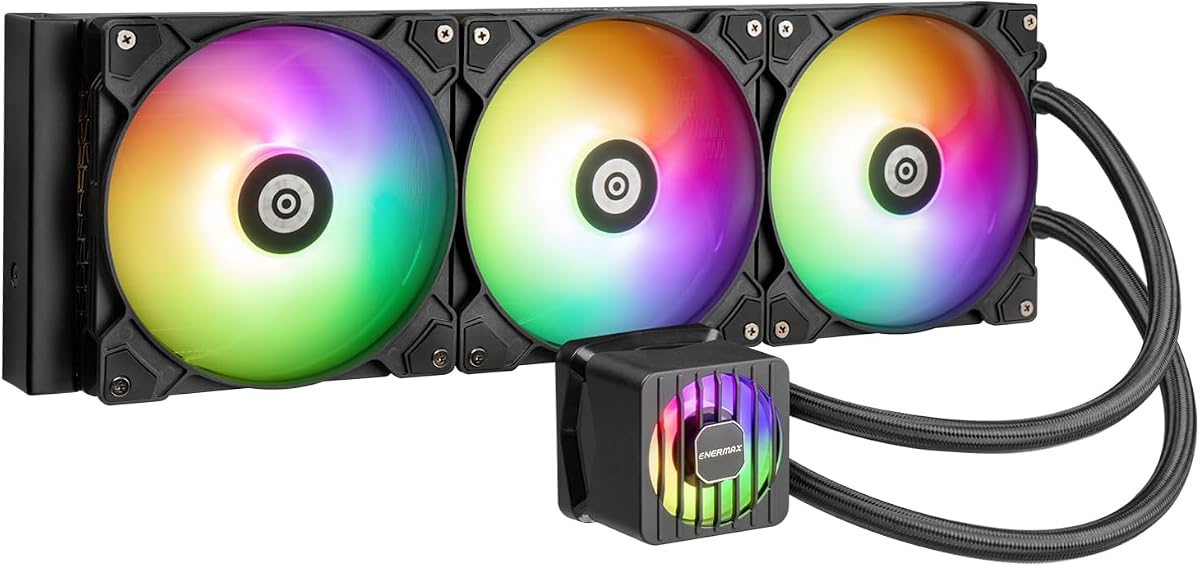
The ARCTIC Liquid Freezer III Pro 420 A-RGB combines a large 420mm radiator with three P14 PRO PWM fans and a feature-rich cold-plate assembly. Its 4.6 rating places it among the strongest performers in this guide. The highlight is a practical cooling package that addresses the CPU, VRM area, radiator airflow, and cable presentation rather than focusing on one conspicuous premium extra.
We may earn a commission when you buy through this link, at no additional cost to you.
Native offset mounting shifts the cold-plate center toward the CPU hotspot, a design ARCTIC says improves heat transfer. The supplied details also describe an Intel LGA1851 and LGA1700 contact frame, an integrated PWM-controlled VRM fan, and integrated fan-cable management in the hose sheathing. Together, these features make it especially compelling for builders who want strong cooling and a tidy finish.
The ARGB version adds illumination for systems that benefit from coordinated lighting, although buyers who do not need lighting can consider the non-RGB model later in this list. The exact platform support should still be checked, particularly because the supplied description for this particular listing names Intel contact-frame compatibility while another ARCTIC variant explicitly mentions both Intel and AMD. Case dimensions and mounting clearance are equally important because radiator length and thickness can determine fit.
This is our top budget recommendation because it provides an unusually complete set of thermal and installation-oriented features without relying on a display as the main selling point. It is well suited to gaming PCs, productivity machines, and high-power desktop systems where the builder values a strong 420mm configuration, neat routing, and quiet-oriented fans. Confirm socket support and chassis clearance before ordering.
The offset mounting design moves the cold plate toward the processor hotspot, while the listed Intel contact frame is intended to distribute contact pressure evenly. These details distinguish this cooler from a basic 420mm liquid cooler with only a standard mounting arrangement.
Routing radiator fan PWM cables through the hose sheathing reduces visible motherboard wiring, and the dedicated VRM fan adds airflow around the power-delivery area. Both features are particularly useful in a finished build where visual clutter and component heat deserve attention.
We may earn a commission when you buy through this link, at no additional cost to you.
This non-RGB Liquid Freezer III Pro 420 is a straightforward thermal solution for builders who want three powerful 140mm fans without illuminated hardware. The supplied rating is 4.4, and the core configuration centers on a 420mm radiator, P14 PRO PWM fans, offset mounting, and a pump block with an integrated VRM fan. Its restrained appearance also makes it easier to coordinate with professional or minimalist builds.
We may earn a commission when you buy through this link, at no additional cost to you.
ARCTIC describes the P14 PRO as delivering more power and quieter operation than its earlier P14, particularly at low speeds, while also reaching a higher maximum speed for heavy loads. The cold plate can be shifted toward the CPU hotspot, and the listed Intel LGA1851 and LGA1700 contact frame is intended to improve contact-pressure distribution and heat dissipation.
One trade-off is the lack of ARGB or an LCD, so this model will not appeal to someone who wants the pump block to act as a visual centerpiece. Native offset mounting can also create motherboard-clearance concerns in crowded cases. As with any large AIO, radiator thickness and the combined dimensions of all three fans should be measured against the case specification rather than assumed.
The model suits experienced builders, workstations, and gaming systems where acoustic-oriented fan hardware and effective heat transfer matter more than RGB effects. It is also a sensible alternative for anyone comparing the ARCTIC line and wanting the same major cooling concepts without decorative lighting. Verify the included brackets for the exact CPU platform before installation.
The stated low-speed improvement in the P14 PRO makes this configuration appealing for noise-sensitive systems. A suitable fan curve can preserve lower operating temperatures without forcing every fan to run at maximum speed during ordinary workloads.
Without decorative RGB, the block presents a more restrained appearance and avoids the need to configure lighting software. The integrated hose routing and VRM fan preserve visual order and active cooling even without a display.
We may earn a commission when you buy through this link, at no additional cost to you.
The be quiet! Silent Loop 3 420mm is built around quiet operation, combining a three-chamber pump design, a dampened six-pole motor, and three Silent Wings 4 PWM fans. Its 4.7 rating is the highest among the ten supplied products. The design is aimed at builders who understand that low noise depends on the entire cooling system, not just the processor fan.
We may earn a commission when you buy through this link, at no additional cost to you.
ARCTIC-style offset mounting is not the focus here; instead, the standout feature is the pump's chambered construction, which the manufacturer says reduces turbulence and noise. The pump is described as adjustable and dampened, while the 140mm fans are positioned with radiator corners in mind. That layout can help maintain consistent airflow through the large radiator without creating as much turbulence as some competing arrangements.
The engineered cooling block and broad CPU plate coverage make the model relevant beyond ordinary desktop processors, with the supplied information specifically noting Threadripper support. That wider coverage can improve contact with large processor packages, although the exact mounting hardware for every platform should be verified. The main concession is the lack of an LCD, so display-oriented builders may prefer the NZXT or Thermaltake options.
This is the editorial choice for quiet-focused builds, premium workstations, and users sensitive to fan and pump noise. The combination of a 420mm radiator, three high-speed Silent Wings 4 fans, and a carefully dampened pump offers a coherent thermal design rather than relying on a conspicuous premium display. It is a strong fit for work environments and carefully assembled enthusiast systems.
The three-chamber pump and dampened motor address turbulence and vibration within the block itself. Combined with dedicated high-speed fans, this focus makes the cooler especially interesting for users who prefer a physically quiet design over software-heavy customization.
The wide CPU plate and stated Threadripper support indicate attention to larger processor surfaces. Builders should still verify that their chosen Threadripper or other platform has the required bracket and that the chassis offers sufficient mounting space.
We may earn a commission when you buy through this link, at no additional cost to you.
This ARCTIC Liquid Freezer III Pro 420 A-RGB listing stands out for explicitly listing native offset mounting for Intel and AMD processors. Its 4.4 rating reflects a well-rounded configuration with a 420mm radiator, three P14 PRO PWM fans, a VRM fan, and ARGB lighting. It is a logical choice for builders who may upgrade between processor platforms or prefer a model presented as broadly compatible.
We may earn a commission when you buy through this link, at no additional cost to you.
The offset cold plate shifts toward the processor hotspot for more efficient heat transfer. ARCTIC also highlights its LGA1851 and LGA1700 contact frame, which is designed to distribute mounting pressure more evenly. The pump block includes a PWM-controlled fan for the voltage converters, while fan PWM cables are integrated into the hose sheathing to reduce visible connections.
The ARGB treatment adds visual appeal but introduces another lighting ecosystem to configure. Some builders may prefer the plain model, while others will want the cooler to match other illuminated components. Because a 420mm radiator with three 140mm fans can consume substantial chassis space, buyers should review both the case's radiator specification and any restrictions around GPU or RAM clearance.
The cooler is a strong option for a colorful gaming PC or a versatile work system where broad socket support and organized wiring matter. It combines the core benefits associated with the Liquid Freezer III Pro family without requiring a display or premium app-based interface. Confirm the exact mounting kit, radiator thickness allowance, and lighting-control compatibility before finalizing the purchase.
Explicit Intel and AMD mounting support simplifies platform planning. It is especially useful for builders who may move the cooler to a different CPU or already own a system that can use either major socket family.
The dedicated VRM fan broadens the cooling target beyond the CPU package. While its effect cannot be quantified from the supplied listing, the added airflow is a meaningful feature for sustained-power configurations.
We may earn a commission when you buy through this link, at no additional cost to you.
The NZXT Kraken Elite 420 RGB is the most display-focused model in this group. Its large 2.72-inch IPS LCD offers 640-by-640 resolution, a 60Hz refresh rate, 690 cd/m² backlight, 24-bit color, and wide viewing angles. The 4.4 rating reflects a capable package that combines a custom high-flow pump, an integrated RGB Core radiator fan, extensive display customization, and tool-free mounting.
We may earn a commission when you buy through this link, at no additional cost to you.
NZXT states that the pump's high flow rate and head pressure help cool heat-prone CPUs, while the RGB Core single-frame fan supplies airflow and illumination in one integrated design. The display can present favorite images, GIFs, real-time performance information, and content from services such as Google Photos, Spotify, and YouTube. The RGB ring can also synchronize with on-screen content and other RGB devices.
Installation is simplified by pre-applied thermal paste, a single breakout cable, and tool-free brackets for the latest AMD and Intel platforms listed in the supplied description. The radiator's single-fan arrangement means the other two mounting positions are left open for additional case fans, which can be helpful for overall case airflow. It also means this is not a conventional three-fan radiator bundle.
This is the premium recommendation for a showcase PC where the pump display is an important part of the design. It is also appealing to users who want monitoring and media directly on the CPU block without opening a monitoring application. Buyers should consider software requirements, open radiator positions, software ecosystem preferences, and case clearance before choosing it over quieter alternatives.
The high-resolution IPS panel can show real-time system information as well as images and GIFs. Its 60Hz refresh rate and bright backlight make it better suited to quick glances and animated content than a small, basic status readout.
The RGB Core fan combines the radiator fan and lighting in one frame. With two radiator positions available for extra fans, this layout can support a more complete airflow plan in larger enclosures.
We may earn a commission when you buy through this link, at no additional cost to you.
The Geometric Future Eskimo Pro pairs a 420mm radiator with three pre-installed Squama 2503 ARGB PWM fans and an advanced K6 liquid pump. Its 4.6 rating is among the best in the guide. The defining visual feature is a diffused ARGB CPU block, giving the cooler a more expressive appearance than a conventional square or circular illuminated pump housing.
We may earn a commission when you buy through this link, at no additional cost to you.
The pump is listed at a 1.5 L/min flow rate, while the cold plate uses a relatively large 55.8-by-55.8mm copper base. Copper's high thermal conductivity is useful for transferring heat from the processor into the coolant. Pre-installed high-static-pressure fans reduce one assembly step, although their physical dimensions and the complete radiator thickness still need to be considered against chassis limits.
The supplied information says the model is compatible with current Intel and AMD sockets and specifically identifies Intel LGA1700 and AMD AM5. Users should confirm the exact mounting parts for their processor before purchase, because compatibility language can vary by platform and bracket revision. The product also carries more assertive RGB styling, making it less suitable for a deliberately non-illuminated or business-focused system.
This model is a compelling choice for a visually dramatic gaming build that wants substantial cold-plate coverage and a visible pump design. Its rating and stated pump specifications suggest a strong overall proposition, but buyers should research software support and component reliability as part of a final decision. It is best suited to those who value appearance and explicit flow specifications.
The 55.8mm square copper base provides generous contact area beneath the processor. Combined with the stated pump flow rate, it creates a clear thermal-design story centered on moving heat efficiently away from the CPU.
Installing the three Squama 2503 fans in advance reduces setup work. Their ARGB treatment and the diffused block lighting create a coordinated appearance for builds designed around visible cooling hardware.
We may earn a commission when you buy through this link, at no additional cost to you.
The ASUS ProArt LC 420mm is designed to complement professional ASUS ProArt components while providing a substantial 420mm cooling package. It carries a 4.4 rating and uses three Noctua NF-A14 industrialPPC-2000 PWM 140mm radiator fans. The combination of a quiet-oriented three-phase motor and high-airflow fans gives it a strong foundation for workstations and refined enthusiast systems.
We may earn a commission when you buy through this link, at no additional cost to you.
Rather than using a conventional LCD, the pump block includes an illuminated meter that indicates live system load, temperatures, and fan speeds. That design preserves useful feedback without covering the entire block with a screen. It also fits the understated aesthetic of the ProArt family, which tends to favor restraint over elaborate decorative effects.
The 450mm reinforced sleeved tubing is intended to resist wear while retaining flexibility and chassis compatibility. The cooler also uses a thicker radiator with larger coolant storage, a design choice ASUS associates with enhanced cooling performance. The trade-offs are a bulkier overall package and the absence of customizable images, GIFs, or application content on a display.
This cooler is particularly suitable for a professional workstation, creator system, or understated gaming PC that values airflow, status information, and a restrained appearance. Users should still check CPU-socket brackets and radiator thickness clearance. The live meter also offers a practical way to monitor conditions without dedicating a large panel to the pump block.
The three NF-A14 industrialPPC-2000 PWM fans are chosen for high airflow with minimal noise. Their 140mm size and radiator-corner placement suit a large 420mm installation designed for substantial heat removal.
The illuminated meter gives quick feedback about load, temperatures, and fan speeds. It is less flexible than an LCD but preserves the clean proportions favored by many professional workstation builds.
We may earn a commission when you buy through this link, at no additional cost to you.
The Thermaltake TH420 V2 Ultra ARGB combines three 140mm ARGB PWM fans, a 420mm radiator, and a 2.1-inch square LCD on the pump block. Its 4.0 rating is solid but not among the highest in the collection. The model is aimed at builders who want a colorful, feature-heavy cooling package with extensive compatibility and several established lighting ecosystems.
We may earn a commission when you buy through this link, at no additional cost to you.
The display uses a 480-by-480 resolution and can display 16.8 million-color videos or photos, while the redesigned industrial housing gives the block a more assertive appearance. The radiator fans operate from 500 to 1800 RPM and use PWM control. A copper cold plate is paired with a circulating pump designed to keep heat transfer surface cool and coolant moving through the loop.
RGB synchronization supports ASUS Aura Sync, GIGABYTE RGB Fusion, MSI Mystic Light Sync, and ASRock Polychrome, which is a major advantage for mixed-component systems. The important qualification is that the Ultra Series relies on TT RGB Plus 2.0 software for its advanced functions. Users comfortable with a dedicated control suite may accept this; those seeking a simple plug-in-and-forget experience may not.
Socket support is extensive, covering numerous Intel generations and many AMD platforms in the supplied list. It is therefore an appealing option for a system built around an older or less common processor. Check the exact bracket contents, software requirements, and radiator thickness before ordering. Overall, it serves visual enthusiasts who value both LCD content and broad RGB compatibility.
The 2.1-inch square panel provides enough surface for color photos, videos, and status information. Its 480-by-480 resolution and support for 16.8 million colors make it a more expressive alternative to a basic illuminated logo.
Compatibility with four major motherboard lighting platforms reduces the chance of a mismatched finished build. TT RGB Plus 2.0 remains necessary for the Ultra Series, so software access should be considered before purchase.
We may earn a commission when you buy through this link, at no additional cost to you.
The MAGFloe 420 Ultra is visually the most unconventional model in this roundup because of its 3.95-inch square LCD. It includes a 420mm radiator and three 140mm SWAFAN EX fans, and its 3.3 rating is the lowest supplied score in the group. The product nevertheless offers a large amount of functionality for buyers attracted to an oversized pump display.
We may earn a commission when you buy through this link, at no additional cost to you.
The screen can display pictures, videos, and system-performance data. MAGForce 2.0 retains magnetic fan-to-fan connections and magnetic daisy-chain cables, while larger contact surfaces are intended to improve reliability and reduce signal drop caused by misalignment. The fans can operate from 500 to 2000 RPM and have detailed airflow and static-pressure specifications in both standard and reversed configurations.
A major practical concern is physical fit. A 3.95-inch square display creates a larger pump-head silhouette than a conventional block, and it may conflict with tall memory, a graphics card, or restrictive cases. The included reverse blades help users keep the illuminated side visible when airflow direction is reversed. Software stability and feature completeness should also be evaluated carefully given the lower rating.
This is a niche choice for a showcase build in which the LCD is the centerpiece. The swappable blades, magnetic connections, and wide socket list are meaningful features, but they should be weighed against the lower user-rating score. Anyone considering it should confirm screen clearance, software requirements, and included mounting hardware before committing.
At 3.95 inches square, the LCD can serve as a compact secondary display for media or monitoring. Its dimensions also make CPU cooler clearance a more important part of case planning than with a conventional pump block.
Swappable reverse blades let users adjust orientation while preserving the visible lighting side. Magnetic fan links and daisy-chain cables can make the three-fan radiator assembly more orderly and easier to connect.
We may earn a commission when you buy through this link, at no additional cost to you.
The ENERMAX LIQMAXFLO 420mm A-RGB is a 420mm AIO built around a high-speed pump, a 38mm-thick radiator, and a pressure-optimized 140mm FDB PWM fan. Its 4.1 rating places it toward the practical middle of this group. The single radiator fan is notable, as buyers may need to consider adding the other two positions for a full three-fan arrangement.
We may earn a commission when you buy through this link, at no additional cost to you.
The pump is advertised at speeds up to 3000 RPM and uses fully PWM-controlled design across the pump, VRM fan, and main fan. A dedicated 60mm VRM fan provides localized airflow around the voltage regulators. The thicker radiator is intended to increase thermal capacity, while the pressure-optimized FDB fan focuses on moving air through the dense radiator and restricted CPU exhaust path.
The magnetic pump cover can rotate by 90 degrees for customization, while three tube clips organize the hoses and wires. A daisy-chain cable design simplifies hookup, and pre-applied Dow Corning TC-5888 thermal grease removes one preparation step. RGB can coordinate with supported software and motherboard synchronization. The main compromise is that only one radiator fan is specified, which may make the kit less complete than the three-fan alternatives.
The model appeals to builders who want control over pump speed and a thick radiator, while accepting the need to assess fan placement and total case airflow. Its supported platforms include Intel LGA1700, LGA1200, LGA115X, AMD AM5, and AM4 according to the supplied details. Verify bracket contents and case allowance, especially if adding fans will increase the radiator assembly's thickness.
The pump's stated ability to reach 3000 RPM gives users fine control over circulation and response. Automatic PWM control can also reduce unnecessary high-speed operation when workload temperatures are low.
A rotating magnetic cover allows the pump face to be oriented more attractively. Tube clips and daisy-chain wiring help maintain a clean build, while pre-applied thermal paste simplifies preparation.
We may earn a commission when you buy through this link, at no additional cost to you.
The right 420mm AIO depends on more than nominal radiator size. Socket support, case clearance, pump and fan behavior, display usefulness, lighting ecosystems, and installation requirements all influence whether a cooler will work well in a particular system.
A 420mm radiator is long, and its total depth depends on the radiator thickness plus the fans mounted to it. Builders should compare the complete assembly—not merely the radiator—with the case manufacturer's supported radiator sizes and maximum CPU cooler clearance. A 38mm radiator with one fan may fit where a 27mm radiator with three fans does not, while additional fans can also interfere with the graphics card or side intake filters.
Confirm that the cooler includes the correct mounting hardware for the exact processor socket. Support for a particular Intel generation or AMD platform is not always identical across variants within the same product family. Large CPUs and workstation processors also benefit from broad cold-plate coverage, but only a compatible bracket can ensure even mounting pressure. Threadripper support should be verified explicitly rather than inferred from the processor's large package.
Pump design influences both circulation and noise. Features such as multiple chambers, a dampened motor, adjustable speed, and a stated flow rate give useful context, but they do not guarantee identical results across different radiator and fan arrangements. Higher pump speeds can support aggressive thermal settings, while PWM control allows the system to balance cooling demand with noise. Consider the complete loop rather than treating pump speed as the only measure of performance.
A 420mm radiator is normally paired with three 140mm fans, but fan characteristics vary considerably. High-static-pressure models help push air through the dense radiator and past restrictive CPU coolers, while models marketed for low-speed quietness can be effective in balanced fan curves. Confirm whether all radiator fans are included, as the ENERMAX option listed here supplies only one, and compare stated speed ranges and pressure figures where available.
LCD-equipped coolers range from restrained status meters to large panels capable of showing images, GIFs, videos, and performance data. A larger display is not automatically better: it consumes more visual space, may conflict with tall memory, and generally depends on vendor software. Check the supported operating environment, display resolution, refresh rate, integration features, and whether the device can function independently of a network connection.
ARGB lighting is separate from basic RGB synchronization. RGB products generally synchronize color and effects, while addressable ARGB products can offer more detailed per-fan or per-zone control. The NZXT Elite uses a single integrated RGB Core fan, Thermaltake supports several major motherboard ecosystems through its own software, and other models may require a specific vendor utility. Confirm compatibility before ordering to avoid an isolated lighting effect.
A well-designed AIO should simplify setup rather than add hidden connections behind the motherboard tray. Single breakouts, daisy-chained fan cables, integrated hose routing, magnetic links, pre-applied thermal compound, and tool-free brackets can materially reduce installation time. The presence of a VRM fan is also helpful, but it may require additional power or control connections. Map out the available headers before choosing a model with several powered or lighting-equipped components.
A 420mm AIO is prominent inside a glass-sided case, so its visual design deserves attention. Minimalist models suit office and workstation environments, while ARGB blocks, square screens, and illuminated fans suit gaming systems. Some coolers carry brand-specific software that can add value through customization but may also feel unnecessary to a builder who wants a simple installation. Match the hardware and ecosystem to the rest of the build rather than choosing the largest display available.
Begin by confirming the radiator, pump, and CPU mounting compatibility before removing parts from the case. Read the included instructions, identify every socket component, and position the radiator where the case manual permits unobstructed airflow. Mount the radiator and fans first if access becomes restricted after the pump block is installed. Clean the processor surface, apply the supplied compound only if it is not already pre-applied, and tighten the bracket evenly according to the manufacturer instructions.
Connect the pump, radiator fans, VRM fan, and lighting according to the motherboard manual and the cooler documentation. If the model supports daisy chaining, confirm that the specified cable and connector orientation match the PWM and lighting headers. Route hoses so they do not contact sharp edges, hot exhaust areas, memory modules, or moving graphics-card components. Secure loose cables away from fans, and use the supplied clips or guides to preserve an orderly interior.
After startup, enter the vendor or motherboard software to configure pump speed, fan curves, lighting effects, and display content when applicable. Begin with conservative performance settings, monitor CPU and component temperatures under a realistic workload, and adjust the curve gradually. Keep the radiator and fans free of dust, inspect fittings for moisture, and avoid operating the pump when the loop is empty. Periodic visual checks and careful cleaning help preserve airflow and make unusual vibration or noise easier to identify.
A 420mm AIO can move more heat away from the processor and reduce the need for a very large tower air cooler, especially in compact or heavily loaded systems. Its benefit depends on case support, radiator placement, fan quality, and correct installation. Air cooling can remain an excellent lower-complexity choice, while a 420mm AIO is attractive when sustained performance, flexible mounting, or a clean visual design is important.
Three 140mm fans are a common arrangement because they cover the full length of a 420mm radiator and create a strong push or pull configuration. Some products include all three, while others intentionally include fewer and leave positions available for case airflow. Check the package contents carefully, and ensure any additional fans match the radiator thickness and the case's available clearance.
It fits only if the case supports a 420mm radiator and allows the combined thickness of the radiator, fans, and any frame. Length, width, mounting holes, GPU clearance, and side-panel space all matter. Measure the available area rather than relying on the cooler alone, and include tubing bend radius and room for the pump head or display.
Noise depends on the pump, fan speed, radiator position, and operating load rather than radiator size alone. Models with dampened pumps, quiet-oriented fans, and controllable PWM curves can remain restrained during normal use. An aggressive curve for sustained maximum loads will generally produce more sound, so a tuned fan curve is important.
Basic cooling can generally operate through standard motherboard PWM controls, although advanced lighting, display content, pump effects, and monitoring may require vendor software. The Thermaltake Ultra Series specifically depends on TT RGB Plus 2.0 for its advanced functions. Review software requirements and platform support before installation, especially if your operating system or build philosophy limits the software you want to run.
The LCD itself adds little installation complexity, but larger displays can create clearance issues with tall memory, graphics cards, and side panels. Display-equipped models also require appropriate power and data connections. Compare the pump-head dimensions with the available motherboard area and check nearby component clearances before choosing a large-screen model.
Inspection frequency depends on dust exposure and how the computer is used. A desktop in a clean room may need only periodic checks, while a system in a dusty environment may require more frequent cleaning. Power down the computer before removing fans, clean carefully without bending fins, and make sure every fan is securely reconnected and operating in the correct direction.
Only if the mounting hardware supports the destination socket and the pump or radiator layout remains compatible with the new system. Some coolers explicitly support both Intel and AMD, while others provide platform-specific brackets. The cooler itself may remain usable, but thermal paste may need replacement, and the mounting kit should never be improvised or reused incorrectly.
The ARCTIC Liquid Freezer III Pro 420 offers the strongest overall value, combining offset mounting, P14 PRO fans, a VRM fan, and tidy cable routing. The be quiet! Silent Loop 3 420mm is the editorial choice for quiet-focused builds, while the NZXT Kraken Elite 420 RGB takes the premium position for its large, bright IPS display and polished software features.
Prioritize confirmed socket support, full radiator-and-fan clearance, and the number of fans included before considering displays or lighting. A quieter three-fan package may serve a workstation better than a screen-equipped model, while a large display can be ideal for a showcase gaming build. The right 420mm AIO is the one that fits the chassis and suits the system, not simply the one with the largest specification.
Ratings, package contents, software compatibility, and current prices can change over time. Before buying, verify the exact ASIN and variant, review the latest product listing, confirm mounting hardware, and compare the complete physical dimensions against the case. That final check helps prevent an otherwise strong cooler from becoming an installation compromise.