
chenyang SATA 90 Degree Up Adapter
4.4Editor score
Upward 90-degree connection
Supports 2.5 and 3.5-inch drives
Handles power and data
A 90 degree SATA adapter changes the direction of a SATA connection, making it easier to install hard drives, SSDs, and optical drives when a straight plug lacks clearance. The right model can reduce strain on cables, improve airflow, and keep internal wiring more orderly inside compact desktop cases.
We compared these adapters by connector configuration, angle direction, drive support, stated transfer capabilities, installation purpose, and package contents. The list includes seven-pin data adapters, full 22-pin power-and-data adapters, upward and downward bends, and multi-adapter sets for different chassis layouts.
Each review identifies the configuration most likely to fit a particular build and explains where extra care may be required. Ratings and product details reflect the supplied listings and can change, while market conditions and current listing details should be confirmed before purchasing.
4.4Editor score

4.6Editor score

5.0Editor score
As an Amazon Associate we earn from qualifying purchases.
The table below compares all ten adapters by connector type, bend direction, supported devices, stated speed, and package configuration, making it easier to identify the correct model for a desktop build.




The CERRXIAN 90 Degree SATA Adapter is a two-pack of upward-bending, seven-pin male-to-female SATA data adapters. It carries a 4.6 rating and stands out for a clearly defined purpose: changing a SATA data connection from vertical to horizontal when the chassis lacks enough room for a straight cable. It is designed for motherboard connections involving internal hard drives, SSDs, and optical drives.
We may earn a commission when you buy through this link, at no additional cost to you.
Its principal strength is practical cable management. Rather than forcing a seven-pin cable sharply against a drive connector or motherboard port, the adapter redirects the plug through a 90-degree path. The listing states SATA III compliance with transfer speeds up to 6 Gbit/s, or 600 MB per second, and compatibility with the earlier 1.5 Gbps and 3 Gbps SATA generations. That makes it suitable for ordinary desktop storage connections rather than specialized legacy equipment.
There is an important limitation: this is a data-only adapter. The drive still needs a separate SATA power connection, so a 22-pin power-and-data cable cannot be replaced by this product alone. Users should also verify that an upward bend is actually required, since the adapter adds a fixed 90-degree change in direction. Despite those constraints, the included pair is useful for multiple drives or as a spare.
This is a strong general recommendation for a desktop with limited clearance above a SATA port. Choose it when you need a seven-pin data adapter, an upward bend, and standard SATA compatibility. It is less suitable for installations that require a single connector to carry both power and data, but for its stated data-routing role it is clear, practical, and well rated.
The upward angle turns a vertical data connection into a horizontal one, giving the cable more natural clearance from the drive cage, expansion cards, or the case floor. This is especially useful when a straight plug would need to be pressed into an uncomfortable position.
The two-pack allows one adapter for an SSD and another for a hard drive or optical drive. It also provides a spare that can be useful if a connector is removed frequently or if a future storage upgrade uses the same connection format.
We may earn a commission when you buy through this link, at no additional cost to you.
The CERRXIAN 90 Degree Duale SATA 7PIN Male to Dual Female Connetcor is a specialized two-pack designed around a dual seven-pin right-angle arrangement. Its 4.5 rating reflects solid user reception, while the product format is aimed at low-profile desktop cases where cable routing is particularly constrained and a conventional right-angle plug may still occupy too much space.
We may earn a commission when you buy through this link, at no additional cost to you.
The listing describes the adapter as a way to change a SATA seven-pin power cable from a vertical to a horizontal orientation. It states SATA III compliance, transfer speeds up to 6 Gbit/s, and backward compatibility with SATA 1.0 and 2.0 ports. Its dual form is the defining feature, offering two female ends associated with the male input side for users whose motherboard and drive layout requires that arrangement.
The tradeoff is that this is not a general-purpose adapter for every SATA system. Buyers should compare the physical dual layout with the ports and cables in their case rather than assuming all seven-pin connectors are interchangeable. The listing also recommends checking the case to determine which angle is needed. As with most SATA data adapters, separate drive power remains necessary.
This adapter deserves consideration when a conventional single-ended right-angle model does not provide enough room in a compact chassis. Its two-piece package, standard SATA III claims, and right-angle orientation make it potentially useful for multiple storage connections. Confirm the connector geometry and required angle before ordering, as those details determine whether it will work in your build.
The dual right-angle configuration is intended to save space around low-profile motherboard layouts. It can be especially useful where a conventional adapter would leave the attached cable protruding into an already congested area.
The stated support for 6 Gbit/s and older SATA generations gives the adapter broad relevance for conventional desktops. Actual performance still depends on the connected drive, controller, and motherboard.
We may earn a commission when you buy through this link, at no additional cost to you.
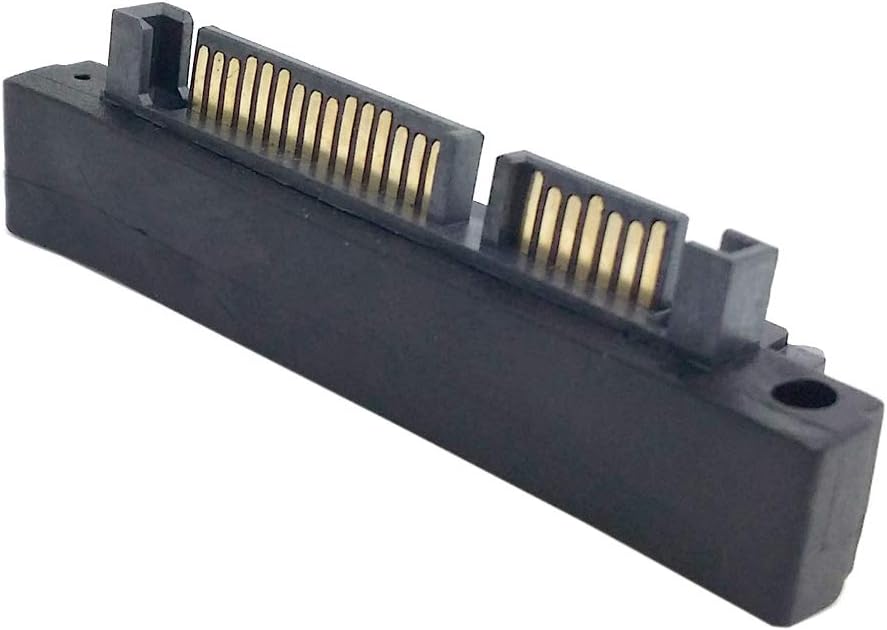
The chenyang SATA Male to SATA Female 90 Degree UP Angled Gender Changer Connector Adapter is a straightforward solution for 2.5-inch and 3.5-inch drives. It has a 4.4 rating and changes the connection direction without changing the stated interface definition or transfer speed. Unlike seven-pin data-only options, this full connector arrangement is designed to carry both power and data.
We may earn a commission when you buy through this link, at no additional cost to you.
The adapter is intended to solve a common desktop-build problem: a SATA cable cannot approach a hard drive or motherboard connector without being bent too sharply. Its upward angle moves the cable into a more manageable orientation and can improve the appearance of internal wiring. The listing states support for 5V and 12V power along with data transfer up to 6 Gbps.
As its name indicates, this is an upward bend, not a universal right-angle connector. It may work perfectly in one chassis and point into a drive cage or neighboring component in another. Since the product is a gender changer for internal SATA drives, it is not designed for external enclosures or other nonstandard connectors. Checking the drive and motherboard orientation remains essential.
This is a good value-oriented choice for a builder using a conventional 22-pin SATA connection who needs the cable to turn upward at a cramped point. It reduces the need to replace an entire cable, supports common desktop drive sizes, and handles both power and data. It is particularly attractive for restoring neat routing around a hard disk in a compact case.
The complete SATA connector arrangement removes the need to route a separate power lead to a small adapter. It simply changes the direction of an existing internal SATA power-and-data connection.
Compatibility with 2.5-inch and 3.5-inch hard drives covers the most common internal storage devices in desktop cases. SSDs using the same SATA interface can also benefit from the improved connection angle.
We may earn a commission when you buy through this link, at no additional cost to you.
The CY 90 Degree Down Angled SATA 22Pin 7+15 Male to SATA 22P Female Extension Convertor Adapter redirects a full SATA connection downward. Its 4.4 rating and stated support for 2.5-inch and 3.5-inch drives make it a practical option for desktop cases where a straight cable interferes with another component.
We may earn a commission when you buy through this link, at no additional cost to you.
The adapter has a 22-pin male end and a 22-pin female end, combining the seven-pin data section and fifteen-pin power section. The listing states that it transfers 12V and 5V power while supporting data rates up to 6 Gbps. The downward angle gives builders an alternative when the available room is beneath the connector rather than above it.
The main consideration is physical space. A downward bend helps when the problem is a cable pointing toward the case floor, but it can crowd a lower drive cage, shroud, or component. The connector also needs to match the SATA standard used by the existing cable and drive. Users should inspect the intended connection point and confirm that no sharp fold is required elsewhere in the cable.
Choose this model for an internal SATA setup that specifically needs a downward 90-degree transition and has clearance below the port. It handles both power and data, supports common hard drive formats, and offers a straightforward way to avoid forcing a bulky cable into an awkward position.
The adapter changes the plug from a straight orientation to a downward-facing one. That can keep a SATA cable away from the case floor, expansion cards, or other parts occupying the area immediately beneath the drive.
Because it uses a full 22-pin connection, the same adapter handles the drive's data and power requirements. This makes it more convenient than a seven-pin data-only adapter when using a conventional combined SATA cable.
We may earn a commission when you buy through this link, at no additional cost to you.
The cablecc Right Angled 90 Degree SATA 22Pin 7+15 Male to SATA 22P Female Extension Convertor Adapter is a compact full-connector solution with a 4.6 rating. It uses a SATA 22-pin male end and SATA 22-pin female end, allowing a standard combined power-and-data cable to make a right-angle turn where space is limited.
We may earn a commission when you buy through this link, at no additional cost to you.
Its appeal lies in the simplicity of retaining the existing SATA cable rather than replacing it with a different length or angle. The right-angle housing moves the cable away from the direct path of a straight connector, which can reduce visual clutter and make installation easier around drive cages. The black housing also blends naturally with most internal PC wiring.
The product information is less detailed than that of some competitors, so buyers should base the decision primarily on connector fit and physical orientation. It is not described as a universal solution for every drive arrangement, and the fixed right angle may point toward another component depending on the chassis. Checking the male and female connector ends is important before installation.
This is a strong top-rated choice for users with standard 22-pin SATA cables who need a straightforward right-angle conversion. It offers the convenience of carrying both power and data without a special cable, and its 4.6 rating is among the strongest among the listed options. Confirm that the adapter's angle matches the available space.
The male-to-female design lets a standard SATA cable plug into the adapter and continue to the drive. That can make a right-angle correction without replacing the entire cable run.
A 4.6 rating indicates strong customer reception for a straightforward adapter. The product focuses on a common physical problem rather than adding unnecessary features that could complicate compatibility.
We may earn a commission when you buy through this link, at no additional cost to you.
The xiwai SATA 7Pin Female to 7pin Male 90 Degree Angled Adapter is a two-piece set containing one upward and one downward adapter. Its 4.3 rating reflects a generally positive reception, while the mixed-angle package is particularly useful when a desktop has several SATA connections positioned differently.
We may earn a commission when you buy through this link, at no additional cost to you.
The adapter is designed to change the installation direction of a seven-pin disk cable. The listing specifically says it can move the connection from vertical to horizontal and solve installation problems in a limited-height chassis. Because one adapter bends in each direction, users can select the appropriate orientation for each drive instead of committing to a single fixed angle.
This is a seven-pin SATA data connector, so it should not be mistaken for a full 22-pin power-and-data adapter. The drive still requires a separate power connection, and users with a combined SATA cable will need to determine whether the physical cable can be separated into the appropriate data and power connections. A conventional straight data lead with a separate power lead is the more natural setup for this adapter.
This set is worth considering for multi-drive desktops, compact cases, and builders who want to keep both an upward and downward option available. It offers more angular flexibility than a single-direction product, although the need for a separate data cable should be understood before installation.
The mixed set solves different clearance problems around different drives. An upward adapter may suit a connection near the case ceiling, while the downward version can work near the floor or a lower drive bay.
The product directly addresses a situation in which a vertical SATA plug has insufficient room. Its 90-degree form shortens the distance needed for the cable to leave the port in a comfortable direction.
We may earn a commission when you buy through this link, at no additional cost to you.
The chenyang SATA Male to SATA Female 90 Degree Down Angled Gender Changer Connector Adapter is a full SATA connection designed for 2.5-inch and 3.5-inch hard disk drives. It holds a 4.3 rating and provides a practical downward bend where the available space favors routing beneath the original connection point.
We may earn a commission when you buy through this link, at no additional cost to you.
The listing says the connector changes only the direction of the drive connection rather than the interface definition or transmission speed. It states support for 5V and 12V power as well as data transfer up to 6 Gbps. This makes it a familiar combined power-and-data solution for internal desktop drives that need a little more freedom in cable positioning.
Physical fit is the critical issue. A downward adapter can make a hard drive easier to connect, but it may also reduce clearance under the drive or interfere with a shroud. The cable should be allowed to leave the adapter without being sharply bent in the opposite direction, and the connector should seat fully without force.
This adapter is a sensible choice for a conventional internal hard drive whose SATA cable enters awkwardly from above or from a limited-height bay. It supports common drive sizes and both power and data while improving routing. Buyers should compare the angle and connector shape with their case layout before installation.
The adapter is described as changing connection direction rather than altering the interface. Its listed 6 Gbps capability remains limited by whichever drive, motherboard controller, and cable are used in the system.
Hard disk drives often occupy tight spaces where a straight combined cable crowds the drive cage. The downward angle can create a cleaner path while keeping power and data together.
We may earn a commission when you buy through this link, at no additional cost to you.
The Right Angle SATA 7 Pin Female to Male Adapter combines a 90-degree turn with a 5.0 rating, the highest numerical rating among the listed products. It is a seven-pin female-to-male data adapter for hard drives, solid-state drives, optical drives, and motherboards with standard SATA data ports.
We may earn a commission when you buy through this link, at no additional cost to you.
One of its most attractive details is the use of gold-plated contacts. The listing also identifies the adapter as SATA III compliant, supporting data transfer rates up to 6 Gbps when the connected devices can handle that speed. Its space-saving design reduces the amount of space occupied near the connector and helps route the attached cable without an abrupt bend.
The adapter does not provide power. A hard drive or optical drive connected through it still needs a standard SATA power lead, and the system must have a suitable seven-pin data connection. The listing also notes RoHS compliance and describes the construction as durable, though the overall dimensions and precise bend orientation should be checked against the available case space.
This is an excellent choice for a builder who values contact construction and wants a compact data-only right-angle adapter. It works with several classes of standard SATA devices and offers the strongest listed customer rating. It is less convenient when a single full 22-pin adapter is required, but for a separate data and power setup it is a particularly polished option.
Gold-plated contacts are intended to provide dependable electrical contact and resist corrosion over time. The benefit is especially relevant in computers that are frequently opened, upgraded, or exposed to ordinary indoor humidity.
The listing positions the adapter for hard drives, SSDs, optical drives, and motherboards with seven-pin SATA data ports. That broad support makes it useful for storage upgrades, legacy optical equipment, and general internal cable management.
We may earn a commission when you buy through this link, at no additional cost to you.
The Four-Pack Mixed Angle Set is designed for desktop builds that use several SATA connections and may encounter different clearance constraints around each one. It includes two upward and two downward seven-pin female-to-male adapters, providing a balanced selection of orientations in a single package.
We may earn a commission when you buy through this link, at no additional cost to you.
The listing identifies the adapters for SSDs, hard drives, and motherboards in space-limited desktop installations. It states support for SATA transfer rates such as 3 Gbps and 6 Gbps, depending on the connected storage device and motherboard. Two compact body dimensions are listed, which suggests the up-angle and down-angle versions may have slightly different shapes.
Because the set uses seven-pin SATA data connectors, the attached drive still needs separate power. The listed plug-and-play design requires no tools, but the connector should still be inserted carefully and checked for a complete seat. The absence of a customer rating means there is less visible user feedback to guide the purchase, making verified dimensions and connector orientation especially important.
This four-pack is most useful for a multi-drive system, a builder who wants spares, or anyone who prefers not to decide between up and down angles before opening the case. It offers good flexibility for internal data connections, although users seeking power and data in one adapter will need a 22-pin model instead.
Different drive bays can present opposite space constraints. Including two upward and two downward adapters makes it easier to match each SATA data port to the direction in which the cable can leave the drive.
The adapter is intended to be simply plugged into a compatible connection. Its small body can reduce the force a cable places on a drive connector, though every end should be checked for a proper fit before the computer is powered on.
We may earn a commission when you buy through this link, at no additional cost to you.
The chenyang CY SATA 7Pin Male to Female 90 Degree Down Angled Motherboard SATA Port Extension Convertor Adapter is a two-pack of downward seven-pin adapters. Its 4.4 rating indicates positive customer feedback, while the included pair offers enough hardware for multiple connections or a replacement spare.
We may earn a commission when you buy through this link, at no additional cost to you.
The adapter changes the direction of a seven-pin SATA disk cable so that it can run horizontally from a vertically oriented connection. Its listing specifically identifies desktop motherboards, SSDs, and hard disk drives as intended applications. The product title and description also associate the adapter with a stated transfer capability up to 6 Gbps.
This is a data adapter rather than a complete 22-pin power-and-data connector. A separate power lead is therefore required for the storage device. Users should also confirm that the downward bend has enough room and that the nearby cable can bend naturally without forming a tight radius immediately after the adapter.
This model is a good fit for a desktop with one or more downward-facing SATA data connections. The two-pack adds flexibility, the downward angle solves a common clearance problem, and the simple seven-pin format suits builds already using separate SATA data and power cables. Checking the connector direction before ordering avoids the most likely installation mismatch.
A downward bend allows a SATA data cable to leave a connector horizontally toward the lower part of the case. This can keep it away from the top panel, a vertical drive cage, or other components positioned above the connection.
Two matching adapters make the package convenient for systems with more than one poorly positioned SATA data port. The extra unit can also remain available for a later storage addition.
We may earn a commission when you buy through this link, at no additional cost to you.
The right SATA adapter depends mainly on connector type, bend direction, cable arrangement, and the physical clearance around your storage connections. These factors determine whether an adapter solves the space problem or simply moves it elsewhere.
A seven-pin SATA adapter is a data-only connector, while a 22-pin adapter includes both the seven-pin data segment and the fifteen-pin power segment. Many desktop SATA cables combine power and data, so a 22-pin adapter can accept that cable directly. A seven-pin option is appropriate when the drive has a separate data lead and power lead. Confirming the connector on the drive, the motherboard, and the existing cable prevents a mismatch and also establishes whether a power connection must be routed separately.
An upward adapter redirects a cable toward the top of the chassis, a downward adapter points toward the case floor, and some products use a side-facing right angle. The correct choice depends on what occupies the space around the connector. Look at the drive bay, cable path, neighboring drives, expansion cards, and case panels. If the available clearance is below the connection, a downward model may be appropriate; if it is above, use an upward adapter. A wrong direction can place the adapter directly in the way of another component.
SATA data connectors are standardized, but right-angle adapters are not all shaped alike. Some include a narrow seven-pin body, while others have the wider geometry of a 22-pin plug or a dual-ended arrangement. Measure the space around the port and compare it with the product images and listed dimensions. The adapter must also leave room for the cable to curve naturally after leaving the connector. A small clearance improvement that creates a sharp bend elsewhere is not a successful solution.
Most internal desktop SATA adapters are designed for 2.5-inch hard drives, 3.5-inch hard drives, SSDs, or optical drives. The product description should identify the relevant devices, but you should also confirm that the connector and cable arrangement match the drive. A full 22-pin adapter is commonly associated with 2.5-inch and 3.5-inch drives, while seven-pin data adapters may support several drive types when paired with separate power. Do not assume that a connector rated for hard drives will suit an optical drive if the physical plug differs.
SATA III supports a stated maximum data transfer rate of 6 Gbps, and many of the listed adapters are also backward compatible with SATA I and SATA II. An adapter does not make an older controller or drive faster than its own limits. The complete path, including the drive, cable, adapter, and motherboard controller, determines real performance. For a typical modern SSD or hard drive, an adapter with stated SATA III compatibility is appropriate, provided all other components in the path meet the same standard.
Package contents can make a meaningful difference when a system has several drives. The list includes two-adapter packs, a four-piece set with two upward and two downward adapters, and single-adapter formats. Matching sets are useful for multi-drive builds or for keeping spares. A mixed set offers additional flexibility because different ports may require opposite bend directions. Count the storage connections in the system before choosing, and consider whether replacement adapters may be needed after repeated servicing.
A well-finished connector helps maintain reliable contact and can withstand repeated installation. One reviewed model specifically advertises gold-plated contacts, while others describe durable materials and sound insulation properties. These claims are most valuable when a computer is opened frequently or the environment contains elevated humidity. Regardless of the advertised material, avoid forcing a connector, check that it seats fully, and inspect for bent pins or debris. A visually solid adapter is still less important than a correct, secure fit.
The adapter changes only the first part of a cable's path. The remaining cable still needs enough room to curve, remain connected, and avoid pressure from fans, drive cages, or moving components. A 90-degree adapter can reduce bending near the drive, but it may create another tight turn farther along the lead. Before buying, trace the likely route from the adapter to the controller or power supply. The best solution provides a smooth path without forcing a sharp fold immediately after the connector.
Begin with the computer powered off and disconnected from its power source. Open the case, locate the SATA connection that lacks clearance, and confirm that the adapter's connector type and bend direction match both the drive and the existing cable. Inspect the connector for dust, bent pins, or other visible damage before attempting to install it.
Attach the adapter to the drive or motherboard according to the direction that makes the cable most comfortable. Connect the SATA cable to the appropriate male or female end, then attach separate SATA power if using a seven-pin data adapter. Press the connectors together until they are fully seated, but do not force them. A right-angle adapter should reduce bending at the port without creating a sharper bend farther along the cable.
After installation, inspect the connection from several angles and gently adjust the cable without pulling on the adapter. Reconnect power only after confirming that no connector is partially inserted, that no cable blocks a fan, and that the adapter does not interfere with a drive cage. Keep the adapter away from hot components and avoid repeated twisting, and replace it if the connector becomes loose, discolored, or physically damaged.
A 90 degree SATA adapter changes a SATA connection from a straight orientation to a right-angle path. It is commonly used when a drive or motherboard port has limited clearance, allowing the cable to bend more naturally. The correct model depends on whether you need seven-pin data, 22-pin power and data, and whether the required angle points up, down, or sideways.
No. A seven-pin SATA adapter carries data only and requires a separate power connection for the drive. A 22-pin adapter contains both the seven-pin data section and fifteen-pin power section, allowing a combined SATA cable to plug into it. The connector on the drive and the type of cable already installed should determine which format you need.
A correctly compliant 90 degree adapter should preserve the interface and support the same standard as the connected components. Many listed models support SATA III rates up to 6 Gbps, although actual performance depends on the drive, cable, motherboard controller, and adapter. A loose, damaged, or poorly seated connector can cause reliability issues, so every connection should be checked carefully.
Choose an upward adapter when there is usable space above the connection and the cable needs to leave toward the top of the case. Choose a downward adapter when the available room is beneath the port. The case layout, drive position, and neighboring components determine the correct direction, which is why mixed-angle packages can be convenient.
Yes, many of the listed adapters are designed for internal SATA SSDs, hard drives, and some optical drives. Compatibility depends on the physical SATA connector and the cable arrangement used by the device. A seven-pin data adapter also requires separate SATA power, while a 22-pin adapter can accept a combined power-and-data cable.
Usually, no. These adapters are designed to redirect the direction of an existing cable, which can be a convenient alternative to replacing the entire lead. The adapter must have the correct connector type, and a seven-pin version is most convenient in builds using separate data and power cables. A full 22-pin adapter is appropriate for a combined SATA cable.
Measure the open space around the SATA port and compare it with the adapter's shape and listed dimensions. Also consider the width of the attached cable and the direction in which it must bend after leaving the adapter. A correct connector fit alone is not enough if the housing, cable, or neighboring component prevents installation.
No. Shut down the computer, disconnect the power supply, and then work on the SATA connection. Hot-plugging internal SATA cables is not an appropriate installation method, and attempting it can damage the drive, motherboard, or adapter. Recheck every plug and cable route before restoring power.
The CERRXIAN 90 Degree SATA Adapter is the strongest all-around choice for users who need an upward seven-pin data connection, while the chenyang up-angle 22-pin model is an appealing budget-friendly option for conventional power-and-data cables. The Right Angle 7 Pin Adapter stands out for its 5.0 rating, gold-plated contacts, and stated SATA III compatibility.
Start by identifying the connector format, then choose the bend direction based on actual case clearance. A seven-pin model is ideal for separate data and power wiring, a 22-pin model accepts a combined SATA cable, and a mixed-angle set offers useful flexibility for multi-drive systems. In every case, ensure the adapter seats fully and allows the cable to follow a smooth path.
Before making a final selection, confirm the current product details, connector dimensions, orientation, and customer feedback on the listing. Product availability and ratings can change over time, so the most recent information is the best basis for a compatible and reliable purchase.