
Yamaha DM3
4.4Editor score
22-channel compact layout
96kHz processing and preamps
18×18 USB audio interface
Our Digital Mixing Consoles guide compares ten leading consoles for live sound, studio recording, streaming, and compact mobile workflows based on features and
Digital mixing consoles combine microphones, instruments, playback, signal processing, monitoring, and recording controls into a unified workspace. A strong console should make live mixing fast, studio sessions repeatable, and system routing understandable without forcing users to depend on complicated external software for essential tasks.
This guide compares ten consoles spanning rack-mounted studio models, tabletop live mixers, tablet-controlled systems, and software-oriented production consoles. We evaluated their documented input and output counts, processing capabilities, control surfaces, connectivity, recording options, workflow aids, and suitability for common studio and live environments.
Each pick highlights a different path for buyers, from compact all-in-one production to expansive touring-style control. Ratings reflect the supplied marketplace feedback, while practical recommendations are based on the stated specifications. Product availability and configurations can change, so confirm the current listing and required accessories before purchasing.
4.4Editor score

4.7Editor score

4.2Editor score
The table below compares the ten consoles by their most important characteristics: channel capacity, output routing, control methods, and production or recording features. It is a quick way to identify the model that best matches your venue, studio, workflow, and stage.



The Behringer X32 is a substantial digital console designed for both studio and live work, combining 40 input channels, 25 buses, 32 MIDAS-designed programmable microphone preamps, and 25 fully automated motorized faders. Its 4.7 rating reflects a well-regarded balance of routing capacity, tactile control, and scene-based workflow, making it the strongest all-purpose choice in this group.
We may earn a commission when you buy through this link, at no additional cost to you.
The physical control surface is one of the X32's defining advantages. Twenty-five motorized 100 mm faders provide immediate visual feedback when levels change, while individual and dynamic LCD Scribble Strips help users identify assigned channels and buses. Sixteen XLR outputs, six additional line inputs and outputs, two headphone connections, and an integrated or external talkback section provide a versatile foundation for stage, rehearsal, studio, and fixed installation work.
The main trade-off is physical scale. With 25 faders and a broad feature set, the X32 demands desk space and carries more operational complexity than a compact digital mixer. New users will also face a dense control layout, although motorized faders, scribble strips, and scene management provide clear ways to organize the work once the console is configured.
Choose the X32 when you need one console to cover many applications, from multitrack recording and mixing to live reinforcement. It is especially attractive for users who value physical level control and recallable scenes over a minimalist interface. For a large project requiring extensive routing without remote I/O expansion, it offers an unusually capable balance.
The motorized faders move to assigned positions when scenes or channel states change, giving operators a quick visual understanding of the current mix. This makes the console particularly effective for repeated shows, rehearsed cues, and productions that rely on consistent recall.
Forty channels, 25 buses, numerous analog connections, talkback, and dynamic labeling support a workflow where sources, mixes, effects, and monitor destinations must remain easy to identify. The result is a console that can support both straightforward rehearsals and more demanding studio sessions.
We may earn a commission when you buy through this link, at no additional cost to you.
The Yamaha DM3 is an ultracompact digital console with 22 channels, 96kHz processing, a 9-inch touchscreen, and an 18×18 USB audio interface. Its 4.4 rating reflects a strong balance of Yamaha signal quality, recording connectivity, and space-saving design, making it an appealing option for smaller venues, rehearsals, and project studios.
We may earn a commission when you buy through this link, at no additional cost to you.
Its 16 professional Yamaha preamps include 12 XLR and four combination jack connections, while eight analog XLR outputs provide enough balanced routing for many practical setups. Six mono or three stereo mixes, two matrixes, and a stereo bus organize the main output structure, while the large touchscreen provides a central surface for channel editing and system navigation.
The DM3's compact format is also its main compromise. Users accustomed to dedicated faders, buttons, and rotary controls may find the touchscreen less tactile, especially in dim conditions or during fast live adjustments. The 16 onboard preamps are ample for many sessions but offer less headroom than the larger X32's 32-preamp configuration.
This console suits singers, songwriters, mobile creators, and small ensembles that need professional Yamaha preamps and multitrack USB recording in a compact package. It is especially useful when the priority is a polished digital workflow without the footprint of a touring desk. Choose it when touchscreen efficiency matters more than a large array of motorized controls.
The 18×18 USB audio interface supports playback and recording, while the two-by-two USB recorder adds a focused recording path. This makes the DM3 useful for capturing performances or producing a multitrack session with less reliance on external computer hardware.
The 9-inch display is unusually prominent for a compact console, giving users room to inspect processing, routing, and scene information. It also enables one-console operation without requiring a tablet or external computer screen.
We may earn a commission when you buy through this link, at no additional cost to you.
The Behringer WING is a full-size 48-channel, 28-bus digital console built for demanding live, studio, broadcast, and installed applications. It carries a 4.2 rating, with its strongest distinctions coming from extensive routing, three independently configurable fader sections, AES50 remote I/O, and a deeply integrated touch-control surface.
We may earn a commission when you buy through this link, at no additional cost to you.
Eight award-winning Midas PRO microphone preamps and eight Midas PRO outputs are available onboard, while three AES50 ports can extend the system to as many as 144 input and output signals using SuperMAC technology. The 24 motorized 100 mm faders are divided into three configurable sections, allowing the physical surface to be adapted to different parts of the mix rather than imposing one fixed layout.
Its complexity is both strength and drawback. A large main display, adjustable swivel, 11 rotary controls, and a dedicated color TFT create considerable editing power, but the learning curve is steeper than on smaller consoles. The physical footprint also makes it less attractive for home studios and mobile rigs where every piece of desk space matters.
The WING is best suited to organizations that want a scalable central platform rather than a limited standalone mixer. It makes sense for touring professionals, theater crews, production studios, and integrators who can benefit from remote I/O and configurable surfaces. Buy it when future expansion and high-level routing flexibility are more important than compactness.
Three AES50 ports and support for up to 144 input and output signals make the WING a natural core for distributed racks and larger stage systems. Users can expand beyond the onboard connections without abandoning the console's integrated control environment.
The three fader sections are fully configurable, while the capacitive main display and touch-sensitive channel editor provide access to parameters beyond the physical controls. This makes the surface adaptable to different shows, engineers, and production roles.
We may earn a commission when you buy through this link, at no additional cost to you.
The Yamaha MGX12 combines an 18-channel digital mixer with a 4.3-inch touchscreen, five control knobs, tactile faders, and extensive software support. Its supplied 5.0 rating is favorable, and the model stands out for workflows that mix physical control, computer connectivity, and beginner-friendly assistance.
We may earn a commission when you buy through this link, at no additional cost to you.
Connectivity is unusually flexible for a compact console. It includes new MGX preamps with an 86 dB gain range, Bluetooth audio input, a microSD card slot, dual USB-C interfaces, and a USB-HDMI feature for 4K video capture and pass-through. A built-in DSP processor handles effects and monitoring, while Cubase AI, WaveLab Cast LE, Basic FX Suite, and Steinberg Plus software support recording and production tasks.
The limited screen size and modest channel count can become restrictive when working with many sources or deeply nested effects. Users who need extensive sends, matrices, or remote stage I/O may outgrow it quickly. Even so, the assist features—including Simple and Standard modes, Auto Gain, Clip Safe, and Scene Recall—reduce setup time and help protect recordings.
Choose the MGX12 for a rehearsal room, podcast, livestream, small performance space, or project studio where a computer is part of the creative process. It is a strong fit for users who want modern routing and bundled software without committing to a large touring console.
Simple and Standard modes tailor the interface to different experience levels. Auto Gain, Clip Safe, and Scene Recall help reduce repetitive tasks and make the console more approachable for new operators.
Bluetooth input, microSD playback, dual USB-C connectivity, and USB-HDMI video support broaden the MGX12's role beyond live mixing. These features are especially useful for mobile creators, livestreams, and hybrid production.
We may earn a commission when you buy through this link, at no additional cost to you.
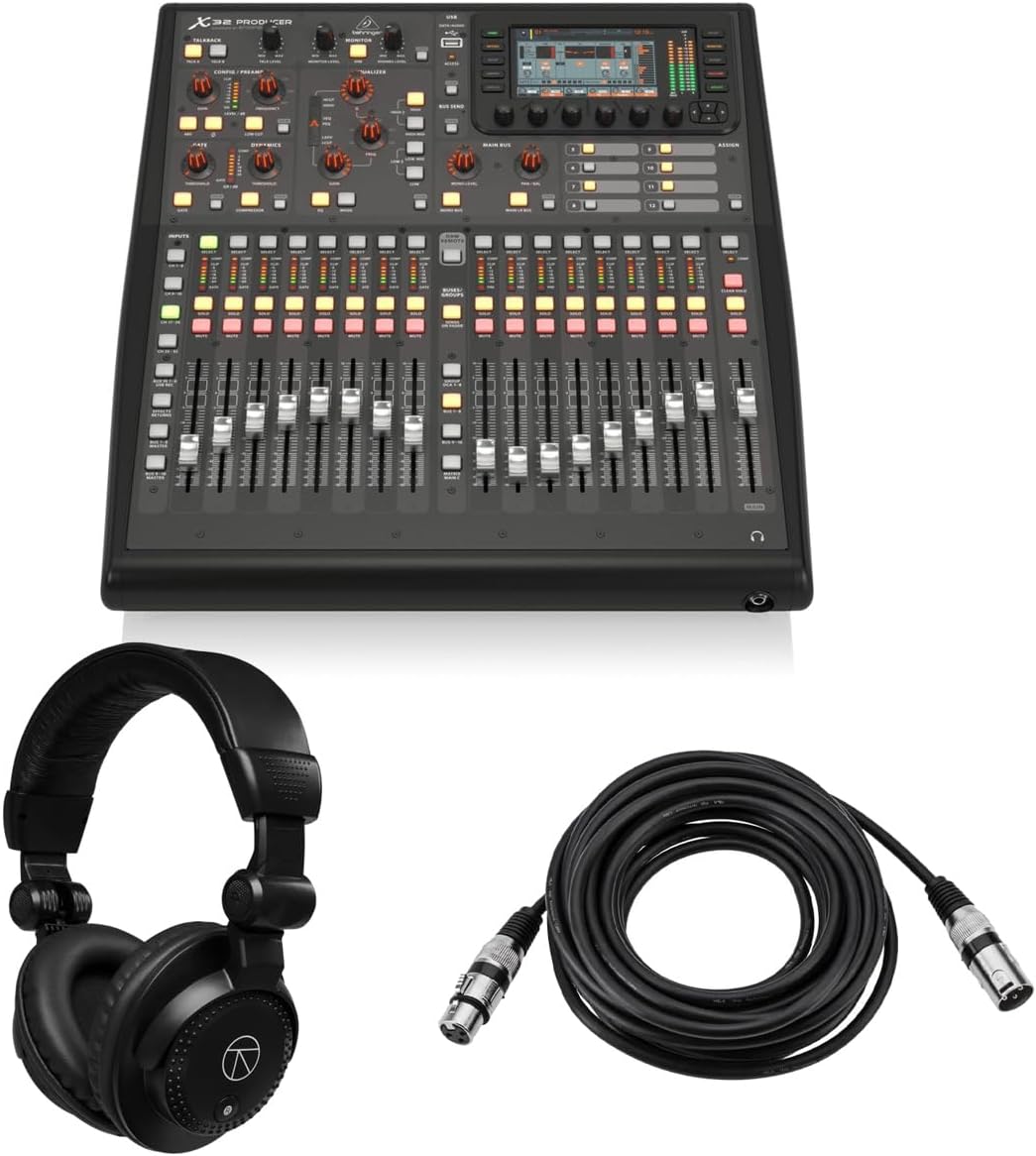
The Behringer X32 PRODUCER is a rack-mountable 40-input, 25-bus console bundled with closed-back studio monitor headphones and a 25-foot XLR microphone cable. Its supplied 5.0 rating, extensive effects, motorized control, and production-focused accessory bundle make it a convenient starting point for project studios.
We may earn a commission when you buy through this link, at no additional cost to you.
Sixteen programmable MIDAS preamps, 24-bit/48 kHz conversion, and a stated 114 dB dynamic range form the signal foundation. A 5-inch 800×480 color TFT, 17 motorized faders, 100 total recall scenes, and dynamic labeling help users move between channel, bus, and production tasks. Sixteen balanced mic or line inputs and eight balanced line outputs provide a serious studio topology.
Every main LCR channel, six matrix buses, and all 16 mix buses have inserts, six-band parametric EQ, and full dynamics processing. The effects section includes eight true-stereo slots and 16 mono engines with simulations such as Lexicon 480L, PCM70, EMT250, and Quantec QRS, giving users considerable creative range without an external effects rack.
The rack enclosure is ideal for permanent studio installation but less convenient for spontaneous mobile use. The included headphone and cable choices may not suit every monitoring preference or existing setup, and users can source alternatives if needed. Overall, this console is compelling for bands, podcasters, and studio operators who want a ready-made production package with extensive recall and processing.
The included closed-back headphones and XLR cable cover two common needs immediately: private monitoring and a basic microphone connection. The bundle reduces the number of separate purchases required for a functional home or project studio.
Six-band parametric EQ, full dynamics, inserts, multiple mix buses, matrices, and a large virtual effects rack provide room to shape sources without immediately adding outboard gear. This is particularly useful for preproduction and tracking sessions.
We may earn a commission when you buy through this link, at no additional cost to you.
The Behringer X32 Compact preserves the familiar 40-input, 25-bus architecture of the larger X32 while fitting 17 motorized 100 mm faders into a more compact control surface. Its 4.7 rating and support for studio and live applications make it a strong choice for engineers who need broad functionality without a full-size desk.
We may earn a commission when you buy through this link, at no additional cost to you.
Sixteen MIDAS-designed programmable preamps support a range of microphone sources, and the console includes eight XLR outputs, six additional line inputs and outputs, two headphone connections, and talkback. Individual and dynamic LCD Scribble Strips on the channels and buses aid fast identification, while automated faders and scene management improve repeatability.
Compared with the full X32, the Compact version offers fewer onboard preamps and XLR outputs, so a larger show may need additional routing. Its reduced fader count also means some layers must be selected rather than displayed simultaneously. Even so, it retains the channel and bus capacity that makes the X32 family attractive for serious work.
Buy the X32 Compact for touring, theater, church production, rehearsal spaces, and studios where desk depth and weight matter. It offers an experienced digital workflow, robust recall, and extensive routing in a more transportable format, without dropping to a basic mixer or tablet-only design.
Automated faders and scene management make it possible to set a show once and reproduce it later. That repeatability is valuable for venues with regular performers, rotating crews, and time-limited load-ins.
Seventeen motorized faders provide more direct control than a typical touchscreen mixer while occupying less surface area than a full touring desk. The result suits users who want both tactile operation and a manageable footprint.
We may earn a commission when you buy through this link, at no additional cost to you.
The PreSonus StudioLive Classic 16.0.2 is a 16-channel USB digital console mixer with 12 Class A XMAX solid-state preamps, Fat Channel processing, and an 18-in/16-out USB 2.0 interface. Its 3.9 rating is lower than the rest of this group, but the included Studio One, Capture, UC Surface, and QMix-UC ecosystem gives it a distinct software-oriented identity.
We may earn a commission when you buy through this link, at no additional cost to you.
Eight mono and four stereo input channels use 12 physical 60 mm faders, while four auxiliary buses, two internal effects buses, and two stereo digital effects processors cover common mixing needs. Every channel and bus receives three-band semi-parametric EQ, compression, downward expansion, and limiting, with a stereo 31-band graphic EQ on the main output.
The 18-in/16-out USB interface records all channels and the main stereo mix at 24-bit/44.1 kHz or 48 kHz. MIDI I/O supports output-level control, preset and scene recall, and MIDI-interface duties. The lower rating may reflect buyers who expected newer software, broader physical routing, or higher resolution from an older platform, so compatibility with the included tools deserves careful attention.
This mixer is best for project studios, teaching spaces, rehearsals, and users already invested in the PreSonus ecosystem. It makes sense when bundled recording software, built-in processing, and mobile auxiliary control outweigh the need for a larger routing matrix. Buyers should verify current operating-system and software support before committing.
Studio One Artist DAW, Capture live-recording software, and UC Surface mixer control provide a connected path from tracking to editing. The ability to control auxiliary mixes from compatible mobile devices adds practical value during rehearsals and small live events.
Fat Channel processing places EQ, dynamics, and related controls on every input and bus. This consistency helps users apply familiar moves across sources rather than navigating a different processing model for each route.
We may earn a commission when you buy through this link, at no additional cost to you.
The Behringer XR18 is an 18-input digital mixer controlled from an iPad or Android tablet rather than a traditional control surface. Its 4.6 rating reflects strong reception for a portable, software-driven approach with 16 programmable MIDAS-designed preamps, built-in Wi-Fi, and direct USB recording.
We may earn a commission when you buy through this link, at no additional cost to you.
Its Tri-mode Wi-Fi router allows direct operation without an external router, simplifying rehearsal-room and mobile setups. An 18-by-18 bidirectional USB interface can record directly to a tablet, while the main output provides two XLR connections. The software workflow also centralizes channel control, routing, and scene management on the larger tablet display.
The reliance on a separate tablet is the central compromise. Users must own a compatible device, account for its battery life, and become comfortable with touch-based adjustments rather than dedicated faders. The listed automatic microphone gain-sharing function is associated with future firmware, so buyers should verify its current availability before relying on it.
The XR18 is well suited to small bands, mobile presenters, podcasters, rehearsal spaces, and engineers who value portability. It offers less immediate physical control than a desk-based console but can create a very compact working setup. Choose it when a tablet can serve as the central interface and when simple standalone Wi-Fi operation is a priority.
The integrated Tri-mode Wi-Fi router removes the need to connect the mixer through an external network router. That simplifies control from a compatible tablet in locations where networking infrastructure is limited.
The 18-by-18 bidirectional USB interface gives a tablet direct access to a substantial number of mixer channels. This can shorten the path from a live performance to a captured multitrack session.
We may earn a commission when you buy through this link, at no additional cost to you.
The Allen & Heath Qu-5 is a modern 38-input, 24-output digital mixer built around 96kHz XCVI FPGA processing, low latency, and a flexible mix architecture. With no marketplace rating supplied for this listing, its evaluation rests on the documented specification set, which is extensive for live sound, recording, and installed audio.
We may earn a commission when you buy through this link, at no additional cost to you.
Connectivity includes 16 XLR/TRS combination mic and line inputs, 12 XLR outputs, AES3 digital output, a 128×128 SLink expansion port, and a USB-C 32×32 multichannel audio interface. Up to 38 inputs can feed 12 configurable mixes, four matrix outputs, and customizable channel layers, providing a strong foundation for complex routing.
Recording and effects are integrated through six multi-FX engines, dedicated returns, USB-A stereo recording and playback, USB-C multitrack recording, and SD card capture for as many as 32 channels. The control surface centers on a 7-inch capacitive touchscreen, 17 motorized faders, eight programmable SoftKeys, and chromatic metering, with remote control apps for Windows, macOS, iOS, and Android.
The Qu-5 is best for production companies, installers, advanced live teams, and recording engineers who need a capable central engine with broad expansion options. It is less approachable for someone seeking a simple compact mixer, and buyers without an established Allen & Heath workflow may face a meaningful learning period. Still, its processing, routing, and recording provisions position it as a high-resolution modern centerpiece.
Configurable mixes, matrix outputs, customizable layers, and a high-capacity SLink port allow the console to adapt to different production layouts. This makes it appropriate for installations and productions whose routing changes over time.
USB-C multitrack recording, stereo USB-A playback and recording, and SD card capture provide multiple ways to preserve a performance. Dedicated effect returns and six multi-FX engines reduce the need to route every source through external processors.
We may earn a commission when you buy through this link, at no additional cost to you.
The QSC TouchMix-16 is a compact digital mixer with 20 full-function inputs, a 4.4 rating, and a bundled carrying bag. It focuses on practical live sound routing, including direct TRS auxiliary outputs for wired in-ear monitors, six XLR auxiliary outputs, and a broad collection of main, cue, and monitor connections.
We may earn a commission when you buy through this link, at no additional cost to you.
Input flexibility comes from 12 microphone channels, four XLR/TRS combination mic or line inputs, two stereo TRS line inputs, an XLR talkback channel, and USB two-track connectivity. Outputs include six XLR auxiliaries, two stereo TRS outputs, main left and right XLR connections, a cue TRS output, and a monitor TRS output, providing a versatile foundation for rehearsals and small events.
Every input channel includes four-band full parametric EQ, variable high-pass and low-pass filters, a gate, and a compressor. That per-channel feature set is practical for voice-heavy and full-band applications. However, the TouchMix-16 lacks the broad multitrack recording and advanced digital routing capabilities found in several newer models, and its compact screen-led workflow may not satisfy users seeking extensive physical control.
Choose this mixer for portable live sound, rehearsals, small venues, corporate presentations, or mobile production where wired monitoring and flexible analog outputs matter. The included bag improves transport and storage, while the broad input selection makes it adaptable to different source types. It remains a compelling option for users who prioritize reliable live routing over studio-style recording workflows.
The auxiliary TRS outputs can drive wired in-ear monitors directly, reducing the need for extra distribution hardware in a compact live rig. This is particularly useful for rehearsals and performances with several monitor mixes.
Four-band parametric EQ, variable filters, gates, and compressors on every input allow detailed source shaping. These tools are especially helpful when a show combines speech, instruments, and playback with different tonal and dynamic requirements.
We may earn a commission when you buy through this link, at no additional cost to you.
The right digital mixing console depends on source count, routing demands, control preferences, recording needs, portability, and the environment where it will be used. Comparing these factors before shopping prevents an underpowered or overly complicated choice.
Begin by counting realistic source and destination requirements rather than relying on the largest headline channel number. A console that supports 18 physical inputs may still be appropriate for a full band, podcast, or worship service if those inputs are used effectively. Outputs deserve equal attention because main mixes, monitors, auxiliaries, recording feeds, and external effects each require routing. Compare both analog and digital connectors, including XLR, TRS, USB, and network options.
Physical faders and dedicated controls are valuable for fast live adjustments, while touchscreens and tablet applications can make routing and editing easier. Motorized faders provide visual confirmation of recalled states, and SoftKeys or assignable controls can personalize common tasks. Consider the operator as much as the device: a drummer may value immediate tactile control, while a producer may favor a large screen for editing and recall.
A useful console should provide EQ, dynamics, and effects on the channels and buses you expect to use. Check whether processing includes parametric EQ, high-pass and low-pass filters, gates, compressors, limiters, inserts, and dedicated sends. Onboard effects can streamline rehearsals and smaller productions, but they should complement rather than replace outboard gear when a show requires specialist processing or recallable, brand-specific sound.
USB audio interfaces can turn the console into a multitrack recording hub, but channel counts, resolution, and sample-rate support vary. A two-track connection is useful for playback, while a 16-by-18, 18-by-18, or 32-by-32 interface can support isolated track capture. For modern workflows, also consider USB-C, SD card recording, storage format, computer compatibility, and whether the supplied software remains current and supported.
Shows, studios, and houses often reuse the same basic mix. Scene storage, motorized fader recall, channel automation, and dynamic scribble strips can reduce setup time and prevent incorrect changes between performances. The number of scenes matters less than the ease of organizing and recalling them. Look for clear naming, broad recall groups, and controls that make it easy to see which parameters change together.
Rack-mountable consoles save desk space and suit permanent installations, while compact tabletop units are easier to move between rehearsals, studios, and venues. A tablet-controlled mixer can minimize hardware but adds a dependency on battery life, screen visibility, and network stability. Full-size digital desks provide extensive physical control but demand more room, transport support, and a larger learning curve. Choose the format that matches the real operating environment.
Large stages and fixed installations may need inputs and outputs far from the console. AES50, SLink, Dante, or other compatible expansion systems can distribute channels over network connections, while digital outputs can feed external processors and recording systems. Check the maximum supported signal count, port type, redundancy needs, and whether expansion requires compatible hardware. A console with modest onboard I/O may still be ideal if its expansion path is well matched to the production.
Headphone outputs, cue and monitor paths, talkback, solo, mute groups, channel labels, and assistive setup features can materially affect daily usability. Solo and mute groups help isolate sources quickly, while Auto Gain, Clip Safe, and Simple modes can shorten setup for inexperienced operators. Evaluate these features against your normal workflow, especially the need to give performers quick control over their own monitor mixes.
Begin with a clean signal plan. List every source, where it needs to go, which output it feeds, and whether it must also reach a recording device. Confirm input gain before applying channel processing, save a baseline scene, and then add EQ, compression, effects, and automation in small, audible steps. Label channels consistently so physical controls, displays, and scene lists use the same names.
Treat the console as the heart of the system rather than a cure for poor input or output configuration. Use proper microphone technique, balanced connections, suitable cable lengths, and correctly configured external devices. Update software and firmware when appropriate, back up scenes and show files, and keep copies away from the console. If the unit is used on the road, transport it in a suitable case and protect the surface from impact, moisture, and debris.
For live operation, prepare a show scene and test every input, output, effect return, talkback route, and recording path before the audience arrives. Keep written notes for unusual changes and use mute groups or separate scenes when they improve safety. After the session, lower output levels before disconnecting equipment, remove cables carefully, and inspect connectors for strain. Periodically clean the surface with a dry, soft method appropriate for the enclosure and replace aging cables before they interrupt a performance.
A digital mixer routes and processes signals internally in the digital domain, allowing scenes, automation, effects, and multitrack USB recording to be managed by software. An analog mixer uses physical signal paths for routing and processing. Digital consoles usually offer greater recall and routing flexibility, but their workflows may require more setup and learning.
Motorized faders are not essential for every live mix, but they are useful when users rely on scenes, linked changes, or visual confirmation of channel positions. Touchscreen and tablet control can handle many routine adjustments, while tactile faders remain preferable for fast, continuous level changes in busy performances.
A typical small band can often fit within 12 to 18 physical inputs, but the correct count depends on drum microphones, instrument pickups, playback, speech, and stage monitors. It is wise to count connections that may be needed in the future and leave room for auxiliaries, recording feeds, and a talkback source.
Many digital consoles can, but their USB interfaces differ in channel count, resolution, and supported sample rates. The Yamaha DM3 provides an 18×18 interface, the XR18 offers 18×18 USB, and the Allen & Heath Qu-5 includes a 32×32 USB-C interface. Confirm compatibility and track routing before a critical session.
A tablet-controlled mixer can be reliable when the tablet, operating system, wireless connection, power supply, and console firmware are properly supported and tested. Keep the tablet charged, use a stable network arrangement, and maintain a rehearsed fallback workflow. Some engineers prefer a dedicated surface for critical performances because it removes one variable.
A 24-bit converter at 48 kHz is common in professional production, while 96 kHz can suit projects that benefit from higher-resolution capture and processing. Sample-rate support should be considered alongside the rest of the signal chain, including converters, preamps, recording software, and the final playback system.
Some spare capacity is useful for growth, expansion, and changing input lists, but excessive complexity can slow setup and make operation less intuitive. Choose a console whose routing and controls match your typical workload, then confirm that it has a clear expansion path for unusually large productions.
Use a fitted flight case for frequent touring and a padded case or cover for occasional movement. Secure cables, protect faders and displays, avoid placing heavy objects on the control surface, and prevent moisture or debris from entering the chassis. Back up show files and scenes separately before taking equipment on the road.
The Behringer X32 stands out as the most versatile overall choice, combining extensive routing, motorized faders, scene recall, and strong studio-live credentials. The Yamaha DM3 is the clearest compact option for users who prioritize a large touchscreen, Yamaha preamps, and direct multitrack USB, while the Behringer WING offers the greatest expansion potential for high-level live and production work.
Your priorities should determine the right alternative. The X32 Compact serves users wanting familiar X32 workflows in a smaller case, the MGX12 emphasizes software and assistive features, and the X32 PRODUCER targets rack-based studio setups. The StudioLive Classic 16 centers on a PreSonus software ecosystem, the XR18 prioritizes tablet freedom, the Qu-5 combines high-resolution processing with modern recording, and the TouchMix-16 remains a portable live mixer with useful in-ear monitor outputs.
Before ordering, verify the exact channel count, output connectors, recording format, software support, expansion requirements, and physical space. Confirm that the supplied accessories fit your setup and check the current marketplace listing and specifications, since product configurations and commercial conditions can change over time.
