
TECKNET Wireless Mouse
4.5Editor score
Dedicated horizontal side wheel
Three connection modes available
Six adjustable DPI settings
Mouse with Horizontal Scroll: compare 10 wireless and ergonomic models for spreadsheet navigation, device switching, comfort, scrolling speed, and productivity.
A mouse with horizontal scroll can make wide spreadsheets, design canvases, timelines, and expansive webpages much easier to navigate. The best model pairs a thumb-side wheel with smooth vertical scrolling, accurate tracking, quiet operation, and a shape that remains comfortable through long work sessions.
This guide compares ten wireless, rechargeable, and battery-powered options on horizontal navigation, connection methods, DPI control, ergonomics, device switching, and workday features. It covers models for spreadsheets, creative work, travel, and multi-computer setups while noting important operating-system limitations.
Each recommendation highlights a different balance of capabilities, from value-focused everyday performance to premium productivity tools. Ratings and specifications reflect the supplied product information, while availability and current prices can change, so readers should verify the latest listing details before purchasing.
4.5Editor score

4.6Editor score

4.3Editor score
The table below compares all ten models by their most consequential horizontal-scroll, connectivity, precision, and ergonomic features, making it easier to identify the right mouse for spreadsheets, design work, travel, or a multi-device office.


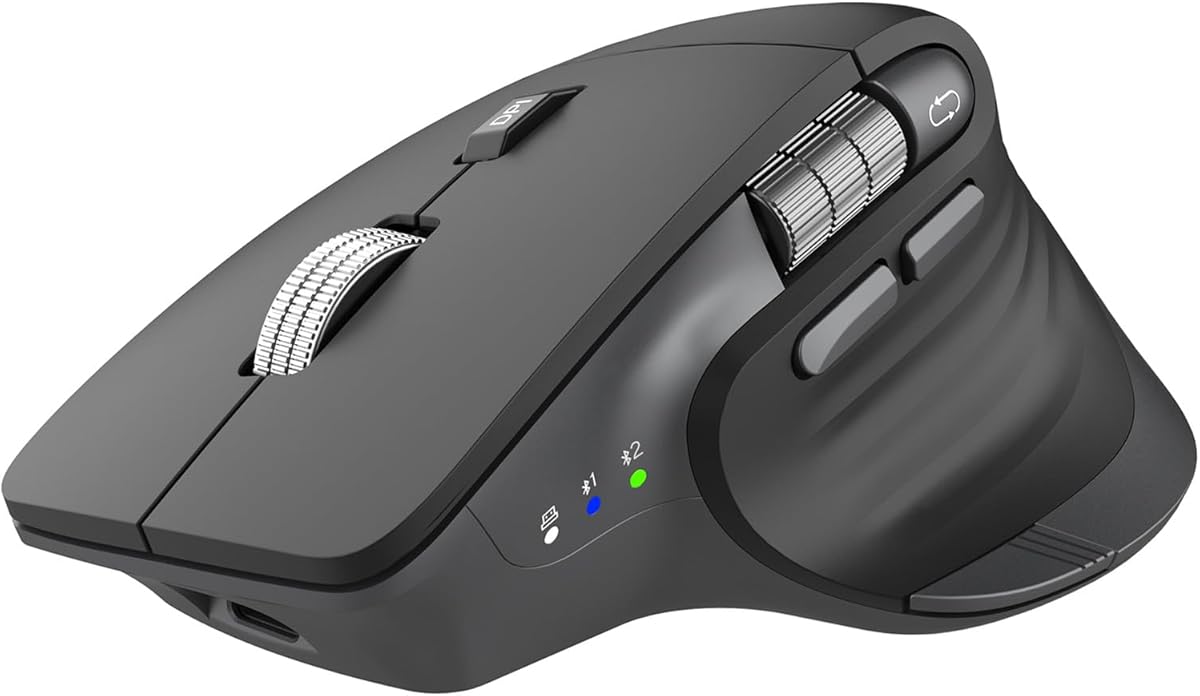


The TECKNET Side-Scroll Mouse combines a 4.5 rating with the practical feature mix many spreadsheet users look for: a dedicated horizontal wheel, fast vertical scrolling, adjustable precision, and multiple ways to connect. Its ergonomic, contoured body and silent clicks also make it a credible everyday option for office work, study, and long browsing sessions.
We may earn a commission when you buy through this link, at no additional cost to you.
The side-mounted wheel is the defining feature. It allows horizontal movement through wide spreadsheets, design canvases, and webpages without repeatedly dragging a conventional scrollbar. A high-speed metal wheel handles vertical movement, while six DPI levels from 800 to 4800 let the user balance close-detail work with faster cursor travel. The LED indicator reports the selected sensitivity.
Connection flexibility is unusually strong for a value-focused model. It supports two Bluetooth 5.3 or 5.0 connections, a 2.4GHz USB receiver, and wired operation through the included charging cable. The rechargeable battery can last as long as 90 days on one charge, according to the supplied information, while automatic sleep helps conserve power during inactive periods.
There are two important limitations. The side scroll wheel is not supported on macOS, which makes this less attractive for Mac users who rely on horizontal navigation. In addition, the product information notes that some older versions of the documentation may not be compatible with the side wheel, so buyers should confirm the current manual and their preferred applications. Subject to those caveats, it is a strong all-around recommendation for Windows and Linux productivity users.
The horizontal thumb wheel reduces the repetitive sideways dragging normally required to inspect distant spreadsheet columns. It is particularly useful for financial tables, project timelines, design boards, and webpages whose content extends well beyond the display.
A palm-contoured shape, grip-oriented construction, and noise-reduced clicks target extended daily use. Automatic sleep after ten minutes and low-battery LED indication further reduce the need for close maintenance.
We may earn a commission when you buy through this link, at no additional cost to you.
This TECKNET Three-Device Mouse is built for people who move between a work computer, personal laptop, and another Bluetooth-enabled device. Its 4.4 rating reflects a useful combination of side scrolling, quick device switching, quiet clicks, adjustable DPI, and a rechargeable battery, all within a straightforward productivity mouse.
We may earn a commission when you buy through this link, at no additional cost to you.
Two Bluetooth 5.3 or 5.0 connections and a bottom-mounted 2.4GHz USB-A receiver allow up to three devices to remain connected. A dedicated button changes among them without software, which is useful when the available USB-A ports are limited. The side wheel supports horizontal movement, and the metal main wheel is designed for a smooth, durable tactile experience.
Sensitivity can be adjusted across six levels, with the LED blinking a set number of times to identify the current setting. The rechargeable battery lasts about three months with two hours of daily use and charges in approximately one and a half to two hours. Silent clicks and a sleep mode after ten minutes of inactivity suit shared offices and focused study sessions.
The controls are fixed rather than programmable, so users who want custom shortcuts or application-specific actions should look elsewhere. The product information also says side buttons are not supported on macOS, and very old Microsoft Office documentation may not recognize the horizontal wheel. It remains a practical choice for Windows and Linux users wanting useful horizontal navigation without complex setup.
Keeping two Bluetooth links and one 2.4GHz connection active makes device switching fast and consistent. This is especially useful for hybrid workers who regularly move between a desk setup, a meeting-room laptop, and a home computer.
Six DPI levels cover both rapid browsing and detailed editing. The blinking LED makes the active setting visible, while the non-programmable layout keeps operation simple for users who do not need extensive macro control.
We may earn a commission when you buy through this link, at no additional cost to you.
The PHILIPS SPK7858B is a productivity-focused ergonomic mouse whose 4.3 rating is supported by broad customization options, a dedicated horizontal scroll wheel, and connectivity designed around modern laptops. It is particularly compelling for analysts who work in Excel, designers moving around wide canvases, and professionals who want their navigation buttons tailored to specific applications.
We may earn a commission when you buy through this link, at no additional cost to you.
A tactile main wheel and thumb-side horizontal wheel cover both dimensions of scrolling. Forward, backward, and middle-click buttons can be assigned custom macros through Philips software when using model SPK7858B. This makes the mouse more adaptable than many competing models, whose extra buttons remain fixed even when several devices are connected.
The included receiver has both USB-A and USB-C, offering a convenient way to connect without carrying a separate adapter. Bluetooth pairing supports three-device use across platforms such as iPad, Windows, and Mac. The optical sensor provides five adjustable DPI levels from 800 to 4000, while a 500mAh rechargeable battery, automatic sleep, and a five-minute emergency top-up support demanding workdays.
The sculpted shell and anti-slip thumb rest are designed specifically for a right hand and wider grip, so left-handed users may prefer another model. Macros also depend on compatible software rather than working solely through physical controls. Even with those qualifications, this is one of the strongest choices for spreadsheet-heavy users who value horizontal movement and programmable productivity functions.
The horizontal wheel makes distant columns easier to reach without shifting attention from the keyboard or scrollbar. Programmable buttons can then place frequently used spreadsheet, design, or browser actions closer to the cursor.
The USB-A and USB-C receiver reduces adapter juggling, while Bluetooth allows the mouse to move among three devices. This mix of wired receiver and wireless links suits offices with different port configurations and travel setups.
We may earn a commission when you buy through this link, at no additional cost to you.
The TECKNET Three-Device Side Scroll Mouse closely resembles the brand’s other three-device model but appears as a distinct listing with its own 4.4 rating. Its appeal lies in a combination of a dedicated horizontal wheel, quiet operation, adjustable tracking, and the freedom to keep up to three devices connected.
We may earn a commission when you buy through this link, at no additional cost to you.
The mouse supports two Bluetooth 5.3 or 5.0 connections along with 2.4GHz USB-A connectivity. Users can change among the three with a single button, without installing receiver software. Six DPI settings, shown through LED blinks, support everything from careful document work to rapid movement, while the metal wheel provides a smooth-feeling vertical scroll.
A side-mounted wheel handles horizontal navigation through wide spreadsheets, websites, and design canvases. This is the feature that gives the mouse its relevance for the target category, reducing the need to drag horizontal scrollbars. The rechargeable design takes about one and a half to two hours to charge and may last approximately three months with two hours of daily use.
All buttons are non-programmable, making the mouse less attractive to power users who want per-application shortcuts. The supplied information also indicates that side buttons are not supported on macOS, while certain old Microsoft Office versions may fail to recognize the horizontal wheel. For Windows and Linux users, however, it remains a well-balanced wireless productivity choice.
A gentle side-wheel flick moves the view laterally, which can be much faster than searching for a narrow horizontal scrollbar. It is a meaningful efficiency gain in wide spreadsheets and design applications.
The rechargeable battery eliminates routine disposable-battery replacement. Automatic sleep after ten minutes and a blinking low-battery indicator help the user preserve power and know when charging is necessary.
We may earn a commission when you buy through this link, at no additional cost to you.
The CITLLA Ergonomic Mouse is a 4.3-rated option for users who split their time among a laptop, desktop, tablet, or phone. Its horizontal thumb wheel, flying-scroll mechanism, quiet clicks, and broad platform support make it especially relevant to students, hybrid workers, and creative professionals who navigate varied digital canvases.
We may earn a commission when you buy through this link, at no additional cost to you.
A premium metal flying-scroll wheel is designed to move rapidly through long documents, while the dedicated thumb wheel provides direct horizontal control. This is a useful pairing for Excel, image-editing workspaces, video timelines, and websites that extend beyond a single display. The ergonomic shape is intended to support the hand during extended work, study, or browsing.
Dual Bluetooth plus a 2.4GHz receiver permits three connected devices and one-click switching. Five DPI levels reach a maximum of 4800, giving users a useful range between detailed work and fast navigation. USB-C recharging, silent clicks, and a claimed battery life of up to 60 days per charge make it convenient for travel and shared workspaces.
The supplied specifications do not mention programmable buttons or a companion configuration utility, so buyers who need detailed shortcut mapping should verify that requirement before purchasing. Compatibility is broad—Windows, Mac, ChromeOS, Linux, iPadOS, and Android are listed—but a one-touch Return to Desktop button is identified specifically for Windows users. Otherwise, it is a flexible, practical side-scroll choice.
The flying-scroll mechanism handles long vertical documents while the thumb wheel handles horizontal movement. Together they minimize the need to alternate between the wheel and a tiny on-screen scrollbar.
The ability to pair with three devices makes the mouse effective for workflows that move from a desktop workstation to a laptop and then a tablet. Broad platform support extends that convenience beyond a single operating system.
We may earn a commission when you buy through this link, at no additional cost to you.
The INFINMIND Side Scroll Mouse offers a different power strategy from most rechargeable models in this guide. Its 4.3 rating is paired with the ability to run on either one or two AA batteries, allowing the user to select between a lighter setup and a longer-lasting configuration.
We may earn a commission when you buy through this link, at no additional cost to you.
According to the supplied information, one battery can last up to 20 months and two can last up to 40 months, although actual results vary with the environment. This makes the mouse a compelling option for anyone who prefers replaceable batteries, travels frequently, or does not want to recharge another device every few weeks. Both batteries are included in the package.
The side wheel scrolls pages left and right, while a metal roller and adaptive flying-scroll system provide fast, near-silent vertical movement. The system is designed to work without manually switching between Windows and Mac behavior. Four DPI settings—1000, 1600, 2400, and 3000—cover everyday office and study requirements, though they are fewer than several rivals offer.
Contoured construction and soft rubber grips are intended to reduce hand fatigue. Two Bluetooth connections and one 2.4GHz USB connection support three devices, and compatibility extends across Windows, Mac OS, Linux, iOS, Android, Chrome OS, and several device categories. The lack of a rechargeable battery and the smaller DPI range are trade-offs, but the long battery life and broad compatibility make this a distinctive option.
Using one battery reduces weight and can still support a long working life, while adding a second battery extends endurance further. That flexibility is unusual among rechargeable competitors.
The smart flying-scroll design seeks to remove operating-system switching from the experience. Its side wheel and quiet roller provide useful two-axis navigation for wide pages and long documents.
We may earn a commission when you buy through this link, at no additional cost to you.
The Logitech MX Master 3S carries a 4.6 rating and is the most broadly capable productivity mouse in this group. Its horizontal thumb wheel, high-resolution sensor, quiet clicks, MagSpeed wheel, and software customization make it a natural fit for analysts, developers, designers, and anyone moving between several computers.
We may earn a commission when you buy through this link, at no additional cost to you.
The 8000 DPI sensor provides very fine sensitivity control and is designed to work on almost any surface, including glass. MagSpeed scrolling is described as 90% faster and 87% more precise than conventional scrolling, with near-silent operation. Quiet Clicks reduce click noise by 90%, which is valuable in offices, libraries, shared homes, and recorded virtual meetings.
App-specific profiles in Logi Options+ allow the buttons to be tailored to different workflows. FLOW cross-computer control can transfer text, images, and files between Windows and macOS, while three-device Bluetooth connectivity supports smooth movement among systems. The sculpted silhouette and placed thumb controls are intended to encourage a natural wrist position during extended sessions.
This particular Bluetooth edition does not include a USB receiver, adapter, or charging cable, and a Logi Bolt receiver is not included. That limitation matters for users who prefer a 2.4GHz connection or want a wired charging option. Within its Bluetooth-focused design, however, the combination of horizontal control, customization, and cross-computer workflow makes it an excellent all-around recommendation.
The thumb wheel offers precise lateral scrolling, while MagSpeed handles rapid vertical travel. Together they support dense spreadsheets, timelines, and multi-monitor arrangements without constant scrollbar dragging.
Logi Options+ profiles can assign different functions depending on the active application. FLOW adds a convenient way to move content among computers, reducing the friction of cross-machine projects.
We may earn a commission when you buy through this link, at no additional cost to you.
The Logitech MX Master 2S is a 4.6-rated alternative for buyers who favor a recognizable, established MX design. Its listed strengths—multi-surface use, hyper-fast scrolling, an ergonomic shape, rechargeable operation, and connectivity with up to three Mac or PC computers—cover the essentials of a capable horizontal-scroll productivity mouse.
We may earn a commission when you buy through this link, at no additional cost to you.
The primary wheel is built for fast movement through long pages, documents, and lists. A thumb control provides the lateral movement needed for wide spreadsheets, while the sculpted form places the hand in a more natural position than a basic rectangular mouse. The multi-surface designation also suggests useful versatility when a dedicated mouse pad is unavailable.
Connecting as many as three Mac or PC computers is a major advantage for people who alternate between office and personal systems. Rechargeable operation removes the routine expense and interruption of disposable batteries, while the older MX layout offers a familiar alternative for users already accustomed to Logitech’s productivity mice.
The supplied product data is much more limited than it is for the newer MX Master models, so buyers should examine the current listing for details about button mapping, included accessories, and charging. It is also an older design in a rapidly evolving category. Despite those considerations, its 4.6 rating and established feature set make it worth comparing directly with the MX Master 3S.
The hyper-fast wheel is designed for moving through long material quickly, while the thumb control handles horizontal movement. That combination remains relevant for spreadsheets, timelines, and expanded web interfaces.
Support for three Mac or PC computers makes the mouse straightforward to use across desks and personal systems. Rechargeable power and multi-surface tracking further support a flexible, always-ready workspace.
We may earn a commission when you buy through this link, at no additional cost to you.
The Logitech MX Master 4 is the premium productivity choice here, combining a 4.3 rating with a distinctive Haptic Sense Panel, an Actions Ring, MagSpeed scrolling, and a horizontal thumb wheel. It is designed for intensive workflows in which tactile feedback, contextual controls, and precise navigation matter as much as basic pointing.
We may earn a commission when you buy through this link, at no additional cost to you.
The Haptic Sense Panel can provide customizable feedback for selected actions, shortcuts, and notifications. The Actions Ring creates a dynamic, application-aware overlay that places frequently used filters, adjustments, and commands near the cursor. These features can reduce menu hunting and help users remain focused on the work directly in front of them.
The MagSpeed wheel can scroll up to 1,000 lines per second and stop on a pixel, according to the supplied information. A thumb scroll wheel supports fluid horizontal navigation, while Quiet Clicks reduce noise by 90%. The natural-tilt ergonomic shape, refined button placement, and 90% reduction in click noise are aimed at long, concentrated work periods.
Connectivity includes a USB-C dongle with an advanced radio chip and optimized antenna, as well as Bluetooth for broader device flexibility. The product information mentions improved stain resistance and substantial recycled-plastic use. Its specialized features make it most compelling for power users, while buyers seeking a simpler mouse may find more than they need. For those willing to embrace the premium workflow tools, it is highly capable.
The Actions Ring adapts to different applications, surfacing relevant controls where the cursor already is. This can shorten repetitive menu journeys without expanding the mouse’s physical button count.
The Haptic Sense Panel communicates selected actions and notifications through configurable feedback. The goal is not simply novelty, but a clearer signal that helps users understand when a command has registered.
We may earn a commission when you buy through this link, at no additional cost to you.
The Logitech MX Master 4 for Mac is a 4.4-rated premium model aimed specifically at users building an Apple-centered workspace. Its Mac-oriented Logi Options+ integration, Space Black finish, USB-C charging support, haptics, Actions Ring, and thumb wheel distinguish it from the more general MX Master 4 listing.
We may earn a commission when you buy through this link, at no additional cost to you.
Logi Options+ functions for macOS, allowing the mouse’s advanced controls to fit into a Mac workflow rather than merely operate alongside it. The Haptic Sense Panel delivers customizable feedback for actions, shortcuts, and notifications, while the Actions Ring places app-relevant tools near the cursor for quick access.
MagSpeed scrolling can reach 1,000 lines per second and stop on a pixel, making it suitable for very long documents and large creative workspaces. The horizontal thumb wheel reduces hand stress while navigating broad interfaces. Quiet Clicks are listed as producing 90% less click noise, supporting distraction-free work in offices and shared environments.
USB-C charging lets the mouse operate while charging, although the supplied information says a cable is not included. Compatibility extends beyond macOS to iPadOS and Windows, so it can serve mixed-device users despite its Mac emphasis. The result is a refined premium productivity mouse for Mac owners who value tight software integration, haptics, contextual controls, and accurate two-axis scrolling.
Mac-specific Logi Options+ support and matching Apple-oriented finishes make the mouse feel more integrated than a generic wireless model. It remains useful with iPadOS and Windows when the user needs to move beyond one device.
A horizontal thumb wheel, very fast MagSpeed main wheel, and contextual Actions Ring form a capable navigation system. These features suit expansive timelines, artwork canvases, spreadsheets, and other horizontally demanding applications.
We may earn a commission when you buy through this link, at no additional cost to you.
The best horizontal-scroll mouse should match your operating system, workspace, connection preferences, and comfort needs. Comparing the wheel, sensor, controls, battery, and software support is more useful than focusing on a single specification.
A side-mounted or thumb-side wheel provides direct lateral movement through spreadsheets, timelines, image canvases, and wide webpages. Its placement should feel natural for the grip you use, and the wheel should offer enough tactile feedback to make small adjustments possible. Main-wheel speed also matters because users often alternate rapidly between vertical and horizontal travel.
Horizontal scrolling is not always handled identically across platforms. Some TECKNET models explicitly exclude side-wheel or side-button support on macOS, while Logitech’s premium options provide dedicated macOS software integration. Confirm that the selected model supports your operating system, preferred spreadsheet application, and any macros or shortcuts you expect to use.
Bluetooth is convenient for travel and USB-light devices, while 2.4GHz receivers offer a dedicated connection path. Some models pair two Bluetooth links with one receiver for three-device switching, and the PHILIPS model includes a USB-A and USB-C receiver. Check whether the package includes the receiver and whether a charging cable is supplied.
DPI determines how far the pointer travels for a given physical movement. More levels offer finer adaptation between detailed editing and rapid screen crossing, while dedicated physical controls or software can make changes easier. Higher maximum ratings are useful in large displays, but smooth tracking and predictable behavior matter more than a headline number alone.
A mouse should support the hand without encouraging a bent wrist or awkward thumb reach. Contoured shells, thumb rests, soft grips, and a natural tilt can improve comfort during long sessions. The PHILIPS SPK7858B is explicitly right-handed, while many other models offer more neutral or sculpted forms, so hand shape and orientation should guide the choice.
Rechargeable mice are convenient for routine desk use because they can be topped up through USB-C or a charging cable. The INFINMIND option instead uses one or two AA batteries, allowing the user to trade weight for longer endurance. Compare stated battery life under realistic use and confirm whether a cable is included before committing.
Programmable buttons can transform a mouse into a productivity tool for spreadsheet navigation, design shortcuts, or application commands. The PHILIPS mouse supports custom macros, while Logitech models provide app-specific profiles, Actions Ring controls, and haptic feedback. If custom actions are important, verify compatibility with the required applications and operating system.
Silent or noise-reduced clicks help in offices, libraries, shared homes, and online meeting environments. Quiet operation is separate from quiet scrolling, so consider both the main wheel and side wheel. Most models in this guide specifically emphasize reduced click noise, with the Logitech MX Master 3S and MX Master 4 models providing the clearest 90% click-noise reduction claims.
Begin by installing the required receiver software or pairing the mouse through Bluetooth. If the model includes a USB-A and USB-C receiver, select the connector that matches the available port without forcing an adapter. For models with multiple device links, pair each computer or tablet and then use the designated switch button to move between them.
In a spreadsheet or design application, test the side wheel in both directions and adjust its sensitivity through the operating system or mouse utility if necessary. Users who work across operating systems should confirm horizontal scrolling in each one because application behavior can differ. Avoid leaning on the wheel to move the pointer itself, and use a mouse pad when additional traction is beneficial.
For rechargeable models, charge the mouse with the specified cable and avoid using a damaged connector. Replaceable-battery models should use compatible AA cells and carry spare batteries when traveling. Clean the wheel and buttons with a dry or lightly damp cloth, keep liquid away from openings, and follow the manufacturer’s instructions for storage, software updates, and battery care.
It is a mouse with a small side-mounted wheel that moves the view from left to right. This is especially useful in wide Excel sheets, video-editing timelines, design canvases, and webpages. It can be quicker and less tiring than repeatedly dragging a narrow horizontal scrollbar.
No. Some models explicitly do not support the side wheel or side buttons on macOS, while others provide dedicated Mac software. Check the product specifications and test the wheel in the applications you use before making a purchase.
A side wheel offers a more direct and often faster way to move laterally, but it does not change what an application does. Some software uses Shift plus the main wheel for horizontal movement, while dedicated side wheels send a separate horizontal-scroll command. Application support therefore remains important.
Not automatically. A high maximum DPI can make large displays easier to cross, but smooth tracking and adjustable sensitivity are more relevant to overall comfort. The ideal mouse offers a range of DPI levels that can be adjusted for detailed work and rapid movement.
Rechargeable mice are convenient for users who can charge at a desk or travel with a cable. Replaceable-battery models can offer much longer unattended operation and let users choose a lighter one-battery setup. The better choice depends on charging habits, travel frequency, and access to spare batteries.
Several models support three paired devices by combining two Bluetooth connections with a 2.4GHz receiver. The dedicated switch button changes the active device, while the other connections remain available. The exact connection options and any included receiver vary by model.
A dedicated horizontal wheel, precise vertical wheel, comfortable grip, and reliable tracking are the most important features. Programmable buttons can also help if you use particular formatting or navigation commands repeatedly. For very wide sheets, test the wheel’s speed and check that your spreadsheet software recognizes it.
A dedicated horizontal wheel often works without custom software, although macOS support and application behavior can vary. Software is more important for DPI indicators, button remapping, device profiles, haptics, and cross-computer workflow features. Check whether setup software is optional and which operating systems it supports.
The Logitech MX Master 3S stands out as the strongest overall productivity option, combining excellent horizontal control, high-resolution tracking, quiet operation, and cross-computer customization. The TECKNET Side-Scroll Mouse provides the most balanced value for users who want a dedicated horizontal wheel, flexible connections, and quiet clicks without premium extras.
Users who need programmable spreadsheet commands may prefer the PHILIPS SPK7858B, while the Logitech MX Master 4 models add contextual controls and haptic feedback for intensive professional workflows. The right choice ultimately depends on operating-system support, grip, device count, battery preference, and the complexity of the software features you will genuinely use.
Ratings, product details, availability, and prices can change, so check the current listing before buying. Confirm the horizontal-wheel behavior in your operating system, review the included accessories, and compare the features that matter to your daily workflow rather than choosing on specifications alone.