
Razer Viper V3 Pro SE
4.6Editor score
Lightweight 54-gram design
Focus Pro 35K sensor
Zero-debounce optical switches
Up to 95-hour battery life
Our 2026 guide compares the best Mouse for Drag Clicking options, covering switches, grip, wireless performance, sensors, macros, comfort, and control.
A mouse for drag clicking should respond quickly, remain comfortable through extended sessions, and support the movement style or software demands of its user. The best choices combine precise sensors, durable switches, useful customization, and an ergonomic shape, whether connected by cable or operating over low-latency wireless.
We compared all ten models across switch technology, sensor specifications, grip design, programmable controls, connectivity, battery considerations, and suitability for drag-oriented workflows. The list includes lightweight esports mice, ergonomic wireless models, button-heavy MMO designs, and a wired programmable option, giving readers several distinct approaches.
Each review identifies the mouse's strongest features, practical trade-offs, and the users most likely to benefit. Ratings and specifications reflect the available product information, while product availability and pricing can change, so readers should verify current details and offers before purchasing.
4.6Editor score

4.6Editor score

4.4Editor score
The following comparison shows how the ten shortlisted mice differ in switch design, sensor capability, control count, connectivity, and physical emphasis, helping buyers identify the most suitable option for drag-oriented workflows.
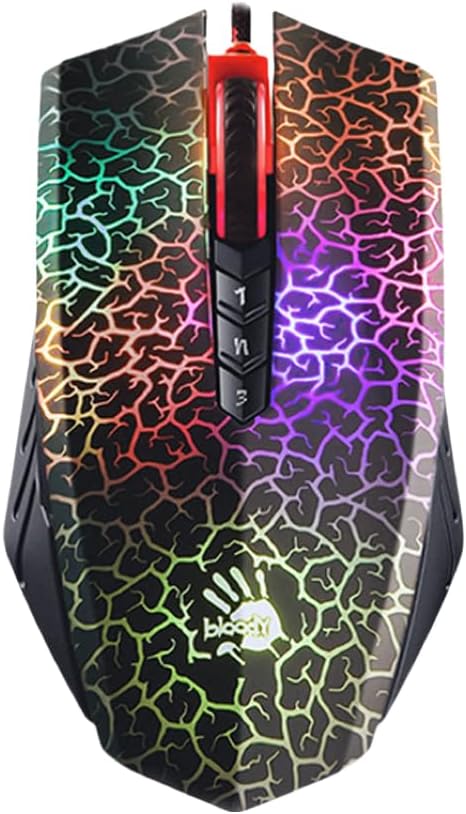



The Bloody A70 II is a wired gaming mouse built around fast optical switch technology, adjustable sensitivity, and extensive programmability. Its 4.5 rating reflects a favorable balance of response, durability, and customization, while the 0.2 ms click response makes it particularly interesting for users who value immediate input during rapid drag-style movements.
We may earn a commission when you buy through this link, at no additional cost to you.
Its BC3332-S optical engine supports adjustment up to 8,000 DPI, giving drag-oriented users a meaningful range of movement speeds. The Light Strike switches avoid traditional metal contact bouncing, while the stated 20-million-click lifespan suggests a device designed for sustained use. Full programmability and advanced macro support also make the mouse practical for users who need to assign complicated sequences rather than merely click more quickly.
The main limitation is its wired construction. A cable is not a serious problem at a fixed desk, and it removes battery management and wireless interference from the equation, but it offers less flexibility than the wireless alternatives in this list. The extensive customization options may also create a steeper learning curve than buyers wanting a straightforward mouse with a few preset controls.
This is a strong choice for gamers, macro users, and desktop operators who want fast optical switches and precise configuration. It is less compelling for people who need one mouse to travel among several devices, but its consistent connection, adjustable sensor, and programmable design make it a practical addition to a dedicated gaming setup.
The Light Strike switch system provides a listed 0.2 ms response and avoids the metallic bouncing behavior associated with conventional contact switches. That combination supports precise, repeatable click registration during demanding movement sequences.
Advanced macros and programmable behavior can streamline recurring command sequences. Buyers should spend time configuring the controls for their most common tasks rather than treating the extra features as unused decoration.
We may earn a commission when you buy through this link, at no additional cost to you.
The Razer Basilisk V3 is a wired ergonomic gaming mouse with a 4.6 rating, a high-resolution optical sensor, eleven programmable buttons, and an unusually versatile scroll wheel. Its sculpted shape and thumb rest make it a strong candidate for users who perform extended clicking and dragging sessions and prefer a full-size layout.
We may earn a commission when you buy through this link, at no additional cost to you.
The Focus Plus 26K sensor supports precise tracking, while Gen-2 optical switches deliver a listed 0.2 ms actuation speed and are rated for up to 70 million clicks. Eleven programmable buttons offer substantial control for game commands, productivity shortcuts, and macros. The Hyperscroll wheel can move freely for quick scrolling or shift to tactile mode when finer increments are needed.
As a wired model, it trades away the flexibility of wireless operation. The large body may also feel less natural for users accustomed to compact, lightweight mice. In addition, eleven programmable buttons only deliver value when they are mapped carefully; without suitable software configuration, some users may find the layout unnecessarily busy.
The Basilisk V3 is best for desk-bound users who want precise control, comfort, and extensive customization in one package. It is a particularly sensible fit for drag-oriented gamers who need a stable connection and value the freedom to assign many separate actions.
The ergonomic form supports the hand through a broad thumb rest, making the mouse more suitable than very small alternatives for prolonged use. This is especially relevant when repeated clicking and sustained drags can create hand fatigue.
HyperScroll can move rapidly through long content or provide tactile feedback for controlled scrolling. The same mechanism can cycle through weapons or skills, adding value for mixed gaming and productivity setups.
We may earn a commission when you buy through this link, at no additional cost to you.
The Logitech G PRO X2 SUPERSTRIKE is a wireless gaming mouse designed around adjustable click actuation, haptic trigger feedback, and very fast polling. Its 4.6 rating reflects a strong overall package, and the mouse was developed with input from esports professionals for users who want very precise control over the point at which a click registers.
We may earn a commission when you buy through this link, at no additional cost to you.
The Haptic Inductive Trigger System supports ten actuation levels and five rapid-trigger reset levels, allowing the click threshold to be adjusted rather than accepted as a fixed setting. The HERO 2 sensor reaches up to 44,000 DPI and tracks at more than 888 IPS with 88 g-force capability. LIGHTSPEED wireless supports an 8 kHz polling rate, while the battery is rated for 60 to 90 hours.
Its advanced functionality depends on Logitech G HUB, so buyers who want no software setup may find the experience less straightforward. Endless wireless play through POWERPLAY 2 also requires a separately sold accessory. Despite these considerations, the adjustable trigger system is unusually relevant to users who care about click timing and consistent actuation.
This mouse is best for competitive players and precision-focused users who want to tune click response rather than rely on a fixed mechanical behavior. It also suits buyers who value a high-resolution sensor and extremely fast wireless polling enough to manage the additional software ecosystem.
Ten actuation levels let users tune how far a button must travel before the click registers. This is a meaningful advantage for drag-oriented control because it provides greater influence over the exact moment an action begins.
The Haptic Inductive Trigger System returns real-time feedback as the trigger moves toward activation. That tactile confirmation can make rapid inputs feel more deliberate, although users may need to adjust the actuation level to match their preferred sensitivity.
We may earn a commission when you buy through this link, at no additional cost to you.
The Razer Basilisk V3 X HyperSpeed offers a familiar ergonomic design, wireless flexibility, and extensive controls at a comparatively accessible position in this roundup. Its 4.4 rating indicates a well-rounded option, with nine customizable controls, an 18,000 DPI sensor, and the ability to connect through either HyperSpeed wireless or Bluetooth.
We may earn a commission when you buy through this link, at no additional cost to you.
Razer lists up to 285 hours of battery life on HyperSpeed and up to 535 hours on Bluetooth, though actual results depend on use. Multi-device support allows the mouse to move among computers without complicated reconnection routines. Gen-2 mechanical switches use gold-plated contact points and are rated for up to 60 million clicks, while Chroma lighting adds visual customization for compatible games.
The switches are mechanical rather than optical, so buyers whose priority is zero-debounce optical actuation may prefer another model. Its 18,000 DPI maximum is also below the figures offered by several newer competitors. The sizeable control layout and broad shape may not suit users who prefer minimal, compact equipment.
The Basilisk V3 X is a strong value-oriented pick for buyers who want a comfortable wireless mouse with extensive programmability and long battery life. It works well for everyday gaming, office use, and mixed productivity, making it a more versatile alternative to a narrowly focused esports mouse.
HyperSpeed wireless supports low-latency gaming, while Bluetooth extends use across compatible hosts. Multi-device support is particularly convenient for people alternating between a gaming computer, laptop, and productivity system.
The signature Basilisk form supports several grips, and nine easy-access controls create room for both standard commands and macros. It is a practical choice for users who need more control density than a lightweight competitive mouse provides.
We may earn a commission when you buy through this link, at no additional cost to you.
The Razer Viper V3 HyperSpeed is an 82-gram wireless esports mouse that emphasizes balanced movement, fast tracking, and simple control. Its 4.4 rating makes it a dependable all-round choice, particularly for players who want a lighter competitive form without moving into the most minimal designs.
We may earn a commission when you buy through this link, at no additional cost to you.
The Focus Pro 30K sensor is positioned toward the front and is designed to track accurately across a wide range of surfaces, including glass. Up to 280 hours of high-performance gaming are claimed from one AA battery. Mechanical Gen-2 switches have a listed 60-million-click lifespan, and a conveniently placed top button can cycle through five DPI stages or be reassigned.
Its main limitation is control density. Unlike the Basilisk and Naga families, it does not provide a large collection of programmable side buttons, so users with complex command sets may need another mouse. AA battery power is convenient, yet some users may prefer a rechargeable internal battery and a more flexible power option.
The Viper V3 HyperSpeed is best for competitive players who value a balanced shape, low-latency wireless, and rapid sensor adjustments. It also works for office users who want a dependable sensor and simple DPI control without a crowded button layout.
Centralizing the mass around the 82-gram body helps the mouse move consistently during quick directional changes. That balance can benefit users who alternate between controlled drags and abrupt flicks.
The top-mounted DPI control makes sensitivity changes accessible during play. It can cycle through five stages or be assigned to another command, reducing the need to open software for routine adjustments.
We may earn a commission when you buy through this link, at no additional cost to you.
The Razer Pro Click V2 Vertical is built for people who prefer a handshake grip and want a mouse that can be used across work and gaming. Its 4.1 rating is the lowest among the top-rated models in this list, but the vertical shape, six controls, and multi-device connectivity serve a specific and clearly defined audience.
We may earn a commission when you buy through this link, at no additional cost to you.
The angled body promotes a more natural hand position, while the base support elevates the wrist to reduce friction during movement. The Focus Pro 30K sensor tracks across surfaces including glass, and the mechanical switches have a stated 60-million-click lifecycle. Up to five devices can be connected through HyperSpeed wireless, Bluetooth, or a wired mode.
A vertical shape can take time to adapt to, and it is not the most natural option for every competitive grip. The six-button layout is modest for power users who want many direct commands. Razer also lists up to six months of use under standard test conditions, a useful result but one that depends heavily on real-world activity.
The Pro Click V2 Vertical is best for office-heavy users, creators, and gamers who prefer a more neutral hand position. Its ability to switch among several devices adds convenience, while the vertical form may be the decisive comfort advantage for buyers who struggle with flatter mice.
The vertical angle aligns the hand more closely with a handshake posture than a conventional flat mouse. For users who experience discomfort with traditional shapes, this difference can be more important than additional programmable controls.
Connection to up to five devices across HyperSpeed, Bluetooth, and wired modes gives the mouse a broader role than a dedicated gaming peripheral. A dedicated device button allows users to move between systems with less interruption.
We may earn a commission when you buy through this link, at no additional cost to you.
The Razer Viper V3 Pro SE is a premium lightweight wireless mouse built for quick, precise movement. Its 54-gram balanced design, 35,000 DPI Focus Pro sensor, and Gen-3 optical switches make it one of the strongest choices for competitive users who value immediate response and effortless movement.
We may earn a commission when you buy through this link, at no additional cost to you.
The Gen-3 switches offer a listed 0.2 ms actuation time, no debounce delay, and a 90-million-click lifecycle without double-clicking issues. The sensor supports 1-DPI-step adjustments for granular sensitivity control, and the optimized 1,000 Hz USB-A receiver is designed to remain stable in noisy tournament environments. The smooth-touch finish seeks to balance grip with reduced skin friction.
The primary trade-off is endurance. Its stated battery life of up to 95 hours is competitive for a high-performance wireless mouse but trails several models offering substantially longer figures. The minimalist competitive layout also offers fewer direct controls than ergonomic or MMO-oriented alternatives.
This is the best premium pick for players who want a very light mouse, optical switch behavior, and fine-grained sensitivity control. It is especially suitable for users who perform repeated drags and quick flicks and want a responsive device without the weight of a full-size ergonomic model.
The 54-gram body keeps movement effort low while its centered construction supports consistent directional changes. This makes it well suited to users who value fast flicks and controlled drag motions over an expansive feature set.
The Gen-3 switch system provides a stated 0.2 ms actuation with no debounce delay. This gives users a more immediate and consistent click response than designs that rely on mechanical contact settling.
We may earn a commission when you buy through this link, at no additional cost to you.
The Razer Pro Click V2 is a right-handed ergonomic wireless mouse designed to bridge productivity and gaming. Its 3.9 rating is the lowest in the roundup, but the model offers a distinctive combination of an extended thumb rest, HyperScroll wheel, multi-device support, and a high-resolution sensor for users who work and play at the same station.
We may earn a commission when you buy through this link, at no additional cost to you.
The sculpted shape promotes better wrist posture, and the wider thumb rest offers support throughout longer sessions. The Focus Pro 30K sensor tracks on surfaces including glass, while Gen-2 mechanical switches are rated for 60 million clicks. HyperScroll supports both tactile and rapid free-spinning movement, and up to five devices can be managed through the dedicated connection button.
The right-handed design deliberately excludes left-handed users, and its focus on productivity may not suit someone seeking a minimal competitive layout. The listed 3.9 rating is another reason to compare user feedback and current product details carefully. A mouse used for hours of work and play should suit the user's grip and preferences above all else.
The Pro Click V2 is best for right-handed office users, hybrid workers, and casual gamers who want a comfortable mouse with strong scrolling and broad device support. It is less suitable for left-handed users or competitive players who prefer a featherweight body and minimal shape.
The wider thumb rest provides a support point that can reduce the strain associated with holding a conventional mouse for long periods. This makes the mouse particularly relevant to users who alternate between document work, browsing, and gaming.
HyperScroll can cover long content quickly in free-spin mode or provide tactile feedback for controlled movement. That versatility is useful for productivity tasks as well as games that require rapid command cycling.
We may earn a commission when you buy through this link, at no additional cost to you.
The Razer Naga V2 HyperSpeed is built for players who want many commands accessible without using the keyboard. Its 4.0 rating reflects a specialized MMO-focused package with nineteen programmable buttons, a 30,000 DPI sensor, and a mouse shape designed to keep a large control set manageable.
We may earn a commission when you buy through this link, at no additional cost to you.
HyperScroll can perform repeated commands rapidly, free-spin through content, or provide tactile feedback for precision. The Focus Pro 30K sensor tracks accurately across a broad range of surfaces, including glass. Mechanical Gen-2 switches use gold-plated contacts and are rated for 60 million clicks. Battery life is listed at up to 400 hours on Bluetooth and 250 hours on HyperSpeed wireless.
Nineteen buttons create a substantial learning curve, and reaching every key can encourage awkward hand movement if the layout does not fit the user's grip. The design is also bulkier than a lightweight competitive mouse. Buyers who only need a few direct controls may find the extra density unnecessary.
The Naga V2 is best for MMO players, macro-heavy strategy gamers, and users who want many actions under their fingertips. It can also serve productivity tasks well when buttons are assigned thoughtfully, provided the user is comfortable with its larger, command-dense layout.
Nineteen programmable buttons give games and applications direct access to a large set of commands. This reduces keyboard switching and allows users to keep both hands on the mouse during complex sequences.
The scroll mechanism can repeat commands rapidly, move through lengthy content, or switch to tactile mode. It adds another input layer to a mouse already designed for command-heavy workflows.
We may earn a commission when you buy through this link, at no additional cost to you.
The Razer Cobra Pro Wireless combines a 4.6 rating with ten customizable controls, five onboard profiles, a 30,000 DPI sensor, and Gen-3 optical switches. It offers the most balanced collection of practical features in this list, making it a versatile choice for gamers who switch between titles or need more than a minimalist layout.
We may earn a commission when you buy through this link, at no additional cost to you.
A button at the base allows users to swap between five stored game profiles created through Razer Synapse. The Focus Pro 30K sensor tracks on a wide range of surfaces, including glass, while Gen-3 optical switches provide a listed 90-million-click lifecycle, 0.2 ms actuation, and protection against double-clicking issues. HyperSpeed supports responsive wireless play, with up to 100 hours listed on that mode and 170 hours on Bluetooth.
The five-profile system depends on Razer Synapse, so users seeking a completely software-free experience should account for that setup requirement. Actual battery life depends on activity and connection mode. Ten controls are also fewer than those offered by the Naga, but they are easier to accommodate on a general-purpose shape.
The Cobra Pro is best for multi-game users, hybrid work-and-play setups, and anyone who wants distinct configurations for different applications. Its optical switches, strong sensor, onboard profiles, and flexible connectivity make it an adaptable choice for drag-oriented use without sacrificing everyday productivity.
Five onboard memory profiles make it possible to maintain separate button assignments for different games or applications. Switching from the base button is faster and more dependable than rebuilding configurations from scratch.
HyperSpeed wireless is intended for low-latency gaming, while Bluetooth extends the mouse's usefulness across compatible devices. The two listed battery figures show that connection mode can have a meaningful effect on runtime.
We may earn a commission when you buy through this link, at no additional cost to you.
The most useful mouse for drag clicking depends on whether the priority is switch response, wireless latency, sensor accuracy, grip comfort, programmable controls, or the ability to store task-specific profiles. Reviewing these factors before buying helps prevent a technically capable mouse from feeling wrong in daily use.
Switch technology is central to a drag-oriented workflow because every movement may require a held button and repeated input registration. Optical switch systems such as the Light Strike system in the Bloody A70 II, Razer Gen-2 and Gen-3 optical switches, and the Logitech Haptic Inductive Trigger System are designed around fast, consistent actuation. Mechanical switches offer familiar tactile behavior and long click ratings, but buyers who place a high priority on debounce-free response may favor optical designs.
Choose a switch system that feels consistent during long sessions rather than focusing only on the fastest headline response.
A conventional mouse can perform drag-style input by holding a button while moving, but many gaming switches activate once and do not automatically repeat. Some mice also do not include native drag-click mechanisms. Buyers should verify whether their required drag behavior is built into the mouse or depends on the operating system, game, or additional software. Adjustable actuation, as offered by the Logitech G PRO X2 SUPERSTRIKE, can influence the moment an action registers.
Confirm that the device supports your required drag method before expecting a gaming mouse to behave like a dedicated drag-click mouse.
Precise movement requires a sensor that tracks consistently and offers enough sensitivity options for the user's preferred grip and desk space. The models here range from the Bloody A70 II's adjustable 8,000 DPI maximum to 35,000 DPI in the Razer Viper V3 Pro SE. Several Focus Pro sensors also claim tracking across glass and other broad surface ranges. High maximum figures are useful, but stable tracking and appropriate sensitivity matter more than reaching the largest advertised number.
Prioritize smooth, repeatable tracking and a range of practical sensitivity settings over the highest DPI headline alone.
Dragging can place greater emphasis on the relationship between the hand, thumb, and mouse buttons. The Basilisk models use a broad ergonomic shape with a thumb rest, the Pro Click V2 offers an extended right-handed rest, and the vertical Pro Click V2 uses a handshake angle. Lightweight esports designs such as the Viper V3 HyperSpeed and Viper V3 Pro SE minimize resistance but provide less hand support. The best choice is the shape that can be held comfortably without twisting, pinching, or repeatedly repositioning the wrist.
Match the mouse's size, height, and grip style to your hand rather than choosing solely by button specifications.
Wireless mice reduce cable clutter and make multi-device use easier, but latency and interference can matter in competitive settings. Razer HyperSpeed models emphasize low-latency wireless, while the Logitech G PRO X2 SUPERSTRIKE supports an 8 kHz polling rate. The Viper V3 Pro SE uses an optimized 1,000 Hz receiver for stable tournament-oriented performance. Wired models remain dependable alternatives when a consistent connection is more important than portability.
For competitive play, favor a low-latency wireless system or a wired connection, and keep the receiver unobstructed.
Repeated drag actions often sit within a larger sequence of commands, making macros and remapping valuable. The Razer Naga V2 provides nineteen programmable buttons, the Basilisk V3 provides eleven, and the Cobra Pro stores five onboard profiles. The Bloody A70 II supports advanced macros, while the Cobra's onboard profile button allows quick switching without opening the software. Large control counts can accelerate complex workflows, but they also require practice and an ergonomic layout that keeps every button accessible.
Map only the commands you use regularly and choose a control layout that your grip can reach comfortably.
Battery life can determine how consistently a mouse performs because wireless power management may affect convenience or connection behavior. The Razer Naga V2 lists up to 400 hours on Bluetooth and 250 hours on HyperSpeed, while the Cobra Pro lists up to 170 hours on Bluetooth and 100 hours on HyperSpeed. Rechargeable vertical Pro Click models offer different charging routines. Users should compare expected battery figures on the connection mode they intend to use most, because Bluetooth and high-performance wireless can have very different results.
Check the battery specification for your preferred connection mode and consider how often you can realistically recharge or replace the power source.
The best mouse depends on the tasks performed with it. A minimal lightweight model may suit competitive movement, a button-heavy mouse may benefit MMO and macro users, and an ergonomic model may be more useful for extended mixed work. Razer Synapse and Logitech G HUB enable advanced features, while some hardware controls, such as the Cobra's base profile button, work more directly. Buyers should account for software compatibility, platform support, and their willingness to configure the mouse before finalizing a choice.
Choose the model that matches your primary workload, then verify that its software and advanced features fit your setup.
Begin by installing the appropriate software and updating the mouse firmware if the manufacturer provides an option. Assign the main click, secondary click, wheel, and any side buttons to the commands you use most often. For drag-oriented tasks, verify that the operating system or application recognizes the hold-and-move gesture correctly, and test the required behavior before entering a long work or gaming session.
Adjust the sensor to a sensitivity that lets you move accurately without requiring large physical movements. A higher setting can support rapid flicks, while a lower setting may improve fine placement. If the mouse offers adjustable switch actuation, begin with a moderate level and change it only after testing several drag patterns. On-mouse DPI controls can be mapped to suit these changes, but avoid changing sensitivity and actuation simultaneously while learning.
Keep the underside and feet free of dust, crumbs, hair, and adhesive residue, and use the mouse on a surface appropriate for its sensor. Clean the exterior with a soft, dry cloth and avoid spraying liquid directly onto the device. Check battery levels for wireless models, keep receivers connected to the intended computer, and periodically revisit button assignments or stored profiles as your games and workflows change.
No. The listed models are general gaming mice with different switch and control systems, but the supplied specifications do not confirm a dedicated native drag-click mechanism. Some workflows can be performed by holding a standard button while moving, while others may require operating-system, application, or third-party support. Buyers who require a specific drag-click method should verify compatibility before purchasing.
Optical switches can be attractive when immediate, debounce-free response is the priority. Models in this roundup using Gen-2 or Gen-3 optical switches advertise actuation times of 0.2 ms, while the Bloody A70 II uses Light Strike optical switches. Mechanical switches may still be preferable for users who prefer their familiar feel, so the best choice depends on responsiveness, sound, and personal preference.
There is no universally best shape because comfort depends on hand size and grip. The Razer Basilisk V3 and Basilisk V3 X use a broad ergonomic form with a thumb rest, while the Pro Click V2 models emphasize right-handed or vertical support. Lightweight Viper models move easily but provide less physical support. Users should choose based on how naturally they can position and hold the mouse.
No. A higher maximum DPI provides a broader range of available sensitivity, but the most appropriate setting depends on desk space, movement style, and display resolution. Stable tracking and comfortable control are more important than selecting the largest possible figure. Users can often change DPI directly or configure alternatives in the supporting software.
Wired mice provide a straightforward, consistent connection and eliminate battery concerns. Wireless models offer greater portability and multi-device convenience, while modern low-latency systems can suit competitive use. The Logitech G PRO X2 SUPERSTRIKE supports 8 kHz polling, and several Razer models use HyperSpeed wireless. Buyers should consider the connection mode they will use most and the stability of their wireless environment.
The right number depends on the complexity of your commands. A few remappable buttons may be enough for ordinary play and productivity, while MMO or macro-heavy users may benefit from the Naga V2's nineteen controls. More buttons do not automatically improve a workflow, so consider whether each extra control has a genuine purpose and whether the layout remains comfortable.
Most can serve both purposes, but certain models are more balanced than others. The Cobra Pro Wireless stores five onboard profiles, the Basilisk V3 X supports multiple devices, and the Pro Click V2 models emphasize office comfort and HyperScroll. Competitive players wanting minimal weight may prefer a Viper model, while frequent office users may benefit more from ergonomic support and programmable convenience.
Keep the mouse and sensor surface free from dust and debris, and clean the feet so they can glide consistently. Avoid liquid cleaners near the switches, charging port, and buttons. Check software updates when available, inspect batteries regularly, and revisit button assignments or actuation settings if your workflow changes. Proper maintenance helps preserve smooth movement and reliable input.
The Razer Cobra Pro Wireless stands out as the most versatile overall choice because it combines ten customizable controls, five onboard profiles, a 30,000 DPI sensor, Gen-3 optical switches, and flexible wireless connectivity. The Razer Viper V3 Pro SE is the premium pick for users who prioritize a lightweight 54-gram body and very fast optical actuation, while the Basilisk V3 X HyperSpeed offers a strong value-focused combination of wireless control, comfort, and long battery life.
Before buying, decide whether responsiveness, grip comfort, low latency, button density, or native drag behavior matters most. Competitive users may prioritize the Viper and Cobra models, macro-heavy players may prefer the Naga, and users who game for long periods may feel more comfortable with the Basilisk or Pro Click shapes. Always verify the precise drag method and software requirements before making a final decision.
Product ratings, availability, and prices can change over time, so check the current listing and compare the mouse's specifications with your own setup. The right choice is ultimately the one that combines dependable input, comfortable handling, and the controls needed for your recurring drag-oriented tasks.