JBL Vibe Beam 2
4.1Editor score
Four-microphone call system
Active noise cancellation
Forty-hour total playback
Earbuds for Teams Meetings guide compares ten options for call clarity, noise control, wireless reliability, comfort, battery life, and device switching.
Earbuds for Teams meetings must do more than deliver pleasant sound. They need to capture your voice clearly, limit distracting office noise, maintain a dependable connection, and remain comfortable through long calls. The best options also support convenient controls, useful battery life, and smooth switching between a laptop and phone.
We compared these ten products using their supplied specifications and feature descriptions, focusing on microphone systems, noise cancellation, connectivity, fit, controls, battery life, and meeting-focused functions. The list includes certified business models, multipoint designs, budget earbuds, and feature-rich premium options rather than limiting the search to one narrow type.
Each review explains where a product stands out, what compromises buyers should consider, and which work styles may benefit most. Ratings and specifications reflect the available product information, while features can vary by device, operating system, app, or firmware. Product listings, bundles, and prices change, so confirm current details before purchasing.
4.1Editor score

3.7Editor score
3.5Editor score
This side-by-side comparison highlights the strongest distinctions among all ten earbuds, including platform certification, microphone design, connection method, noise-control features, battery endurance, and practical controls for meetings and everyday use.


The Dell Pro Plus EB525 is built around a simple premise: make the speaker's voice clear while reducing distracting noise around the listener. Its supplied feature description highlights an AI-based noise-cancelling microphone, Adaptive ANC, and an emphasis on comfortable, distraction-free communication. That combination makes it a credible all-round choice for Teams meetings, particularly for people whose home or shared offices contain regular background activity.
We may earn a commission when you buy through this link, at no additional cost to you.
The most meeting-relevant component is the microphone system, which is designed to recognize the wearer's voice and filter surrounding sound. Dell also provides enhanced transparency mode, allowing the wearer to hear the surrounding environment without taking the earbuds out. Adaptive ANC and transparency can be changed directly with touch gestures, reducing the need to open an app when a meeting moves between a focused room and a more interactive setting.
The controls deserve particular attention. A pinch can handle calls and switch between listening modes, while a swipe adjusts volume. These direct actions are valuable during online meetings because they avoid the delay and distraction of navigating a companion application. Bluetooth 5.3 provides the stated wireless foundation, though the product information does not identify a dedicated computer dongle or formal Microsoft Teams certification.
The principal trade-off is that the EB525 offers fewer explicitly documented meeting-management features than the Logitech Zone True Wireless or Jabra Evolve2. Its rating of 4.1 reflects a well-liked overall product, but it does not erase the value of platform certification or USB receiver support. Still, for users who prioritize intelligible speech, adaptive distraction control, and straightforward gestures, the Dell Pro Plus EB525 is a strong recommendation.
The AI-based noise-cancelling microphone is the centerpiece for meeting use. Its voice-recognition approach is intended to preserve the wearer's speech while suppressing background noise, making it useful in offices, cafés, or homes where interruptions are common.
Pinch and swipe controls let users answer calls, switch modes, and adjust volume directly on the earbuds. That keeps essential meeting actions accessible when opening a phone or desktop app would be inconvenient.
We may earn a commission when you buy through this link, at no additional cost to you.
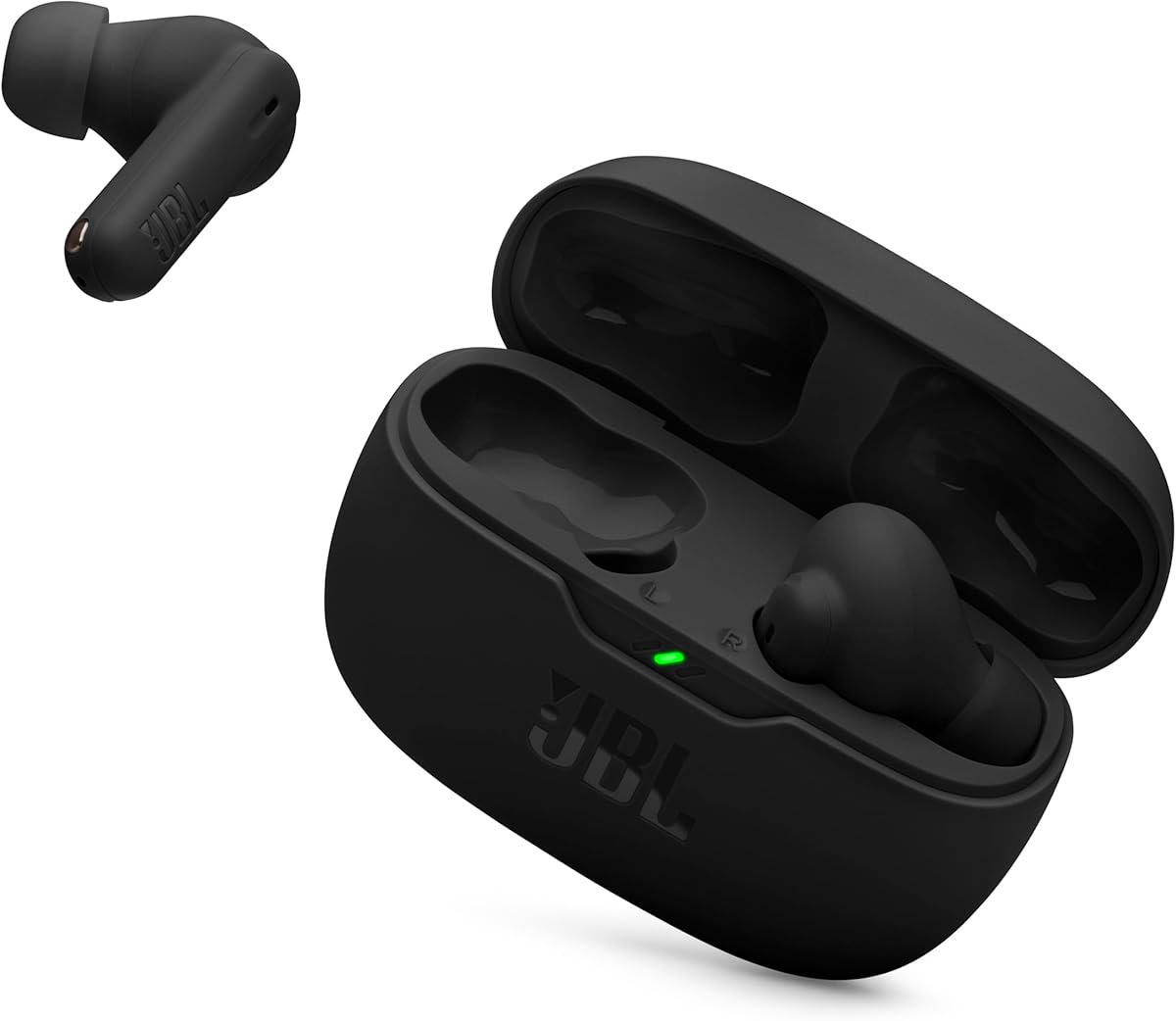
The JBL Vibe Beam 2 combines active noise cancellation, a four-microphone call system, and extended battery life in a straightforward package. Its 4.1 rating places it among the stronger-rated products in this guide, while the supplied specifications make it particularly appealing to buyers who want dependable everyday earbuds without moving into specialized enterprise equipment.
We may earn a commission when you buy through this link, at no additional cost to you.
For Teams meetings, the four-microphone arrangement is the most important feature. Two microphones are placed in each earbud, allowing the earbuds to detect and transmit the wearer's voice while attempting to cancel ambient noise. That is directly relevant to calls taken in a busy park, a shared office, or a home where household sounds can easily reach other participants.
Active Noise Cancelling helps reduce distractions, while Smart Ambient controls how much outside sound remains audible. This is more flexible than a permanently sealed or fully muted experience: a wearer can focus during a presentation, then let in nearby speech without removing the earbuds. The JBL Headphones app adds EQ selection, customization, voice prompts, and a Relax Mode with five sounds.
Battery endurance is another practical strength. The earbuds supply up to 10 hours of playback, while the case adds three further charges for 40 hours total with ANC off. A 10-minute USB-C charge adds three hours, which is helpful before a rapid sequence of calls. The Vibe Beam 2 lacks a stated Teams certification and does not list multipoint in the supplied information, so it is not the most feature-complete meeting option. Nevertheless, it is an excellent budget-focused recommendation for users who value call microphones, ANC, and battery life together.
Each earbud carries two microphones, giving the product a dedicated four-microphone call architecture. The stated goal is clear voice transmission with reduced ambient noise, which is especially helpful when joining calls from less controlled environments.
Ten hours of playback per charge and a case that contributes 30 additional hours reduce the likelihood of battery pressure during extended workdays. The fast-charge figure also helps cover a last-minute meeting or commute.
We may earn a commission when you buy through this link, at no additional cost to you.
The Logitech Zone True Wireless is the most explicitly meeting-oriented model in this roundup. It is certified for Microsoft Teams, Zoom, Google Meet, and Google Voice, and it includes a USB receiver for computer connectivity. For buyers who want a clearly defined conferencing workflow rather than relying on general Bluetooth behavior, that combination is compelling.
We may earn a commission when you buy through this link, at no additional cost to you.
Voice handling is supported by three microphones in each earbud, six in total. The described signal processing combines beamforming, cascaded noise reduction, and dynamic processing to separate the wearer's voice from surrounding sounds. Hybrid ANC reduces distractions, while Transparency mode allows outside sound to remain audible. Removable ear gels in three sizes help create both a stable fit and a consistent acoustic seal.
The included USB receiver is particularly important in Teams meetings because it offers a direct route to a computer rather than relying solely on the computer's Bluetooth radio. Logi Tune provides five-band EQ adjustment, while Logitech Sync centralizes management of supported video-calling devices, updates, and settings. These business-oriented tools distinguish the Zone True Wireless from many general-purpose earbuds.
Its 3.7 rating is lower than several alternatives, and the supplied information does not list Bluetooth multipoint, so buyers may have less freedom when moving among several devices. Nevertheless, formal platform certification, a USB receiver, six microphones, and centralized device management make the Logitech Zone True Wireless a particularly strong recommendation for Teams-centered professional workflows.
The supplied USB receiver offers an extra-reliable wireless path to a computer. That can be preferable to depending on the computer's native Bluetooth connection in meeting-heavy workspaces where connection consistency matters.
Logitech Sync places supported video-calling device configuration and updates in one cloud-based platform. For organizations deploying audio equipment across teams, this adds operational value beyond the earbuds themselves.
We may earn a commission when you buy through this link, at no additional cost to you.
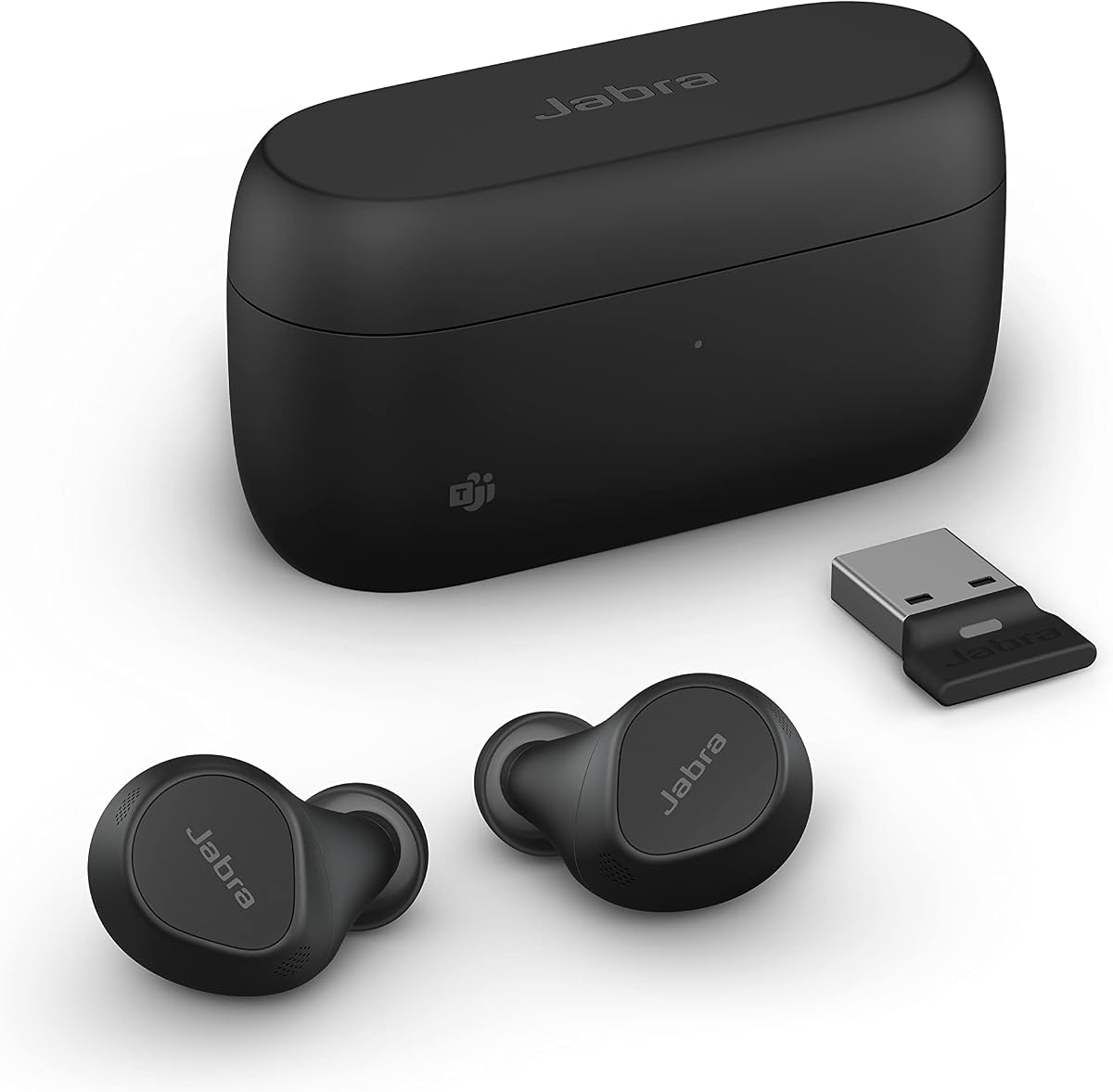
The Jabra Evolve2 True Wireless is designed as a premium communication tool rather than simply another pair of music earbuds. Its distinguishing features include four microphones, bone-conduction sensors, Bluetooth multipoint, adjustable ANC, Microsoft Teams certification, and a USB dongle for meeting-platform connections. The combination explains why it remains a serious option despite a 3.5 rating.
We may earn a commission when you buy through this link, at no additional cost to you.
The call system uses four microphones, algorithms, and bone-conduction sensors together to reduce background noise. That layered approach is intended to help the wearer's voice remain clear in busy locations. ANC creates a personal quiet zone during focused work, while the USB dongle offers a more stable computer connection and is positioned as improving the meeting-platform call experience.
Bluetooth multipoint is especially attractive for hybrid workers. The earbuds can remain connected to a laptop and smartphone at once, making it easier to move from a Teams meeting to a mobile call without rebuilding the connection. The ergonomic, water-resistant design also supports use beyond a fixed desk, and the included USB dongle simplifies setup for online meetings.
The obvious trade-off is the 3.5 rating, the lowest among these ten products, along with the more elaborate feature set. Some buyers may not need multipoint, a dongle, bone-conduction sensing, or certification across many meeting applications. Even so, Jabra has created a focused premium package for people whose audio presence during meetings is especially important. For that buyer, the Evolve2 remains a recommendation worth serious consideration.
Four microphones work with intelligent algorithms and bone-conduction sensors. Rather than relying on one noise-control mechanism, the system combines several methods to help the wearer's voice stand out from background sound.
Multipoint keeps the laptop and smartphone connected simultaneously. This reduces friction when a meeting continues on one device but a second call or notification arrives on the other.
We may earn a commission when you buy through this link, at no additional cost to you.
The XIAOWTEK S58 Pro has the highest listed rating in this selection at 4.9, and its supplied description presents a remarkably broad set of features. It combines Bluetooth 5.4, four ENC microphones, 50 hours of total playback, dual digital case displays, IPX7 protection, and broad compatibility with phones, tablets, and laptops.
We may earn a commission when you buy through this link, at no additional cost to you.
For meeting use, the four-microphone ENC arrangement is the central feature. It is described as capturing the wearer's voice while blocking up to 80% of background noise. Bluetooth 5.4 supplies the connection foundation, and the stated low-latency behavior should suit users who alternate between calls, video, gaming, and music. The microphones sit within a pair that also supports AAC and SBC audio coding.
Power management is unusually visible thanks to dual digital LED indicators for the earbuds and charging case. Each earbud is rated for six hours per charge, while the 470mAh case supplies four additional full charges for a stated total of 50 hours. Touch controls cover playback, volume, track changes, calls, and voice assistants, reducing reliance on the phone during meetings.
The 4.9 rating is attractive, but it should not be treated as proof of enterprise-level meeting certification. The product is not listed as certified for Teams, and multipoint is not specified. It also describes a strong general-purpose feature set rather than formal conferencing certification. Within those boundaries, the S58 Pro is a compelling recommendation for buyers seeking extensive hardware, long battery life, and a four-microphone design at a relatively accessible level.
Separate digital indicators show the charging status of the case and both earbuds. During a long schedule of calls, this reduces uncertainty about remaining power and makes it easier to return the earbuds to the case before a critical meeting.
Bluetooth 5.4, automatic pairing, and a Hall-switch design support quick reconnection. The supplied description also states a stable connection within 15 meters under its tested conditions.
We may earn a commission when you buy through this link, at no additional cost to you.
The TAGRY Hybrid ANC stands out for endurance, secure fit, and extensive noise-control functionality. It carries a 4.4 rating and offers up to 80 hours of combined playback, hybrid ANC, transparency mode, Hi-Res audio, and a 13-millimeter driver. The included earhooks and three tip sizes give it a more specialized shape than a conventional compact work earbud.
We may earn a commission when you buy through this link, at no additional cost to you.
Hybrid ANC is described as reducing ambient noise by up to 90%, with an integrated chip dynamically adjusting the noise optimization. A triple tap switches from ANC to transparency mode, letting a wearer check nearby conversations or announcements without removing the earbuds. The 13-millimeter driver is intended to maintain clarity in noisy surroundings, while Bluetooth 5.4 supports efficient transmission and lower latency.
The battery specification is the major attraction for frequent users. A single charge provides up to 10 hours, and the case raises the total to 80 hours. The USB-C case can recharge fully in approximately one hour. LED displays report the battery levels of both the earbuds and charging case, useful for professionals who travel between meetings and locations without regular charging opportunities.
The product information does not provide a precise microphone count or Microsoft Teams certification, so its meeting performance cannot be compared with the Jabra and Logitech models on the same documented level. The earhook design may also feel more substantial than users want for all-day wear. Nevertheless, the TAGRY is a strong recommendation for people who prioritize long battery life, secure placement, adjustable noise control, and a flexible fit.
Transparency mode is activated with a triple tap while ANC is active. This provides a quick way to monitor the environment while retaining music or call audio and maintaining the earbuds' seal.
Soft composite earhooks surround the ears while S, M, and L ear tips provide a closer seal. That combination is useful for commuters and active users who may otherwise have to reposition conventional earbuds repeatedly.
We may earn a commission when you buy through this link, at no additional cost to you.
The Soundcore P30i is a well-rounded everyday choice for people who want good call tools, adjustable noise cancellation, and useful companion-app features. Its 4.3 rating reflects a strong general proposition, while the four-microphone AI-enhanced call system makes it relevant to people who regularly join online meetings from variable environments.
We may earn a commission when you buy through this link, at no additional cost to you.
Advanced active noise cancellation is stated to reduce noise by up to 42 decibels. Adaptive technology examines external sound and chooses an appropriate cancellation level, while transparency mode allows outside sound back in when awareness is necessary. The four built-in microphones work with an AI algorithm intended to isolate the wearer's voice accurately during calls.
Sound quality uses 10-millimeter drivers and BassUp technology for deeper low-frequency emphasis. The soundcore app adds EQ modes, ANC settings, and firmware updates. Its Bluetooth 5.4 implementation supports automatic reconnection to the last paired device, which helps when the same earbuds move between a phone and laptop throughout the day.
The charging case doubles as a hands-free phone stand, a distinctive convenience for users who take video calls, watch clips, or join meetings on a phone. Battery life reaches 10 hours per charge without ANC and six hours with it, while the case raises total playback to 45 or 25 hours respectively. There is no stated Teams certification, and ANC materially reduces endurance, but the P30i remains a flexible recommendation for practical hybrid work.
The adaptive system automatically selects a cancellation level according to external sound. This reduces the need to adjust ANC manually when moving between quieter rooms, busy streets, and shared offices.
Opening the rear panel reveals a phone stand. That turns the case into a small support for video calls or hands-free viewing, giving the product a role beyond simply storing and charging the earbuds.
We may earn a commission when you buy through this link, at no additional cost to you.
The Soundcore Liberty 5 Pro Max is the most technically elaborate option in the guide, combining advanced call processing, adaptive ANC, a display-equipped charging case, and an AI note-taking system. Its 4.2 rating makes it a credible premium recommendation for professionals who treat audio hardware as part of a broader productivity setup.
We may earn a commission when you buy through this link, at no additional cost to you.
For communication, the earbuds use ten sensors alongside the Thus AI Chip to process voice information. The supplied information states that the system is designed to maintain clear calls in very noisy environments and in quiet rooms, with support for whispering, normal speech, or shouting. Eight sensors also power the ANC system, which processes more than 384,000 noise signals per second according to the stated technical claim.
The charging case includes a 1.78-inch AMOLED screen for accessing the AI Voice Recorder, adjusting ANC, and managing settings. Its in-room recorder captures in-person meetings and interviews through the case microphone, then creates transcripts, summaries, key points, and action items. Crucially, the product information says it does not record online meetings, video calls, or phone calls, which prevents confusion about its intended use.
Privacy is addressed with local AES-256 encryption and several listed security standards. The free transcription allowance lasts for a limited period, while expanded use requires a paid plan, so buyers should evaluate both privacy expectations and ongoing service requirements. The 6.5-hour ANC battery life is also more modest than some competing products. Even with these caveats, the Liberty 5 Pro Max is a compelling recommendation for users who value sophisticated voice capture, in-room transcription, and a highly interactive case.
Ten sensors and the Thus AI Chip process the user's voice across different speaking levels. The goal is clear communication in environments ranging from quiet rooms to locations with extreme ambient noise.
The case-based AI recorder is intended for face-to-face meetings and interviews. Its stated inability to capture online meetings or phone calls keeps it separate from call-recording functions and helps users understand the boundary of its functionality.
A large AMOLED display provides access to recording, ANC adjustment, and earbud settings without requiring the earbuds themselves. It is especially convenient when the earbuds are being used as a meeting headset rather than for personal listening.
We may earn a commission when you buy through this link, at no additional cost to you.
The JLab Work Buds take a headset-style approach to true wireless earbuds by including a detachable, noise-cancelling boom microphone. The boom can be fitted to either earbud, and the charging dock both stores and charges the equipment. Its 3.9 rating and broad feature set make it a practical choice for people who prioritize voice pickup over a completely minimal design.
We may earn a commission when you buy through this link, at no additional cost to you.
The microphone arrangement combines a MEMS microphone in the earbud with a condenser microphone on the boom. Placing the boom close to the mouth gives the user's voice a direct path to the microphone, while noise-cancelling technology is intended to reduce background interference. The detachable design also allows the wearer to remove it when switching from calls to music.
The charging dock supplies more than 45 additional hours and uses USB-C. Each earbud provides more than 10 hours of playback, with more than six hours of talk time, while total playtime reaches more than 55 hours. Bluetooth 5.3 and multipoint support help the earbuds remain connected to multiple devices, a useful feature for people handling calls on both a computer and phone.
The obvious compromise is visual and practical: a boom microphone is more noticeable than the integrated microphones found in conventional earbuds, and it must be detached for the most streamlined appearance. The supplied information also does not list formal Teams certification. Even so, the JLab Work Buds are a strong recommendation for users who want a clear, dedicated talking-point microphone, straightforward call handling, and an unusually long battery system.
The detachable boom sits closer to the mouth than an earbud's integrated microphone. That positioning can give users a more consistent vocal signal in challenging acoustic environments without relying entirely on software processing.
The USB-C dock charges the earbuds while keeping the detachable boom organized. It reduces the chance of leaving a small microphone accessory behind between workdays.
We may earn a commission when you buy through this link, at no additional cost to you.
The TOZO NC3 combines a six-microphone ENC call system with hybrid active noise cancellation, long battery life, and extensive sound customization. Its 4.3 rating and stated 45-decibel noise reduction make it a compelling option for users who want aggressive distraction control and clear voice transmission.
We may earn a commission when you buy through this link, at no additional cost to you.
The microphone system is explicitly described as useful for phone calls and online meetings in busy cafés, offices, and other environments. Six built-in microphones work with ENC technology to reduce background noise and make the user's voice clearer. Hybrid ANC focuses on steady low-frequency sounds such as subway rumble, airplane engines, and air-conditioning hum, while multiple ear-tip sizes help establish a consistent seal.
Battery life reaches up to 13 hours per charge with ANC off and 9.5 hours with it on. The case extends those figures to 68 and 40 hours respectively. A 10-minute charge supplies up to one hour of playback. For sound, a 12-millimeter driver and OrigX 2.0 tuning provide fuller bass and clearer vocals, while the TOZO app offers 32 EQ presets and custom sound settings.
IPX8 protection adds suitability for workouts, rain, and everyday splashes, and Bluetooth 5.3 supports stable, low-latency connections with automatic pairing and a one-key reset function. No Teams certification or multipoint support is stated, so it lacks some of the business-focused advantages of the Logitech and Jabra models. Still, the NC3 is a strong recommendation for anyone prioritizing microphone count, deep passive-noise reduction, long playback, and broad app-based EQ control.
The six-microphone ENC system is designed to suppress surrounding noise while preserving speech. Its meeting focus makes the NC3 more compelling for mobile work than earbuds that mention microphones only briefly.
The TOZO app provides 32 EQ presets, custom sound options, and shared EQ profiles. This adds flexibility for calls, music, audiobooks, and streaming without changing hardware controls.
Hybrid ANC is aimed at steady low-frequency distractions, while transparency mode restores environmental awareness. Proper ear-tip sealing remains important for achieving the stated reduction consistently.
We may earn a commission when you buy through this link, at no additional cost to you.
The best earbuds for meetings balance voice capture, connection reliability, comfort, noise control, and practical controls. Because every product has different strengths, begin with the environments and devices you use most often, then compare those needs with the documented features.
A microphone count can provide a useful indication of the processing hardware, but it is not a substitute for examining the stated technology around it. Look for beamforming, ENC, AI-assisted voice isolation, bone-conduction sensing, or a boom microphone that positions the pickup capsule close to the mouth. Dell emphasizes an AI-based noise-cancelling microphone, Logitech uses six microphones with beamforming and cascaded reduction, Jabra combines four microphones with bone-conduction sensors, and TOZO advertises six microphones with ENC.
Microsoft Teams certification is a meaningful differentiator because it indicates that the earbuds have been evaluated for use with the Teams ecosystem. Logitech Zone True Wireless and Jabra Evolve2 True Wireless are explicitly certified, with Logitech also listing Zoom, Google Meet, and Google Voice. The remaining products may still work well through standard Bluetooth audio, but the supplied information does not establish equivalent platform-level certification.
Native Bluetooth is convenient, but a dedicated receiver can offer a more consistent route to a meeting computer. Logitech includes a USB receiver, and Jabra supplies a USB dongle that is positioned as providing a more stable connection and better meeting-platform experience. Other models rely on standard Bluetooth pairing, so computer support, operating-system behavior, and the strength of the computer's radio become important compatibility considerations.
Noise cancellation can improve concentration and reduce the distraction of air handlers, traffic, or background conversation. It does not automatically improve the voice picked up by the microphone, so consider call processing separately. Transparency mode is equally useful when users need to hear announcements, colleagues, or household activity. TOZO, Dell, JBL, TAGRY, Logitech, Jabra, Soundcore P30i, and Liberty 5 Pro Max all describe ANC or transparency functionality in different forms.
Multipoint lets earbuds remain connected to more than one device, which is valuable when a laptop handles Teams while a phone receives calls. Jabra Evolve2 and JLab Work Buds explicitly list multipoint, while some other products describe automatic reconnection without confirming simultaneous multipoint. For a hybrid worker, verify multipoint in the exact model and confirm that the computer, phone, and meeting applications behave as expected.
Total playback figures often combine several case charges and may be measured with ANC disabled, making direct comparisons imperfect. TAGRY leads the stated total at 80 hours, followed by TOZO at 68, JLab at more than 55, Soundcore P30i at 45, JBL at 40, and XIAOWTEK at 50. Also consider the single-charge duration, ANC-on figures, charging speed, and whether the case supports a convenient desktop workflow.
Meeting calls can last long enough that fit becomes a technical requirement rather than a preference. Dell describes a comfortable workspace-oriented fit, Logitech includes removable ear gels in three sizes, TAGRY provides S, M, and L tips with soft earhooks, and TOZO supplies multiple ear-tip sizes for a proper seal. A secure seal improves both isolation and microphone consistency, while an overbuilt design may be less appealing for all-day use.
Mechanical buttons, touch gestures, a case display, and app controls serve different meeting needs. Dell provides pinch and swipe gestures; XIAOWTEK uses sensitive touch controls; TAGRY uses multi-function buttons; Soundcore Liberty 5 Pro Max places settings on its AMOLED case display; and several products rely on companion apps for EQ, ANC, or firmware updates. Choose controls that remain easy to locate without risking accidental input during a call.
Start by fully charging both earbuds and the case, then install the manufacturer's app if one is included or offered. Update the firmware before your first important meeting, pair the earbuds with your primary computer or phone, and test the selected microphone and noise-control modes in a short call. Devices that include a USB receiver should be connected to the computer before joining the meeting.
Choose a seal that feels secure without causing pressure, and confirm whether the earbuds are connected through native Bluetooth or the supplied receiver. Set a useful volume level before entering the call, verify the microphone input in the meeting application, and avoid repeatedly changing ANC or transparency modes mid-conversation. If the app exposes EQ or microphone settings, make those adjustments before the meeting so controls remain predictable.
Remove the earbuds before sleeping, exercise, or exposing them to water beyond their stated rating. Clean the ear tips and charging contacts with a dry or lightly damp soft cloth, avoid pushing debris into the microphones, and keep the case dry. Store the earbuds fully charged if they will be unused for an extended period, and check the battery display or app when unexpected disconnects occur.
Certification indicates that a product has been evaluated for compatibility and expected behavior within the Teams ecosystem. It can simplify purchasing confidence and reduce uncertainty about platform integration. It does not guarantee that every surrounding noise condition will be eliminated, so microphone design, fit, and the user's environment still influence call quality.
ANC primarily reduces sound reaching the listener, which can make it easier to focus on colleagues' voices. It does not automatically make the wearer's voice clearer because that depends on the microphone array and its processing. The strongest choices address both needs with separate ANC, ENC, beamforming, or boom-microphone systems.
Multipoint is valuable if you regularly move between a laptop and smartphone while keeping both connected. It can make transitions between a Teams meeting and a mobile call easier. If you use only one computer and prefer a simple setup, a reliable single-device connection or a USB receiver may be sufficient.
A USB receiver can provide a dedicated wireless path to the computer and may be more consistent than the computer's native Bluetooth radio. Logitech Zone True Wireless and Jabra Evolve2 True Wireless include this option. Performance still depends on the room, computer, application, and correct microphone selection.
A boom microphone places the voice pickup closer to the mouth, which can be useful in noisy or unpredictable locations. It also makes the hardware more visible and requires an extra accessory to carry. Integrated microphones are cleaner for commuting and lighter everyday wear, while the JLab Work Buds suit buyers who prioritize direct voice positioning.
The answer depends on ANC use and how frequently you recharge. Single-charge endurance matters during uninterrupted calls, while total case capacity helps when there is no desk or outlet nearby. Compare ANC-on figures because noise cancellation often reduces runtime, and use quick charging as a backup rather than the main plan.
None of the supplied descriptions indicates standard Teams call recording as a core earbud feature. Soundcore Liberty 5 Pro Max includes an AI note-taker for in-room meetings and interviews, but its information explicitly says it does not capture online meetings, video calls, or phone calls. Use authorized meeting recording tools and company policies for online calls.
No earbud can eliminate every environmental variable. A proper seal, close microphone placement, sensible gain, stable connection, and quiet microphone placement all matter. The Jabra, Logitech, Dell, JLab, and TOZO models place particular emphasis on microphone hardware, while the Soundcore options provide AI-assisted or sensor-driven call processing.
The Logitech Zone True Wireless stands out for explicit Teams certification, an included USB receiver, and business-oriented device management. Jabra Evolve2 True Wireless offers the most comprehensive premium meeting toolkit, with multipoint, four microphones, bone-conduction sensors, and a USB dongle. For budget-conscious buyers, the JBL Vibe Beam 2 combines four call microphones, ANC, and extended battery life without requiring a specialized headset design.
Your priorities should determine the winner. A formal platform certificate and computer receiver suit managed Teams workflows; boom-mic positioning and multipoint suit mobile professionals; deep ANC and long playback suit commuters; and app-based EQ or AI-assisted tools appeal to users who want more control. Whichever route you choose, test the microphone in your actual environment and confirm that the earbuds select the correct audio input.
Ratings, firmware, device compatibility, bundled accessories, and prices can change over time. Review the current product page and manufacturer documentation before purchasing, especially if formal Teams certification or multipoint behavior is essential. The right earbuds should make your voice easier to hear, keep distractions under control, and remain comfortable through the workday.