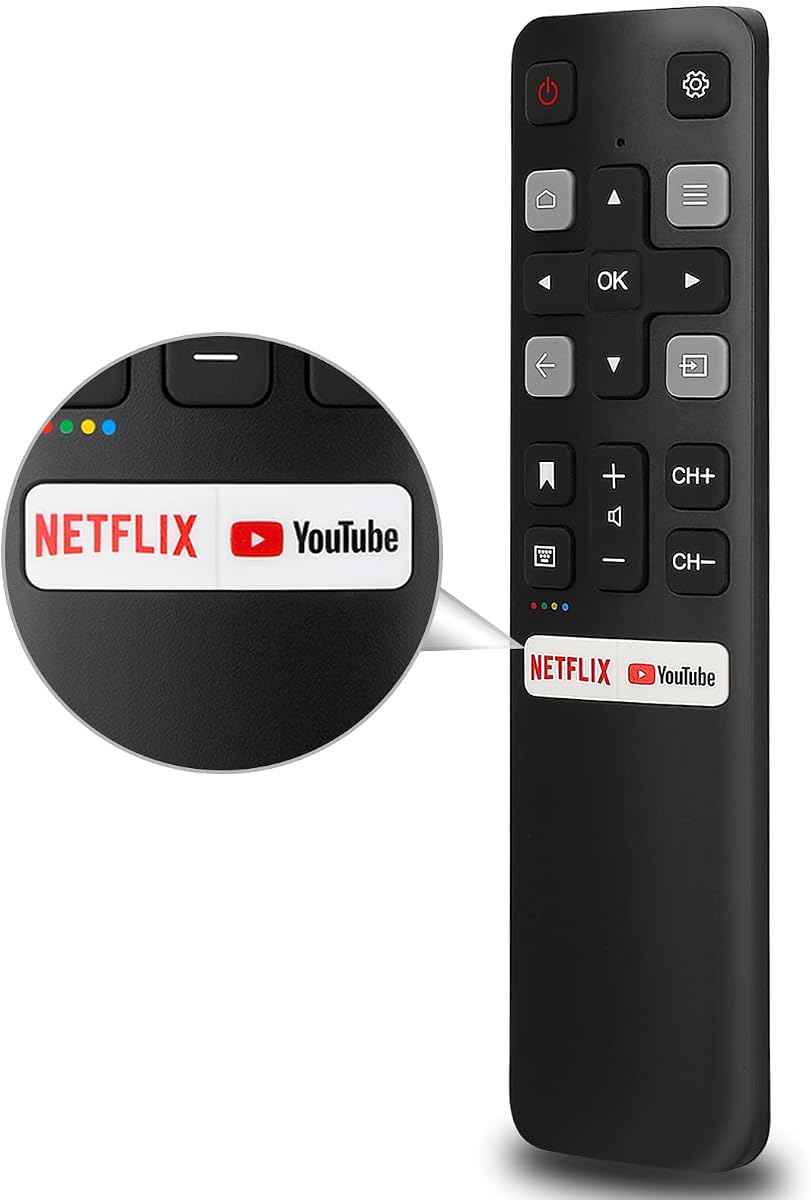
All TCL Android Remote
4.4Editor score
No programming required
Two streaming shortcut keys
Infrared range exceeds 35 feet
Designed for TCL Android TVs
Our TCL TV Replacement Remote guide compares 10 options for TCL Roku, Google TV, Fire TV, Android, and voice remotes, including fit, features, and setup.
A replacement remote should restore control without making the television itself difficult to use. TCL televisions use several remote platforms, including Roku, Google TV, Fire TV, and older Android systems, so a remote that looks similar may still be incompatible. The right choice depends on the exact model, required functions, and preferred connection method.
This guide compares ten TCL TV replacement remotes according to compatibility, control method, shortcut buttons, range, setup requirements, construction, and practical support. The list covers standard infrared models, Bluetooth voice remotes, dual-mode options, and multipacks. It also distinguishes remotes designed specifically for TCL Roku televisions from those intended for Google TV and Android-based sets.
Each review explains the most appropriate use for its remote, along with limitations that shoppers should consider before ordering. The top selections represent the strongest balance of compatibility, useful functions, and value within the category. Product ratings and availability can change over time, and prices fluctuate, so verify the current listing and your television model before making a final decision.
4.4Editor score

4.7Editor score

4.0Editor score
The comparison below highlights each remote's intended TCL platform, connection style, core functions, and setup needs, helping shoppers narrow the field before checking exact model numbers.




This Acoyer replacement remote has a 4.5 rating and stands out as a practical two-pack for owners of compatible Roku-based televisions. It combines straightforward infrared operation, four application shortcuts, and a 30-foot stated control distance. The inclusion of two remotes is particularly useful for households where a misplaced remote frequently becomes an inconvenience.
We may earn a commission when you buy through this link, at no additional cost to you.
Compatibility extends beyond TCL Roku televisions to compatible Hisense, Onn, Sharp, Element, Westinghouse, Philips, Insignia, JVC, RCA, Hitachi, and Sanyo Roku television series. Setup is refreshingly uncomplicated: install two AAA batteries, point the remote at the television, and begin using it. The buttons are rated for more than 160,000 clicks in approved testing, adding confidence in their everyday durability.
The important limitation is platform specificity. This is a Roku television remote, not a universal remote for every device sold under the TCL name. It cannot control Roku streaming sticks, boxes, players, or other standalone Roku components, and it does not work with compatible Roku televisions from brands other than those listed. Batteries and a manual are also not included.
This two-pack is a strong choice for a compatible TCL Roku television, particularly when the goal is to keep a spare remote in another room. It is less suitable for a TCL Google TV or Fire TV. For Roku owners who prioritize uncomplicated setup, multiple shortcuts, and the security of having two remotes, it offers an excellent balance of usefulness and value.
Keeping a second remote eliminates the disruption caused by a lost or damaged controller. One can remain in the living room while the other serves as a backup in the bedroom, guest room, or another viewing area.
Infrared control avoids account sign-in, network configuration, and complicated pairing. The remote is designed for immediate use after two AAA batteries are installed.
We may earn a commission when you buy through this link, at no additional cost to you.
This RC813 replacement has a 4.4 rating and is designed specifically for listed TCL Google Smart TV models. It offers an easy recovery path when the original controller is lost or damaged: install two AAA batteries and use the remote without programming or pairing. Six direct-access keys reduce the effort required to reach popular streaming services.
We may earn a commission when you buy through this link, at no additional cost to you.
The compatibility list covers many QM, S, and Q series sets, including the 65QM850G, 98QM851G, 115QM891G, 98S550G, S551G, S571G, S470G, S450G, Q750G, Q670G, Q650G, Q651G, Q681G, Q550G, and Q570G families. Infrared transmission is stated to work from as far as 40 feet, while the product description reports response within 0.2 seconds.
It is essential to distinguish this from a general TCL remote. The listing explicitly excludes TCL Roku televisions and TCL Fire televisions. Although it offers shortcut buttons, it does not reproduce every feature of a modern Bluetooth voice remote, and the product does not include batteries or a manual. Older televisions may also behave differently if their on-screen software lacks the same shortcut functions.
This is a sensible recommendation for a TCL Google TV whose model appears in the stated list and whose owner prefers uncomplicated infrared control. It is particularly useful for replacing an RC813-style remote without navigating a pairing process. Google TV owners who require hands-free voice search should instead examine one of the dedicated voice-control options.
The remote names a broad collection of TCL Google TV model numbers, making it easier to verify fit before ordering. Checking the complete list reduces the risk of choosing a remote intended for a different platform.
Dedicated Netflix, YouTube, Apple TV, and other service buttons can shorten the path from the home screen to frequently used entertainment.
We may earn a commission when you buy through this link, at no additional cost to you.
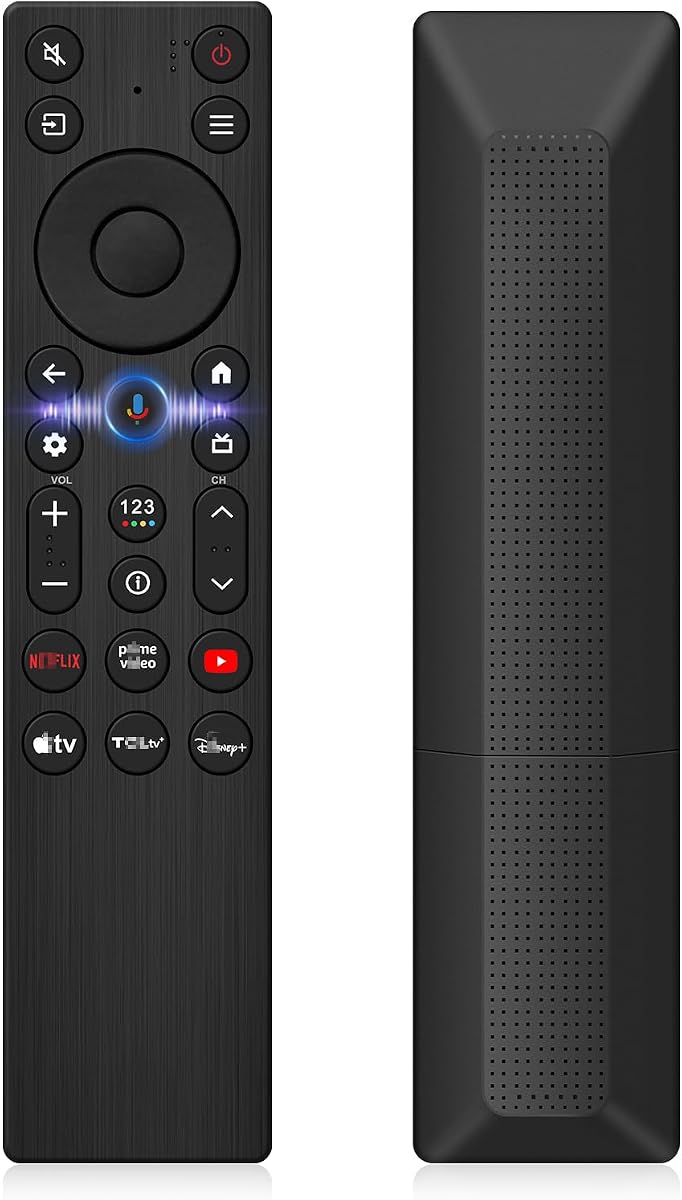
This smart replacement earns the premium recommendation because it combines infrared and Bluetooth hardware in one remote. With a 4.0 rating, it is not the highest-rated product in the list, but it offers the broadest functional package for compatible TCL smart televisions, including voice control, backlit buttons, and a stated operating range of up to 12 meters.
We may earn a commission when you buy through this link, at no additional cost to you.
The remote is designed for TCL Google, Android, and Fire OS televisions, spanning numerous Q, S, T, NXTVISION, QD-MINI LED, 4K UHD, HD, and QLED families. It also lists 2023 through 2026 TCL Fire Smart TV variants, including S551F, Q651F, Q650F, Q681F, S350F, and F7D. A television can support up to four paired remotes, according to the product information.
Voice control is the defining feature, but compatibility is not universal. The television must have suitable Bluetooth support, and pairing steps differ by model. Backlighting is helpful in a dark room and automatically switches off after three seconds to conserve power. The remote also provides a Home plus OK reset route when troubleshooting is needed.
Choose this option when a single replacement should cover navigation, voice commands, and improved nighttime usability across a modern TCL smart television. It is a better fit for a flexible smart-TV setup than for a basic TCL Roku set that only needs standard infrared commands. Buyers should still confirm that their specific television and operating system support the voice functions described.
Pressing a button illuminates the keypad, making the controls easier to identify in low light. A three-second automatic shutoff helps avoid unnecessary battery consumption.
Infrared handles conventional commands, while Bluetooth enables compatible voice functions. This combination offers broader functionality than a standard infrared-only replacement.
We may earn a commission when you buy through this link, at no additional cost to you.
With a 4.7 rating, this OEM-style remote is the strongest overall choice for compatible TCL Roku televisions. It provides a familiar layout, four useful application shortcuts, and straightforward infrared operation. Installation requires only two AAA alkaline batteries, with no programming, account setup, or pairing involved.
We may earn a commission when you buy through this link, at no additional cost to you.
The stated compatibility list spans many S, R, and US series sets, including 32S327, 43S455, 50S535, 65S455, 75S555, 55R635, 65R655, 85R655, 55US57, 50UP120, and 65Q825. Dedicated buttons are provided for Netflix, Disney Plus, Apple TV+, and HBO Max, allowing popular services to be opened more directly.
The key trade-off is functional rather than a compatibility compromise. This is an infrared remote without a microphone, headphone jack, or voice-search button. It also cannot control a Roku Stick, Box, Player, Game, Express, or another brand's television. Buyers seeking voice search should choose a dedicated voice remote for the appropriate newer TCL platform instead.
This is the best fit for an owner of a compatible TCL Roku smart television who wants a direct, uncomplicated replacement. Its strong rating, useful shortcut arrangement, and clearly defined platform support make it a dependable primary or backup controller. Verify the model number and avoid purchasing it for a Google TV or Fire TV.
Using a remote that closely follows the familiar Roku control pattern can make the transition from an original remote smoother. Navigation remains focused on familiar television functions.
Netflix, Disney Plus, Apple TV+, and HBO Max buttons reduce menu navigation. Their availability remains tied to the services and software supported by the television.
We may earn a commission when you buy through this link, at no additional cost to you.
This basic TCL Android remote offers a practical way to replace a missing controller without adding unnecessary complexity. Its 4.4 rating reflects a generally well-received product that installs two AAA batteries and operates without programming or setup. The remote also includes dedicated Netflix and YouTube buttons.
We may earn a commission when you buy through this link, at no additional cost to you.
Its primary attraction is simplicity. The product information describes compatibility with TCL Android 4K UHD smart televisions and states a transmission distance exceeding 35 feet. The ABS shell is described as resistant to falls and free of a peculiar odor, two practical qualities for a device that is handled frequently and often dropped.
Compatibility terminology requires care. Despite broad references to TCL TVs, the listing specifically says it cannot be used directly with a TCL Roku television. It also has no voice-search function. It is therefore most appropriate for a TCL set running the Android television platform, not a newer Google TV, Fire TV, or Roku model merely because the manufacturer name matches.
For a compatible TCL Android television, this is an affordable and uncomplicated choice, especially when voice control is unnecessary. It also provides a useful alternative to universal remotes that demand programming. The best approach is to confirm the platform printed in the television's settings or on its original remote before ordering.
The remote is ready to use after two AAA batteries are installed. This avoids the learning process associated with broad universal controllers.
The stated impact-resistant ABS shell and quick infrared response suit a controller used frequently around a busy living room. Basic construction keeps the design straightforward.
We may earn a commission when you buy through this link, at no additional cost to you.
This two-pack RC813 remote combines broad TCL Google TV support with the convenience of a backup controller. Its 4.4 rating and six dedicated streaming keys make it a practical choice for households that want more than one way to operate a compatible television.
We may earn a commission when you buy through this link, at no additional cost to you.
The compatibility description covers TCL UHD, HDR, LED, QD Mini LED, QLED, and 4K Google TV sets in the QM8, QM7, S5, S4, S3, Q7, Q6, and Q5 series. Specific examples include the 65QM850G, 75QM850G, 98QM751G, 98S550G, 43S551G, 55S470G, 43S470G, 55Q670G, and 65Q670G. Two AAA batteries are enough to begin operation, with no pairing required.
The remote is built around infrared and does not include voice control. Its shortcut buttons work when the television's Google TV software provides the corresponding programs. As the product information notes, older televisions may not offer those same shortcuts, so the physical buttons may not produce identical results across every compatible model.
This two-pack is well suited to Google TV owners who do not need microphone control and value immediate setup. It can serve one remote as the primary controller and retain the other as a backup. Confirm the television series and software before purchase, particularly if access to voice search is important.
A second remote protects against dead batteries, accidental damage, and the common problem of not knowing where the original controller was placed.
The product information states that the buttons were click tested more than 160,000 times. This supports confidence in repeated navigation and streaming-key use.
We may earn a commission when you buy through this link, at no additional cost to you.
The RC923A FMB1 voice remote targets newer TCL Google television families rather than the older infrared replacements. It carries a 4.3 rating and offers voice search, six streaming shortcuts, and a familiar smart-TV control layout. This makes it a logical choice for owners of QM5K, QM6K, QM6KPRO, and QM7K sets.
We may earn a commission when you buy through this link, at no additional cost to you.
The explicit model list includes 50-inch through 98-inch QM5K configurations, 50-inch through 98-inch QM6K sets, 65-inch through 98-inch QM6KPRO models, and 55-inch through 115-inch QM7K sets. The microphone can be used to search for content, change volume, select inputs, or begin music playback, while shortcut buttons provide immediate access to favored streaming platforms.
Unlike an infrared-only replacement, this remote needs to be paired before its voice functions are available. The process involves turning on the television, pressing the voice button to enter setup, and holding Home plus OK while the remote is near the television. Two AAA batteries are required but not included.
This model is best for a compatible newer TCL Google television whose owner actively wants hands-free search. It is not a broad solution for older TCL sets or Roku televisions. Buyers should compare the listed model numbers and be comfortable completing the one-time pairing procedure before purchase.
The dedicated microphone supports content search, volume changes, input selection, and music playback without repeated on-screen menu navigation.
The listed QM5K, QM6K, QM6KPRO, and QM7K coverage targets modern television families. Older model numbers should not be assumed to be supported.
We may earn a commission when you buy through this link, at no additional cost to you.
This RC923A FMB1 remote offers voice control for a broad group of newer TCL Google televisions, including the QM5K, QM6K, QM6KPRO, QM7K, Q77K, and X11K families. Its 4.0 rating reflects a specialized product for relatively recent model generations, where Bluetooth voice functionality has become an important part of the viewing experience.
We may earn a commission when you buy through this link, at no additional cost to you.
Coverage includes numerous screen sizes, from 50-inch QM5K models through 115-inch QM7K sets and 85-inch or 98-inch X11K televisions. The remote replaces part number G0401-000267 according to the listing. Its Google Voice Assistant can launch applications, find content, and control playback, while six shortcut keys provide fast access to streaming services.
Unlike many lower-cost replacements, the listing also discusses low-power consumption, a 26-foot signal range, and high-grade ABS construction. Voice control nevertheless requires manual pairing: install two AAA batteries, then hold Home and OK together within three feet of the television. The process is brief but should be expected before all functions are available.
Choose this remote when the television belongs to one of the listed modern Google TV families and voice navigation is a priority. It is less appropriate for older Google TV models, Fire televisions, or TCL Roku sets. The explicit model check is essential because similarly named TCL series can use very different remote hardware.
The model list includes Mini LED, QLED, 4K, and HDR sets from several K-series families, making the remote relevant to owners of newer TCL hardware.
The product information highlights low standby consumption. Efficient power use is helpful for a Bluetooth remote that may remain connected to the television for extended periods.
We may earn a commission when you buy through this link, at no additional cost to you.
This RC813 replacement has a strong 4.6 rating and provides a straightforward infrared solution for a wide selection of TCL Google televisions. It covers the QM8, QM7, S5, S4, S3, Q7, Q6, and Q5 families, including 4K UHD, HDR, LED, QLED, QD-Mini LED, and Full-HD sets.
We may earn a commission when you buy through this link, at no additional cost to you.
Its compatibility list is extensive, naming examples such as the 65QM850G, 98QM850G, 98QM851G, 115QM891G, 43S551G, 55S470G, 50S450G, 32S370G, 55Q750G, 55Q670G, 85Q650G, 55Q550G, and 65Q570G. Six shortcut buttons simplify access to popular streaming channels, and installation requires only two AAA batteries. No pairing or programming is necessary.
The remote uses advanced infrared transmission with a stated range of 33 feet and a response time within 0.2 seconds. It does not support voice functions, and it cannot control TCL Roku televisions or TCL Fire televisions. Its value is therefore concentrated in owners who want dependable menu and streaming control without voice assistance.
This is a compelling recommendation for a compatible TCL Google TV owner seeking a simple and highly rated replacement. The extensive model list helps reduce uncertainty, while quick installation means little disruption after the original remote is lost. Confirm the model number first, and choose a voice remote if hands-free operation is essential.
The lack of a pairing step makes this a convenient choice for anyone who wants to restore television access quickly after losing the original controller.
A stated 33-foot range and response within 0.2 seconds support use from couches, beds, and other typical viewing positions in a living room.
We may earn a commission when you buy through this link, at no additional cost to you.
This smart voice remote combines Google Assistant control with six streaming shortcuts for listed TCL Google televisions. It holds a 4.3 rating and targets Q6, Q7, QM8, S3, and S4 series sets, offering a functional mixture of spoken commands and direct application access.
We may earn a commission when you buy through this link, at no additional cost to you.
Specific compatibility examples include the 55Q670G, 65Q670G, 75Q670G, 85Q670G, 55Q650G, 65Q650G, 75Q650G, 55Q750G, 65Q750G, 65QM850G, 98QM850G, 32S370G, 43S370G, and 55S470G. Shortcut keys correspond to Netflix, Prime Video, YouTube, TCL Channel, TCL Home, and Apple TV+, providing a more useful set than a controller with only basic navigation keys.
The remote uses ABS material and requires two AAA batteries, which are not included. Voice functionality requires pairing: press the Google Assistant button, then hold Home and OK together for about five seconds until the television confirms completion. This requirement distinguishes it from the simpler infrared alternatives in the guide.
This is a good selection for a compatible TCL Google TV owner who wants voice navigation and convenient streaming keys in one controller. It is best for users comfortable with a short pairing process and willing to confirm their model number. It is not intended for unsupported TCL platforms or televisions whose software lacks the relevant Google Assistant features.
The microphone supports spoken requests, while dedicated service buttons offer fast manual access. Together they make common navigation tasks more flexible.
Holding Home and OK for approximately five seconds starts the process. The television provides an on-screen completion cue once the remote has connected.
We may earn a commission when you buy through this link, at no additional cost to you.
Choosing a replacement remote begins with confirming the television's platform, model number, and required functions. Compatibility is more important than appearance, while shortcuts, voice control, range, construction, and setup requirements help determine which compatible option is most convenient.
TCL manufactures televisions that run on Roku, Google TV, Fire TV, and Android-based interfaces, and these platforms do not generally share the same remote protocols. A Roku television remote may use standard infrared commands, while Google and Fire TV remotes often rely on Bluetooth for voice functionality. Check the platform in the television's settings menu, the label on the original remote, or the model information printed on the television before selecting a replacement. A remote advertised for TCL televisions is not automatically compatible with every TCL product.
Even within one platform, a TCL television series can use a different remote generation. Model numbers such as the QM850G, QM751G, S551G, S470G, or newer K-series codes can reveal the intended controller. Review the seller's explicit compatibility list and compare it with the complete model number, including the size suffix where applicable. Do not rely on screen size, display technology, or a loose series family alone, as similar-looking televisions can have different voice-button and Bluetooth arrangements.
Voice control is the largest functional dividing line among these replacements. Standard infrared remotes handle menus, inputs, playback, and volume without microphones, while dedicated RC923A, RC813 voice, and dual-mode options support spoken commands on compatible Google or Fire OS televisions. Voice remotes generally require pairing and may support a maximum number of paired controllers. Select an infrared model for dependable basic control, or choose a voice remote when searching, launching applications, and hands-free operation are important.
Shortcut buttons can make frequently used services easier to open, but their usefulness depends on the platform and television software. Options in this guide range from two keys for Netflix and YouTube to six keys for major streaming applications, and the TCL Roku OEM remote includes Netflix, Disney Plus, Apple TV+, and HBO Max. Older or differently configured televisions may not support every shortcut program. Check which services you use and whether your television's software includes the corresponding options.
A replacement should work reliably from the position where the household normally watches. Stated ranges among these products range from roughly 26 feet to 40 feet, with several infrared models providing around 30 to 33 feet. Range specifications are not always measured under identical conditions, so a wider-angle sensor can matter as much as maximum distance. A reported response within 0.2 seconds is desirable for menus, though real-world performance also depends on batteries, line of sight, room layout, and the television's infrared receiver.
Most infrared replacements work after two AAA batteries are installed, without codes or learning procedures. Bluetooth voice remotes add a one-time pairing step, which may involve pressing the Google Assistant, Home, and OK buttons. Dual-mode remotes may use infrared for ordinary commands and Bluetooth for selected features. Review how much setup you want to manage and whether your television supports direct replacement. Simple models are convenient after a battery change, while voice controls offer more functionality in exchange for a slightly more involved connection process.
Batteries and manuals are not included with any of the listed products, so plan to purchase suitable AAA alkaline batteries separately. Two remotes offer immediate insurance against future loss or damage and allow convenient placement in separate rooms. A single remote is adequate when replacing only one controller and provides a simpler package. Some sellers also describe warranty or after-sales service periods, so those terms can provide added reassurance, although the physical product details and compatibility remain the priority.
Remote controls endure frequent handling, button presses, and occasional drops. Several listings mention ABS construction, upgraded chips, automatic backlighting, and click testing on buttons. These details can help distinguish a more robust option, although no remote is entirely drop-proof or immune to battery corrosion. Warranty periods, return policies, and responsive support vary among the products. Consider these protections after confirming that the remote fits the television and provides every function you need.
Begin by confirming the remote's platform and model compatibility, then install two fresh AAA batteries with the correct polarity. Most infrared remotes can be used immediately, but a Bluetooth voice remote generally requires you to open the television's pairing interface and hold the specified combination of Home, OK, or Google Assistant buttons until completion. Keep the remote close to the television during pairing and point it directly at the set when testing basic commands.
Use the remote from a position that provides a clear path to the television's infrared receiver. If response is weak, replace the batteries before troubleshooting further, then try again from a lower and more central position. Voice remotes may need a refreshed connection after batteries are changed. Avoid placing the remote on surfaces where food, moisture, or dust can enter the battery compartment, and do not mix fresh and depleted batteries.
For long-term care, remove the batteries if the remote will not be used for an extended period. Clean the exterior with a soft, dry cloth and keep moisture away from the buttons and battery bay. Replace the batteries as a set when performance declines, and avoid leaving batteries inside a remote that is stored for months. Periodic testing ensures that a backup remains ready when the primary controller is lost or damaged.
Check the platform and complete model number printed in the television's settings, on the original remote, or on the television itself. TCL makes Roku, Google TV, Fire TV, and Android televisions, and a remote designed for one platform may not control another. Compare the model number with the replacement's explicit compatibility list before ordering.
No. Most products here are platform-specific replacements, not universal controllers that learn commands from different television brands. Their compatibility is generally limited to a stated family of TCL models. Some remotes support several Roku television brands, but they still exclude streaming sticks, boxes, players, and other non-television devices.
Infrared replacements in this guide generally need only two AAA batteries and do not require programming or pairing. Bluetooth voice remotes require a one-time connection process, usually involving the Google Assistant, Home, and OK buttons. The exact procedure depends on the remote and television, so follow the included pairing instructions and keep the remote near the screen during setup.
Usually not. The two platforms use different remote functions and protocols, and the Roku-focused products explicitly exclude TCL Google televisions. Similarly, a Google TV remote should not be assumed to work with a TCL Roku set. Match the replacement to the operating platform before considering specific model suffixes.
Install two fresh AAA batteries with the correct polarity and test the remote from directly in front of the television. For an infrared remote, remove any obstruction between the device and the receiver. For a voice remote, repeat the pairing procedure after a battery change. If the issue continues, verify the television model and compatibility details.
No. The product information for every listed remote states that batteries are not included, and manuals are also generally excluded. Purchase a pair of suitable AAA alkaline batteries before setting up the remote. Replacing both batteries at the same time helps maintain consistent power and reduces the chance of inconsistent remote performance.
Voice control is valuable if you regularly search for content, launch applications, change volume, or want hands-free navigation. It adds convenience but also requires a compatible television, a newer remote design, and a one-time pairing process. If you mainly navigate menus and use shortcut buttons, a standard infrared replacement may be simpler.
A single remote is sufficient for replacing the original controller. A two-pack is more useful when you want a backup, keep a controller in another room, or share a television with multiple household members. The multipacks in this guide are both basic infrared options, so they do not add voice functionality.
The best overall option for a compatible TCL Roku television is the TCL Roku OEM Remote, which combines a strong rating, four streaming shortcuts, and effortless infrared operation. The All TCL Android Remote stands out as the budget-friendly choice for compatible Android-based sets, while the Smart Dual-Mode TCL Remote offers the most versatile combination of infrared, Bluetooth, voice control, and backlit keys for modern smart televisions.
Compatibility should always come before convenience. Confirm the television platform, full model number, and required voice or shortcut features before ordering. Once those details match, consider operating range, button layout, response, included warranty terms, and whether a two-pack would provide useful backup coverage. Infrared models are generally the simplest choice, while Bluetooth voice remotes suit owners of newer compatible smart televisions.
Ratings, listings, support terms, and prices can change as sellers update their inventory. Review the current product page and compatibility information at the time of purchase, especially when buying a replacement for an older or less common model. With the right platform and model confirmed, any of these carefully matched remotes can restore convenient control over the television.
