
Taja To Do List Notepad
4.8Editor score
Structured daily task sections
Fifty-two thick paper pages
Portable planning format
Protective transparent cover
Explore the best ADHD desk accessories for focus, time management, task planning, memory, and comfort with our expert comparison guide.
ADHD desk accessories can make everyday work and study more manageable by reducing visual clutter, supporting time awareness, and turning overwhelming tasks into manageable next steps. The most useful products do not demand constant attention; instead, they quietly prompt action, preserve important information, and create structure around demanding routines.
We compared these ten products by examining their core purpose, ease of use, portability, materials, included components, and suitability for common ADHD-related needs. The list covers visual timers, daily planners, analog task systems, monitor-mounted note holders, and an ergonomic footrest, giving attention to different ways of working rather than focusing on only one solution.
Each pick shows what it does best, where it can be less convenient, and the kind of user it may suit. Ratings and product details reflect the supplied listings, while availability and prices can change. The practical recommendation is to choose one tool that addresses your largest recurring obstacle rather than assembling a crowded collection of accessories.
4.8Editor score
4.6Editor score

4.5Editor score
The comparison below highlights each product's main function, format, portability, and best-suited setting. Together, the ten options provide multiple ways to improve focus, planning, time awareness, note capture, and physical comfort.



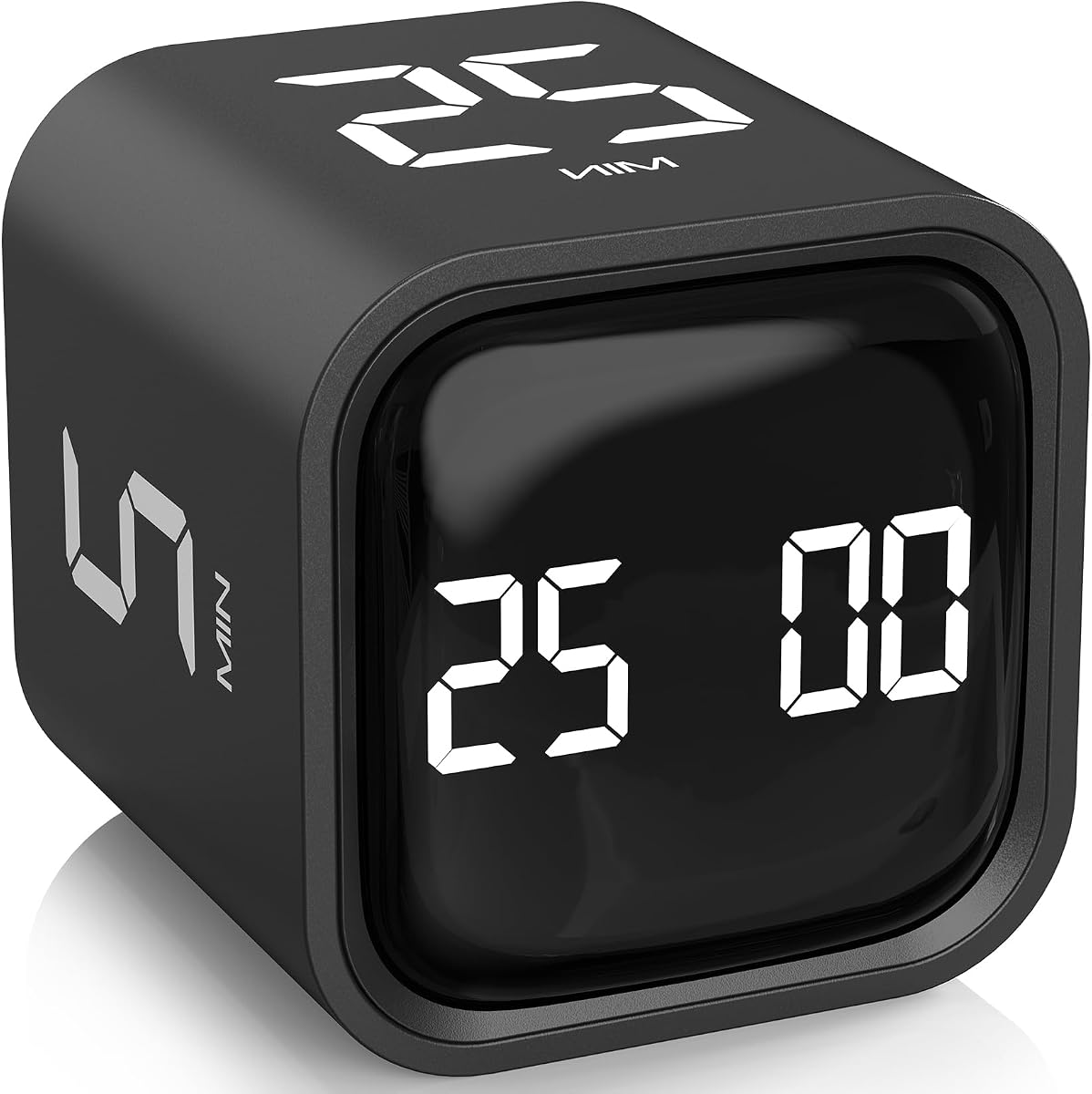
The Rotating Productivity Timer earns the Editor's Choice position because it combines a genuine 5/25 work-and-break structure with unusually flexible timing controls. Its 4.6 rating reflects a product designed to reduce setup friction, and the cube format makes time visible without requiring a phone, app, or complicated digital menu. For an ADHD desk accessory, that combination of immediate visibility and physical operation is particularly valuable.
We may earn a commission when you buy through this link, at no additional cost to you.
The defining feature is the set of 5-, 25-, 10-, and 50-minute gravity-sensing presets. Flipping the timer upward starts the selected countdown, flipping it upward again stops the count, and turning it downward resets it. The timer also supports custom values up to 99 minutes and 59 seconds, as well as countdown and stopwatch modes. That flexibility means it can handle a standard focus sprint, a shorter warm-up, a longer study block, or a kitchen and exercise interval without becoming a single-purpose tool.
Its three volume settings are another meaningful benefit. Silent mode uses noticeable vibration without creating an audible interruption, while low and high alert modes provide stronger options for louder or busier environments. The trade-off is that this is still an electronic device, and users who prefer purely analog tools may find the physical flip action more engaging than the digital settings. The timer also does not solve task selection; it tells you when to work, but a separate planner is still needed to determine what deserves your attention.
It is best for students, office workers, and anyone who benefits from a visible time boundary and struggles to switch off a digital countdown. People with sound sensitivity should begin with silent mode, while users with longer attention periods can customize the presets. Overall, it is the strongest all-purpose choice in this guide because it combines structure, accessibility, and adaptability without requiring ongoing setup.
A visible countdown creates an external cue for beginning and ending a task. That can be especially useful when internal time awareness is inconsistent, because the timer supplies a clear endpoint without judgment.
The standard 5/25 cycle is ready immediately, while custom timing and stopwatch modes accommodate longer assignments, brief administrative tasks, exercises, and other activities.
We may earn a commission when you buy through this link, at no additional cost to you.
The Taja To Do List Notepad is the Best Budget pick in this guide, combining a 4.8 rating with a straightforward daily-planning format. It turns a broad list of responsibilities into a visible checklist that can be reviewed at the beginning and end of the day. Its appeal comes from the fact that it requires little training: open the pad, identify priorities, write a small number of tasks, and mark progress as each item is completed.
We may earn a commission when you buy through this link, at no additional cost to you.
The notepad includes multiple sections for recording important tasks, which allows a user to separate immediate actions from secondary concerns without moving everything onto one long list. A protective transparent PP cover helps shield the pages from dirt and wear, while a thick paperboard back provides a stable writing surface. The 52 pages of 100 gsm paper are described as thick and non-bleeding, making the format more comfortable for writing and quick reference than a loose sheet of paper.
Its compact size is both a strength and a limitation. The notepad is easy to carry between home, school, and work, and it is less likely to intimidate users than a dense planner filled with dates and scheduled appointments. At the same time, it is not intended to store every appointment, deadline, or long-form note. Users who need more room can use the back pages for additional context, but a separate calendar or project notebook may still be necessary for complex schedules.
This is a strong recommendation for anyone who wants a low-friction planning tool without committing to a dated system. It is particularly useful for people who know what needs doing but struggle to prioritize an unstructured list. If your main problem is deciding what to do next, the Taja notepad is likely more helpful than another timer; if your main problem is staying focused once started, consider pairing it with one of the timers in this guide.
Writing tasks on a dedicated page gives each obligation a location and makes the next action easier to identify. Checkmarks provide immediate feedback as the list becomes shorter.
The undated format avoids the friction of finding the correct date. A fresh page can be used whenever a new planning cycle begins, making the notepad adaptable to irregular schedules.
We may earn a commission when you buy through this link, at no additional cost to you.
The Daily To-Do List Cards system is the Best Premium selection because it offers a complete analog workflow rather than a single planning pad. It includes more than 130 double-sided index cards, a wooden storage box, and a metal divider with magnets for displaying current tasks and retaining completed work. The result is a flexible system that can help someone move work away from scattered sticky notes and into a deliberate, visible queue.
We may earn a commission when you buy through this link, at no additional cost to you.
The daily task cards are undated, which avoids the pressure of maintaining a conventional calendar. Circles in the left margins support multiple planning methods, including ABC priorities, color coding, and checkmarks. Each card measures three by five inches and is made from 100 GSM paper, giving it enough substance to resist tearing when carried in a pocket, handbag, or backpack. The reverse side expands the system for appointments, reminders, deadlines, meeting notes, call notes, checklists, and spontaneous ideas.
The physical nature of the system is its major advantage and also its main drawback. Moving a card from the current display to a completed stack provides a clear sense of progress, and the magnetic divider keeps active work within the field of view. However, a box, divider, and multiple cards occupy more desk space than a single notepad. Users who tend to preserve every card or become distracted by too many options may need to establish a strict rule for what enters the display.
This product is best for someone who wants a tactile, analog method for separating daily work from long-term goals. It is also a good fit for users who find digital task managers overwhelming, provided they are willing to maintain the physical system. For a smaller, lower-effort alternative, the Taja notepad is more appropriate; for users who want the richer card ecosystem and value a coordinated display, this set is the stronger choice.
Completing a card and moving it out of the active display creates a physical record of progress. That tangible change can be more motivating than merely checking a box inside a scrolling application.
Undated daily cards, goal cards, and a customizable priority margin support several levels of planning. Double-sided printing also ensures that captured details do not have to crowd the main task list.
We may earn a commission when you buy through this link, at no additional cost to you.
The two-piece Office Desk Accessories monitor memo board is a straightforward way to keep important notes within the user's field of vision. Its 4.3 rating reflects a practical product aimed at reducing forgotten tasks, scattered messages, and misplaced reminders. The transparent acrylic panels are designed to stick to the left or right edge of a computer monitor, providing a dedicated place for meeting notes, business cards, planning reminders, and to-do items.
We may earn a commission when you buy through this link, at no additional cost to you.
Installation relies on the included adhesive. The instructions call for removing a protective film, wiping dust from the surface, and attaching the board to a suitable edge. The panels are described as lightweight, durable, waterproof, and resistant to dirt, making them easy to maintain with routine cleaning. Two pieces offer more flexibility than a single holder and can be positioned on either side of the display or elsewhere in the workspace.
Placement is the primary concern. The product should not be attached directly to a computer screen, and narrow edges are not recommended. A monitor's black bezel may be too slim for reliable adhesion, and the product could still be unsuitable for curved, textured, or unusually narrow displays. Because the adhesive is described as strong, users should test a corner and avoid pressing the panel against the glass. The boards can also be used on cabinets, dressers, refrigerators, and walls, although their value is greatest when positioned near the screen.
This is a good choice for someone who repeatedly loses information between digital windows and paper scraps. It is less appropriate if your monitor has very thin bezels, you need frequent repositioning, or you prefer to keep every visible surface completely clear. When used on a suitable black edge, it offers a low-effort visual memory aid with no batteries and no software.
A note placed beside the active screen is harder to lose than a message buried in a task list. The transparent panel keeps the information visible without concealing part of the display.
Installation requires no tools beyond wiping the mounting area. The durable, cleanable acrylic makes the holder suitable for frequently updated reminders and notes.
We may earn a commission when you buy through this link, at no additional cost to you.
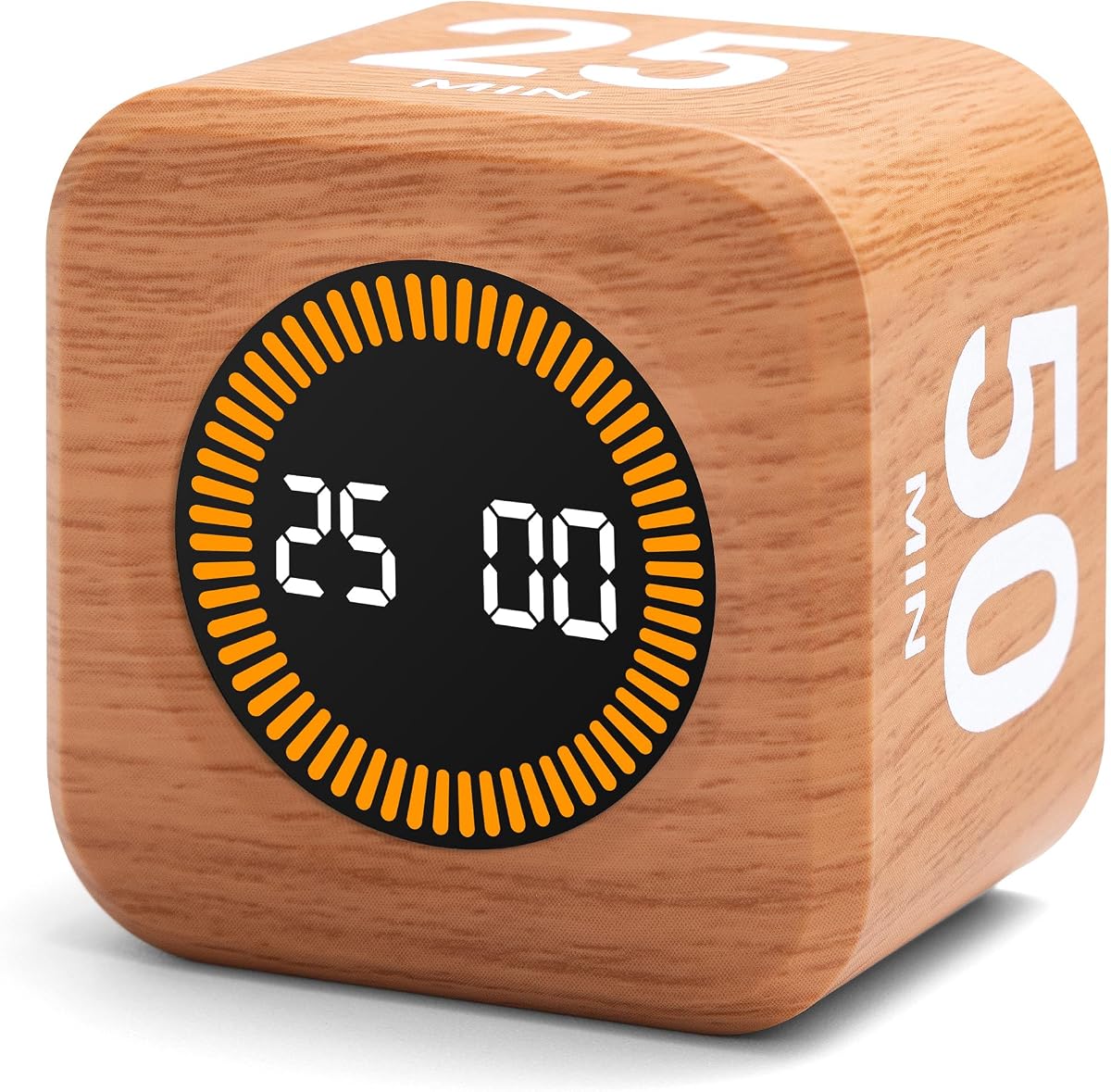
The Wood Grain Cube Timer combines the familiar 5/25 productivity method with a natural-looking finish and a rechargeable design. Its 4.5 rating and 5-, 25-, 10-, and 50-minute presets place it among the stronger timing tools for ADHD-friendly routines. The cube form is compact enough to sit beside a laptop, move between a study area and an office, or fit into a bag for use away from home.
We may earn a commission when you buy through this link, at no additional cost to you.
The light-up screen is a practical feature in dim rooms or evening work sessions, while the wood grain finish makes the timer feel more like a piece of decor than a technical gadget. Its gravity-sensing operation is designed to make starting and stopping intuitive: turn the selected face upward to begin, turn it upward again to stop, and turn it downward to reset. Users can customize the preset values through the SET button over a range of one second to 99 minutes and 59 seconds.
Unlike a simple analog kitchen timer, this model has an electronic control system and a rechargeable battery. That adds flexibility but also introduces a few routine demands. The display may need time to become familiar, and the timer must be charged regularly to remain dependable. The customization also appears to reset to the original presets after the device is turned off, which could inconvenience someone who wants a custom interval to persist indefinitely.
It is best for a person who wants a time-management aid that also looks attractive on a carefully arranged desk. The rechargeable battery and portable size make it particularly convenient for students or hybrid workers. If appearance is secondary and you want the simplest possible operation, the rotating productivity timer reviewed earlier offers a similar core concept with less emphasis on the wood grain finish and rechargeable construction.
The wood grain exterior softens the appearance of a digital timer and helps it blend into a home office or study area. It offers a more decorative alternative to a basic plastic cube.
A compact rechargeable design reduces dependence on disposable batteries. The light-up display also improves visibility when the timer is used in different lighting conditions.
We may earn a commission when you buy through this link, at no additional cost to you.
The TIME TIMER Home MOD is designed around visual time awareness rather than a conventional digital countdown. Its analog-style face uses a colored section to show the remaining portion of a 60-minute interval, allowing users to understand how much time remains without reading numbers. The listing specifically highlights its suitability for people with autism, ADHD, and other learning disabilities, making the intuitive display its strongest selling point.
We may earn a commission when you buy through this link, at no additional cost to you.
The optional alert is useful for sound-sensitive environments. A person can use the timer's silent operation while still benefiting from the changing visual display, which helps preserve concentration without adding an unexpected noise. The product can also be assigned to a specific activity through removable silicone covers, such as a gym timer, homework timer, kitchen timer, study timer, or work timer. The covers are not included in the package, so this is better understood as a color-coding system the user can add.
The main limitation is its fixed 60-minute range. It is excellent for reading, homework, meetings, and other broad activities, but it is less precise for 25-minute focus sprints or brief transition periods. It also requires one AA battery, which is not included. Users who travel frequently or work in places where a battery might be depleted may want to keep a spare nearby, and the removable colored covers will add to the complete setup if used.
This timer is best for a person who finds abstract time difficult to interpret and responds well to a visual gauge. Parents, teachers, and workplace facilitators may also appreciate its clear transition signal. For short, highly structured work intervals, the digital cube timers are more flexible; for a broader sixty-minute activity, this visual model is exceptionally easy to understand.
The shrinking colored area communicates the passage of time at a glance. This can reduce the mental calculation involved in estimating how much remains in an activity.
Assigning a different removable silicone color to homework, exercise, meetings, or kitchen tasks creates an immediate visual cue. The optional audible alert can be turned off in sensitive settings.
We may earn a commission when you buy through this link, at no additional cost to you.
The ADHD Daily Planner Notepad is explicitly designed for neurodivergent adults, making it one of the most targeted products in this roundup. Its 4.5 rating reflects a structured approach to prioritization, task capture, and motivation. The planner combines a checklist with a rewards section, creating a format that goes beyond merely listing obligations and gives the user a way to recognize progress.
We may earn a commission when you buy through this link, at no additional cost to you.
A particularly relevant feature is the brain-dump method described in the listing. Users can record distracting thoughts and secondary information without allowing those thoughts to interrupt the active task list. Prioritization becomes more manageable when every possible obligation does not have equal visual weight. The undated format also removes date pressure, while 50 sheets provide a substantial amount of reusable planning material and are described as enough to plan for an entire year.
The A4 portrait format offers generous writing space, but it is not the most compact option. It works well beside a monitor or on a dedicated planning zone, though it takes up considerably more room than a three-by-five-inch card or a small notepad. Its explicit focus on neurodivergent adults may also make it feel less tailored to children, although the core principles of prioritization, distraction capture, and positive reinforcement are broadly useful.
This notepad is a strong recommendation for adults who want a paper routine designed around attention, organization, and motivation rather than a conventional date-led planner. It is especially helpful when too many thoughts compete for attention and completing each visible item would otherwise require a new decision. Users who need an even more portable card system can consider the walnut display set, while those wanting maximum writing space may prefer this A4 format.
The page design gives important tasks a distinct place while allowing other thoughts to be captured elsewhere. This reduces the need to hold every incoming idea in working memory.
The checklist and rewards format makes progress observable. Marking completed actions provides immediate feedback, while the reward area offers a planned way to acknowledge achievement.
We may earn a commission when you buy through this link, at no additional cost to you.
The Thboxes Weekly Desk Planner is built for people who need to distribute responsibilities across an entire week rather than confront a single daily list. Its 4.8 rating is among the highest in the group, and the organized layout divides tasks into high-priority, low-priority, and follow-up sections, with separate areas for to-do items and notes. That structure can make a large workload feel less abstract by assigning each item to a category and a week.
We may earn a commission when you buy through this link, at no additional cost to you.
The planner measures 8.5 by 11 inches and includes 52 sheets of 100 GSM paper. The paper is described as thick and resistant to bleeding, while the cardboard back provides stability for writing in different locations. A transparent cover protects the inner pages, and the spiral binding allows pages to be turned conveniently or removed after use. Together, these details make it more of a desk reference than a disposable pad.
The main question is whether a weekly format suits your attention patterns. Some people work best with one day at a time and may find a full-week page intimidating. Others need to see upcoming obligations, but a large notepad can become a surface filled with postponed tasks. The priority sections help control that risk, although a weekly plan works best when it is reviewed and reset at the beginning of each cycle rather than continuously added to.
This planner is best for students, caregivers, and professionals balancing several recurring responsibilities. It is a strong choice when the daily notepad is too informal and a dated planner is too restrictive. The balance of a large writing area, a spiral binding, and explicit priority categories makes it especially practical for home, school, and office use.
Separate high-priority, low-priority, and follow-up areas help distinguish urgent work from items that can wait. Dedicated to-do and notes sections keep supporting information from crowding out the main list.
Spiral binding and removable pages make it easy to turn to the current week or start with a clean sheet. The transparent cover helps protect the pages during storage and transport.
We may earn a commission when you buy through this link, at no additional cost to you.
The Portable Monitor Memo Board offers a safer and more flexible alternative to adhesive panels that attach directly to a monitor. Its 4.5 rating reflects a design centered on a durable acrylic panel, a removable wooden base, and a dual-slot system. The panel measures 12.2 by 3.1 inches, while the wooden base measures 2.56 by 3.15 inches, and the package includes 100 square sticky notes measuring three by three inches.
We may earn a commission when you buy through this link, at no additional cost to you.
The base is the key difference from a conventional sticky-note holder. Rather than relying on adhesive or clips that could contact the screen, it can be attached to a monitor, laptop, or nearby device. Angled and vertical slots allow the panel to be positioned beside a display or directly on a desktop, making it easier to find a comfortable viewing angle. The acrylic surface is described as durable and easy to clean, which suits a product intended for daily notes.
The format has some trade-offs. A 12.2-inch panel occupies more horizontal space than a small sticky-note pad, and the wooden base adds weight and visual presence to a minimalist setup. The included notes are large enough to hold reminders and meeting details, but they may be inconvenient for very brief reminders that fit more neatly on small squares. Users who value a permanent message area may appreciate the extra space, while those who write only a few words may consider it oversized.
This product is best for someone who needs a visible information zone but does not want to attach anything to a screen. It is also useful for hybrid work because the base can move between devices and locations. The included notes make it ready for immediate use, while the removable construction makes updating and cleaning more convenient than peeling adhesive-mounted panels away from a display.
The base keeps adhesive and notes away from the monitor glass. This design reduces the need for clips or adhesive pads that could contact the screen.
Dual-slot construction supports angled and vertical positioning. The removable base can sit beside a monitor, on a desk, or near a portable device.
We may earn a commission when you buy through this link, at no additional cost to you.
The CasaZenith Foot Rest addresses a physical side of desk-based focus: prolonged sitting can become uncomfortable, and discomfort can make concentration harder to sustain. With a 4.2 rating, this is a complementary rather than central ADHD accessory, but it supports the same broader goal of creating a work environment that is easier to remain in. The foot area measures 13 by 9.6 inches, providing a substantial surface for both feet.
We may earn a commission when you buy through this link, at no additional cost to you.
The platform can swing forward and backward, allowing the user to change position without getting up. Its textured surface and built-in rollers are intended to provide a light massage and promote a more comfortable foot movement. A non-slip pad on the underside increases friction and helps prevent the stool from sliding, while the thickened polypropylene construction can be cleaned directly.
Ergonomic benefits vary depending on body proportions, chair height, and workstation setup. Elevating the feet may support a more comfortable posture, but a footrest cannot correct every desk-related issue, and it should not be used if it causes pressure or discomfort. The snap-on assembly requires no tools and the portable shape is convenient for moving between work, home, and travel, though users should confirm that the platform fits beneath their desk without interfering with the chair.
This is the best choice for a person whose focus declines because sitting becomes physically uncomfortable, particularly during long work sessions. It is not a task-management tool and will not solve difficulty starting or sequencing work, but it can make the environment more comfortable once a session begins. Pairing it with a timer and a daily planner can create a well-rounded desk routine that addresses structure, planning, time awareness, and physical comfort.
The swingable platform lets the feet move in different directions during a session. Small position changes can help reduce the monotony of remaining completely still at a desk.
The non-slip underside improves stability, and the plastic surface can be wiped clean. Tool-free assembly and a portable profile make it easy to use in more than one location.
We may earn a commission when you buy through this link, at no additional cost to you.
The most effective ADHD desk accessory addresses a specific obstacle, fits naturally into your routine, and remains simple enough to use consistently. Consider whether your main difficulty is time awareness, task selection, memory, motivation, visual clutter, or physical comfort before choosing a product.
Different accessories solve different forms of friction. A visual timer helps when work is difficult to stop or restart, while a daily planner helps when priorities are unclear. Monitor memo boards support information that must remain visible, and a footrest addresses physical discomfort during long sessions. Beginning with the recurring obstacle makes it easier to avoid buying an attractive tool that does not address your actual routine.
A useful desk tool should not require a complicated setup each time you sit down. Physical timers that start with a flip, paper planners with clearly divided sections, and note holders that use a removable base can reduce the chance that a useful tool is left unused. Digital products may offer more features, but notifications, menus, and configuration can create additional decision points for users who already struggle with initiation.
A five-minute timer, a 60-minute visual clock, and a weekly planner operate at very different scales. Short focus sessions may benefit from a digital cube with 5/25 presets, while homework or meetings may be better supported by an analog visual timer. Daily notepads work for a manageable list, whereas weekly planners help distribute several responsibilities. Match the format to the size of the commitment rather than trying to force every task into one system.
An ADHD accessory should not create unnecessary noise, visual clutter, or physical distraction. Silent vibration modes help with time management when sound is unwelcome, and an analog visual timer communicates without screen-based alerts. Some users benefit from a discreet system, while others need bold, colorful cues to maintain attention. Choose based on your sensory profile rather than assuming a more stimulating display will always be more motivating.
A tool that looks excellent at home may be impractical in a shared office or classroom. Compact notepads and rechargeable cube timers travel easily, while an A4 planner or a card display consumes more room. Note holders placed beside a monitor must not crowd the screen, and footrests need enough clearance beneath the desk. Measure the available space and consider how often the accessory will be moved before choosing its size.
Some products need frequent interaction while others are ready to use. Timers require battery changes or charging, planners need pages turned or replaced, and memo boards require notes to be updated and surfaces cleaned. A sustainable accessory is one you can maintain without creating a secondary project. Look for simple refill systems, durable materials, and clear storage for completed cards or used paper.
Progress feedback can make a task feel more concrete. Timers show when a session is complete, checklists provide checkmarks, and card systems let users move finished work out of the active display. The best finish line is one that is visible enough to register but simple enough to update. A product that takes several actions to record completion may be less effective than a straightforward paper list.
The strongest desk setup uses each tool for a separate stage of the workday. A planner can hold the day's priorities, a timer can define the focus interval, a memo board can display essential reminders, and a footrest can improve comfort during longer sessions. Keeping responsibilities distinct prevents one accessory from being overloaded and makes the routine easier to understand.
Begin by identifying one planning tool, one time-management tool, and one physical support for your desk. Keep each item within reach but outside the primary screen area, and assign it a specific purpose. For example, use the planner only when selecting priorities, the timer only during a work interval, and the memo board only for information that must remain visible. This prevents the desk from becoming a collection of competing reminders.
Review your system at consistent boundaries rather than continuously rearranging it. At the start of a day or session, choose a small number of priorities and set the intended interval. During work, keep the timer visible and place only essential reminders on the note holder. When the interval ends, record progress, move or mark completed tasks, and take a genuine transition pause before starting again.
Care for each material according to its design. Wipe acrylic memo surfaces with a soft cloth, protect paper planners with their covers, and keep removable cards organized in the wooden box. Charge rechargeable timers before they are needed and keep spare batteries with battery-powered visual timers. Clean the polypropylene footrest regularly and confirm that it sits securely before placing your feet on it.
The most useful accessory depends on the specific difficulty you experience. A visual timer can help with starting and stopping work, while a structured planner is more useful for prioritizing and remembering tasks. Many people benefit from combining one planning tool with one timer rather than relying on a single product to manage every part of the day.
Analog planners can be useful because they provide a fixed, limited view of priorities and do not generate notifications. They may be easier for people who feel overwhelmed by dashboards or habitually switch between digital applications. However, a digital system may be better for automatic reminders, calendars, and searchable records, so the best choice depends on how consistently you can use each format.
The 5/25 method divides the day into focused work intervals and short breaks, with the most common version using 25 minutes of work followed by five minutes of rest. A product with true 5- and 25-minute presets makes this routine easy to repeat without entering settings each time. The technique is not a medical treatment, and intervals can be adjusted to suit individual needs.
A visual timer can provide an external representation of time that is easier to understand than a mental estimate. The TIME TIMER Home MOD is particularly suited to this approach because it displays the remaining portion of a 60-minute interval. The rotating cube timers are more useful when you need short, repeated focus intervals and multiple preset durations.
Products that use adhesive should generally be attached to a suitable monitor bezel rather than the display glass. The monitor memo boards in this guide specifically warn against direct screen placement and recommend a sufficiently wide black edge. A removable-base design is preferable when the available bezel is narrow or when you want to move the accessory between devices.
Choose one dedicated note location and empty it at the end of each day. A monitor memo board or card display gives every note a defined home, while a daily notepad can hold tasks and notes in separate sections. The key is to review the location regularly and transfer only information that remains relevant into the next session.
Multiple tools can be helpful when each has a distinct role, but more products do not automatically create better organization. A timer for work intervals and a planner for priorities already form a strong combination. Add a physical product only when it addresses another clear problem, such as memory, sensory distraction, or prolonged physical discomfort.
No desk accessory treats ADHD or replaces professional care. These products are environmental tools that may make common tasks more structured, visible, and manageable. Their usefulness varies by person, and they work best as part of a broader routine that also considers sleep, medication guidance from a qualified clinician, therapy, and other individual needs.
The Rotating Productivity Timer is the strongest overall pick because it combines visible time, genuine 5/25 presets, silent vibration, and custom timing in one tool. The Taja To Do List Notepad is the most economical and accessible way to clarify daily priorities, while the Daily To-Do List Cards offer the richest analog system for people who want tactile progress tracking and a more complete display setup.
Prioritize the problem that repeatedly interrupts your routine. Choose a timer for boundaries around focused work, a planner for unclear priorities, a memo board for information you repeatedly lose, and a footrest for physical discomfort. The most effective setup is usually a small, consistent system in which every tool has one clear purpose and a reliable place in the daily workflow.
Before buying, verify the current listing, included components, dimensions, compatibility, and price. Product availability and pricing can change, and accessories that look ideal together may not suit the available desk space. Read the latest product details and customer feedback to confirm that the chosen format matches your attention, sensory, and organizational needs.