
Cable Matters 110-Blade Punch Down Tool
4.3Editor score
Removable twist-lock 110 blade
Adjustable low and high impact
Supports Cat 5 through Cat 8
Compare the best Ethernet punch down tool options for 66 and 110 terminations, keystone jacks, cable categories, blade systems, comfort, and versatility.
An Ethernet punch down tool seats and trims twisted-pair conductors inside 66 or 110 insulation-displacement contacts, providing a dependable alternative to installing modular plugs. A good tool should match your cabling system, deliver controlled impact, hold blades securely, and remain comfortable during repeated terminations.
The ten options in this guide span traditional impact tools, interchangeable-blade models, dedicated speed-termination tools, and a broader cable-installation kit. We compared blade standards, supported cable categories, impact controls, ergonomics, storage features, jack compatibility, and the information provided about each product.
Each review identifies the tool's strongest use case and important limitations, while the comparison table provides a quick reference. Ratings and product details reflect the supplied listings, which may change over time. Check current availability, compatibility, and pricing before making a final purchase.
4.3Editor score

4.8Editor score

4.7Editor score
This side-by-side comparison highlights blade support, termination style, impact controls, and special-purpose compatibility so you can identify the most appropriate tool for residential cabling, patch panels, professional installations, or dedicated keystone systems.


The Cable Matters Punch Down Tool with 110 Blade is a straightforward 110-style terminator for home networks, small offices, and structured cabling work. Its 4.3 rating reflects a practical tool with a useful combination of removable-blade retention, adjustable impact, and broad compatibility across Cat 5, Cat 5e, Cat 6, Cat 6A, Cat 7, and Cat 8 Ethernet or voice cable.
We may earn a commission when you buy through this link, at no additional cost to you.
The twist-and-lock blade system makes the removable 110 blade easier to change while helping prevent it from loosening during use. A low and high impact setting allows the user to vary force for different jack, block, and patch-panel applications. The spring-action handle supports fast, low-effort seating, while the reversible cut-and-punch blade is designed to trim excess conductor as the wire is seated.
Its main limitation is the narrower termination standard. Unlike dual-standard tools, this model is centered on 110 IDC terminals and does not include a 66 or Krone blade in the supplied package. That makes it a better fit for installers whose equipment consistently uses 110 blocks or compatible keystone jacks, but a poor choice when mixed panel systems are part of the job.
Choose this model for a dependable 110-only workflow, especially if you need an approachable tool without advanced speed features. It handles a wide range of common Ethernet categories, offers controlled impact, and includes the basic functions needed to terminate and trim conductors. Verify your jack type before purchasing, and use a compatible punch-down stand when the work benefits from added stability.
The Lo/Hi impact control is one of the tool's most useful features. It provides a way to tailor the punch to different IDC terminals and cable constructions rather than relying on a single fixed force setting, which can make repetitive installations more consistent.
Compatibility from Cat 5 through Cat 8 makes the tool relevant to both conventional office cabling and newer high-bandwidth installations. Actual performance still depends on using the correct jack, block, and cable system for the intended network standard.
We may earn a commission when you buy through this link, at no additional cost to you.
The Klein Tools VDV427-300 combines broad panel compatibility with a 4.8 rating, the highest among the tools in this guide. It is designed to terminate and cut CAT3, CAT5e, and CAT6/6A cable while working with both 66 and 110 panels and blocks, making it a strong general-purpose choice for installers who encounter more than one wiring system.
We may earn a commission when you buy through this link, at no additional cost to you.
The included blade is made using metal injection molding, and the spring-loaded mechanism is intended to make repeated seating efficient. A selectable high and low impact lever allows the user to adjust force for different cable types and termination requirements. The traditional punchdown format, cushioned handle, and non-slip grip also improve control during extended jobs.
One consideration is that the supplied information lists 66 and 110 support but not Krone. A technician working with mixed Krone and 110 equipment may need a second tool or a compatible alternative blade. Another consideration is that the tool remains a traditional terminator, so it does not offer the specialized eight-wire speed operation found in the dedicated keystone tools later in the list.
This is a strong recommendation for residential installers, network technicians, and anyone who wants one well-rounded impact punchdown tool. It covers the two most common panel standards, includes useful accessories, and provides adjustable force in a familiar design. Its high rating, broad application range, and ergonomic construction make it the most balanced overall selection here.
Supporting both 66 and 110 systems reduces equipment changes on jobs that include older blocks, newer patch panels, and compatible keystone jacks. The included blade makes the tool immediately useful for the two listed standards without requiring a separate purchase for either one.
The cushioned, non-slip handle and spring-loaded action focus on control and reduced effort. These details are particularly valuable when making many terminations in sequence, where a slippery or harsh handle can quickly make a precise job less comfortable.
We may earn a commission when you buy through this link, at no additional cost to you.
The TRENDnet TC-PDT is a 4.7-rated punchdown tool for Cat 5, Cat 5e, Cat 6, and Cat 6A network cable. Its distinguishing feature is the supplied 110 and Krone blade combination, which makes it particularly relevant to technicians working with European-style Krone termination systems alongside 110 blocks, faceplates, and patch panels.
We may earn a commission when you buy through this link, at no additional cost to you.
The precision blades are interchangeable and reversible between the two standards. A twist-and-lock holder provides quick changes and helps prevent blade pullout, while the tool is also designed to store a spare blade. Its ergonomic comfort grip supports handling, and the insert-and-cut operation is intended to complete terminations in one movement.
The tradeoff is that 66 support is not listed, so installers working across 66, 110, and Krone panels will still need broader blade coverage. The listing also includes NDAA and TAA compliance statements for U.S. and Canadian government customers, but that does not make the tool unsuitable for other installations; it simply narrows the context in which those procurement statements apply.
Choose the TC-PDT when 110 and Krone compatibility is the deciding requirement. It offers a strong 4.7 rating, secure blade retention, and clear versatility without requiring a separate tool for each of those two standards. Confirm the termination layout on your target panels before purchasing, especially if your work also depends on 66-style blocks.
The reversible 110 and Krone blades are valuable when a single installation includes more than one regional termination style. The twist-lock mechanism adds confidence by keeping the blade seated during repeated impact operations.
Built-in storage for a spare blade is a thoughtful field detail because small replaceable components are easy to misplace. Keeping the extra blade in the tool body makes it more accessible when changing standards or replacing a worn edge.
We may earn a commission when you buy through this link, at no additional cost to you.
The Cable Matters Punch Down Tool with 110 and 66 Blades is a flexible 4.4-rated option for technicians who need both of the most common North American block standards. It can cut and terminate cable in patch panels and keystone jacks, and its listed compatibility extends from Cat 5 through Cat 8 Ethernet or voice cable.
We may earn a commission when you buy through this link, at no additional cost to you.
Both 110 and 66 blades use a removable twist-and-lock system. The blade can be stored inside the tool body during transport, which improves organization and reduces the chance of leaving a critical small component behind. Low and high impact settings support different IDC terminals, while the spring-action design and reversible cut-and-punch blade help complete terminations efficiently.
It does not list Krone compatibility, so the TC-PDT may be the better fit for European-style panels. It also does not match the dedicated speed tools' ability to terminate all eight wires in a specialized operation. Those distinctions matter if you routinely work with unusual panel layouts or need maximum productivity on every jack.
This model is a sensible selection for a user who wants more flexibility than a 110-only tool and prefers keeping blades in the handle. It combines two standards, adjustable impact, broad wired-cable support, and convenient storage without adopting a complex dedicated-jack design. Confirm that the keystone or block you plan to use accepts the appropriate blade and cable category.
The included 110 and 66 blades cover widely used block and jack arrangements. This makes the model more adaptable than a single-standard tool without adding a specialized mechanism that would limit it to one keystone brand.
Storing the removable blade inside the body keeps the main components together. That is useful for technicians moving between job sites or carrying the punchdown tool in a crowded tool bag.
We may earn a commission when you buy through this link, at no additional cost to you.
The VCELINK Punch Down Impact Tool with 110 and 66 Blades is a multi-function installer's tool rated 4.3. It handles both common North American block standards, uses a double cutter head to punch and trim simultaneously, and includes a mini wire stripper as part of the package for common preparation tasks.
We may earn a commission when you buy through this link, at no additional cost to you.
Its interchangeable 110 and 66 blades are reversible, while low and high impact settings allow the user to vary force between termination applications. Pull-out wire puller and flat-blade tools are integrated into the sides, providing convenient ways to remove leftover wire and clean up the work area without reaching for separate implements.
The extra functions are convenient, but they are not a substitute for a full cable-preparation toolkit. The side-mounted tools can make the unit bulkier than a simpler punchdown, and the supplied information does not list Krone support. Users who regularly terminate Krone systems should choose a tool explicitly designed for that standard.
Choose this model for mobile installers who want a punchdown tool, wire stripper, and cleanup tools in one package. It provides the essential 110 and 66 capability, controlled impact, and an efficient punch-and-cut arrangement. It is particularly suitable when consolidating several frequently used hand tools matters more than having the smallest possible termination tool.
The pull-out wire puller and flat blade are aimed at two common jobs after punchdown work. Keeping those functions on the tool body can reduce the number of separate items needed for a basic field termination kit.
The double cutter head is intended to cut excess conductor while the conductors are punched into the IDC terminals. This can streamline repetitive work compared with using a separate cutter after each termination.
We may earn a commission when you buy through this link, at no additional cost to you.
The VCELINK Speed Punch Down Tool is a specialized 4.6-rated solution for VCE's C265 series 90-degree keystone jacks. It is intended for CAT6A, CAT6, and CAT5E installations, including compact multi-port wall plates and patch panels where the slimmer listed jack design is useful.
We may earn a commission when you buy through this link, at no additional cost to you.
Its central advantage is the ability to punch down and cut eight wires in one smooth action. The listing states that this can be up to eight times faster than a traditional punchdown tool. Because the operation does not require a separate punch-down stand or individual wire-by-wire trimming, it can substantially reduce repetitive actions when the correct VCE jack is being installed.
Compatibility is extremely narrow. The product is explicitly designed only for VCE's C265 series and is not a universal keystone punchdown tool. Its replaceable SK5 steel blade head extends the useful life of the tool by allowing the small working component to be changed instead of replacing the entire unit.
Buy this tool if every keystone in your project is a compatible VCE C265 model and speed is the main priority. It is particularly attractive for large residential or commercial rollouts using those jacks. If your work includes mixed brands, traditional 66 or 110 panels, or uncertain jack types, a universal 66/110 impact punchdown will be a safer investment.
The specialized blade head aligns with the arrangement of the supported keystone so all eight conductors can be seated and cut together. This shifts the tool from individual wire work to a single repeated operation.
Direct termination on a wall plate or patch panel means the installer may not need to move each jack to a flat work surface. That can make dense panel layouts and elevated wall boxes more practical to work on.
We may earn a commission when you buy through this link, at no additional cost to you.
The Rapink Speed Keystone Jack Tool is a dedicated 4.2-rated punchdown device for compatible Rapink CAT6 90-degree speed-termination keystone jacks. It combines punching and cutting in one operation and is specifically designed to reduce the repetitive motions and finger strain associated with terminating jacks one wire at a time.
We may earn a commission when you buy through this link, at no additional cost to you.
Its built-in housing holds the jack in position during the operation, allowing termination in the air or directly at a patch panel. This is helpful where a traditional 110 tool and separate stand would be awkward. The middle adjustment nut changes the trimming depth, helping avoid either leaving excess wire or cutting too deeply into the supported jack.
The strict brand limitation is the decisive drawback. The listing states that the tool is compatible only with the specified Rapink CAT6 90-degree speed keystone and does not fit other brands. Its carbon steel body and alloy steel termination head are built for repeated use, but the specialized geometry prevents it from serving as a general Ethernet punchdown.
Choose the Rapink tool for a large installation using its compatible 90-degree jacks, especially when speed and reduced hand fatigue are priorities. It can make patch-panel work feel more controlled than a traditional punchdown approach. Do not select it as a general-purpose purchase unless you are certain that all target jacks are the supported Rapink model.
The integrated housing keeps the keystone from shifting while conductors are being terminated. That stability is particularly valuable when working directly on a patch panel or holding the jack in an otherwise awkward position.
The adjustable middle nut changes how much excess conductor is cut. Correct calibration helps produce a clean termination while reducing the risk of trimming too deeply and damaging the jack.
We may earn a commission when you buy through this link, at no additional cost to you.
The Fluke Networks D914S is a premium impact punchdown tool with a 4.7 rating and a lifetime warranty. It is designed around 66 and 110 wiring blocks, and its automatic spring handle selects the impact level according to whether the conductors are 24 or 26 gauge or 22 gauge.
We may earn a commission when you buy through this link, at no additional cost to you.
The automatic impact function removes the need to operate a separate setting switch for every wire gauge. Its rubber handle and ergonomic shape are intended to improve grip and reduce hand fatigue. Hook and spudger tools and blade storage are integrated into the handle, while the included EverSharp 66/110 cut blade provides the required cutting and termination capability.
Its cost places it above general-purpose models, so buyers should consider whether long-term durability, automatic force selection, and warranty support justify the premium. It also does not list Krone compatibility, and the automatic gauge-based system may be unnecessary for someone making only occasional terminations.
This is a compelling choice for professional technicians, facilities teams, and high-volume installers who value ergonomics and repeatable force selection. The lifetime warranty adds confidence, while integrated accessories reduce the need to carry separate small tools. For consistent 66/110 work, it is one of the most thoughtfully equipped options in this guide.
The spring handle automatically chooses a lower impact for 24 and 26 gauge wire and a higher setting for 22 gauge wire. This makes the tool easier to use correctly across a mixed cable inventory.
The soft-touch rubber handle, integrated hook, spudger, and blade storage are designed for daily professional use. Keeping small accessories in the chassis improves convenience without requiring a separate organizer.
We may earn a commission when you buy through this link, at no additional cost to you.
The Klein Tools VDV026-212 is a 4.8-rated modular cable installation kit rather than a dedicated punchdown tool. It bundles a 110-type punchdown tool with a radial stripper, ratcheting modular crimper and stripper, a cable cutter, F connectors, six RJ45 Cat5e modular plugs, and a zippered storage pouch.
We may earn a commission when you buy through this link, at no additional cost to you.
The radial stripper automatically adjusts to different cable diameters and uses a durable high-carbon steel blade intended to protect conductors during preparation. The ratcheting crimper and stripper handles cutting, stripping, and crimping of data cables, while the 110-type punchdown tool uses Klein's DuraBlade cutting edge for termination.
The main tradeoff is focus. A buyer who needs only a punchdown tool may end up with several unused components, and the listed punchdown coverage is centered on 110 rather than 66 or Krone. It is also less convenient to carry a full kit than a single handheld tool when working in tight spaces or moving between only a few terminations.
Buy this kit for a new installer who wants the core tools for modular Ethernet work in one organized package. Its high rating and broad preparation coverage are attractive for learning and general use. Professionals who already own a quality crimper and stripper may get more value from a dedicated adjustable impact punchdown instead.
The bundle covers the main stages of modular cable work: stripping, trimming, crimping, and punchdown termination. This makes it particularly useful for someone assembling a first toolkit rather than replacing one narrowly defined tool.
The polyester zippered bag keeps the individual components together and protects them during transport. A technician carrying several tools to a job can return everything to one designated location instead of managing loose pieces.
We may earn a commission when you buy through this link, at no additional cost to you.
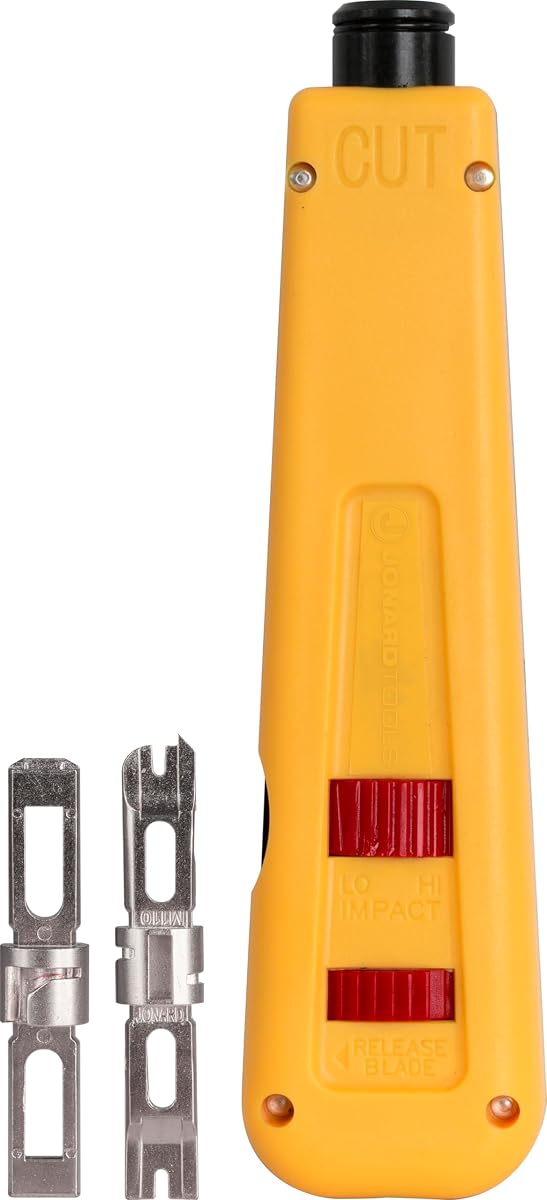
The Jonard Tools EPD-91461 is a manual punchdown tool with a 4.5 rating, supplied with both 66 and 110 blades. It offers adjustable high and low impact settings, an ergonomic color-coded body, and compatibility with Jonard's EPB-series blades and similar products sold separately.
We may earn a commission when you buy through this link, at no additional cost to you.
The included blades are made from hardened alloy steel and nickel plated for durability. Jonard states that the tool was tested for up to 100,000 cycles at the high impact setting, a useful indication of its professional orientation. The combination hook and spudger stores inside the chassis, and an enlarged compartment provides room for blade storage.
Unlike spring-loaded impact models, this is a manual design, so the user supplies the termination force rather than relying on a fixed mechanical impact. It remains a capable and durable choice, but installers handling very large quantities may prefer automatic impact for consistency and reduced repetitive effort. The compatibility with separately sold similar blades expands future options.
Choose the EPD-91461 when you want a direct, manually controlled punchdown with both 66 and 110 blades included. It is particularly attractive for technicians who value metal blade durability, cycle-tested construction, and straightforward settings. If your priority is automatic impact or maximum speed on specialized keystones, choose a model built around those functions.
The hardened, nickel-plated alloy steel blades and stated 100,000-cycle testing point toward repeated professional work. Manual operation also gives the user direct control over the force applied to each termination.
The yellow and blue body divisions make the cut side easy to identify, while the integrated hook, spudger, and enlarged blade compartment keep the tool's small parts organized.
We may earn a commission when you buy through this link, at no additional cost to you.
The right Ethernet punch down tool depends on the termination equipment you actually use, the cable categories involved, and whether speed, manual control, or tool-bag convenience matters most.
Begin with the physical type of insulation-displacement contact used by your patch panels, blocks, faceplates, and keystone jacks. A 110-blade tool is intended for 110-style terminals, a 66-blade tool suits 66-style blocks, and a Krone blade serves Krone systems. Buying the wrong blade can prevent the conductors from aligning correctly with the IDC contacts, even when the tool feels powerful and operates smoothly.
Match the tool to your equipment rather than selecting on cable category alone. For mixed work, prioritize a model with 66 and 110 blades, or 110 and Krone if your panels use that pairing. Dedicated speed tools are different: they support one named jack family rather than general block standards.
A useful punchdown tool should be appropriate for the conductor sizes and constructions used in your cabling system. Products in this guide list support ranging from Cat 5e and Cat 6 to Cat 6A, Cat 7, and Cat 8 in their respective descriptions. The listed range can be useful when a tool will remain in service as a network installation is upgraded.
Check the manufacturer's compatibility statement for both the cable and the target jack. Higher-category cable support does not mean every Cat-rated jack has the same physical layout, and the blade still must match the termination standard. Treat category ratings as one part of compatibility rather than a substitute for checking the exact hardware.
Impact control determines how firmly the conductors are seated into the insulation-displacement contacts. Low and high settings provide useful flexibility because different wire gauges and IDC designs may respond differently to the same amount of force. Automatic tools can select an appropriate setting by wire gauge, while manual and selectable models place more control in the installer's hands.
Look for a method that you can use consistently. A labeled selector or automatic spring mechanism can make repetitive work easier, while a manual tool may be preferable when you want direct feedback from each punch. Whichever design you choose, practice on a spare jack and inspect the termination rather than assuming maximum force is always appropriate.
The blade does much more than make the initial cut: it must align each conductor accurately with the IDC. Twist-and-lock or similar secure retention systems help prevent loosening, pullout, and poor alignment during repeated strikes. Models that store blades inside the handle are also easier to organize and transport.
Consider replacement availability and compatibility as well. A replaceable head can extend the tool's useful life, while a standard interchangeable blade may offer broader future options. Confirm whether extra blades are included, sold separately, or shared with another manufacturer's similarly sized system.
General-purpose 66/110 impact tools work across traditional blocks, faceplates, and compatible jacks. Dedicated speed tools terminate all eight wires in one specialized operation and can be dramatically faster, but they generally support only one named brand and model of keystone. This distinction affects both purchase cost and the number of tools needed for your workflow.
Choose a dedicated tool when you consistently install the supported jack and speed materially affects productivity. Choose a universal impact punchdown when your work includes varied panels, occasional maintenance, or uncertainty about future equipment. Specialty tools can outperform general models within their narrow design envelope, but they are not substitutes for broad compatibility.
Repeated terminations can make handle design and weight more important than they seem during a short demonstration. Cushioned grips, non-slip surfaces, spring action, and automatic impact can reduce hand fatigue. Built-in hooks, spudgers, wire pullers, strippers, and blade storage can also make a tool more convenient in the field.
Prioritize the features you will actually use. A multi-function design is helpful for a mobile technician, while a dedicated manual tool may be simpler to carry and maintain. Confirm that added accessories do not make the tool too bulky for the spaces in which you work.
A punchdown tool is repeatedly exposed to spring tension, impact force, metal blades, and drops in a tool bag. Look for durable blade materials, secure retention, metal construction, and stated cycle testing. Warranty coverage and manufacturer support can also influence the decision, particularly for professional users who keep only one tool on active jobs.
High cycle counts indicate useful longevity, but proper care still matters. Keep blades clean, avoid striking unsuitable materials, and do not force a tool into a jack that uses a different layout. For professional fleets, a reputable support structure may be as valuable as the physical specifications.
Prepare the cable and termination hardware before picking up the tool. Strip the outer jacket to expose the required length of pair conductors, preserve the pair twists as much as practical, and arrange the wires in the color sequence specified by the manufacturer of the jack or block. Confirm that the blade standard matches the equipment and inspect the blade for nicks, debris, or a dull cutting edge.
Place the termination in a suitable punch-down stand when using a traditional 66 or 110 tool. Keep the cable stable, align the conductors with the proper IDC channels, and place the blade squarely over the row. Use the appropriate impact setting and apply controlled, deliberate force along the tool's intended axis. A dedicated jack tool should be seated fully in its supported housing before operation.
After punching, inspect the termination for straight, fully seated conductors, secure pair mapping, and clean trimming. Remove loose wire fragments with the tool's hook, spudger, puller, or a suitable accessory. After use, retract or clean the blade according to the instructions, store removable components in their compartments, and avoid placing a dirty tool where residue can contaminate contacts or other tools.
An Ethernet punch down tool seats twisted-pair conductors into insulation-displacement contacts on 66 or 110 blocks, compatible keystone jacks, faceplates, and patch panels. It also trims excess conductor during the operation. It is used for permanent cable termination rather than for attaching a modular RJ45 plug directly to a cable.
It depends on the installation method and desired result. Punchdown tools are standard for terminating jacks, blocks, patch panels, and wall outlets, while crimpers attach plugs to patch cords. Many professional installations use both because permanent runs terminate into jacks, while shorter cables use plugs.
The primary difference is the physical layout of the insulation-displacement contacts they match. A 66 blade is intended for 66-style blocks, while a 110 blade is designed for 110-style blocks and compatible jacks. They should not be treated as interchangeable, even if a tool body can accept multiple blade formats.
Many listed tools support both categories, but the tool must also match the connector and blade layout. Cable category alone does not guarantee compatibility. Always check the tool, jack, block, conductor size, and installation requirements together before starting a termination.
Usually not. The VCELINK and Rapink speed tools featured here are designed for specific named keystone families and their specialized physical layouts. They can reduce installation time and hand fatigue within that supported range, but they should not be used on unrelated brands or traditional 66 and 110 blocks.
Start with the manufacturer's recommendation for the cable and IDC type, then test on a spare termination. Some tools provide low and high settings, while the Fluke D914S automatically chooses between impacts for specified wire gauges. The goal is secure seating without excessive force, so avoid assuming the highest setting is always best.
Use the correct blade, keep the tool aligned squarely over the IDC row, stabilize the jack in a suitable stand or supported housing, and inspect the result after each punch. Replace worn blades promptly, because a dull or misaligned edge can produce incomplete seating, excess wire, or damage to the termination hardware.
You need an appropriate termination method for permanent cable runs, even in a small home network. A dedicated 110 or 66 impact tool is broadly useful for wall jacks and patch panels, while a single compatible RJ45 plug and crimper can handle short custom patch cords. The right choice depends on the hardware you plan to install.
The Klein Tools VDV427-300 is the strongest all-around selection because it combines a high rating, 66 and 110 blade support, adjustable impact, and a comfortable traditional design. The Cable Matters 110-Blade Tool offers the most straightforward 110-focused option with broad Ethernet category support, while the Fluke Networks D914S stands out for automatic impact selection, integrated accessories, and a lifetime warranty.
For specialized high-volume work, the VCELINK Speed Tool and Rapink Speed Jack Tool may deliver greater productivity, but only when the specified keystone brands are used throughout. Otherwise, prioritize blade compatibility, stable blade retention, and an impact system suited to your wire gauge. A multi-function kit can be useful for a new installer, while a focused professional tool is usually easier to carry.
Product listings, ratings, and pricing can change, so verify the current specifications and price before buying. Most importantly, check the exact jack or block style, confirm the required blade, and ensure the tool's supported cable categories match your installation. Those compatibility checks will prevent the most common and costly punchdown mistakes.