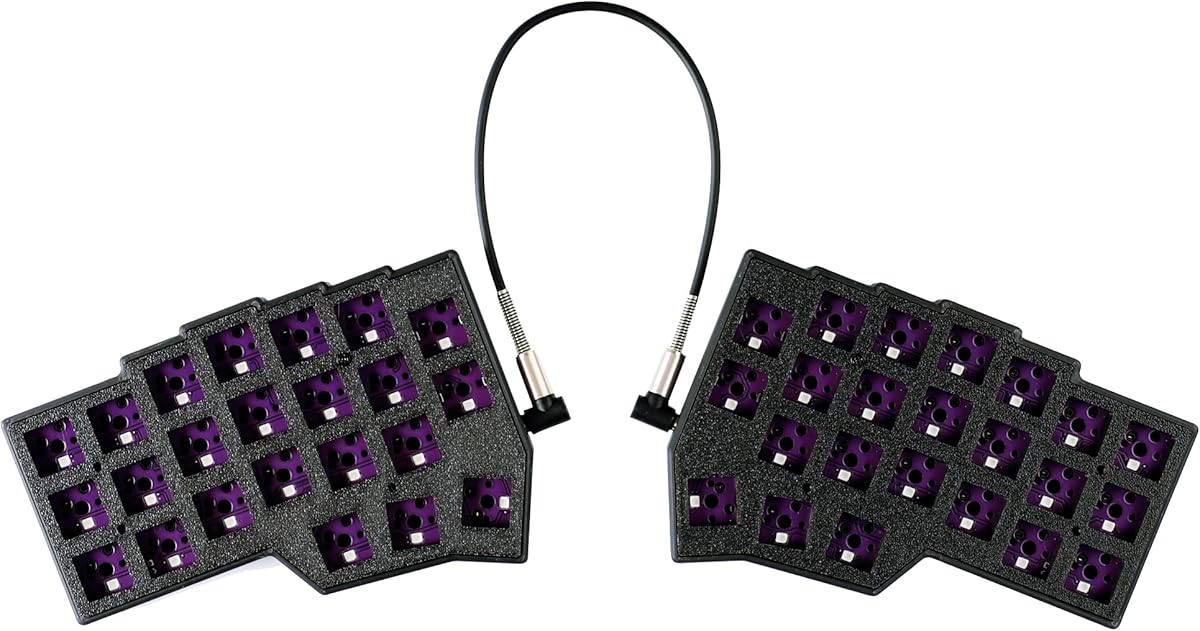
YMDK Corne V4.1 Kit
4.2Editor score
Compact 46-key split layout
Fully programmable RGB controls
Kit requires final assembly
Our ortholinear keyboards guide compares ten options across layout, ergonomics, programmability, connectivity, build, and everyday usability.
Ortholinear keyboards arrange keys in straight vertical and horizontal columns, creating a compact alternative to the familiar staggered layout. The strongest choices balance a uniform grid with comfortable spacing, useful customization, and a build that suits your desk, typing habits, and need for portable or full-size functionality.
We compared all ten products using the supplied specifications, focusing on key layout, split or low-profile design, mounting and switch options, programmable controls, lighting, connectivity, key count, and included components. The list includes true ortholinear boards, closely related ergonomic designs, and conventional alternatives that help clarify what separates a specialized layout from a mainstream keyboard.
Our recommendations span finished keyboards, kits, wireless models, and premium ergonomic options, so each entry has a different purpose rather than simply repeating the same feature set. Ratings and availability can change over time, and current prices may also vary, so confirm the latest listing details before buying.
4.2Editor score

4.3Editor score

4.2Editor score
This comparison shows how the ten featured keyboards differ in layout, ergonomics, programmability, connectivity, and included components. Several entries are specialized ortholinear or split designs, while the final options provide useful context for shoppers comparing them with mainstream ergonomic and mechanical keyboards.


The KBDcraft 07Israfel 50% in white is our leading recommendation for shoppers seeking a finished, low-profile ortholinear keyboard with genuinely ergonomic controls. It carries a 4.3 rating and stands apart from many bare-bones kits by combining a 56-key ortholinear arrangement, a split hinge, a gasket mount, hot-swappable switches, RGB lighting, and both QMK and Vial compatibility.
We may earn a commission when you buy through this link, at no additional cost to you.
Its standout feature is the Core56 low-profile platform, developed around 3-pin low-profile switches, hot-swap sockets, and compatible low-profile MX-style keycaps. The hinged halves offer seven tilt positions, allowing the user to tune the angle rather than accepting a fixed desk posture. The adaptive gasket mount adds flexibility intended to soften bottom-out feel and reduce vibration, while Vial support opens up mappings, macros, shortcuts, and lighting effects.
The compromises are mainly associated with the board's compact specialty layout. Fifty-six keys leaves little room for dedicated navigation or numeric clusters, so common functions may need remapping or layer changes. It is also wired, which is perfectly serviceable at a desk but offers none of the device-switching convenience found in wireless alternatives. As with most ortholinear boards, changing from a staggered keyboard requires deliberate practice.
This is the strongest general choice for programmers, writers, and keyboard enthusiasts who want a complete ortholinear package without assembling switches and keycaps themselves. The white finish also differentiates it visually from the otherwise identical black version. Choose this model if low-profile height, split adjustability, sound control, and programmable behavior matter more than a full-size layout or wireless connectivity.
The Israfel arrives as a full kit and uses a compact 3-pin low-profile switch system rather than requiring the buyer to source special components. That convenience makes it easier to begin using the layout without turning the first build into a hobby project.
Seven hinge positions let each half settle at a more personal angle, while the gasket mount adds controlled movement beneath the keys. These features work together to make an unfamiliar grid feel more manageable during extended typing sessions.
We may earn a commission when you buy through this link, at no additional cost to you.
This 4×6 Corne variant is the most premium-oriented selection in the group, with a 4.2 rating and a notably expanded key arrangement. It combines 58 keys, two knobs, four thumb keys on each hand, hot-swappable sockets, RGB lighting, Vial remapping, and pre-lubed silent linear switches rated at 40g trigger pressure.
We may earn a commission when you buy through this link, at no additional cost to you.
The additional column creates more room for layer-specific shortcuts than a conventional three-by-six Corne arrangement. Two rotary knobs add another layer of hands-on control, useful for volume, scrolling, zooming, or custom actions. Meanwhile, the separated halves can be adjusted for spacing, tilt, and rotation, allowing the board to follow the user's shoulders rather than forcing a fixed placement.
This is not a casual or plug-and-play purchase. The supplied guidance explicitly notes a one-to-two-week adaptation period and says the board is not intended for people accustomed to traditional staggered layouts. Buyers should also be comfortable learning Vial, configuring layers, and taking advantage of the compact 60% format. The silent linear switches are a thoughtful premium inclusion for shared or quiet spaces, although individual preferences still matter.
Consider the 4×6 Corne when you want a highly adjustable and extensively programmable ortholinear board with enough keys to serve as a primary daily driver. It is especially compelling for programmers, advanced productivity users, and enthusiasts who want to dedicate thumb keys and rotary controls to specialized actions rather than settle for a smaller layout.
Four keys per thumb and an extra column create meaningful capacity for alternate layers, navigation commands, and application-specific shortcuts. The design can become a productivity advantage once its unusual arrangement becomes automatic.
Pre-lubed silent linear switches offer a light 40g trigger and reduced acoustic distraction. They suit shared workspaces, although users who prefer pronounced tactile feedback may want to explore other compatible switch options.
We may earn a commission when you buy through this link, at no additional cost to you.
The YIVU Corne V4.1 is a compact 46-key split mechanical keyboard built around a 3×6 column-staggered ortholinear layout. Its 3.8 rating is the lowest among the featured products, but its supplied specifications show a capable feature set: adjustable spacing, tilt and rotation, three thumb keys per hand, hot-swappable 3-pin and 5-pin switches, per-key RGB, and pre-lubed 40g linear switches.
We may earn a commission when you buy through this link, at no additional cost to you.
The defining benefit is freedom of placement. Each half can be moved independently, which helps avoid shoulder rotation and allows the hands to rest in a more natural position. Vial and QMK support allow every key to be remapped and make it possible to create layers tailored to editing, coding, or navigation. The compact footprint also leaves more desk space for a mouse, notes, or a larger display.
Cable management requires attention. The supplied 1.5-meter USB-C cable connects the keyboard to the computer, while the 28-centimeter TRS cable connects the two halves. The TRS connection does not support hot-swapping and should not be disconnected while power is on. The product also does not support connecting both USB ports simultaneously, so users should follow the prescribed connection method.
This is a sensible pick for someone who wants a finished split ortholinear keyboard with programmable controls but does not need the extra column and knobs found in the 4×6 Corne. Prospective buyers should accept the learning curve and cable constraints, then dedicate time to Vial setup. For enthusiasts who value a clean, compact, highly configurable split design, it remains a compelling option.
Independent adjustment of spacing, tilt, and rotation is the YIVU's strongest ergonomic feature. It gives users direct control over the board's relationship to their shoulders and forearms.
Vial and QMK support make this board more than a fixed compact keyboard. Users can remap keys, establish a rapid-access layer, and coordinate lighting with their preferred configuration.
We may earn a commission when you buy through this link, at no additional cost to you.
The black KBDcraft 07Israfel 50% shares the core advantages of the white edition while offering a darker visual treatment for a more understated desk. It has a 4.3 rating, a 56-key ortholinear layout, a low-profile Core56 switch platform, a hinged split case, gasket mounting, hot-swappable sockets, RGB, and QMK and Vial support.
We may earn a commission when you buy through this link, at no additional cost to you.
The straight-column arrangement supports accurate finger travel by removing the familiar lateral offsets of a staggered board. Its hinge adds seven tilt settings, giving the user a way to adjust the typing angle instead of relying on a fixed wedge. Low-profile switches and keycaps reduce overall height, and the gasket mount is intended to provide a softer, less rigid feel. Programmable mappings, macros, and lighting effects make the board adaptable to different tasks.
The layout still asks for a meaningful adjustment period, particularly if touch typing is already deeply ingrained. Its 56-key arrangement means fewer immediate keys than a conventional compact keyboard, and some users may want to add alternate layers for editing or navigation. The wired connection keeps desk setup simple but prevents effortless movement between devices.
Choose the black Israfel if you appreciate the same balanced feature set as the white model but prefer a darker finish that blends into a professional workspace. It is a well-rounded choice for people who value a low-profile mechanism, adjustable split geometry, and open-source programming support.
The compact mechanism still supports hot-swappable switches, RGB, and programmable functions. That combination makes the board practical for users who want a slim keyboard without giving up common enthusiast features.
The black version is ideal for setups where visual prominence is undesirable. Its restrained color pairs naturally with dark desks, monitor arms, and other understated accessories.
We may earn a commission when you buy through this link, at no additional cost to you.
The YMDK Corne V4.1 is the most approachable kit in this comparison for enthusiasts who want to build a compact 46-key split ortholinear keyboard themselves. It carries a 4.2 rating and includes two bottom PLA cases, two top PLA plates, two hot-swap PCBs, a USB-A-to-C cable, and a PCB connection data cable.
We may earn a commission when you buy through this link, at no additional cost to you.
It is important to recognize that this package does not arrive as a ready-to-use keyboard. Switches and keycaps must be prepared separately, and the buyer must assemble the components. Once built, the wired USB-C design opens directly to Vial and supports QMK, Vial, and per-key south-facing RGB. The split construction also permits the two halves to operate independently.
The kit approach is both its limitation and its appeal. Users gain control over switch feel, sound, color, and keycap profile, while PLA construction may prove attractive to anyone interested in a DIY project. The trade-off is that a first-time builder must plan for assembly, compatibility, and any missing components. Those comfortable with the process gain a compact, programmable foundation that can be tailored to personal preferences.
This is our best pick for a budget-minded custom builder rather than a shopper seeking a turnkey purchase. It also works well for anyone who wants a compact independent split layout but does not need the 4×6 model's extra keys or knobs. Make sure to source compatible switches and keycaps and allow enough time for setup and testing.
Because switches and keycaps are not included, the builder can select the feel and sound that best match the desk environment. That freedom is the main reason to choose a kit over a finished board.
The 40% layout minimizes desk usage while keeping two separately placed halves. This makes the kit useful for travel setups, gaming desks, or workspaces where mouse movement and screen space matter.
We may earn a commission when you buy through this link, at no additional cost to you.
The Maketheone M is not a true ortholinear keyboard, but its butterfly-style X-Bows arrangement makes it a useful comparison for shoppers interested in nontraditional layouts. Its 3.4 rating is the lowest in the group, and the supplied feature list is modest: an 80% ergonomic format, USB-C wired connection, white backlighting, hotkeys, Gateron Brown switches, and a retro-oriented design.
We may earn a commission when you buy through this link, at no additional cost to you.
Unlike the straight grids in this guide, the M uses a split-looking butterfly arrangement that attempts to bring the hands inward while retaining a familiar overall footprint. It is a conventional alternative rather than a compact split board with independently movable halves. A wired interface and included tactile switches make it approachable for users who do not need hot-swapping, layers, or software-based remapping.
Its main limitation is that it does not deliver the consistent straight-column finger travel associated with a true ortholinear design. The 80% size also takes up more space than the 40% and 50% choices, and the specifications do not list wireless connectivity or advanced macro software. The relatively low rating reinforces the need to compare customer feedback carefully before choosing it for a specialized workflow.
Choose the Maketheone M if you like retro styling, tactile Brown switches, and a relatively familiar 80% footprint but want to try an unusual ergonomic arrangement. It is less suitable for programmers or productivity users who require a fully programmable compact layout. For those needs, one of the Corne or Israfel options is the more focused recommendation.
The 80% format provides a useful middle ground between a full-size board and a tiny split model. Dedicated hotkeys preserve common controls that would otherwise be reached through layers.
Gateron Brown switches provide tactile feedback, while the white backlight and vintage appearance distinguish the board from modern minimalist designs. This makes it an expressive alternative rather than a strict layout specialist.
We may earn a commission when you buy through this link, at no additional cost to you.
The Keychron K2 HE is a conventional 75% keyboard rather than an ortholinear model, but it earns inclusion for illustrating what modern premium mechanical technology can offer. With a 4.4 rating, it combines magnetic Hall effect switches, a 75% layout, wireless connectivity, rapid triggering, and a browser-based configurator.
We may earn a commission when you buy through this link, at no additional cost to you.
Its magnetic system allows each key's actuation point to be adjusted from 0.2 to 3.8 millimeters with 0.1 millimeter sensitivity. Rapid trigger changes activation and reset behavior according to real-time key travel, which is particularly relevant to fast gameplay. The pre-lubed Gateron Double-Rail Magnetic switches are hot-swappable, but only compatible Double-Rail Magnetic switches are supported, limiting the broader switch ecosystem.
Connectivity is excellent for a mainstream board. It can switch among 2.4GHz wireless, Bluetooth 5.2, and Type-C modes, connect with up to three devices, and maintain a stated 1000 Hz polling rate. Mac and Windows keycaps are included. The trade-offs are the lack of an ortholinear grid, the need to remain within the compatible switch family, and legends that are not shine-through and may be difficult to see in low light.
The K2 HE is best viewed as a high-feature alternative for a shopper who values wireless flexibility and game-focused magnetic switches more than uniform finger columns. It also demonstrates why layout and actuation priorities should be evaluated separately: a board can offer sophisticated performance controls while retaining a conventional key arrangement.
Per-key magnetic sensing supports a wide actuation range and rapid trigger. This gives the board an advantage for users who want different responses from gaming, typing, and productivity keys.
Bluetooth 5.2, 2.4GHz, and wired Type-C modes make the keyboard convenient across a computer, phone, or tablet. Included Mac and Windows keycaps help preserve familiar legends across operating systems.
We may earn a commission when you buy through this link, at no additional cost to you.
The Logitech K835 TKL is not ortholinear, but its 4.6 rating makes it the strongest-rated mainstream product in this comparison. It offers a familiar tenkeyless mechanical layout, an aluminum frame, linear Red switches, a curved key profile, adjustable tilt brackets, and a compact design without a numeric keypad.
We may earn a commission when you buy through this link, at no additional cost to you.
The defining benefit is straightforward mechanical typing. Linear Red switches deliver a smooth, consistent action without a tactile bump, while the tested switch durability is specified at up to 50 million clicks. Its curved profile, slim front edge, and adjustable feet work together to create a comfortable typing position. Twelve dual-function keys provide direct access to media and shortcuts without taking up excessive desk space.
Compared with the split ortholinear boards, the K835 sacrifices the ability to angle each hand independently and does not provide the straight-column travel of a grid layout. It also lacks documented advanced remapping features in the supplied information. The included five-foot USB cable and Windows compatibility keep the setup simple, but there is no wireless connection.
This keyboard is worth considering when the priority is dependable conventional typing rather than a specialized layout. New users who find ortholinear keyboards unfamiliar may appreciate the reduced transition effort, while desk-space-conscious shoppers can still benefit from omitting the number pad. It is a strong control option for comparing specialized ergonomic boards with a straightforward mechanical keyboard.
Removing the numeric keypad creates useful desk space without cutting away the main typing area. It pairs naturally with laptops and compact monitor arrangements where every centimeter matters.
The aluminum frame and switches tested for up to 50 million clicks support the board's reputation for conventional longevity. Linear Red switches keep the typing experience smooth and uncomplicated.
We may earn a commission when you buy through this link, at no additional cost to you.
The nuphy Air60 V2 is another conventional-layout alternative, with a 4.2 rating and a clear emphasis on portability and wireless flexibility. Its low-profile 60% board has 64 keys, supports QMK and VIA, works with Windows, macOS, and Linux, and connects through Bluetooth 5.1, 2.4GHz, or a wired USB-C cable.
We may earn a commission when you buy through this link, at no additional cost to you.
The absence of a conventional function row makes the keyboard smaller without removing the underlying function layer. Up to four devices can be connected for switching among work and entertainment setups. Two RGB light bars along the aluminum frame communicate Caps Lock, connection mode, battery level, and system mode, while a 2500mAh battery is rated for up to 150 hours with all lights off under the supplied lab conditions.
The Air60 V2 is not a true ortholinear board, and its compactness still introduces some adaptation compared with a full-size layout. Its portability also depends on keeping the battery charged, while a 1000 Hz return rate in wireless mode supports responsive gaming despite the lack of a physical cable at all times. The supplied information does not claim a split design or independently movable halves.
This is a strong choice for a frequent traveler who needs programmable controls, broad platform support, and easy device switching. It may also appeal to anyone wanting a low-profile mechanical keyboard without the complexity of building a kit. Those committed to an ortholinear layout should favor the Israfel or Corne designs, while portable users may accept the Air60 V2's conventional grid.
Bluetooth, 2.4GHz, and wired modes support different working environments, while four-device switching simplifies a laptop-and-phone setup. The choice between these modes also gives the user control over responsiveness and power use.
The side light bars provide visible status information for Caps Lock, connection mode, battery, and system mode. They add visible customization without sacrificing the board's compact outline.
We may earn a commission when you buy through this link, at no additional cost to you.
The Logitech Ergo K860 delivers the most conventional full-size interpretation of ergonomic design in this group. It has a 4.4 rating, a curved split keyframe, a full-size key arrangement, a memory-foam wrist rest, adjustable palm lift, and wireless connectivity. Unlike the compact boards, it retains the navigation and numeric areas a traditional workstation expects.
We may earn a commission when you buy through this link, at no additional cost to you.
Its strongest feature is physical comfort. The sloping design and curved keyframe encourage a more natural posture, while the padded wrist rest supplies substantially more support than a bare keyboard. Logitech states that the design provides 54 percent more wrist support and 25 percent less wrist bending than a standard keyboard without a palm rest. Adjustable legs offer 0, negative 4, and negative 7 degree positions for seated or standing use.
The trade-off is that it is not ortholinear and does not offer independently angled halves. Its scooped keycaps may also feel unusual to people accustomed to flat conventional keycaps. It is larger and less portable than the Corne and Israfel options. Connectivity is flexible, however, with USB receiver and Bluetooth support, plus Fn customization and battery notifications through Logitech Options.
Choose the K860 when full-size functionality and built-in wrist comfort outweigh the desire for a straight-grid layout or compact footprint. It is particularly relevant to users who spend long periods at a fixed desk and want an approachable ergonomic upgrade without learning a heavily remapped ortholinear layout.
The curved frame, sloping profile, and memory-foam wrist rest work together to support the hands throughout long sessions. The three-position palm lift allows the user to adjust the angle for different working positions.
The K860 keeps a full-size layout, including dedicated navigation and numeric keys. That makes it easier to adopt than a 40% or 50% board while still offering a more comfort-focused physical arrangement.
We may earn a commission when you buy through this link, at no additional cost to you.
Choosing an ortholinear keyboard involves balancing column alignment, finger travel, footprint, connectivity, and programming requirements. The best board is the one whose physical layout and software complexity match your experience, while its size and included components match your budget and preferred setup process.
A genuine ortholinear keyboard aligns keys in uninterrupted vertical and horizontal columns. That uniformity can improve predictability after the adaptation period, but the number of columns determines how much direct access users receive. The 40% Corne format uses 46 keys, the KBDcraft Israfel uses 56, and the featured 4×6 Corne expands to 58 with two knobs. More keys can reduce reliance on layers while also increasing desk width.
Choose a small grid if maximizing desk space and learning layers sound appealing. Choose a larger ortholinear board if immediate access to shortcuts matters more than the smallest possible footprint.
The primary ergonomic benefit of a split board is the ability to place each half independently. Look for adjustments in spacing, tilt, and rotation rather than assuming every split design is equally adaptable. The Israfel offers seven hinge tilt positions, while the featured Corne designs support spacing, tilt, and rotation adjustments. These controls can align the keyboard with shoulder width and reduce sustained wrist deviation.
In short, a board that accommodates multiple angles is more likely to become a comfortable daily tool than one with only a fixed split shape.
Ortholinear and split layouts change where users expect punctuation, modifiers, and navigation keys to appear. Even experienced typists need time to rebuild muscle memory, and the featured 4×6 Corne is explicitly described as requiring a one-to-two-week adaptation period. Begin with an on-screen layout guide and practice in short, frequent sessions rather than trying to maintain maximum productivity during the first days.
The best layout is the one you will practice consistently. New users may appreciate a board with extra keys, while experienced users may prefer the efficiency of a smaller grid and custom layers.
A kit gives greater control over switches, keycaps, sound, and appearance, but it also requires assembly and compatibility research. The YMDK Corne V4.1 includes cases, plates, hot-swap PCBs, and cables, but not switches or keycaps. Finished boards such as the Israfel and featured Corne models include more of the working hardware and are better for immediate use.
Choose a kit if building is part of the experience. Choose a finished board if you want to concentrate on learning the layout rather than troubleshooting components.
Hot-swappable sockets make switch changes faster and reduce soldering work, while low-profile switches reduce overall height. The Israfel uses 3-pin low-profile components, and both featured Corne keyboards support 3-pin and 5-pin switches. The K2 HE is different because its magnetic system is compatible only with designated Gateron Double-Rail Magnetic switches. Mounting can also alter perceived sound and flex, as seen with the Israfel's adaptive gasket mount.
Check switch compatibility before planning a switch upgrade. A large hot-swap ecosystem is valuable, but only if your chosen switch type fits the socket and plate.
Vial provides browser-based or desktop-friendly control for mappings, layers, macros, and lighting on the featured split boards. The Israfel also supports QMK, while the YIVU Corne lists both Vial and QMK. Configuration depth can improve productivity, but it also creates a setup burden. Confirm whether the firmware and software are available for your operating system before buying.
Prioritize programmable controls if you use shortcuts, alternate application layers, or custom lighting. A simpler board may be more suitable if convenience matters more than deep customization.
Most dedicated split boards in this comparison are wired, which reduces charging and connection complexity. Wireless alternatives such as the Air60 V2 and K2 HE support several devices and are more convenient for travel or shared systems. A wired split may still use separate cables between halves and to the computer, making cable routing an important part of the setup. Follow the included connection instructions and avoid hot-swapping a TRS link while power is connected.
Choose wireless for mobility and device switching. Choose wired for a permanent desk, predictable power, and fewer charging concerns.
Ortholinear boards range from compact 40% kits to a full-size split ergonomic model. Low-profile constructions reduce vertical desk requirements, while the K860's wrist rest and complete key set demand considerably more space. Switch choice and mounting affect sound: the 4×6 Corne includes silent linear switches, whereas other boards allow more control if hot-swappable. Consider the rest of your setup, including mouse placement and monitor distance.
A smaller board is easier to fit but may require more layers. A larger board offers familiar access but consumes the benefit of switching to an ortholinear layout in the first place.
Begin with a familiar layout rather than attempting maximum productivity immediately. Load the correct operating-system layer in Vial or QMK, place the two halves at a comfortable distance, and set the available tilt or rotation adjustments before practicing. Keep wrists neutral, avoid resting them on a hard edge, and take short breaks while the new muscle memory develops.
Program a practical starting configuration with only the shortcuts you need. Place frequently used navigation and editing commands on an accessible layer, then test every modified key in the applications you use. For split boards with two cables, connect the halves according to the supplied instructions and never disconnect the inter-half TRS cable while the keyboard is powered.
Keep the keyboard free of dust and spilled liquids, and clean keycaps and the case with a soft, dry or lightly damp cloth appropriate for the materials. Do not clean switches by forcing liquid into hot-swap sockets. If the board is hot-swappable, power it down before changing compatible switches, and reconnect the half-to-half cable only after the system is safely powered down.
Ortholinear keyboards can improve consistency because each key occupies a predictable position in a straight grid. They may also reduce hand strain when the split halves are positioned well. However, the layout requires an adjustment period, and individual comfort depends on switch feel, keycaps, desk setup, and how much time the user spends practicing.
Ortholinear describes the key arrangement, where columns and rows are straight rather than staggered. Split describes the physical separation into two movable halves. A keyboard can therefore be split without being ortholinear, although the featured Corne and Israfel designs combine both ideas.
The transition varies by person, experience, key count, and chosen layer layout. The featured 4×6 Corne recommends a one-to-two-week adaptation period, while other users may adapt faster or struggle longer. Short, frequent practice sessions are usually more useful than trying to complete an entire workday immediately.
Yes, provided its firmware recognizes the computer and the correct layer is selected. The Israfel and featured Corne keyboards support Windows and macOS, while the Air60 V2 also lists Linux. Vial or QMK configuration allows the user to match modifiers and shortcuts to the active operating system.
No. A finished hot-swappable keyboard can provide switch customization without a full build. Kits are useful when you want to select cases, plates, switches, keycaps, and connectors as part of the construction process. They also require more assembly knowledge and careful component compatibility.
They can be, especially when suitable layers are configured for navigation, editing, and shortcuts. Their compact footprint is attractive for gaming, travel, and large mouse surfaces. The tradeoff is that direct access to function, navigation, and number keys is limited, so users must become comfortable with layer switching.
Look for independent spacing and tilt adjustment, a layout that suits your hand size, and software support for the operating systems you use. Consider the switch format, mounting, cable arrangement, lighting, and whether the product is a finished keyboard or kit. The best split design is one you can position comfortably and configure around your workflow.
They can be, provided the layout is familiar enough for fast input and the board supports the required functions. Compact ortholinear designs can also free mouse space, while programmable layers can place frequently used commands under the thumbs. Competitive players should account for adaptation time and verify compatibility with their preferred games.
The KBDcraft 07Israfel 50% White is the most complete all-around recommendation because it combines a true 56-key ortholinear layout, low-profile mechanical components, seven-position hinge adjustment, gasket mounting, hot-swapping, and open-source programmability in a finished package. The YMDK Corne V4.1 Kit is the best option for a builder who values a compact 46-key design and wants to choose the switches and keycaps personally.
Prioritize the factors that affect daily use rather than focusing only on a visually striking grid. Key count, split adjustability, software, switch compatibility, and assembly requirements will determine whether the board becomes a practical tool. Shoppers who want minimal setup should consider a finished keyboard, while experienced builders may prefer the flexibility of a Corne kit.
Before ordering, verify the current listing, included components, operating-system support, and firmware instructions. Ratings, product availability, and prices can change, so the latest Amazon listing remains the best source for current details. Taking time to select the right layout and configuration will make the adaptation process easier and improve long-term comfort.