
Nomo Medical Alert System
4.1Editor score
Smart Hub and range extenders
Wearable fall-detection tags
Optional professional monitoring
Elderly monitoring systems help families detect falls, wandering, inactivity, and emergencies. This guide compares ten leading options for privacy, ease, and
Elderly monitoring systems give families a practical way to respond to falls, nighttime wandering, inactivity, and everyday care concerns. The best device depends on the person's routines, mobility, cognition, home layout, and whether caregivers want an alert at home or throughout the neighborhood.
The products in this guide use different approaches, including wireless bed and floor sensors, wearable pendants, Wi-Fi cameras, motion alarms, caregiver pagers, and monitored systems with fall detection. We compared their stated functions, connectivity, alert methods, range, setup requirements, privacy features, and suitability for different levels of care.
Each review explains the system's strongest benefits, practical limitations, and best-fit caregiver. Ratings and product details reflect the supplied marketplace information, while features and availability may evolve. Current prices and subscription terms can change, so check the listing before purchasing.
4.1Editor score

4.4Editor score

4.4Editor score
This side-by-side comparison highlights each system's monitoring method, connection style, alert delivery, range or coverage, and most important setup consideration.






The Lunderg Wireless Early Alert Bed Alarm System is a focused solution for caregivers concerned about nighttime bed exits. It earns a 4.4 rating and stands out for its wireless pager, hip-level Patented PreRise sensor, and ability to operate without a Wi-Fi connection, app, or complicated setup.
We may earn a commission when you buy through this link, at no additional cost to you.
Its most useful design decision is sensor placement at hip level. The manufacturer says this position can alert a caregiver before the loved one fully leaves the bed, while avoiding the repeated triggering associated with placing a pressure pad under the shoulders. The 10-by-33-inch pad has a soft foam interior, wipes clean, and is described as incontinence-resistant.
The handheld monitor offers adjustable volume and a vibration-only mode, giving caregivers a way to receive an alert without creating a loud alarm beside the sleeper. A range of up to 400 feet provides useful coverage within a home and potentially nearby areas. The included clip and wall bracket also make it straightforward to keep the pager with a caregiver or near a sleeping area.
This is the strongest general choice for a household that primarily needs to know when someone is getting out of bed. It is less suitable for someone who needs continuous visual monitoring, location tracking outdoors, or automatic fall detection while walking. Families should test sensor sensitivity, secure the pad properly, and confirm that the range reaches the caregiver's normal location.
Because the alert travels to a separate pager, the system can reduce the need for a sudden alarm directly beside the person in bed. Caregivers can select audible or vibration-only delivery according to the household's sleeping environment and the person's response to sudden sounds.
A wireless, local system avoids placing a wired alarm on the mattress. It may be especially appropriate for dementia-care situations where preserving dignity and reducing agitation are important, provided the person understands or can safely respond to a caregiver's arrival.
We may earn a commission when you buy through this link, at no additional cost to you.
The Nomo Medical Alert System is a broader home-monitoring platform for families that want wearable tags, hub communication, range extenders, caregiver notifications, and an optional professional response service. Its 4.1 rating reflects a capable but more involved alternative to simple pager-based devices.
We may earn a commission when you buy through this link, at no additional cost to you.
The kit includes a Smart Hub, two satellite range extenders, and wearable tags. Tags can detect unusual movement and falls, trigger emergency alerts, or be placed on important items. The hub supports two-way conversation, while the satellites help extend coverage through a larger home. Setup is described as plug-and-play, with no landline or special wiring required.
The primary distinction is its optional 24/7 monitoring through the Nomo app and RapidSOS. A monitoring trial is included, after which a subscription applies for continued service. Families that want professional response should confirm the current terms, supported contact methods, device requirements, and cancellation process before making a long-term commitment.
This system suits a senior who spends time moving around the home and whose family wants more than a single bedside alert. It may be less attractive for a household seeking a simple, entirely local device with no ongoing service. Wi-Fi reliability, wearable comfort, and the willingness to charge tags should all be considered before selection.
Tags can be worn or placed on key items, letting one platform support personal protection and household activity checks. This flexibility is useful when the same person moves between rooms but a caregiver wants alerts tied to a wearable or important possession.
The option for 24/7 monitoring adds a response layer beyond family notifications. Families should compare that option with direct caregiver alerts, understand what happens after an alert, and ensure the responsible contacts are current.
We may earn a commission when you buy through this link, at no additional cost to you.
The Elderly Monitor with Camera and Audio combines visual monitoring, two-way communication, a one-touch call button, environmental alerts, and caregiver prompts in a local system. Its 4.1 rating makes it a strong choice for families that want more information than a basic motion or bed sensor provides.
We may earn a commission when you buy through this link, at no additional cost to you.
The portable 2.8-inch screen supports up to 4x zoom and a range of up to 1,000 feet. Infrared night vision, eight soothing melodies, and a 2,000mAh screen battery are designed for overnight use. A VOX setting can put the screen to sleep during quiet periods and wake it when sound exceeds a chosen threshold, while continuous viewing is also possible.
The alert button supports distinct caregiver notifications for SOS, movement, toilet needs, water, and help. The system can also provide medication and meal reminders at multiple intervals and monitor room temperature against a user-defined range. It operates through 2.4GHz FHSS without Wi-Fi, monthly service, or internet access according to the supplied information.
This is a good match for a caregiver who wants both visual confirmation and a direct way for the senior to request help. It is less ideal for anyone uncomfortable with camera monitoring. Position the camera thoughtfully, establish expectations for two-way audio, and test the call button from the bed and bathroom before relying on it overnight.
A camera can help a caregiver distinguish a minor repositioning from a possible fall or request for help. Combined with the alert button, it provides visual and direct communication channels without requiring an internet-dependent service.
Medication, meal, hydration, bathroom, and temperature prompts can support routines that are difficult to supervise continuously. They should complement, rather than replace, appropriate caregiving and professional medical advice.
We may earn a commission when you buy through this link, at no additional cost to you.
The PILSAMAS WiFi Caregiver Pager is a multi-button call system intended for caregivers who want alerts on a receiver and smartphone. It includes two wall- or table-mountable call buttons and a wearable wristband panic button, giving a senior several ways to request assistance.
We may earn a commission when you buy through this link, at no additional cost to you.
The receiver connects to 2.4GHz home Wi-Fi and supports a stated range of 230 feet through walls. Pressing a button triggers a loud receiver alarm with flashing lights and an app notification. Users can name devices, choose among 18 ringtones, adjust four volume levels, and monitor battery and signal status through the app.
Family members can be included in notification sharing, although SMS, phone, and email delivery requires a subscription. This distinction matters when selecting a system: local receiver alerts and standard app notifications may meet a family's needs, while expanded remote delivery could add an ongoing service requirement.
This product works well for a senior who can reliably press a button but does not need automatic fall detection. Its multiple wearables can also be useful in a home with separate bedroom and bathroom call points. Before installation, verify 2.4GHz Wi-Fi coverage, determine which family members receive alerts, and test every button after batteries are installed.
The combination of two mounted buttons and a wristband creates several low-friction ways to summon a caregiver. Placing buttons near a bed, bathroom, or other likely need zone can make help more accessible than relying on one pendant alone.
The app adds remote awareness by showing device status and sending notifications. Because expanded communication methods may require a subscription, families should confirm which alert types are included before deploying the system.
We may earn a commission when you buy through this link, at no additional cost to you.
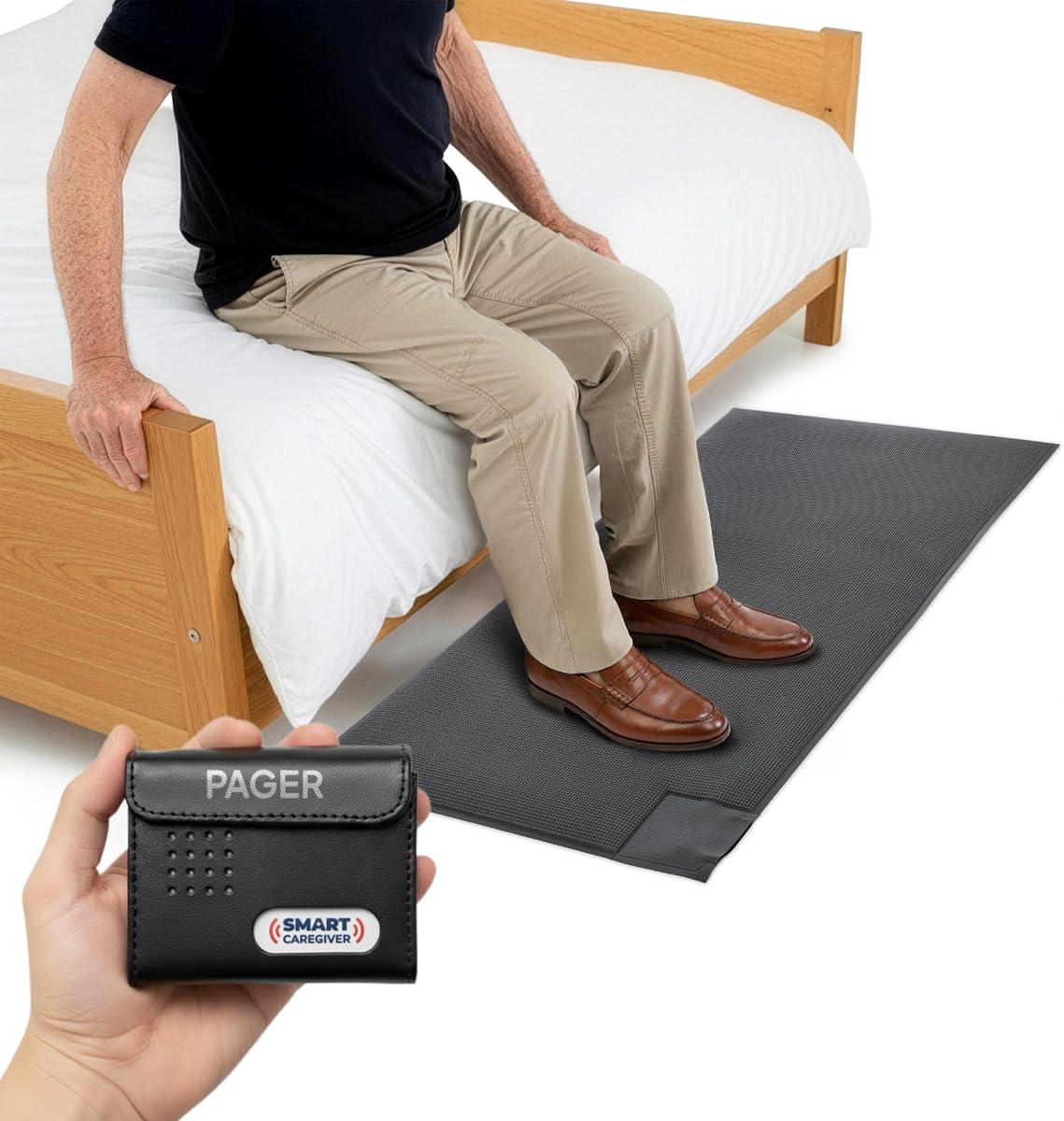
The Smart Caregiver Floor Mat Alarm and Pager System has the highest rating in this roundup at 4.6. It is designed for one highly specific need: alerting a caregiver when a person steps onto a pressure-sensitive mat, commonly placed beside a bed or near an exit.
We may earn a commission when you buy through this link, at no additional cost to you.
The 24-by-48-inch wireless mat sends an alert to the included caregiver pager from up to 300 feet away. The pager can produce an audible signal or a vibration alert, allowing the caregiver to respond without placing a loud alarm in the patient's room. A one-year manufacturer warranty is included.
The system can complement other Smart Caregiver devices, such as call buttons, motion sensors, and bed or chair pads sold separately. That makes it useful in a layered safety plan rather than as a complete monitoring suite by itself. The person does not need to wear a device for this particular alert to work.
Choose this system when wandering or getting out of bed is the primary concern and a threshold alert is preferable to continuous video. Because the floor mat occupies a walking area, installation must avoid creating a trip hazard or interfering with mobility aids. Test the pager and mat from the intended bedroom, hallway, or exit location.
The mat converts a specific location into a meaningful alert point. Positioning it near a doorway can warn a caregiver that a resident may be attempting to leave, while bedside placement can support nighttime monitoring.
Vibration delivery is especially useful at night because it reduces the need for an audible alarm close to the sleeper. Caregivers can still carry or place the pager in a convenient location within range.
We may earn a commission when you buy through this link, at no additional cost to you.
The SecuLife Medical Alert Pendant is intended for seniors who may be away from a stationary caregiver device. It combines automatic fall detection, GPS tracking, two-way cellular calling, safe-zone alerts, and direct notifications to preselected contacts. It carries a 3.8 rating.
We may earn a commission when you buy through this link, at no additional cost to you.
Its necklace format makes the device relatively easy to wear continuously. The pendant offers a large SOS button, hands-free auto-answer for incoming calls, a display with time, battery, and signal information, and an IP67 waterproof rating. The stated battery life reaches up to six days with location tracking at a 24-hour interval.
A monthly subscription is required for the described fall alerts, live tracking, speakerphone, customer care, and related premium features. GPS history is stated to be available for one year, while safe zones can be customized to provide notifications when the wearer enters or leaves designated areas.
This pendant is most appropriate for someone who spends time outdoors or travels beyond reliable caregiver-pager range. Its trade-off is the ongoing service requirement and a lower rating than several simpler alternatives. Families should confirm cellular coverage at regular destinations, charging habits, emergency-contact behavior, and the service terms before choosing it.
GPS tracking and cellular calling are meaningful advantages when a senior walks, runs errands, or travels. Unlike a stationary room monitor, the pendant can remain with the wearer and provide a direct way to communicate.
The large SOS button, readable status display, and hands-free call handling reduce the learning burden. Caregivers should still help the wearer understand the distinction between pressing the button and making a normal call.
We may earn a commission when you buy through this link, at no additional cost to you.
The Smart Caregiver Video Monitor offers a portable visual way for caregivers to check on an elderly relative. It has a 3.6 rating and combines a rechargeable camera, infrared night vision, a compact 2.8-inch display, two-way audio, and a multi-function wireless call button.
We may earn a commission when you buy through this link, at no additional cost to you.
The camera includes an integrated rechargeable battery, allowing it to be moved around the home during the day and plugged in at night for continuous use and charging. The monitor also has a belt clip for movement between rooms. Both camera and monitor recharge through included USB-C cords.
The call remote offers distinct buttons for general assistance, bathroom help, water, moving help, and urgent SOS. The monitor supports push-to-talk audio, while the camera has an always-on microphone. The system operates without Wi-Fi or an app, reducing setup complexity and keeping the connection local.
This product suits a caregiver who wants a portable screen and needs to move the camera between living, bedroom, and hallway spaces. It works best when the camera can be charged overnight and monitored from a nearby room. The stated 3.6 rating warrants careful evaluation, particularly around connection stability, battery expectations, and call-button placement.
The rechargeable camera can follow the needs of a household instead of remaining fixed in one room. Moving it to a bedside during the night and returning it to a common area by day can make the system more adaptable.
The five labeled assistance options can help a caregiver understand the type of help requested at a glance. Clear labels and consistent placement may make the remote more usable than a single unlabeled call button.
We may earn a commission when you buy through this link, at no additional cost to you.
The SYMYNELEC Elderly Monitoring Camera is a Wi-Fi video system designed around one-touch family calls, automatic tracking, and stronger privacy controls. It has a 4.4 rating and pairs a 2.8-inch parent-facing screen with a 1080p pan-tilt-zoom camera.
We may earn a commission when you buy through this link, at no additional cost to you.
Pressing the button rings bound family phones, which pop up and vibrate like a regular call. The first person to answer connects. The camera can also detect loud crashes, falls, or cries for help and send phone alerts, while automatic tracking is intended to keep the person in view.
Its physical privacy mode is a major distinction among camera-based choices. Tapping the app mechanically rotates the lens away, cuts the live feed, and displays a privacy-mode message on the screen. Scheduled timers can automate on and off periods. The product is also stated to have no subscription, with local continuous recording and replay supported through a memory card up to 128GB, which is not included.
This is a strong option for a family that wants video calling and automated camera control but does not want a recurring service. It requires 2.4GHz Wi-Fi and constant Type-C power. Test the remote call flow, notification permissions, tracking behavior, and privacy schedule with all family members who may need to respond.
A mechanically rotating lens provides visible assurance that the feed is off, which can be reassuring during private moments. Scheduled privacy periods further reduce the need to remember to turn the camera off manually.
The older adult only needs to press one button, while relatives receive a familiar incoming call. That design can make contact more natural than asking someone to launch an application or navigate a contact list.
We may earn a commission when you buy through this link, at no additional cost to you.
The CallToU Elderly Monitor is a portable camera and receiver for families seeking local, two-way room monitoring. It has a 3.6 rating and includes a 720p display, infrared night vision, four-times zoom, a temperature sensor, and a wearable-style one-press assistance button.
We may earn a commission when you buy through this link, at no additional cost to you.
The compact 2.8-inch receiver is designed to be carried or placed near the caregiver. The camera supplies live video and two-way audio through a 2.4GHz FHSS connection that does not require Wi-Fi or internet service. The connection is described as FCC-certified and intended to keep the monitoring process local.
The call device includes an SOS function and daily prompts for drinking water, movement, toilet use, and help. Those prompts may support routine building and communication, although the screen and camera remain the primary observation tools. The receiver's portability distinguishes it from a fixed wall-mounted display.
This monitor is best for a caregiver who wants to move a compact screen between rooms and prefers a local connection over cloud-dependent features. Its 3.6 rating suggests buyers should carefully consider the clarity needed for their situation, particularly if identifying a small sign of distress is essential.
Operating without internet removes a cloud account from the basic use process. This can simplify setup and reduce reliance on the home internet connection, while still allowing live checks and two-way communication.
The small receiver can remain near the caregiver or move between rooms. That makes it possible to check on a relative without installing a fixed monitor in every important area.
We may earn a commission when you buy through this link, at no additional cost to you.
The Smart Caregiver Wireless Motion Sensor Alarm is a straightforward system for detecting movement near a bed or doorway. It has a 4.4 rating and consists of one motion sensor, one caregiver pager, and an optional adjustable mounting bracket.
We may earn a commission when you buy through this link, at no additional cost to you.
When movement is detected, the sensor alerts the caregiver pager from up to 300 feet away. The alert can be audible or vibration-only, helping a caregiver monitor from another room without placing a noisy alarm directly beside the person. Mounting the sensor near a bed can identify nighttime movement, while placement by a door can help indicate an attempted exit.
The listed contents include a caregiver pager, a motion sensor, two AA batteries for the pager, and three AA batteries for the motion sensor, although another part of the product information notes that pager batteries are sold separately. Buyers should verify the package contents and install the correct batteries before testing.
This is a good basic option for a household seeking a simple wandering-prevention signal without cameras, Wi-Fi, or a subscription. It does not identify a fall or establish what the person is doing, so it should be treated as an activity alert. Position it to reduce false triggers and confirm that its detection field covers the intended bedside or exit area.
The system can provide an early indication that a person has left a bed or entered a doorway area. Because it detects motion rather than a specific event, correct placement is essential for useful and manageable alerts.
The pager lets the caregiver move away from the monitored area while remaining informed. Vibration mode is useful overnight or when minimizing disturbance is a priority.
We may earn a commission when you buy through this link, at no additional cost to you.
The right elderly monitoring system should match the risk being managed, the person's abilities, and the caregiver's response plan. Start with the most important need, then evaluate connectivity, alerts, privacy, installation, and ongoing requirements.
Different systems are engineered for different events. A bed alarm is intended to reveal a nighttime exit, a floor mat can mark a doorway or bedside threshold, a motion sensor detects general movement, a camera provides visual context, and a wearable pendant supports fall detection and communication outside the home. Choosing the type that directly addresses the highest concern usually produces a more dependable setup than combining several unrelated functions without a clear plan.
Write down the events that require a response, such as leaving bed, wandering outside, a possible fall, missed medication, or difficulty reaching a caregiver. Match the system to that list first.
A person who can confidently press a large button may benefit from a caregiver pager, while someone at risk of falls may need automatic detection. Consider hearing, vision, dexterity, memory, language, and comfort with wearing or being observed by a device. A system can be technically advanced but ineffective if the user cannot understand how to activate it or if alerts are difficult to perceive.
Choose controls and displays that match the user's abilities, and arrange a simple fallback method for situations when the primary device is not used correctly.
Some systems sound an alarm in the room, while others send an alert to a handheld pager, a smartphone, or both. Consider who needs to respond, how quickly they must act, and whether sleeping caregivers should receive audible or vibration-only alerts. Also determine whether multiple family members can share notifications and whether secondary communication methods require a subscription.
Choose an alert method that can be heard or felt in the actual response area. Test it during the day and at night before depending on it.
Stated range is only one part of coverage. Walls, floors, appliances, and the placement of a router or hub can affect performance. Pager-based products may work well within a single home, while camera and Wi-Fi products depend more heavily on network placement. A system designed for a bed or doorway does not need to cover an entire property, but it should reliably reach the caregiver's normal location.
Measure the distance from the sensor to the receiver and test through the relevant walls. Do not assume the maximum listed range will be consistent in every home.
Local systems often use a dedicated radio connection and do not depend on internet service. Wi-Fi systems are convenient for phone notifications and remote family access, but they require a stable 2.4GHz network in many cases. Cellular wearables offer mobility away from the home but use a cellular service. Professional monitoring adds another response layer and generally includes ongoing service terms.
Decide whether continuous connectivity and professional response are necessary. Review any subscription, trial, notification, or cancellation conditions before installation.
Cameras and GPS tracking can offer valuable information but may also feel intrusive. Privacy controls, physical shutters, scheduled monitoring windows, local connections, and clearly defined camera positions can help preserve dignity. Consent is particularly important when the monitored person has dementia, since unfamiliar technology can cause fear or agitation.
Discuss monitoring openly when possible, position cameras respectfully, and use privacy modes when they are not needed.
A reliable product can still fail because of complicated setup, weak signals, forgotten charging, or dead batteries. Local systems often need only pairing and placement, while Wi-Fi and cellular systems require compatible accounts, networks, and charging habits. Battery-powered sensors need regular checks, and video cameras need uninterrupted power for overnight coverage.
Choose a system your caregiver can maintain. Establish a weekly battery, connection, and test routine before the device becomes critical.
Technology cannot respond by itself unless it includes an appropriate monitoring service. Decide who receives alerts, who performs the first check, what happens if no one answers, and when emergency services should be contacted. A written response plan prevents delays and confusion when an alert sounds at an inconvenient time.
Practice the plan with every responsible family member. A clear escalation process is more valuable than an extra feature that no one knows how to use.
Begin by choosing the correct placement with the person's normal routine in mind. Put bed sensors where the manufacturer directs, position doorway sensors to cover the intended path without unnecessary overlap, and install call buttons within easy reach. Camera systems should be positioned for useful visibility while avoiding private spaces. Turn on and test each component before leaving the person alone.
Teach the user as much as is realistic and appropriate. Demonstrate the difference between an SOS button, a routine call, and a general movement alert. If the person has memory or vision limitations, use consistent placement, large controls, and simple routines. A caregiver should still check that the device is worn or accessible rather than assuming it has been used correctly.
Create a regular maintenance schedule. Test alerts, inspect sensor placement, check battery or charge status, confirm network or cellular service, and clean cameras and removable buttons according to the instructions. After any fall, hospitalization, relocation, medication change, or change in routine, reassess whether the selected system still addresses the person's current risks.
The best choice depends on whether the goal is immediate movement notification, automatic fall detection, or visual confirmation. A bed or floor sensor can warn a caregiver before or as someone leaves a bed, while a wearable pendant can detect a fall and provide calling and location features. Choose a system that matches the person's mobility and verify its detection behavior in realistic conditions.
They can be useful when visual observation reduces caregiver stress and improves response time, but they may also increase confusion or reduce privacy. Use a physical privacy shutter or scheduled off periods, explain the camera when possible, and avoid positioning it in a private bathroom or bedroom. Monitor the person's reactions and adjust the setup if distress increases.
No. Several featured products use a dedicated local wireless connection and work without internet service. Wi-Fi is generally needed for smartphone notifications, remote access, and some camera features. Cellular wearables instead rely on mobile coverage and an associated service. Check the connection requirements before choosing a device for a home with unreliable internet.
Follow the manufacturer's placement instructions and observe where the person actually rises or exits. Bed alarms often work best at the appropriate mattress position, while motion sensors should cover the path without creating unnecessary alerts. Test the device with the user moving naturally, adjust the sensitivity, and make sure the receiver reaches the caregiver's normal location.
No. These systems can supplement care by detecting events, delivering alerts, and supporting communication, but they cannot provide hands-on help, judgment, medication administration, or continuous supervision. The appropriate level of support depends on the person's health, cognition, mobility, and living arrangement. Use technology as one layer of a broader care plan.
A local pager sends a signal directly to a nearby receiver, often through a dedicated radio connection, and does not require internet access. An app alert depends on a Wi-Fi or cellular network and can notify family members farther away. Local paging can be more immediate and resilient, while app alerts offer broader reach and more detailed status information.
Test the system during setup, after moving or changing equipment, and on a regular schedule thereafter. Weekly checks are practical for local sensors and pagers, while rechargeable or networked devices should also be checked for battery level, charging, signal strength, and app connectivity. Test at a realistic time of day and confirm that every responsible caregiver receives the alert.
Confirm that the power source, batteries, network connection, and pairing are working, then repeat the test. Check that the sensor has not shifted and that the receiver is still within range. If the device fails during a real emergency, use the appropriate backup contact or emergency services and replace the failed equipment promptly.
The Lunderg Wireless Early Alert Bed Alarm is the strongest focused choice for nighttime bed exits, while the Nomo Medical Alert System offers the broadest mix of wearable tags, range extenders, caregiver notifications, and professional monitoring. The Smart Caregiver Motion Sensor is a straightforward option for basic wandering awareness.
Prioritize the event you most need to detect, the user's ability to operate the device, and the reliability of the alert path. Privacy matters just as much as functionality, especially for camera systems, and every setup should include a written caregiver response plan with a tested backup method.
Ratings, features, service terms, and prices can change, so review the current product listing before buying. Confirm compatibility, included accessories, connectivity requirements, and any subscription conditions, then test the complete system before relying on it for everyday safety.