
Nettbe Reusable Cable Ties
4.8Editor score
Sixty reusable hook-loop straps
Adjustable six-inch sizing
Suitable for indoor and outdoor use
Cable Management Solutions help transform tangled, exposed cords into safer, more orderly spaces. The right organizer can reduce visual clutter, protect wiring from damage, improve access to plugs, and keep desks, entertainment areas, offices, and workstations looking intentional. Effective options range from reusable straps and adhesive clips to sleeves, raceways, boxes, and under-desk trays.
The products in this guide were compared using their stated construction, installation methods, capacity, dimensions, intended applications, and practical features such as adjustability, ventilation, and tool-free mounting. The list covers solutions for a single loose charging cable as well as complex setups containing power strips, data cables, chargers, and peripheral wiring, with options suitable for temporary and more permanent organization.
Each review identifies the most useful application for that product and explains the trade-offs involved in installation and placement. Ratings and product details reflect the supplied information, while features and availability can change over time. Current prices also fluctuate, so compare the latest listings and verify dimensions, surface compatibility, and desk clearances before purchasing.
4.8Editor score

4.6Editor score

4.6Editor score
As an Amazon Associate we earn from qualifying purchases.
The table below compares the ten cable management solutions by their core format, capacity, mounting approach, and most notable construction feature. It is designed to help readers quickly distinguish simple reusable straps from adhesive raceways, protective sleeves, enclosed boxes, and larger under-desk trays.



The XHF Adhesive Cable Mounts are a point-anchoring solution for keeping individual cables or small bundles secure along walls, desks, cabinets, and other suitable surfaces. With a 4.6 rating, their strongest offering is flexibility: the kit includes 100 mounts, 100 eight-inch zip ties, and screws, allowing installers to choose between self-adhesive placement and mechanical fastening. The mounts combine PA66 nylon with the stated 3M Strong Adhesive backing.
We may earn a commission when you buy through this link, at no additional cost to you.
The large assortment makes this product useful for distributed cable-control projects rather than a single desk. It can manage computer, television, USB, and decorative-light wiring, while the screws offer a more secure option where adhesive alone may be insufficient. Small square mounting points are particularly useful when a full-length raceway would be excessive or where cables need to follow a specific route. The stated UV protection also broadens its relevance to outdoor installations.
Surface preparation is the main consideration. The backing should be applied only to a clean, dust-free area, and the adhesive is intended to be installed once rather than repeatedly removed and repositioned. A full 24-hour interval is recommended before loading the mount, which means the placement of every point must be planned carefully. For users who require frequent rearrangement, reusable straps may prove more accommodating.
This is a strong choice for homeowners, offices, installers, and anyone who wants a large stock of mounting points with both adhesive and screw options. Buy it when precision anchoring and versatility matter more than rapid, unrestricted repositioning. The included quantity also makes it practical for multi-room cable-control projects or maintenance supplies.
Each square provides a dedicated point for securing a cable with an included tie. Adhesive supports convenient installation on clean compatible surfaces, while screws add a mechanical alternative for locations where a more secure hold is needed.
The 100-piece combination of mounts, eight-inch ties, and screws makes it easier to tackle several rooms or several cable runs without assembling a separate organizer for every point.
We may earn a commission when you buy through this link, at no additional cost to you.
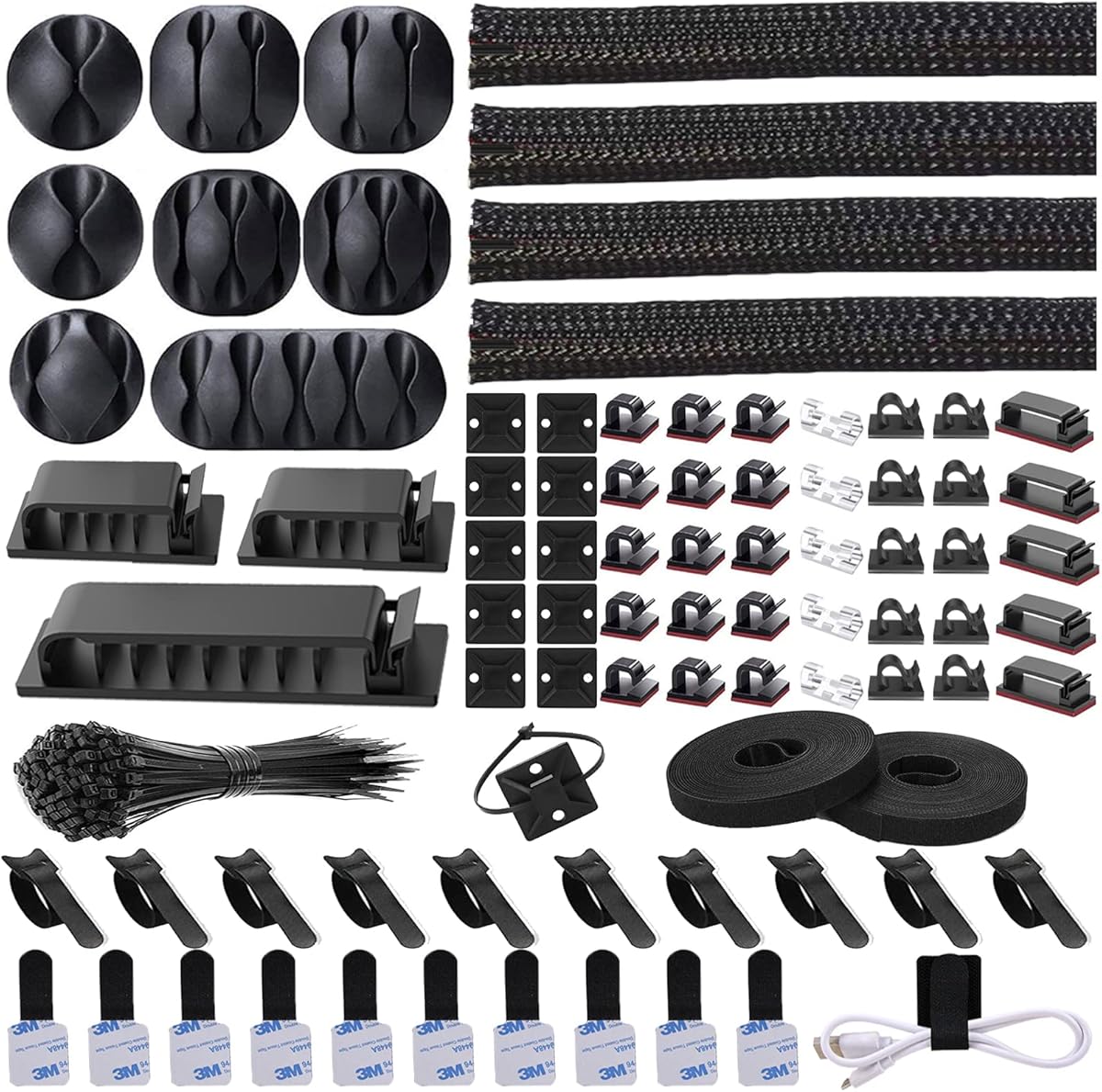
The N NOROCME Management Kit is a broad 192-piece assortment designed for users who want several cable-control methods in one purchase. Its 4.6 rating reflects a versatile package containing four 20-inch braided sleeves, reusable wire ties, 46 wire clips, two rolls of self-adhesive ties, 20 cable tie mounts, and 100 seven-and-eight-inch fastening ties. It is less a single-purpose holder than a compact organization toolbox.
We may earn a commission when you buy through this link, at no additional cost to you.
One major advantage is that several kinds of tasks can be addressed with the same kit. Braided sleeves gather and conceal longer cable runs, adhesive clips route lightweight cords along furniture or walls, reusable ties group cables temporarily, and tie mounts create fixed routing points. The split sleeve construction allows wires to be loaded without threading each cable through a closed end, which is particularly useful when several cords need to enter the sleeve together.
The kit is broad rather than focused, so buyers should check that they actually need the quantity and range of components included. The 100 small fastening ties and numerous clips can be unnecessary for one outlet or monitor, and adhesive-based parts are best limited to clean surfaces such as desks, wood, ceramics, walls, cabinets, and baseboards. The bundled materials are described as sturdy PA66, while the sleeves are designed for repeated opening and closing.
Choose this kit for a mixed household, office, or entertainment-center project where cables of different lengths and quantities need to be managed together. It is especially helpful when a convenient assortment prevents repeated purchases of sleeves, clips, ties, and mounts. A specialist single solution may be cleaner for one tightly defined job, but this package is well suited to general-purpose organization.
The assortment combines permanent-style adhesive clips and mounts with reusable ties and sleeves, allowing the same kit to serve routed, bundled, and concealed cable arrangements.
The split braided sleeve closes around installed wires, avoiding the need to feed every cable through a closed tube. It also offers a physical layer around grouped cords.
We may earn a commission when you buy through this link, at no additional cost to you.
The YECAYE J-Channel Organizers are adhesive-backed raceways for hiding and routing cables along desks, walls, and other smooth surfaces. The 4.6-rated set includes six channels, each measuring 15.7 inches long, 0.99 inches wide, and 1.55 inches high. The open J-shaped profile is the defining feature: cables can be placed in or removed from the channel without lifting the cover.
We may earn a commission when you buy through this link, at no additional cost to you.
That outward-facing opening makes the system more convenient for desks that remain active. A user can add a charging cable, reposition a monitor lead, or service a connection without dismantling the entire organizer. Each channel has a stated theoretical capacity of up to ten cables, giving the six-pack enough flexibility for several devices in a home office or entertainment area. The PVC construction is also described as flame-retardant.
Installation relies on pre-applied adhesive. The surface should be smooth and clean, and the channel should remain in place for 24 hours before use. Powder-coated walls and uneven surfaces may prevent a strong bond. For temporary placement, the supplied guidance mentions using a little heat from a hairdryer to remove the channel and reduce the chance of residue, although careful handling remains important.
This is our preferred option for users who want cables concealed but still immediately accessible. It is especially effective along the rear edge of a desk or on a smooth wall where a visible raceway fits the room's style. It is less suitable for rough walls, frequently moved equipment, or installations requiring a permanent structural connection. For those needs, a clamp-mounted tray may be more dependable.
The outward-facing J design keeps the front open, allowing cords to slide in or out as equipment is added, moved, or disconnected. This improves everyday usability compared with a fully enclosed raceway.
Six matching black channels can disguise runs across multiple work areas or rooms. The defined profile also creates a more deliberate appearance than exposed cables draped across a surface.
We may earn a commission when you buy through this link, at no additional cost to you.
The D-Line Cable Management Box is an enclosed organizer for power strips, extension leads, and excess cord clutter. It has a 4.5 rating and is designed for situations where hiding wires is more important than accessing each cable constantly. The large black box measures 16.5 inches long, 6.5 inches wide, and 5.25 inches high, providing a substantial enclosed volume for a power strip and attached cords.
We may earn a commission when you buy through this link, at no additional cost to you.
Its purpose extends beyond appearance. Keeping a power strip and excess cable inside can make the wiring less accessible to curious infants or pets while also removing loose leads from walkways. Three slots in the rear allow cables to enter and exit in a controlled way. Curved edges and the understated exterior help the box blend with a TV stand, office, gaming setup, kitchen worktop, or seasonal display.
The critical buying consideration is size. A large enclosure does not guarantee that every power strip will fit, so buyers should compare the external dimensions and the shape of the intended power strip before ordering. Because the box is enclosed, individual connections may also be less convenient to reach than with an open tray or J channel. A separate cable entry accessory may also be needed for a particularly neat finish at the rear openings.
This product is well suited to homes, offices, and shared environments where an exposed power strip looks untidy or presents an access concern. Choose it for consolidated floor or furniture-side storage, especially around entertainment centers and work areas. If easy plug access, minimal footprint, or very frequent cable changes matter most, an open tray or reusable strap may be a better match.
Enclosing a power strip removes it from casual contact and shortens the amount of loose cable crossing an exposed area. That can make spaces around entertainment units and workstations look neater and feel less hazardous.
The curved exterior, black finish, and controlled rear cable entries create a less utilitarian appearance than an uncovered power strip. It can sit beside or beneath compatible furniture in a home or office.
We may earn a commission when you buy through this link, at no additional cost to you.
The Nettbe Reusable Cable Ties are hook-and-loop straps for grouping loose cords without tools, adhesive, or permanent mounting. The 4.8 rating makes them one of the strongest simple options in the guide. Each of the 60 straps measures six inches and can be wrapped around a bundle, removed, readjusted, and reused as the arrangement changes.
We may earn a commission when you buy through this link, at no additional cost to you.
This approach is especially useful behind a television, inside a computer, around charging leads, in a workshop, or anywhere a quick visual cleanup is needed. The straps secure several cords together while leaving the individual cable ends accessible. Their reusable construction is valuable for setups that change frequently, such as a mobile work area, a gaming station, or a shared charging station.
These ties organize but do not conceal. For a polished finished look, they can be paired with a sleeve or raceway, but on their own they are best viewed as a flexible way to reduce tangling and keep related leads together. The six-inch length is appropriate for small or medium bundles rather than long runs of heavy power cabling. As with any hook-and-loop product, keeping the fastening surfaces free of debris will help maintain secure closure.
Choose the Nettbe set when you want a straightforward, reusable solution that works without modifying furniture or walls. It is an excellent first step for taming a few cables and a practical supplementary tool for larger organization projects. For a fixed and fully hidden installation, choose a raceway, box, or tray instead; for changing bundles, these reusable ties are among the most flexible options listed.
The hook-and-loop closure can be opened and adjusted whenever a cord is added or removed. This makes the straps useful for temporary setups and for spaces where the connected equipment changes.
With 60 individual straps, the set can manage more than one cluster of wires. Users can keep separate supplies in an office, garage, entertainment area, and travel kit without taking the entire assortment apart.
We may earn a commission when you buy through this link, at no additional cost to you.
The Alex Tech Split Wire Loom is a protective sleeve for bundling multiple power, data, audio, video, or USB cables. It has a 4.7 rating and measures 10 feet long with a one-half-inch diameter. The split construction allows the user to lay a group of cords over the sleeve and close it around them, rather than feeding every wire through a rigid closed tube.
We may earn a commission when you buy through this link, at no additional cost to you.
Once installed, the sleeve gathers multiple conductors into a single protected run. This can reduce tangling, keep associated cables together, and provide insulation around the bundle. The product data also identifies applications involving high-fidelity speaker, HDMI, and automotive wiring, and notes that it can help protect cables from cat chewing. Its operating range is listed from minus 103 to 257 degrees Fahrenheit, with a melt temperature of 446 degrees.
Its main limitation is that a sleeve organizes cables but does not secure them to a wall, desk, or furniture edge. A separate tie, clip, or adhesive mount may still be needed. Cable diameter should also be checked before installation, because the sleeve's half-inch opening is intended for bundles that fit within its stated size. The black finish blends well with common computer, television, and office equipment.
Choose this sleeve when the priority is protecting and consolidating a run of compatible cables. It is well suited to home offices, media areas, computer setups, and vehicle projects where a clean bundled appearance is important. For complete under-desk concealment, pair it with a tray or mounting points. As a standalone protective and bundling solution, it offers a simple approach with strong physical coverage.
The woven exterior surrounds grouped conductors and adds insulation compared with leaving multiple cables exposed. That can improve handling, reduce snagging, and make a cable run look like one intentional line.
Because the sleeve opens along its length, cables can be placed directly over it before it closes around the bundle. The process is much easier when a run has several permanently connected ends.
We may earn a commission when you buy through this link, at no additional cost to you.
The Univivi 32-Inch Cable Tray is an under-desk storage solution for power strips, chargers, power cords, and data cables. Its 4.6 rating reflects a practical combination of capacity, mounting flexibility, and ventilation. The tray occupies previously unused space beneath a desk, keeping bulkier wiring off the floor and reducing the visual clutter created by a multi-device setup.
We may earn a commission when you buy through this link, at no additional cost to you.
Users can install it with C-clips for a trace-free option or with screws for a more stable mount. Enlarged cable holes on both the front and back make it easier to route cords toward equipment on the tabletop or floor. The hollow, ventilated structure is also intended to dissipate heat around stored power strips, an important consideration when several adapters are gathered in one location.
Desk construction and clearance should be checked before installation. The clamp method depends on the underside and edge profile, while screw mounting requires suitable material and a comfortable installation position. The tray is more suitable for a fixed workstation than for frequently relocated equipment, and it will not remove the need to bundle loose cables inside the basket. Nevertheless, it gives those cables a defined home and keeps them away from foot traffic.
This tray is a strong option for a home office, gaming desk, or professional workstation with multiple powered devices. Choose it when capacity and heat dissipation matter more than having the organizer move with every desk adjustment. Users wanting a shorter, narrower model or a fabric-sided construction can consider the other tray options, but this version stands out for its ventilated structure and dual mounting approach.
A 32-inch tray can hold a power strip and associated cords beneath the work surface. Moving those items off the floor reduces visual clutter and can remove cables from areas where they might be stepped on or snagged.
The open, hollow structure allows air to circulate around stored electrical components. This is particularly helpful in densely equipped desks where multiple adapters and power strips are collected in a confined area.
We may earn a commission when you buy through this link, at no additional cost to you.
The Flexible Under-Desk Cord Holder uses pairs of hook-and-loop straps to sort cables without installing a full basket or raceway. The 4.6-rated set contains 20 pairs of 120-by-40-millimeter holders, with each extended strap described as capable of holding up to 15 cables. The low-profile format is intended to fit beneath a desk and within tight corners where a larger tray would be inconvenient.
We may earn a commission when you buy through this link, at no additional cost to you.
The segmented construction is the product's most useful feature. Individual sections can be adjusted without removing the entire unit, allowing users to create space for thicker plugs, power supplies, or cables that need to bend in a particular direction. The self-locking hook-and-loop closures are intended to resist slipping, while the reinforced pairing helps maintain the cable bundle's position.
Installation can be done alone or with adhesive hooks. The acrylic pads are described as adhering to most smooth surfaces, including wood, glass, and tiles, and as being removable without residue. Nevertheless, users should wait two hours after applying the adhesive before loading the holder. The product organizes rather than encloses cables, so it does not provide the same heat management or physical shielding as a ventilated tray.
Choose this set for compact workspaces, shallow desks, or cable runs that need frequent adjustment. It is particularly useful when a rigid basket would interfere with legroom or where only a small number of routes need sorting. For heavy power strips, large adapters, or maximum heat dissipation, an under-desk tray is the more suitable format.
The segmented holder can conform around desk supports or cable bundles of different thicknesses. Its low profile helps preserve open legroom and makes it practical for corners where a deep basket is difficult to fit.
Removable acrylic adhesive pads allow the cord holder to be attached without drilling. Waiting the specified two-hour interval helps the bond establish before cable weight is added.
We may earn a commission when you buy through this link, at no additional cost to you.
The Univivi 36-Inch No-Drill Tray is a high-capacity under-desk organizer made for complex workstation setups. It carries a 4.6 rating and measures 36 inches long by 5.5 inches wide and 5.5 inches high. The tray is designed to hold power strips, sockets, adapters, and other bulky items, creating a dedicated location beneath the desk rather than allowing them to collect randomly on the floor.
We may earn a commission when you buy through this link, at no additional cost to you.
Its premium construction includes thick 600D oxford fabric, a bottom support to help the tray retain its shape under load, and a heavy-duty screw-free clamp. Screw fixing is also supported for users who want an alternative attachment method. Built-in ties help keep stored items from shifting, while the tray can unfold for easier access when adding or removing equipment. The stated material is flame retardant.
Clearance is essential. The manufacturer advises at least 5.3 inches of space along the table edge for the clips, and drawers or back rods may interfere. The clamp remains visible because it attaches to the underside and edge of the table, so this is a functional solution rather than a completely concealed one. The stated dimensions should also be compared with the available under-desk area before installation.
This tray is the premium pick for a serious office, gaming system, editing workstation, or home office containing several power supplies and bulky adapters. Its larger capacity and reinforced support make it more appropriate than a small basket for a densely wired setup. Buyers who need the smallest possible footprint or expect to move the entire workstation frequently may prefer a compact holder or a J-channel system.
The wide, deep tray is intended for power strips, sockets, adapters, and associated leads. Its substantial dimensions reduce the need to split a large wiring system among several smaller containers.
The heavy-duty clamp offers a no-drill route, while screw fixing provides another option where appropriate. Built-in ties then keep the stored components organized within the tray.
We may earn a commission when you buy through this link, at no additional cost to you.
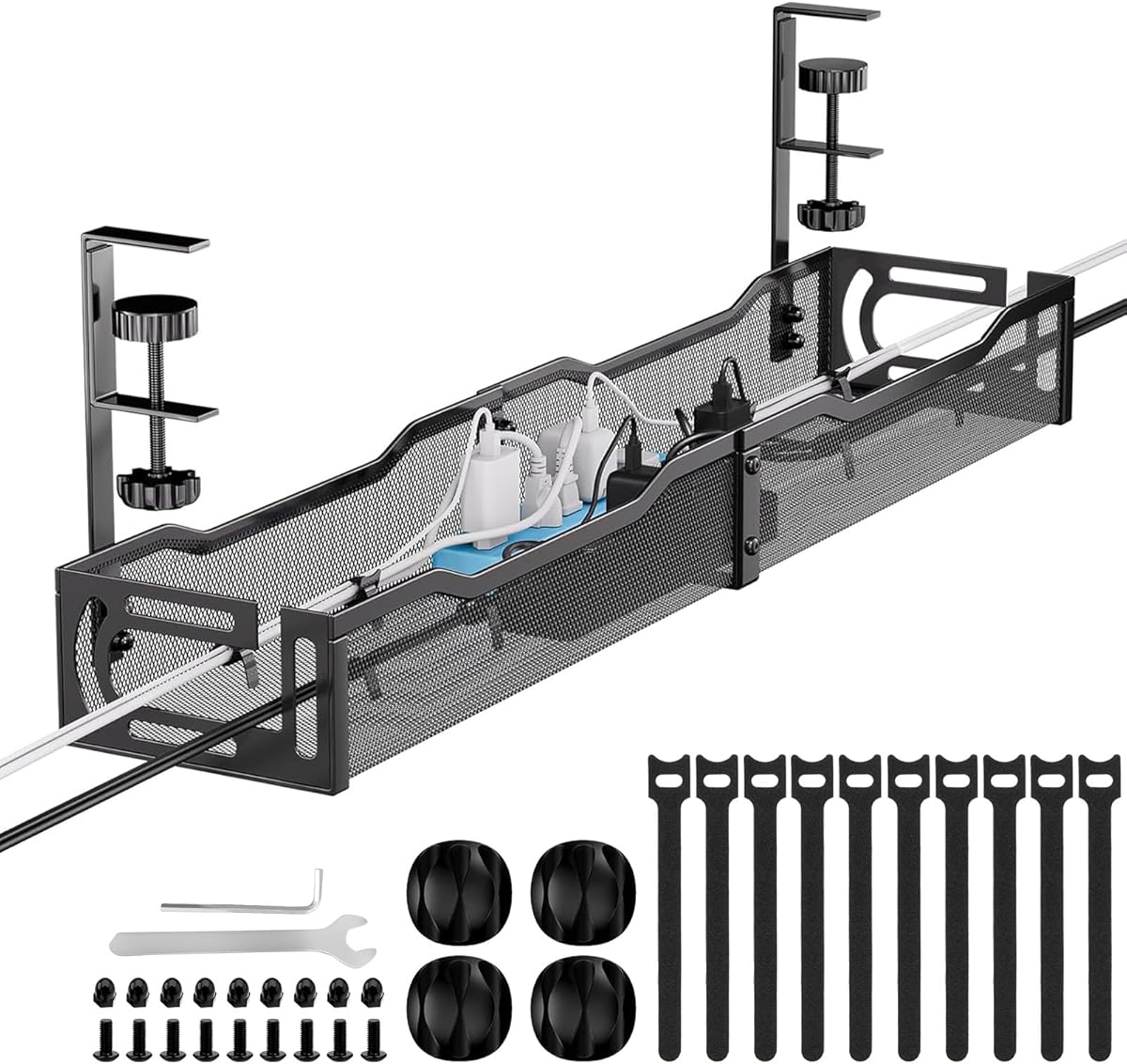
The 25-Inch Metal Cable Tray is a rigid, ventilated under-desk organizer with a 4.8 rating. It is designed to hold cables, sockets, and power supplies while keeping them away from the floor. The stated load capacity is approximately 15 pounds, and the metal mesh construction provides a strong structure without completely blocking airflow around stored electronics.
We may earn a commission when you buy through this link, at no additional cost to you.
The tray attaches with an adjustable desk clamp and does not require drilling. It supports inward or outward positioning, which makes it easier to align the tray with the way cables approach the work surface. Non-slip rubber pads on the clamp are intended to protect the desktop from scratches. Compatibility covers desks between 0.4 and 2 inches thick, including many common office and standing-desk configurations.
The two-part design divides the 25-inch tray at the middle, which simplifies transportation but requires the user to join the sections with screws before installation. The stated assembly time is three minutes or less. Although the open sides allow cables to pass freely, the mesh still creates a defined basket, so separate ties may be useful for keeping thinner cords grouped within it. The product also cannot be positioned where a clamp cannot engage the desk edge.
Choose this tray for a fixed desk that needs sturdy storage and dependable ventilation. It is a good match for offices, gaming setups, and home workstations where a power strip and several adapters need a dedicated location. Compare the 25-inch length with the desk size before buying; a longer fabric tray may be better for broad installations, while this metal model is attractive for its rigid structure, open mesh, and straightforward clamp system.
The metal structure supports a substantial load, while the mesh pattern allows air to circulate around stored power supplies and cables. This combination is useful for a fixed workstation with multiple connected devices.
The adjustable clamp accommodates a range of common desktop thicknesses and includes non-slip rubber pads. It can be positioned inward or outward to suit the desk's layout and cable direction.
We may earn a commission when you buy through this link, at no additional cost to you.
Start by identifying the type of cable problem, the surface where the solution will be mounted, and how often the arrangement will change. Format, capacity, attachment method, and access requirements matter more than the number of pieces in a package.
Cable organizers solve different problems. Reusable hook-and-loop straps bundle loose cords but leave them visible. Braided sleeves conceal and protect a compact group of cables. Adhesive clips and tie mounts hold lightweight cords at fixed points, J channels create a defined raceway, and trays or boxes store bulkier power strips and adapters. Match the format to the outcome: tidiness, concealment, protection, stable routing, or storage of equipment.
Choose a strap for flexible grouping, a sleeve for protected bundles, a raceway for a clean fixed route, and a tray or box for bulky power components.
Capacity should be considered in several ways. A sleeve has a maximum cable diameter, a clip is limited by the space it occupies, and a raceway or tray must accommodate the number and bulk of the wires. For enclosed boxes, check both the external dimensions and the shape of the power strip. Under-desk trays should be measured against the available depth, length, and clearance around drawers, legs, and support rails.
Check the dimensions of the intended cables, power strip, adapters, and installation area rather than relying only on the stated piece count.
Adhesive installation is fast and avoids holes, but it depends on a clean, smooth, compatible surface. Stronger adhesive does not compensate for dust, oil, powder-coated walls, or uneven texture. Mechanical options such as screws, clips, and clamps are better for permanent installations, heavy loads, or surfaces where adhesive is uncertain. Some products offer both, allowing the user to choose according to the location and the need to reposition equipment.
Use adhesive for clean smooth surfaces and light duties; choose screws or clamps for heavy loads, uncertain surfaces, and fixed workstation installations.
The best solution is one that remains usable after installation. An open J channel allows cords to be added or removed without dismantling a cover. A tray keeps a power strip accessible, while a fully enclosed box is better when visual concealment and reduced access take priority. Straps offer the easiest rearrangement but do not hide cables. Think about how often devices are plugged in, unplugged, moved, or reconfigured before selecting the enclosure.
Prioritize open or accessible designs for frequently changed equipment and enclosed designs for areas where hiding and tidiness matter more.
Power strips, chargers, and adapters generate heat, so storage design should not trap it unnecessarily. Ventilated metal mesh provides open airflow, while fabric trays may combine a structured base with open sides. J channels and sleeves primarily route or cover individual cables rather than store concentrated electronics. For densely powered desks, select a ventilated tray and avoid packing multiple heat-producing adapters into a fully enclosed or poorly ventilated container.
Choose an open, ventilated tray for power strips and multiple adapters, especially in a workstation where sustained heat could accumulate.
Adhesive products work best after the surface is cleaned and allowed to bond for the stated interval. Some coatings, textured walls, glass edges, and uneven furniture can reduce adhesion. Clamp-based trays have their own requirements: check desktop thickness, edge shape, support bars, drawers, and the space needed for the clamp. Screw-mounted systems also require compatible material and sufficient room to position a tool. Verify these constraints before selecting a model.
Confirm the exact surface type, desk thickness, edge clearance, and mounting hardware required rather than assuming every installation is interchangeable.
Small clips and sleeves are designed for particular cable dimensions. A bundle that is too thick may not close securely, while a very thin cable can slip or fail to fill the intended grouping. Before purchasing sleeves, confirm the diameter of the wires and whether the stated size refers to the opening, the internal space, or the overall sleeve. For mixed cable types, test the bundle in a similar configuration whenever possible.
Verify that the opening accommodates the actual cable bundle and that the fastening surface will remain closed around it.
Large assortments are valuable when several rooms, devices, or cable types need attention, but they can include components that remain unused. A focused setup may be better served by one tray, a set of clips, or a handful of reusable straps. Look for a collection that covers the actual routes you need rather than judging quality only by total piece count. Mixed kits are useful for general maintenance, while purpose-selected products usually create a cleaner installation.
Buy the components your setup will use, whether that is a few reusable straps, a coordinated clip set, or one correctly sized tray.
Begin by identifying every cable that needs attention, unplugging the equipment, and laying the cords into their intended route before installing an organizer. Measure the available path, test the fit, and clean the mounting surface. For adhesive components, use the specified waiting period before loading cables; for clamps and screws, secure the base evenly and confirm the desk or furniture can support the installation.
Route power, data, and charging cables according to their actual connections, leaving enough slack for equipment movement and avoiding sharp bends. Bundle similar cables with reusable ties or sleeves, then secure them with clips, mounts, or channels at useful intervals. Keep plugs and frequently accessed connectors visible, and route power cords separately from data cables when practical to reduce tangling and simplify troubleshooting.
For maintenance, inspect adhesive mounts for lifting and check that clips, straps, and sleeves remain secure. Clean hook-and-loop surfaces with a soft brush or suitable lint-removal method, and keep adhesive surfaces free of dust and residue. Review enclosed boxes and trays periodically for heat buildup, damaged cords, or crowded connections. Reconfigure reusable systems whenever equipment changes rather than allowing groups to expand without a plan.
Reusable hook-and-loop straps are often the easiest solution for loose cords because they require no adhesive, screws, or drilling and can be removed and adjusted. For a cleaner appearance, place the grouped cables inside a split braided sleeve. Use clips or raceways when the cables also need to follow a fixed route along a surface.
They work best on clean, smooth, compatible surfaces, but wall texture and coatings can affect adhesion. Powder-coated walls and uneven surfaces are particularly likely to reduce the bond. Clean the area, press the mount firmly into place, and wait for the manufacturer's specified curing time before loading it.
A tray is preferable when you need easy access to a power strip, adapters, and changing connections, and it provides better ventilation. A box is better when the main objective is concealing the power strip and excess cord in a tidier, less accessible enclosure. Measure the intended power strip before choosing either format.
Collect related leads into bundles, then store those bundles in an under-desk tray or cord holder. Route data and power cables through separate openings where possible, leave enough slack for equipment movement, and avoid creating tight bends. A ventilated tray is especially helpful when several power adapters share the same area.
A split wire loom can add a physical barrier around compatible cable bundles and may discourage chewing. It is not a substitute for supervising pets or routing dangerous cords completely out of reach. Keep sleeves snug enough to cover the bundle and confirm the cable diameter is appropriate before installation.
Compatibility depends on the specific model. The 25-inch metal tray supports desks approximately 0.4 to 2 inches thick, while other clamp systems may have different limits. Also check drawer overhangs, back rods, legs, and the edge space needed for the clamp, because desktop thickness alone does not guarantee a fit.
A mount provides a fixed anchor point for a zip tie, usually using adhesive or screws. A clip directly holds one or a small number of cables. A raceway is a longer channel that conceals and guides a run of cords. The best choice depends on whether the priority is a precise anchor, a light-duty route, or a finished cable path.
Reusable straps and sleeves can simply be unfastened and removed. Adhesive organizers are more difficult because their bond is intended to be strong, so users should follow the product's removal instructions and avoid pulling forcefully. Some raceways can be released with gentle heat, while clamp-mounted trays release without leaving holes.
The best overall approach depends on the visibility, capacity, and flexibility required. The YECAYE J channels offer a polished, accessible route for frequently used desk cables, while the Nettbe straps provide the simplest reusable solution for small bundles. The Univivi 36-inch tray stands out for demanding workstations that contain bulky adapters and power strips.
Prioritize the installation surface, cable dimensions, available clearance, and how often connections will change before choosing. A reusable organizer is best for a temporary or evolving setup, an adhesive channel suits a clean fixed route, and a ventilated tray is preferable for concentrated power equipment. Matching the product to the actual space will produce a cleaner result than simply choosing the largest assortment.
Finally, check the latest product listing, current availability, and current price before purchasing. Ratings, surface requirements, dimensions, and included accessories can change over time, and desk configurations are rarely perfectly standard. Reviewing those details at the point of purchase helps ensure that the selected cable management solution fits both the cables and the space.