
Silkland USB4 V2.0 Adapter
4.7Editor score
Up to 80Gbps data
Up to 240W charging
Up to 16K display output
This guide compares the best right angle USB C adapters for charging, data transfer, video output, portability, device compatibility, and cable strain.
Right angle USB C adapters make it easier to connect a charging or data cable without forcing it into an uncomfortable bend. They are especially useful beside desks, on travel trays, at bedside tables, and around handheld gaming devices where a straight connector can pull against the socket or crowd adjacent ports.
The products in this guide were compared using their stated charging capacity, USB4 performance, display support, right-angle configuration, construction, pack size, and compatibility. The list covers single-direction and mixed-orientation sets, with options for everyday charging, high-speed storage, external displays, and newer Thunderbolt workflows.
Each review identifies the strongest feature and the main trade-off of its adapter. The UGREEN and Silkland models lead the high-performance category, while JSAUX, Basesailor, Vanjua, and CableCreation provide alternatives for different port layouts and device needs. Product pricing and availability can change, so confirm current listing details before purchasing.
4.7Editor score

4.7Editor score
4.6Editor score
This side-by-side comparison highlights charging capacity, data speed, display support, construction, and pack configuration. The specifications represent the maximum capabilities listed for each adapter and may require compatible devices, cables, chargers, and displays.


The UGREEN 90 Degree USB C Adapter combines a space-saving 90-degree profile with charging, data, and display capabilities. It carries a 4.6 rating and supports up to 240W USB-C Power Delivery, up to 40Gbps data transfer through USB4 and Thunderbolt-compatible connections, and display output up to 8K at 60Hz. The three-pack makes it practical for keeping an adapter at a desk, in a travel bag, and near a second device.
We may earn a commission when you buy through this link, at no additional cost to you.
Its main advantage is the combination of features within a compact right-angle format. The angled design can reduce cable bending, lessen stress on a device port, and improve comfort when a device sits close to a wall or desk edge. The aluminum alloy housing is designed for heat dissipation, scratch resistance, and durability, while the product listing states that it has been tested for more than 10,000 plug cycles.
The specification sheet is impressive, but the practical result still depends on the entire connection chain. To reach the stated charging and transfer limits, the charger, cable, device, and connected peripheral must support the corresponding standards. Display resolution is similarly conditional on compatible USB-C display capabilities and suitable monitors. Buyers who only need basic charging may find some of the advanced functions unnecessary.
This is a strong all-around pick for people who want meaningful USB4 performance, generous charging support, and multiple adapters without settling for a basic passive connector. It suits laptop owners, handheld gamers, and users who connect their devices in space-restricted locations. For most shoppers seeking one versatile right-angle adapter set, it balances capability, portability, and practical coverage particularly well.
The three-pack is useful for separating adapters among a workstation, travel kit, and charging area. It also reduces the need to unplug and move a single adapter when one device is in active use while another needs a connection.
The listed 240W charging, 40Gbps transfer, and 8K display modes are maximum supported capabilities. Reaching them requires a compatible charger, USB4 or Thunderbolt cable, host device, and, for video, a suitable display.
We may earn a commission when you buy through this link, at no additional cost to you.
The Silkland 40Gbps USB C 90 Degree Right Angle Adapter pairs a 4.7 rating with high-speed USB4 functionality and an angled, space-conscious form. It supports up to 240W charging through USB PD 3.1 Extended Power Range, including stated 140W, 180W, and 240W levels. Its data capability reaches up to 40Gbps, and the listing also advertises 8K video support.
We may earn a commission when you buy through this link, at no additional cost to you.
This model is particularly appealing for owners of modern USB-C laptops who need charging, external storage, docking, and display functions in one adapter. The thin profile is designed to avoid blocking a neighboring port, while the non-slip treatment should make repeated insertion and removal easier. Scratch-resistant aluminum alloy provides a more durable shell and better heat dissipation than a lightweight plastic body.
The main limitation is physical clearance. Silkland specifically advises that the device's USB-C port should be fully exposed because thick or bulky cases may prevent the adapter from seating correctly. Additionally, the most advanced charging, transfer, and display modes still depend on compatible connected equipment. A USB-C port alone does not guarantee every advertised function.
This two-pack is a compelling option for users who want full-featured USB4 performance in a compact adapter. It works particularly well for travel, desk charging, and high-power laptops, while the pair allows one adapter to remain in a bag and another to stay with a device. It is a strong alternative to larger multi-adapter sets when two units are sufficient.
The adapter combines a stated 240W charging maximum with 40Gbps USB4 transfer while retaining a slim shape. That balance makes it relevant to demanding laptops without being designed exclusively around a workstation.
The connector must have enough room to sit fully in the device port. A protective case that extends beyond the socket may require removal even when the device itself is compatible.
We may earn a commission when you buy through this link, at no additional cost to you.
The Basesailor USB C 90 Degree Right Angle Adapter stands apart with its selection of three right-angle options. Rather than offering a uniform set, the 3-pack is designed to handle different physical arrangements, including walls, desk edges, and confined areas near sofas or bedside tables. It has a 4.6 rating and supports up to 100W Power Delivery, up to 40Gbps USB4 or USB 3.2 data transfer, and video output up to 4K at 60Hz.
We may earn a commission when you buy through this link, at no additional cost to you.
The range of orientations is the central feature. A device may need a cable to leave toward the left, toward the right, or in another direction depending on where it is placed. Having options in the pack reduces the temptation to force a connector into an unnatural position, which can help preserve the cable and reduce leverage on the device's port. The aluminum shell also keeps the overall form relatively compact.
Compared with 240W-capable rivals, this adapter supports a lower stated charging ceiling of 100W. Its maximum video resolution is also listed at 4K at 60Hz rather than 8K. Those limits are not significant for many phones, tablets, handhelds, and ordinary laptop charging tasks, but they matter when a user needs maximum power delivery or drives an ultra-high-resolution display.
Basesailor is a good fit for travelers, hybrid workers, and anyone who changes workspaces often. The three different orientations offer more flexibility than a standard duplicate pack, while 100W charging and 40Gbps data cover many modern accessories. It is especially appealing for users whose priority is mechanical fit and cable direction rather than the highest published specifications.
The three angle options let users follow the natural direction of a cable around furniture or equipment. This reduces awkward routing and makes it easier to keep a connected device stable.
Up to 100W charging is suitable for many mainstream USB-C devices, and 40Gbps transfer supports compatible USB4 workflows. High-resolution video above 4K and charging beyond 100W are outside the stated limits.
We may earn a commission when you buy through this link, at no additional cost to you.
The UGREEN 40Gbps Right Angle USB C Adapter Combo is designed to solve both cable direction and port-access problems. Its 2-pack includes top-or-bottom and left-or-right angle configurations, giving users a choice based on the device's placement. The adapter has a 4.6 rating and supports up to 240W charging, up to 40Gbps data transfer through USB4 and Thunderbolt 4, and 8K video output.
We may earn a commission when you buy through this link, at no additional cost to you.
This orientation system is especially useful for laptop and tablet users whose devices may sit in different positions over the course of a day. A vertical adapter can make room near a desk surface, while a horizontal option can reduce stress when a cable runs toward a wall or neighboring equipment. The rugged aluminum housing and metal connectors are intended to provide a secure fit and long-term durability.
The product's high specifications are only available when the rest of the setup supports them. A compatible USB4 or Thunderbolt 4 cable, host port, external storage device, or display may be required. The adapter can also be slightly bulkier than a simple fixed-angle piece because it is designed to provide multiple orientation choices within the set.
This UGREEN combo is a sensible pick for someone who wants one solution to cover several device orientations. It combines useful 240W charging with fast USB4 data and display support, making it more versatile than a basic charge-only adapter. It is especially attractive for mixed-device households or mobile workflows where the correct cable direction can vary from one session to the next.
The mixed orientations make the pack useful across different desks, stands, and travel arrangements. Users can select the direction that matches the available space rather than bending the cable.
With up to 240W charging, 40Gbps data transfer, and 8K output, the adapter targets modern high-power workflows. Compatible host ports and cables remain essential for reaching these limits.
We may earn a commission when you buy through this link, at no additional cost to you.
This Silkland 40Gbps USB C 90 Degree Right Angle Adapter is a compact, high-power option with a 4.7 rating. The two adapters support USB4 bandwidth up to 40Gbps, 8K video support, and USB PD 3.1 Extended Power Range charging up to 240W. The stated extended power levels include 140W, 180W, and 240W for compatible hardware.
We may earn a commission when you buy through this link, at no additional cost to you.
Its slim construction and right-angle profile are the most useful physical traits. The adapter is designed to sit neatly against a device, reduce cable bending, and avoid blocking the port beside it. Aluminum alloy provides a durable shell, wear resistance, and improved heat dissipation, while a non-slip surface can help with repeated insertion and removal.
As with every high-speed adapter, the headline figures describe supported maximums rather than guaranteed performance in every setup. The host device, cable, charger, and peripheral all influence the result. The manufacturer's compatibility reminder is especially important for owners of devices with thick protective cases, which may leave too little clearance for the adapter to fit securely.
This two-pack works well for people who regularly connect a USB-C laptop, handheld console, or tablet in confined spaces. It offers an appealing combination of compact size, 240W charging, and USB4 data performance. Buyers who need more than two units or broader orientation choices may prefer a three-pack, but for travel and desk use, this set is highly practical.
The small aluminum body is easy to carry and should fit into a laptop sleeve, tech pouch, or pocket. Two units allow convenient sharing between a work and home setup.
Up to 240W delivery makes the adapter suitable for compatible high-power laptops when paired with the correct charger and cable. Lower-power devices can also use the same connection within their supported limits.
We may earn a commission when you buy through this link, at no additional cost to you.
The Silkland 80Gbps USB C 90 Degree Right Angle Adapter is the most technically advanced model in the group. It has a 4.7 rating and uses USB4 V2.0 with Thunderbolt 5 and Thunderbolt 4 compatibility. Its stated maximum data rate is 80Gbps, charging reaches up to 240W, and display support extends to 16K, including dual 8K or 6K and triple 4K configurations on suitable systems.
We may earn a commission when you buy through this link, at no additional cost to you.
This adapter is intended for users whose equipment can actually take advantage of the newest connection standard. Its 80Gbps data capability is useful for large media files, complex project folders, external drives, and other high-capacity transfers. The compact right-angle aluminum body redirects the cable, helps protect the connector, and supports cleaner routing around tightly arranged equipment.
The distinction between data bandwidth and display bandwidth is important. The listing states that up to 120Gbps of dynamic bandwidth may be allocated for video transmission, while actual data transfer remains capped at 80Gbps. Display results also depend on the USB-C port supporting DisplayPort Alt Mode, along with compatible cables, monitors, and host hardware. Older USB4 V1 systems will not unlock the full stated performance.
This is the premium choice for creators, high-end laptop owners, and users building an advanced Thunderbolt workstation. It delivers the strongest combination of transfer speed, display capability, and charging in a right-angle format. For anyone with matching modern hardware, it is the clear performance leader; for simpler charging tasks, a less advanced model would be more than sufficient.
USB4 V2.0 and Thunderbolt 5 compatibility distinguish this adapter from the 40Gbps models. It offers meaningful advantages for compatible external storage, displays, docks, and demanding data workflows.
The adapter can allocate more bandwidth for video in supported multi-display configurations, but its data transfer maximum remains 80Gbps. Actual display layouts depend on the source device, cable, operating system, and monitor.
We may earn a commission when you buy through this link, at no additional cost to you.
The Vanjua 4 Pack 90 Degree USB-C Male to Female Adapter provides four units for use across multiple devices and locations. It has a 4.4 rating and supports up to 100W charging, up to 40Gbps data transfer through USB4, and 8K video output at 60Hz. The right-angle format is designed to reduce cable wobble, connector strain, and repeated strain on a device's charging port.
We may earn a commission when you buy through this link, at no additional cost to you.
Compatibility is a major selling point. The listed device range includes Steam Deck, ROG Ally, Legion Go, Nintendo Switch, Surface Book 2, MacBook Pro, iMac, iPad, mainstream laptops, tablets, and numerous phones, including recent iPhone, Google Pixel, and Samsung Galaxy models. Thunderbolt 3 and 4 equipment is also included, making the set broad for mixed device collections.
The adapter does not work with devices fitted with protective cases, covers, or skins, according to the product information. Its charging maximum of 100W is suitable for many portable devices but falls short of adapters designed for 240W laptop charging. The lower 4.4 rating should also be considered when comparing it with the stronger-rated alternatives in this list.
Vanjua is a practical choice for households or offices that use several USB-C devices and want spare right-angle adapters on hand. The aluminum body, compact form, and stated testing of more than 10,000 insertion cycles support its value for regular use. It works best for users who prioritize quantity, broad device support, and simple plug-and-play operation.
Four adapters can be distributed among a handheld console, laptop, tablet, and phone. This avoids repeatedly transferring one small adapter between charging locations.
The right-angle body needs sufficient clearance to enter the port. Devices with cases that extend beyond the socket may not fit, even when the underlying hardware is compatible.
We may earn a commission when you buy through this link, at no additional cost to you.
The JSAUX 90 Degree USB C to USB C Adapter is a focused two-pack for users who want a cleaner cable direction and solid everyday performance. It carries a 4.7 rating and supports up to 100W Power Delivery, 40Gbps data transfer, and 4K video output at 60Hz. Its right-angle construction helps reduce strain on ports while keeping cables neater around monitors, desks, and docks.
We may earn a commission when you buy through this link, at no additional cost to you.
The adapter is well suited to handheld gaming, phones, tablets, and laptops that use compatible USB4 or Thunderbolt connections. Up to 40Gbps transfer makes it relevant for external SSDs, docking stations, and large file transfers when the host, cable, and peripheral all support the same standard. Video output at 4K at 60Hz covers a broad range of monitor and television setups.
Its limits are clear when compared with premium alternatives. The stated charging maximum is 100W, so it cannot provide the 240W output claimed by several other picks. Video support is listed at 4K at 60Hz rather than 8K. The fixed right-angle orientation may also be less versatile than a mixed-angle or three-direction set in unusual arrangements.
JSAUX is a strong option for people who want a compact, highly rated adapter for mainstream devices and compatible USB4 accessories. It handles charging, data, and display tasks without requiring drivers or complicated setup. The gray finish also gives it a restrained appearance that suits a laptop-centric workspace.
The right-angle profile directs the cable away from the device at a sharper angle. That can make charging more comfortable and keep the connector from projecting into a crowded work area.
Up to 40Gbps transfer and 4K at 60Hz video cover common high-speed workflows. Charging and display results still rely on compatible source devices, cables, and accessories.
We may earn a commission when you buy through this link, at no additional cost to you.
The JSAUX 90 Degree USB C Male to Female Adapter 2-Pack differentiates itself with one left-angle and one right-angle adapter. This mixed set lets users select a natural cable direction for different device positions. It has a 4.7 rating and supports up to 100W charging, up to 40Gbps data transfer, and 4K video at 60Hz with audio pass-through.
We may earn a commission when you buy through this link, at no additional cost to you.
Directional flexibility is useful when a device alternates between portrait and landscape use, or when it is moved between a desk and a stand. The angled connection can reduce strain on the device port and improve comfort during charging, docking, or gaming. The same 40Gbps capability also makes the adapters suitable for compatible external SSDs, docks, and fast file transfers.
The pack contains only two adapters, so users seeking several spare units may need a larger set. Charging stops at a stated 100W, and the display specification tops out at 4K at 60Hz. As with the other high-speed models, performance depends on compatible host ports, Thunderbolt or USB4 cables, and peripherals. The adapter cannot upgrade a device whose original port has lower capabilities.
This JSAUX set is a good compromise between simple charging adapters and elaborate premium models. It gives users a meaningful orientation choice while retaining fast data, 100W power, and 4K display support. It is particularly suitable for people who alternate between two working positions or own devices with ports located near the edge of a chassis.
Having left- and right-angle pieces means the cable can follow the more natural side of the device. The setup looks neater and may place less lateral force on the connector.
The adapters support 4K video and audio on compatible displays while also handling up to 40Gbps data. That combination suits users who alternate between media output and high-speed storage tasks.
We may earn a commission when you buy through this link, at no additional cost to you.
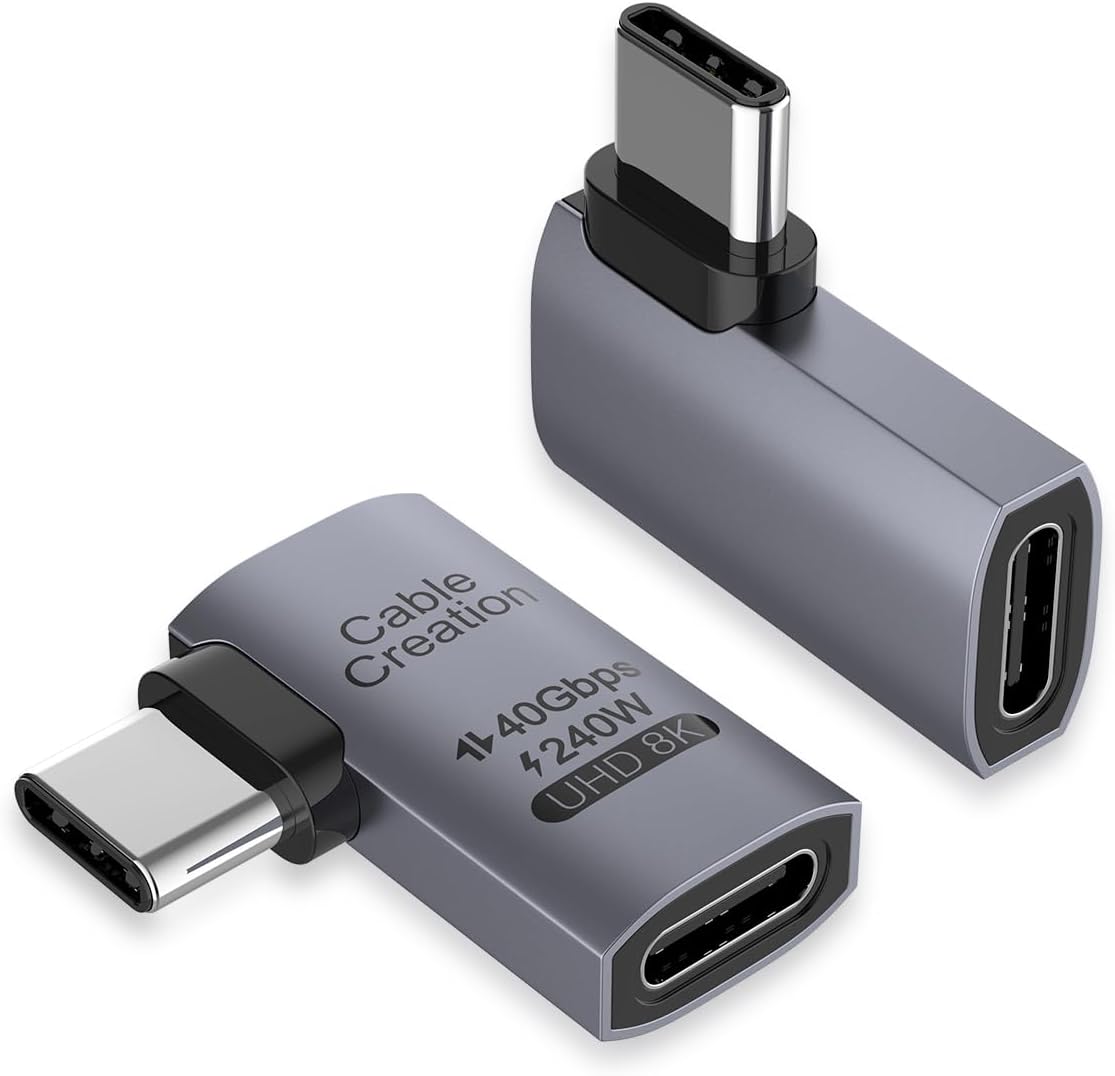
The CableCreation Right Angle USB C Adapter delivers a capable set of specifications in a straightforward two-pack. It has a 4.6 rating and supports up to 240W charging, up to 40Gbps data transfer, and 8K video output at 60Hz. The adapters also support single 8K or 5K output and dual 4K output when the connected device, cables, and displays support those configurations.
We may earn a commission when you buy through this link, at no additional cost to you.
The right-angle form helps direct a charging or data cable in a more natural direction, which can reduce wear at the connector and lessen stress on the device's input port. The lightweight body is easy to carry for office and travel use, and no driver software or program is required. Compatibility includes USB4, Thunderbolt 4, Thunderbolt 3, and other USB-C devices.
Users should note that the listed charging and transfer figures are maximum capabilities. A compatible charger and USB4 or Thunderbolt cable are needed for the intended performance, while multi-monitor arrangements depend on the host's DisplayPort capabilities and the resolution and refresh rate of each screen. The fixed right-angle design also offers only one cable direction.
CableCreation is an attractive pick for buyers who want high-power charging and modern data performance without paying for the newest USB4 V2.0 standard. The two-pack makes it easy to keep one adapter at a desk and another in a bag. For most USB-C laptop, tablet, handheld, and display workflows, it offers a capable feature set in a portable format.
Up to 240W delivery supports compatible high-power laptops and works backward with lower charging levels. The adapter can therefore serve a range of devices when paired with suitable charging equipment.
No drivers are required, and the USB4 and Thunderbolt compatibility list covers many modern laptops, tablets, phones, handhelds, and VR devices. The included two-pack improves availability at more than one location.
We may earn a commission when you buy through this link, at no additional cost to you.
The right adapter depends on your device, charger, cable, workspace, and required display or storage performance. Consider physical fit and orientation first, then match charging, data, and video capabilities to the equipment you actually use.
Charging capacity is one of the most important compatibility points. Options in this roundup range from a stated 100W maximum to 240W, with several models supporting USB PD 3.1 Extended Power Range levels of 140W, 180W, and 240W. A higher maximum is useful for compatible high-power laptops, while many phones, tablets, handheld consoles, and smaller laptops operate comfortably within a lower limit.
The adapter cannot create power that the charger or device does not support. Actual output also depends on the USB-C cable, connector orientation, thermal conditions, and the charging protocol negotiated by the devices. Always check the charging requirements of the host device and use a charger and cable that support the same level.
Right-angle adapters are often used with external SSDs, docks, and high-resolution displays, making data speed relevant beyond basic charging. Most selections support up to 40Gbps through USB4, while the Silkland USB4 V2.0 model reaches up to 80Gbps. Even a 40Gbps adapter is useful only when the host port, cable, and peripheral all support the required standard.
For ordinary file copying, a lower-speed connection may be sufficient, but large media libraries, backups, and compressed project files benefit from faster transfer. Check whether the device uses USB4 or Thunderbolt and whether the cable is certified for the desired bandwidth. A USB-C port alone does not guarantee 40Gbps.
Display support ranges from 4K at 60Hz to as high as 8K at 60Hz in the listed products. The Silkland USB4 V2.0 adapter also advertises 16K maximum output, dynamic display bandwidth, and multi-display configurations. These are maximum capabilities rather than guarantees, and the connected computer must support DisplayPort Alt Mode and the desired resolution.
Cable quality, monitor specifications, operating system support, and the number of connected displays also influence the final result. A single high-resolution display has different requirements from a multi-monitor desk. Users who only need a standard office monitor can prioritize charging and data performance rather than paying attention to the largest stated resolution.
A right-angle connector can redirect the cable toward the edge of a device rather than forcing it straight outward. Some products offer a fixed orientation, while the UGREEN Combo and JSAUX Mixed-Angle sets provide left and right choices. The Basesailor pack goes further with three angle options for different furniture and equipment arrangements.
Think about where the device will be placed. A laptop beside a wall, a handheld console on a table, and a tablet in a stand can each require a different cable direction. Buying a mixed set reduces the risk of ending up with an adapter that is technically capable but mechanically inconvenient in your usual setup.
The right-angle body must have enough space to enter the USB-C socket fully. Thick protective cases, covers, and skins can obstruct the adapter even when the device itself is compatible. Silkland and Vanjua specifically caution that the port should be fully exposed for a reliable fit.
Adjacent ports can also be affected by the adapter's footprint. A slim model is preferable in compact workstations or on devices with tightly arranged connectors. If a case cannot be removed, check the product's fit notes carefully and compare the connector dimensions with the available space before ordering.
Aluminum alloy appears across most of the leading options because it provides a durable shell, resistance to scratches, and better heat dissipation than basic plastic. The UGREEN 3-Pack is specifically stated to have been tested for more than 10,000 plug cycles, and the Vanjua set carries a similar stated cycle-test claim. These details are useful when the adapter will be handled frequently.
The shell cannot compensate for poor port alignment or an incompatible case. Correct orientation and a full insertion remain more important to long-term performance than the material alone. Inspect the connector regularly and avoid forcing it if it does not seat easily.
Two- and three-packs are common, while the Vanjua option includes four adapters. Multiple units are convenient for keeping an adapter at each charging area, sharing one with a family member, or preventing the need to move a frequently used adapter between devices. A larger set can also be overkill for someone with a single USB-C device.
For travel, a slim two-pack is easy to distribute between a laptop sleeve and a smaller tech pouch. The weight is generally modest, but carrying more than necessary adds bulk. Consider the number of devices and locations you expect to use rather than simply choosing the largest pack.
The adapters in this guide are designed primarily for USB-C devices, with many also listing Thunderbolt 3, Thunderbolt 4, and newer Thunderbolt 5 compatibility. Listed devices include MacBook models, iPads, iPhones, Steam Deck, ROG Ally, Nintendo Switch, Samsung Galaxy phones, Google Pixel phones, Chromebooks, Quest headsets, and various laptops and tablets.
A connector shape alone is not enough to guarantee full functionality. Some USB-C devices support charging and data but not display output, while older ports may not offer the stated USB4 bandwidth. Check the device specifications and manufacturer guidance for each function you plan to use.
Begin by confirming that the device's USB-C port is unobstructed. If a protective case extends beyond the socket, remove it or verify that the adapter has enough clearance. Inspect the male connector for debris, align it with the port, and insert it directly without twisting or applying uneven pressure.
For charging, connect a compatible USB-C charger and cable to the female end of the adapter. For data or display use, connect the appropriate peripheral, monitor, or storage device. Use a USB4 or Thunderbolt cable when you want to reach the adapter's highest stated transfer speed, and confirm that the host device supports the required charging, data, and display protocols.
Remove the adapter by gripping its housing rather than pulling on the attached cable. Keep the connector free of dust and moisture, avoid sharply bending the cable immediately at the adapter, and store the set in a pouch when traveling. If the connector becomes loose, the port shows abnormal wear, or charging behavior changes, stop using the adapter and check both the device and accessory for damage.
It can, provided the adapter, charger, cable, and device all support the same charging protocol and power level. The right-angle shape changes cable direction, not the underlying electrical standard. For the highest stated charging rates, use the specified USB-C charger and a cable rated for the intended power delivery.
Yes, when the host device, adapter, cable, and peripheral all support the relevant standard. Adapters that list 40Gbps data transfer require a compatible USB4 or Thunderbolt host and cable for maximum speed. Display output also requires a source with DisplayPort Alt Mode and a monitor that supports the selected resolution.
The most common issue is a protective case that extends beyond the USB-C socket or crowds the neighboring port. The adapter also needs to be inserted straight without forcing it. Check the product's clearance notes and compare the connector size with the space around your device's port.
No. The 40Gbps figure is a maximum supported capability. The device port, cable, external storage or dock, and connection mode must all support that rate, and suitable USB4 or Thunderbolt cables are generally required. Older USB-C ports may negotiate a lower speed automatically.
The principal difference is the maximum data throughput. A 40Gbps USB4 adapter targets first-generation USB4 and Thunderbolt 3 or 4 workflows, while an 80Gbps adapter uses USB4 V2.0 and is intended for newer Thunderbolt 5 and 4 systems. The faster option matters most for external storage, complex files, and advanced dock or display configurations.
It can be useful when the console is used in a stand, on a desk, or in a tight gaming setup where a straight cable interferes with the device or creates an awkward bend. Choose a model that explicitly supports the console and provides sufficient port clearance. Charging and data output should also be confirmed with the specific cable and power supply.
Some adapters support multiple displays, but the result depends on the adapter, host device, operating system, cables, and monitors. Several products list dual 4K or higher configurations, while the Silkland USB4 V2.0 model advertises 16K and multi-display support. Verify each link in the chain before assuming every layout will work.
Remove the cable and inspect the adapter and device port for dirt, lint, or physical damage. Check that the connector is fully seated and that the case does not prevent proper insertion. Avoid forcing it into a tight socket, and discontinue use if the adapter or port appears damaged.
The Silkland 40Gbps two-pack is the most balanced overall recommendation for buyers who want substantial charging, data, and display support in a compact form. The Silkland USB4 V2.0 set is the premium option for compatible high-end hardware, while CableCreation provides a capable 240W and 40Gbps alternative with a straightforward two-pack format.
Prioritize the features your equipment can actually use. A 100W adapter may be entirely adequate for a phone or handheld console, while a 240W model makes more sense for a compatible high-power laptop. Mixed-angle packs improve physical flexibility, but fixed designs can be sufficient when the device has one consistent position. Always verify case clearance, port direction, and protocol support.
Current product details, including pricing, availability, and listing specifications, may change over time. Review the latest product page and compatibility information before purchasing, especially if your setup depends on maximum charging, 40Gbps or 80Gbps transfer, or high-resolution multi-display output.