
Overhead Camera Mount with Articulating Arm
4.6Editor score
Three-section articulated aluminum arm
Supports loads up to five pounds
Padded clamp protects desk surfaces
Includes phone holder and ball head
An overhead camera mount turns an ordinary desk into a practical production station for top-down tutorials, unboxings, crafts, meetings, and live streams. A worthwhile model combines a secure desk clamp, stable articulated arm, smooth angle adjustment, and a compatible connection for your camera, phone, webcam, or light.
We compared the included mounts by examining clamp capacity, arm construction, reach, height range, load specifications, adjustment mechanisms, and device compatibility. The list covers compact single-camera stands, multi-section boom arms, heavy-duty rigs, and articulated systems intended for demanding studio-style workflows.
Each review explains the product's most useful features, practical limitations, and ideal buyer profile. Ratings and specifications reflect the supplied product information, while availability and prices can change, so readers should confirm current listing details before ordering.
4.6Editor score

4.4Editor score

4.4Editor score
As an Amazon Associate we earn from qualifying purchases.
This side-by-side comparison highlights the key differences in reach, load capacity, clamp design, arm construction, and equipment compatibility across all ten overhead camera mounts.

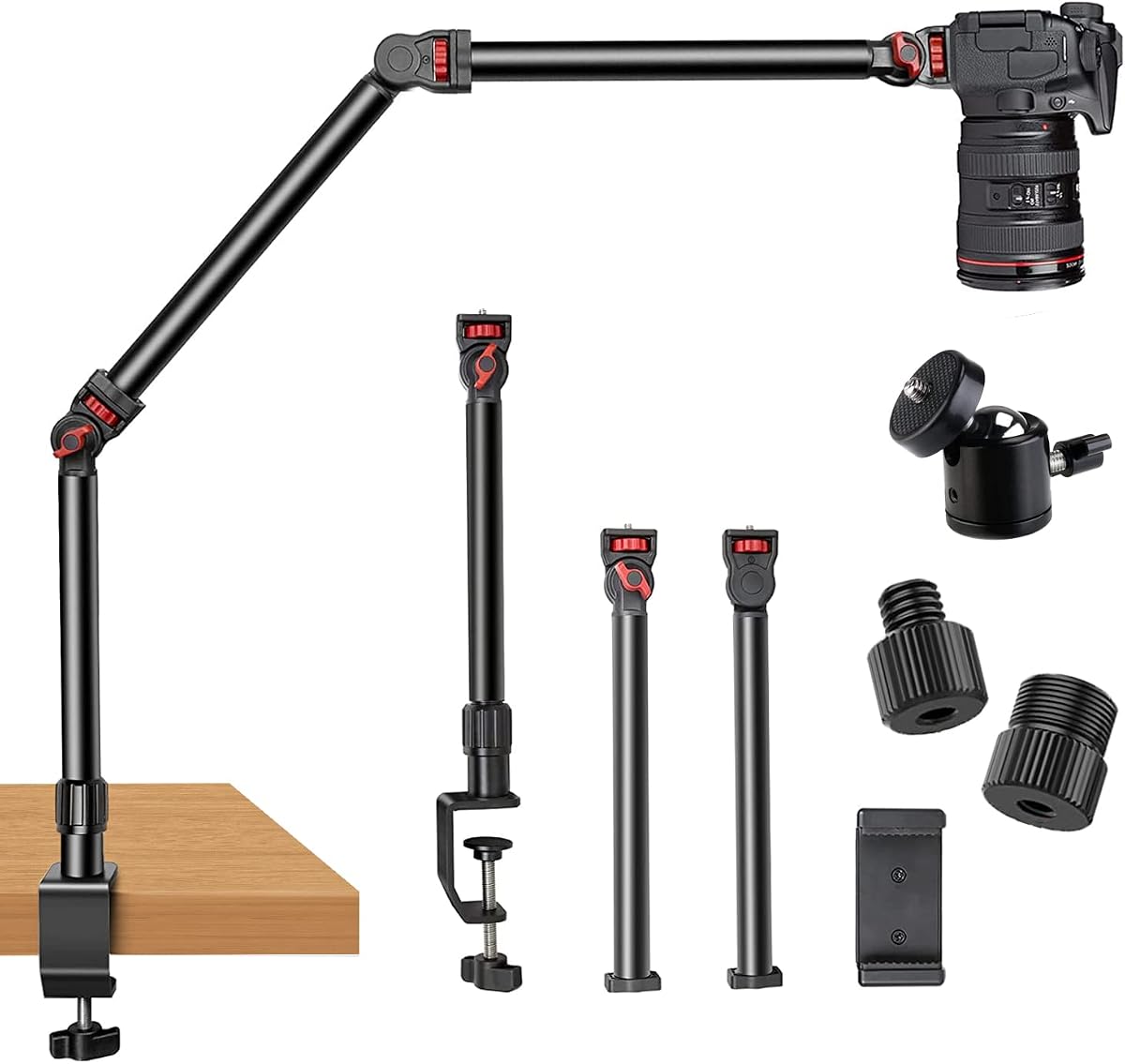


This overhead camera mount combines a three-section articulating arm, a telescoping vertical section, and a 360-degree ball head. Its 4.6 rating reflects a well-rounded package for creators who need overhead positioning without a large permanent rig. The included phone holder, quarter-inch screw, and ball head make it adaptable to several common production devices.
We may earn a commission when you buy through this link, at no additional cost to you.
The arm is constructed from reinforced aluminum and carries a stated load capacity of five pounds. That is ample for a phone, compact camera, webcam, ring light, or microphone, while the telescopic section provides a useful 15- to 25-inch height range. The rubber-padded C-clamp accommodates desk thicknesses from 0.5 to 2.1 inches and avoids requiring permanent installation.
The main tradeoff is reach. This model is better suited to a compact work area than to a broad table where the camera must sit far above the subject. Its small-scale construction may also feel less substantial beside a heavy DSLR rig, and repeated repositioning could require checking the ball-head fastener for a secure hold.
It is an excellent choice for first-time buyers, students, and light creators who want flexible overhead framing in a small studio. The combination of adjustment range, device support, and simple clamping makes it a practical general-purpose recommendation among the ten mounts compared.
The three-section arm and ball head make it practical to move from a high top-down view to a lower side angle without changing equipment. This flexibility suits demonstrations, video calls, and unboxing sessions where the subject or presenter changes position.
The padded clamp grips desks between 0.5 and 2.1 inches thick while reducing the chance of scratching the surface. It also makes the mount more approachable for renters and temporary workspaces that cannot accommodate drilled hardware.
We may earn a commission when you buy through this link, at no additional cost to you.
This detachable three-section mount offers extensive articulation, including a rotatable base and pole sections that adjust through 180 degrees. Its 4.4 rating reflects a capable design for top-down recording, lessons, demonstrations, and streaming. Included quarter-inch, three-eighth-inch, and five-eighth-inch screws broaden its usefulness with different equipment.
We may earn a commission when you buy through this link, at no additional cost to you.
CNC-machined aluminum alloy construction is designed for firm seams and dependable support. The stated limit is 4.5 pounds horizontally and six pounds when suspended. Because the arm can be placed at numerous angles, paying attention to whether the equipment is extending horizontally or hanging vertically is important when planning a setup.
Its desk clamp extends to 2.4 inches and includes padding to reduce surface damage. The multi-piece construction is more involved than a compact telescopic stand, however, and users should tighten every adjustment point before a recording. The included converter thread also adds another connection to check during initial setup.
The mount is best for creators who prioritize articulation and detachment over a minimalist footprint. Photographers, teachers, and streamers can use its range to place a camera above or beside a work area, while the lightweight sections remain convenient to carry between shooting locations.
Each of the three poles has an adjustment point, allowing the mount to form a wide variety of shapes. This makes it easier to move a camera over an obstacle or place it at a side angle without relying on a separate support arm.
Quarter-inch, three-eighth-inch, and five-eighth-inch attachments allow the stand to serve more than one type of device. That versatility is helpful for creators who alternate among cameras, lights, microphones, phones, and other tabletop production tools.
We may earn a commission when you buy through this link, at no additional cost to you.
This heavy-duty desk stand focuses on vertical reach and flexible positioning. Its three detachable sections create a stated height range of 14.5 to 41 inches, and each section can also connect to a light stand for additional elevation. The 4.4 rating suggests it is well suited to streaming, vlogging, and larger tabletop workspaces.
We may earn a commission when you buy through this link, at no additional cost to you.
Aluminum alloy construction supports a stated load of nearly 6.6 pounds while keeping the overall stand at 2.2 pounds. The enlarged handle-operated C-clamp reaches up to 1.96 inches and includes a rubber pad. Compared with a small knob-style clamp, the handle offers a visible way to adjust clip width and maintain a firm grip.
The long articulated configuration requires thoughtful placement. Extending the arm over the center of a desk can place considerable leverage on the clamp, so heavier equipment should be positioned carefully and all joints should be locked. The package includes the clamp, three extension poles, and a manual, but it does not include a phone holder.
Choose this model when vertical reach is more important than a minimal accessory bundle. It can accommodate webcams, cameras, projectors, microphones, and video lights, making it a flexible choice for creators working across a broad desk or adding a second accessory to a stand.
The 41-inch upper range gives a camera room to clear a subject and capture a wider overhead field. This is valuable for crafting, cooking demonstrations, group meetings, and product filming where a low camera would include too much of the room.
The extended handle rotates to fit different table and counter shapes, while the rubber pad helps protect the contact area. It is a practical design for users who prefer a direct grip over repeatedly turning a compact screw knob.
We may earn a commission when you buy through this link, at no additional cost to you.
The TARION TKA01-L stands out for its three locking gear joints and steel-tube frame. Those toothed locks are intended to hold camera angles without slowly slipping, a valuable feature for long recording sessions. Its 4.4 rating reflects a design oriented toward dependable positioning and a more substantial studio feel.
We may earn a commission when you buy through this link, at no additional cost to you.
The arm can support 8.8 pounds vertically and 6.6 pounds when extended horizontally. It reaches 38 inches, allowing it to cover larger workspaces while keeping a direct mechanical structure beneath the camera. A detachable ball head provides a three-eighth-inch attachment or a removable quarter-inch screw for cameras, webcams, and lights.
The dual-slot C-clamp opens to 2.36 inches and includes a metal structural anchor base. This secondary structure is intended to align the frame and preserve load capacity, although the more complex clamp and locking controls take more time to configure than a lightweight telescopic stand. Its steel construction also adds weight during transport.
This is the strongest recommendation for users who value stable angles over minimal weight. It suits detailed unboxings, macro work, document scanning, stop-motion projects, teaching, and live production where an unnoticed arm shift could spoil a take.
The three toothed joints give each section a deliberate, repeatable position. Once tightened, they are less likely to move under the weight of a camera or ring light than simple friction joints that rely on pressure alone.
The dual-slot clamp and anchor base create a more structured connection to the desk. Extra quarter-inch and three-eighth-inch threads also provide places for microphones, monitors, and lights when the main camera position is already occupied.
We may earn a commission when you buy through this link, at no additional cost to you.
The NEEWER UA057 uses a compact 22-inch magic-arm design with three sets of 360-degree ball head adapters. Its 4.5 rating reflects smooth positioning and broad applicability for phones, action cameras, webcams, and microphones. It is particularly attractive for users who want a small, adaptable arm rather than a large production rig.
We may earn a commission when you buy through this link, at no additional cost to you.
The aluminum alloy arm extends to 22 inches, while each ball head has padded rings intended to provide a firm grip. Anti-twist pins at the interfaces help keep the mounted device from rotating unexpectedly. These details are especially helpful for vertical phone recording, where a loose connection could change the framing.
The stated device capacity is 500 grams, so this arm is better suited to phones, compact cameras, webcams, and lightweight microphones than to a large DSLR with an extensive lens kit. The Super Clamp also accepts cylindrical objects up to 1.6 inches in diameter, but its 22-inch reach remains compact compared with the larger stands in this guide.
This mount is a good choice for overhead photography, gaming, calls, podcasts, and short video sessions. People who value compact storage, quick repositioning, and broad accessory compatibility may find its simpler approach more useful than the extra reach offered by heavier multi-section systems.
The segmented magic-arm shape folds into a relatively compact footprint and can be placed close to the device. This makes it useful where a long overhead boom would intrude on the workspace or be difficult to store between sessions.
Pins at the mounting interfaces resist unwanted rotation, while padded ball-head rings help prevent slipping. Together, they provide useful security for upright phone recording and other angle-sensitive applications.
We may earn a commission when you buy through this link, at no additional cost to you.
The JINRAIKO mount centers on a hydraulic floating arm designed to move smoothly while supporting a camera, phone, or webcam. Its 4.3 rating indicates a versatile package for live streaming, unboxing, crafts, and 3D printing. The included phone holder and extension pole reduce the need to source basic accessories separately.
We may earn a commission when you buy through this link, at no additional cost to you.
A 360-degree adjustable arm provides broad directional positioning, and the hydraulic mechanism offers a more fluid movement experience than a conventional friction joint. This can be useful when a creator needs to make small framing changes quickly during a live session or when repeated repositioning would otherwise require taking the device apart.
The supplied information provides fewer detailed load and dimensional specifications than several competing mounts, making it harder to judge the arm's exact capacity. Hydraulic components also require reasonable care: sudden movements or excessive force can damage the mechanism, and the arm should be supported while the device is attached or removed.
This model is best for creators who prioritize smooth adjustment and a ready-to-use accessory set. It suits live production, demonstrations, phone-based content, and tabletop workflows where quick changes are more important than a very long reach or high published load figure.
The hydraulic arm allows controlled repositioning without repeatedly releasing and tightening several conventional joints. That makes it convenient for live streams, instructional content, and video calls where a small framing adjustment may be necessary without interrupting the workflow.
A universal phone holder and extension pole are included, allowing a new user to build a working arrangement without immediately searching for separate basic supports. The mount can also accommodate larger cameras, webcams, and microphones.
We may earn a commission when you buy through this link, at no additional cost to you.
The ULANZI ZJ02 uses four adjustable sections to provide an extended length of up to 38.6 inches and an overhead shooting height of 25.6 inches. Its 4.6 rating places it among the strongest-rated options here. The design is particularly relevant to flat-lay photography, where a high camera produces cleaner top-down compositions.
We may earn a commission when you buy through this link, at no additional cost to you.
A quarter-inch ball head and toothed joints that adjust through 180 degrees provide flexible camera positioning. The aluminum alloy construction carries a stated capacity of 2 kilograms, or 4.4 pounds. This supports many common camera, phone, and lighting arrangements without moving into the much heavier load range of dedicated studio rigs.
The silicone-padded C-clamp attaches to desks up to 1.89 inches thick, making it suitable for most conventional office tables. The long four-section arm can place substantial leverage on the clamp, so heavier devices should be installed close to the base and positioned carefully. A phone holder is not listed among the included features.
Choose the ZJ02 for overhead product images, recipes, artwork demonstrations, and crafting videos. Its combination of useful vertical clearance, multiple adjustment points, and solid stated capacity makes it especially attractive for photographers who want a dedicated flat-lay perspective.
The maximum shooting height of 25.6 inches helps the camera clear surrounding objects and produce a more direct top-down perspective. That is particularly useful when subjects need to fill the frame evenly.
Each section uses a 180-degree toothed adjustment point, allowing the arm to form deliberate shapes and remain at the selected angle. This makes repetitive overhead setups more consistent.
We may earn a commission when you buy through this link, at no additional cost to you.
The TARION Titanrig Lite Z is built for users who need to suspend more substantial equipment over a desk. Its 4.4 rating reflects a premium construction with a stated load capacity of 8 kilograms, or 17.6 pounds. It is suited to larger cameras, ring lights, tablets, and other equipment that can challenge a lightweight stand.
We may earn a commission when you buy through this link, at no additional cost to you.
The arm has dual quarter-inch and three-eighth-inch threads, a tablet clamp measuring 5.5 to 10.63 inches, and a two-section vertical structure. The articulating arm measures 18.9 inches and adjusts 360 degrees vertically and 180 degrees horizontally. Its ball head rotates as well, allowing the camera to be placed beyond the main arm's centerline.
A double C-clamp uses anti-slip silicone pads and accommodates desktop thicknesses from 0.6 to 2.95 inches. This larger, heavier design improves stability but reduces portability, and the many clamp, extension, and positioning components make initial assembly more involved than that of a compact telescopic mount.
This rig is appropriate for permanent or semi-permanent studio stations, heavier DSLR setups, and creators running multiple accessories from one base. Buyers who need an expansive modular system or a light mobile arm should choose accordingly, but those who prioritize capacity will find this model especially compelling.
A 17.6-pound stated capacity creates a substantial margin for a camera body, lens, tablet, or additional light. It is a better fit for a permanent production desk than for users who must carry a mount between locations.
The dual-clamp design spreads the attachment across the desk and reduces movement compared with a single-clamp base. Adjustable silicone padding protects the surface and helps limit slipping during long sessions.
We may earn a commission when you buy through this link, at no additional cost to you.
The JUSMO LS15 Pro is a modular aluminum rig designed to support cameras, lights, microphones, and other tabletop equipment. Its 4.4 rating and 22.05-pound load capacity distinguish it as one of the most substantial options in the guide. Segmented poles allow creators to shape the rig around a particular workspace and add compatible accessories over time.
We may earn a commission when you buy through this link, at no additional cost to you.
The large C-clamp is thickened and reaches a width of 3.54 inches, allowing it to secure to a broad range of desktops while saving space. Corrugated anti-slip pole surfaces, secondary anti-deflection screws, and a laser-engraved tick design support repeatable positioning. A super clamp is included for expanding the system with additional equipment.
Expansion requires separate LS15 extra poles or compatible accessories, and the broad modular system can become visually complex. The platform is better suited to a dedicated production desk than to a minimalist recording corner, but its capacity makes it practical when the user wants to operate several devices from a coordinated structure.
This is a compelling choice for serious video creators, educators, and craft or recipe producers who expect to add more cameras or lighting over time. The modular design rewards users who want to build a customized multi-arm station rather than purchase an entirely separate stand for each device.
Additional LS15 poles and compatible clamps can extend the system as the user's production setup becomes more complex. That flexibility makes the initial rig useful for more than one camera angle or device category.
Secondary locking screws, anti-slip pole sections, and engraved position marks help limit small shifts during extended recording. These details are valuable when a camera, light, and microphone remain mounted simultaneously.
We may earn a commission when you buy through this link, at no additional cost to you.
The Ailight mount combines a three-section vertical stand with a two-section horizontal arm, creating a practical overhead position for cameras, phones, lights, and webcams. Its 4.5 rating reflects a straightforward design with useful telescoping adjustment. The vertical structure extends from 15.75 to 33.45 inches.
We may earn a commission when you buy through this link, at no additional cost to you.
The horizontal arm measures 11.8 to 20 inches and has a stated 2.2-pound load capacity. Quarter-inch screws appear on both vertical and horizontal ball heads, giving users familiar attachment points for common production equipment. Aviation aluminum alloy tubing is used to keep the structure durable and resistant to rust.
The inner rubber-padded C-clamp fits desk thicknesses from 0.2 to 1.97 inches, giving it one of the broadest thickness ranges in the guide. Its lower listed load makes it most appropriate for a webcam, compact camera, phone, or modest light. The two-section arm also provides less three-dimensional positioning than a fully articulated multi-joint stand.
This mount is a good match for online teaching, meetings, interviews, streaming, makeup recording, and straightforward overhead videos. It offers a good balance of vertical reach and simple operation for users who do not need the high load ratings or deep articulation of the premium studio rigs.
The wide vertical adjustment range lets the camera move from a lower side view to a more direct overhead angle. Twist locks keep each chosen height in place once the desired framing is reached.
The C-clamp accommodates surfaces from 0.2 to 1.97 inches thick, covering thin and standard desks in one design. Inner rubber pads help reduce scratches and add friction during use.
We may earn a commission when you buy through this link, at no additional cost to you.
The right overhead mount depends on your device weight, available reach, desk thickness, and need for precise repositioning. Reviewing these factors before shopping helps prevent an underpowered arm, an incompatible clamp, or a structure that cannot hold the angle you need.
Start by adding the combined weight of the camera, lens, phone, holder, light, and microphone. Published load figures may distinguish between horizontal extension and suspended configurations, so compare the intended working position rather than focusing on a single maximum number. A modest setup with a phone and webcam needs less support than a DSLR fitted with a large lens, video light, and audio equipment.
Vertical reach determines whether the camera can sit above a subject without including too much of the room or being obstructed by nearby objects. Compact mounts with limited height are convenient for small desks, while multi-section systems can cover larger work areas and provide better flat-lay perspectives. Also consider whether the arm can extend horizontally, since some vertical stands are paired with a separate horizontal boom.
The clamp must fit the thickness and shape of your desktop without damaging its finish. Compare the stated opening range with the desk edge, and pay attention to whether the contact area uses rubber or silicone padding. Wider reinforced clamps can improve stability, while a longer handle or visible screw makes the grip easier to adjust. A padded clamp is especially valuable on finished wood, laminate, and painted surfaces.
Smooth movement makes framing easier, but secure locking is what keeps that framing unchanged during a recording. Friction joints, spring arms, toothed gear joints, and hydraulic mechanisms each offer different benefits. A hydraulic arm can reposition fluidly, while gear joints are useful when an exact angle must remain fixed. Check how many points require tightening and whether the controls are large enough to operate comfortably.
The attachment system must match the equipment you already own. Quarter-inch screws are common on cameras and accessories, but three-eighth-inch and five-eighth-inch threads provide additional options. A phone holder is convenient, yet a model designed for a standard tripod interface may need a separate phone clamp. Consider whether the top of the arm can support a second light or microphone as well as the main camera.
Aluminum alloy is common because it combines low weight with useful rigidity, while steel tubing can be appropriate for a fixed studio rig. A mount's real-world stability depends on clamp strength, joint quality, leverage, and how close the camera is to the base. Long horizontal arms create greater turning force than compact vertical ones, so a heavier equipment setup benefits from a dual clamp, reinforced base, or short lever arm.
An arm with several independently adjustable sections can reach awkward positions, clear obstacles, and serve different camera angles. However, more joints mean more fasteners to check and a larger structure to manage. If the mount will be moved regularly, compare the folded dimensions, detached sections, and overall weight. A collapsible arrangement may be more practical than maximum reach when portability is the priority.
Think about where the mount will be used and how often it will move. A home office benefits from a small, padded, no-drill setup, while a dedicated studio may justify a permanent heavy-duty rig with several accessory points. Cooking creators may need a higher angle and easy cleaning around the mount, whereas teachers may prioritize quiet movement and broad framing. Modular systems are useful for evolving workflows but can require more planning and accessories.
Begin by checking the desk thickness, mounting hardware, and weight of every attached device. Position the clamp on a solid edge, tighten it gradually, and keep the camera relatively close to the base when using a long arm. Connect the device with the appropriate screw or holder, then adjust one joint at a time until the framing feels correct.
Once the desired angle is set, tighten all locking knobs, gear joints, and ball-head controls. Keep the device supported when changing the final orientation, and avoid forcing a joint past its intended range. Before every important recording, make a short test clip to check for drift, vibration, cropping, and interference from the arm itself.
For care, wipe the metal surfaces and padded contact areas with a soft, slightly damp cloth, and dry them before reassembly. Do not submerge the mount or use harsh cleaners that could damage coatings, rubber, or markings. Retighten loose fasteners periodically, inspect the clamp for wear, and store detached sections in a padded case to protect both the hardware and the desk.
An overhead camera mount suspends a camera, phone, webcam, or light above a desk so it can capture a direct top-down view. Creators commonly use one for cooking demonstrations, crafts, painting, unboxings, product photography, online lessons, and live streaming. An articulated arm also makes it easier to move between overhead and side angles.
It depends mainly on the desk thickness and the available clearance around the edge. The mounts in this guide list clamp openings ranging from narrow thin-table support to a 2.95-inch range, so measuring the desktop before ordering is essential. Also check whether drawers, support rails, or a crossbar will prevent the clamp from closing correctly.
Several models can hold a DSLR, although the smallest load ratings are better suited to webcams, phones, action cameras, and lightweight accessories. For a DSLR, compare the combined weight of the body, lens, and attached equipment with the mount's stated capacity. A mount with a dual clamp or heavy-duty frame is preferable when the lens is large or the arm extends far over the desk.
A quarter-inch screw is the most common standard used by the mounts reviewed, while some include three-eighth-inch or five-eighth-inch attachments. Check the underside of the camera or accessory for a threaded socket rather than assuming it will fit. An included adapter can convert one thread size to another, but it should be tightened securely.
Start with a clamp that fully and securely grips the desk, then tighten every arm joint and ball head. Position the camera closer to the base when possible, avoid extending the arm beyond what the load rating permits, and keep cables from pulling against the mount. A short test recording can reveal small movement that is hard to notice by eye.
Aluminum is generally lighter and easier to carry, making it convenient for occasional use and mobile recording. Steel offers a more substantial feel and can be advantageous for a fixed studio installation, but it is usually heavier and less pleasant to transport. The best choice depends on whether portability or a permanent, highly stable workstation matters more.
Yes, especially when a top-down view of documents, demonstrations, or a shared workspace is needed. A phone, compact camera, or webcam with a standard attachment can be fitted to the arm or ball head. For frequent calls, a compact model with smooth one-handed positioning is usually more convenient than a large modular rig.
A properly padded clamp should be gentler than an unprotected metal edge, but no mount can guarantee that every surface will be immune from marks. Check the listed desk-thickness range, use the rubber or silicone pad, and tighten the clamp only until it is secure. Inspect the contact area periodically, particularly on soft finishes or freshly painted surfaces.
The Articulating Arm Camera Mount offers the strongest overall value for basic overhead work, combining a 4.6 rating with a useful three-section arm, phone holder, padded clamp, and five-pound capacity. The TARION TKA01-L stands out for studio-oriented stability through its steel construction and locking gear joints, while the JUSMO LS15 Pro is the most expandable premium system for heavy, multi-device configurations.
Prioritize the features your workflow actually requires. Phone creators may need little more than a compact arm and padded clamp, flat-lay photographers need vertical clearance, and heavier camera setups benefit from dual clamps, stronger materials, and a generous load rating. Before buying, measure the desk, check the connection size, inventory attached accessories, and consider how often the stand must be moved.
Ratings, configurations, availability, and prices can change over time, so confirm the current listing details before purchasing. Comparing the latest product information with your equipment, available space, and required camera angle will help ensure that the selected overhead camera mount is a practical long-term addition to your desk.